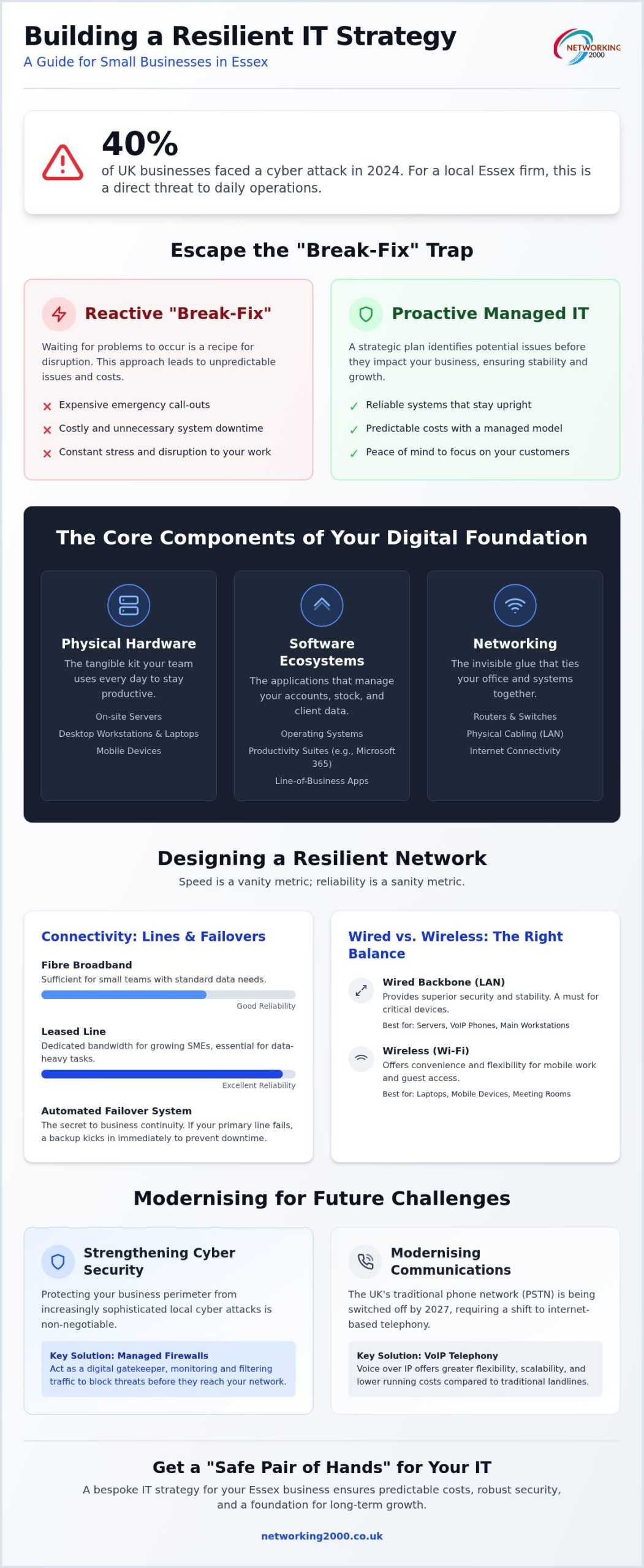
Did you know that 40% of UK businesses faced a cyber attack in 2024? For a local firm in Chelmsford or Basildon, that isn’t just a statistic; it’s a direct threat to your daily operations. You’ve likely felt the frustration of a network that drops out at the worst moment or the headache of choosing between expensive on-premise servers and the cloud. Developing a clear IT strategy for small business Essex isn’t about chasing the latest shiny gadgets. It’s about building a foundation that stays upright when things go wrong.
We understand that you want technology to be a silent partner that just works, not a source of constant stress or unpredictable invoices. It’s exhausting to worry about data loss whilst trying to grow your company. In this guide, we’ll show you how to design and manage a resilient infrastructure that fits your specific needs. We’ll cover everything from securing your perimeter with managed firewalls to preparing for the 2027 PSTN switch-off with modern VoIP systems. By the end, you’ll have a roadmap to achieve predictable costs and the peace of mind that comes with expert local support.
Key Takeaways
- Identify the essential hardware and software components needed to build a stable digital framework for your daily operations.
- Develop a proactive IT strategy for small business Essex that focuses on network reliability to prevent costly system downtime.
- Understand the critical role of managed firewalls in protecting your business from increasingly sophisticated local cyber attacks.
- Learn how to modernise your communications by transitioning to VoIP telephony ahead of the national PSTN switch-off.
- Discover the benefits of a “safe pair of hands” approach to managed support for predictable costs and long-term growth.
What is Small Business IT Infrastructure?
Infrastructure isn’t just a technical term for the equipment hidden in your office cupboard. It’s the entire framework of hardware, software, and services that keeps your business running. In technical terms, IT infrastructure represents the composite hardware, software, network resources, and services required for the existence, operation, and management of an enterprise IT environment. For a local company, having a clear IT strategy for small business Essex ensures these pieces work together rather than against each other.
For an Essex SME, IT infrastructure serves as the digital backbone that enables every transaction, communication, and piece of data to flow securely across the business.
Many firms fall into the “break-fix” trap. They wait for a server to fail or a connection to drop before calling for help. This reactive approach is expensive and causes unnecessary downtime. A proactive model identifies potential issues before they disrupt your work. It’s about being prepared, not just being responsive. By shifting to a managed model, you gain a reliable system that stays upright whilst you focus on your customers.
The Core Components of Your Digital Foundation
Your infrastructure is built on three main pillars. Each must be robust to support the others.
- Physical hardware: This includes your on-site servers, desktop workstations, laptops, and mobile devices. It’s the tangible kit your team uses every day to stay productive.
- Software ecosystems: This covers your operating systems, productivity suites like Microsoft 365, and the specific line-of-business apps that manage your accounts, stock, or client data.
- Networking: This is the invisible glue. It involves routers, switches, and the physical cabling that ties your office together. Without a stable network, even the fastest hardware is useless.
Why Local Essex Businesses Need a Bespoke Strategy
A generic approach rarely works for companies in our region. Essex has a unique business landscape, with towns like Wickford and Basildon having specific connectivity profiles and local challenges. A bespoke IT strategy for small business Essex takes these local factors into account from day one.
Growth shouldn’t mean constant hardware overhauls. A well-planned strategy allows you to scale your operations without replacing your entire kit every two years. Working with a local partner who understands the Essex area means you get support that’s grounded in reality. You aren’t just a ticket number in a national call centre; you’re a local business that needs a reliable, safe pair of hands to keep things moving. This local expertise ensures your network is designed for the specific demands of your industry and location.
Designing a Resilient Network for Your Essex Office
Speed is a vanity metric; reliability is a sanity metric. For a local firm, a fast connection that drops twice a week is far more damaging than a slightly slower one that never fails. Developing a comprehensive IT strategy for small business Essex means looking beyond the router. It requires a focus on a network that won’t buckle under the pressure of daily operations or sudden growth. Whether you opt for on-premise servers or a cloud-based setup, the priority must be consistent performance.
Future-proofing your office isn’t just about buying the newest kit. It’s about building a foundation that doesn’t require a total overhaul every two years. This involves investing in structured cabling to keep your Local Area Network (LAN) stable and organised. Neat, professional cabling reduces interference and makes troubleshooting significantly faster. If you aren’t sure if your current setup is up to the task, our team can audit your office network to identify hidden bottlenecks.
Connectivity: Fibre, Leased Lines, and Failovers
Choosing the right internet connection depends on your location in Essex and your data needs. Standard fibre broadband might suffice for a small team, but growing SMEs often require the dedicated bandwidth of a leased line. Redundancy is the secret to business continuity. If your primary line fails, an automated failover system should kick in immediately. This prevents system downtime from halting your work. Balancing the cost of these lines against the potential loss of a day’s revenue is a vital part of your strategic planning. Regional businesses in towns like Wickford often find that a managed connection provides the best balance of performance and predictable cost.
Wireless vs Wired: Finding the Right Balance
Wi-Fi offers flexibility, but a wired backbone provides superior security and stability. Critical devices like servers, VoIP phones, and main workstations should always be hard-wired. This reduces the load on your wireless access points and ensures your most important tasks aren’t interrupted by signal interference. When implementing Wi-Fi, security must be the first thought. Following standards like the FTC Cybersecurity Guide helps ensure your network design isn’t just fast, but fundamentally secure. Implementing a separate, secure guest Wi-Fi network is essential to protect your internal data from external visitors. In older Essex office buildings with thick walls, we focus on optimising signal strength through strategic placement of access points to ensure every corner of the office remains connected.
Strengthening Cyber Security and Managed Firewall Protection
Cyber attacks aren’t just a problem for big corporations. Many attackers target SMEs specifically because their defences are often less robust. For a local firm, a solid IT strategy for small business Essex must place security at the heart of every digital decision. Common threats like ransomware can encrypt your entire database in minutes, whilst sophisticated phishing attempts target your staff’s login details daily. Regular security audits and active monitoring are the only ways to stay ahead of these evolving risks.
A standard ISP router is essentially a basic door; it doesn’t offer the deep inspection needed to stop modern threats. This is why our managed firewall Essex guide is essential for understanding how to protect your perimeter. A managed firewall acts as a vigilant security guard, actively checking every piece of data entering or leaving your premises to block malicious traffic before it reaches your workstations.
The Role of Managed Firewalls in Your Infrastructure
Managed firewalls provide continuous monitoring, which is critical for identifying suspicious patterns in real time. With hybrid working now a standard practice, these devices also manage remote access securely. They create encrypted tunnels for staff working from home, ensuring your company data remains private even when accessed via home Wi-Fi. We handle the technical heavy lifting by managing regular firmware updates. This patches vulnerabilities automatically, so you don’t have to worry about manual checks. It’s a proactive way to ensure your IT strategy for small business Essex stays resilient against emerging threats.
Data Protection and Disaster Recovery
Relying on a single local backup is a dangerous gamble. If your office suffers a fire, flood, or physical break-in, that local drive could be lost forever. Modern SMEs need a robust disaster recovery plan that includes off-site, immutable backups. Immutable storage means the data cannot be changed or deleted once it’s written, providing a final line of defence against ransomware that tries to wipe your archives.
Testing your backups is the only way to ensure they actually work. We’ve seen many businesses discover their backup files were corrupted only when they desperately needed to restore them. Regular restoration tests should be a non-negotiable part of your IT maintenance schedule. By treating security as a managed service, you gain a “safe pair of hands” that monitors your network, allowing you to focus on your core operations without the constant fear of data loss.
Modernising Communication with VoIP and Cloud Solutions
Modern communication is no longer a separate utility from your computer network. In a smart IT strategy for small business Essex, voice traffic and data live on the same infrastructure. Moving to VoIP (Voice over Internet Protocol) isn’t just a technical upgrade; it’s a necessity ahead of the UK’s PSTN switch-off in January 2027. Traditional copper lines are being retired. This means every local business must move to an internet-based system to stay connected.
The cost-saving benefits for regional SMEs are significant. By removing the need for multiple physical line rentals, you can reduce monthly overheads whilst gaining features like auto-attendants and call recording. If you are still weighing up your options, our VoIP vs landline for business guide provides a detailed breakdown of why the cloud is the right choice for 2026 and beyond.
Transitioning to Business VoIP Telephony
Switching systems doesn’t have to be disruptive. A methodical approach ensures your team stays connected throughout the move. We follow a clear three-step process to get you up and running.
- Assessing bandwidth: We start by checking if your current internet connection can handle voice traffic alongside your daily data usage. We often implement Quality of Service (QoS) rules to prioritise voice calls, preventing audio lag during busy periods.
- Hardware vs Softphones: You don’t always need a physical phone on every desk. Many Essex firms now use softphone apps on laptops or mobiles, whilst others prefer traditional physical handsets for the front office.
- Porting numbers: You can keep your existing 01245 or 01268 numbers. We manage the porting process with your current provider to ensure you maintain your local identity without any downtime.
Cloud Integration and Remote Collaboration
A resilient IT strategy for small business Essex integrates telephony with cloud tools like Microsoft 365. This creates a unified environment where staff can collaborate from anywhere. Accessing files from outside the office requires strict security protocols, including multi-factor authentication and secure cloud storage. This ensures that your data remains protected, even when accessed from a home office or a client site.
Using VoIP allows your team to maintain a professional presence whilst working from home. When a client calls your Wickford office number, it can ring on a staff member’s mobile app in Southend. This flexibility is essential for modern hybrid working models. It allows your business to remain responsive regardless of physical location. If you are ready to modernise your setup, we can design bespoke VoIP telephony solutions that grow with your business.
Strategic IT Planning for Long-Term Business Growth
Effective growth requires more than just buying new laptops when old ones fail. A long-term IT strategy for small business Essex involves regular infrastructure reviews to ensure your technology supports your commercial goals. Without this planning, you risk accumulating technical debt. This refers to the clunky workarounds and outdated kit that slow down your team and cost more to fix in the long run. Regular reviews prevent these issues from mounting up.
Engaging in professional IT consultancy in Wickford helps you spot these bottlenecks before they impact your bottom line. It’s about having a safe pair of hands to guide your digital decisions. By moving away from the reactive break-fix cycle, you can transform IT from a source of stress into a reliable engine for growth.
The Proactive Managed IT Support Model
The old break-fix cycle is a trap for regional SMEs. You wait for something to fail, pay a premium for a repair, and lose productivity in the meantime. A proactive managed model is different. We focus on 24/7 network monitoring rather than 24/7 emergency call-outs. Monitoring identifies a failing hard drive or a security breach before it causes a crisis. It’s the difference between preventing a fire and trying to put one out whilst your office is already full of smoke.
This approach offers predictable monthly budgeting. You know exactly what your IT costs will be, which makes financial planning much easier. Most importantly, it allows owners to focus on their core operations. You shouldn’t have to be your own IT manager. Managed support provides the security and stability needed to scale without constant technical distractions. For those whose growth plans extend to the Netherlands, ICSPayroll provides the specialised support needed to manage overseas staff and payroll compliance efficiently.
Technology moves fast, but your strategy should be steady. We recommend planning for hardware replacement cycles every 3-5 years to maintain peak performance. This prevents the sudden, massive expense of replacing every machine at once. When it comes to emerging tech like AI, we only advocate for adoption when it serves a clear, measurable business goal. Flashy features are useless if they don’t solve a practical problem.
Partnering with a local expert who has been based in Essex since 1998 gives you access to nearly three decades of regional experience. We understand the local market and the specific infrastructure needs of Essex businesses. By building a roadmap together, we ensure your IT strategy for small business Essex remains resilient, scalable, and ready for whatever the future holds. This long-term view is what separates successful, stable firms from those constantly fighting technical fires.
Secure Your Business Future with a Resilient IT Foundation
Building a stable digital environment requires more than just reactive fixes; it demands a proactive approach to security and connectivity. We’ve explored how a resilient network, backed by managed firewalls and modern VoIP telephony, creates a platform for long-term growth. By prioritising reliability over speed and planning for hardware cycles, you avoid the technical debt that hinders many regional SMEs. A robust IT strategy for small business Essex is the difference between constant system downtime and a network that just works.
Since 1998, Networking2000 has been the “safe pair of hands” for firms in Wickford and across the county. We provide expert managed firewall monitoring and tailored support designed specifically for the needs of local enterprises. If you’re ready to stop fighting technical fires and start focusing on your core operations, we can help. Get a Professional IT Infrastructure Review from Networking2000 today to ensure your digital foundation is as strong as your business. Your technology should be an asset, not a burden. Let’s build a network that grows with you.
Frequently Asked Questions
What is the minimum IT infrastructure a small business needs?
The minimum setup includes a business-grade internet connection, a managed firewall, secure workstations, and a robust backup solution. You also need a productivity suite like Microsoft 365 for communication and document management. This foundation ensures you can handle daily tasks safely whilst maintaining a professional appearance. For many local firms, this basic kit is the starting point of a successful IT strategy for small business Essex.
How much does small business IT infrastructure typically cost in Essex?
Costs are determined by the number of users, the complexity of your network, and your specific security requirements. Whilst we don’t provide flat-rate pricing, most UK SMEs allocate between 4% and 7% of their annual revenue to technology. This investment covers hardware, software licensing, and managed support. Working with a local partner helps ensure your budget is spent on essential kit that provides long-term value.
Can I manage my own IT infrastructure or do I need a partner?
Can I manage my own IT infrastructure or do I need a partner?
Whilst small firms can manage basic tasks internally, it often leads to technical debt and security gaps. Partnering with an expert provides a “safe pair of hands” to handle complex tasks like managed firewall configuration and disaster recovery planning. For businesses looking to source other reliable specialists, 78+ Services offers a directory of professional service providers to help you find the right expertise. This allows business owners to focus on their core operations instead of troubleshooting routers. Professional management ensures your systems are proactive, identifying potential failures early.
IT support is typically reactive, focusing on fixing problems after they occur, such as a broken printer or a forgotten password. IT infrastructure management is a broader, proactive service. It involves designing, securing, and maintaining the entire digital framework of your business. This includes managing your servers, network switches, and security protocols. It is a vital part of a long-term IT strategy for small business Essex.
How often should a small business upgrade its IT hardware?
We recommend a hardware replacement cycle of every three to five years for most workstations and servers. Technology moves quickly; older machines become slower and more susceptible to security vulnerabilities as they age. Regular upgrades prevent sudden, massive capital outlays by spreading the cost over time. This cycle ensures your team stays productive with reliable kit that supports the latest software and security patches.
Is cloud infrastructure safer than keeping servers in my Essex office?
Cloud infrastructure is often safer for SMEs because it benefits from the enterprise-level security of providers like Microsoft or Google. These data centres have physical security and redundancy that a small local office cannot match. However, security depends on how the system is configured. A well-managed cloud setup with multi-factor authentication and encrypted storage is generally more resilient against local threats like fire, theft, or hardware failure.
What happens to my IT infrastructure if we move to a new office in Wickford?
Relocating your infrastructure requires careful planning to avoid downtime. We recommend checking the connectivity options at your new Wickford premises at least three months before the move. You’ll need to coordinate the transfer of your internet lines, reconfigure your network hardware, and ensure your new office has adequate structured cabling. A professional review ensures your servers and workstations are moved safely and reconnected correctly on day one.
How does VoIP telephony impact my existing network infrastructure?
VoIP telephony shares your existing data network, which means it relies on your internet bandwidth. To ensure high-quality calls, we often implement Quality of Service (QoS) rules on your router. This prioritises voice traffic over standard data like large file downloads. Without this configuration, you might experience dropped calls or poor audio quality. A stable network foundation is essential for VoIP to function as a professional communication tool.

