A phone system that works well in the office can leave hybrid staff harder to reach at home. Choosing a VoIP phone system for hybrid working means planning how calls will reach people across locations, and checking that the connections and devices they rely on suit the job.
It’s understandable to want one straightforward setup for everyone, but the right fit depends on how your team works, where calls are handled and what you’ll do if an internet connection fails. There’s also a clear reason to plan ahead: Openreach and the UK Government have confirmed that PSTN and ISDN networks will be switched off on 31 January 2027, moving traditional voice calls to internet-based services.
This guide compares hosted and on-site VoIP options, explains what hybrid teams need from handsets, computers and call handling, and offers practical ways to assess connectivity and management needs. You’ll finish with a framework for choosing a setup that connects office and home workers, including a useful starting point for businesses in Wickford.
Key Takeaways
- Choose a VoIP phone system for hybrid working by mapping where staff work and how customers need to reach them.
- Understand how hosted telephony, internet connections and user devices work together to route business calls.
- Compare hosted VoIP, traditional fixed lines and mixed setups across flexibility, equipment, connectivity and ongoing management.
- Record call volumes, customer contact needs and current telephone arrangements before comparing systems.
- Networking2000 provides internet hosted telephone systems, lines and calls, and phone system maintenance to support business communications across work locations.
Why a VoIP phone system suits hybrid working
Staff may work from the Wickford office one day and from home the next, while customers still expect a clear, dependable way to contact the business. If calls rely on a phone tied to one desk or location, it can be harder to keep communication consistent as working patterns change.
VoIP carries voice calls over an internet connection. The term stands for Voice over Internet Protocol. The Voice over IP (VoIP) overview explains the technology and how it is used for internet-based calls.
A VoIP phone system manages business telephony. The devices employees use to access it are separate: depending on the setup, they might include desk phones or computers. Choosing a VoIP phone system for hybrid working therefore means considering both the service and how staff will use it from each location.
What does VoIP change for a hybrid team?
Internet-based telephony can separate business calls from a single fixed office location. Depending on the configuration, calls can be handled by staff in different places using the devices selected for their roles. The system provides the telephony service; the endpoint is the device a person uses to make or answer a call.
That distinction matters. A desk phone and a computer aren’t interchangeable by default, and available functions depend on the chosen system and setup. Before deciding, list the devices that suit each role and write down how incoming and outgoing calls should be handled. Don’t assume a particular feature is included simply because a system uses VoIP.
Which businesses should consider hybrid VoIP?
Hybrid VoIP may suit small and medium-sized businesses whose employees regularly move between office and home working. It can also be relevant when staff need a consistent approach to business calls, even when they aren’t in the same building. For example, a Wickford business might want customers to use its established business contact route while staff take calls from different work locations.
Suitability depends on more than location. Map who handles incoming calls, how staff make outbound calls and whether particular roles need dedicated handsets. Then consider the internet connection at each workplace. VoIP relies on connectivity, so a stable, suitable connection is an important part of planning. Include what staff should do if a connection is interrupted.
There isn’t one arrangement that suits every organisation. A business with staff mainly in one office may have different needs from a team regularly split between home and office. Start with work patterns, connectivity and call-handling requirements. That gives you a clearer basis for assessing hosted telephony or a mix of arrangements.
How a VoIP phone system connects office and home workers
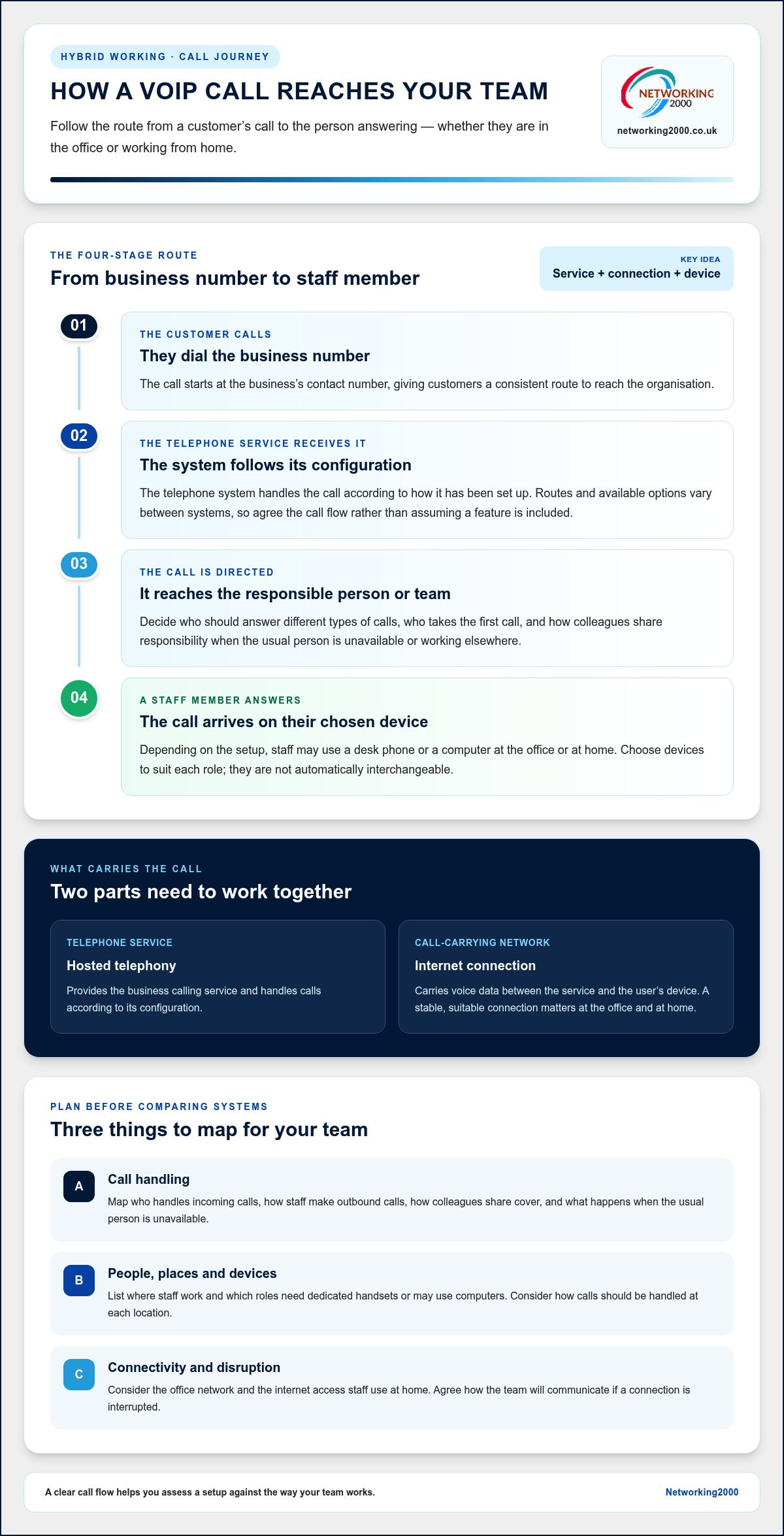
To understand how calls work across locations, follow one from start to finish. A customer dials the business number. The telephone system receives the call and handles it according to its configuration. It may then connect the caller to the staff member or team responsible, using an appropriate device at the office or at home. The precise route depends on how the system is set up.
VoIP depends on both the telephone service and the network carrying the calls. Hosted telephony provides the business calling service, while the internet connection carries voice data between that service and the user’s device. Both parts matter: the system needs to reflect how calls should be handled, and the connection needs to support day-to-day use.
Planning a VoIP phone system for hybrid working involves more than choosing handsets. Decide who should answer different types of calls, how colleagues share responsibility and what should happen when the usual person is unavailable. These are call-handling decisions, not features to assume every system includes.
Hosted telephony and the call journey
With hosted telephony, the telephone service is provided over the internet rather than relying solely on equipment kept at one business site. A business number can form part of a system used across locations, subject to its configuration. Staff use the endpoints selected for their setup, such as desk phones or computers. Call routes and available options vary between systems.
For a small team, agreeing a clear sequence for incoming calls can make a practical difference. Decide which person or role should take the first call, and how colleagues will coordinate if that person is working elsewhere. For instance, a Wickford office could record who covers the main business number on office days and how calls are handled when that person works from home. Compare systems against this written call flow.
Connectivity and continuity across locations
Because voice calls travel over an internet connection, the quality and reliability of that connection matter. Consider the office network and the internet access staff typically use at home. Note whether other online activity could affect calls, and agree how the team will communicate if a connection is disrupted. This identifies operational needs without assuming a particular system has a specific continuity feature.
Networking2000 provides internet connectivity and managed IT support, alongside internet hosted telephone systems. These services can be considered together when planning, but shouldn’t be treated as automatically bundled. A joined-up view helps clarify how the network and telephony need to support the way your team works.
- Map the journey of an incoming call, from the business number to the person handling it.
- List the devices staff will use at each location.
- Agree how colleagues share incoming and outgoing calls.
- Consider internet access at the office and typical home-working locations.
These decisions give you a useful brief for comparing systems and keep the focus on core requirements before optional features. Businesses in Wickford can explore Networking2000’s business telephony support when planning communications across work locations.
Hosted VoIP, traditional lines or a mixed setup: what should you compare?
The right choice depends on how your business operates, not on which option sounds most modern. Compare where staff need to take calls, what equipment is already in use, how dependable internet access is at each location and how much ongoing management the arrangement requires.
In the UK, the PSTN and ISDN networks are scheduled to be switched off on 31 January 2027. Openreach and the UK Government have confirmed this deadline, so businesses using traditional phone lines need to plan how calls will be handled after the change. It’s a reason to review your arrangements while still accounting for practical requirements.
| What to compare | Hosted VoIP | Traditional fixed lines |
|---|---|---|
| Location flexibility | Can support calls across locations, depending on system setup and the devices used. | Typically linked to a physical line and its site, which may limit how staff handle calls elsewhere. |
| Equipment | Uses a hosted telephone service and compatible user devices. Requirements vary by arrangement. | Uses line-based equipment already installed at the premises; existing equipment may affect transition planning. |
| Connectivity | Calls rely on a suitable internet connection. | Calls use the fixed-line network until the relevant service changes. |
| Ongoing management | Consider who manages the hosted service, devices and any related network needs. | Consider how the current lines and equipment are maintained, and what changes are needed before switch-off. |
Hosted VoIP versus fixed phone lines
Hosted VoIP may suit a team that regularly shares call responsibilities between home and office. A traditional arrangement may feel more familiar for staff who mainly work at one site. Either way, assess connectivity: internet-based calls depend on the connection, so consider its suitability wherever staff work. For a fuller explanation of the differences, see this VoIP vs landline comparison guide.
When might a business need a mixed transition?
A mixed arrangement may be considered during a changeover if the business has existing equipment, staff with different work patterns or operational reasons to move in stages. Treat it as a transition-planning question, not a standard product configuration. Document which users, numbers and call-handling requirements need to be accounted for, then map the proposed change against the PSTN switch-off deadline.
For a VoIP phone system for hybrid working, compare options against the same requirements: locations, equipment, connectivity and management. That makes trade-offs visible and helps you choose an approach that fits your working pattern, rather than assuming one setup suits every business.
A practical checklist for choosing VoIP for hybrid working
Before comparing systems, write down how your team handles calls in practice. A clear brief separates essential requirements from optional extras and gives you a consistent basis for assessing each option. Use this checklist to capture what your business needs across its office and home-working arrangements.
Map users, locations and call-handling needs
- List users and work locations. Note who needs business telephony, which days they work in the office or at home, and whether any roles regularly move between locations.
- Record call volumes and busy periods. Identify when calls peak and which teams handle the most customer contact. This describes demand in practical terms and helps you plan staffing and call handling.
- Map customer contact routes. List the business numbers customers use and who answers calls to each one. Include handovers between colleagues, such as when an enquiry moves from reception to a specialist.
- Set priorities. Mark what the system must support, such as staff answering calls from their usual work locations. Keep convenient extras separate so they don’t distract from the core requirements.
Check connectivity, management and support requirements
- Review internet access. Consider the office connection and the connections staff typically use at home. Note any locations where access may be less dependable, as internet connectivity is part of the phone service’s operating environment.
- Choose devices and plan administration. Record whether roles suit desk phones or computers. Decide who will manage users, devices and routine system changes, and what support the business expects if issues arise.
Be specific about support expectations. Networking2000’s stated operating hours are 6am to 10pm, Monday to Sunday and on Bank Holidays. Include the hours your team needs help with telephony, and consider how routine changes will be managed alongside any support arrangement.
Use your checklist to compare systems against real workflows, not just a feature list. If several people share responsibility for a number, make that requirement clear in your brief and assess each setup against it.
The right system is the one that fits your actual call workflows. A VoIP phone system for hybrid working should reflect who handles calls, where they work and how customers reach the business.
With your requirements mapped out, you can Discuss business telephony with Networking2000 and plan a setup around the way your team works.
Plan a hybrid VoIP phone system with Networking2000
A hybrid phone setup should reflect how your business actually works. Networking2000 provides internet hosted telephone systems for businesses coordinating communications between office and home. Its wider telephony services include lines and calls, as well as phone system maintenance. Start with your users and call workflows, rather than a list of assumed features.
For businesses in Wickford and across Essex, turn your working arrangements into a clear brief. Note who needs to make and receive business calls, where they work, which numbers customers use and how calls pass between colleagues. These details help shape a practical discussion about a VoIP phone system for hybrid working.
What to expect when discussing your business requirements
Begin with your staff and their day-to-day call responsibilities. Explain how often people move between the office and home, which teams answer incoming calls and what existing telephone arrangements you rely on. Include busy periods, important customer contact routes and handovers between roles. You don’t need technical language to describe what the business needs.
Then consider the requirements in the context of your project. Look at how users, locations, lines and call-handling expectations fit together. The right recommendation depends on those details, so avoid assuming that every business needs the same setup or that a particular configuration will suit your team. Clear priorities keep the discussion focused on what matters.
Local business communications and wider IT support
Telephony also relies on the wider IT environment, including the connections staff use to work across locations. Networking2000’s highly experienced IT engineers and highly trained professional team bring 19+ years of experience working with businesses. If you’re reviewing the wider technology picture alongside business calls, the managed IT support guide for Essex businesses can help frame your planning.
Networking2000 supports businesses in Essex, London and surrounding counties. Support options include pay as you go and monthly maintenance arrangements. These give businesses different ways to plan support for their telephone system, rather than treating maintenance as a one-size-fits-all decision.
Before discussing your requirements, bring together your user and location list, current telephone arrangements, key customer numbers and call-handling priorities. Add any concerns about connectivity at the office or home-working locations. This gives the conversation a practical starting point and keeps it focused on your needs.
If you’re planning business calls across office and home, discuss your telephony requirements with Networking2000.
Make your next telephony decision with confidence
Turn your comparison into a short decision brief. Set out who needs to make and receive calls, where they’ll work and what customers should experience when they contact your business. Share this alongside your current telephone arrangements and any concerns about connectivity. It gives the discussion a useful focus and grounds the decision in how your team actually works.
A VoIP phone system for hybrid working should support your business as its working patterns evolve, without adding complexity staff don’t need. A clear plan helps you weigh practical requirements and identify the right questions before settling on an approach.
Networking2000 provides business telephony services for planning calls across office and home. Discuss a VoIP phone system for your hybrid team and take the next step towards communications that fit your business.
Frequently Asked Questions
Is VoIP suitable for hybrid working?
Yes, VoIP can suit hybrid working when the way calls are handled and the available connections match the team’s needs. For example, a Wickford firm with a receptionist in the office and consultants at home can plan how customer enquiries reach each role. Consider typical call conditions where staff work, not only at the main office, and decide who takes over when the usual contact is unavailable.
Can employees use a business phone system from home?
Yes, employees can use a business phone system from home if the system and their user setup support working from that location. Decide which people need access, what device they’ll use and how they’ll handle customer calls privately. For example, a staff member taking calls from a shared household space may need a quiet room and suitable audio equipment to manage conversations clearly.
How does a VoIP phone system work for hybrid teams?
A hybrid team uses a shared business telephony service, with calls handled by users at different locations according to the system’s configuration. A caller might reach a business number, then speak to the colleague assigned to that enquiry, whether they’re at the office or working elsewhere. Before implementation, document how calls should reach each role and how staff will coordinate handovers during busy periods.
What happens to VoIP calls if the internet connection fails?
If the connection carrying a VoIP call fails, calls using that connection may be interrupted or unavailable until service returns. The effect depends on the system and which location is affected, so don’t assume calls will automatically transfer elsewhere. Agree a simple contingency, such as who will update colleagues and how urgent customer enquiries can be handled using an available alternative contact method.
Do hybrid workers need a desk phone for VoIP?
No, a desk phone isn’t essential for every hybrid worker. The appropriate device depends on the telephone system, the user’s role and how they work. Some roles may benefit from a dedicated handset, while others may suit a computer-based setup. Consider call frequency, workspace and comfort before deciding. A receptionist handling frequent calls may have different device needs from a colleague who makes occasional calls.
Is hosted VoIP different from a traditional landline?
Yes. Hosted VoIP provides telephone service over the internet, with the service hosted away from the business premises. A traditional landline uses a fixed telephone connection associated with a location. This affects how each arrangement supports staff working elsewhere and the infrastructure it relies on. For a business reviewing existing lines, list connected equipment and telephone numbers before planning any change.
How can an Essex business choose a VoIP provider for hybrid working?
Start by matching the proposed service to your call workflows, users, locations and connection needs. For a Wickford business, write down which numbers customers use, who answers them and what staff need at home and in the office. Then discuss those requirements with Networking2000, including existing arrangements and ongoing maintenance expectations. Clear information keeps the conversation practical and focused on your business.

