Logging an urgent support ticket into a faceless national helpdesk won’t get your team back to work when a critical machine fails. Dependable small business server support Wickford companies can trust requires hands-on, proactive care, not distant call-centre ticketing. You shouldn’t have to endure hours of silence while staff sit idle, nor should you have to worry whether aging hardware, failed backups, or ransomware threats will compromise your daily trade.
You already know that unexpected server downtime drains revenue and frustrates clients. This guide will show you how to evaluate, select, and implement reliable server support tailored to small businesses in Wickford. We will explore the practical choices between physical hardware and hybrid cloud setups, identify key accountability standards, and show you how to secure direct engineer access with predictable peace of mind.
Key Takeaways
- Discover why proactive infrastructure health monitoring and direct engineer contact deliver far greater reliability than multi-tiered call centres.
- Learn how dependable small business server support Wickford firms rely on protects core operational databases, applications, and commercial productivity.
- Compare on-premises, hybrid, and cloud architectures to select the ideal infrastructure balance for your specific operational needs.
- Understand the hidden operational costs of unplanned downtime and how structured onboarding audits prevent unexpected disruption during support transitions.
Understanding Small Business Server Support in Wickford
Every small business relies on a digital core to keep operations running smoothly. Servers manage critical business databases, internal files, user permissions, and core applications that local teams use every hour of the working day. Whether your company operates out of the Shotgate industrial area, the High Street, or modern business parks around Wickford, stable server infrastructure guarantees that staff can access operational software without latency or unexpected disruption.
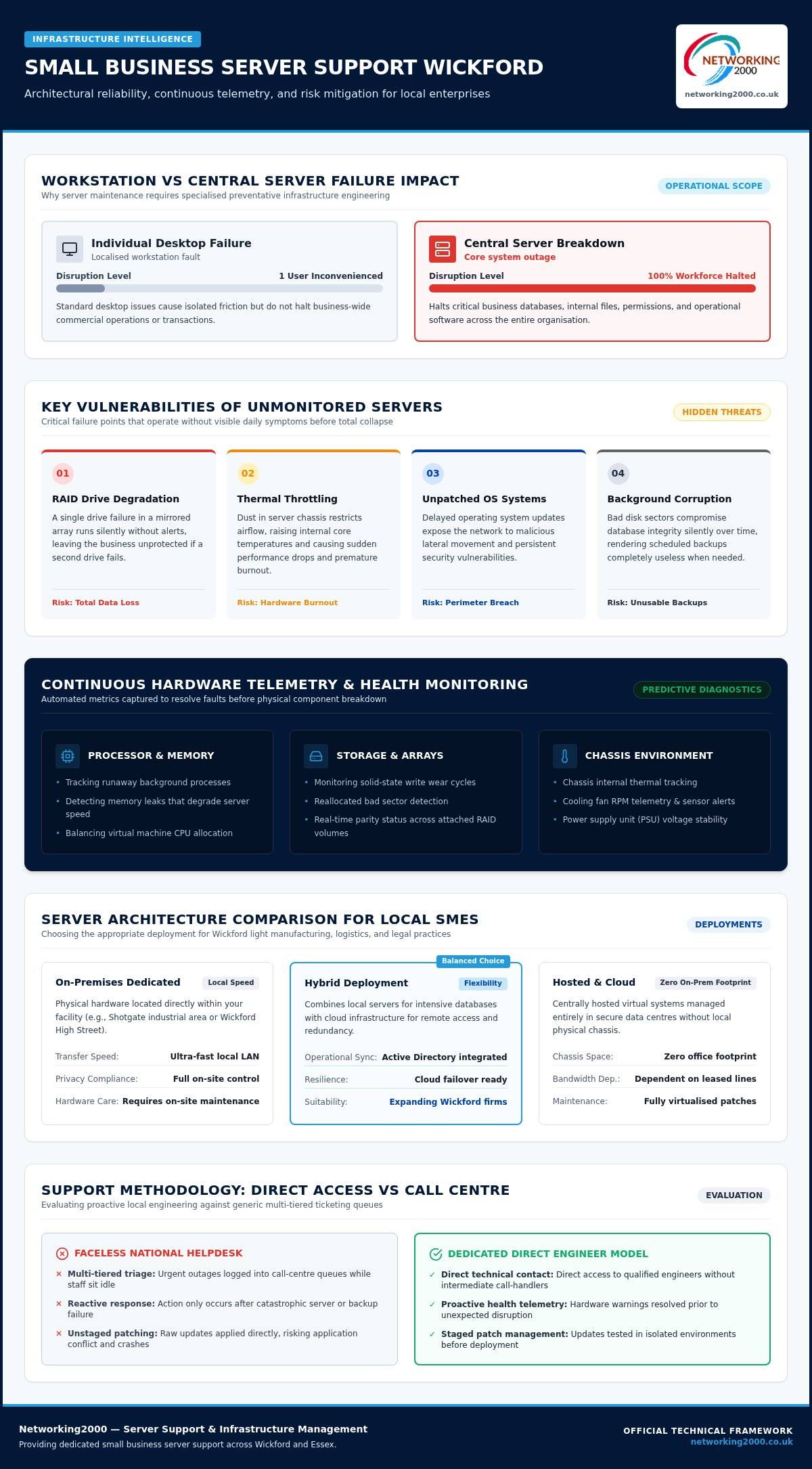
Dedicated server maintenance differs significantly from standard desktop and workstation support. A desktop issue usually inconveniences one person; a server failure brings your entire workforce to an immediate halt. Professional small business server support Wickford companies depend on focuses on preventative health rather than reactive emergency fixes. Active oversight ensures minor telemetry alerts, like degraded memory modules or failing cooling fans, are resolved long before they lead to catastrophic hardware breakdown.
The Role of On-Site and Hosted Servers for Local SMEs
Small business server support is the ongoing technical management, security monitoring, and hardware maintenance of central computing systems that power organizational operations. From secure authentication to local file repositories, dedicated systems provide stability that basic public cloud folders cannot match. Companies utilizing traditional Windows Server technology or modern hybrid deployments need consistent oversight to protect system state and active directory structures. In Wickford, sectors such as light manufacturing, logistics, and professional legal practices often require localized server infrastructure to maintain rapid local file transfers, comply with strict privacy policies, and run high-demand operational software.
Key Vulnerabilities of Unmonitored Small Business Servers
Neglecting back-end infrastructure introduces severe vulnerabilities that rarely show symptoms on daily user screens until complete collapse occurs:
- RAID Drive Degradation: A single drive failure in a mirrored array continues to operate silently, but leaves the business entirely unprotected if a second drive fails.
- Thermal Throttling: Dust accumulation in server chassis restricts airflow, leading to elevated core temperatures, sudden performance drops, and premature hardware failure.
- Unpatched Operating Systems: Delayed security updates expose your network to malicious lateral movement and persistent vulnerabilities.
- Background Disk Corruption: Bad disk sectors can slowly compromise database integrity without triggering user alerts, rendering scheduled backups useless when needed most.
As your team expands, these hidden risks compound. Reliable small business server support in Wickford provides continuous performance checks, keeping infrastructure stable so your company remains fully operational.
Key Criteria for Selecting Server Support in Wickford
Selecting a partner requires looking beyond standard promises of quick helpdesk ticketing. You need an objective framework that scrutinises how a provider monitors internal infrastructure, protects network perimeters, and guarantees recovery. Rather than waiting for a system to crash, high-calibre small business server support Wickford companies invest in focuses on predictive health checks and perimeter defence using managed firewall Essex services to block external intrusions before they reach internal databases.
Continuous Hardware Monitoring and Health Telemetry
Automated telemetry captures early hardware warnings long before physical components fail completely. A capable support provider continually measures critical operating parameters:
- Processor and Memory Allocation: Identifying runaway background processes and persistent memory leaks that degrade server speed.
- Storage Health and Wear: Monitoring disk write cycles, bad sector reallocations, and RAID array status across all attached volumes.
- Chassis Environment: Tracking internal fan speeds and thermal readings to prevent heat-related component failure.
These alerts allow technicians to dispatch replacement components and conduct scheduled firmware updates without disrupting daily business trade.
Operating System Maintenance and Patch Management
Operating system maintenance protects infrastructure against active exploits and configuration drift. Structured patch cycles must balance security requirements against application availability. Following established FCC cybersecurity guidelines for business defence, your provider should stage all updates in isolated environments first. This practice confirms compatibility with your specific databases and line-of-business software before applying patches to live production servers.
Backup Integrity Audits and Rapid Recovery Planning
Backups offer false reassurance unless tested through active restoration drills. A dependable maintenance agreement mandates periodic sandbox restorations to confirm image integrity. Support plans should define clear Recovery Time Objectives (RTO) and Recovery Point Objectives (RPO), ensuring operations resume swiftly after unexpected incidents. Reviewing our framework for a disaster recovery plan will help you establish realistic recovery benchmarks for your organisation.
If you want to strengthen your internal IT infrastructure with dedicated technical oversight, partnering with Networking2000 provides the local expertise and proactive management your systems require.
Server Architectures: On-Premises, Hybrid, or Cloud
Every infrastructure decision shapes ongoing IT maintenance overheads and operational resilience. While some national providers push every business into the public cloud as a default, the reality for local companies involves practical trade-offs. Selecting the right architecture dictates your hardware lifecycle costs, compliance posture, and network dependency. High-performing small business server support Wickford providers assess operational software, file sizes, and local connectivity before recommending an architectural shift.
Managing and Maintaining Physical On-Premises Servers
On-premises servers deliver unmatched local processing speed for data-heavy applications, proprietary ERP databases, and large creative or engineering files. Retaining physical hardware on-site gives you total custody over proprietary data, but demands disciplined physical maintenance:
- Power Resilience: Regular testing of uninterruptible power supply (UPS) batteries to shield sensitive disk sectors from sudden grid cuts and brownouts.
- Physical Environment: Ensuring dedicated server cabinets maintain clean airflow and correct operating temperatures.
- Lifecycle Upgrades: Tracking typical four to five-year hardware lifecycles and manufacturer warranty renewals before component obsolescence occurs.
Having local technicians available to physically inspect chassis, swap redundant power supply units, and diagnose physical motherboards eliminates prolonged shipping delays when physical faults happen. For organisations managing mission-critical facilities that require specialised environmental controls and high-density infrastructure support, click here to explore dedicated data centre solutions.
Hybrid Server Configurations and Cloud Integration
Pure cloud setups are not always ideal, which is why an estimated 85 to 90 percent of UK organisations run hybrid or multi-cloud environments. Hybrid architecture combines the rapid response of on-premises equipment with the flexibility of cloud storage and collaboration. An on-site server can manage local authentication and core databases, whilst synchronising directory services with Microsoft Entra ID for unified security across remote workers.
Aligning these dual environments with recognised FTC small business cybersecurity principles ensures identical access controls apply across both on-site storage and cloud folders. When you want to modernise aging infrastructure at a measured pace, experienced providers delivering managed IT support services can structure a phased transition roadmap that preserves workflow stability throughout the upgrade.
The True Cost of Server Downtime vs Managed Support
Treating back-end infrastructure as a secondary concern until it breaks down is an expensive operational gamble. When an internal server stops responding, commercial activity freezes. Staff cannot access shared project files, dispatch customer orders, or update accounts software. Choosing comprehensive small business server support Wickford organisations can rely on shifts your business away from unpredictable emergency repairs and guarantees continuous operational continuity.
Calculating the Direct and Indirect Costs of Outages
Every minute of unexpected downtime creates immediate payroll waste. If a team of fifteen employees sits idle because a local application server crashed, you continue paying standard wages while generating zero billable output. The hidden consequences often inflict even deeper damage:
- Missed Commercial Deadlines: Delays in processing shipments or completing client deliverables undermine customer confidence and risk contractual penalties.
- Regulatory Exposure: Abrupt server outages during database writes can corrupt transactional records, complicating compliance reporting under current UK data protection standards.
- Emergency Recovery Premiums: Ad-hoc repair technicians charge steep urgent call-out fees to diagnose complex hardware faults after an avoidable failure.
For an expanding enterprise, an unmanaged server failure costs far more in lost productivity and damaged client relationships than the predictable investment in regular maintenance.
Break-Fix Support Versus Retained Server Management
The traditional break-fix model suffers from an inherent conflict of interest. Ad-hoc technicians only profit when your systems crash, meaning they have no financial incentive to keep your infrastructure healthy. Emergency call-outs generate surprise invoices, yet they rarely address the underlying root causes of system instability.
Retained management realigns priorities entirely. Under a proactive maintenance agreement, your provider succeeds when your systems remain completely stable. Continuous health monitoring, routine security updates, and scheduled hardware reviews ensure issues are corrected before they cause a standstill. When researching local vendors, our guide on choosing the best IT support companies in Essex outlines how to assess contractual service tiers and response accountability.
To eliminate unexpected downtime and secure dependable infrastructure management, partner with Networking2000 for experienced, proactive support tailored to your business.
Onboarding Server Support: Practical Implementation Steps
Switching IT providers often triggers anxiety about operational disruption. Moving your critical databases and core applications to a new partner should occur smoothly without interrupting staff workflows. Professional small business server support Wickford companies implement follows a methodical rollout that discovers existing flaws, stabilises operations, and provides seamless continuity from the first day.
A structured onboarding framework relies on three distinct phases:
- Phase 1: Deep Discovery Audit: Cataloguing hardware specifications, software dependencies, storage configurations, and network layout.
- Phase 2: Stabilisation and Telemetry: Deploying lightweight monitoring agents, remediating overdue security patches, and validating automated backup integrity.
- Phase 3: Operational Handover: Activating service level agreements, documenting staff escalation workflows, and scheduling preventative maintenance reviews.
The Comprehensive Initial Server and Infrastructure Audit
Reliable onboarding begins with an exhaustive audit of your current computing environment. Technicians examine component serial numbers, manufacturer warranty coverage, and remaining storage drive write endurance. Beyond hardware, this step maps directory privileges, admin credentials, and dormant accounts that present hidden security gaps. For on-site equipment, engineers inspect comms cabinet airflow, cable management, and uninterruptible power supply (UPS) runtimes to guarantee baseline reliability before signing off on daily oversight.
Establishing Service Level Agreements and Support Expectations
Clarity around response accountability keeps business owners in control. Your service agreement should define guaranteed response windows for low-priority alerts compared to severe server outages that halt billing. Straightforward escalation routes ensure your team bypasses multi-tier call-centre queues, speaking straight to an engineer who already understands your server topology.
Regular review sessions align your technical capacity with broader commercial expansion plans. As your customer base grows, your server resources must adapt without causing application latency. Choosing an established specialist like Networking2000 Managed IT Support gives your organisation direct access to experienced Essex engineers committed to keeping your core systems dependable, secure, and fully operational.
Build a Resilient Server Infrastructure in Wickford
Protecting operational data and maintaining seamless staff productivity comes down to proactive oversight. Reliable back-end stability is never an accident; it requires structured hardware monitoring, verified data recovery procedures, and an architecture tailored to your specific commercial workflows. Investing in professional small business server support Wickford companies trust ensures your systems stay online while eliminating the stress of unexpected IT failures.
Since 1998, Networking2000 has delivered dependable infrastructure care across Essex. Whether your operations run on physical on-premises servers, cloud platforms, or a hybrid configuration, our engineers deliver comprehensive technical management. You gain direct access to experienced technical specialists who understand your environment, completely bypassing cumbersome ticketing queues and helpdesk bureaucracy.
Take control of your technology and keep your organisation trading without interruption. Speak to Networking2000 about protecting your business servers today and establish a dependable IT foundation built for long-term stability.
Frequently Asked Questions
Can my Wickford small business manage without a dedicated server?
Some micro-businesses manage solely with cloud-based software, but growing Wickford companies often find dedicated servers essential. If you run proprietary databases, heavy design files, or local accounting applications requiring rapid throughput, a dedicated server prevents internet latency bottlenecks. It also centralises user permissions and secures internal storage control in ways that basic off-the-shelf cloud subscriptions cannot match.
How often does an on-premises business server require routine maintenance?
Business servers require continuous digital health monitoring alongside structured monthly operating system maintenance. While automated telemetry monitors processor loads, storage write cycles, and chassis temperatures every minute, engineers should apply security patches, review event logs, and test backup images each month. Physical cabinets also need scheduled inspections to clean cooling vents and confirm battery runtime on uninterruptible power supplies.
What happens if a hard drive fails inside my business server?
With a properly configured redundant storage array, your server continues running without interrupting daily business operations. Modern servers use RAID technology, which mirrors or distributes data across multiple physical disks. When one drive fails, automated telemetry alerts your support provider immediately. A technician then replaces the faulty drive during scheduled maintenance, rebuilding the array in the background while your team works normally.
Is remote server support sufficient, or do we need local engineers?
Remote support handles software patches effectively, but access to local engineers remains vital when physical hardware fails. Dependable small business server support Wickford companies rely on combines remote health monitoring with on-site engineer visits when power supplies, motherboards, or network switches fail. A local Essex provider can attend your site quickly, eliminating the prolonged hardware delays typical of distant call centres.
How much downtime should a business expect when onboarding a new support provider?
Transitioning to a professional support partner should involve zero unplanned operational downtime for your staff. Experienced technicians perform initial infrastructure discovery, deploy diagnostic agents, and audit directory permissions quietly in the background. If critical system updates or server reboots are required to establish security baselines, your provider schedules them outside standard business hours to safeguard daily commercial output.
Can an outsourced IT provider support older legacy servers and software?
Yes, an experienced provider can stabilise, monitor, and protect legacy operating systems while planning safe upgrade paths. Many Wickford businesses rely on older line-of-business applications that cannot be replaced overnight. Through tailored small business server support Wickford providers isolate these systems behind managed firewalls, implement immutable offline backup snapshots, and maintain hardware reliability until a planned migration makes commercial sense.
How do server support agreements protect business data against ransomware?
Multi-layered protection shields your servers by combining network perimeter defence, access restrictions, and verified data recovery. Providers deploy managed firewalls to block external intrusion attempts and consistently patch known operating system vulnerabilities. Crucially, support agreements include automated, isolated backup routines. If malicious code compromises a workstation, clean server snapshots allow engineers to restore uninfected files without paying ransoms.

