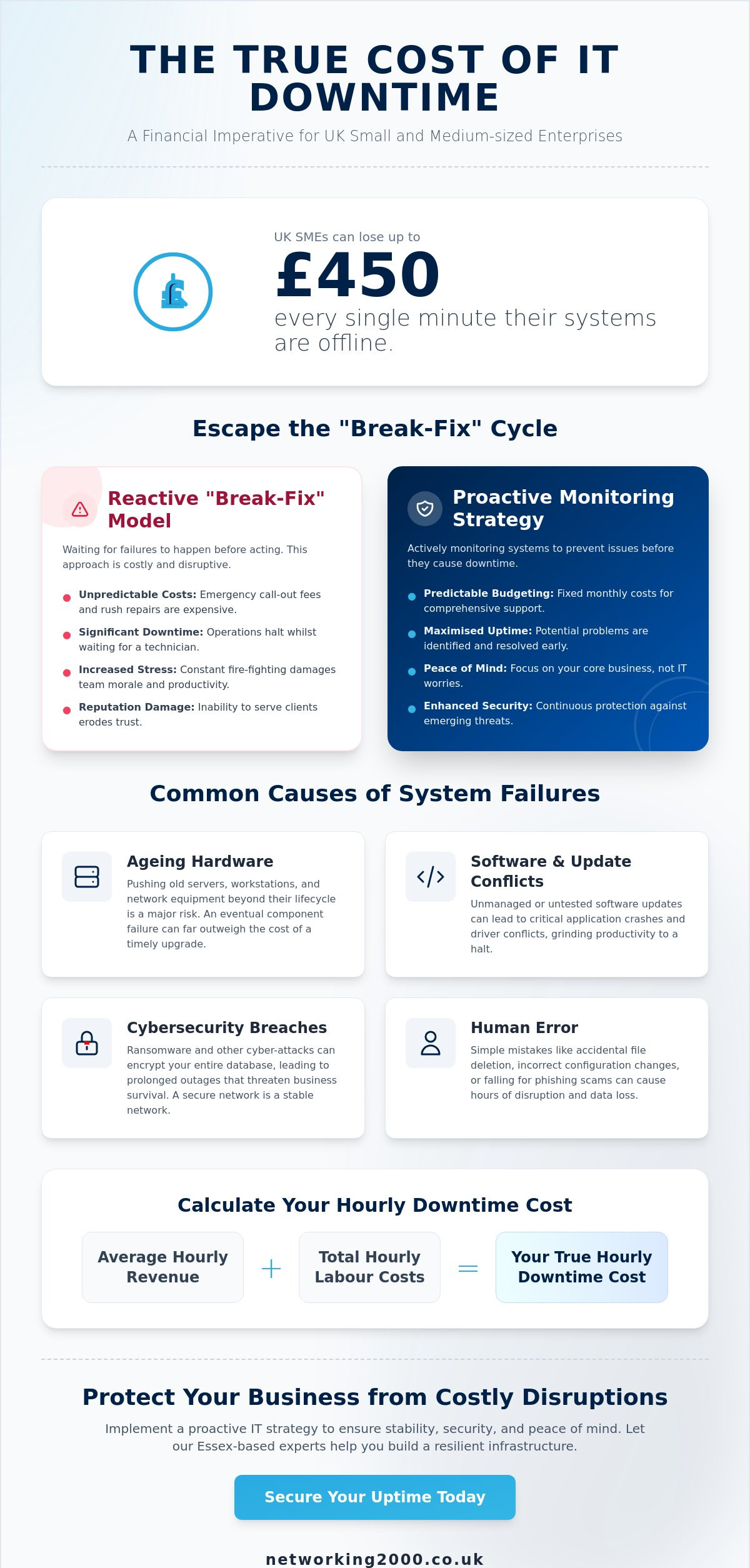
Did you know that UK SMEs can lose up to £450 every single minute their systems are offline? It is a staggering figure that highlights why learning how to reduce IT downtime is no longer just a technical goal; it is a financial necessity. For businesses across Essex, a single server crash or a botched software update can halt productivity, frustrate your hard-working team, and put your sensitive data at risk.
We know how stressful it is when technology fails. You have worked hard to build your reputation, and seeing revenue vanish during a system outage is incredibly frustrating. This guide shares actionable strategies to eliminate technical disruptions and keep your operations running smoothly throughout 2026. We will show you how to move away from the “break-fix” cycle and build a stable, reliable infrastructure. You will discover how proactive monitoring, better cybersecurity, and clear recovery plans can provide the peace of mind you need to focus on your core business.
Key Takeaways
- Calculate the true cost of outages, from immediate lost sales to long-term damage to your professional reputation.
- Spot the warning signs of system failure, including ageing hardware and unmanaged software updates.
- Discover how to reduce IT downtime by switching from a reactive “break-fix” model to a proactive monitoring strategy.
- Learn how to audit your technology assets and implement a robust backup plan to ensure business continuity.
- Find out why a local Essex partner offers the fast, jargon-free support your business needs to stay online.
The True Cost of IT Downtime for UK Businesses
It is easy to think of a system crash as a minor inconvenience. In reality, it’s a silent profit killer. To properly address what is IT downtime, we must look at it as any duration where your staff cannot perform their duties due to technical failure. In 2026, our reliance on cloud-based tools and hybrid working makes uptime critical. If your internet drops or your Microsoft 365 access fails, your entire operation grinds to a halt.
The financial impact is split into hard and soft costs. Hard costs are the easiest to track, such as lost sales or unbillable hours. Soft costs are more insidious. If a local Essex client tries to call you and your VoIP system is dead, they won’t wait. They’ll move to the next business on their list. This damages your reputation and erodes the trust you’ve built over years. According to the Gov.uk Cyber Breaches Survey 2025, 92% of UK businesses need more than 24 hours to recover from a significant incident, which is a devastating amount of lost time.
Don’t ignore the human element. System outages cause massive frustration in the office. Staff can’t do their jobs and morale drops instantly. They feel helpless, which leads to burnout and decreased productivity even after the systems come back online. A stable environment is essential for a happy, efficient team.
Calculating Your Business’s Hourly Downtime Rate
To understand how to reduce IT downtime, you must first know what you’re losing. Start by adding up the hourly wages of every idle employee during an outage. Next, factor in the average hourly revenue your business generates. You should also check for potential Service Level Agreement (SLA) penalties if you miss client deadlines. These figures often shock business owners who previously thought of IT as a background expense. The Downtime Formula is calculated by adding your average hourly revenue to your total hourly labour costs for the affected team.
Why ‘Break-Fix’ IT is Costing You More
The “break-fix” model is a relic of the past. You wait for a failure, call a technician, and pay a one-off bill. It sounds simple, but it ignores the “hidden tail” of technical debt. Temporary fixes are often applied just to get you back online quickly. These patches don’t solve the root cause. Eventually, these weak links snap, causing even more significant disruptions. Understanding how to reduce IT downtime starts with moving away from this reactive habit. Proactive maintenance acts as a financial safeguard, catching these issues before they turn into expensive disasters.
Common Causes of System Failures in SME Environments
System failures rarely happen without warning. Usually, they are the result of small, ignored issues that eventually snowball into a total shutdown. If you want to know how to reduce IT downtime, you must first identify the weak points in your current setup. For many Essex SMEs, these vulnerabilities fall into four main categories: hardware, software, security, and people.
Hardware obsolescence is a frequent culprit. Pushing an old server or workstation too far is a gamble that rarely pays off. Whilst it might seem cost-effective to keep a ten-year-old machine running, the eventual cost of a motherboard failure far outweighs the price of a timely upgrade. Similarly, software and update conflicts can cause chaos. Unmanaged patching, where updates are installed without testing, often leads to driver conflicts that crash critical applications. It’s a delicate balance that requires professional oversight.
Cyber security breaches are now a leading cause of prolonged outages. Ransomware attacks can encrypt your entire database, halting operations for weeks. Research shared by techUK highlights The True Cost of IT Downtime, showing how cyber incidents drain resources and threaten business survival. Finally, never underestimate human error. Whether it’s an accidental deletion of a client folder or a configuration mistake in your network settings, simple slips can lead to hours of lost productivity. Effective IT security training for your team is often the best way to prevent these internal mistakes.
The Role of Managed Firewalls in Uptime
A managed firewall Essex service acts as your first line of defence against network-clogging attacks. By filtering malicious traffic before it reaches your internal systems, these tools prevent the breaches that cause long-term instability. A secure network is a stable network. Without professional management, your firewall can become a bottleneck or, worse, a gateway for threats that result in total system failure.
Infrastructure Bottlenecks and VoIP Stability
Poor internet connectivity is the most frequent cause of “micro-downtime.” These short, intermittent drops might only last seconds, but they are enough to disconnect your cloud apps and drop calls. Switching to a modern VoIP telephony system provides better resilience, but only if your underlying infrastructure is sound. Outdated cabling or consumer-grade routers often struggle with the demands of a busy office, leading to frustrating performance issues that hinder your daily operations.
Proactive vs Reactive IT: A Comparison for Reliability
The most significant shift in how to reduce IT downtime is moving from a reactive mindset to a proactive one. Reactive IT is the traditional “break-fix” approach. You wait for something to fail, call a technician, and then wait while they travel to your site. This creates a massive gap in productivity that costs you money every minute you sit idle. In contrast, a proactive approach acts as a “Safe Pair of Hands.” It involves constant vigilance, ensuring that small glitches don’t evolve into business-halting disasters.
When comparing Proactive vs Reactive IT, the difference in reliability is clear. Proactive management relies on Root Cause Analysis. Instead of just rebooting a server and hoping for the best, we look at why it failed. This stops the same issue from appearing next week. It also allows for better financial planning. Rather than facing sudden, large repair bills, you can budget for predictable monthly support costs. This stability allows you to focus on your core operations without the constant fear of a technical crash. This proactive stance is the most effective way to understand how to reduce IT downtime across your entire organisation.
We believe that technology should work for you, not the other way around. By identifying patterns and addressing vulnerabilities early, we create a resilient environment that supports your staff and protects your bottom line. This methodical approach ensures that your infrastructure is always ready to meet the demands of your customers.
The Benefits of 24/7 Network Monitoring
Monitoring is the engine of a proactive strategy. Software agents installed on your systems work silently in the background. They detect early warning signs, like a failing hard drive or a memory leak, long before a crash occurs. This allows us to patch systems out-of-hours, ensuring your team isn’t interrupted during the working day. By receiving instant alerts, we significantly reduce the “Mean Time to Repair” (MTTR). Often, the fix is applied before you even realise there was a problem.
Strategic IT Consultancy and Planning
A long-term view is essential for stability. We don’t just fix what’s in front of us; we look ahead. Creating a three-year technology roadmap prevents emergency hardware failures by scheduling upgrades before devices reach their breaking point. This is where IT consultancy in Wickford becomes invaluable. We align your infrastructure with your business growth goals, ensuring your technology supports your expansion. It’s about building a foundation that stays solid as your business evolves.
5 Steps to Reduce IT Downtime in Your Office
Transitioning from identifying problems to implementing solutions is the most effective way to understand how to reduce IT downtime in a practical, everyday setting. It isn’t just about buying new gadgets; it’s about creating a disciplined culture around your technology. By following a structured approach, you can transform your IT from a source of stress into a silent, reliable engine for your business.
Step 1: The Infrastructure Health Check
You can’t fix what you haven’t measured. Start by auditing every piece of hardware and software in your office. Pay close attention to “End of Life” (EOL) equipment. These are devices that the manufacturer no longer supports with security patches or parts. Keeping an EOL server is a major risk that often leads to catastrophic failure. Don’t forget the physical environment. Check your Uninterruptible Power Supply (UPS) batteries to ensure they can handle a sudden surge or outage, and verify that your server room cooling is efficient. Local Wickford businesses should audit their infrastructure biannually to stay ahead of regional environmental factors like power fluctuations or heatwaves.
Step 2: Implementing a ‘3-2-1’ Backup Strategy
A backup is only useful if it works when you need it. We recommend the 3-2-1 rule for total peace of mind. This means keeping three copies of your data, stored on two different types of media, with one copy kept securely offsite. There is a vital difference between simple data backup and true disaster recovery. Backup saves your files, but disaster recovery is the plan that gets your entire system back online in minutes rather than days. You must test these backups regularly. A backup that hasn’t been tested is merely a hope, not a strategy.
Step 3: Employee Cyber Awareness
Your staff are your first line of defence. Much of the downtime we see in Essex offices is “self-inflicted” through accidental clicks on phishing links or social engineering scams. Training your team to spot these threats is one of the most cost-effective ways to learn how to reduce IT downtime. We also suggest standardising user permissions. By preventing unauthorised software installs, you stop many conflicts before they start. Create a simple “IT Incident” report process so staff feel comfortable flagging potential issues early.
If you’re unsure where to start with your audit, our team provides comprehensive Managed IT Support to identify and fix your system’s weak links.
- Organise a maintenance schedule: Set aside time each month for patching and updates to avoid “emergency” fixes during the working day.
- Partner with a specialist: Oversight from a managed service provider ensures that your technical debt never grows out of control.
Eliminating Disruptions with Networking2000
Choosing the right partner is the final, most crucial step in learning how to reduce IT downtime. At Networking2000, we pride ourselves on being a local veteran deeply integrated into the Essex community. Based in Wickford, our proximity allows us to provide the responsive, personalised touch that national competitors often lack. We don’t just fix computers; we provide a sense of security and calm that allows you to focus on your core operations. You get the benefit of a professional IT department without the significant overhead costs of a full-time in-house team.
Our approach is built on honesty and simplicity. We avoid dense jargon and instead offer straightforward, practical advice that makes sense for your specific business needs. By acting as your “safe pair of hands,” we handle the complexities of infrastructure and security so you don’t have to. A fully managed support contract ensures that your systems are monitored, patched, and protected around the clock. This level of comprehensive care is the most reliable way to understand how to reduce IT downtime and maintain a stable environment.
Our Proactive Support Model
Since our founding in 1998, we have refined a support system that prioritises prevention over repair. Our advanced monitoring tools work silently in the background to identify potential failures before they disrupt your working day. We tailor our support packages specifically for SMEs across London and Essex, ensuring the solutions we provide are relevant to your scale and industry. This proactive stance stops small glitches from evolving into expensive, business-halting disasters. We believe in being both proactive and reactive; we stop problems before they start, but we’re ready to act fast if an issue does arise.
Next Steps for a Downtime-Free Future
Ready to move away from the frustration of system outages? The process starts with a free initial infrastructure review. We will visit your site, audit your current hardware, and identify any hidden risks that could lead to future failures. What should you expect during your first 30 days of managed IT support services? We begin by stabilising your network, resolving any lingering technical debt, and implementing the 3-2-1 backup strategy discussed earlier. This methodical onboarding ensures your business is resilient and ready for growth.
Contact Networking2000 for a reliable IT audit today and take the first step toward a more stable, secure, and productive workplace.
Secure Your Business Continuity for 2026
IT downtime isn’t an unavoidable cost of doing business; it’s a challenge you can overcome with the right strategy. By shifting from a reactive “break-fix” mindset to a proactive support model, you protect your revenue and your team’s productivity. Implementing a 3-2-1 backup strategy and conducting regular infrastructure audits are fundamental steps in learning how to reduce IT downtime effectively. These actions move you away from emergency repairs and toward a stable, predictable technical environment.
Since 1998, Networking2000 has served businesses across Essex and London as a “safe pair of hands.” Our specialists provide proactive 24/7 network monitoring and expert management of your firewalls and VoIP security to stop disruptions before they start. We handle the technical complexity so you can focus on growing your business with total peace of mind. You deserve a partner that understands the local landscape and delivers jargon-free support when you need it most.
Secure your business continuity with Networking2000 today. We are ready to help you build a more stable, reliable, and secure future for your office.
Frequently Asked Questions
What is the most common cause of IT downtime for small businesses?
Human error and hardware failure are the primary causes of system outages in SME environments. This often includes staff accidentally deleting critical files or configuration mistakes made during unmanaged software updates. Hardware eventually reaches its breaking point, and without a proactive replacement cycle, a sudden motherboard or drive failure becomes inevitable.
How much does unplanned IT downtime actually cost per hour?
For UK SMEs, the cost of unplanned downtime typically ranges between £137 and £450 per minute. This figure accounts for immediate lost revenue, unbillable staff hours, and the resources required to fix the fault. When you calculate these costs over a full hour, the financial impact can be devastating for a local business.
Can managed IT support really prevent all system crashes?
No service can guarantee 100% uptime, but managed support significantly reduces the frequency and impact of crashes. By using 24/7 monitoring tools, we catch early warning signs like failing hard drives or memory leaks before they halt your operations. It moves your business away from the “break-fix” cycle toward continuous stability.
What is the difference between a backup and a disaster recovery plan?
A backup is simply a copy of your data, whilst a disaster recovery plan is the documented process for restoring your entire business operation after a failure. You might have a copy of your files, but without a recovery plan, it could still take days to rebuild your server and get your team back to work.
How often should my business hardware be replaced to avoid failure?
Most business-grade hardware, including servers and workstations, should be replaced every three to five years. Beyond this timeframe, the risk of component failure increases and performance begins to lag. Keeping a consistent upgrade cycle is a fundamental part of how to reduce IT downtime across your organisation.
Is it possible to reduce downtime without a massive upfront investment?
Yes, you can improve reliability without a huge capital outlay by switching to a proactive managed service. This provides expert oversight and monitoring for a predictable monthly fee rather than expensive emergency repair bills. Better staff training and refined security configurations are also cost-effective ways to learn how to reduce IT downtime.
How does a managed firewall help keep my systems online?
A managed firewall acts as a digital perimeter, filtering out malicious traffic and preventing cyber-attacks like ransomware from entering your network. By stopping these threats before they can encrypt your data or crash your server, the firewall ensures your systems remain stable and accessible for your staff and customers.
What should my staff do first when the network goes down?
Your team should immediately report the issue through your agreed support channel to ensure the resolution process starts instantly. Whilst waiting for a fix, staff should switch to pre-planned offline tasks or use safe mobile tethering to maintain basic productivity. Having a clear, written procedure prevents panic and helps everyone stay focused during an outage.

