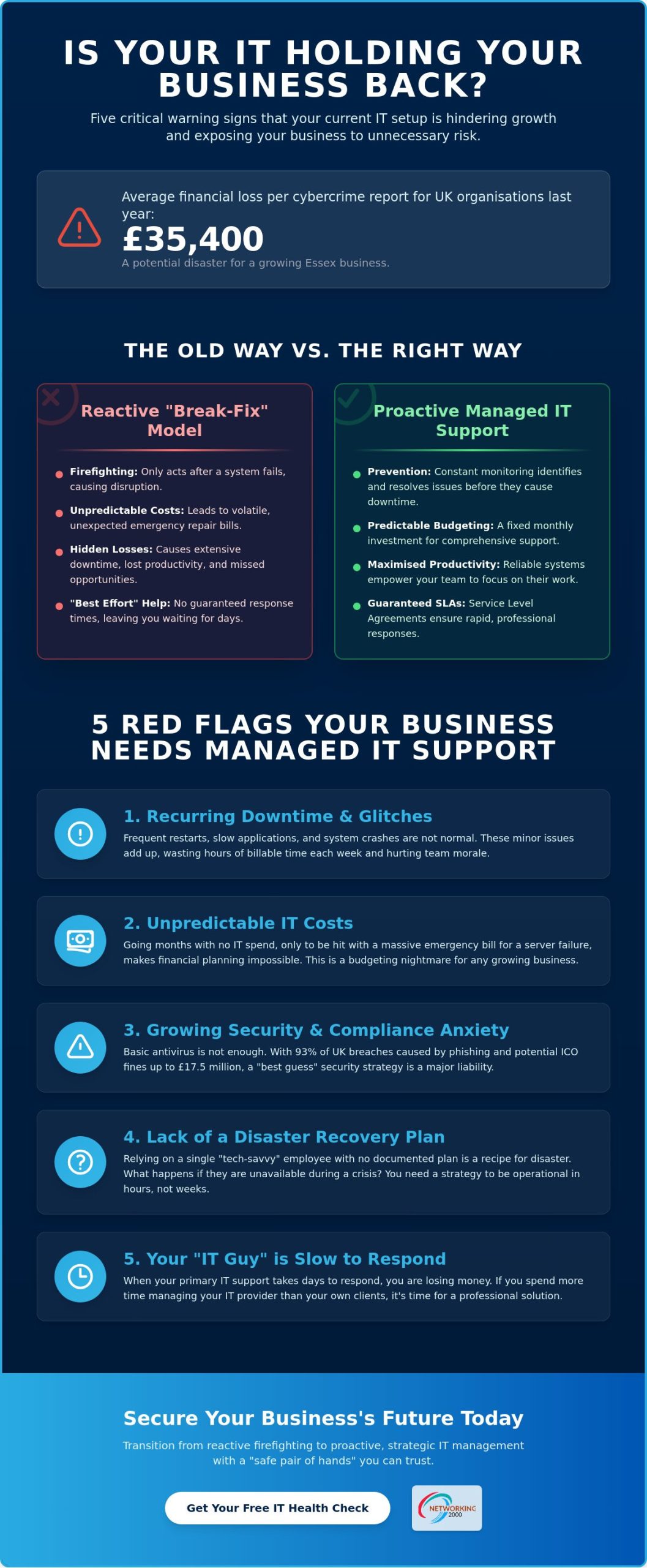
Did you know that the average financial loss per cybercrime report for UK organisations reached £35,400 this past year? For a growing Essex business, that isn’t just a minor setback; it’s a potential disaster that could halt your operations entirely. You likely started your company to focus on your customers, not to spend your afternoons troubleshooting a sluggish network or worrying about the latest phishing scams. It’s frustrating when your current “IT guy” takes days to respond, leaving you with mounting downtime and unpredictable bills. If you’ve noticed these recurring headaches, it’s time to recognise the signs you need managed IT support before a system failure forces your hand.
We understand that you want a reliable, “safe pair of hands” to handle your technology so you can get back to business. You deserve the peace of mind that comes with predictable budgeting and total compliance under the Data (Use and Access) Act 2025. This article reveals the five critical warning signs that your current IT setup is hindering your growth. We’ll also explain how transitioning to a professional managed solution can eliminate technical distractions and secure your company’s future.
Key Takeaways
- Understand why the reactive “break-fix” model often leads to higher long-term costs and hidden productivity losses compared to a fixed monthly service.
- Recognise the five specific signs you need managed IT support to move away from constant firefighting and towards proactive business growth.
- Compare the practical ROI of guaranteed Service Level Agreements against the unpredictable nature of “best effort” technical help.
- Learn how to audit your current hardware and identify which critical applications are vital to your daily operations.
- Discover the security and compliance benefits of partnering with a local Essex veteran to safeguard your data and reputation.
The High Cost of Reactive IT: Why “Break-Fix” No Longer Works
Many Essex businesses still rely on the “break-fix” model. This is a reactive approach where you only call for help after a system fails. It sounds simple, but it creates a relentless cycle of firefighting. You wait for a crash, suffer the disruption, and then pay a premium for a rushed repair. This is exactly what managed IT support is designed to replace by shifting the focus from emergency repairs to constant prevention.
The true price of this model isn’t found on the repair invoice. It’s hidden in the lost hours when your team can’t access files or the missed enquiries that vanish because your email server is down. When your technology is unreliable, your business loses momentum. One of the clearest signs you need managed IT support is the realisation that you are spending more time managing your “IT guy” than your own clients. Proactive maintenance identifies these vulnerabilities early, acting as a “safe pair of hands” for your entire digital infrastructure.
The Productivity Drain of Minor Glitches
We often see staff members spending twenty minutes trying to “fix” a printer or restart a frozen application. These minor glitches seem small in isolation. However, across a team of ten, these interruptions can easily waste several hours of billable time every week. For a local firm in Wickford, this inefficiency directly eats into your profit margins. Beyond the numbers, constant technical friction causes genuine frustration. If your team feels their tools are working against them, morale and employee retention often suffer.
Unpredictable Budgeting and Financial Surprises
Reactive IT is a budgeting nightmare. You might go three months with no costs, only to be hit by a massive emergency bill when a server fails or a security breach occurs. These financial shocks make it impossible to plan for growth or invest in new equipment with confidence. By recognising the signs you need managed IT support, you can swap these volatile expenses for a transparent, fixed monthly investment. To understand exactly what you should be paying and how to compare quotes fairly, review the latest managed IT support pricing Essex benchmarks for 2026. This allows you to forecast your overheads accurately while ensuring your systems remain secure and updated. Managed IT is essentially a proactive insurance policy for your digital assets, ensuring they remain an asset rather than a liability.
5 Red Flags: Signs You Need Managed IT Support Now
Identifying the signs you need managed IT support early can save your business from a terminal failure. It’s often not one single crash that signals the end, but a series of persistent red flags. If your morning routine regularly involves “quick restarts” to get the server going, you’re already in trouble. Recurring downtime is the most visible symptom, but it’s the invisible risks that often do the most damage. When your technology stops being a tool and starts being a hurdle, your growth is at risk.
Many Essex firms rely on a single “tech-savvy” employee or a local one-man-band. While this works for a startup, it creates a dangerous bottleneck as you scale. If your IT support lacks a documented disaster recovery plan, your data is essentially unprotected. You need a strategy that ensures your business can resume operations within hours, not weeks, after a failure. If you don’t have a clear roadmap for your digital assets, you’re simply waiting for the next crisis to hit. Before deciding whether to hire internally or outsource, it’s worth understanding the full implications of IT support vs in-house IT for a growing Essex business in 2026.
When Security Becomes a Source of Anxiety
Relying on basic antivirus software is no longer enough to protect a modern business. Sophisticated threats require a managed firewall Essex businesses can trust to filter traffic and block intrusions before they reach the network. In 2025, phishing attempts caused 93% of cybersecurity breaches in the UK. This highlights why email security isn’t just a technical choice; it’s a fundamental part of Cybersecurity for Small Business.
Compliance is another major pressure point that creates anxiety for business owners. With the Data (Use and Access) Act 2025 having come into force on 5 February 2026, the ICO has enhanced powers to impose fines up to £17.5 million. If your security feels like a “best guess” rather than a robust, documented strategy, you’re carrying a level of risk that could bankrupt your firm. Professional oversight ensures you meet these strict regulatory requirements without the guesswork.
The Scalability Wall: Is Tech Holding You Back?
Technology should facilitate growth, not hinder it. If your home-grade Wi-Fi or ageing server causes lag every time you hire a new staff member, you’ve hit the scalability wall. Modern Essex firms require flexible infrastructure that supports hybrid working without compromising security. You cannot expect legacy hardware to handle the demands of a high-performance, modern team.
This often starts with communication. Choosing between VoIP vs landline for business is a critical decision for teams that need to stay connected across the county. A managed solution ensures your telephony, data, and security all work in harmony. If you’re ready to stop firefighting and start growing, it might be time to explore how professional managed IT support can stabilise your operations.
Managed IT vs. Break-Fix: A Practical ROI Comparison
The financial difference between reactive and proactive care is stark. When you rely on a “break-fix” provider, you’re paying for their time. This means they only profit when your systems fail. Their response is usually based on “best effort,” which leaves you waiting while your team sits idle. In contrast, managed support operates under a Service Level Agreement (SLA). This guarantee ensures that critical issues are addressed within a set timeframe. When you spot the signs you need managed IT support, the decision often comes down to this shift from uncertainty to guaranteed uptime.
Consider the cost of a major outage. Beyond the hourly repair fees, which typically sit between £80 and £150 in the UK, you must factor in lost revenue and staff wages. With the average financial loss per cybercrime report hitting £35,400 in early 2026, the risk of a “best effort” response is simply too high. Managed IT provides an entire team of experts for a fraction of the cost of a junior in-house hire. A junior employee’s salary typically ranges from £28,000 to £40,000 before you even consider national insurance, training, and equipment costs. For a detailed breakdown of these staffing costs versus outsourced alternatives, our guide on IT support vs in-house IT for Essex businesses provides a clear financial comparison. Before committing to a contract, it’s worth consulting a detailed managed IT support pricing Essex guide to ensure you’re comparing providers on a like-for-like basis and avoiding hidden fees.
The Value of Proactive Monitoring
Remote monitoring tools allow us to see a disk failure or a security vulnerability before it impacts your workflow. Instead of waiting for a crash, we apply regular patches and software updates in the background. This is a vital step in protecting your business, especially as phishing caused 93% of breaches last year. Proactive care also extends the life of your hardware by ensuring it isn’t constantly running at its limit. For more actionable advice on keeping your systems running, see our guide on how to reduce IT downtime.
Strategic Guidance and Future-Proofing
A managed partner does more than fix broken PCs; they act as a virtual Chief Technology Officer (CTO). Through IT outsourcing Wickford businesses can access high-level strategic planning that was once reserved for large corporations. We help you plan hardware life cycles and cloud migrations so your tech remains a competitive advantage. This ensures you aren’t hit with a massive, unexpected bill for a total system overhaul. Ultimately, managed support is about planning for 2027, not just fixing 2026.
Checklist: Preparing Your Business for Managed Support
If you have spotted the signs you need managed IT support, jumping straight in without a plan is a mistake. Transitioning to a managed service is a significant step for any Essex firm. It requires a clear understanding of your current assets and your future requirements. By preparing properly, you ensure that your new provider can act as a “safe pair of hands” from day one. This process helps eliminate the technical friction that has been slowing your team down.
Use the following checklist to gather the essential information for your transition:
- Audit your current hardware: Create a comprehensive list of every PC, laptop, server, and networking device currently in use. Don’t forget older machines tucked away in cupboards that might still be connected to your network.
- Identify your “Critical Apps”: List the software your business cannot function without. This might include your accounting programme, a bespoke CRM, or your primary email platform.
- Review your IT spend: Analyse your monthly outgoings for ad-hoc repairs, software licences, and cloud subscriptions. This helps you compare your current variable costs against a fixed monthly investment.
- Assess your compliance needs: Determine if you handle sensitive client data that requires specific protections. Under the Data (Use and Access) Act 2025, you must ensure your systems are ready to handle the mandatory 45-day response period for data complaints.
- Define your growth goals: Consider where you want your business to be in 12 to 24 months. Are you planning to move to a larger office in Wickford or expand your remote workforce?
The IT Onboarding Process Explained
A professional onboarding starts with a thorough site audit. We review your infrastructure to document every connection and identify hidden vulnerabilities. This is the stage where we clean up “legacy” issues, such as outdated operating systems or messy server cabling, that cause recurring glitches. Proper documentation is vital; it allows our helpdesk to solve your problems faster because they already have a digital map of your entire network. This proactive approach ensures a smooth handover without disrupting your daily operations.
Setting Your Expectations for Support
Successful IT partnerships rely on clear communication. You should understand your provider’s escalation paths; knowing exactly who to call when a critical system fails provides immense peace of mind. Discuss the balance between remote support and on-site visits to ensure your Essex office has the physical presence it needs. Finally, talk to your staff about the change. Explain that they will now have access to a professional helpdesk, which empowers them to resolve minor issues before they become major headaches. If you are ready to begin this transition, our managed IT support team is here to guide you through every step.
Why Wickford Businesses Choose Networking2000
Choosing a technology partner is about more than just finding someone who can fix a computer. It’s about finding a long-term ally that understands the specific challenges of the Essex business landscape. Since 1998, Networking2000 has served as a local veteran in Wickford, providing the stability and experience that only comes with over 25 years in the industry. If you have identified the signs you need managed IT support, you need a partner that offers more than just reactive fixes.
Our core philosophy is to be a “safe pair of hands” for your infrastructure. This means taking full responsibility for your digital health through our managed IT support services. We don’t just wait for things to go wrong. We proactively monitor your systems to prevent issues before they disrupt your day. This approach allows you to step away from technical distractions and return your focus to your core operations. We believe in being a partner that grows with you, rather than a service you only call in a crisis.
We offer a comprehensive suite of solutions designed for modern SMEs. From implementing high-performance website design Essex firms can use to capture more leads, to setting up robust VoIP telephony, we cover every angle of your digital presence. We pride ourselves on straightforward, jargon-free communication. You won’t find any complex tech-speak here; just practical advice and honest solutions that help your business grow. Our goal is to make your technology transparent and dependable.
Local Expertise, Professional Standards
Our proximity to Wickford and London is a major advantage for our clients. We aren’t a faceless national call centre. We are local experts who can be on-site quickly when a physical presence is required. This local touch, combined with professional standards, ensures your IT packages are both tailored and scalable. We understand the unique pressures of the commuter belt and design our services to meet those demands. We focus on providing the same level of care and expertise that a large corporation enjoys, but with a personalised touch for regional enterprises.
Your Next Steps to Secure IT
If your current setup is showing the signs you need managed IT support, the best way forward is a professional assessment. You can book a no-obligation IT audit to get a clear picture of your network’s current health and security status. Unlike a standard “IT guy” who only reacts to problems, our proactive monitoring provides a constant shield for your data. We’ll identify the gaps in your security and create a roadmap that ensures your technology supports your future ambitions. It’s time to reclaim your schedule and focus on what you do best while we handle the rest.
Secure Your Business Future with Proactive IT
Recognising the signs you need managed IT support is the first step toward a more resilient and efficient business. Moving away from the “break-fix” cycle eliminates the hidden costs of downtime and ensures your firm stays ahead of strict data regulations. By shifting to a proactive model, you gain a strategic partner that prioritises long-term stability over emergency repairs.
Networking2000 has been a dependable partner for regional enterprises since 1998. Our local Essex-based technical team are specialists in SME cyber security and VoIP, providing the seasoned expertise required to navigate today’s digital landscape. We don’t just solve technical problems; we provide the peace of mind that allows you to focus on your core operations.
If you’re ready to stop worrying about system failures and start leveraging technology as a growth tool, we’re here to guide you. Book your free IT infrastructure audit with Networking2000 today. Reclaiming your time and securing your digital assets has never been more straightforward.
Frequently Asked Questions
What is the difference between managed IT support and a standard IT repair shop?
Managed IT support is a proactive partnership, whereas a repair shop is a reactive service. A repair shop waits for your hardware to break before charging an hourly rate to fix it. In contrast, a managed provider monitors your systems constantly to prevent failures from occurring. This shift from “break-fix” to prevention is one of the key signs you need managed IT support to maintain consistent business operations.
Is managed IT support cost-effective for a business with fewer than 10 employees?
Yes, it’s highly cost-effective for small teams. For a business with fewer than 10 employees, the cost of a single day of downtime often exceeds the monthly fee for professional support. It provides you with a full team of experts for a fraction of the cost of a junior in-house hire, ensuring your small team stays productive without technical interruptions.
Can managed IT support help with GDPR and Cyber Essentials compliance?
Professional managed support is essential for meeting modern compliance standards like GDPR and Cyber Essentials. Your provider ensures that security patches are applied and data handling follows the requirements of the Data (Use and Access) Act 2025. This includes managing the mandatory 45-day response period for data complaints and ensuring your infrastructure meets the latest cybersecurity frameworks.
What happens if we have an IT emergency outside of standard business hours?
Most managed contracts include automated monitoring to catch issues even when your office is closed. Whilst manual response times depend on your specific Service Level Agreement (SLA), the goal is to identify and isolate threats before they impact your morning start. You should always review your contract to understand the specific support hours and escalation paths available to your team.
Do we need to buy all new hardware before switching to a managed service?
You don’t usually need to replace all your hardware immediately. The transition begins with a comprehensive site audit to identify which devices are reliable and which pose a security risk. We focus on optimising your existing setup whilst creating a manageable roadmap for future upgrades. This approach prevents large, unexpected capital outlays and allows for better long-term budgeting.
How quickly can a managed IT provider respond to a critical server failure?
Response times for critical failures are guaranteed within your Service Level Agreement. Unlike a standard “IT guy” who might be busy on another site, a managed provider uses a prioritised helpdesk system. Critical server issues are moved to the front of the queue, ensuring that a technician begins remote or on-site recovery efforts within the timeframe agreed in your contract.
Will managed IT support work with our existing industry-specific software?
Yes, a professional provider will work alongside your existing industry-specific software vendors. We act as a single point of contact, coordinating with third-party developers to ensure your niche applications run smoothly on your network. This eliminates the frustration of being caught between two different support teams when a software glitch occurs.
What is included in a typical monthly managed IT support contract?
A typical contract includes remote network monitoring, helpdesk support for your staff, and proactive security management. It often covers managed firewalls, backup monitoring, and regular patch updates to protect against phishing. Recognising the signs you need managed IT support allows you to bundle these essential services into one predictable monthly investment, removing the stress of variable technical costs.

