What if your business firewall is switched on, but nobody can explain what it protects? The signs of a weak business firewall aren’t always dramatic. They may include unclear settings, overdue updates or activity that isn’t being reviewed.
A firewall helps control traffic entering and leaving your network, but it isn’t a complete security solution. Warning signs are not proof that a breach has occurred. They are reasons to check what’s in place and whether it’s being managed effectively.
This checklist will help you spot common gaps, understand what your firewall does and doesn’t protect, and prioritise next steps. It covers the equipment’s support status, rule changes, updates, alerts and logs. It also explains when technical support can help. With clear ownership and regular management, you can investigate concerns and keep protection under review as your business changes.
Key Takeaways
- The signs of a weak business firewall can point to poor oversight or maintenance, but they don’t prove a breach has happened.
- Assess who owns the firewall, whether its updates and rules are reviewed, and how access and activity are monitored.
- Separate records you can check yourself from configuration issues that need technical expertise.
- If you find a concern, document it and prioritise verified exposure or unexplained access before less urgent issues.
- Managed firewall support can help businesses maintain oversight through ongoing monitoring and threat mitigation.
Signs of a weak business firewall: what should you look for?
A firewall can be installed and switched on yet still be poorly maintained or configured. Warning signs often point to gaps in oversight: nobody is sure who manages it, changes aren’t recorded, or alerts and logs go unread. These clues don’t prove your business has been breached, but they show where a closer review may be needed.
A firewall filters network traffic according to set rules. Its value depends on those rules being suitable and kept under review. For a general introduction, see What is a Firewall? For your business, the practical question is whether someone can explain how the firewall is managed and what activity it records.
Operational clues that deserve a closer look
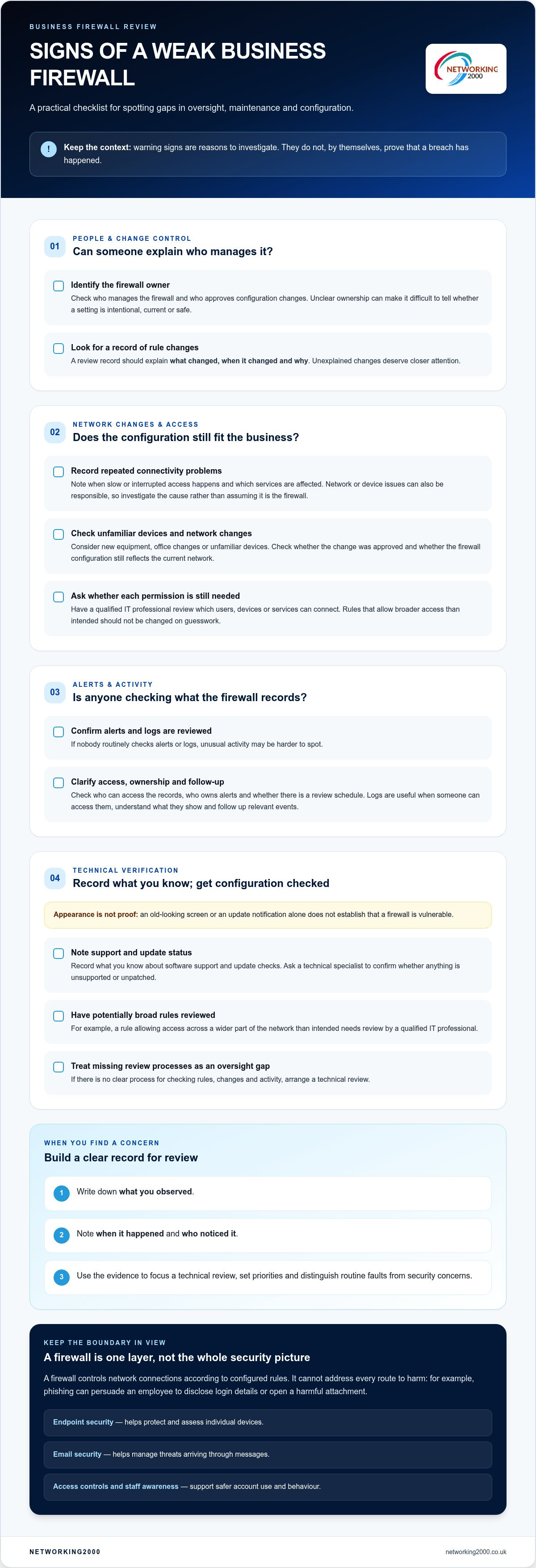
Start with the people and processes around the firewall. If you can’t identify who manages it or approves configuration changes, it may be difficult to tell whether a setting is intentional, current or safe. Unexplained changes to rules deserve particular attention. A review process should record what changed, when and why.
- Repeated connectivity problems: Slow or interrupted access to business systems can have several causes, including network or device issues. Note when problems occur and which services are affected. Investigate the cause rather than assuming the firewall is responsible.
- Unknown devices or network changes: New equipment, office changes or unfamiliar devices can alter what needs access. Check whether the change was approved and whether the firewall configuration still reflects the current network.
- Limited visibility: If nobody routinely checks firewall alerts or logs, unusual activity may be harder to spot. Missing access to records, unclear alert ownership or no review schedule are reasons to arrange a technical review.
Security clues that need technical verification
Some warning signs can’t be assessed safely by appearance alone. Record what you know about software support and updates, then have a qualified IT professional verify the firewall’s status and any potential exposure. An old-looking screen or an update notification by itself doesn’t establish that the system is vulnerable.
A weak firewall is a network control without effective oversight or configuration suited to the business it protects. This can include rules that allow broader access than necessary. For example, a rule permitting access across a wider part of the network than intended should be reviewed by a qualified IT professional, not changed on guesswork.
- Unclear update status: Record what you know about software support and update checks. Have a technical specialist confirm whether anything is unsupported or unpatched.
- Unexpectedly broad rules: Arrange a review of which users, devices or services can connect, and whether each permission is still needed.
- No routine review: If there’s no clear process for checking rules, changes and activity, treat that as an oversight gap to investigate.
Note what you observed, when it happened and who noticed it. This record helps a technical review focus on evidence, set priorities and distinguish routine faults from security concerns.
How a business firewall works, and where its protection stops
A business firewall filters network traffic against configured rules. In plain terms, it applies instructions about which connections can pass and which should be blocked. Depending on the network setup, it may control traffic between the business network and the internet, or between different parts of the network.
Owning firewall hardware is only one part of the picture. Effectiveness also depends on suitable rules, ongoing maintenance and visibility of relevant activity. Rules that no longer match the way staff work can disrupt legitimate access or leave permissions broader than intended. The NIST Firewall Guidelines discuss firewall policy and management, underlining that configuration is an ongoing responsibility, not a one-off setup.
What firewall rules and monitoring are meant to do
Rules set conditions for network traffic, such as its source, destination or connection type, then allow or block it accordingly. Monitoring makes activity visible so it can be reviewed and events needing attention can be investigated. For these controls to be useful, rules need to suit the network, be maintained as it changes and have activity reviewed by someone responsible.
For example, a business might need to allow a particular service to communicate with a work system. A rule can permit that connection while restricting others. The permission should still make sense as systems, users and working practices change. Logs and alerts provide useful records only if someone can access them, understand what they show and follow up relevant events.
Why a firewall cannot prevent every cyber threat
A firewall is one layer of security, not a complete defence for every device, account or user. Phishing emails, for instance, can persuade an employee to disclose login details or open a harmful attachment. Filtering network traffic alone cannot address every route to harm.
Other controls cover different risks. Endpoint security focuses on individual computers and devices. Email security can help manage threats arriving through messages, while access controls and staff awareness support safer account use and behaviour. If a device is already compromised, its activity may need investigation alongside the firewall.
- Firewall: Controls network connections according to configured rules.
- Endpoint security: Helps protect and assess individual devices.
- Email and user controls: Address message-based threats, account access and risky behaviour.
These layers work best when responsibilities are clear and changes are reviewed. If your checks raise questions about firewall configuration or activity, managed firewall support can help maintain oversight through monitoring and threat mitigation.
Business firewall checklist: how to assess warning signs
Use this review to turn uncertainty into a useful record. You don’t need to interpret technical settings or change anything yourself. Document what your business can verify, then flag questions that need technical assessment. The signs of a weak business firewall are easier to investigate when you can show what’s known, what’s missing and when a question first arose.
- Confirm ownership and change approval. Record who administers the firewall, who can approve changes and where approvals are kept. Note the date and reason for the latest known change, if available. If nobody can identify the responsible person or explain how changes are authorised and recorded, flag an accountability gap for review.
- Document update and review status. Write down what you know about software support, update checks and the last recorded firewall review. Note where that information came from, such as a maintenance record or management report. If the status or review date can’t be established, record it as unresolved. A qualified technical specialist can verify whether the software is supported and appropriately updated.
- Arrange a review of firewall rules. Record whether rules are reviewed routinely and whether their purpose and approval are documented. Business staff may be able to identify when a rule changed, but shouldn’t guess what technical settings mean. Flag rules nobody can explain, or permissions that appear broader than the business needs, for assessment by a qualified IT professional.
- Map users, devices and services needing access. Make a simple list of the people, equipment and business services that need network access. Note recent additions or changes and compare the list with records your team already maintains. An unfamiliar item or mismatch is a prompt to investigate its purpose and access, not proof of unauthorised entry.
- Check activity records and review responsibility. Find out whether firewall activity is recorded, who can review it and whether checks are part of a routine process. Note the latest available review date and any outstanding alerts or questions. If records are unavailable, nobody is assigned to review them, or an event can’t be explained, record the gap and arrange technical investigation.
Keep business checks separate from technical checks. Your team can usually document ownership, approval processes, review dates, known network changes and who is responsible for checking activity. Assessing rule behaviour, update status and technical alerts requires appropriate expertise. Don’t make changes based on a label you don’t understand. Preserve the relevant details and arrange a technical review.
Unexplained gaps call for investigation, not assumptions of compromise. A clear record helps the reviewer focus on evidence and decide what needs attention first. For more on how ongoing monitoring and threat mitigation can support oversight, see our managed firewall protection guide.
What to do when your firewall shows signs of weakness
Finding a concern doesn’t automatically mean your business has been breached. Preserve what you know, consider what could be affected and arrange a technical review. The signs of a weak business firewall call for calm investigation, not rushed changes that could interrupt work or make the situation harder to understand.
Prioritise findings without disrupting the business
Use this sequence to move from concern to action. Keep your record factual, and don’t diagnose a technical issue from a single alert or symptom.
- Document what happened. Note the affected systems, symptoms, when they began and who noticed them. Keep relevant messages, alert details or change records in their original form. Separate what you know from what remains uncertain.
- Assess the possible business impact. Identify which work, services or information could be affected if the concern is real. A connectivity problem affecting one device may need a different priority from evidence that an important business system or account was accessed unexpectedly. Consider operational disruption as well as security risk.
- Arrange a technical review. Involve IT support when you can’t verify the firewall’s status, interpret a rule or explain an event. A specialist can assess the evidence and advise on next steps. Don’t disable firewall controls or change rules during business operations without an informed review. A change could weaken protection or block legitimate services.
Prioritise verified exposure, unexplained access or evidence of an active security incident. Escalate promptly through your established IT and security support arrangements if the evidence points to unauthorised access or an incident in progress. A cosmetic issue or isolated alert without corroborating evidence may warrant investigation, but it is not proof of compromise. Preserve the details so they can be assessed in context.
Turn a one-off review into ongoing oversight
After the immediate concern has been assessed, agree who is responsible for firewall configuration, update checks and activity reviews. Set a routine that suits your business and revisit it when your network, systems or working practices change. Record decisions and follow-up actions so unresolved issues don’t disappear from view.
Documented ownership makes firewall issues easier to identify, investigate and address. It gives staff a clear route for raising concerns and helps technical support understand what has changed. If a firewall issue could affect essential operations, include it in wider continuity planning.
For ongoing firewall oversight, monitoring and threat mitigation, managed firewall support from Networking2000 can help your business maintain a clear review process.
Managed firewall support for Wickford and Essex businesses
A firewall needs attention beyond its initial setup. Rules, software status and network activity may all need review as a business changes. Managed firewall support can provide ongoing monitoring and threat mitigation, giving your business clearer oversight and a route for investigating issues that need attention.
When ongoing firewall management may be the right fit
Ongoing support may suit a business that can’t clearly identify who owns firewall administration, lacks a regular review process or has limited visibility of alerts and activity. It can also help when changes to systems, users or network access make it harder to keep settings aligned with business needs. The aim is consistent oversight, not a promise that every threat will be stopped.
The checklist can help make the need more specific. Perhaps update status is unclear, old rules have no obvious owner, or activity records aren’t being reviewed. These gaps are practical reasons to put continuing oversight in place. Regular management keeps firewall arrangements under review as threats and business requirements evolve, rather than leaving them untouched after installation.
A practical next step for local businesses
Bring together your notes: what you could verify, what remains unclear and which findings may affect business operations. Share the records with the technical person responsible for your network so they can assess the situation and identify priorities. This gives the discussion a practical starting point based on evidence, rather than a general sense that something may be wrong.
Networking2000 provides managed firewall protection with continuous monitoring and threat mitigation, alongside managed IT support and IT security. Based in Wickford, the company supports businesses across Essex and London. Its local presence gives businesses a point of contact for discussing firewall oversight in the context of their wider IT needs.
If your review has highlighted unclear ownership, limited activity visibility or configuration questions, managed support can help establish more consistent oversight. Start with the evidence you’ve gathered and the issues you want to resolve.
Discuss managed firewall support with Networking2000 to explore a practical next step for your business.
Make firewall oversight part of your next steps
The signs of a weak business firewall are a prompt to improve visibility, not a reason to panic. Set a clear next action: assign responsibility, record what needs checking and agree when it should be reviewed again. This helps prevent questions getting lost between system changes and competing business priorities.
If technical gaps remain, don’t try to resolve them by guessing or changing settings yourself. A focused review can clarify what needs attention and how to maintain oversight as your business changes. Taking a practical step now can make firewall management more organised and give your team a clear route for raising future concerns.
Discuss managed firewall support for your business and take the next step towards a more confidently managed network.
Frequently Asked Questions
Can a business firewall be weak even if the business has never had a cyber attack?
Yes. Not knowing of an attack doesn’t show that firewall controls are effective. An incident might go unnoticed, particularly if the business has little visibility of network activity. Treat the absence of known incidents as context, not a pass or fail test. Check whether the business can identify who approves firewall changes and whether records show the settings have been reviewed. These details can help assess the signs of a weak business firewall.
Does a firewall protect a business from phishing emails?
No, a network firewall alone isn’t a complete defence against phishing. A convincing email might lead an employee to enter their password on a fake website, even if no unusual network connection is involved. Consider how staff report suspicious messages and whether email and device protections are in place. If someone has entered credentials, follow your organisation’s account-security process promptly rather than relying on the firewall to resolve the issue.
What does it mean if a firewall has no logs or alerts?
It could mean activity isn’t being recorded, alerts aren’t set up, or the relevant information isn’t accessible to the person responsible. None of these possibilities proves an attack or a fault. The practical concern is that you may have less evidence to understand what has happened. A qualified IT professional can establish what information the firewall can provide and whether the business has a suitable way to review it.
Can a router firewall protect a whole business network?
Some routers include firewall functions, but the label alone doesn’t show whether the setup suits your business. A network with guest Wi-Fi, staff devices and shared systems, for example, may need access boundaries that aren’t obvious from the router’s basic settings. Create a simple map of how devices connect and what services staff need. A technical assessment can compare the router’s configuration with the network’s actual requirements.
How often should a business firewall be reviewed?
There isn’t one review interval that fits every business. Set a routine that reflects how often your network changes, and review the firewall after meaningful changes such as adding a site, introducing a new business system or changing remote access arrangements. Keep dated records of decisions and outstanding actions. A calendar reminder can help prevent routine checks being displaced by day-to-day work, but technical review should also follow relevant changes.
Can a weak firewall cause slow internet or connection problems?
It can contribute, but slow internet or dropped connections don’t identify the firewall as the cause. The issue could instead involve the internet connection, a device or other network equipment. Note whether the problem affects one person, one service or the whole office, and record when it occurs. Trouble with a single cloud application, for instance, may need a different investigation from a loss of connectivity across the business.

