Monday at 8:47am is when most business owners realise whether their IT is helping them or getting in the way. The phones start ringing, two staff can't log in, email is slow, the Wi-Fi drops in the back office, and someone forwards a worrying message that looks like a security alert but might just be spam. Meanwhile, customers still expect answers, quotes still need sending, and payroll still has to go out.
This is the situation for many London and Essex firms. Not dramatic. Just draining. A steady drip of small technical problems that steal time, distract staff, and make simple jobs take twice as long.
Good small business it solutions fix that. They don't just repair broken laptops or reset passwords. They give you a stable setup, clearer costs, better protection, and a working day that isn't constantly interrupted by technology. If your team handles enquiries across multiple channels, it also helps to understand how customer communication fits into the wider stack. A practical overview of a small business contact center is useful if you're trying to connect telephony, support, and day-to-day operations without creating more complexity.
The businesses that cope best aren't always the biggest. They're usually the ones with sensible systems, clear support, and a plan.
Table of Contents
- Your Guide to Small Business IT Solutions
- What Are IT Solutions for a Small Business
- The Essential IT Solutions for Today's SMEs
- Measuring the ROI of Professional IT Solutions
- Choosing Your IT Partner A Decision Checklist
- From Decision to Deployment An Implementation Roadmap
- How Networking2000 Supports London and Essex Businesses
- Frequently Asked Questions
Your Guide to Small Business IT Solutions
If you own or run a small company, you probably didn't start it because you wanted to chase broadband faults, compare firewall options, or wonder whether an email attachment is safe to open. You started it to sell, serve, build, advise, or deliver.
Yet IT has a habit of dragging itself to the front of the queue whenever something breaks. One printer issue becomes a network issue. One missed update becomes a security concern. One member of staff working from home exposes the fact that the whole setup was built for a team that sat in one room five days a week.
That's why small business it solutions matter. They're the practical systems and support that keep your business moving. For one firm, that means stable Wi-Fi and proper cabling. For another, it means cloud email, VoIP handsets, CCTV, and a managed firewall. For many, it means replacing ad-hoc fixes with something organised.
A good IT setup is like a good set of locks, lights, and keys in a building. You only notice it when it's poor.
For London and Essex SMEs, local context matters. A business in Romford with office staff and mobile workers won't need the same setup as a shop in Brentwood, a solicitor in Hornchurch, or a warehouse operation on the edge of Chelmsford. The right answer is rarely the most complicated one. It's the one that fits how your team works.
What Are IT Solutions for a Small Business
Most owners hear the phrase “IT solutions” and think it sounds broad because it is. In plain English, it means the mix of technology, support, and planning that helps your business operate properly.
The easiest way to understand it is to think about a commercial building. You've got electrics, heating, locks, phones, internet access, alarms, and maintenance. If you wait until each one fails and then call a different person in a panic, you'll spend more time chasing problems than running the premises. That's break-fix support.
Managed IT is closer to having a facilities manager. Someone is looking after the moving parts before they fail, keeping standards consistent, and spotting risks early.
Break-fix versus managed support
Break-fix sounds cheaper because you only pay when something goes wrong. In reality, it often means unpredictable invoices, recurring faults, and no one taking ownership of the bigger picture.
Managed support works differently:
- It focuses on prevention: Updates, monitoring, backups, user support, and security checks happen routinely instead of after a failure.
- It gives you one joined-up view: Your phones, internet, devices, email, and security aren't treated as separate islands.
- It makes costs easier to plan: You're not budgeting blind every time a laptop dies or a router starts misbehaving.
- It reduces dependence on one staff member: Too many small firms rely on “the one person who knows the system”.
A lot of businesses in Essex still operate with a patchwork setup. One company handles broadband, another sold the phone system years ago, a third person gets called when the server has a wobble, and nobody is fully accountable. That arrangement works until it doesn't.
What small firms are actually buying
Small business it solutions aren't just technical products. You're buying outcomes.
A few examples make that clearer:
| Business need | IT solution behind it |
|---|---|
| Staff need to work from home without chaos | Cloud services, secure remote access, managed devices |
| Calls need to reach the right person quickly | VoIP telephony, call routing, handset or softphone setup |
| Files must stay available if hardware fails | Backup and recovery planning |
| The office internet needs to be dependable | Proper networking, business-grade connectivity, structured cabling |
| Sensitive data needs protection | Firewalls, email security, access controls, staff awareness |
Practical rule: If your current “solution” depends on luck, memory, or one person being on holiday, it isn't a solution yet.
The right provider should be able to explain all of this without drowning you in acronyms. If they can't make it clear, they probably can't make it reliable either.
The Essential IT Solutions for Today's SMEs
A Monday morning usually exposes weak IT faster than any audit. Half the team logs on at once, calls start coming in, someone opens a large file from SharePoint, and the Wi-Fi drops in the back office again. From the owner's side, it looks like a string of unrelated annoyances. From the IT side, it is usually one thing. The setup was never built to support how the business works now.
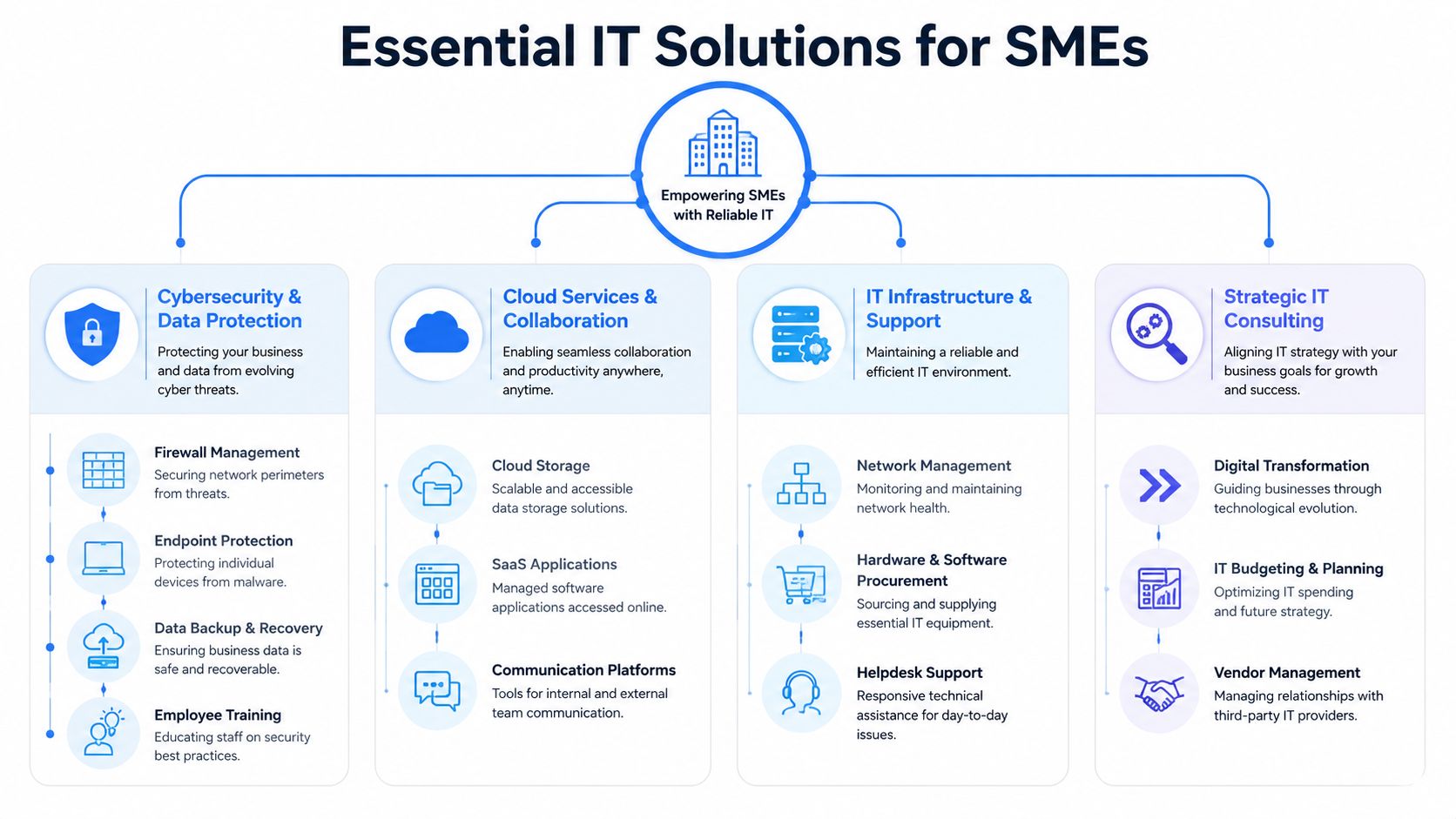
For most London and Essex SMEs, the priority list is fairly consistent. You need a dependable foundation, communication tools that match hybrid working, and protection that reduces the chance of a costly interruption. If one of those is weak, staff feel it straight away and customers often feel it next.
The foundation that keeps everything running
The basics do the heavy lifting. Cabling, switches, wireless coverage, routers, broadband, and device standards decide whether cloud systems feel quick and reliable or painfully slow.
I have seen plenty of offices where the internet provider gets blamed for problems caused by poor internal wiring, badly placed access points, or a network cabinet full of old kit nobody wants to touch. It is a bit like fitting a new boiler to a building with blocked pipes. The headline service might be fine, but the delivery inside the premises is still poor.
Cloud use among smaller UK firms has risen sharply in recent years, as noted by Ofcom's Connected Nations reporting. That shift changes the decision checklist for local firms. Before adding more cloud apps, check whether your office network, broadband resilience, and device setup can cope with ten people working at full tilt on a Tuesday morning, not just two people testing it on a Friday afternoon.
A sensible foundation usually includes:
- Structured data cabling: Properly labelled and tested cabling, usually Cat5e or Cat6, so faults can be traced without guesswork.
- Wireless design: Access points placed to cover real working areas such as meeting rooms, warehouses, and upstairs offices.
- Business-grade connectivity: Broadband or leased line options chosen for uptime, support response, and backup options, not just monthly price.
- Device standards: Laptops, desktops, and printers set up in a consistent way so support is quicker and replacements are simpler.
Communication tools that suit hybrid work
Phone systems catch businesses out because they often stay untouched for years. Then one day the cracks show. Calls cannot be redirected easily, remote staff use mobiles as a workaround, and managers have no clear view of missed calls or response times.
A modern VoIP setup fixes practical problems first. Staff can answer calls from the office, home, or mobile app without giving customers three different numbers. New starters can be added quickly. Call routing can reflect how the business works, whether that means sending sales calls to Chelmsford, support calls to London, or out-of-hours messages to the right person.
The trade-off is straightforward. VoIP works well when the network underneath it is stable and call flows are planned properly. If a provider skips that groundwork, the system can feel cheap even when the platform itself is decent. For SMEs, the better question is not "should we have VoIP?" but "what setup gives us clearer calls, fewer missed enquiries, and less admin?"
Protection that goes beyond antivirus
Security needs to be treated like locks, alarms, and insurance combined. No single tool covers the whole risk.
The Cyber Security Breaches Survey 2024 found that 43% of UK SMEs identified a cyber breach or attack in the last 12 months, with phishing remaining the most common type. That matches what many firms see in practice. The weak point is rarely a dramatic Hollywood-style hack. It is usually an ordinary email, a weak password, or an account with too much access.
Protection should cover several areas at once:
- Managed firewalls: To control traffic in and out of the business network.
- Email filtering: To reduce the number of suspicious links and attachments reaching staff inboxes.
- Backups and recovery: To make sure a ransomware incident, hardware failure, or deletion mistake does not stop the business for days.
- Access controls: To limit who can reach finance systems, customer records, and shared files.
- Premises security and CCTV: Useful where stock, equipment, or confidential paperwork is kept on site.
- Staff awareness training: Because people still make the final click.
For firms reviewing suppliers, one practical test helps. Ask how they would onboard your users, devices, backups, and security policies in the first 30 to 60 days, and ask what gets checked first for a London or Essex office with hybrid staff. If the answer is vague, the support will probably be vague too. For a plain-English benchmark, these best practices for securing business data are a useful starting point.
Measuring the ROI of Professional IT Solutions
Monday, 8:47am. The phones are live, quotes need to go out, and three people cannot get into email. Nobody calls that a major outage. It still costs money.
That is how poor IT hits a small business. Usually in short, expensive interruptions that get absorbed into the working day. A director resets passwords instead of speaking to clients. A sales admin retypes information because systems do not sync properly. A manager spends an hour chasing two suppliers who both blame each other. The losses are spread out, which is why they are often missed.
In London and Essex firms, I see the same pattern. Owners focus on the monthly support fee because it is visible. The bigger cost sits in wasted staff time, delayed customer response, avoidable risk, and management attention being pulled away from the job that earns revenue.
Where weak IT costs the business
Downtime is the obvious one, but small interruptions do plenty of damage on their own. If five staff each lose 20 minutes in a day, that is more than an hour and a half gone before lunch.
The second cost is process drag. People build workarounds around unreliable systems. Files end up in the wrong place. Staff use personal devices because the office kit is slow or unavailable. Customer updates get delayed because information sits in separate systems and no one trusts what is current.
Risk has a cost as well. A compromised mailbox, failed backup, or internet outage can stop invoicing, customer service, and internal communication in one hit. The invoice for the incident is only part of the problem. The bigger loss often comes from interruption, rework, and dented client confidence.
If a business says, “we manage,” it usually means staff have got used to friction. That is not efficiency. It is adaptation.
What good support changes
Professional IT support should improve three things. Time, predictability, and control.
Time improves because recurring faults are fixed at source rather than patched over. Predictability improves because support, maintenance, and hardware planning move into a budget you can forecast. Control improves because one party is responsible for the day-to-day estate, the supplier handoffs, and the standards your business is working to.
For small and mid-sized firms, that matters more than technical jargon. A stable setup means fewer interruptions, faster onboarding for new starters, and less senior time wasted coordinating fixes. That is where the return usually shows up first.
A simple way to measure it is to put numbers against the friction you already have:
- How many hours do staff lose each week to slow devices, login problems, email issues, or file access delays
- What does one hour of lost sales, service, or admin time cost the business
- How much director or manager time goes into chasing internet providers, software vendors, and ad hoc repairs
- What would one day of email, phone, or system downtime do to cash flow and customer response
- How long does it take to set up a new starter properly, and how much of that could be standardised
That checklist gives London and Essex businesses a more honest ROI view than comparing support fees alone. It turns IT from a vague overhead into a set of operational numbers.
A practical SME view of return
For a 15-person business, even modest gains add up quickly. If each employee gets back 30 minutes a week because devices, email, printing, and shared files work properly, that is 7.5 hours recovered across the team. Over a month, that is roughly two working days. Over a year, it is serious capacity.
Then add the costs you avoid. Emergency callouts. Rush hardware purchases. Time spent recovering from poor changes. Delays caused by a setup no one has documented properly. Good managed support reduces those surprises because the environment is monitored, standardised, and reviewed before problems turn into disruption.
That is why the best ROI conversation is not “what does IT support cost?” It is “what is poor IT already costing us, and what would a controlled rollout save over 12 months?” For SMEs in this part of the UK, that is usually the point where the numbers start to make sense.
Choosing Your IT Partner A Decision Checklist
Most providers sound competent in a sales conversation. The difference shows when you ask specific questions that tie support to outcomes, accountability, and fit.

A quality IT partner should help you understand the whole cost picture, not just quote a monthly fee. As this managed services analysis notes, many businesses struggle to quantify the move from reactive break-fix support to proactive managed services, and a strong provider should help build a clear TCO model that includes downtime reduction and productivity gains.
Questions that expose weak providers quickly
Ask these and listen carefully to how they answer.
How do you assess our current setup before recommending changes
If they jump straight to a package without asking about your users, premises, connectivity, security, and existing contracts, they're guessing.What support is remote and what requires an on-site visit
For firms in Essex and London, locality still matters. Some issues are handled quickly online. Others need someone physically present.How do you price support
Per-user, per-device, and flat-rate models all exist. None is automatically right or wrong. The key is whether the billing model matches how your business operates.What happens if we grow, move office, or add hybrid staff
A decent setup should scale without needing a total rebuild every time the business changes.How do you handle security in practical terms
You want specifics like firewall management, backup oversight, email protection, user controls, and response process. Not vague talk about “enterprise-grade solutions”.Can you explain the likely onboarding process in plain English
If they make migration sound mysterious, expect confusion later.
A simple comparison table
| What to check | Good answer sounds like | Warning sign |
|---|---|---|
| Ownership | One team coordinates support, suppliers, and changes | You're told to contact multiple vendors yourself |
| Response expectations | Clear service levels and realistic escalation paths | Vague promises such as “we're always available” |
| Commercial model | Pricing is explained against your user count and needs | Add-ons appear for every ordinary request |
| Documentation | They keep records of devices, access, and setup | Knowledge lives in one engineer's head |
| Strategy | They can discuss the next 12 to 24 months sensibly | They only talk about immediate fixes |
Ask a provider to explain your environment back to you in simple language. If they can't, they haven't understood it properly.
Contracts deserve proper attention too. Long terms aren't always bad, but lock-in without clear service expectations works in the provider's favour, not yours. Read the support scope, exclusions, and exit process before you sign anything.
From Decision to Deployment An Implementation Roadmap
A lot of business owners delay changing provider because they think the switch will cause chaos. It doesn't have to. A professional rollout should feel controlled, staged, and surprisingly uneventful from the client side.

Phase one and two
The first phase is discovery and planning. That means reviewing what you already have, what's working, what's risky, and what should change first. Good providers audit users, devices, email, connectivity, telephony, backups, security controls, and any third-party contracts.
The second phase is preparation, with the new environment readied in the background. User accounts are checked, hardware is ordered if needed, networks are tidied up, and migration tasks are scheduled for lower-impact times.
Your involvement is usually limited to practical decisions:
- Approvals: Signing off agreed scope, timings, and budget
- Access: Providing admin details or supplier contacts where needed
- Staff coordination: Letting the team know what's happening and when
- Priority setting: Flagging critical systems, key users, or blackout periods
A sensible provider won't swap everything in one hit unless there's a strong reason. They'll sequence the work so the business stays operational.
For a quick visual on what a staged transition can look like, this overview is helpful:
Phase three and four
Next comes onboarding and go-live. Staff receive the access, devices, phones, or instructions they need. Any training should be short, practical, and relevant to how they work. Nobody needs a lecture on technology theory. They need to know how to log in, place calls, access files, and avoid obvious security mistakes.
The final stage is what many providers call hypercare, even if they don't use that term with clients. It's the period just after launch when support is a bit closer to hand. Minor snags get sorted, permissions are adjusted, and anything that only becomes visible in live use is tidied up quickly.
The best implementations are boring. That's a compliment. No drama, no mystery, no business-wide downtime. Just a clear handover from an old setup that caused friction to a new one that works properly.
How Networking2000 Supports London and Essex Businesses
Networking2000 has been supporting businesses since 1998, and that longevity matters because small firms rarely need theory. They need someone who can walk into a real office, identify the weak spots fast, and sort them without making the process harder than it needs to be.

Local support that matches real business needs
For a growing business in Brentwood, that might mean putting the basics in order first. Reliable connectivity, cleaner wireless coverage, proper Cat5e or Cat6 cabling, and VoIP that lets staff answer calls whether they're in the office or at home.
For a Romford firm handling sensitive records, the focus may be different. Managed firewalls, email services, CCTV, access control, and practical support around secure day-to-day working usually matter more than fancy extras.
For home users and smaller offices in places like Hornchurch, Rayleigh, Wickford, and Chelmsford, speed of response often matters just as much as the service itself. Networking2000 offers support from 6am to 10pm seven days a week, which suits businesses that start early, trade late, or can't afford to wait until standard office hours.
The company's range is broad enough to cover the usual gaps that create friction in smaller organisations:
- IT support for business and home users
- Managed firewalls and email services
- VoIP telephony, lines and calls, and phone system maintenance
- Wireless networking, routers, and structured cabling
- CCTV, intruder alarms, and access control
- Branding, website design, and marketing support
That mix is useful because many SMEs don't need five separate suppliers. They need joined-up help, local knowledge, and advice that's clear enough to act on.
Frequently Asked Questions
Is my business too small for managed IT
Usually, no. Small firms often benefit the most because they don't have spare time or spare people to absorb technical issues. If you've got staff relying on email, internet access, shared files, phones, or cloud apps, then your business already depends on IT whether you think of it that way or not.
The core question isn't headcount. It's how disruptive failure would be.
What is the difference between break-fix and managed support
Break-fix means you call when something goes wrong. Managed support means someone works to prevent problems, monitor systems, keep things updated, and provide structured help before faults turn into bigger disruptions.
Break-fix can suit one-off jobs or very light usage. It tends to fall short when the business depends on stable systems every day.
How secure is moving to cloud services
Cloud services can be very secure when they're set up properly. The problem usually isn't “the cloud” as a concept. It's poor permissions, weak passwords, missing backups, unmanaged devices, and no clear rules about who can access what.
A good move to cloud services should include account controls, backup planning, staff guidance, and review of how data is shared.
Do I need both cyber security and physical security
Many businesses do. If you have premises, stock, equipment, or confidential paperwork, physical security matters alongside digital protection. CCTV, alarms, access control, and secure networking often belong in the same conversation because they support the same goal, which is reducing avoidable risk.
How long does a switch to a new IT provider take
It depends on what's being changed. Taking over support can happen quite quickly. Replacing telephony, reworking networks, or cleaning up years of inherited issues takes longer. A good provider should set expectations early and phase the work so the business keeps operating normally.
If your business in London or Essex needs clearer, more dependable technology support, Networking2000 offers practical help across IT support, networking, VoIP, connectivity, firewalls, CCTV, and more. The team gives straightforward advice, works around real business needs, and supports organisations with solutions that are built to last rather than patched together.
Powered by the Outrank app

