Could a local IT company near Wickford support more than the occasional computer problem? When IT issues interrupt staff, it’s easy to focus on finding someone nearby. But proximity alone isn’t enough. Your business needs support that fits the way you work and helps keep everyday operations moving.
If you’re unsure which services you need or how best to protect business data, you’re not alone. Technology often spans several areas, from staff support and security to phone systems and your website. This article explains how a practical local IT partner can help you understand your options and consider how they fit together.
Networking2000 provides businesses in Wickford and across Essex and London with managed IT support, managed firewalls and IT security, VoIP telephony, and website design and development. Read on to see how these services can support different business needs, what to consider when choosing IT support, and how to prepare for a focused conversation about your technology.
Key Takeaways
- Choose a local IT company near Wickford based on how well its support fits your business, not proximity alone.
- Use recurring staff issues and system upkeep to identify whether ongoing managed support could help.
- Distinguish ongoing IT support from project-based work, such as website development.
- List recurring problems, critical workflows and planned technology changes before discussing support.
- Consider support, security and communications in relation to your business priorities.
What a Local IT Company Near Wickford Can Do for Your Business
A slow computer, failed connection or sign-in problem can interrupt more than one person’s work. Staff may be unable to access files, serve customers or complete routine tasks while they try to resolve it. If the cause sits within a wider system, disruption can spread. Business IT support helps organisations manage these problems and keep the technology they rely on under clearer control.
A local IT company near Wickford can support your employees and the systems and infrastructure they use. That means looking beyond a single fault to understand how devices, networks and essential services fit together. Support can be shaped around your business’s working practices instead of assuming every organisation needs the same setup.
Managed IT support is ongoing care for business systems and users; one-off technical assistance deals with a specific issue or task. Managed support can include routine system upkeep as well as help when staff encounter technical problems. It gives your business a consistent way to look after IT rather than relying only on assistance when something goes wrong.
The right balance depends on how your organisation operates. A small team with a few essential systems may have different priorities from a larger business with multiple departments or staff working across locations. Consider which tools are critical to daily work, how often staff need help and what disruption means for customer service. Those details help shape support around operational needs.
What does business IT support usually cover?
Support can help employees with practical issues such as access problems, software faults and technology that isn’t working as expected. Ongoing management adds regular attention to the systems behind those requests. The aim is to identify recurring issues and the systems they affect, rather than treat every request as an isolated event.
Managed support is the ongoing service; other services address different needs. Managed firewalls and IT security focus on protecting systems and business data. VoIP telephony supports business calls, while website design and development covers your online presence. Keeping these areas distinct makes it easier to identify what needs ongoing support and what calls for a defined project.
Why local knowledge matters to Wickford businesses
Wickford businesses operate within Essex, England, but their technology needs depend on their staff, customers and workflows. A local relationship can help build a shared understanding of how the organisation works and which systems matter most. Networking2000 serves businesses in Wickford and across Essex and London.
Continuity matters. As a support partner becomes familiar with your setup and priorities, conversations can focus on the business impact of a problem, not just its technical symptoms. For example, if a connection issue repeatedly delays a customer-facing task, describing that impact helps put the technical problem in context. The result is a clearer view of the technology your team relies on and the support it needs.
Match Your Wickford Business’s IT Needs to the Right Support
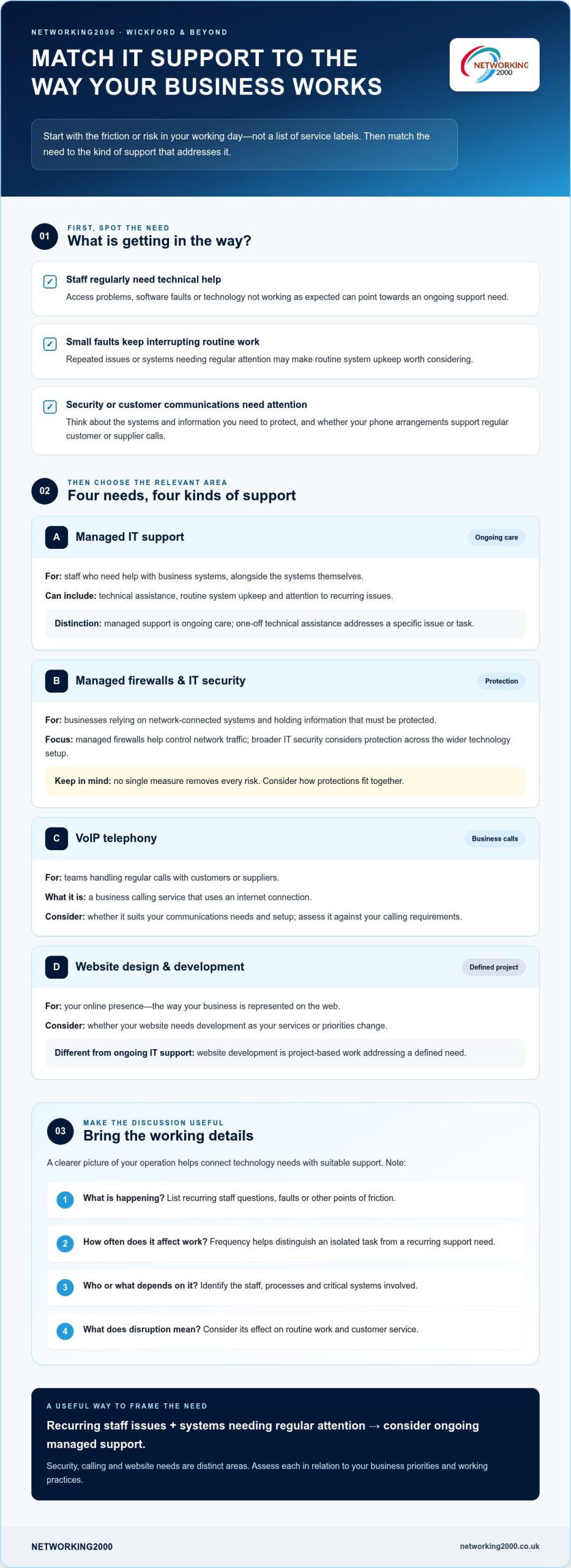
The most useful starting point isn’t a list of services. It’s identifying where technology creates friction or risk in your working day. Repeated staff questions, systems that need regular attention or customers struggling to reach your team can all point to different areas of IT support worth considering.
A local IT company near Wickford can help connect those operational needs with suitable support. Start by noting what is happening, how often it affects work and which staff or processes depend on the technology involved. This makes priorities clearer and helps keep the approach proportionate to your business.
When managed IT support is the priority
If staff regularly need help with business systems, or small technical faults keep disrupting routine tasks, managed IT support may be a useful foundation. It gives employees an ongoing route for technical assistance and makes system upkeep part of day-to-day support, rather than leaving it until a problem grows. Explore managed IT support services for Essex businesses to understand how support can be structured around operational needs.
Maintenance matters because systems that are left unattended can become harder to manage. Keeping business IT under ongoing review helps identify recurring issues and gives support conversations useful context. For example, if several employees encounter the same access problem, the focus can shift from repeated individual fixes to understanding the shared cause. This can support continuity without promising that disruption will always be prevented.
When security or communications need attention
Security deserves particular attention if your business relies on network-connected systems and holds information that must be protected. Managed firewalls help control network traffic, while broader IT security considers protection across the wider technology setup. No single measure removes every risk, so it’s useful to understand how protections fit together. The CISA Cyber Guidance for Small Businesses offers a planning resource for building cybersecurity into business operations.
If your team handles regular customer or supplier calls, consider whether your current phone arrangements support the way people work. VoIP telephony is a business calling service that uses an internet connection. Its suitability depends on your communications needs and setup, so assess it based on how it supports your calling requirements rather than assuming it will deliver a particular saving.
Your website has a different role: it represents your business online and may need development as your services or priorities change. Whether building a standard business site or partnering with specialist development teams like Larasoft for bespoke web applications, website design and development is generally project-based, unlike ongoing managed IT support. Treating these as distinct needs helps you plan routine technology care alongside specific improvements to your online presence.
For a practical next step, note your most common IT interruptions, the systems staff rely on, any network security concerns, and planned changes to your phones or website. Explore Networking2000’s business IT support as you consider which priorities need attention first.
Compare IT Support Approaches by Business Need, Not by Service Labels
Service names can sound similar, but they address different parts of your operation. Start with the business need: staff struggling with recurring technical issues, a network that needs stronger protection, customer calls that are difficult to manage, or a website that no longer reflects the business. The right mix depends on what your organisation relies on and where technology affects everyday work.
| Business need | Relevant service area | Practical purpose |
|---|---|---|
| Staff need help with business systems, or IT needs regular attention | Managed IT support | Provide ongoing assistance and management for business technology. |
| Network protection is a priority | Managed firewalls and IT security | Help manage network traffic and address security needs. |
| Your team relies on business calls | VoIP telephony | Support business communications over an internet-based phone system. |
| Your website needs a new build or improvement | Website design and development | Plan and deliver a defined project for your online presence. |
Ongoing support, security and project work are different needs
Managed IT support is ongoing: employees can get help with technical issues while systems receive continued attention. Managed firewalls and IT security focus on protecting networks and business information. They address specific security needs, but shouldn’t be treated as a substitute for all IT support or as a promise that incidents can’t happen. Website design and development is generally organised around a project, such as creating or improving a site. Ongoing website maintenance is a separate consideration from a development project.
This distinction helps with planning. A business dealing with recurring user issues may prioritise managed support; one preparing to update its website may need a defined development project. Security requirements can matter alongside either, but each type of work has a distinct purpose. Keeping those needs clear makes it easier to plan work in a sensible order and understand what each part of a support arrangement is intended to cover.
How connected services can support daily operations
Different workflows depend on different parts of your technology setup. Staff support helps employees use business systems. Network security focuses on protecting the environment those systems rely on. VoIP supports calls with customers and suppliers, while the website provides information about your business online. A change in one area may affect how another is used, so consider the connections without assuming one service automatically includes another.
For example, a business changing its working arrangements may need to consider staff access, network protection and how calls are handled. These questions don’t necessarily require the same service or need to be addressed at the same time. If you’re planning changes across several systems, set priorities before committing to individual projects. This helps connect the work to your business plans.
Service fit depends on your business operations and how much your day-to-day work relies on technology. A local IT company near Wickford can help you discuss your organisation’s priorities and consider a practical approach.
Prepare Your Wickford Business for a Practical IT Support Plan
A useful support plan starts with a clear picture of how your business works. You don’t need a technical audit or a complete equipment inventory before discussing your needs. A few notes about the systems staff use, the problems they encounter and the work that matters most will help make the conversation more focused.
Networking2000 tailors IT support around a business’s technical requirements. The more clearly you can describe what’s working, what’s getting in the way and what may change, the easier it is to discuss a suitable scope. Use the steps below to organise your priorities before speaking with a local IT company near Wickford.
Record the systems and issues affecting work
Start with a simple overview of the technology your staff depend on. Include the people or teams who use each system and what they need it for. The aim is to show how technology supports your operation, not to produce a detailed technical specification.
- List the essentials: note business computers, network equipment, key software and systems, phone arrangements and the company website.
- Record recurring issues: describe what happens, who it affects and how it interrupts work. For instance, note if staff repeatedly lose access to a shared system or a connection problem holds up a routine task.
- Identify critical workflows: highlight activities that rely on particular systems, such as processing orders, handling customer calls or accessing business information.
- Flag areas of concern: note questions about network protection, staff access, business communications or website updates.
Keep the notes practical. “The team can’t access the system used to complete daily orders” gives a clearer sense of impact than a technical label on its own. If you know when an issue occurs or whether it affects one person or several, include that too.
Set priorities for a tailored support conversation
Separate problems affecting current operations from improvements you’re considering for later. A network concern or recurring issue disrupting essential work may need an early discussion; a planned website refresh or future change to phone arrangements can sit on a longer-term list. This distinction helps prevent every task from seeming equally urgent.
Then consider what may change. Growth, new staff, different working patterns or a move to new business systems can all affect the technology your organisation relies on. You don’t need to predict every detail. Note the changes you can already anticipate and which systems or teams they may affect.
Use the discussion to clarify the support scope: which systems and users are in focus, what ongoing managed IT support should address, and whether security, VoIP or website work is also relevant. Clear priorities help shape a practical, tailored approach without assuming every business needs the same arrangement or outcome.
Have your notes ready and discuss your business IT support needs with Networking2000.
Work with Networking2000, a Local IT Company Serving Wickford
Choosing support is about finding a practical fit for the technology your business depends on. Networking2000 is a privately owned UK IT services provider, founded in 1998, serving businesses in Wickford, Essex and London. Its services include ongoing IT support and related technology solutions, giving businesses a place to discuss connected needs rather than treating every challenge as an isolated issue.
A practical service mix for Wickford businesses
Managed IT support provides ongoing help for staff and attention to business IT systems. Other services address specific requirements. The right starting point depends on what your team relies on and where technology needs attention.
- Managed IT support: ongoing assistance for employees and management of business IT, shaped around your technical requirements.
- Managed firewalls and IT security: protection-focused services to address network and wider security needs.
- VoIP telephony: business calling for organisations that want their communications technology considered alongside their IT setup.
- Website design and development: project-based work for a business website that needs to be created or improved.
These services have different purposes. Your business may need ongoing support for staff, a clearer approach to network security, or a defined website project. You may have several priorities to address over time. Networking2000 tailors support to a business’s technical requirements, so the discussion can focus on its systems, working practices and priorities rather than a one-size-fits-all package.
Business technology requirements are shaped by staff, customers and operational workflows. Phone systems, security and websites each play a different role in how a company works and communicates, so consider how each service relates to your business priorities.
Take the next step with Networking2000
A useful first conversation can begin with a simple outline of your business. Describe the systems your staff rely on, the technical issues that interrupt work and any planned changes to your technology. You don’t need to arrive with a complete technical specification. A clear account of what matters most gives the discussion a practical starting point.
From there, you can talk through which needs call for ongoing managed IT support and which may be better treated as focused security, communications or website work. This helps bring the scope into focus without assuming every service is needed or that one automatically includes another.
If you’re looking for a local IT company near Wickford, outline your business, current IT challenges and priorities to discuss your business IT needs with Networking2000. The aim is a tailored conversation about the technology your organisation relies on and the support that fits it.
Turn Your IT Priorities into a Clear Next Step
Reliable business technology starts with knowing what needs attention first. You don’t have to solve every issue or plan every upgrade at once. A clear priority, whether it’s reducing recurring disruption or preparing for a future change, gives you a practical place to begin.
Choosing a local IT company near Wickford is most useful when the relationship helps you make decisions that fit your business, not simply respond to a list of technical problems. Keep your notes on hand, be open about what’s affecting work, and consider how your needs may change. That gives the conversation a useful direction and helps make the next steps feel manageable.
To take the next step, talk to Networking2000 about your business IT needs. A straightforward discussion can help you identify a sensible starting point and shape support around your priorities. With a clearer plan, your team can focus on its work while your technology receives the attention it needs.
Frequently Asked Questions
What does a local IT company near Wickford do?
A local IT company helps businesses manage and support the technology their staff rely on, from user access and computers to networks and business systems. For example, if several employees report trouble with the same application, support can investigate the shared issue rather than treating each report as unrelated. The work can be shaped around the organisation’s size, systems and working practices, with other technology services considered where they meet a specific business need.
Can an IT company support both day-to-day IT and cybersecurity?
Yes. Managed IT support and cybersecurity address connected but distinct needs. Support helps staff use business systems and keeps IT under ongoing management, while managed firewalls and IT security focus on protecting networks and information. For instance, a business can consider both employee access to systems and the security controls around that access. The right scope depends on the organisation’s technology and priorities, and security measures shouldn’t be treated as a guarantee against every threat.
How do I know whether my Wickford business needs managed IT support?
Consider managed support if technical problems regularly take staff away from their work, or if responsibility for keeping business systems maintained and usable is unclear. A useful sign is a pattern: the same issue returns, several employees are affected, or small faults accumulate without a clear owner. If important workflows depend on systems that nobody has time or expertise to manage, an ongoing support arrangement may be worth exploring.
Does a local IT company provide VoIP for businesses?
Yes. Networking2000 provides VoIP telephony for businesses. It may suit organisations reviewing how they handle business calls, including teams whose working arrangements or communications needs have changed. Before planning a change, note how calls are currently managed, what staff need from the phone system and where the existing arrangement causes difficulty. VoIP is a business communications service; whether it suits your organisation depends on its requirements and setup.
Can one IT company help with managed support and a business website?
Yes. Networking2000 provides both managed IT support and website design and development. They address separate requirements: one supports business technology and staff, while the other involves work on the website itself. For example, if a change to your services means the website needs updating, explain the business aim and which pages or customer journeys are affected. Website development shouldn’t be assumed to form part of ongoing IT support.
What should I prepare before discussing IT support for my Wickford business?
Bring a short record of the issues you want to discuss, including any error messages, when they began and which tasks they prevent staff from completing. Note who can explain the affected systems and who will help set business priorities. You can describe a technical problem without sharing passwords or sensitive customer information. This gives the conversation useful detail while keeping the focus on the operational issue.
Does Networking2000 provide 24/7 emergency IT call-outs?
Networking2000 provides managed IT support tailored to business technical requirements. When planning support, distinguish ongoing management of business IT from the steps your organisation would take to maintain essential work during an unexpected disruption. Make sure the relevant people in your business understand those arrangements.

