What if a ransomware attack stopped your Wickford team from working, even though you already had antivirus, backups and a firewall? Ransomware protection for Wickford businesses isn’t a single product or promise. It’s a set of security layers that need to be maintained, monitored and ready to support recovery.
It’s understandable to question whether your current setup is enough, especially if there’s limited time or in-house expertise to manage security. Individual tools can help, but their value depends on how well they work together, who maintains them and whether recovery plans have been tested.
This guide explains practical controls that can reduce risk and help your business recover, without suggesting any approach can prevent every attack. You’ll learn what to review in backups, multi-factor authentication, software updates and staff awareness, and how managed IT support, firewall oversight, monitoring and threat mitigation can contribute to a layered approach. We’ll also compare protection options using business-focused criteria, so you can identify sensible next steps for your Wickford organisation.
Key Takeaways
- Assess ransomware protection for Wickford businesses as a set of complementary controls, not a single tool or guarantee.
- Review how software updates, access controls, email awareness and endpoint protection fit together.
- Compare standalone tools, in-house oversight and managed support by who maintains controls and responds to issues.
- Start your readiness review by listing critical data, accounts, devices and business dependencies.
- Use the findings to assign ongoing security ownership and plan how your business would recover.
Ransomware protection for Wickford businesses: understand the risk before choosing
Ransomware is malicious software that can block access to business systems or data, often by encrypting files. Staff may be unable to open shared documents, use essential applications or access digital records. For a Wickford firm that relies on email and connected systems to coordinate work, losing access, even temporarily, can delay routine tasks and put customer-facing work under pressure. For a straightforward overview, see What is ransomware?
The impact depends on which systems are affected and how your business operates. Staff might struggle to respond to enquiries, process orders or retrieve information for daily administration. Some ransomware incidents also involve data theft, but losing access alone doesn’t prove that information has been copied or exposed. Establishing what happened requires investigation.
No single security tool or service can guarantee protection from every attack. Start by considering how an incident might happen, what it could interrupt and how your business would respond. This helps you assess protection against operational needs, rather than relying on a product name or reassuring claim.
How ransomware can reach a business
Common routes include deceptive emails, stolen login details and systems exposed through weaknesses that haven’t been fixed. An email might look routine and refer to a real supplier, invoice or work request, but lead to a harmful attachment or sign-in page. Checking unexpected requests can help, but staff shouldn’t be expected to spot every convincing message without wider security controls.
Out-of-date software and poorly protected accounts can create further opportunities for attackers. Ransomware protection for Wickford businesses needs to account for people, accounts and systems together. Email awareness can help address one route in, while managed IT and firewall oversight can support the maintenance and monitoring of business technology.
What a ransomware incident could disrupt
If staff lose access to files or applications, work may slow or stop while systems are assessed and restored. Customer service can suffer if teams can’t retrieve records, check progress or respond through normal channels. Email, shared folders and digital records may each support several everyday processes, so identify which operations depend on them.
Prevention reduces the chance of disruption; recovery preparation helps your business respond if prevention isn’t enough. Identify important systems and dependencies, then consider how staff would continue essential work and restore access. From there, assess the protective layers and recovery arrangements your organisation already has in place.
Which ransomware protection layers should a Wickford business assess?
Effective ransomware protection for Wickford businesses relies on controls that support one another. Updates can close known software weaknesses, access controls can limit what a compromised account can reach, and endpoint protection can help identify harmful activity on computers and other devices. None of these measures guarantees that every attack will be stopped. Together, they can reduce exposure and help limit the impact if something gets through.
Prevention and detection controls to compare
Check that security settings and software updates are maintained across the systems staff use, including devices used away from the office. A properly configured and reviewed firewall can help control network traffic, but it isn’t a complete barrier. Managed firewall oversight helps keep those protections aligned with business needs.
Review how staff accounts are set up. Each person should have an individual account, permissions should match their role, and multi-factor authentication (MFA) should be used where supported. These measures can make it harder for a stolen password to provide broad access. Email awareness matters too. Regular reminders and clear reporting routes help staff handle suspicious messages, but training works best alongside technical controls, not as a replacement for them.
Endpoint protection can help detect or block malicious activity on individual devices. Check who reviews alerts and who is responsible for acting on them. The CISA Ransomware Guide offers additional prevention and response guidance. Use it as a reference alongside advice suited to your organisation’s systems and needs.
Backups and recovery readiness
Backups support recovery; they don’t prevent an attack. Their value depends on whether important data can be restored in a useful timeframe. Test restores periodically, check that backup copies cover the information and systems your business depends on, and set retention periods according to how far back you may need to recover.
Consider who can access and change backups. If everyday user accounts can alter or delete backup copies, an attacker using a compromised account may be able to affect them too. Review how backups are protected, who can access them and how restoration would work in practice. For help turning recovery arrangements into a structured plan, see our disaster recovery plan guide for Essex businesses.
Networking2000’s managed IT support, managed firewalls and IT security can help Wickford businesses maintain a layered approach, including monitoring and threat mitigation. Explore managed IT and firewall support as part of your review.
Managed ransomware protection compared: what should Wickford firms look for?
Choosing ransomware protection for Wickford businesses is also a decision about ownership. A security product can provide useful tools, but buying software alone doesn’t ensure it’s configured correctly, reviewed as systems change or acted on when it raises an alert. The practical difference between approaches is who takes responsibility for those ongoing tasks.
| Approach | Ownership and review | Escalation and recovery |
|---|---|---|
| Standalone tools | Your business configures and maintains each tool. Reviews may be periodic or prompted by a problem. | Your team needs to decide who handles alerts and how recovery is planned. |
| Internally managed controls | Named staff oversee settings, updates and security alerts alongside their other duties. | Internal processes set out who investigates issues and coordinates recovery. |
| Managed support | An external IT partner takes on agreed maintenance and oversight, alongside your organisation’s own responsibilities. | Agreed arrangements should explain how issues are raised and escalated, and how support fits your recovery plans. |
Layered protection can reduce risk, but it can’t eliminate it. Managed support isn’t a guarantee against an incident. Its value is having clear ownership for agreed controls, regular oversight and a defined route for dealing with issues.
Questions to use when assessing managed protection
Look for clarity on how firewall settings are maintained and relevant security alerts monitored. Understand what routine support covers, who receives alerts and how issues are escalated under the agreed service arrangements. Recommendations should reflect your systems, users and operational priorities, rather than applying the same settings to every business.
For example, a firm with staff working across shared systems may need to consider permissions and access arrangements alongside firewall oversight. A useful service discussion connects those controls and identifies who is responsible for maintaining each one.
When managed IT and firewall support fit together
Infrastructure maintenance and managed firewall oversight address different parts of the security picture. Maintaining business systems helps reduce avoidable weaknesses, while firewall management supports oversight of network traffic and settings. Neither replaces the other, and a firewall alone can’t detect or stop every ransomware incident. Read more about managed firewall protection for Essex businesses.
Networking2000 provides managed IT support and managed firewalls, with IT security that includes monitoring and threat mitigation. To explore how managed IT and firewall oversight could fit your business, visit Networking2000’s IT support website.
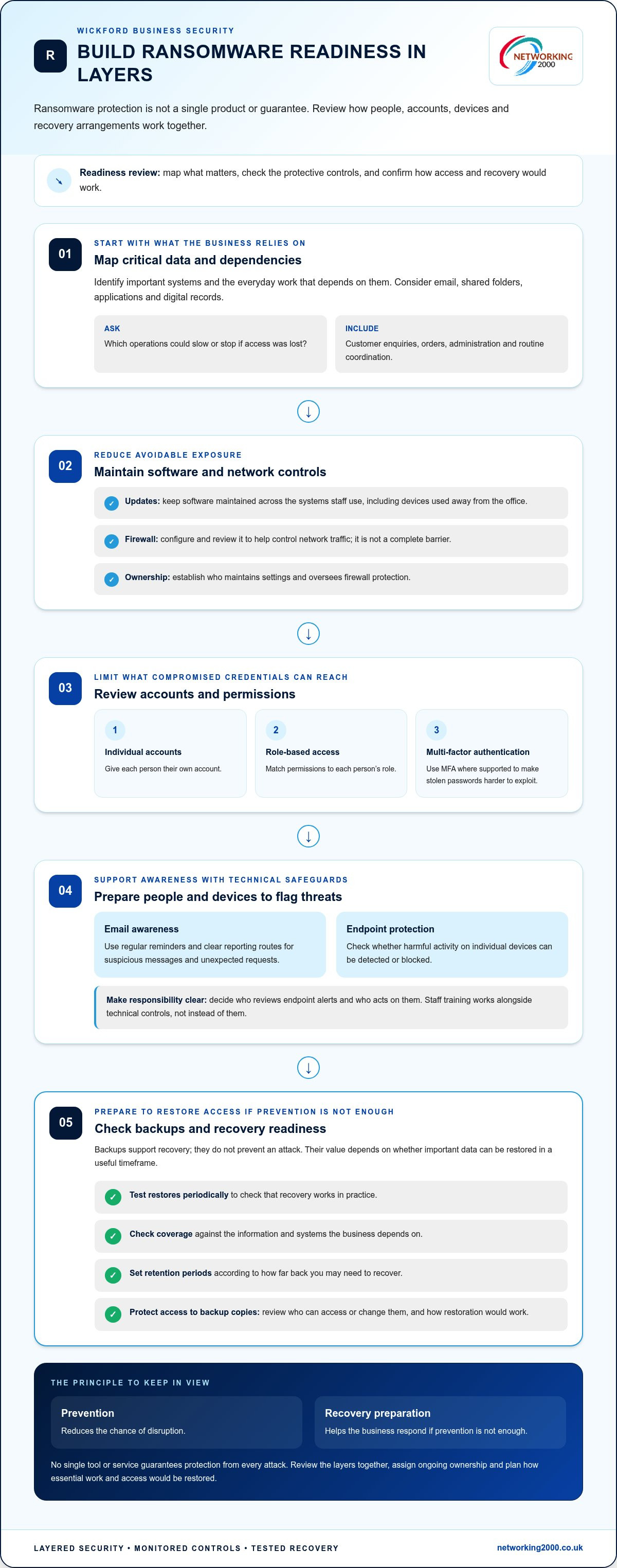
A practical ransomware readiness checklist for Wickford businesses
Use this five-step review to turn ransomware protection for Wickford businesses into practical actions. Record what’s in place, who owns it and what needs attention. The aim is to find gaps and improve readiness, not to treat a checklist as a guarantee against an attack.
- Map essential systems and dependencies. List critical data, user accounts, devices, applications and services. Note which business activities rely on each one, such as processing orders, accessing customer records or communicating with staff. Include third-party services your team depends on, so the picture reflects how work actually gets done.
- Assign ownership for security controls. Record who manages software updates, user permissions, firewall settings and security alerts. Check that accounts are individual, access is appropriate to each person’s role, and multi-factor authentication is enabled where supported. Clear ownership makes routine reviews less likely to be missed.
- Review backups and restoration. Check which important systems and data are covered, how backup copies are protected from everyday account access, and when a restore was last tested. Record what was restored and any issues found. A backup plan is more useful when the business knows how to recover information in practice.
- Set out how to respond. Write down who staff should contact if they suspect an incident, how concerns are escalated and who coordinates decisions. Keep the incident response process accessible, including if normal systems are unavailable. Make sure relevant people know where to find it.
- Record gaps and improvement actions. Note each issue, its business impact, who will address it and when it will be reviewed. Prioritise actions around essential systems and operational needs, then revisit the list as technology and responsibilities change.
UK guidance and local support considerations
Use the National Cyber Security Centre’s current guidance to inform your review. Cyber Essentials is a UK scheme that helps organisations address common cyber security risks, but certification should not be presented as a guarantee that a business is safe from ransomware. Guidance and obligations can change, and what applies may depend on the facts of an incident.
If an incident may involve personal data, consult the Information Commissioner’s Office’s current guidance to understand whether reporting or other obligations apply. Don’t assume every ransomware incident involves personal data being accessed or stolen. For ongoing maintenance of systems and controls, read about managed IT support for Essex businesses.
Networking2000 provides managed IT support, managed firewalls and IT security, including monitoring and threat mitigation for businesses in Wickford and the wider Essex area. Explore managed IT support to make ongoing maintenance part of your readiness plan.
Ransomware protection in Wickford: how Networking2000 can support your next steps
Turn your security review into a plan: identify gaps, decide who owns ongoing maintenance and work out how the business would recover if systems or data became unavailable. Ransomware protection for Wickford businesses should fit the organisation’s systems and working practices, rather than rely on a single tool or promise of complete prevention.
Networking2000 provides managed IT support, managed firewalls and IT security, including monitoring and threat mitigation. These services support a layered approach by helping maintain and oversee business technology. They can reduce risk, but no service can guarantee that every attack will be prevented.
What an initial protection discussion should cover
A useful discussion starts with your business: which systems and records matter most, who needs access, what controls are already in place and what disruption would affect day-to-day work. Managed IT and firewall support can then be considered alongside your current setup, with priorities based on your users, infrastructure and operational needs.
Establish what routine support includes, how security issues are raised and escalated, and how responsibilities are shared. Clear arrangements help everyone understand the support in place. They don’t remove the need for your business to maintain recovery plans and know who makes decisions during an incident.
Turn the assessment into a prioritised plan
Rank improvements by the importance of the affected systems and the exposure you’ve identified. For example, a gap affecting access to essential records may need attention before one involving a less critical administrative system. Assign an owner and review date to each action, then keep the plan current as staff, systems and business dependencies change.
Routine maintenance and security monitoring can help keep controls under review, rather than leaving them untouched after initial setup. Networking2000 has supported businesses in Essex and London since 1998, bringing established IT experience to practical security discussions for Wickford organisations.
If you’re ready to discuss your business’s systems, current protections and priorities, discuss ransomware protection for your Wickford business with Networking2000.
Make your next security steps practical
Strong ransomware protection for Wickford businesses is built through maintained layers, clear responsibility and a workable recovery plan. Review how updates, access controls, firewall oversight and backups fit together, then prioritise gaps according to the systems your business depends on. No single tool can remove every risk, but practical preparation can help you respond more effectively.
Networking2000 has supported businesses in Essex and London since 1998. Its managed IT support, managed firewalls and IT security, including monitoring and threat mitigation, can help keep controls under review as your needs change. This supports a layered approach, not a promise that every attack will be prevented.
Start with a clear discussion of your systems, current protections and priorities. Discuss practical ransomware protection for your Wickford business with Networking2000 and take the next step towards a more prepared organisation.
Frequently Asked Questions
What is the best ransomware protection for a small business?
A strong approach combines security controls with a tested plan to restore important systems and data. Keep software updated, use individual accounts with appropriate permissions, enable multi-factor authentication where supported, and maintain endpoint protection and a properly managed firewall. Train staff to recognise suspicious messages, but don’t rely on training alone. Test backups regularly and make sure someone is responsible for reviewing alerts and maintaining controls.
Can a firewall stop ransomware?
A firewall can help control network traffic and reduce exposure to some threats, but it can’t stop every ransomware attack. Malicious software may arrive through a deceptive email, a compromised account or another route that a firewall alone won’t address. Its settings also need to suit the organisation and be maintained. Treat firewall protection as one layer alongside software updates, access controls, endpoint protection, staff awareness and recovery planning.
Are backups enough to protect a business from ransomware?
No. Backups can help a business recover data, but they don’t prevent ransomware or address every part of an incident. Check that copies cover important information, are protected from access through everyday user accounts, and are retained for a suitable period. Test restoring files and systems, then record when the test took place and any issues. Recovery is more dependable when the business knows who will restore data and how essential work can continue.
What should a business do if it suspects a ransomware attack?
Follow your incident response process and contact the person responsible for IT security straight away. If safe to do so, disconnect affected devices from the network to limit possible spread, but avoid deleting files or attempting a full system rebuild before getting technical advice. Record what you’ve observed and when. If personal data may be involved, check the Information Commissioner’s Office’s current guidance to understand whether reporting obligations apply.
Does Cyber Essentials protect a business from ransomware?
Cyber Essentials helps organisations address common cyber security risks through a set of baseline controls. It can support a business’s defences, but it doesn’t guarantee that ransomware or another cyber incident won’t occur. Treat it as one part of a wider approach that includes maintained systems, appropriate access, monitoring and tested recovery arrangements. Check current scheme guidance when assessing how its requirements relate to your organisation’s technology and security priorities.
How can a Wickford business choose managed ransomware protection?
Compare what each approach covers and who is responsible for maintaining controls, reviewing alerts and escalating issues under agreed arrangements. Consider how recommendations reflect your systems, users and business priorities, and how support fits with your recovery plan. Networking2000 supports Wickford businesses with managed IT, managed firewalls and IT security, including monitoring and threat mitigation. These services support a layered approach, not a guarantee against every attack.

