After something has already gone wrong, businesses start looking at commercial security cameras. A theft near the till, a delivery dispute, stock missing from a back room, a complaint nobody can verify, or a manager who's discovered that the existing cameras recorded everything except the one useful angle.
That's usually the problem. The business has cameras, but it doesn't have a working commercial security cameras installation. It has a collection of devices fixed to walls, mixed with weak Wi-Fi, poor lighting, untidy retention settings, and nobody quite sure how to pull footage when it matters.
In London and Essex, that gets exposed quickly. Premises are tighter, streets are busier, shared units are common, and plenty of sites have grown in layers over time. The office network was added one year, VoIP later, a firewall refresh after that, and CCTV gets bolted on at the end. That approach nearly always creates rework.
A proper installation is wider than camera choice. It includes the site survey, objective-by-camera design, cabling routes, switch capacity, recording platform, remote access, privacy controls, signage, retention policy, commissioning tests, and a support plan for when a camera drops out or footage needs exporting in a hurry.
Practical rule: If the system can't reliably capture usable images, store them for the right reason, and let authorised staff retrieve them without guesswork, the installation isn't finished.
That's the gap between domestic kit thinking and commercial delivery. A small shop, office, warehouse, clinic, yard, or mixed-use site doesn't just need video. It needs deterrence at the front, evidence quality at key points, operational visibility in the right areas, and controls that stand up when staff, customers, police, or insurers ask questions.
Table of Contents
- Introduction to Commercial Security Camera Installation Done Properly
- Planning Your Site Survey and Choosing the Right Cameras
- Cabling Power and Network Foundations That Make or Break Reliability
- Mounting Configuration and Integration With Your Existing IT Systems
- Testing Commissioning and Staying Compliant With UK Data Protection
- Maintenance Costs ROI and Local Support for London and Essex Businesses
Introduction to Commercial Security Camera Installation Done Properly
A manager arrives on Monday morning after a weekend break-in. The cameras recorded something, but the entrance shot is too wide to identify a face, one camera dropped off the network overnight, and nobody on site is sure how to export footage for the police. That is a common failure on commercial jobs. The hardware is there, but the installation was never treated as part security system, part networked IT service, and part compliance process.
Commercial CCTV is now standard across UK business premises rather than a specialist add-on. By 2022, about 21 million CCTV surveillance cameras were operating in the UK, up from up to 6 million in 2013, with growth driven mainly by private-sector adoption rather than public-sector expansion, according to Pelco's summary of British Security Industry Association reporting. The same reporting noted that around 70% of cameras were used for crime prevention and 25% for business operational purposes, which matches what businesses expect from a live system.
In London and Essex, volume is not the issue. Design discipline is.
A proper commercial security cameras installation starts long before the first bracket goes on the wall. The camera view has to suit the task. The cabling has to suit the building. The switches have to carry PoE loads without causing random dropouts. The recording platform has to meet the retention period the business can justify. Remote access has to sit properly behind the firewall, especially on sites already running VoIP, cloud apps, guest Wi-Fi, and VPN access for staff.
That joined-up approach is what usually gets missed. CCTV is often bought like a hardware package, then forced onto an already busy network with little thought for bandwidth, VLANs, storage growth, user permissions, or GDPR. The problems rarely appear on day one. They show up later, when footage is needed quickly, when a camera fails after a switch change, or when a business cannot explain why it is keeping recordings longer than necessary.
What proper looks like on a live business site
On site, the difference is obvious. Good installations give clear images at the points that matter, record consistently, and let authorised staff retrieve footage without guesswork. Poor ones create blind spots, patchy evidence, and support calls every few months.
The usual warning signs are familiar:
- Entrances covered without identification quality: Movement is visible, but faces are not clear enough to use.
- Wide shots doing too much work: One camera is expected to cover an entire frontage, yard, or shop floor, so detail is lost where it matters.
- Retention set by guesswork: Recording quality, frame rate, and storage capacity do not line up with the period the business needs.
- Network impact ignored: Cameras are added onto the same estate as phones, desktops, access points, and printers without proper planning or segregation.
- Access and handover handled badly: Staff have no clear process for playback, export, password control, or deciding who should see what.
After commissioning dozens of systems, one pattern comes up again and again. The biggest faults are rarely the cameras themselves. They are usually power budgets, poor terminations, weak switching, bad remote access setup, or retention rules that were never agreed at the start.
The installation has to work technically and stand up operationally
Commercial CCTV has to do two jobs at once. It has to work every day as a technical system, and it has to stand up when an incident, insurer, HR issue, or subject access request puts it under pressure.
That is why a proper installation is wider than mounting devices and handing over an app login. It includes clean cabling routes, suitable PoE switching, recorder or VMS sizing, secure remote connectivity, defined user permissions, and a retention policy the business can defend. On many London and Essex sites, it also means fitting around old comms cupboards, limited riser space, shared tenancies, and networks that have grown in stages over several years.
Treat CCTV as infrastructure from day one and the system is easier to support, easier to search, and far less likely to fail when footage matters. Treat it as a late add-on and the weak points usually surface at the worst possible time.
Planning Your Site Survey and Choosing the Right Cameras
The site survey decides whether the job works. Everything after that is implementation.
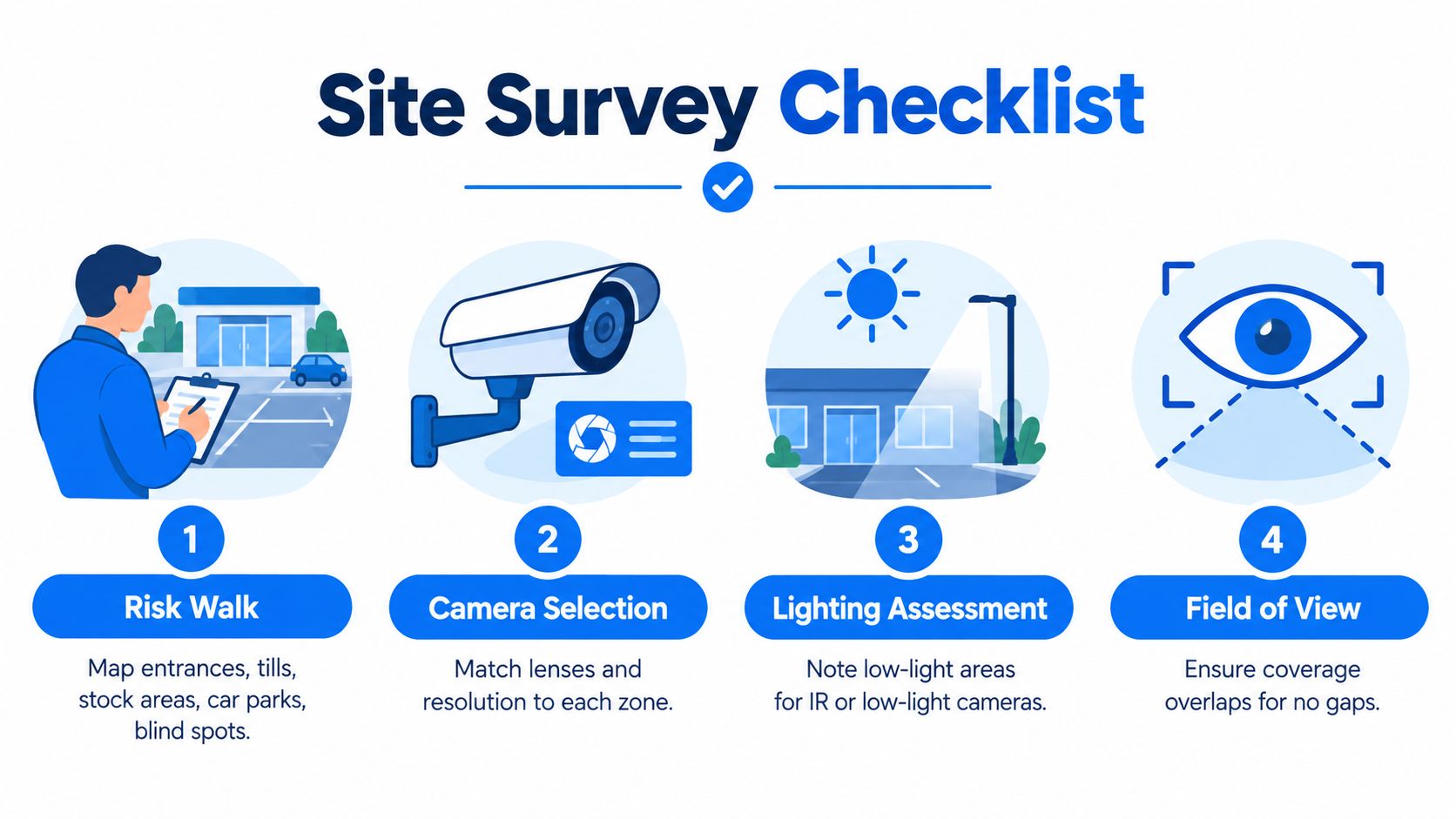
Too many projects begin with, “We need six cameras,” as if the number itself solves anything. It doesn't. The survey needs to establish what each camera is for, where the light fails, where people move, what the blind spots are, and how the business will use footage in practice.
Start with operational requirement, not product preference
UK guidance is clear that a commercial CCTV installation should be built around a specified purpose, clear procedures, and storing no more images than strictly required. The Government's owner-installer guidance also adds a concrete benchmark: at least one camera should capture identifiable images of everyone entering the premises, and that camera should record at a minimum of 6 frames per second. Lower-risk cameras may record at 2 frames per second, while higher-risk locations should also use 6 fps, as set out in the UK owner-installer CCTV guidance.
That has practical design consequences. Your main entrance camera can't be an afterthought. It needs the right height, angle, background, and field of view to capture faces properly rather than giving you the top of someone's head or a silhouette against daylight.
Don't buy resolution first. Decide what proof the business needs from each viewpoint, then choose the camera, lens, and settings to match.
What to check during the survey
A useful survey walks the site in the same way a problem would happen. Through the customer entrance. Around the side access. Past the bins and delivery point. Into the store room. Through staff-only doors. Out into any yard, car park, or alley.
A simple working checklist usually includes:
- Entry and exit points: Front doors, side doors, roller shutters, reception access, fire exit abuse points.
- Transactional areas: Tills, service counters, collection points, signing desks.
- Asset and stock zones: Store cupboards, cage areas, comms rooms, loading bays, archive rooms.
- Behaviour pinch points: Corridors, stairwells, shared entrances, lift lobbies, gate lines.
- Lighting conditions: Daylight glare, low-light corners, changing conditions at dusk, reflective surfaces.
Matching camera type to the job
Retail, office, and warehouse sites usually need different camera behaviour even when the hardware family is similar.
In a retail unit, the priority is often a clean entry image, till coverage, stock movement, and any route to the back door. In an office, reception, shared access control points, server cupboards, and after-hours circulation often matter more than constant wide-area viewing. In a warehouse, long aisles, loading areas, and fork-lift movement need coverage that's planned around distance and obstruction.
Common mistakes come up again and again:
- 4K everywhere: It sounds sensible, but it can be wasteful if the scene doesn't need it and the storage plan hasn't caught up.
- One camera doing two jobs badly: Trying to identify faces and monitor a large open area with one wide shot usually disappoints on both.
- Ignoring mounting background: A strong backlight at a door can ruin the image at the exact point you need identification.
- No overlap between views: One failed camera then creates a complete blind spot.
Use a camera-by-camera objective table
The cleanest way to keep a design honest is to write down each view in plain English. Camera location, what it must show, likely lighting condition, whether identification is required, and whether the business needs continuous or event-based recording there.
That table becomes useful later. It gives the installer something to commission against, gives management a record of why each camera exists, and makes future changes easier to justify instead of drifting into random expansion.
Cabling Power and Network Foundations That Make or Break Reliability
The most expensive camera on the job won't help if the infrastructure behind it is weak. Reliability is usually won or lost in the parts customers don't see. Cable route, switch choice, power budget, recording path, and what else the network is already carrying.
PoE first, wireless when there's a real reason
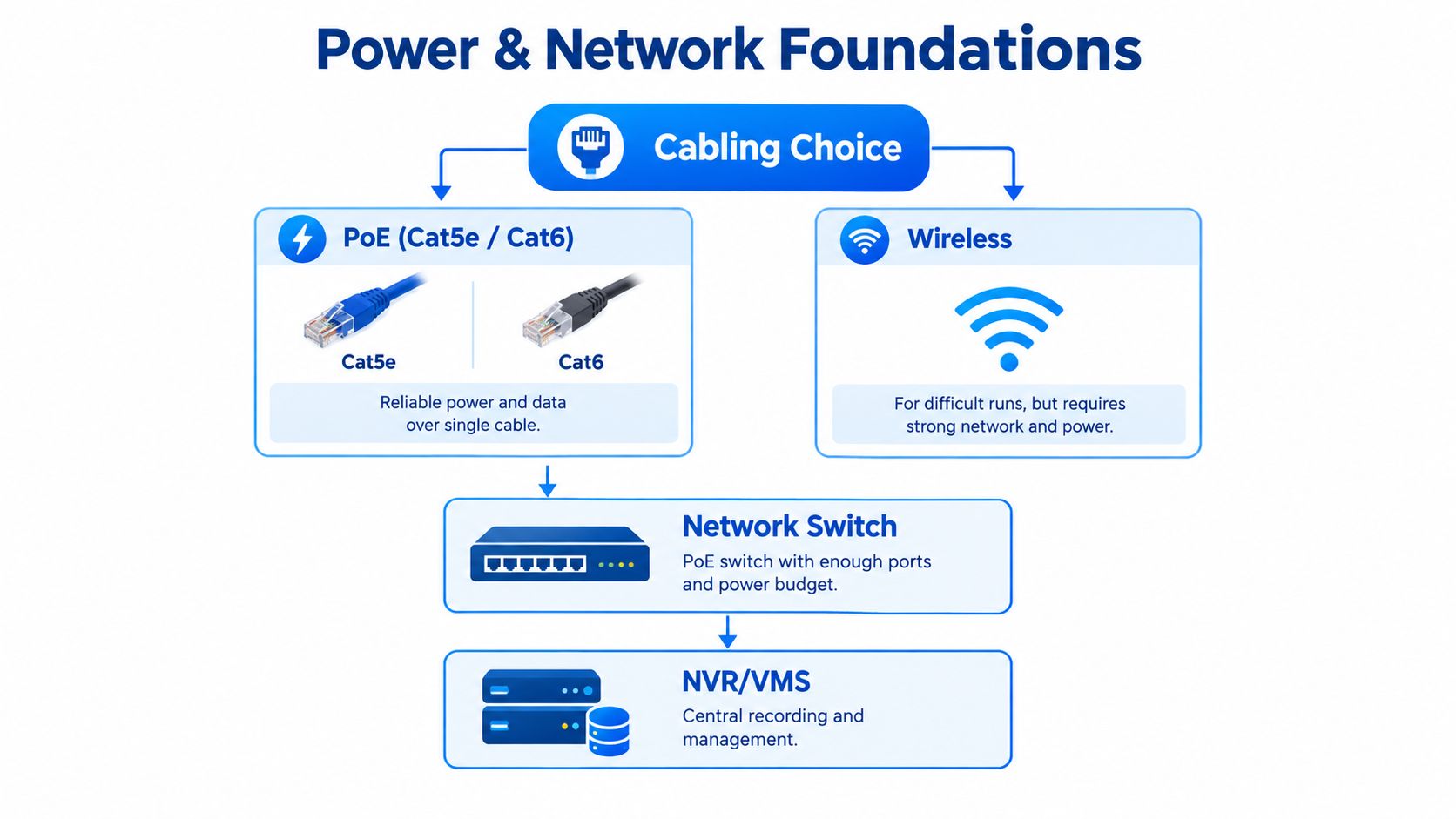
For most commercial sites, PoE over Cat5e or Cat6 is the right default. One cable carries power and data, fault-finding is cleaner, and the system is easier to document and maintain. Wireless has a place, especially where cable routes are difficult, heritage finishes can't be disturbed, or external links need bridging, but it needs strong survey work and it shouldn't be chosen to avoid proper cabling.
In practice, wireless camera problems are rarely “camera problems”. They're signal issues, interference, poor line of sight, overloaded access points, or power arrangements that were never meant for always-on surveillance.
Switches, storage, and segregation matter early
Commercial CCTV should be discussed with whoever manages the business network before the install date, not after the first dropout. Cameras generate steady traffic. Recording platforms need predictable throughput. Remote viewing adds another layer. If the same environment already carries cloud apps, guest Wi-Fi, VoIP, and business-critical traffic, a camera estate dropped in without planning can create odd faults.
A sound foundation normally includes:
- Enough switch ports and power budget: A PoE switch must support the full camera estate and any growth expected soon after handover.
- Clean cable containment: Routes need to be practical, protected, and labelled so future engineers can trace faults quickly.
- Network separation where appropriate: CCTV traffic often benefits from logical separation from user devices and voice services.
- Recording capacity aligned to real settings: Resolution, frame rate, scene activity, and retention rules all affect storage demand.
- Power resilience for priority areas: Reception, main entrances, and other critical viewpoints may justify UPS support.
A camera system that works only when the building is quiet isn't reliable. It has to keep recording during normal business traffic, opening hours, and busy periods.
Documentation saves time later
One of the best habits on commercial camera jobs is boring paperwork. Label both ends of every run. Record patching. Note switch ports. Save the password handover properly. Keep a simple camera map. Export the final settings record.
When that doesn't happen, future work becomes guesswork. An engineer gets called because “Camera 4 is down,” but nobody knows where Camera 4 patches, which cabinet serves it, whether it was moved during an office refit, or whether the fault is power, data, or storage.
That's also where an IT-aware installer helps. If the same provider understands cabling, managed firewalls, switching, wireless, and voice, there's less finger-pointing when systems interact badly.
Mounting Configuration and Integration With Your Existing IT Systems
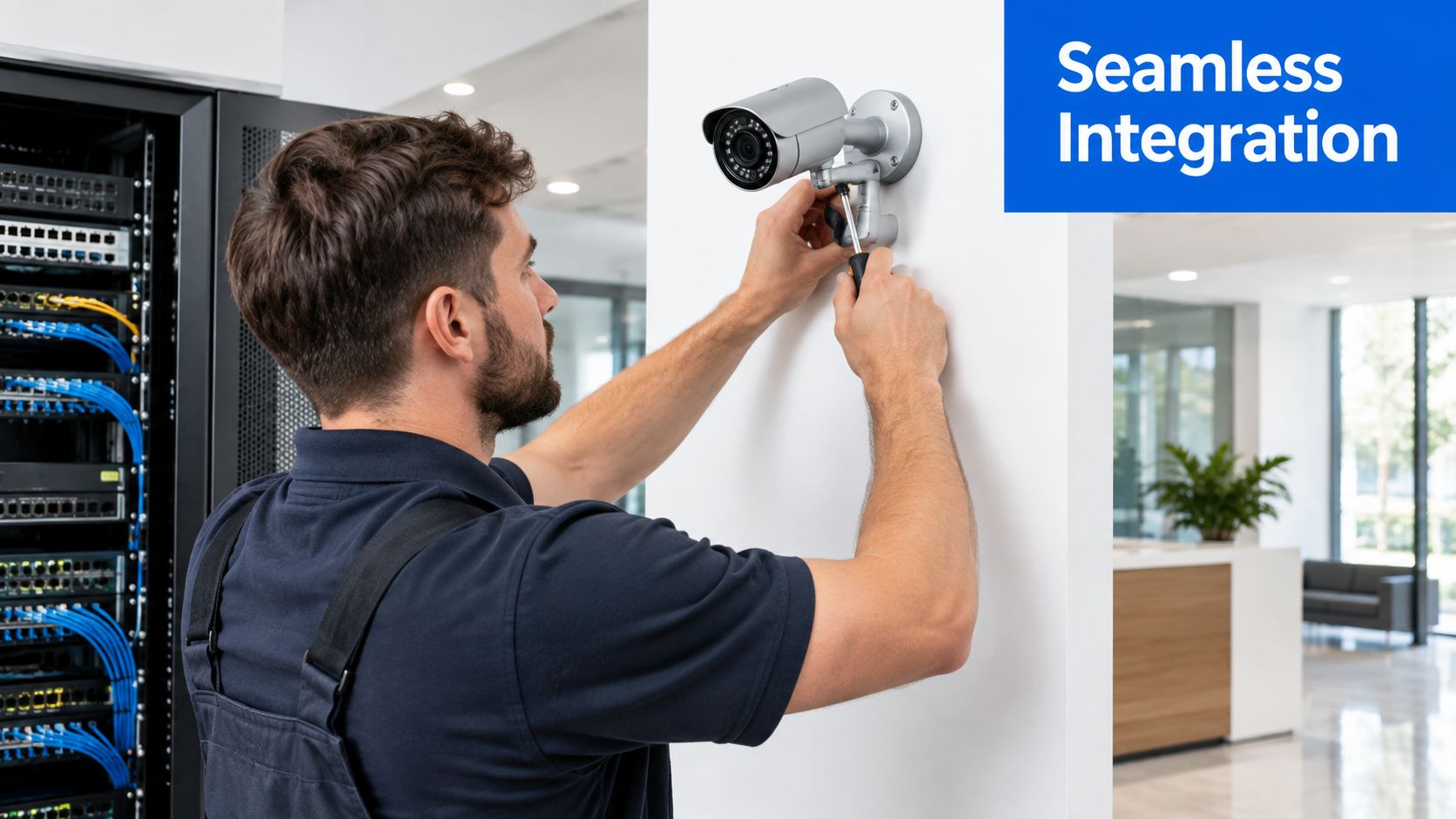
A camera can be perfectly specified on paper and still fail the business once it meets the building. The entrance that looked clear during survey now has a roller shutter housing in frame. The warehouse wall vibrates every time the loading bay door drops. The office camera aimed through glass turns into a mirror after dark because of internal lighting. Those are installation problems, not product problems, and they decide whether footage is usable.
Good mounting starts with the job the camera has to do
A bracket being level is fine. A stable image, the right viewing angle, and a position that still works during normal trading hours matter more.
On commercial sites, poor mounting usually shows up later rather than on day one. A dome fixed to a weak surface slowly shifts off target. A camera mounted too low gets nudged by staff, stock, or contractors. A tidy-looking position near glass gives poor night footage because the infrared reflects back into the lens. None of that is unusual. It is the sort of thing installers need to catch before handover.
Practical mounting checks usually include:
- Tamper risk: Can staff, visitors, or intruders reach it easily?
- Maintenance access: Can it be cleaned, adjusted, or replaced without unnecessary disruption?
- Surface and fixing strength: Will the wall, soffit, pole, or cladding hold position over time?
- Lighting conditions: Does the view stay usable in daylight, darkness, and mixed internal lighting?
- Operational obstructions: Will shutters, signage, parked vans, or seasonal stock displays block the shot?
Mounting height is always a trade-off. Higher positions protect the camera and widen the view, but they can make identification harder. Lower positions improve facial detail, but they increase tamper risk and often complicate access. The right answer depends on whether the camera is there to monitor an overview, identify a person, watch a till, or cover a vehicle gate.
Configuration decides whether the footage is actually useful
Once the cameras are physically in place, the system still needs proper setup. That means recording profiles, motion detection, user permissions, time sync, image settings, export format, and remote access all need to match the site's actual use.
Factory defaults cause a lot of avoidable problems. Storage gets eaten by scenes that never needed high settings. Motion recording misses people because the detection area was drawn badly. Remote viewing gets enabled in a way that is convenient on day one but difficult to support securely later.
A better approach is to configure by risk and by scene. A reception entrance may justify stronger image settings and longer attention to after-hours alerts. A quiet internal corridor may only need event-based recording. A stock room door might need tighter permissions so only managers can review footage. That is where CCTV stops being a box-install job and becomes part of the business system.
Here's a useful walkthrough of the kind of practical install work that sits behind a stable setup:
Integration with firewalls, VoIP, email, and internet services
Commercial security cameras installation often succeeds or fails on the network side. Cameras generate constant traffic. Recorders need reliable addressing. Remote access has to be set up through the firewall properly. Alert emails need to work with the customer's mail platform. If the same connection also carries hosted VoIP, careless CCTV setup can create call quality complaints that get blamed on the phones.
For that reason, CCTV should be treated as an IT and compliance project from the start, not just a hardware install. The switching, VLAN design, firewall rules, DNS, internet resilience, and user authentication all affect supportability. So does retention policy. If the business only has a lawful reason to keep footage for a defined period, the recorder settings need to reflect that from day one rather than leaving the customer with a storage bill and a GDPR problem later.
A provider such as Networking2000 handles CCTV alongside managed firewalls, VoIP, internet connectivity, and Cat5e or Cat6 cabling, which suits sites that want one view of the dependencies instead of separate trades arguing over where the fault sits.
Secure remote access should be routine. If access depends on shared passwords, undocumented port forwarding, or one person's mobile app setup, the system becomes a support issue waiting to happen.
Handover should match the people who will actually use it
The customer needs a working handover, not a rushed demo at the recorder. Staff should know who has login rights, how to find footage, how exports are produced, what the retention setting is meant to be, and what to report if a camera drops offline.
If those points are unclear, the system may still be recording, but the business will struggle when there is a real incident.
Testing Commissioning and Staying Compliant With UK Data Protection
A commercial CCTV job shouldn't end when the pictures appear on screen. Commissioning is the point where you prove the system meets the stated requirement and where compliance moves from theory into working practice.
Government guidance recommends that systems are tested using an approved audit and commissioning test to prove they meet the specified requirement, and it also points installers and operators toward BS EN 62676-4 for the selection, planning, installation, commissioning, maintenance, and testing of CCTV systems in the recommended standards for the surveillance camera industry.
What commissioning should actually verify
A useful sign-off process checks more than whether cameras power on. It should confirm image usability, field of view, camera objectives, storage behaviour, retrieval speed, permissions, and whether the final setup still matches the business reason for installing the system.
If the entrance camera was specified to capture identifiable images, someone should verify that in realistic conditions. If the business expects to export footage after an incident, someone should test the export process. If motion recording was chosen to control storage use, someone should confirm it triggers properly and doesn't miss routine activity in the target zone.
| Check Area | What to Verify | Why It Matters |
|---|---|---|
| Camera view | The final scene matches the agreed purpose and key areas are visible | A live install often differs from the drawing, so the view must be confirmed on site |
| Image quality | Faces, movement, and objects are usable for the intended task | Recorded video that lacks detail is rarely helpful after an incident |
| Recording behaviour | Continuous or motion-based rules work as expected | Poor rules either waste storage or miss events |
| Storage and playback | Footage records correctly and can be searched and played back without issue | Retrieval is part of the system's job, not an optional extra |
| Export process | Authorised users can export footage in a usable format | Delays usually happen when nobody has tested the handover workflow |
| Access control | Only the right staff can view, export, or manage recordings | Uncontrolled access creates both security and data protection risk |
| Documentation | Final settings, camera list, and user guidance are complete | Support becomes slower and riskier when sign-off records are missing |
Compliance is part of the installation, not paperwork after the fact
Businesses using CCTV on commercial premises may need to provide recorded images within 1 calendar month to people captured on camera, share images with authorities such as the police when asked, keep footage only as long as needed, and pay a data protection fee, according to GOV.UK guidance for CCTV at commercial premises.
Those points shape the install from day one. Retention can't just be “keep everything as long as possible”. User access can't be open-ended. Signage has to tell people they may be recorded. The ICO guidance referenced in government standards also makes it clear that businesses must control who can see recordings and use CCTV only for the purpose intended.
That matters especially when a system expands. A camera originally installed for front-door security shouldn't become a staff monitoring tool without review. That's where otherwise sensible businesses get caught out.
Annual review stops drift
A camera estate changes over time. Walls move. Desks move. Shelving goes up. A quiet corridor becomes a staff route. Someone asks for remote viewing on a new device. The original purpose gets blurred.
A short annual review helps keep the system lawful and useful. Confirm each camera still has a valid purpose. Check retention remains justified. Test retrieval. Review who has access. Make sure signage still reflects the system in place.
Maintenance Costs ROI and Local Support for London and Essex Businesses
The system that costs less on day one isn't always the system that costs less over its life. That's particularly true with CCTV because ongoing value depends on reliability, support response, and whether the original design left room for change.
A camera that records properly for years is usually sitting on decent cabling, stable switching, sensible storage, and regular maintenance. A cheaper install with poor documentation and no health checks often becomes expensive in engineer visits, false assumptions, and rushed fixes after an incident.
What drives cost beyond camera count
Price conversations often start and end with “How much per camera?” That's too narrow for commercial work.
Neutral guidance suggests standard commercial installation is often £300 to £750 per camera, yet site complexity, cabling, storage, remote access, monitoring, and integrations can push small systems from roughly £1,000 to £2,500 to multi-site projects above £30,000 to £70,000, as outlined in Keep Safe Secure's guide to commercial CCTV installation cost.
Those figures are useful because they reflect what practitioners see on site. The expensive parts often aren't the camera bodies. They're the awkward cable routes, external works, cabinet changes, recording requirements, network upgrades, remote access setup, or the fact the business needs a multi-site platform rather than a basic recorder.
What maintenance should include
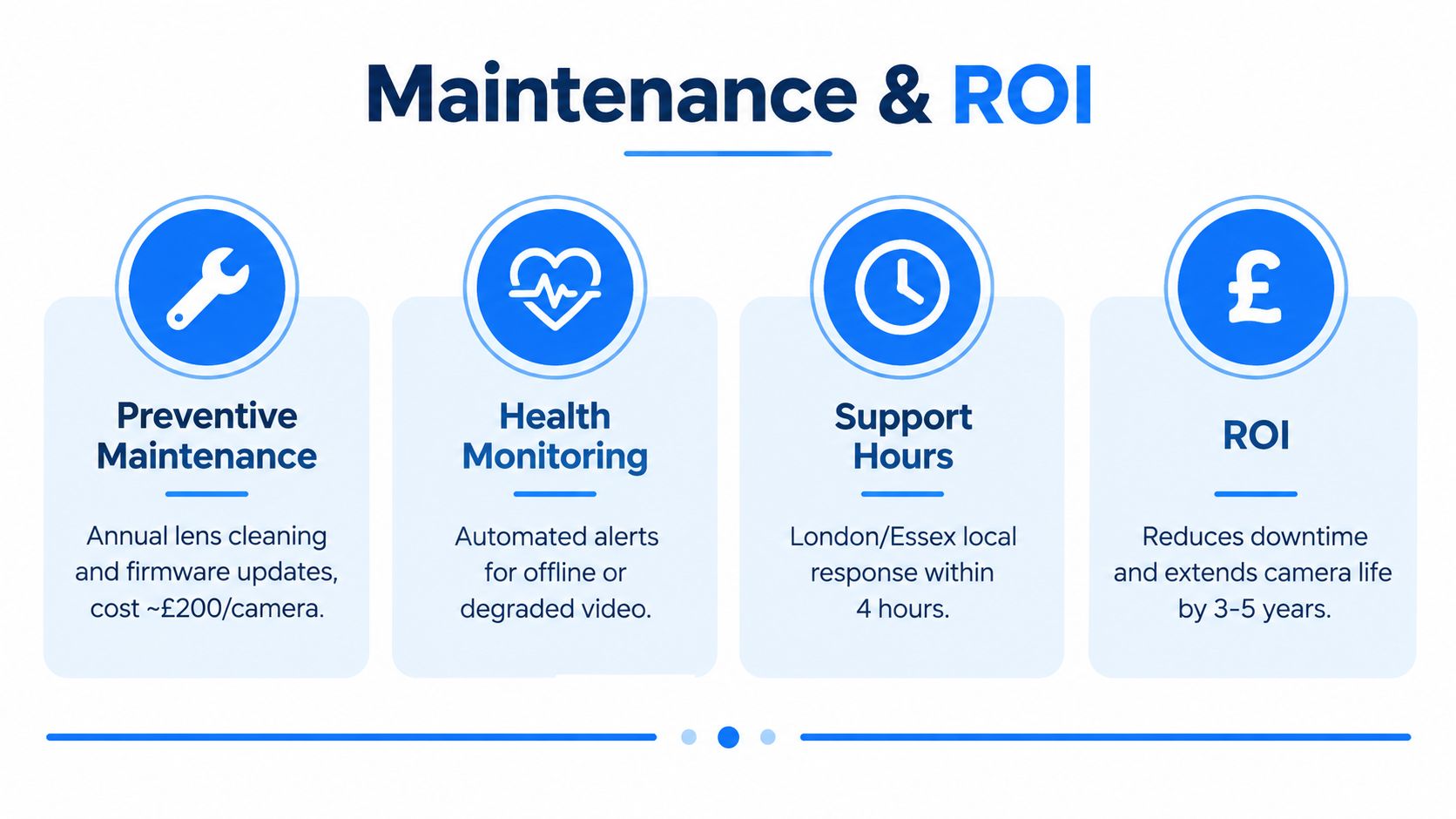
Good maintenance is not just waiting for failure. It usually covers a mix of technical upkeep and practical inspection.
- Lens and housing checks: Dirt, spider webs, condensation, or impact damage can ruin a view.
- Firmware and platform updates: Security and stability updates need managing, not ignoring.
- Recording verification: Someone should confirm footage is still writing and retrievable.
- Health monitoring: Offline cameras, disk warnings, or degraded streams should be spotted before the customer discovers them during an incident.
- User and access review: Staff changes often leave old accounts or unclear permissions behind.
Local support matters more on multi-site estates
London and Essex businesses often have awkward estates. A head office in one borough, a warehouse outside town, a retail branch elsewhere, maybe a shared serviced-office presence as well. That changes what “support” really means. It's not just about installation quality. It's about whether someone can diagnose remotely, attend locally when needed, and keep records straight across more than one site.
For businesses in Romford, Hornchurch, Rayleigh, Brentwood, and surrounding areas, local response and familiarity with mixed IT environments can make support far smoother. CCTV faults are easier to fix when the same team understands the switching, the internet line, the firewall, and the physical layout history.
The best return on CCTV doesn't come from owning cameras. It comes from having footage you can trust when something happens.
A sensible buying decision usually comes down to four questions. Is the design tied to a clear business purpose? Is the infrastructure strong enough to keep it reliable? Will the compliance side stand up under scrutiny? And will somebody maintain it properly once the install team has left?
If you need commercial security cameras installation planned as part of your wider network, connectivity, and compliance setup, Networking2000 can survey, design, install, and support systems for London and Essex businesses. That includes cabling, switching, remote access, and practical handover so the system is usable from day one. Visit Networking2000 to arrange a survey or discuss a quote for your site.

