A renewal email lands on a Friday afternoon. Your London office has more staff than it did when the software was first purchased, several people have changed roles, and one former employee still appears in the vendor portal. Nobody can say exactly which licences the business owns, who is using them, or whether the contract permits the current installation pattern. The supplier wants an answer before renewal, while your team is busy serving customers.
That situation is common for small and medium-sized businesses in London and Essex. Software license management isn't just a procurement task or a legal exercise completed after an audit notice arrives. It's an operational control that helps you match software access with real business needs, maintain useful records, remove avoidable waste, and keep essential tools available.
This guide explains the subject from the ground up. It's written for owners, office managers, finance staff, and IT contacts who need practical answers rather than contract jargon. Networking2000 supports businesses across London and Essex with clear, jargon-free IT guidance and extended support hours, so licensing questions can be handled alongside security, connectivity, Microsoft 365, and everyday technical support.
You'll start with the basic meaning of a software licence, then follow the licence lifecycle, consider the risks of poor control, choose an appropriate tool category, and finish with an audit and cost-saving checklist.
Table of Contents
- Introduction Why Software License Management Matters Now
- What Software License Management Really Means
- Business Risks and Benefits You Cannot Ignore
- Understanding the Software Licence Lifecycle and Compliance
- Practical Policies and Processes for SMBs
- Tool Categories and How to Choose the Right Fit
- Cost Saving Audit Preparation and Next Steps with Networking2000
Introduction Why Software License Management Matters Now
The renewal problem usually begins with a simple question: “How many licences do we need?” The answer isn't always the number of employees, devices, or software installations. It depends on the agreement, the licence model, assigned users, permitted locations, deployment method, and actual usage.
A ten-person Essex business might have a mixture of Microsoft 365 subscriptions, accounting software, design tools, remote-support utilities, security products, and cloud applications bought directly by individual departments. Each purchase may have seemed reasonable at the time. Without one reliable register, however, the business can pay twice for similar tools, renew unused seats, or discover that an installation doesn't match its terms.
The UK public sector faced this control problem at a much larger scale. The National Audit Office's 2003 report on purchasing and managing software licences found that UK departments and agencies spent around £610 million on software in 2001–02, including about £100 million on more than one million software licences. Licence spending represented roughly 5% of £2.1 billion in public-sector IT expenditure, and some departments held more than 20,000 licences. The lesson for an SMB isn't that it should operate like a government department. It's that software access becomes difficult to control when records, ownership, and usage are scattered.
The operational questions behind every licence
Good management answers practical questions:
- What do we have? Record the licence, quantity, version, agreement, purchase evidence, and renewal date.
- Who owns the decision? Assign a person who can approve purchases and coordinate with finance, suppliers, and IT.
- Who uses it? Link access to named people, roles, devices, or teams where the contract requires it.
- Does usage match the terms? Compare entitlements with installations, accounts, devices, and consumption.
- What happens when circumstances change? Reclaim access after departures, adjust subscriptions after role changes, and retire software safely.
Treat the register as a working business record, not a document created once and forgotten. A current record supports budgeting, onboarding, offboarding, renewals, security reviews, and audit responses.
The rest of this article turns that principle into a manageable process. You don't need a large software asset management department to begin. You need visibility, clear ownership, regular checks, and a willingness to make licensing part of normal IT operations.
What Software License Management Really Means
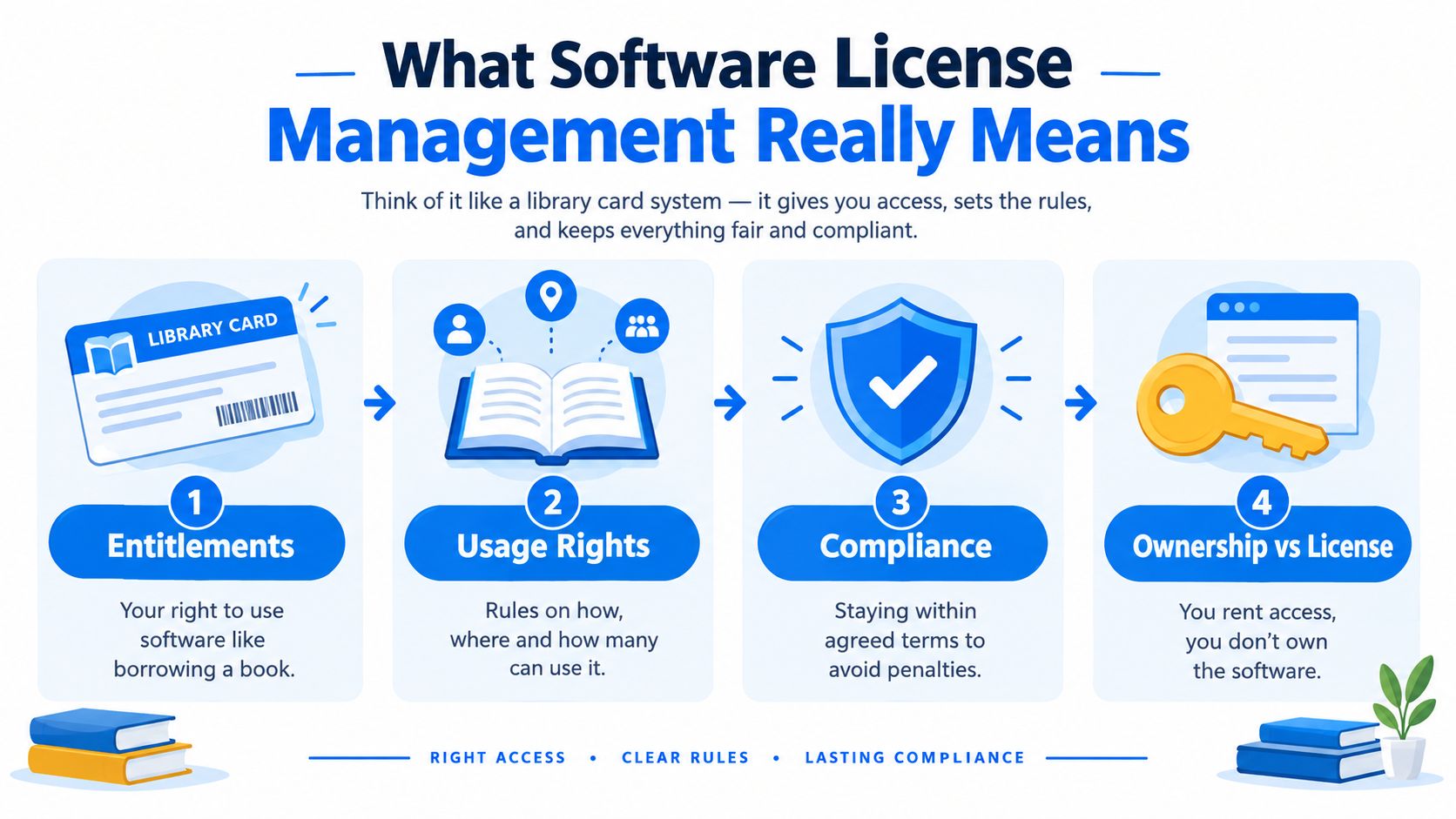
Think of a software licence like a library card. The card doesn't mean you own every book in the library. It gives you defined permission to borrow particular material, subject to rules about who may borrow it, how many items they may hold, and what they must do when the borrowing period ends.
Software license management applies the same logic to digital access. A business records the permissions it has bought, the rules attached to those permissions, and the people or systems using them. It then compares the records with reality.
Four ideas make the subject easier
Entitlement means the right your organisation has purchased. It could be access for a named user, permission to install software on an approved device, or a subscription to a defined service level. Keep the order confirmation, agreement, invoice, and renewal information together so someone can prove what the business bought.
Usage rights describe the boundaries. A licence may limit the number of users, devices, locations, installations, or features. It may also distinguish between internal use, contractor access, testing, development, and production work. The important point is that “we paid for it” doesn't answer every permitted-use question.
Compliance means the organisation's actual use stays within those agreed boundaries. Compliance isn't achieved by possessing an invoice alone. You need evidence that the current deployment and access arrangements correspond with the entitlement.
Ownership is separate from permission to use. Buying access to a cloud application normally doesn't transfer ownership of the provider's software or intellectual property to your business. UK government guidance from HM Revenue and Customs says organisations should include licensing information with software, understand who owns the intellectual property, and comply with open-source licences in its software licensing standard.
Common models in plain English
A named-user licence is assigned to a particular person. A device-based licence is tied to a computer or other approved device. A concurrent or floating licence allows access for a limited number of users at the same time, even if more people are authorised to use the system. A subscription provides access for a recurring term, while a perpetual licence may grant continuing use of a particular version, often with separate maintenance or support arrangements.
Cloud services can combine these models. A supplier may charge by user, feature, storage, transaction, or consumption. Read the commercial terms before assuming that adding an account is harmless.
Your licence register should preserve the metadata that makes these distinctions visible. Include the supplier, product, edition, licence model, quantity, assigned owner, users or devices, contract dates, renewal terms, restrictions, purchase evidence, and notes about intellectual property or open-source obligations. That information becomes the foundation for every later decision.
Business Risks and Benefits You Cannot Ignore
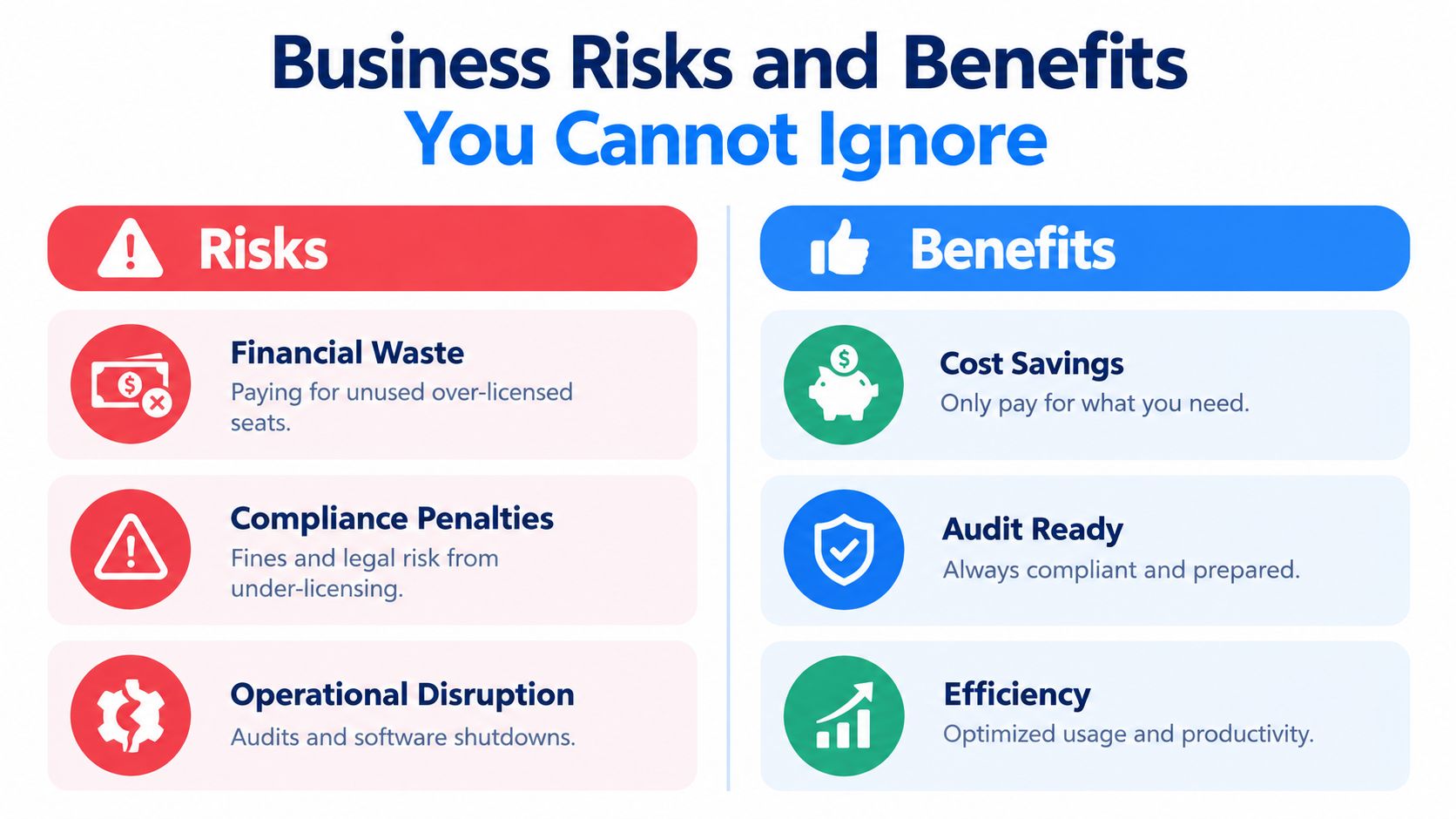
Poor licence control creates problems in several directions at once. You can spend money on access nobody uses, lack access when a team needs it, or discover a compliance gap during a renewal or audit. Each issue requires different evidence, so a simple list of purchased products isn't enough.
Under-licensing creates the clearest exposure. If staff install software without approval, reuse a licence outside its permitted terms, or keep access after a role change, the business may need to correct the position quickly. That correction can involve extra purchases, supplier negotiations, technical remediation, and management time at the least convenient moment.
Over-licensing looks less dramatic but steadily weakens the budget. An unused seat still appears in renewal discussions unless someone identifies it, and a premium tier can remain assigned to a user who only needs basic functions. Duplicate applications can also leave teams with fragmented processes and multiple contract owners.
The cost is operational as well as financial
A 2025 survey of 500 ITAM and SAM professionals found that 27% spent more than $500,000 a year fixing software licensing issues, while 37% identified compliance as their top issue, as reported by Enterprise Times. Those figures come from a professional survey rather than an SMB cost model, so they shouldn't be copied directly into a small-business forecast. They do show why remediation deserves attention as an operational expense, not just a legal concern.
Security adds another layer. Unauthorised or unmanaged software may miss normal approval, patching, access-control, and offboarding processes. If your team can't identify where an application is installed or who controls its administrator account, it becomes harder to respond when the supplier issues an update or a user leaves.
Legacy terms can also hold back sensible technology decisions. A 2026 survey of 512 UK IT decision-makers found that 67% said restrictive legacy software licences often made productivity-driving decisions harder, rising to 68% among senior decision-makers, according to the Communications and Connectivity Industry Association. For an SMB, that may appear as hesitation over cloud migration, reluctance to replace an old platform, or unexpected costs when a vendor changes the commercial model.
Effective control reverses those pressures:
- Better budgeting: Renewal forecasts use recorded requirements instead of guesswork.
- Faster decisions: Managers can see whether an existing entitlement can support a new starter or project.
- Stronger negotiations: Usage evidence gives procurement a defensible basis for changing quantities or tiers.
- Reduced disruption: IT knows which access is business-critical and which software can be retired.
- Clearer accountability: Finance, IT, and department managers know who must review each agreement.
The benefit isn't perfect paperwork for its own sake. It's the ability to make ordinary business decisions with reliable information.
Understanding the Software Licence Lifecycle and Compliance
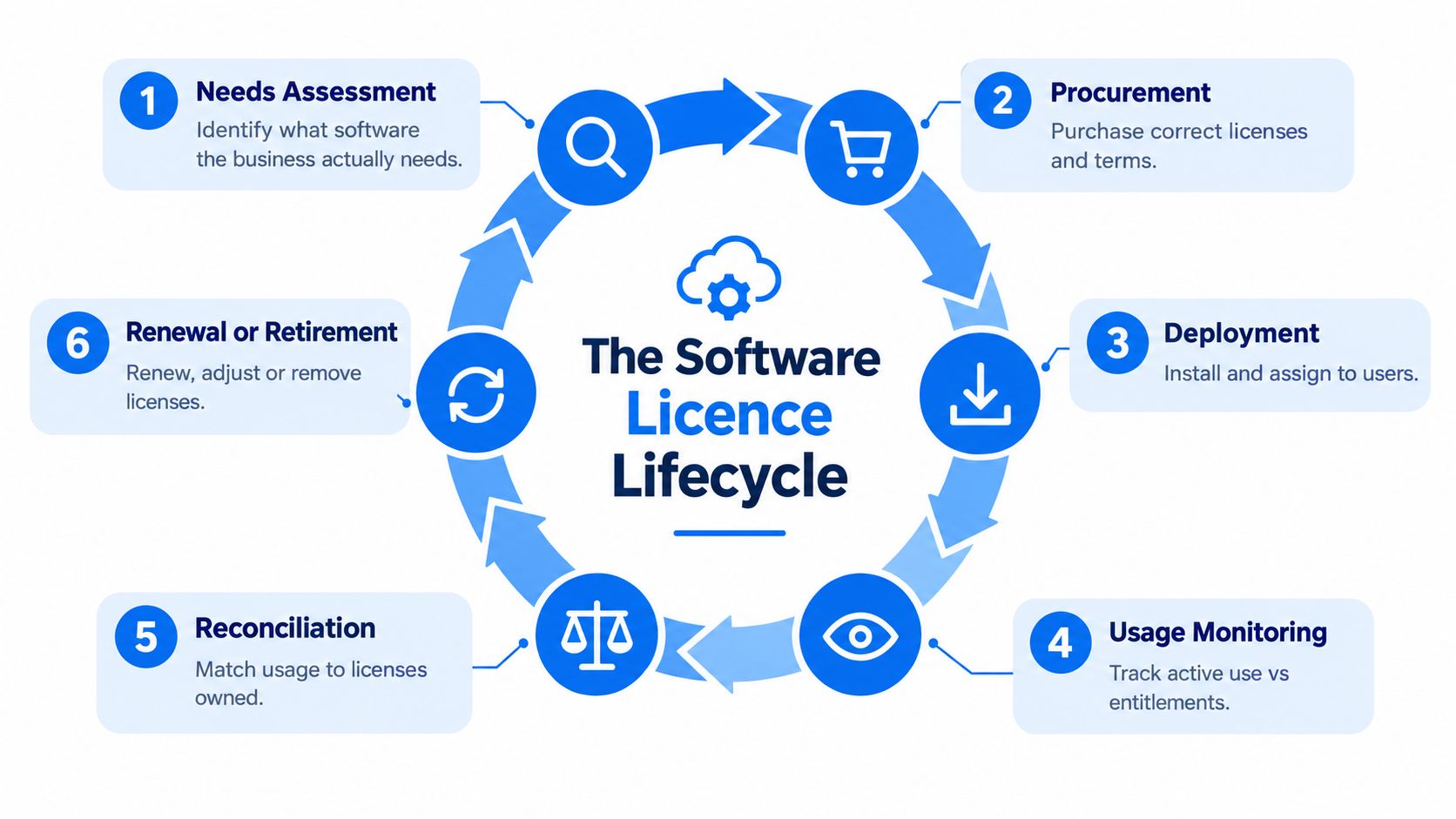
A new software request can look small: one employee needs access, a team wants a new feature, or an old system requires renewal. The operational question is larger. Can the business show why it bought the licence, who may use it, what the agreement permits, and what happened when access ended? A lifecycle answers those questions from purchase through retirement.
Define the need before buying
A department should describe the task, proposed users, required features, data involved, expected term, and any existing tool that could do the job. That short check limits “just in case” purchases and gives finance a clear reason for the spend. It also helps an Essex or London business avoid building another dependency around a product it may struggle to replace later.
Procurement then confirms the licence model and commercial terms. Record the quote, order, agreement, invoice, user count, device restrictions, renewal notice period, and support conditions in the central register. If the supplier uses a portal, record its administrator and account recovery process. A licence controlled by one employee can become difficult to manage when that person leaves.
Deployment should match the approved request. Assign users or devices, record installation details where relevant, and follow consistent onboarding and offboarding steps. A company may hold the right number of licences yet still lose control if former users retain access or staff install unapproved copies.
Monitor and reconcile
Monitoring compares actual access with contractual entitlement. For named users, review assignments and available activity records. For shared access, examine licence server or service reports. For device-based software, compare deployment records with the permitted device count.
Reconciliation brings the paperwork and the working environment together. The National Audit Office's 2003 recommendations on licence records and reconciliation, cited earlier, stress accurate records, comparison with software in use, and regular independent checks. The guidance also recommends a detailed inventory at least twice a year, since reconciliation errors can cause accidental under-licensing and contractual non-compliance.
Practical rule: Keep evidence of each check, not only its conclusion. Record the date, reviewer, data sources, exceptions, action taken, and responsible person.
Before renewal, choose the outcome supported by the evidence:
- Renew when the software remains necessary and use fits the agreement.
- Adjust when users, tiers, features, or terms no longer match demand.
- Reassign an available entitlement to someone who needs it.
- Retire the product when it is no longer required.
Retirement is a controlled change, not an uninstall. Export business data where appropriate, remove integrations, cancel automatic renewal, uninstall software, close supplier accounts, and retain purchase and termination evidence. The lifecycle ends when the business can explain what happened to the entitlement and can prove that access was removed.
Practical Policies and Processes for SMBs
A small business can lose control of its software without buying much software at all. A new starter creates an account, a manager approves a subscription during a busy week, and an old licence remains active after someone leaves. The fix is a process that still works during staff changes, urgent requests, and routine interruptions.
Start with one central licence register. For a modest estate, a well-structured spreadsheet may be sufficient if a named person maintains it. Store it in a controlled business location, limit editing, and link each entry to the relevant contract and invoice. Personal inboxes, finance folders, and vendor portals should not become separate versions of the truth.
Give each task a named owner
One person can maintain the register without making every licensing decision. Department managers confirm business need, finance checks budget and supplier payment, and an IT contact verifies deployment, access, and removal. This division prevents a renewal decision from being made without knowing whether the software is still being used.
Use a short approval route for new software:
- Request: The user describes the task and checks whether an existing tool could meet it.
- Review: IT or the appointed reviewer examines security, data handling, integration, support, and licence terms.
- Approve: A named budget holder authorises the purchase and subscription term.
- Record: The owner adds the entitlement, users, supplier, and renewal details before access is issued.
- Review: The responsible manager confirms continued need before renewal.
The same route helps control shadow IT. Staff receive a clear way to request tools, while the business avoids personal subscriptions and expense claims that bypass review. It also creates an audit trail showing who requested, approved, and received access.
Make reviews part of the calendar
Schedule a detailed reconciliation at least twice each year, following the National Audit Office guidance cited earlier. Add lighter checks after staff departures, major projects, office moves, supplier changes, and before renewal windows.
Open-source software needs a separate reminder. UK government guidance requires organisations to follow the relevant open-source licence and understand intellectual-property ownership. Record the component, source, licence conditions, modification status, attribution requirement, and redistribution obligations when those details affect the product or service.
A licence register is useful only when it changes behaviour. Connect it to purchasing, onboarding, offboarding, renewal approval, and security review.
For a business in London or Essex, Networking2000 can act as an external IT support contact within this operating model. Keep commercial approval inside the business, while the IT provider supports discovery, access reviews, patching, and evidence gathering under the agreed service. This keeps ownership clear while giving a small team practical help with the technical work.
Tool Categories and How to Choose the Right Fit
The right tool depends on the problem you need to solve. A spreadsheet can track contracts and renewal dates, but it won't automatically discover every installed application. An inventory tool can identify devices and software, but it may not understand the commercial terms in your agreements.
Separate the tool categories before comparing products.
Discovery and inventory tools identify devices, installed software, user accounts, and sometimes cloud applications. They're useful when you don't trust the current asset list.
Software asset management platforms connect entitlement records, deployments, usage, contracts, and reports. They suit estates where manual reconciliation has become difficult or audit evidence needs to be produced consistently.
Contract repositories organise agreements, invoices, renewal notices, supplier contacts, and approval history. They're valuable when the main weakness is scattered documentation.
Cloud subscription controls focus on user assignments, administrator roles, activity, renewals, and consumption. They're particularly relevant when SaaS applications are bought by different teams.
A practical decision matrix
| Business Need | Best Fit Category | What It Solves |
|---|---|---|
| A small estate with known devices and few suppliers | Controlled spreadsheet plus inventory checks | Records ownership, quantities, dates, and basic assignment |
| Uncertainty about what is installed | Discovery and inventory tool | Finds software and devices that the register misses |
| Many contracts, renewals, or departments | Contract repository | Brings agreements, invoices, and renewal evidence together |
| Cloud subscriptions with changing users | Cloud subscription controls | Shows assignments, administrators, activity, and access changes |
| Complex licensing across devices, users, and servers | Software asset management platform | Reconciles entitlements with deployment and usage |
| Development work involving third-party components | Repository and open-source review process | Records licence metadata, ownership, and redistribution obligations |
Choose based on automation, reporting, integration, access controls, and exportability. Ask whether the tool can import supplier data, connect with identity systems, identify inactive accounts, preserve audit history, and produce a report someone outside IT can understand.
A spreadsheet is enough when the estate is small, stable, and reviewed consistently. It stops being enough when staff can't maintain it, data comes from several systems, renewals are missed, or nobody can explain the difference between purchased access and deployed software.
UK demand also reflects the specialist nature of the work. In the six months to 18 November 2025, indexed UK job adverts requiring Software Asset Management skills included 43 permanent vacancies and 65 contract vacancies. These represented 0.082% of permanent UK jobs and 0.12% of UK contract jobs, with a median permanent salary of £50,000, according to IT Jobs Watch's UK Software Asset Management data. A small business may not need to hire that specialist, but it should recognise when external expertise is sensible.
For wider technology projects, teams may also need end-to-end development support, especially when licensing decisions affect a new application, integration, or modernisation programme. Bring licensing into that conversation early, not after code and infrastructure choices have already limited your options.
Cost Saving Audit Preparation and Next Steps with Networking2000
Begin with the renewals that create the most risk. List the supplier, product, renewal date, contract owner, current quantity, assigned users, actual activity, termination notice, and business-criticality. Then ask a practical question for every line: if this renewal stopped today, who would be unable to work and why?
Remove orphaned access, reclaim unused seats, and downgrade users who don't need premium features. Check for duplicate tools that serve the same purpose, but don't cancel a product until the department confirms data retention, integrations, and replacement arrangements. Cost control mustn't create an avoidable outage.
Build an evidence pack before an audit
Keep these items together:
- Entitlement evidence: Orders, invoices, agreements, amendments, and renewal confirmations.
- Deployment evidence: Device, server, application, and user records relevant to the licence terms.
- Usage evidence: Supplier reports, access records, assignment history, and review notes.
- Control evidence: Approval records, offboarding actions, reconciliation dates, exceptions, and remediation.
- Ownership evidence: The responsible business owner, technical administrator, supplier contact, and escalation route.
An audit trail should show what changed and who approved it. For teams improving their record-keeping approach, Server Scheduler audit management offers useful background on preserving traceable operational history.
Legacy contracts deserve a separate review. If restrictive terms make cloud migration, consolidation, or productivity improvements harder, identify the constraint before renewal. You may need a revised agreement, a phased migration, a different licence model, or a supplier discussion based on documented usage. The UK survey evidence cited earlier indicates that this is a real decision-making issue, not merely a paperwork concern.
For businesses in Romford, Hornchurch, Rayleigh, Brentwood, Wickford, Chelmsford, and wider London and Essex, Networking2000 can combine licensing support with proactive monitoring, patching, Microsoft 365 support, network management, and security work. Its stated support hours run from 6am to 10pm, seven days a week, which can help businesses handle access, renewal, and technical issues outside a standard office window.
The sensible next step is a focused review, not a major transformation project. Start with one supplier or one group of business-critical applications, establish the register, reconcile the records, and use the findings to improve the next renewal.
Networking2000 helps London and Essex businesses organise software access, Microsoft 365 licensing, patching, monitoring, and wider IT support in clear, practical terms. Visit Networking2000 to discuss a licensing review and build a support plan that keeps your records, systems, and users under control.

