A six-person accountancy in Reading can still be answering calls through equipment designed for a different era. The phones work, but the business has been told that its ISDN service is being retired, the router has never been configured for voice, and nobody is quite sure what happens to the main number if the broadband fails.
That is the wrong way to approach VoIP. A small business phone system isn't primarily a handset purchase. It's a connectivity project involving broadband, switching, routing, number porting, power, security and ongoing support. Most poor call-quality incidents start with congestion, weak Wi-Fi, unsuitable router settings or an incomplete failover plan, rather than with the phone itself.
The UK market is already moving away from traditional voice services. Ofcom reported that fixed voice revenues fell to £1.09 billion in Q1 2025, down 13.3% year on year, while fixed lines fell to 23.6 million and fixed-originated call volumes dropped 23.5% to 3.90 billion minutes. The figures are summarised with the relevant UK context in this UK VoIP statistics overview. For firms in London, Essex and elsewhere, a new installation should therefore be designed around managed VoIP and internet-based calling from the outset.

Table of Contents
- Why Small Businesses Are Moving to VoIP in 2026
- Planning Your VoIP Rollout the Right Way
- Choosing Phones, Gateways and PBX Setups
- Getting Your Network Ready for Voice Traffic
- Configuring SIP, Firewalls and Handsets
- Failover, Security and Fraud Prevention
- Testing, Go-Live and Ongoing Maintenance
Why Small Businesses Are Moving to VoIP in 2026
The UK's digital transition has a firm endpoint. Ofcom's guidance says all landlines are being upgraded to digital by January 2027, and the cited industry summary records that more than two-thirds of UK landlines had already migrated to VoIP at that point. That makes the switch relevant even if your existing service appears stable. The supporting Ofcom briefing on the UK VoIP migration also highlights why analogue devices such as alarms, card machines and fax-like equipment need checking before a cutover.
VoIP gives a small business more control over how calls move through the organisation. A hosted PBX can give a Manchester office and home workers the same extension plan, main number, voicemail rules and call groups. Staff can use desk phones, desktop applications or mobile applications, depending on their role and working pattern.
The trade-off is straightforward. Traditional lines have their own limitations, but a digital phone system depends on both internet connectivity and electrical power. If the broadband circuit drops, or the router and switch lose power, a desk phone connected to the office network won't magically remain available. That's why resilience belongs in the initial design rather than in a footnote after installation.
A practical project should include:
- A service inventory: Record every number, extension, analogue device and call route.
- A connectivity assessment: Test the actual business circuit during busy periods.
- A device decision: Match hard phones, softphones and headsets to each role.
- An outage plan: Define mobile diversion, secondary connectivity and power backup.
- A security baseline: Protect the voice portal and control expensive or risky dialling.
By the end of the rollout, you should have a documented extension list, porting schedule, provider comparison, network test record, security configuration and cutover checklist. That approach is more dependable than buying phones first and hoping the rest will sort itself out.
Planning Your VoIP Rollout the Right Way
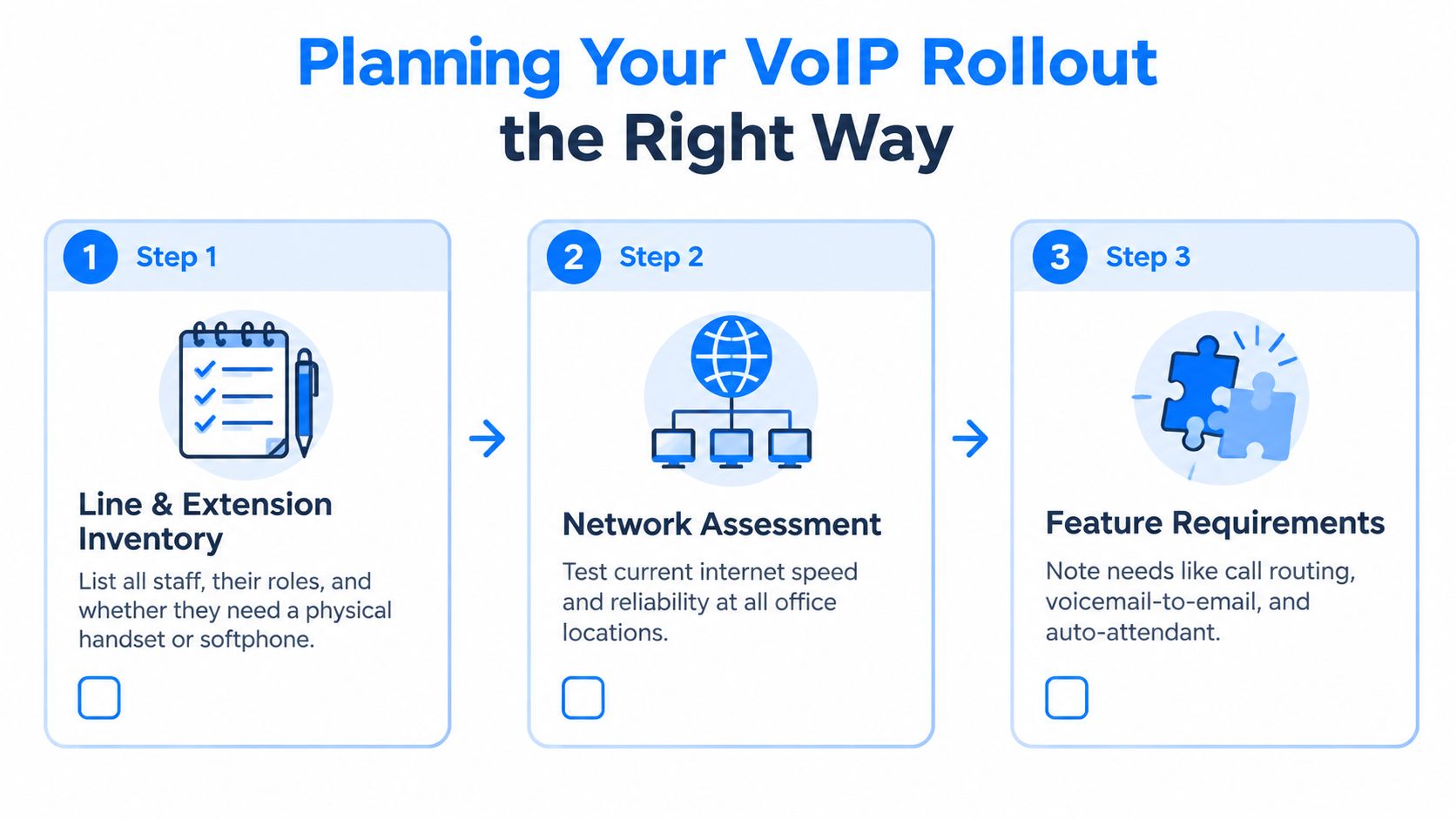
Start with a simple inventory that a non-technical owner can understand. List every member of staff, their role, current number, required extension and preferred device. A receptionist may need a physical handset with programmable line and transfer keys, while a home-based employee may need only a softphone and headset.
Mark the numbers that customers already know. Include geographic numbers, non-geographic numbers, shared reception numbers and any 03 or 08 service that appears on websites, invoices, vehicles or printed material. Identify analogue equipment separately, particularly lift phones, door entry systems, alarms, payment terminals and older fax equipment.
Build the porting plan before choosing the cutover date
Ask the gaining provider to confirm that it can port each number type and service. Give the provider the required Letter of Authorisation early, then check the account details against the current bill. A mismatch in the registered business name or installation address can delay the transfer.
Don't cancel the old service until the port has completed and the new call paths have been tested. Keep a written schedule showing the number, gaining provider, authorisation status, planned date, temporary routing and person responsible for approval.
Compare providers on support, not just features
A glossy feature list won't help if nobody can investigate one-way audio during a busy morning. Ask each provider:
- Support coverage: Is help available during your trading hours, and is support UK-based?
- Regulatory position: Can the provider explain its Ofcom registration and service responsibilities?
- Billing clarity: Are call charges, licences, recordings, handsets and support shown separately?
- Network responsibility: Will the provider supply a suitable router, or support your existing equipment?
- Exit arrangements: Can you retrieve numbers, recordings, configuration data and call reports if you leave?
For an accessible overview of business VoIP features and setup considerations, the UpTime Web Hosting VoIP guide is a useful supplementary resource. Treat it as background reading, then validate the actual service terms with the UK provider you're considering.
Your planning pack should contain four items: an extension list, a number-porting schedule, a provider matrix and an outage contingency note. Add a one-page scope covering call-recording consent under UK GDPR, the registered location for emergency 999 calling, user permissions and the cutover plan. If those details aren't written down, they tend to become last-minute decisions.
Choosing Phones, Gateways and PBX Setups
The sensible device depends on the job, not the employee's seniority. A basic SIP handset suits a quiet desk, while reception needs visibility of queues, transfers and colleagues' status. A warehouse may need cordless DECT coverage rather than a desk phone tied to one network socket.
| Option | Best for | Typical cost | Key trade-off |
|---|---|---|---|
| Entry-level SIP phone, such as Yealink T3 or Fanvil V series | Standard office users | Provider-dependent | Lower purchase cost, fewer programmable keys and less display space |
| Mid-range colour-screen phone with BLF keys | Reception, office managers and busy users | Provider-dependent | Better call visibility, but more configuration and desk space |
| Executive deskset with sidecar | Directors, reception teams and high-call-volume roles | Provider-dependent | Fast access to many lines, but unnecessary for light users |
| DECT cordless system | Warehouses, workshops and roaming staff | Provider-dependent | Mobility depends on radio coverage and battery management |
| ATA gateway | Door entry, lift phone, fax-like device or analogue equipment | Provider-dependent | Preserves legacy equipment, but needs compatibility testing |
| Softphone with USB headset | Homeworkers and laptop-only users | Provider-dependent | Flexible and portable, but depends on the computer, headset and network |
| Hosted PBX, such as 3CX Hosted, Gamma Horizon or RingCentral | Most small businesses | Subscription-based | Quick deployment and easier provider-managed recovery, with ongoing subscription dependency |
| Self-hosted FreePBX or 3CX | Businesses with internal technical capability | Hardware and support dependent | Greater control, but the business owns patching, backups, security and recovery |
An ATA can be the right answer when replacing one analogue device would be disruptive or expensive. Choose a one-, two- or four-port model according to the number of independent devices, then verify the provider's supported codecs, signalling and emergency-call behaviour. Don't assume that an alarm or lift phone will work because it has a telephone-style connector.
Hosted PBX is usually quicker to deploy and easier to support across multiple locations. Self-hosting can provide deeper control, but it turns the phone system into another server that needs monitoring, updates, backups and a tested restoration process. For a small firm without in-house voice expertise, that operational responsibility is often the cost.
Headsets deserve proper attention. A wired USB headset is predictable for call-centre-style work, while a DECT wireless headset helps staff who need to move around without taking calls on a mobile. Softphones are convenient, but a hard handset remains easier to operate when a workstation is rebooting or a user needs a dedicated calling surface.
For a typical small office, pair reception with a colour-screen BLF handset, standard users with entry-level SIP phones, mobile or home users with softphones, and roaming staff with DECT. Review subscription pricing separately from device pricing. For example, this Freshcaller pricing per agent overview can help frame the licence discussion, but the final comparison should include support, call charges, recording storage and exit terms.
Getting Your Network Ready for Voice Traffic
Don't plug in every phone until you've tested the network that will carry the calls. Run a baseline test on the business connection during busy hours, using the office's real router, switches and access points. Record download and upload performance, latency, jitter and packet loss, preferably against a nearby UK test endpoint.
The useful voice benchmarks are one-way latency under 150 ms, jitter under 30 ms and packet loss under 1%. Sustained alerts are recommended at jitter above 20 ms, packet loss above 0.5% or bandwidth utilisation above 70%, based on the UK-focused VoIP internet-speed guidance. The same guidance notes that fibre links typically sit around 10 to 30 ms latency, but cloud backups, video meetings and poorly managed Wi-Fi can create intermittent jitter spikes.
Readiness thresholds
| Metric | Acceptable | Marginal | Action if Marginal |
|---|---|---|---|
| One-way latency | Under 150 ms | At or above 150 ms | Investigate routing, circuit quality and provider location |
| Jitter | Under 30 ms | At or above 20 ms for sustained alerts | Enable QoS, check congestion and retest during busy hours |
| Packet loss | Under 1% | Above 0.5% for sustained alerts | Check cabling, Wi-Fi, circuit faults and upstream congestion |
| Bandwidth utilisation | Below 70% | Above 70% | Schedule backups, increase capacity or prioritise voice |
A three-day pre-launch test during working hours is more useful than a short test taken when nobody is in the office. Look for patterns. A clean result at nine in the evening doesn't prove that voice will work while cloud backup, Microsoft Teams and guest Wi-Fi are all active.
Configure the LAN in a deliberate order
Update the router and switch firmware, then review the path from the phones to the provider. Disable SIP ALG on consumer-grade routers where it interferes with registration or media handling. Decide whether phones will use a separate voice VLAN, and apply DSCP EF marking or the equivalent provider-supported priority policy for RTP traffic.
On a small-business router, create the voice network, reserve DHCP addresses for phones where useful, and configure priority queues before connecting the full handset estate. On managed switches, enable the appropriate 802.1p priority behaviour and confirm that the voice VLAN reaches the intended ports. Keep the configuration documented, because a replacement router should reproduce the same policy rather than starting from factory defaults.
Wi-Fi can be acceptable for a softphone in a controlled environment, but it shouldn't be the default foundation for fixed desk phones. Wired Ethernet gives you a known path, predictable power options and fewer variables during troubleshooting. If staff need wireless calling, test the specific access points, roaming behaviour and headset combination rather than relying on a generic coverage map.
Configuring SIP, Firewalls and Handsets
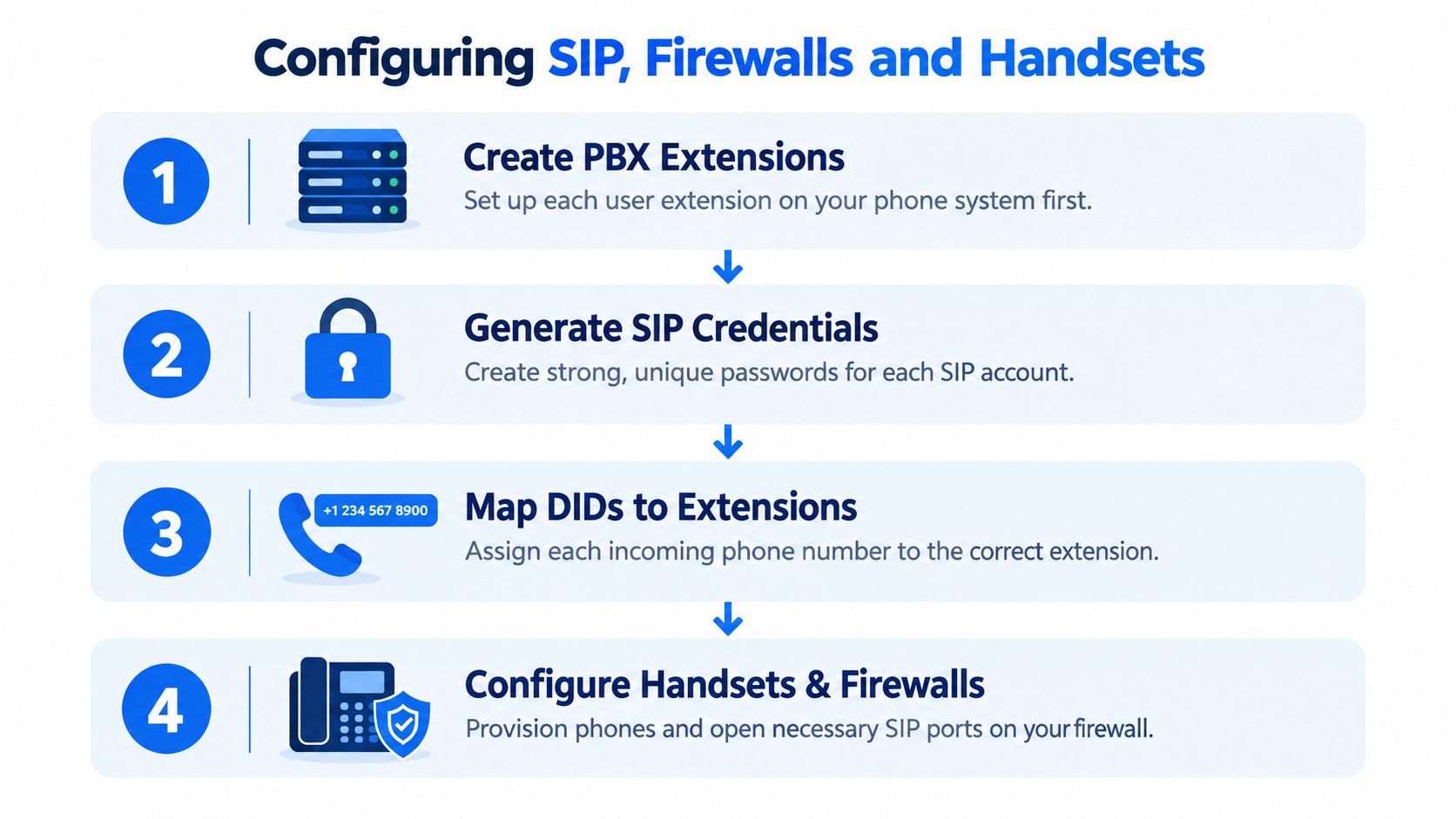
Configuration order prevents many avoidable faults. Create the PBX extensions first, then generate credentials, assign numbers, configure the firewall and provision the phones. If you begin by changing random handset settings, you'll struggle to tell whether a fault belongs to the PBX, network address translation or the device.
Create the voice identities
Give every user a separate extension and a strong, unique SIP password. Map each direct-dial number to the right extension or call group, then define the main number's routing for business hours, overflow and voicemail. Registration-based authentication suits mobile and distributed users, while IP authentication can be appropriate for a controlled office site. Choose deliberately, and document the decision.
On the firewall, open only the signalling and RTP ranges specified by the provider. Disable SIP ALG, create the required outbound rule with connection tracking, and verify that return media is permitted. If double NAT is unavoidable, document the static mappings and test them. Don't rely on STUN as a substitute for understanding the actual network path.
Provision the endpoint
Factory-reset each handset before deployment, then use the provider's configuration URL or autoprovisioning service where available. Enter the extension credentials, set the codec order to favour Opus or G.722 before G.711u where the platform supports those choices, and disable unused LDAP or XML applications.
Label every phone with the user and extension. Make one internal extension-to-extension call before testing the public network. Confirm that both parties can hear each other, that hold and transfer work, and that the display shows the correct identity.
The following video provides a visual introduction to the configuration sequence:
Once the internal test passes, test inbound and outbound calls on each DDI, then check voicemail, caller ID, transfers, hunt groups and recordings. Keep a record of the handset model, firmware, assigned user, extension and provisioning method. That information turns a future replacement into a controlled task rather than a guessing exercise.
Failover, Security and Fraud Prevention
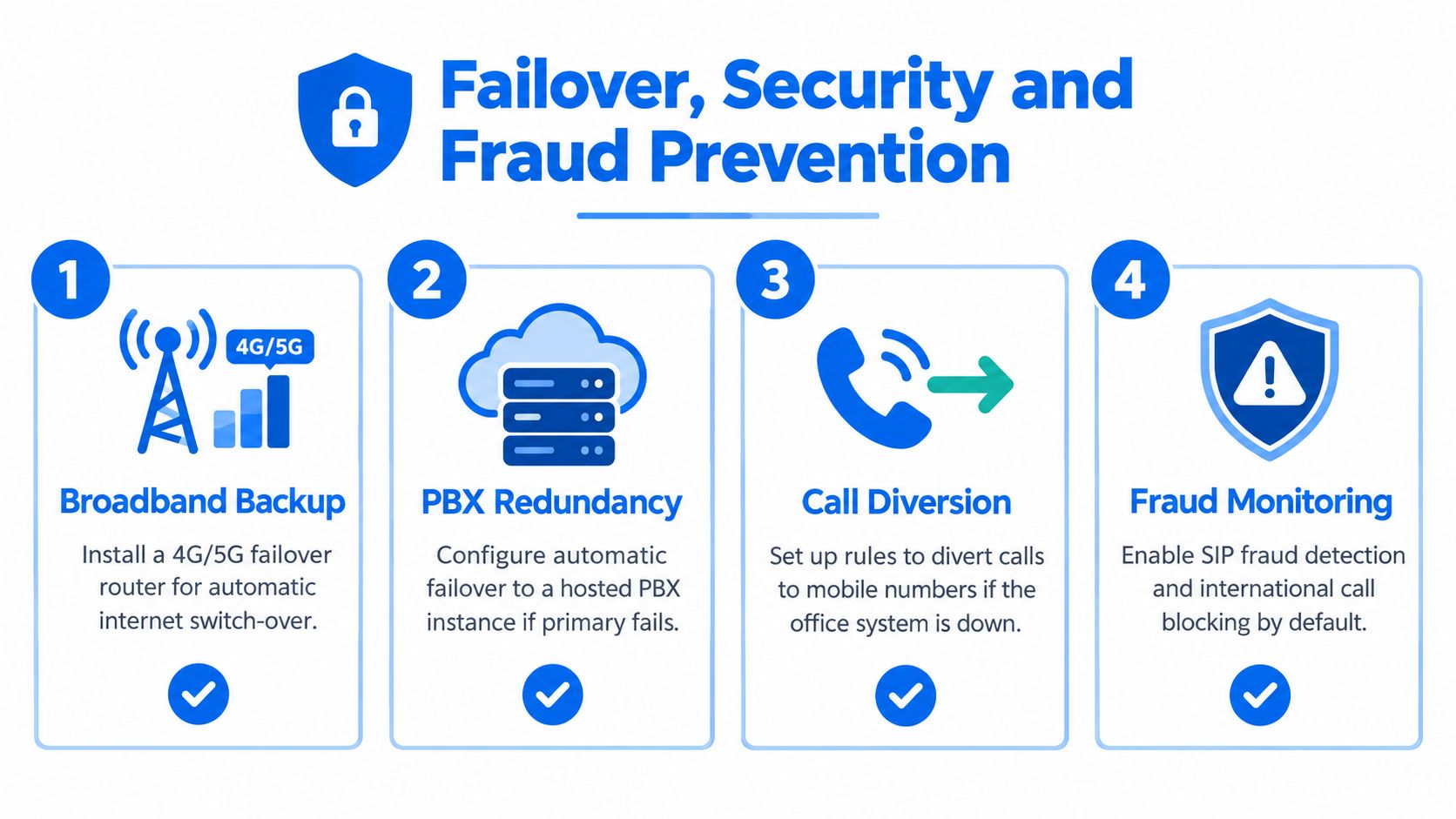
A VoIP installation that works only while the office broadband and mains power are available isn't resilient. UK guidance increasingly recommends failover routing, mobile diversion and UPS-backed routers or handsets because digital voice relies on both connectivity and power. The practical risk is total loss of the reception, sales or support line during an outage, not merely a slightly degraded call.
Install a 4G or 5G failover router and configure automatic switching if the primary circuit fails. For important numbers, arrange provider-side diversion to mobile numbers or a secondary SIP destination. A small UPS should cover the router, network switch and at least one phone per workstation where that level of continuity is required.
Control the routes that create risk
Voice fraud often begins with excessive permissions rather than technical attacks. Start with international and premium-rate barring, then add approved exceptions only when a user needs them. Apply per-user and per-trunk spend limits, restrict after-hours dialling and alert on unusual call patterns.
Use MFA on the voice administration portal, named administrator accounts and IP allow-listing where the provider supports it. Protect signalling with TLS and media with SRTP when available, and revoke a departing employee's extension immediately. Call logs should be treated as security evidence, not just billing records. For payment or bank-detail changes, use a separate call-back verification process rather than trusting an unexpected request made over the phone.
The security concern is material. Forty-three per cent of UK businesses reported a cyber breach or attack in 2025/26, while phishing affected 38%, according to the Reuters report on the UK breach survey. That data isn't specific to VoIP fraud, but it reinforces the need to protect the administration layer and user identities.
Keep the arrangement aligned with Ofcom's guidance on nuisance and scam calls. Review outbound controls after staffing changes, supplier changes and any unexplained bill increase. Networking2000, for example, provides business VoIP telephony, connectivity, managed firewalls and phone-system maintenance for organisations across London and Essex, which can be relevant when one team needs to manage both voice and the network carrying it.
Testing, Go-Live and Ongoing Maintenance
Treat go-live as a controlled test, not the moment you plug in the final phone. Before porting numbers, confirm internal calling, inbound and outbound calls for every DDI, voicemail deposit and retrieval, caller ID, transfers, hunt-group overflow and recording behaviour. Test the registered emergency location and keep provider support details beside the main phone.
Run a monitored outage test by disconnecting the primary broadband link and confirming that the configured mobile diversion or secondary SIP route behaves as expected. Record a simple call-quality result for each handset, including any one-way audio, delay, clipping or unexpected disconnects. A short written result is more useful than relying on staff saying that the system “seems fine”.
Keep the service healthy
Use a practical maintenance rhythm:
- First month: Review call-quality reports weekly and investigate repeated complaints by time, user and location.
- Quarterly: Check firmware on phones and ATA gateways, review router and switch settings, and confirm UPS health.
- Annually: Reconcile the number inventory, remove unused extensions, review administrator permissions and rotate SIP credentials.
- After changes: Retest routing after broadband, router, provider, office or staffing changes.
Print the final cutover checklist. Include DNS ownership, emergency 999 location data, porting confirmation, handset labels, voicemail greetings, call-recording notices, failover behaviour and provider support contacts. A small amount of documentation makes the system easier to operate when the person who installed it isn't available.
Networking2000 can assess your broadband, router, switching, handsets, hosted VoIP requirements and outage arrangements as one connected project across London and Essex. Visit Networking2000 to discuss a practical small-business phone system rollout and arrange support for installation, security and ongoing maintenance.

