A new CCTV system can look excellent on installation day. The live view is sharp, the mobile app connects quickly, and every camera appears to be recording. Then an incident happens. A business owner in Romford searches for a face at the entrance and finds a wide shot with no usable detail. A homeowner in Brentwood checks the driveway after a late-night delivery and sees headlights, glare, and a dark vehicle disappearing out of frame.
Those failures usually aren't caused by one faulty camera. They come from decisions made before installation, including unclear objectives, poor lighting assessment, unsuitable lenses, weak network capacity, incomplete retention planning, and no proper acceptance testing. A reliable CCTV system design guide must therefore begin with risk, evidence, privacy, and operating conditions, not a catalogue of camera specifications.
Table of Contents
- Why Most CCTV Installations Disappoint After the First Month
- Defining the Purpose and Operational Requirements
- Choosing Camera Types and Lens Options for Each Zone
- Planning Coverage, Placement, and Lighting
- Sizing Storage, Retention, and Network Capacity
- Integrating CCTV with Alarms and Access Control
- Designing for UK GDPR and Surveillance Camera Compliance
- Commissioning, Handover, and Ongoing Review
Why Most CCTV Installations Disappoint After the First Month
The common pattern is predictable. A shop receives a camera system designed around the number of devices the budget can buy, rather than around what staff need to see. The entrance camera covers the doorway, but the lens is too wide for identification. The car park camera records the whole area, but it can't provide useful detail on a person near the barrier. At night, infrared reflects from a nearby surface or the image is washed out by vehicle headlights.

A home installation can fail in a different way. The driveway is visible during daylight, but a porch light creates a bright patch beside an unlit gate. Motion recording captures branches moving in the wind while missing a person approaching from the side. The recorder works, yet the footage isn't useful because the design never defined whether the priority was deterrence, vehicle monitoring, or identifying a visitor.
Hardware doesn't compensate for an undefined purpose
Before any camera is mounted, someone needs to answer a basic question: what must this system allow an authorised user to do after an incident? Detecting movement across a boundary requires a different view from identifying a face at a reception desk. Monitoring stock movement in a Chelmsford office requires different coverage from protecting a secluded rear access route.
A strong design links each camera to a risk and an operational outcome. That makes choices about placement, lens, lighting, recording mode, network capacity, and access permissions easier to justify. It also gives the installer something concrete to test rather than a vague instruction to “cover the site”.
Practical rule: If the design can't explain what detail each camera must deliver, adding more cameras probably won't solve the problem.
The UK framework reinforces this risk-led approach. The Surveillance Camera Code of Practice sets out 12 principles for operators in England and Wales, including defined purpose, transparency, necessary data retention, secure access, and review at least annually. A system that performs well technically but lacks a defensible purpose or secure governance is still poorly designed.
Defining the Purpose and Operational Requirements
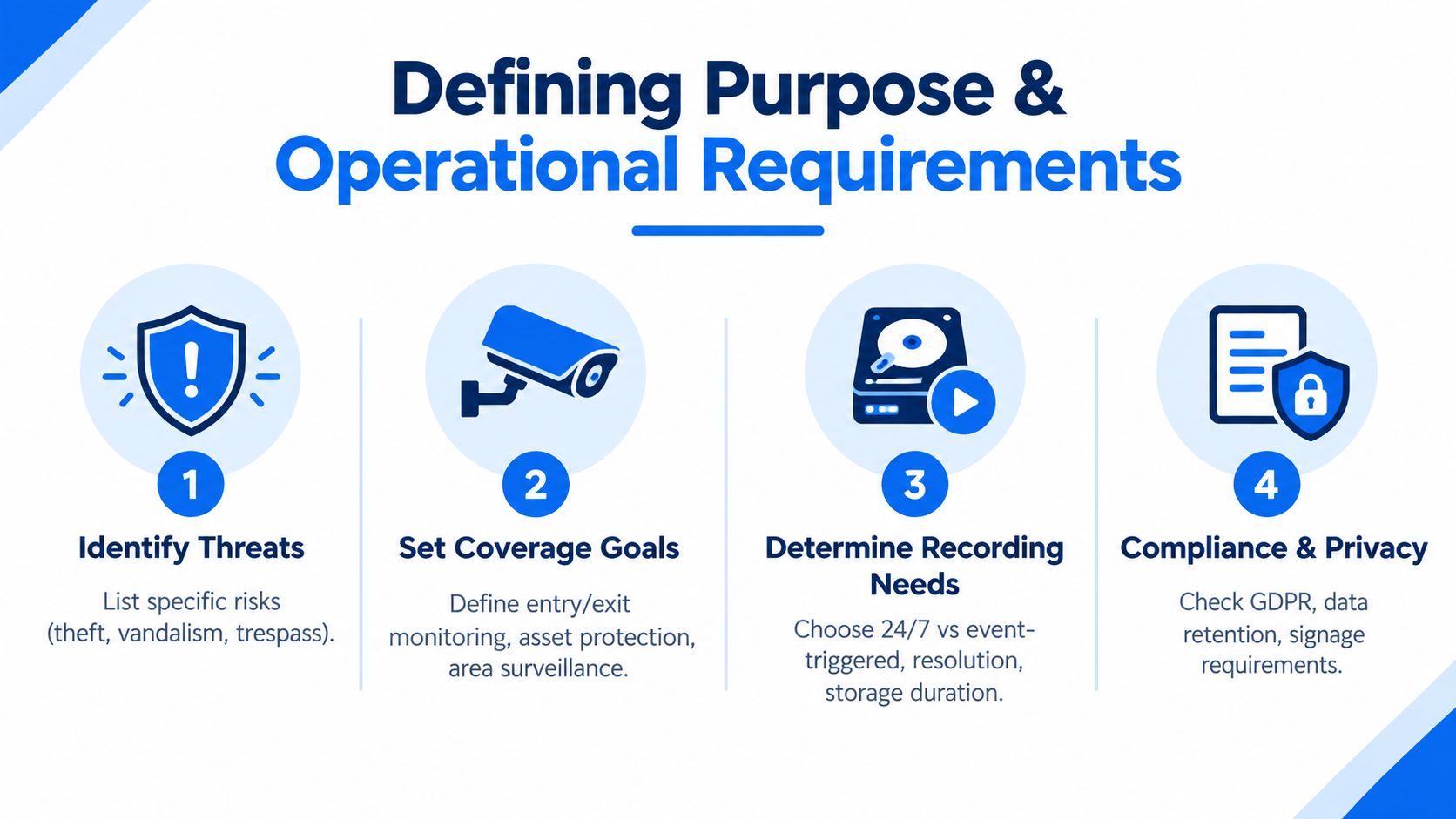
Start with a written risk assessment, not a camera shortlist. Walk the site during normal operation and consider entrances, exits, delivery routes, staff-only areas, public boundaries, valuable equipment, vulnerable doors, and places where incidents would be difficult to investigate without footage.
Ask the owner or facilities manager:
- What needs protection? Separate people, property, vehicles, cash areas, stock, and restricted spaces.
- What incidents matter? Burglary, trespass, vandalism, theft, disputes, unsafe access, or delivery problems may require different views.
- What evidence is needed? A broad overview may show movement, while an entrance camera may need to support facial identification.
- Who will respond? Decide whether staff review footage later, a monitoring centre receives alarm events, or both.
The site survey should record daylight, darkness, glare, reflective surfaces, obstructions, mounting options, cable routes, power availability, and network paths. A camera position that looks sensible on a floor plan may be unusable once a new partition, delivery vehicle, sign, or security gate is present.
Put the decisions into an SDS
UK CCTV design guidance based on BS EN 62676 and the NSI Code of Practice calls for a documented risk assessment, site survey, user operational requirements, and a complete System Design Specification, or SDS. The government's recommended standards for the surveillance camera industry says the SDS should identify cameras, recorders, storage, network topology and capacity, power backup, encryption, image categories, frame rate, resolution, export formats, trigger logic, and integration details.
That document should give every camera a unique reference and explain why it exists. It should also record assumptions, exclusions, proposed retention, user roles, and any privacy masking. If the client later requests another camera or a wider view, the revision can be assessed against the original risk instead of being added informally.
The practical test is simple. For each camera, write down the required viewing task, the target area, expected lighting, recording method, evidence export requirement, and who can access the footage. If those fields can't be completed, the project isn't ready for equipment selection.
Choosing Camera Types and Lens Options for Each Zone
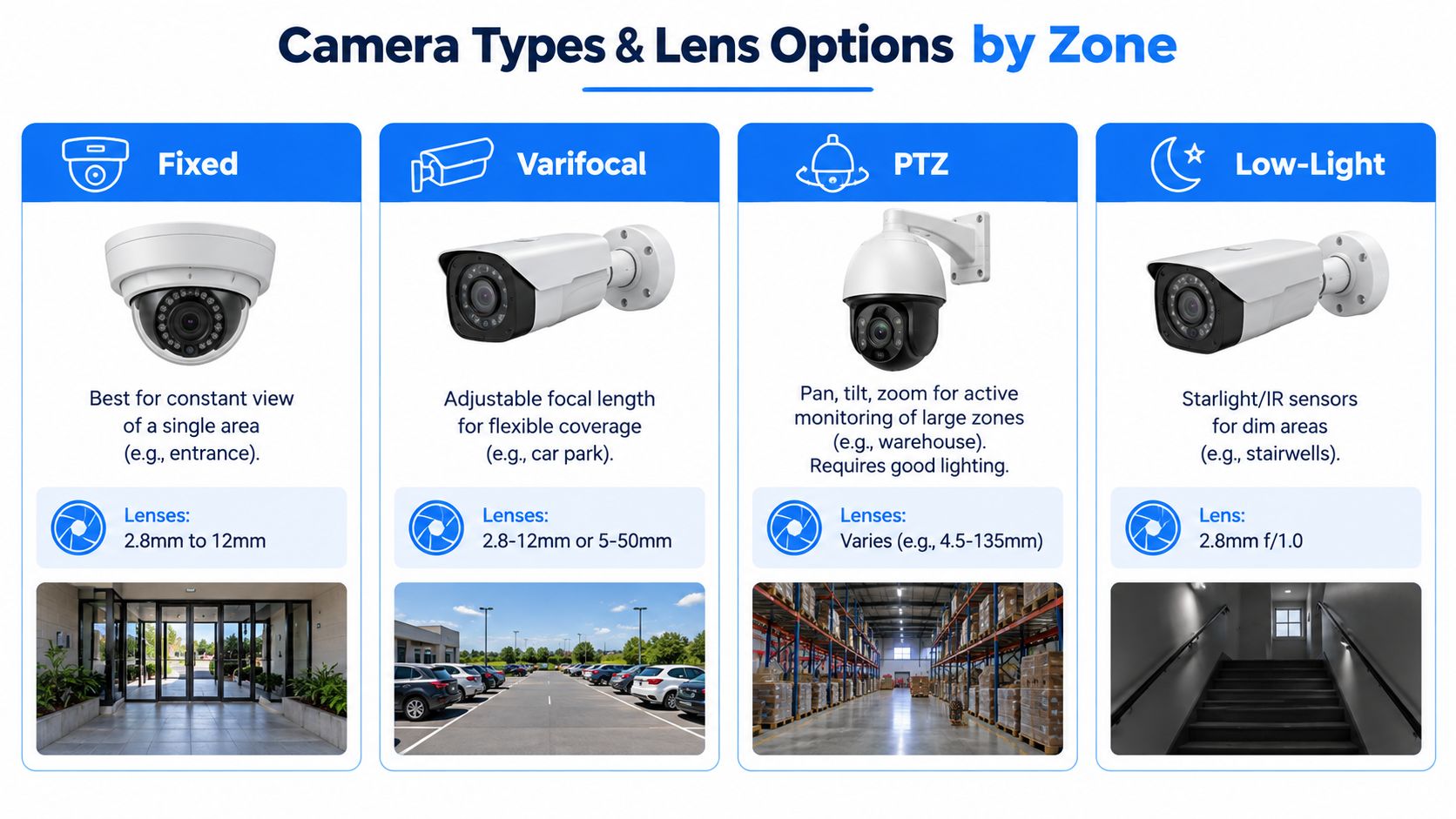
Camera selection should follow the detail required at a location. A useful design distinguishes between detect, observe, recognise, and identify. A wide view may detect someone entering a yard, while a narrower view at the doorway may provide the detail needed to identify that person.
Match the camera to the job
A fixed camera suits a known, stable view such as a shop entrance, staff doorway, or narrow driveway approach. It has a clear advantage, the scene doesn't depend on an operator remembering to point it at the right place. A fixed dome often works neatly inside reception areas, while a bullet format can be practical outside where a longer viewing direction is required.
A varifocal camera gives the installer room to adjust the focal length during commissioning. That flexibility helps on a car park or yard where the exact boundary of useful detail isn't obvious until the camera is mounted. It costs more than a basic fixed option, but it can prevent a poor compromise between scene width and identification detail.
A PTZ camera can pan, tilt, and zoom across a large open area, making it useful when an operator actively monitors a warehouse, yard, or perimeter. It shouldn't replace fixed cameras at critical doors. When a PTZ is facing elsewhere, it can't provide a continuous evidential view of the entrance.
Low-light cameras and appropriate illumination are valuable in stairwells, service yards, side passages, and driveways that remain dark after sunset. Infrared can help, but it doesn't correct poor positioning, reflective surfaces, or an overly wide scene.
A high-resolution camera pointed from the wrong angle still produces the wrong evidence.
Lens choice matters as much as the camera body. A wide lens can cover more of a retail floor, but faces occupy fewer pixels. A narrower lens can support identification at an entrance, but it covers less of the surrounding area. In a Romford shop, that may mean using one overview camera for customer movement and a separate, tighter camera for the doorway. In a Brentwood driveway, the design might prioritise a controlled approach view rather than the entire front garden.
Use the accompanying camera comparison video as a visual reminder that camera categories aren't interchangeable. The final choice belongs in the SDS, tied to the viewing task, mounting position, lighting, and expected distance.
Planning Coverage, Placement, and Lighting
A coverage plan should divide the property into practical zones. Start with the routes people and vehicles use, then mark entrances, gates, reception desks, stairwells, loading areas, car park barriers, side passages, and high-value rooms. Don't assume that continuous coverage of every square metre is the most useful design. Transition points often provide stronger evidence than a distant camera aimed at a large empty area.
For a small office in Chelmsford, the main entrance may need a controlled identification view, while the reception camera provides context about movement and waiting areas. A retail shop floor may benefit from an overview of tills and aisles, with tighter views at exits and stock access points. A home driveway needs attention to approach direction, gate position, neighbouring boundaries, and vehicle headlights.
Position for faces, not just movement
Mounting height and angle determine whether a camera sees a face or the top of a head. Avoid pointing directly towards bright windows, low sun, reflective signs, or vehicle lights. If the camera must face a bright entrance, use suitable wide dynamic range, adjust the angle, and consider a separate view that captures people as they enter rather than only after they pass through the doorway.
Night-time testing is essential. Street lighting may illuminate one part of a scene while leaving the important approach dark. Infrared can create reflections from glass, pale walls, signs, or nearby surfaces. White-light illumination may produce better colour detail, but it can affect the environment and may be unsuitable where light spill is a concern.

Document each position on an annotated plan. Record the camera reference, direction of view, intended target, mounting height, lighting assumption, privacy masking, and any known blind spot. This helps the installer work consistently and gives future engineers a way to understand the original design intent. For a practical visual reference on refining angles and eliminating gaps, see this guide to improving CCTV coverage in 2026.
Overlap is worth paying for at critical points. Two complementary views can show both the wider context and the detail at a doorway, gate, or cash-handling area. Don't add overlap automatically across low-risk zones. Use it where a blocked view, poor angle, or incident near the boundary would otherwise leave the system dependent on one camera.
Sizing Storage, Retention, and Network Capacity
Storage and network capacity should be designed from the workload, not selected after the cameras are chosen. The calculation needs to account for each camera's resolution, frame rate, compression, bitrate, recording mode, scene complexity, and required retention. Continuous recording creates a different workload from event recording, while live viewing and alarm exports add demand at the moment users may need the system most.
BS EN 62676-1-2 transmission guidance requires the minimum data rate for each major video node to be calculated. Traffic on any specific link should use no more than 75% of that link's total available capacity, leaving headroom for normal operation, live viewing, alarm conditions, and exports. The published BS EN 62676 transmission guidance also supports separating functional components and planning for normal and peak conditions.
Build the calculation around real use
Ask whether the site needs 24-hour recording, event-triggered recording, or different profiles by zone. A side passage may use event recording, while an entrance or till area may need continuous recording because a relevant event won't always trigger motion reliably. Storage should include room for system overhead and planned growth, rather than stopping at the first acceptable figure.
| Scenario | Camera Count | Resolution and Frame Rate | Retention Target | Approximate Storage Planning Range |
|---|---|---|---|---|
| Small home exterior | Qualitative planning example | Detail-led entrance and driveway views | Set by documented purpose | Size from selected bitrate and recording mode |
| Small business premises | Qualitative planning example | Mixed overview and identification views | Set by documented purpose | Allow for continuous and event profiles |
| Larger mixed-use site | Qualitative planning example | Multiple zones with varied detail needs | Set by documented purpose | Model normal, alarm, and export workloads |
The table deliberately avoids false precision. There isn't a defensible storage range without the actual bitrate, camera configuration, recording schedule, and retention decision. Ask the designer to show the assumptions and the calculation, not just the hard-drive model.
Local NVR storage gives the site direct control and avoids making every review dependent on an internet connection. A hybrid or cloud-assisted design can help with remote access and off-site resilience, but it introduces recurring service dependencies, account security requirements, and bandwidth considerations. Protect recording equipment with appropriate access controls and power backup, and separate CCTV traffic from general business or guest use where the network design requires it.
Integrating CCTV with Alarms and Access Control
CCTV should support a defined response, not generate more alerts. A door contact can call up a nearby camera, an access-control event can mark related footage, and a panic button can direct an operator to the correct view. The design must shorten investigation time while keeping alert volume manageable for staff.
For a small office with one controlled entrance, an access event could display the entrance camera and preserve footage before and after the event. A business operating across London and Essex may need consistent user permissions, camera naming, and export procedures across sites. At home, a smart lock or video doorbell can complement fixed cameras, provided the design states who receives alerts and how recordings are protected.
Write the trigger logic down
The system design specification should define:
- Trigger source: Door event, alarm input, panic button, analytics event, or operator action.
- Camera response: Preset position, recording profile, pre-event and post-event capture, or live pop-up.
- Escalation path: Named user, monitoring service, call process, or local response.
- Evidence handling: Export format, authorisation, audit trail, and secure transfer.
- Failure behaviour: The response if the network, recorder, alarm panel, or remote connection is unavailable.
PTZ cameras require particular care. An alarm-driven preset can improve response, but fixed coverage should remain where continuous evidence is required. Otherwise, the PTZ may be facing another area when an incident occurs.
For detector-activated video surveillance, BS 8418:2021 covers design, installation, commissioning, maintenance, operation, and remote monitoring. It distinguishes between Type A and Type A+ systems, with Type A+ requiring additional security measures against compromise, as outlined in the Surveillance Camera Code of Practice. That distinction matters when the system must support a higher-assurance monitored response rather than simple local recording. It should also inform access permissions, alarm handover, audit records, and the resilience expected from the network and recording equipment.
Designing for UK GDPR and Surveillance Camera Compliance
Compliance needs to shape the design before the first camera is installed. The UK surveillance camera framework expects a defined purpose, transparency, proportionate operation, secure storage, controlled access, necessary retention, and regular review. Those requirements affect field of view, signage, user roles, export procedures, and the decision to record areas outside the premises.
A business should be able to explain why each camera is present and why its view is no wider than necessary. Privacy masking can help exclude neighbouring gardens, public paths, or unrelated work areas. Signage should make surveillance apparent, while access permissions should limit viewing and export to people with a legitimate operational role.
Treat governance as an engineering control
The ICO guidance on video surveillance and CCTV says CCTV and video surveillance must be assessed for compliance with data protection law. The guidance is under review following the Data (Use and Access) Act coming into law on 19 June 2025, so organisations should check current requirements rather than rely on an old installation pack.
Good design records:
- Purpose and lawful basis: State the security or operational reason for surveillance.
- Coverage boundaries: Mark public, neighbouring, staff, and restricted areas.
- Retention rule: Keep no more footage than the documented purpose requires.
- Access controls: Use named accounts, strong authentication, and role-based permissions.
- Review process: Check performance, necessity, access logs, signage, and privacy settings at least annually.
Tools can help organise evidence for a privacy assessment, particularly where a business manages several sites or changes camera layouts regularly. A team considering ways to automate privacy assessments should still ensure that a responsible person reviews the result and records the reasoning.
The scale of private ownership makes this responsibility easy to underestimate. A 2026 UK surveillance statistics review reported that approximately 96% of cameras are privately owned by businesses and homeowners and that responding police forces operated roughly 130,000 CCTV cameras in total, as reported in the UK surveillance statistics review. Compliance is therefore a practical concern for an Essex homeowner or London SME, not only for public authorities.
Commissioning, Handover, and Ongoing Review
Installation ends only after commissioning proves that the system matches the SDS and the operational purpose. Test every view in daylight and darkness. Walk the entrances, approaches, boundaries, and other areas where an incident might occur. Check faces at the intended distance, difficult lighting, motion handling, and whether recorded playback provides usable evidence rather than merely a clear live image.
User acceptance must include a real export exercise. An authorised user should locate an event, protect the relevant footage, export it in the agreed format, and record how the file will be handled. Test alarm triggers, access events, mobile or remote viewing, recorder failure behaviour, power backup, time synchronisation, and user permissions. These checks expose faults that a dashboard showing every camera online will not reveal.
Demand a complete handover pack
The handover should include:
- As-built drawings: Final camera positions, fields of view, cable routes, recorder locations, and network connections.
- Operational settings: Recording profiles, trigger logic, retention configuration, privacy masks, and time settings.
- Account controls: Named users, permissions, administrator ownership, and a secure process for changes.
- Evidence procedure: Playback, export, incident protection, and audit steps.
- Maintenance record: Firmware approach, cleaning access, fault reporting, and review responsibilities.
A review should take place at least annually, in line with the governance expectations of the Surveillance Camera Code. Review sooner when the site changes, lighting is upgraded, partitions are installed, a building is extended, staff responsibilities change, or an incident reveals a coverage weakness. Check whether the system still serves its stated purpose, respects privacy boundaries, and produces evidence at the required quality.
A camera system is a governed asset. If nobody checks whether it still meets its purpose, its original design gradually becomes an assumption.
Public-sector surveillance estates continue to grow, as documented in 2024 public CCTV reporting context. That trend does not set the requirements for a private property, but it reinforces the need to manage cameras as an ongoing responsibility. UK GDPR, ICO guidance, the Surveillance Camera Code, and BS EN 62676 remain relevant design and review inputs where they apply.
For London and Essex homes or SMEs, ask the installer for the risk assessment, site survey, SDS, coverage drawings, storage and bandwidth calculations, commissioning results, and review plan. Networking2000 provides CCTV installation with a no-obligation site survey, alongside networking, intruder alarm, and access-control services. Visit Networking2000 to discuss a design based on the property, risks, and compliance responsibilities.

