A printer fails just as a client needs a signed document. The nearest replacement uses a different driver, the toner cupboard contains the wrong cartridge, and nobody knows whether the problem belongs to the office manager, the IT team or the supplier. Meanwhile, confidential pages are waiting unattended beside a busy multifunction device.
That pattern is rarely caused by one faulty printer. It usually points to an unmanaged print environment, where devices, users, networks, consumables and support contracts have grown separately. Printer management solutions bring those moving parts under deliberate control, so print supports the business instead of interrupting it.
Table of Contents
- What Printer Management Solves
- Core Features of Printer Management Solutions
- Business Benefits and Measurable Outcomes
- Planning a Successful Implementation
- Comparing Delivery and Support Models
- Building an ROI Case Without Guesswork
- Common Pitfalls and How to Avoid Them
- Choosing a Local Managed Service Partner
What Printer Management Solves
A small business might have a colour multifunction printer at reception, an older laser device in accounts, label printers in a warehouse and several remote workers using home equipment. Each device may have its own driver, supplier, maintenance arrangement and security settings. A toner warning can therefore become a purchasing problem, a support ticket and an operational delay at the same time.
A managed approach changes the question from “Which printer has failed?” to “What does the print estate need, and who owns the response?” The service creates an operational layer around the equipment. It records what is installed, monitors device health, coordinates supplies, applies suitable policies and gives support teams evidence instead of guesswork.
Practical rule: Treat every printer as a connected endpoint, not as isolated office furniture.
That distinction matters because a printer depends on the same wider environment as other workplace technology. It uses network connectivity, authentication, power, endpoint configuration and sometimes cloud services. A change to a VLAN, firewall rule, wireless network or office layout can affect printing, just as a device replacement can create new support work for the networking and telephony teams.
From reactive fixes to routine control
Without management, people often solve print problems locally. Someone buys a cartridge from a convenient supplier, another person installs a driver manually and a third changes a setting at the device. The immediate fault may disappear, but the organisation loses consistency and visibility.
Printer management solutions make responsibility clearer across the device lifecycle:
- Inventory: Identify each device, its location, model, connection and assigned users.
- Supply control: Monitor consumption and coordinate replenishment before essential work stops.
- Policy: Set practical defaults for colour, duplex printing, access and retention.
- Security: Control who can release a job and preserve an activity trail.
- Support: Route faults, driver issues and service requests to the right owner.
The result isn't necessarily fewer printers at any cost. It's a print environment that behaves more predictably. The UK managed print services market was estimated at about £1.7 billion, with roughly 300 MPS businesses operating in the country, according to UK managed print services sector insight. That market context reflects a broader shift from in-house printing towards outsourced printer management, where businesses seek better efficiency and lower print volume rather than buying more hardware.
Core Features of Printer Management Solutions
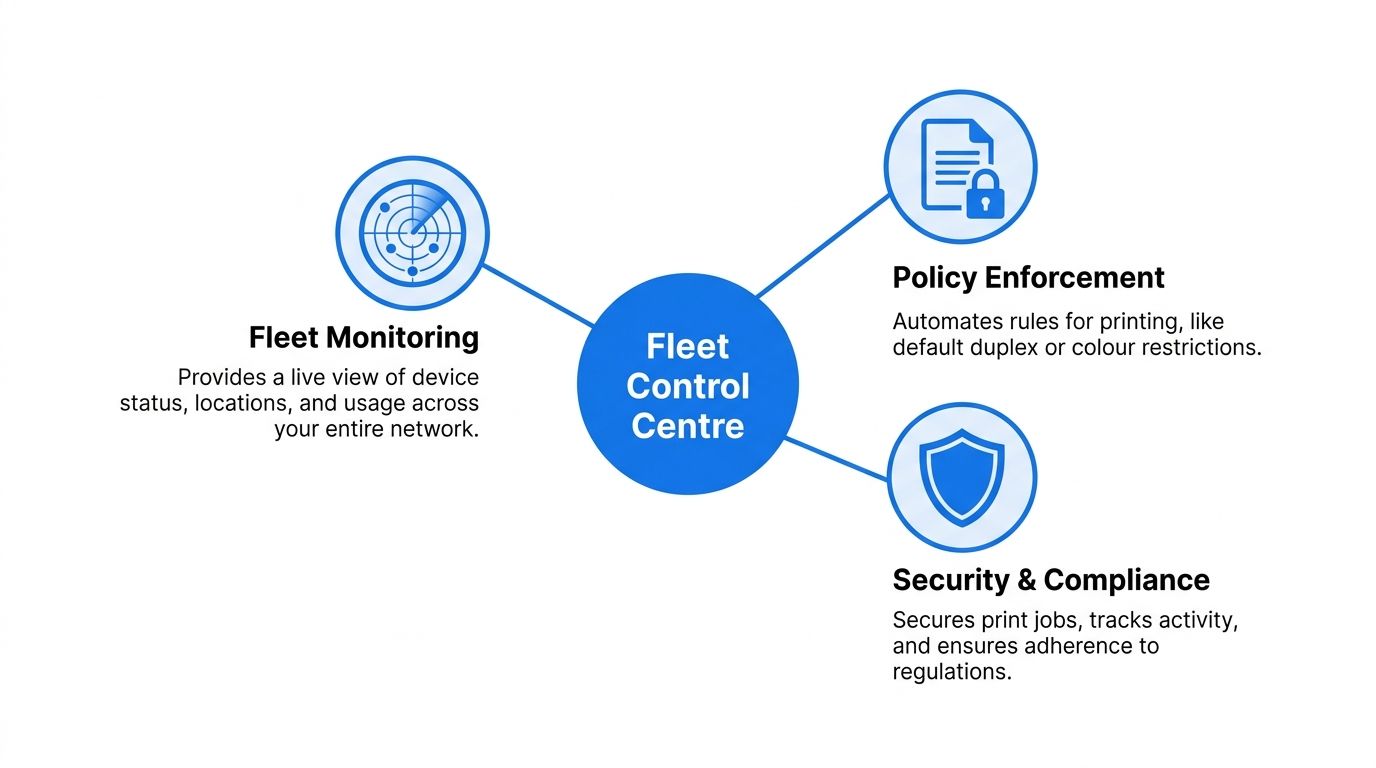
Think of a printer management platform as a fleet control centre. The dashboard doesn't replace every technician or solve every network fault, but it gives the team a shared view of what the fleet is doing and where attention is needed.
See the fleet clearly
Fleet monitoring collects status information from devices across offices and, where supported, remote locations. The support team can see whether a printer is online, out of paper, reporting a fault or approaching a consumables threshold. Location and usage information adds context, so a high-volume device in a finance department isn't assessed in the same way as a lightly used reception printer.
Monitoring becomes more useful when someone acts on it. A dashboard that merely displays warnings still leaves the business with manual work. Look for alert routing, useful device grouping and reporting that helps distinguish a temporary warning from a recurring fault.
Automate supplies and reordering
Automatic supplies management uses usage patterns and device status to trigger replenishment. That reduces the chance that staff will discover an empty cartridge in the middle of a document run, while also limiting hurried purchases that don't match the installed model.
The process should include ownership rules. Decide who approves orders, whether the supplier ships directly, how spare stock is recorded and what happens when a device is scheduled for replacement. Automation works best when it reflects the organisation's procurement process rather than bypassing it.
Apply sensible print policies
Print rules act as guardrails. A default duplex setting can reduce unnecessary single-sided output, while colour permissions or departmental limits can prompt users to choose the appropriate device. Policies should support the workflow, not punish it. A design team and an accounts team may need different allowances.
Secure print release adds another control. A user sends a document, but the pages remain in a queue until that person authenticates at the device. This prevents sensitive paperwork from sitting in an output tray and gives the organisation a clearer record of who released the job.
Turn activity into decisions
Reporting should move beyond raw page counts. Useful reports show usage by user group, department, site, device or cost centre, alongside colour activity, failed jobs, policy exceptions and consumables demand. Those signals help answer practical questions: Is a busy device in the wrong location? Are users sending jobs to an unavailable printer? Does a department need a workflow change rather than another device?
Centralised driver management completes the control loop. Instead of asking each employee to find and install the correct driver, administrators can deploy approved configurations through the management platform. That reduces inconsistent settings and makes new starters, office moves and device changes easier to support.
These features are strongest when they interlock. Monitoring identifies a problem, policy reduces avoidable demand, secure release protects output, reporting explains behaviour and driver management prevents configuration drift. A collection of separate tools can still leave gaps. A coordinated system gives the support team one operating picture.
Business Benefits and Measurable Outcomes
Printer management becomes valuable when its features produce observable operational results. The three outcomes most businesses should track are cost control, security and uptime. They overlap, but each needs its own evidence.
| Outcome | Driving feature | Operational signal | Business question answered |
|---|---|---|---|
| Cost control | Usage reporting, print rules and supplies automation | Consumables demand, colour use and unnecessary jobs | Where is print spending coming from? |
| Security | Secure release, authentication and policy enforcement | Unreleased jobs, access events and policy exceptions | Can confidential output be traced and controlled? |
| Uptime | Fleet monitoring and managed escalation | Fault alerts, device availability and resolution progress | Are failures being addressed before they disrupt work? |
Cost control doesn't come from counting devices alone. A smaller fleet can still be expensive if users print in colour by default, send jobs to unsuitable devices or request urgent supplies at short notice. Monitoring and policy controls show where waste occurs, while automated replenishment helps prevent both stock shortages and poorly planned purchases.
Security needs the same operational discipline. Secure release protects documents at the device, but the wider setup still matters. Authentication, permissions, firmware maintenance, network segmentation and incident ownership must work together. In the UK, 24% of organisations reported a print-related data breach, according to Quocirca's 2025 print security landscape coverage. The same source reports a difference between print security leaders and laggards, with reported data loss at 47% versus 79%, indicating that maturity in policy enforcement, access control and device hardening can affect outcomes.
Uptime is more than a printer showing as online. A device may be reachable but unusable because its driver is wrong, its queue is stuck, its supplies are unavailable or its network path has changed. A managed service should connect monitoring data to a named response process, so the business can see not just that a fault exists, but who is resolving it and when the next update is due.
Planning a Successful Implementation
A successful deployment starts with discovery, not procurement. Create a complete register of printers, including older devices that staff use occasionally. Record the model, age, site, department, connection method, contract, usage, colour requirements, service history and recurring faults.
Discovery before design
Ask users how they work. Accounts may scan invoices to a shared destination, reception may print visitor documents and warehouse staff may depend on labels during dispatch. A device count won't reveal those dependencies. Note which workflows are time-critical, which documents are confidential and which teams need local or mobile printing.
The baseline should include toner spending, service calls, support tickets, downtime and policy exceptions. It doesn't need to be perfect on the first pass. It does need to be honest enough to prevent a standardised design from removing a device that supports an important process.
Map the technology around print
Printer management tools must fit the existing IT estate. Confirm compatibility with the directory, print servers, cloud services, mobile devices and endpoint platforms. The networking team should review addressing, VLANs, firewall rules, certificates and capacity before agents or devices are deployed.
VoIP deserves specific attention. Printers and phones may share cabling, power arrangements or office moves, even when they use different logical services. A relocation plan that works for print but overloads a switch, disrupts power resilience or complicates the telephony layout isn't a complete plan.
Review privacy, data retention, administrator access and support boundaries before rollout. Decide whether the internal IT team, a print supplier, a network provider or a software vendor owns each layer.
Pilot the real environment
Choose a representative pilot group, not only the easiest devices. Include different models, connection types, user roles and workflows. Test authentication, driver deployment, release printing, scanning, mobile access, reporting, alerts and escalation.
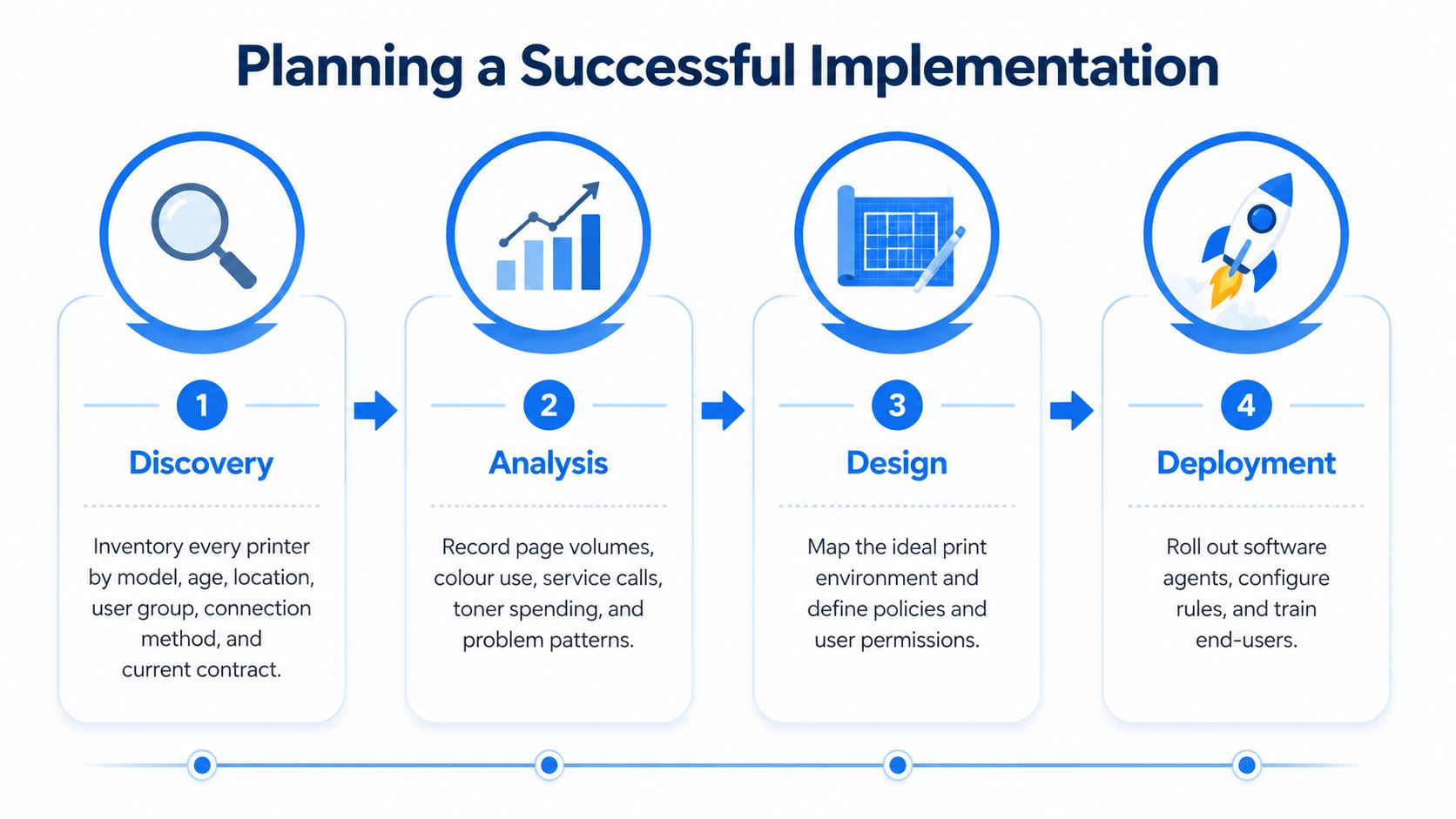
Give users a clear explanation of what changes and why. Document exceptions, support contacts and recovery steps, then phase the rollout by site or department. A staged deployment makes it easier to isolate a driver issue or policy mistake before it affects the whole organisation.
The video below can help teams visualise the role of a structured implementation process.
After launch, review support demand, device utilisation, errors, policy exceptions and user feedback. Governance shouldn't end at go-live. Regular reviews help identify unsuitable devices, outdated rules and service gaps while the environment is still manageable.
Comparing Delivery and Support Models
The platform's location matters less than the ownership model around it. A cloud service, an internally managed platform and a fully outsourced arrangement can all work, but they place responsibility in different hands.
| Model | Best fit | Key trade-off |
|---|---|---|
| Cloud-hosted | Organisations needing central visibility across sites | Easier central administration, but hosting, integration and internet dependencies require review |
| Locally managed | Teams with platform skills and control requirements | Greater internal control, with more maintenance and support responsibility |
| Fully outsourced | Businesses seeking one accountable service partner | Fewer internal tasks, but contract scope and escalation terms must be explicit |
| Hybrid | Mixed sites with different resilience or support needs | Flexible ownership, but hand-offs must be documented carefully |
A cloud-hosted service can simplify multi-site monitoring and updates. Before selecting it, confirm where data is stored, how administrator accounts are protected, which integrations are supported and what happens if connectivity is unavailable. The software provider may manage the platform without managing the physical printer or the network path to it.
A locally managed deployment gives the internal IT team more direct control over servers, access and maintenance. That can suit organisations with established infrastructure skills, but the team must budget time for platform updates, troubleshooting, backups and long-term knowledge retention.
A fully outsourced service may include monitoring, supplies, dispatch, reporting and device management. Buyers should verify response standards, replacement rights, exclusions, reporting access and exit arrangements. For a broader view of the equipment costs that sit around print, scan, copy and fax decisions, the real cost of printer scan copy fax provides useful context.
Hybrid arrangements often fit organisations with dispersed offices or critical local workflows. For example, a central service could oversee policy and reporting while local engineers handle urgent hardware issues. Whatever model you choose, assign ownership for onboarding, policy changes, security updates, break-fix work, reporting and offboarding. Don't assume a hardware supplier owns every access-control issue, or that a software provider dispatches an engineer for every mechanical fault.
Building an ROI Case Without Guesswork
An ROI case should begin with your own records. Collect annual spending on toner and ink, service contracts, maintenance, replacement equipment, IT support time and unplanned downtime. Record unnecessary printing separately where possible, because a reduction in page volume may represent a policy change, a workflow improvement or a service problem rather than a simple hardware saving.
Scenario one for consumables and waste
Compare current consumables spending with the expected position after monitoring, ordering controls and print policies are introduced. Include implementation, subscription, service, training and decommissioning costs. Don't use a generic saving assumption if the business has usable records.
A simple calculation is:
Annual benefit minus annual operating cost, divided by implementation cost.
Use the result to estimate payback, but show every assumption. If a policy reduces colour output, document how that estimate was formed. If supplies automation changes order frequency, record the effect on urgent purchases and stockholding rather than treating every avoided order as a saving.
Scenario two for service and productivity
Count support requests involving toner, drivers, queues, authentication and device faults. Record how long each issue takes to resolve and how many users are affected. The value of recovered time can then be estimated from fewer avoidable tickets multiplied by the minutes saved and an agreed labour value.
That calculation is an internal estimate, not an industry benchmark. Keep it visible in the business case so decision-makers can challenge the assumptions rather than accepting an impressive but unexplained total.

Scenario three for risk
Security benefits should be treated as avoided risk, not guaranteed loss prevention. Assess the potential impact of confidential documents left on trays, unauthorised output, unmanaged endpoints and delayed incident response. Secure release and authentication may reduce exposure, but the calculation should state what has changed and what remains uncertain.
Review the baseline after 30, 90 and 180 days, using Quocirca's 2025 managed print services research as context for the UK focus on cost control and digital transformation. Track cost per page, utilisation, downtime, ticket volume, policy exceptions and user satisfaction. The business case becomes credible when those measures show whether the service changed daily operations.
Common Pitfalls and How to Avoid Them
Print projects often fail because the organisation scopes equipment instead of work. A department receives a newer device, but scanning, driver, authentication or document-routing problems remain. Map the workflow before selecting hardware, and include the people who perform the task rather than relying only on procurement records.
Mixed-vendor estates create another trap. Different firmware, drivers, management consoles and service arrangements can complicate incident response. UK-relevant findings reported by Print IT Reseller's coverage of fleet standardisation research found that 70% of organisations with multi-vendor fleets reported one or more print-related breaches, compared with 59% for standardised fleets, while average breach cost reached £1,028,346. Treat vendor diversity as a resilience question, not merely a purchasing inconvenience.
Test the rules, not just the installation
A policy can look correct in administration screens and still disrupt a real job. Test duplex defaults, colour restrictions, departmental permissions, secure release, mobile printing and exception handling with representative documents. Confirm that urgent work has a controlled path when a policy blocks the normal route.
Driver inconsistency also causes avoidable tickets. Use central deployment where possible, keep approved versions documented and test updates with a pilot group. A new driver should be treated like any other endpoint change.
Finally, don't treat the contract as permanent paperwork. Review service performance, device suitability, recurring faults, policy exceptions and response times against agreed terms. Fleet owners with mixed vendors were reported as almost twice as likely to experience business disruption after a print-related breach in Quocirca's 2025 UK-inclusive survey release. Ongoing governance helps the service adapt before operational weaknesses become incidents.
Choosing a Local Managed Service Partner
The right partner should reduce coordination work across print and the connected IT estate. Start with a written checklist, then ask every shortlisted provider to answer the same questions about onboarding, support, security and reporting.
Look for multi-vendor experience, rather than a partner whose advice always leads back to one manufacturer. Ask how the team handles older devices, mixed drivers, specialist workflows and equipment that remains in service during a phased replacement. A supplier that can only manage its preferred brand may leave your most complicated devices outside the operating model.
Test accountability before signing
A partner should explain its service-level process in plain language. Review response times, escalation routes, engineer coverage, replacement arrangements, consumables responsibility and reporting access. The contract should state what happens when a printer fault is a network issue, an authentication problem or a telephony and cabling concern.
Integration experience matters too. Ask for evidence of work across common network, endpoint, security and VoIP environments, without accepting vague claims. The onboarding engineer should document dependencies, test representative workflows and leave administrators with usable operating instructions.
A local provider can also simplify accountability for London and Essex businesses when print, networking and telephony problems overlap. Networking2000 offers regional engineering support and can coordinate print, network and communications requirements under one provider, with engagement ranging from advice to fully outsourced management. Businesses exploring wider automation relationships may also find AI agent partnership opportunities useful when assessing how emerging support tools fit their service strategy.
Shortlist partners against the same evidence-based criteria, then compare the proposed outcomes: clearer ownership, controlled risk, measurable uptime, informed purchasing and a defensible ROI case. Familiarity matters less than whether the provider can explain how it will operate your actual fleet.
Networking2000 helps businesses in London and Essex connect printer management with IT support, networking, security and VoIP, with practical guidance from discovery through ongoing support. Visit Networking2000 to discuss your mixed-vendor fleet, map the wider technology dependencies and choose a support model that fits your organisation.

