You've upgraded to fast broadband, yet the upstairs bedroom still buffers, the garden office drops calls, and the far end of the shop barely holds a connection. That's a common London and Essex problem. The broadband service may be working well, but the wireless network inside the premises is struggling to distribute that connection consistently.
The choice between Wi-Fi mesh and access points isn't only about filling dead zones. It's about how many devices need service at the same time, how reliably users move around the building, how much control the network requires, and whether the premises can support Ethernet cabling. A mesh kit can be the right answer for a home with awkward walls and no cable routes. Wired access points are usually the more predictable option for a busy office, multi-room business, or property with existing structured cabling.
| Factor | Wi-Fi mesh | Wired access points |
|---|---|---|
| Backhaul | Usually wireless between nodes, though some systems support Ethernet | Ethernet from each access point to the network |
| Installation | Fast and comparatively simple | Requires cabling, switching and careful placement |
| Roaming | Usually coordinated through one system and app | Can be seamless when access points and clients are configured correctly |
| Capacity | Suitable for homes and lighter small-office use | More predictable for dense, high-demand environments |
| Management | Consumer-friendly application is common | Greater control, often with controller or managed platform |
| Best fit | Difficult-to-wire homes and quick deployments | Offices, larger premises and networks that need consistent performance |
Table of Contents
- Why Your Fast Broadband Still Leaves Dead Zones
- How Mesh Networks and Access Points Actually Work
- Performance Comparison Across Real UK Premises
- Installation Complexity and Ongoing Management
- Understanding the True Cost of Each Approach
- Which Solution Fits Your Specific Situation
- Planning Your Wi-Fi Deployment for London and Essex Premises
Why Your Fast Broadband Still Leaves Dead Zones
An Essex business owner can have a modern broadband service, a capable router and a disappointing meeting room. Staff at the front of the building connect without trouble, while people near the rear wall report frozen video calls and slow cloud applications. In a London terrace, thick internal walls and several floors create a similar pattern. The speed reaching the router isn't necessarily the speed available where people work.
Ofcom's infrastructure data puts this problem into context. Gigabit-capable networks reach 87% of UK premises, while full-fibre take-up is 42%, according to the Ofcom Connected Nations 2025 summary. Those figures describe the availability and adoption of the external connection, not the quality of the Wi-Fi path from the router to a laptop, phone, till or smart device inside the building.
Broadband speed isn't Wi-Fi capacity
A fast WAN connection can still feed a poorly designed wireless LAN. Distance, brickwork, foil-backed insulation, stairwells, neighbouring networks and the number of active devices all affect the local connection. A single router may deliver excellent performance in the room where it sits and become a bottleneck elsewhere.
That distinction matters more as device counts grow. Several people may be working on video calls, using cloud software, streaming training content and accessing hosted files at the same time. The network needs enough usable radio capacity and sensible roaming behaviour, not just a high figure on the broadband package.
Practical rule: Test Wi-Fi where people actually work, not beside the router.
Mesh and access points solve the distribution problem in different ways. Mesh nodes create a coordinated wireless system that's relatively quick to deploy. Access points use Ethernet to place radio coverage where it's needed, giving the installer more control over the route data takes back to the router or switch.
For practical examples of wireless installations and related network advice, the WiFi tagged articles from Wisenet Security Ltd provide useful background. The important starting point remains the premises itself. Ofcom's official coverage resources use postcode-level information and data associated with Ordnance Survey and Ofcom, so property-level availability should be checked before accepting a vendor's coverage promise.
How Mesh Networks and Access Points Actually Work
A mesh system uses a main unit connected to the router and additional nodes placed around the property. Those nodes communicate with one another, commonly over a wireless backhaul, while presenting a coordinated network name to users. The system then helps devices move between nodes as they travel through the building.
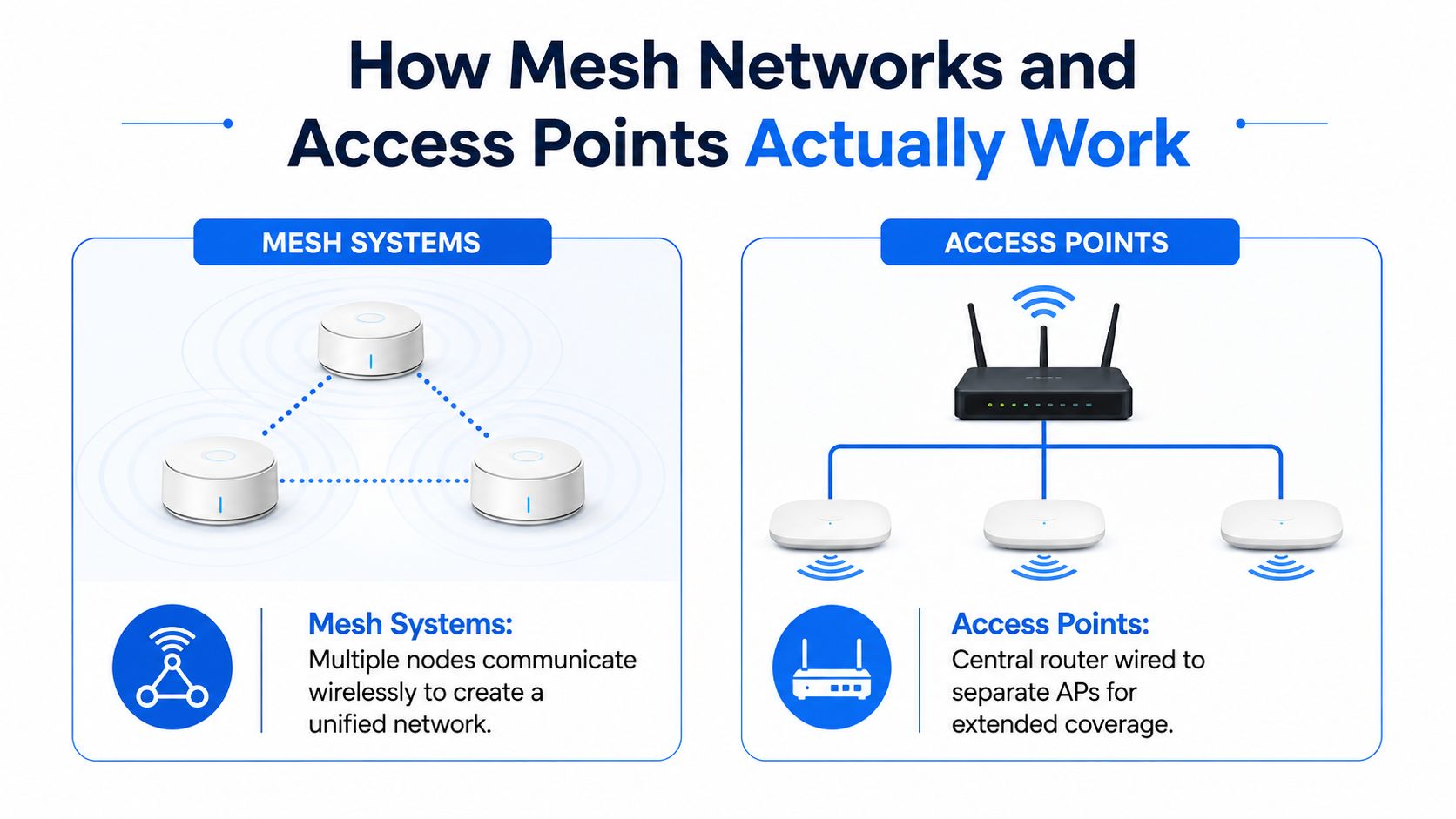
Access points take a more structured route. Each unit connects by Ethernet to a router, switch or managed network, then broadcasts Wi-Fi locally. The access points may share a network name and security settings, but the cabling gives each unit a direct path back to the network rather than asking wireless traffic to travel through another radio node first.
Backhaul changes the result
Backhaul is the connection between the wireless unit and the rest of the network. Wireless backhaul is convenient because it avoids new cable runs, but the node must use radio capacity to communicate with its upstream unit as well as serve clients. Walls and interference can affect both jobs.
Wired backhaul separates those functions. Ethernet carries traffic to the access point, leaving the Wi-Fi radios focused on phones, laptops, scanners and other client devices. A mesh product with Ethernet-connected nodes can combine a coordinated management experience with the performance characteristics of wired access points, provided the system supports that design properly.
Roaming needs more than one network name
A single SSID doesn't automatically guarantee a perfect handoff. The client device decides much of the roaming process, while the network can influence the decision through coordinated settings, radio planning and compatible roaming features. Poor placement can leave a device clinging to a distant node even when a nearer one is available.
Mesh networking's UK history also shows that its original appeal wasn't limited to domestic convenience. A deployment at Cambridge's Strawberry Fair on 3 June 2006 supported mobile live television, radio and internet services for an estimated crowd, as described in the history of wireless mesh networking. That example reflects mesh's strength in flexible, changing environments. Wired access points remain better aligned with fixed, cabling-led layouts where coverage and capacity need to be planned precisely.
For practical setup guidance and troubleshooting mesh WiFi issues, placement and backhaul should be treated as design decisions, not afterthoughts. Adding another node won't necessarily fix a weak upstream link.
Performance Comparison Across Real UK Premises
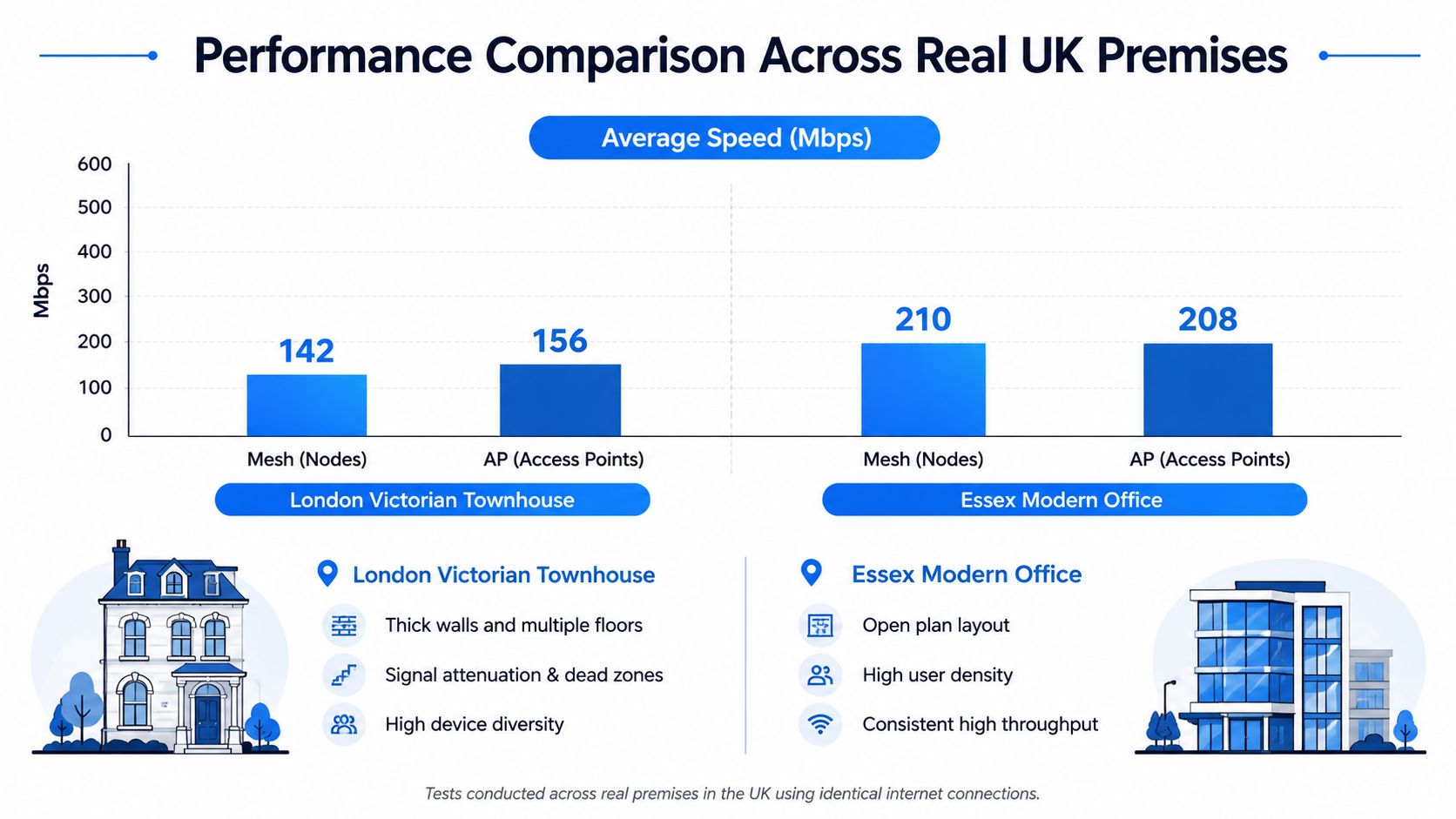
Coverage is the first test, but it isn't the last. A system can show a strong signal in a room and still perform poorly when several users compete for airtime. In installations across London and Essex, the meaningful questions are usually whether calls remain stable, whether devices roam at sensible points, and whether performance stays consistent during busy periods.
A Victorian townhouse often gives mesh systems a difficult environment. Thick walls, narrow staircases and vertically separated rooms can make it hard to position nodes so each one receives a healthy upstream signal. Mesh may solve a dead zone near the kitchen or landing, but a node placed too far from the main unit can extend weak service rather than create a strong local connection.
Capacity is where the difference becomes visible
An open-plan office has a different problem. The building may be easy to cover, yet dozens of laptops, handsets, printers, meeting-room displays and guest devices may use the same wireless environment. A wired access-point design lets the installer distribute radios across the floor and connect each one directly to the network.
Mesh is often perfectly serviceable for a small office with moderate usage, particularly when quick deployment matters more than granular control. It becomes less attractive when every room hosts simultaneous collaboration traffic or when users move between meeting rooms while maintaining calls. A wireless backhaul can add another point of contention precisely when the network is busiest.
Roaming and latency need testing
Voice and video applications expose weak design quickly. A user walking from a reception area to a meeting room may experience a brief interruption if the client holds onto the first radio too long or if neighbouring units use unsuitable power and channel settings. Access points can support smooth transitions, but they still need coordinated configuration. Mesh systems often automate more of that process, although automation can limit the visibility available to an engineer.
The practical comparison looks like this:
- Victorian homes: Mesh is convenient where cabling would disrupt finished rooms, but wired access points are more dependable when walls severely restrict node-to-node communication.
- Modern offices: Both can cover open areas, yet access points usually provide better control over radio placement, client density and future expansion.
- Multi-storey commercial sites: Ethernet-backed access points are generally the safer choice because each floor and work area can receive a planned connection rather than relying on a chain of wireless links.
The right test isn't a single speed reading. Walk the premises during normal use, make calls, move between areas and observe whether the network remains usable when several people connect together.
Installation Complexity and Ongoing Management
Mesh wins the first-day comparison for many homes. You connect the primary unit, follow the manufacturer's app, place additional nodes and adjust their position when the application reports a weak link. Power sockets are usually the main physical constraint, so renters and owners of finished properties can deploy coverage without opening walls.
Access points demand more preparation. Each location needs an Ethernet route back to a switch or router, and the installation may involve Cat5e or Cat6 cabling through walls, ceilings or floor voids. Power can come through the same cable where the design uses Power over Ethernet, which helps with ceiling or wall mounting, but the switching and termination still need to be planned properly.
Management is a trade-off
A consumer mesh application makes routine tasks accessible. Firmware updates, guest access, parental controls and basic diagnostics are often presented in one interface. That simplicity is useful, but advanced wireless controls, detailed client history and wider network integration may be limited by the platform.
A managed access-point system typically offers deeper visibility. An engineer can review client associations, radio settings, channel use, firmware status and the relationship between wireless service and the wired network. That control is valuable for offices using VoIP, managed firewalls, guest isolation or multiple business systems.
| Factor | Mesh Systems | Wired Access Points |
|---|---|---|
| Physical work | Place units and provide power | Install Ethernet, switch ports and mounting |
| Backhaul | Wireless by default on many systems | Wired by design |
| Routine control | Usually app-led | Controller, local interface or managed platform |
| Troubleshooting | Simple guided diagnostics | More detailed but more technical analysis |
| Security | Depends on vendor features and configuration | Can integrate closely with VLANs, firewalls and managed policies |
| Expansion | Add nodes where wireless links remain suitable | Add cable runs, switch capacity and planned APs |
| Roaming | Often coordinated automatically | Requires consistent configuration across APs |
Security needs a design, not a logo
Both approaches can use modern encryption and separate guest access, but the outcome depends on configuration. Business networks should consider staff, guest, voice, CCTV and building-management devices separately where the equipment and firewall support that separation. Default passwords should be changed, firmware maintained and unused management access restricted.
A simple app reduces setup effort. It doesn't remove the need for sound placement, secure settings or maintenance.
Understanding the True Cost of Each Approach
The purchase price is only one part of the decision. Mesh starter packs typically range from £60 to over £200, according to the Ofcom guidance cited in this UK mesh Wi-Fi discussion. Larger homes may need several units to cover every area, so the initial saving can narrow as coverage requirements expand.
Mesh often makes financial sense when cable installation would be disruptive or expensive. A small office in a rented building may need coverage quickly and have no permission to run new infrastructure. In that case, a well-placed system can deliver a usable result without a cabling project.
Price the access-point design properly
A wired deployment includes more than the access point hardware. Allow for Ethernet cable, termination, patching, a suitable switch, mounting and labour. Existing cabling can change the calculation significantly because the network may only need compatible access points and switching rather than a new route to every location.
The cost also reflects what failure means. A weak network can create repeated interruptions to video calls, slow access to cloud applications and complaints from visitors using a guest service. Retrofitting cable or replacing an unsuitable mesh system later can cost more than making the architectural decision before installation.
Use this checklist before choosing:
- Hardware: Count the units, switch ports, power requirements and any controller or firewall integration.
- Cabling: Confirm whether usable Ethernet already reaches the planned locations.
- Labour: Separate equipment cost from surveying, installation, testing and configuration.
- Support: Decide who'll apply firmware updates, investigate faults and adjust the design as the premises changes.
- Replacement: Consider how easily the system can be expanded or refreshed without discarding the whole deployment.
Value depends on the workload
A household that mainly needs reliable browsing, streaming and ordinary connected-device access may value the simplicity of mesh. An office where staff depend on uninterrupted collaboration tools may gain more from the predictable backhaul and monitoring available with access points.
A low upfront price isn't good value if the system can't cope with the way people use it. Conversely, a professionally cabled design can be unnecessary for a small, lightly used property where a mesh kit solves the actual problem cleanly.
Which Solution Fits Your Specific Situation
Start with the building and the workload, not the product box. A three-storey home with no accessible cable routes has different constraints from an Essex office with Ethernet already installed. The best choice changes again when the network carries VoIP handsets, cameras, point-of-sale equipment or a large guest population.
Mesh suits convenience-led deployments
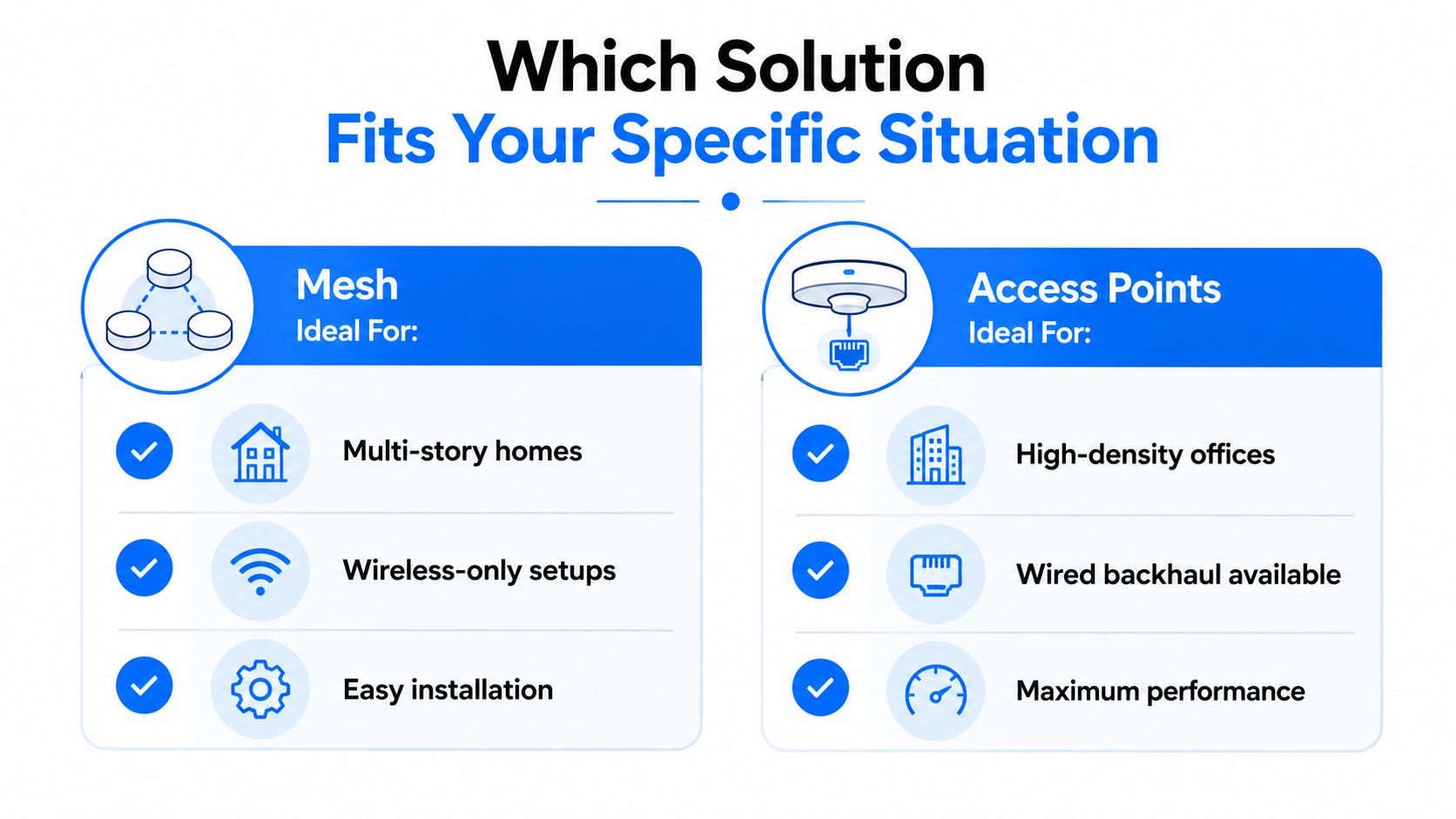
Choose mesh when the main requirement is practical coverage without invasive work. It's often a sensible fit for:
- Multi-storey homes: Nodes can be placed near stairways or on separate floors where running cable isn't realistic.
- Finished interiors: A wireless deployment avoids visible cable routes and additional building work.
- Small offices: Teams that need a quick, centrally managed system may accept the reduced control of a consumer-oriented platform.
- Changing layouts: Mesh can be moved as rooms or work areas change, provided each node retains a strong connection to the system.
Don't add nodes because an app suggests more coverage. Each extra unit must have a sensible position and a reliable path back to the network.
Access points suit capacity-led environments
Wired access points become the stronger recommendation for offices with sustained collaboration traffic, many concurrent devices or a need for detailed monitoring. They're particularly appropriate where Ethernet already exists, where a structured cabling project is affordable, or where Wi-Fi forms part of a wider managed network.
Mobile coverage can provide useful fallback, but it isn't a substitute for dependable indoor Wi-Fi. Ofcom reports 4G coverage at 96% and 5G standalone coverage for 83% of the population on a high-confidence measure, while indoor 5G reaches 81% geographically on a variable measure and 51% on a good measure, as shown in its mobile coverage checker information. Strong outdoor service doesn't guarantee reliable service inside a thick-walled office or home.
A hybrid can be practical
Some premises benefit from wired access points in the main office, reception and meeting rooms, with mesh coverage in a difficult-to-cable annex or garden workspace. Another sensible path is to begin with mesh, then reuse compatible equipment or shift to wired backhaul when the business outgrows wireless links.
The decision rule is straightforward. Choose mesh for installation simplicity and flexible coverage. Choose access points for predictable capacity, structured roaming and long-term control.
Planning Your Wi-Fi Deployment for London and Essex Premises
Begin with a property-level survey. Record wall construction, floor separation, likely interference, work areas, guest zones and the locations where calls or business applications matter most. Check the baseline broadband and coverage position through Ofcom's Connected Nations datasets and the relevant postcode tools before judging internal Wi-Fi performance.
For mesh, place the primary unit in an open, central position and place nodes where they can still communicate well with the upstream unit. For access points, plan Ethernet routes first, then position radios according to user density rather than placing one in every convenient room. Avoid hiding equipment behind cabinets, near large metal objects or beside sources of interference.
Test before you finish
Walk the site with a laptop and phone. Test the areas used for video calls, check roaming while moving between zones, and repeat the exercise when the premises is busy. Configure consistent network names and security settings where uninterrupted movement is required, then review channel and transmit-power choices instead of leaving every radio on automatic without checking the result.
DIY works for a straightforward home deployment. Businesses with VoIP, managed firewalls, guest isolation, CCTV or several floors should consider professional design, cabling and validation. A network engineer can document the installation, test handoffs and leave the organisation with a supportable system rather than a collection of independently placed devices.
Networking2000 designs, installs and maintains wireless networks, routers and Cat5e and Cat6 cabling for homes and businesses across London and Essex. If you're weighing Wi-Fi mesh against wired access points, visit Networking2000 for practical advice and a deployment planned around your premises, device load and future support needs.

