You know the warning signs. The spreadsheet freezes just before payroll, the printer disappears from the network, broadband drops during a client call, and everyone looks at the person who once “sorted the Wi-Fi”. That arrangement works until the business depends on technology for every payment, file, message and appointment.
For small firms in London and Essex, small business IT support services should be treated as a local resilience decision, not a commodity purchase. The right provider keeps people productive, reduces avoidable security exposure, restores connectivity quickly and gives the owner a clear answer when something fails outside normal office hours.
Table of Contents
- When the Spreadsheet Won't Open and You Know It's Time
- What Small Business IT Support Services Cover
- Why Managed Support Has Become the Default for Small Firms
- Pricing Models and SLAs That Suit Small Businesses
- A Realistic Onboarding Journey From First Call to Steady State
- Questions Worth Asking Any Prospective IT Support Provider
- Common Pitfalls and How to Dodge Them
- Your Next Step Toward Reliable Local IT Support
When the Spreadsheet Won't Open and You Know It's Time
At 8:55 on a Monday morning, a five-person accounting firm in Chelmsford is preparing payroll. The shared spreadsheet opens for four employees, then becomes read-only for the person responsible for the final checks. The printer won't respond, broadband has become painfully slow and nobody knows whether the problem is the file, the server, permissions or the office network.
An hour later, payroll still hasn't gone out. No single fault caused the crisis. The firm had accumulated small weaknesses: unclear file ownership, undocumented permissions, an ageing router and no agreed person to call. The owner had been buying help one problem at a time, which felt cheaper until several problems arrived together.
Practical rule: If the same person is repeatedly interrupted to fix technology, the business already has an IT support problem. It just hasn't named it yet.
That breaking point forces three useful questions:
- Who owns the problem? Someone should take responsibility for devices, accounts, connectivity, backups and security, rather than passing the issue between broadband, software and hardware suppliers.
- What does support cover? “IT support” might mean a helpdesk only, or it might include monitoring, patching, Microsoft 365 administration, Wi-Fi, cyber security, backups and onsite engineering.
- What happens during a serious failure? A provider should explain escalation, communications, restoration priorities and out-of-hours cover before an incident starts.
The UK business environment makes this operational rather than theoretical. The government's Cyber Security Breaches Survey 2025/26 found that 43% of UK businesses experienced a breach or attack in the previous 12 months, estimated at about 612,000 businesses nationwide. The same evidence found that 24% of small firms experienced cyber crime during that period, as reported in the UK SME cyber security research.
The rest of the decision is straightforward. You need a reliable route for everyday faults, a properly managed network, practical security controls, resilient connectivity and a contract that explains who does what. For some firms, that means a managed service. For others, it means a smaller fixed maintenance agreement with selected projects handled separately. Either way, waiting for the next spreadsheet failure isn't a strategy.
What Small Business IT Support Services Cover
Small business IT support services connect the people, devices, applications, networks and security controls that keep a firm operating. A provider should examine how these parts interact. A failed login may involve identity settings, connectivity, licensing or a security policy, so the right engineer diagnoses the cause rather than treating one symptom.
The operational layer
Helpdesk support provides the first response. Staff report a problem, and the engineer decides whether it needs a password reset, device repair, application fix or escalation. Good ticket records capture the fault, urgency, user impact and resolution. That history exposes recurring failures and supports practical improvements.
Network management covers switches, routers, firewalls and Wi-Fi access points. These systems carry traffic between laptops, printers, servers and cloud services. The provider should document equipment, monitor important devices and plan wireless coverage around how the premises are used. An access point near reception is not a Wi-Fi design.
Cloud and email administration keeps Microsoft 365 or Google Workspace usable and controlled. The work includes account lifecycle, permissions, mailbox protection, MFA, device access and recovery procedures. Cloud services reduce hardware work, but they still require administration and regular review.
The protection and access layer
Cyber security should cover endpoint protection, patching, email controls, MFA, secure configuration, backup oversight and user awareness. Phishing deserves specific attention. Government survey data found that it affected 38% of all UK businesses and was rated the most disruptive attack type by 69% of affected organisations, according to the Cyber Security Breaches Survey 2025/2026.
Security testing has a separate role. Owners assessing whether penetration testing belongs in their wider support plan can use this guide to penetration testing as a service to understand what that work involves and where it fits.
Connectivity provides the route into the business. Broadband monitoring, a second connection and dual-WAN failover can keep priority work running when the main circuit fails. VoIP replaces an ageing telephone system with managed cloud telephony, allowing staff to use business numbers across suitable locations and devices.
Cabling and Wi-Fi planning form the physical base. Poor cabling, interference and weak coverage often appear as application faults, wasting time on the wrong diagnosis. Ask a London or Essex provider to inspect the premises, document the design and explain how connectivity will be maintained during an outage.
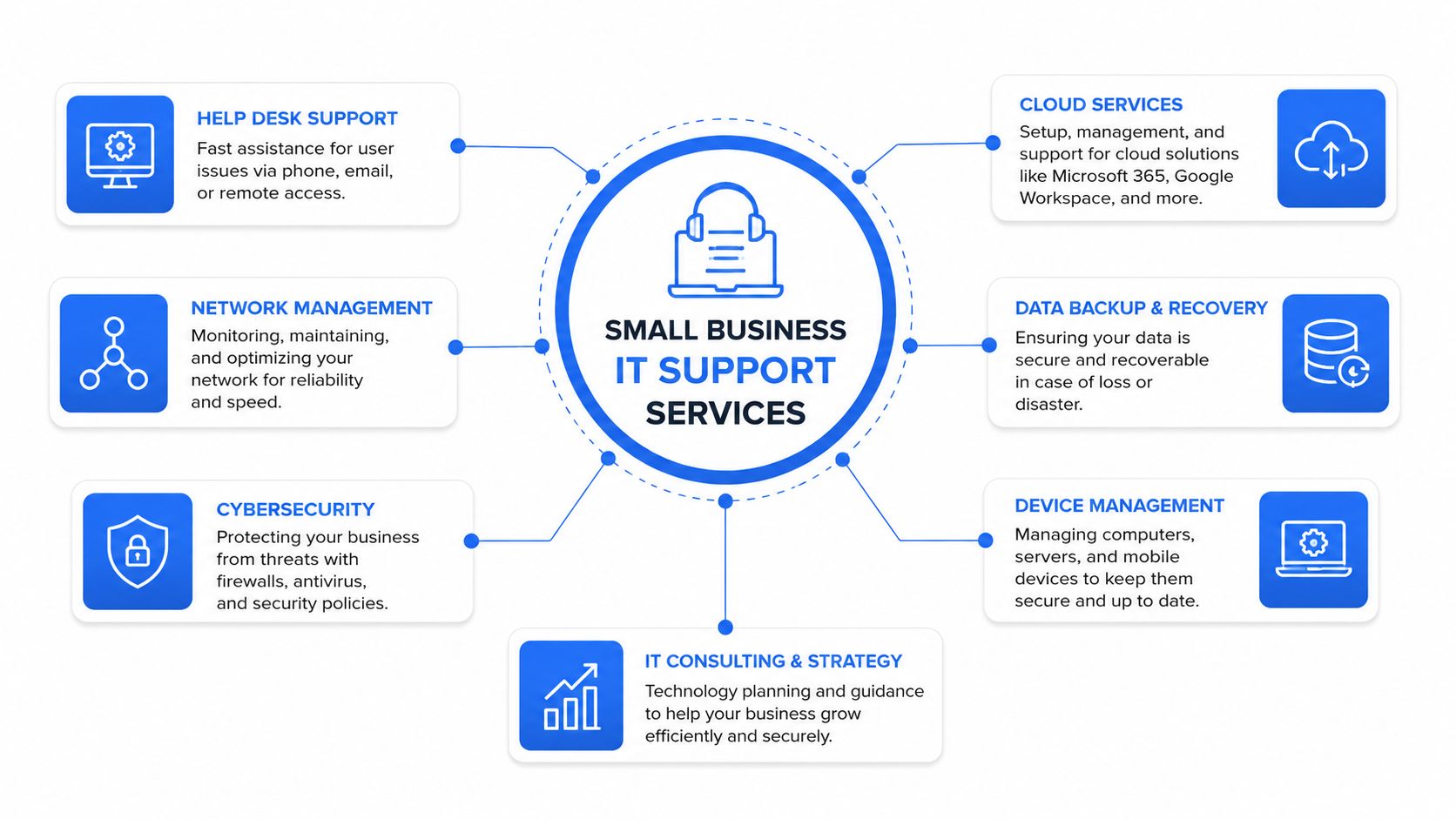
Break-fix engineers respond after failure. Managed providers also monitor systems, apply maintenance and review risks before they interrupt work. For a small firm, that difference is a resilience decision, not merely a choice between invoices.
Why Managed Support Has Become the Default for Small Firms
Break-fix support is attractive because it appears simple. You call when something fails, receive an invoice for the time used and avoid paying for work during quiet periods. The weakness is obvious once you look at the business impact: nobody is necessarily checking the systems between incidents.
The exposure is substantial across smaller organisations. Government data found that 46% of small businesses and 42% of micro businesses experienced at least one cyber breach or attack in the last 12 months, with phishing the most prominent disruptive route, as detailed in the government survey findings. A reactive arrangement may fix the visible symptom while leaving unpatched software, weak identity controls or unmanaged mailboxes in place.
Connectivity creates a second pressure. A UK downtime study found that SMEs experienced an average of 3 to 4 internet failures and nearly 19 hours of downtime each in 2023. It also found that the median time for businesses with employees to start losing money after an internet failure was 6 hours, with estimates of 8.8 million internet failures and 50.5 million hours of disruptive downtime across UK businesses, according to FoxcUbe's UK downtime research.
The practical difference
Managed support generally combines a helpdesk with monitoring, patch management, backup checks, endpoint controls, supplier coordination and scheduled reviews. It doesn't make every fault disappear. It does make responsibility, escalation and maintenance clearer.
| Area | Break-Fix | Managed IT Support |
|---|---|---|
| Fault response | Starts after a user reports a problem | Combines user support with proactive monitoring |
| Maintenance | Often arranged separately | Usually planned and documented |
| Security | May be limited to an agreed incident | Can include patching, endpoint protection, email controls and MFA oversight |
| Budgeting | Costs rise when incidents arrive | A recurring fee creates more predictable planning |
| Accountability | Several suppliers may share responsibility | One provider coordinates the agreed service scope |
| Resilience | Recovery depends on the incident response | Failover, backups and recovery procedures can be reviewed in advance |
The monthly model suits firms that depend on email, online systems, payments, remote access or cloud files to trade. It also suits owners who don't want to become the unofficial IT manager.
A managed contract isn't a promise that technology will never fail. It's a promise that someone is paid to reduce avoidable failure and take control when it happens.
Choose the scope carefully. A low-cost package that excludes Microsoft 365 administration, backup verification, security monitoring or onsite work may leave the most important responsibilities outside the agreement. A smaller, clearly defined managed service is better than a broad package nobody can administer properly.
Pricing Models and SLAs That Suit Small Businesses
There isn't one correct pricing model. The right choice depends on how many users share devices, how often staff work remotely, how critical systems are and whether the provider is responsible for security tooling and connectivity.
| Pricing model | What is usually included | Best-fit profile | Watch-out |
|---|---|---|---|
| Per-device | Support for named laptops, desktops or servers | A small team with stable hardware | Phones, tablets, network devices and new equipment may cost extra |
| Per-user | Support for a user across several approved devices | Professional firms with flexible working | Check whether inactive users, contractors and shared accounts are charged |
| All-inclusive managed | Helpdesk, monitoring and an agreed security and maintenance stack | Firms that need one accountable partner | “All-inclusive” often excludes projects, licences, hardware and after-hours work |
| Pre-paid block hours | A bank of engineering time | A small office with occasional specialist needs | Complex investigation can consume hours quickly, and unused time may expire |
A six-person design studio with varied laptops and occasional project work may prefer per-user support with projects quoted separately. A 25-seat accountancy firm with strict deadlines may value a managed arrangement with defined escalation, backup oversight and priority support. In both cases, read the service schedule rather than relying on the sales description.
What an SLA should say
An SLA should distinguish response time from resolution time. A provider can acknowledge a critical outage quickly without being able to restore it immediately, so the contract should define severity levels, update frequency, escalation, onsite availability and what happens outside standard hours.
Ask whether the fee includes hardware replacement, cloud licences, security software, backup storage, site visits and supplier liaison. If those items are excluded, ask for the actual charging method. For a practical comparison of software subscriptions and automation costs, you can also review Expressify AI's service business AI pricing, while keeping its model separate from your IT support agreement.
Don't accept a worked example containing invented savings or an unexplained total. Instead, ask the provider to price your actual users, devices, locations, required tools and support hours. Then test the contract for auto-renewal, exit fees, data return, minimum terms and price-rise caps.
A useful proposal should show the recurring fee, one-off onboarding work, excluded projects, third-party licences and emergency rates on separate lines. If you can't tell what your next invoice could contain, the pricing model isn't transparent enough.
A Realistic Onboarding Journey From First Call to Steady State
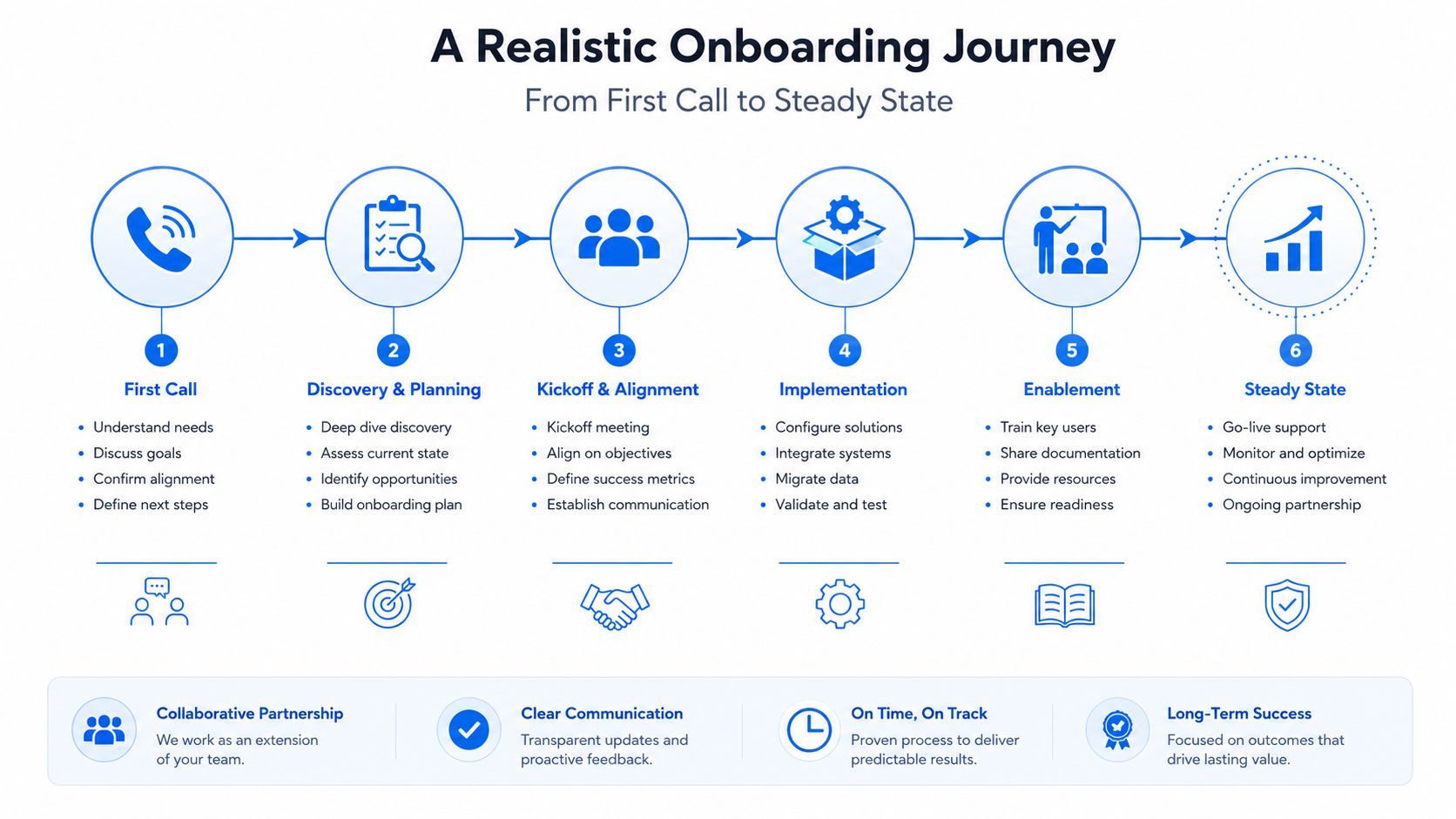
A serious provider won't take control of your environment from a handful of verbal assurances. It starts by discovering how the business operates, what is critical and where the existing documentation is weak.
The first call should establish users, sites, devices, cloud platforms, connectivity, phone systems, suppliers, compliance obligations and known pain points. The audit then checks the estate rather than merely counting laptops. It should identify administrator accounts, unsupported equipment, backup arrangements, security gaps, recurring tickets and dependencies such as line-of-business applications.
The first week
For a 10 to 25 user firm, a sensible transition commonly takes two to four weeks, depending on the number of sites, systems and suppliers involved. That timeline is a planning guide, not a reason to rush the handover.
The first week should produce tangible control:
- Asset inventory: Record devices, owners, operating systems, warranties, network equipment and critical applications.
- Administrative handover: Transfer privileged access through a secure process and remove former supplier access where appropriate.
- Backup verification: Confirm what is backed up, where it is stored, how long it is retained and whether restoration has been tested.
- MFA rollout: Protect administrative and user accounts with multi-factor authentication, prioritising email and remote access.
- Escalation contacts: Agree who can authorise changes, who receives incident updates and which supplier handles each dependency.
A provider that starts charging the full monthly fee before it has an asset register or independently verified backups is moving too quickly. You should know what has been accepted and what remains a project.
The first month
By the end of month one, documentation should be signed off, monitoring alerts should be tuned, users should understand how to raise tickets and the first service review should be scheduled. The provider should also explain unresolved risks in plain English, with an owner and priority for each one.
The onboarding process should leave you with fewer mysteries, not a new collection of passwords and supplier names. This video can help owners visualise the handover stages before the first provider meeting.
Questions Worth Asking Any Prospective IT Support Provider
A provider's sales presentation tells you what it wants to sell. Its answers to operational questions reveal what you'll receive.
Ask about people and accountability
Where is the helpdesk based, and when is it staffed? A weak answer is “we monitor tickets constantly” without clear operating hours or escalation. A strong answer names the support location, coverage window, emergency route and handoff process.
What response and resolution performance do you measure by severity? “We respond quickly” isn't a service level. Ask for the definitions of critical, high, medium and low priority, plus the reporting method. Response is the first acknowledgement. Resolution may require a workaround, a permanent fix or a third-party dependency.
Who handles escalation? If first-line support can't resolve a firewall, cloud identity or connectivity issue, you need to know whether a senior engineer is available or whether the ticket waits.
Ask about security and contracts
What's included in the cyber security baseline? A weak package mentions antivirus and leaves everything else vague. A stronger answer explains endpoint detection, email filtering, MFA, patching, backup verification, alert handling and user training. Ask which tools are bundled and which are charged separately.
Does your own organisation hold Cyber Essentials accreditation? The answer doesn't replace your own risk assessment, but it shows whether the provider takes basic governance seriously. Ask what evidence and processes sit behind the accreditation.
What happens when we leave? Require clear terms for notice, data export, administrator access, documentation, equipment, licences, onboarding fees and price changes. An exit clause protects the business from being trapped by a poor fit.
Ask about London and Essex coverage
What's the expected engineer travel time for our borough or town? A provider that serves London, Chelmsford, Romford, Brentwood or Rayleigh should explain the boundary between remote support and onsite work, including travel charges.
Which local connectivity suppliers and access constraints do you regularly handle? A strong answer will discuss circuit dependencies, building access, landlord coordination and fallback options. A weak answer will promise fast restoration without explaining who controls the underlying line.
Ask for a sample monthly report and a reference from a comparable business. If the provider can't show how it measures ticket performance, recurring faults, security actions and recommendations, it probably won't manage them consistently.
Common Pitfalls and How to Dodge Them
The biggest mistake is buying a bigger stack instead of a better operating model. Premium licences won't help if nobody reviews alerts, applies patches, tests restoration or tells staff what to do after a suspicious email.
The five traps
- Over-buying: Don't pay for advanced tools that your provider won't monitor or explain. Start with the controls that reduce your most likely operational risks.
- Under-buying: A helpdesk without patching, backups or security ownership leaves important work unassigned. Confirm the minimum baseline before comparing monthly fees.
- Delayed security: MFA, mailbox protection, endpoint controls and tested backups belong in the initial plan, not after the first incident.
- Rigid contracts: Avoid long commitments without notice terms, exit assistance and a clear treatment of your data and documentation.
- Untrained users: Technology can't compensate for staff who don't know how to report a suspicious message or verify an unusual payment request.
Government evidence shows the preparedness gap clearly. Only 50% of small businesses had written guidance on who to notify after a cyber incident in 2025/2026, down from 55% the previous year, while external communications plans fell from 29% to 24%, according to the reported survey analysis.
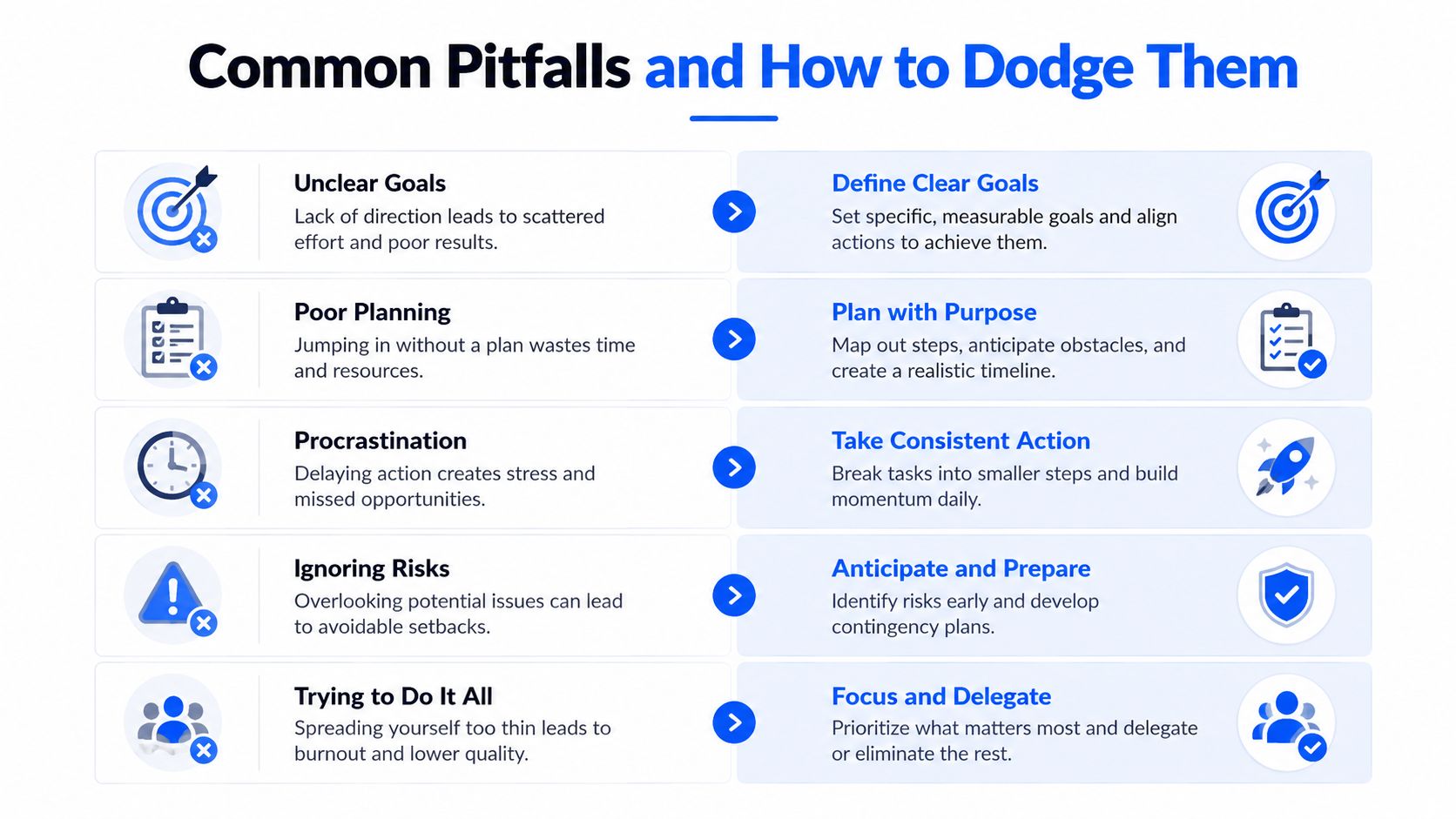
The fix is disciplined prioritisation. Require quarterly reviews, documented scope, ticket metrics, open-risk tracking and an incident playbook. A compact service that people use will protect the business better than an impressive licence list that nobody owns.
Your Next Step Toward Reliable Local IT Support
Start with the business, not the supplier catalogue. Write down the three technology frustrations that consumed the most time or money this quarter, perhaps slow internet, repeat crashes, unresolved tickets, failed backups or anxiety about suspicious emails.
Take that list to two or three providers in London or Essex and ask each one to respond to the same points. A credible first conversation should cover:
- Response commitments: Ask for severity definitions, response targets, update intervals and out-of-hours escalation.
- Local coverage: Confirm onsite support for your borough, town or premises, including travel charges and expected attendance.
- Security baseline: Request a plain-English explanation of MFA, patching, email security, endpoint protection, backups and incident response.
- Transition plan: Ask what happens in the first week, what documentation you'll receive and when steady-state support begins.
- Transparent pricing: Separate recurring support, third-party licences, hardware, projects, emergency work and connectivity charges.
- Evidence of performance: Request a sample monthly report and a reference from a similar organisation.
Don't choose the lowest figure automatically. Choose the provider that asks intelligent questions about payroll, client deadlines, remote access, sensitive information, building access and the consequences of an outage. A quote that arrives without an audit may be quick, but it probably isn't based on your actual environment.
The local angle matters because support isn't only remote ticket handling. London and Essex businesses may need someone to coordinate broadband suppliers, attend a site, troubleshoot Wi-Fi across an awkward building, maintain VoIP or integrate security systems with the office. Local resilience means knowing how your business operates and how quickly practical help can reach it.
Networking2000 offers business IT support, managed infrastructure, connectivity, VoIP, email, networking and security services for organisations across London and Essex, with support available from 6am to 10pm, seven days a week. Visit Networking2000 to discuss your current frustrations, review the support options and arrange a practical first conversation.

