The phone rings just after nine. A user has clicked a dodgy email, nothing obvious has happened on their laptop, and the office keeps moving until someone notices a strange login, a rule in Microsoft 365, or a server behaving like it's got a mind of its own. That's the day threat detection and response stops being a buzzword and becomes the difference between a nuisance and a week of chaos.
In London and Essex, that's not a theoretical problem. The UK Government's Cyber Security Breaches Survey 2024 found 50% of UK businesses reported some kind of cybersecurity breach or attack in the previous 12 months, rising to 70% for medium-sized businesses and 74% for large businesses, with 32% experiencing phishing attacks, so email-based detection has to be treated as a core control, not an optional extra (UK Government Cyber Security Breaches Survey 2024). For a small firm, the hard truth is simple, if you don't see trouble early and act fast, it spreads into downtime, lost trust, and avoidable cleanup.
Table of Contents
- What Threat Detection and Response Means
- The Core Components Every TDR Setup Needs
- EDR, MDR, SIEM and XDR Compared for Small Businesses
- How a Threat Detection and Response Workflow Runs in Practice
- Where Endpoint Tools Stop Seeing the Attack
- Why Manual Response Is the Bottleneck
- Building a 90-Day TDR Plan for Your Business
What Threat Detection and Response Means
A staff member clicks a link, the laptop keeps working, and nobody sees smoke, sparks, or a flashing red warning. That is what makes cyber incidents nasty, they often start invisibly and then show up later as odd logins, strange mail rules, or files being touched at the wrong time.
Threat detection and response is the habit of spotting suspicious behaviour quickly, deciding what matters, and containing it before it spreads. It combines tooling with a routine your business follows every time something looks wrong.
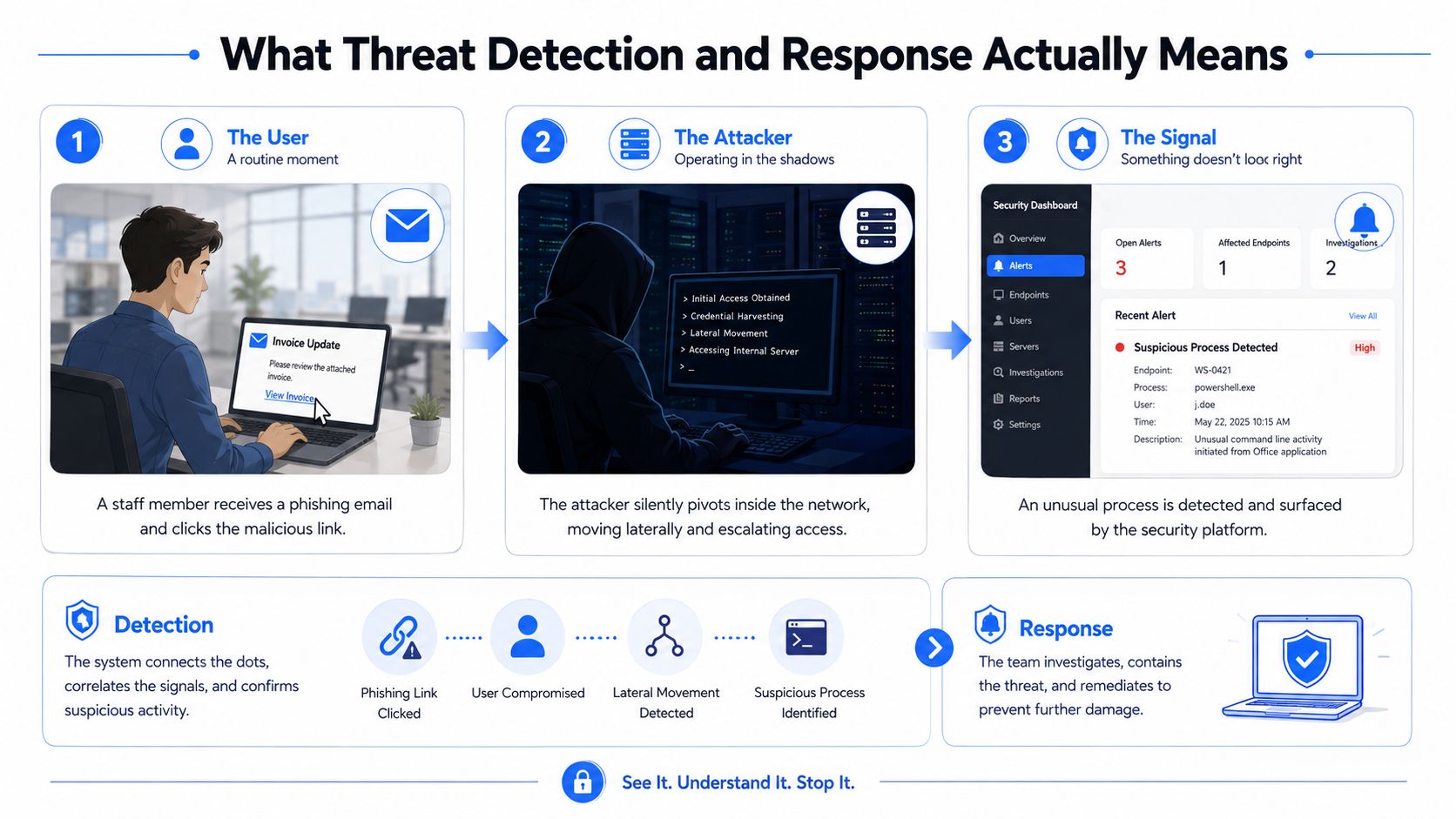
For a London or Essex SMB, this matters because one missed alert can turn into several moving parts very quickly. A phishing click can lead to a stolen login, that login can open Microsoft 365, and from there the attacker may pivot into shared files or finance data. If your team only notices the problem after customers complain or a server starts acting up, you are already paying the price.
A plain-English definition
TDR has two jobs. Detection is the part where you notice something odd, such as an impossible login, a new process on a server, or a mailbox rule you did not authorise. Response is what you do next, isolate, reset, investigate, recover, and then tighten the screws so it does not happen again.
That is the version owners can repeat to staff without getting buried in jargon. It keeps the conversation focused on outcomes, not vendor slogans.
Practical rule: if your team cannot say who watches the alert, who decides it is real, and who pulls the plug, you do not have a response plan, you have hope.
A short glossary you can keep handy
- TDR: Threat Detection and Response, the whole process of noticing and dealing with suspicious activity.
- EDR: Endpoint Detection and Response, agents on laptops, desktops, and servers.
- MDR: Managed Detection and Response, a provider watches detections and helps respond for you.
- SIEM: Security Information and Event Management, the central log and correlation layer.
- XDR: Extended Detection and Response, a platform that tries to join up multiple data sources into one view.
The Core Components Every TDR Setup Needs
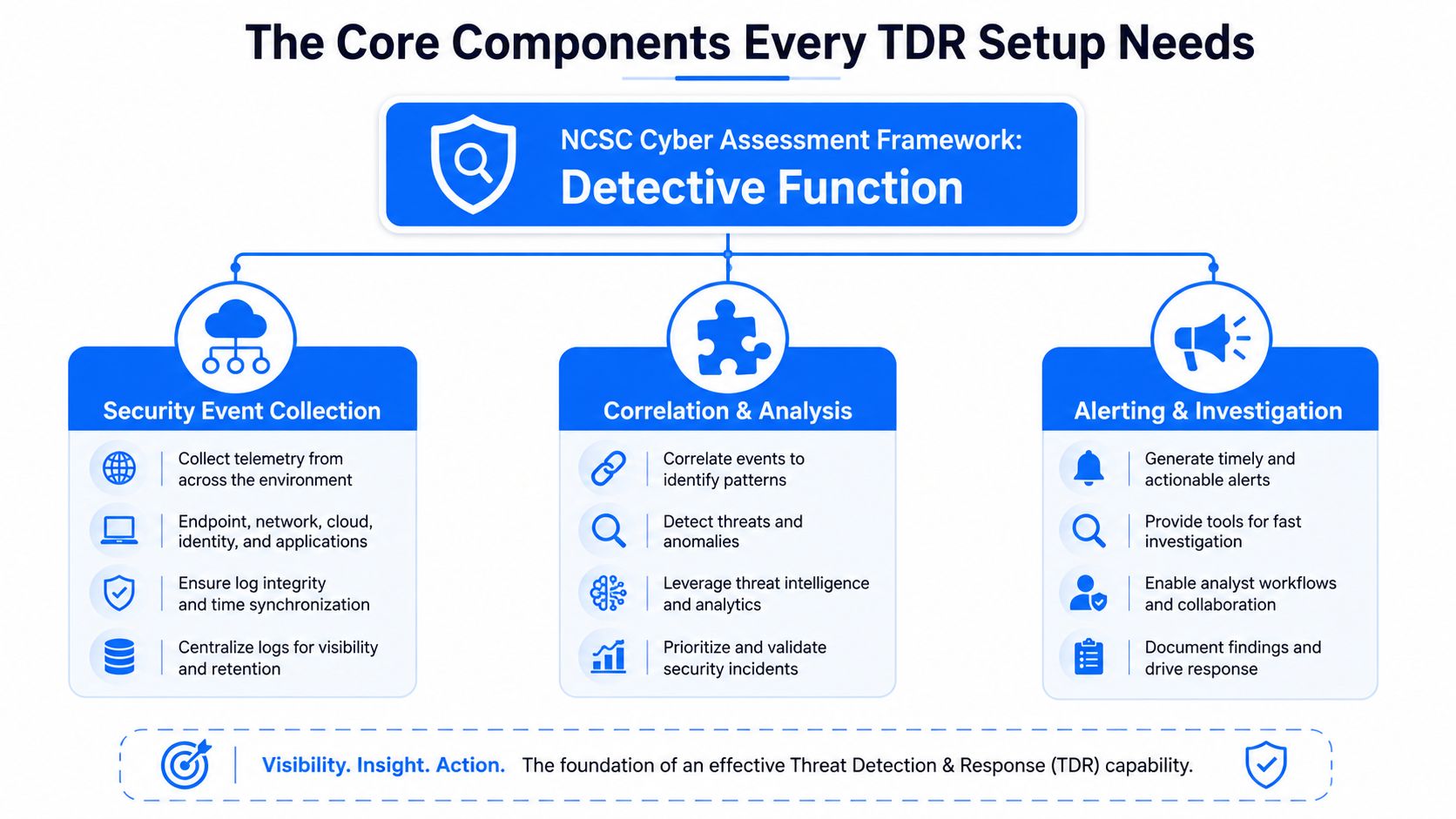
The NCSC's detective framing is the right place to start, because the question isn't whether you own security software, it's whether security events are detected, logged and analysed in a way a human can use. If the logs are scattered, the alerts are noisy, or nobody is triaging them, then the business is just collecting expensive noise.
The five building blocks that matter
The first block is endpoint telemetry, which means the laptop, desktop, and server data that shows processes, file changes, and suspicious behaviour. EDR earns its keep here, because it gives you visibility on the machine itself.
The second block is network visibility. You need to see traffic patterns, not just what's happening on a single device. That matters when an attacker moves sideways between systems or starts beaconing out to something it shouldn't.
The third block is identity and SaaS signals. Logins, token use, mailbox behaviour, and app access all matter now because modern attacks lean on stolen credentials and cloud abuse. If your business lives in Microsoft 365, that activity isn't a side issue, it's front-line detection.
The fourth block is a central place for correlation, usually a SIEM, an MDR platform, or an XDR stack. It is where separate clues become a single investigation instead of a pile of disconnected alarms.
The fifth block is triage. Someone has to decide what's urgent, what's noise, and what needs containment. Without that step, the best detection stack just becomes a busy inbox.
A board-safe summary would read like this, we need telemetry from endpoints, network, identity and cloud services, a central place to correlate it, and a named process for triage and escalation.
Why the analyst still matters
Tools don't contain incidents. People do. A business can have decent collection and still fail if alerts sit untouched until the next morning, or if nobody knows whether to isolate a device, disable an account, or call the owner.
That's why I tell smaller firms to think in terms of detect, then decide, then act. The software helps with the first part. The last two are where most real damage gets prevented.
EDR, MDR, SIEM and XDR Compared for Small Businesses
Too many owners buy acronyms instead of outcomes. That's a mistake, because EDR, MDR, SIEM, and XDR are not interchangeable, and if you treat them that way you'll either overspend or under-cover the hours that matter.
| Option | What it does | Who watches alerts | Typical fit for SMB |
|---|---|---|---|
| EDR | Watches endpoints for suspicious process, file, and device activity | Usually your team, or a partner if you've outsourced monitoring | Good foundation, but weak if nobody has time to review alerts |
| MDR | Adds human monitoring, investigation, and response on top of detection tools | The MDR provider's analysts | Best fit for most smaller firms that need real coverage without hiring a SOC |
| SIEM | Pulls logs together and correlates events across systems | Your team, or a partner if it's managed properly | Useful when you already have the staff and discipline to run it well |
| XDR | Tries to unify endpoint, identity, network, cloud, and email telemetry | Usually a shared model, depending on the provider | Stronger visibility than point tools, but only if someone is actively using it |
The owner's question is simple
Who is watching at 2am on a Tuesday in Wickford, and what happens when a mail rule lands or an account starts behaving strangely? If the answer is “nobody until morning”, then the tool choice isn't the core issue. The coverage gap is.
For most 10 to 75-seat firms in London and Essex, I'd back MDR with solid EDR over a self-run SIEM. A self-run SIEM sounds impressive in a sales meeting, but it needs tuning, rules, log sources, and time, and most small teams don't have that spare capacity. MDR gives you the human layer that smaller businesses need.
My view: buy MDR first, then back it with EDR everywhere. Add SIEM or XDR only if you've already solved monitoring, ownership, and response discipline.
What each option misses
EDR is blind outside the device. SIEM without the right people is just a log warehouse. MDR depends on the quality of the data you feed it, which is why endpoint coverage and identity logs still matter. XDR can help tie pieces together, but it won't rescue a business that hasn't defined who owns containment.
The right buying decision is boring, not flashy. Pay for coverage first, platform second, and optional extras last.
How a Threat Detection and Response Workflow Runs in Practice
A phishing email lands in a Chelmsford sales inbox. The user clicks, reuses a password, and the attacker gets a foothold in Microsoft 365. From there, the account creates a mail rule, data starts moving, and the business only notices when something looks off in the logs.
Eight steps that actually hold up under pressure
- Preparation. The company knows its assets, has MFA on the critical accounts, and has a plain-English incident plan.
- Detection. An alert fires on an odd login, a strange inbox rule, or unusual file access.
- Triage. Someone checks whether this is a false alarm or a real problem, and they do it fast.
- Containment. The account gets disabled, the affected device is isolated, or sessions are revoked.
- Eradication. The attacker's persistence is removed, bad rules are deleted, and the entry point is closed.
- Recovery. Systems come back in a known-good state, with users back on clean credentials and services.
- Post-incident review. The team writes down what happened, what was missed, and what needs tightening.
- Improvement. Alerts, playbooks, and account controls are updated so the same mess is less likely next time.
The shape matters more than the wording. If containment waits for a manager to approve every action, the attacker gets more time. If triage is vague, the team burns time arguing instead of acting.
The best small-business response plans are blunt. They say who can isolate a machine, who can disable a user, who talks to staff, and who checks backups. If those names aren't written down, they'll be argued over during the incident.
For a useful practical reference on the broader response side, the MD TECH TEAM incident response guide is worth reading because it keeps the focus on action, not theory.
Where small teams usually stumble
They stumble on ownership. They also stumble on timing. A sales manager sees a weird email, IT is busy with printers or payroll, and the alert sits there while the attacker keeps going.
That's why response has to be rehearsed. A document in a drawer doesn't isolate a mailbox or reset a password. A tested workflow does.
Where Endpoint Tools Stop Seeing the Attack
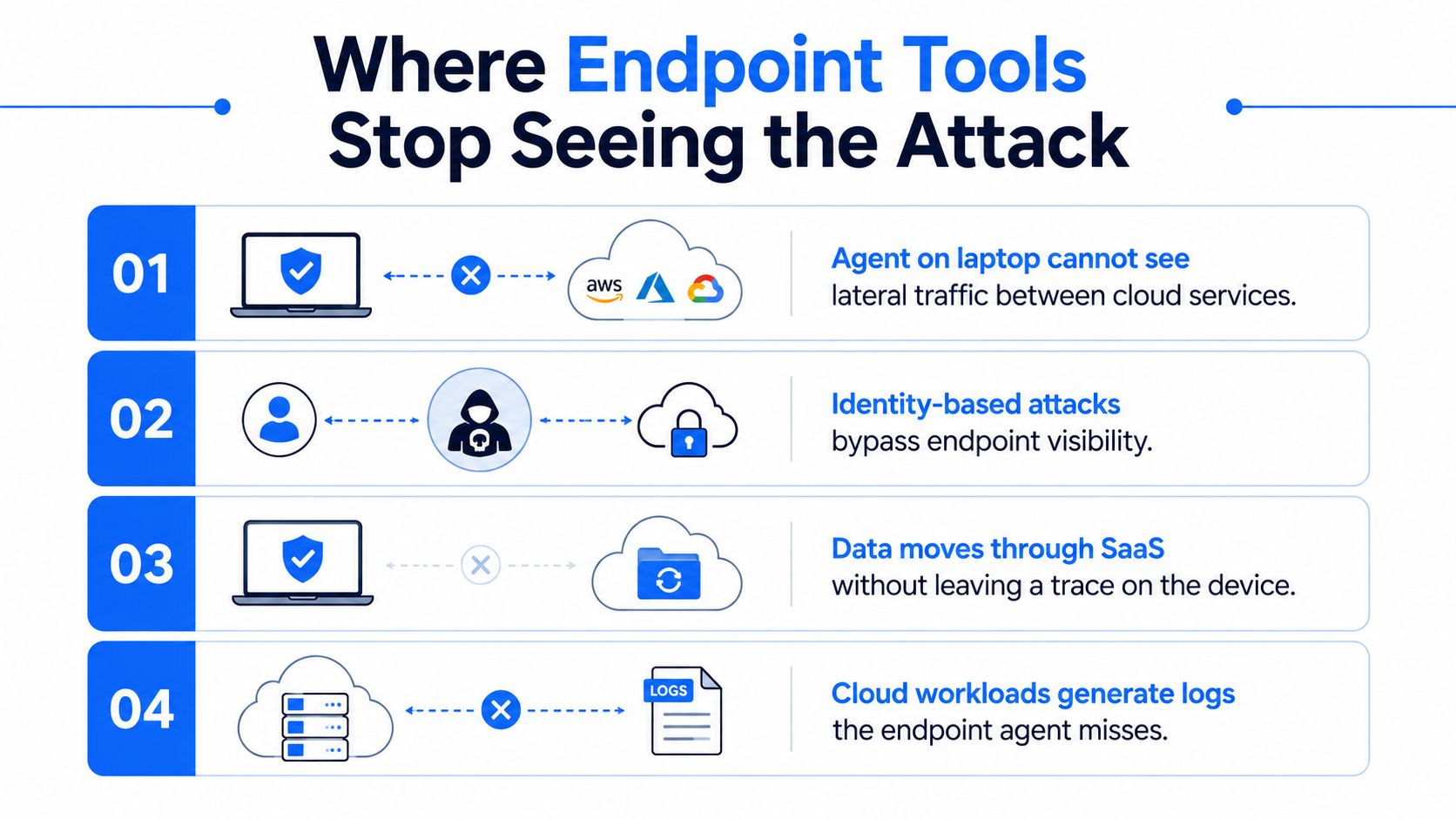
Endpoint tools are useful, but they're not the whole story. If your buying decision stops at the laptop agent, you'll miss the places attackers like to hide, especially when they avoid malware and lean on credentials, cloud access, and quiet lateral movement.
Four blind spots that matter in real life
- Lateral traffic between systems: an agent on one laptop won't tell you what's moving between servers or devices on the network.
- Identity-based attacks: stolen credentials, token reuse, and odd sign-ins can sail past endpoint-only visibility.
- SaaS activity: mailbox rule abuse, file sharing, and customer data movement in cloud apps can leave little to no clue on the device itself.
- Cloud workload logs: cloud hosts and services generate their own evidence, and the endpoint agent doesn't magically collect it all.
That's why practical TDR needs broader telemetry. At minimum, you want endpoint data, identity logs, network flow information, Microsoft 365 or Entra ID activity, and the logs from your key cloud services. If you run line-of-business apps in the cloud, those matter too.
Examples that hit small businesses hard
DNS tunnelling is a good example, because it can look like ordinary traffic unless something is watching the right layer. Mailbox rule abuse is another, because the attacker can divert mail without tripping a laptop agent. Token reuse is the cloud version of a stolen key, it lets the wrong person look legitimate.
If the attack lives in identity, cloud, or the network, a device-only view is already behind.
The smarter move is not to pretend every log must be analysed in-house. It's to make sure the business can collect the right data and hand it to someone who can use it.
Why Manual Response Is the Bottleneck
A lot of SMEs think their problem is detection. It usually isn't. The bottleneck is the person who spots the alert is also fixing printers, onboarding staff, chasing password resets, and dealing with payroll on a Friday afternoon.
The Rapid7 SANS 2025 Detection and Response survey puts that reality in plain sight, with skill gaps at 56% and team coordination at 55% among the top challenges in responding to cyber threats, while the related CSO summary of the same research says many teams spend most of their time on urgent issues, with 26% saying their threat detection and response is anchored by manual processes and 30% reporting blind spots. For a five-person IT function, that is not some edge case, that is Tuesday.
Two ways to fix it
Hire a senior responder and build the muscle in-house. That gives you control, but it costs time, and it is hard to keep going if the team is already stretched. A small London or Essex business also needs to be honest about what it can realistically run out of hours.
Or buy the response hours from a managed partner. For most firms below 75 seats, that is the better move, because the partner brings out-of-hours cover, the playbooks, and the calm head that you probably will not keep on payroll. If you also need extra eyes on the office, a partner that can coordinate with office bug sweep services London is a better fit than a generic support desk that only knows how to close tickets.
Manual response is where small teams fail first. If nobody has time to act on the alert properly, the quality of detection does not matter as much as you would like.
What good outsourced response looks like
It does not mean handing over responsibility and hoping for the best. It means the provider knows your setup, can act on your behalf within agreed boundaries, and can escalate cleanly when the incident crosses a business threshold. That is the difference between a real service and a fancy notification feed.
Building a 90-Day TDR Plan for Your Business
Start with the basics and stop pretending you need the whole security shelf on day one. The fastest way to improve threat detection and response in a London or Essex SMB is to make the environment visible, define who acts, and rehearse the first move before you need it for real.
Days 1 to 30, get the foundations right
- Asset list: write down every laptop, server, and critical cloud service the business depends on.
- Identity hygiene: clean up stale accounts, tighten admin access, and make sure the people who need protection have it.
- MFA: turn it on for email, remote access, and admin accounts first.
- Backups: check they restore, not just that they exist.
- Basic EDR: put an agent on every endpoint and make sure someone sees the alerts.
Days 31 to 60, build detection
- Centralised logs: pull in the key events from identity, email, endpoint, and important cloud apps.
- Alert thresholds: cut the noise so the team sees the things that matter.
- Plain-English incident plan: write down what to do when a suspicious login, phishing click, or malware alert appears.
- Named ownership: decide who isolates devices, who disables accounts, and who tells the customer-facing team.
Days 61 to 90, rehearse response
Run a tabletop exercise with a phishing-to-Microsoft 365 scenario. Then fix the places where the team hesitated, argued, or waited for permission. That's where the weak spots live.
If you need on-site reach across Romford, Hornchurch, Rayleigh, Brentwood and Chelmsford, plus extended cover from 6am to 10pm, choose a provider that can support the way your team works, not just the way a brochure reads. If you're also considering a broader trust check on offices, a service like office bug sweep services London can sit alongside cyber controls when your risk profile justifies it.
The best vendor decision is the one that gives you coverage, clarity, and a fast route to containment. If they can't explain who watches alerts, how they escalate, and how they recover you after an incident, keep looking.
Networking2000 helps London and Essex businesses build practical protection around the systems they use, from support and networking to security and communications. If you want a direct, jargon-free conversation about threat detection and response that fits a small business budget and a real-world team, visit Networking2000 and ask what a sensible setup looks like for your office.

