A lot of small businesses already have an IT asset management problem, even if they wouldn't call it that. It usually shows up as a missing laptop, a licence renewal nobody budgeted for, a former employee still using company software, or a director asking a simple question like, “How many working laptops have we got?” and nobody can answer with confidence.
That gets harder once staff work from home part of the week. One laptop is in Chelmsford, a spare monitor is in Hornchurch, someone bought their own router for a home office, and a VoIP handset was handed over during a rushed setup and never written down anywhere. If you can't see your assets, you can't secure them, support them properly, or make sensible buying decisions.
IT asset management is the practice of knowing what tech you own, who's using it, where it is, what condition it's in, and what should happen next. Done well, it saves money, tightens security, and removes a lot of day-to-day guesswork. It also sits alongside broader practices like corporate IT device management when a business wants more control over laptops and other user devices from the moment they're issued.
Table of Contents
- Why IT Asset Management Is a Business Essential
- Understanding the Complete IT Asset Lifecycle
- Building Your Simple ITAM Policy and Governance
- Practical ITAM Processes for Small Businesses
- ITAM for Security and UK Compliance
- Measuring the ROI of Your IT Asset Management
- How Networking2000 Manages IT Assets for Local Businesses
Why IT Asset Management Is a Business Essential
A familiar example. A member of staff leaves, and everyone assumes their old laptop was wiped and put back into stock. Months later, finance is still paying for software tied to that user, the laptop can't be located, and nobody is fully sure what data was stored on it. That's not unusual in a small firm. It's what happens when equipment is handled informally.
IT asset management gives you a working record of your technology estate. Hardware, software, licences, mobile devices, network kit, and even the equipment sitting in someone's spare room all belong on that record. It's the difference between running your IT by memory and running it with control.
The wider UK market shows how seriously asset management is now being treated. The broader asset management market in the UK, which includes IT asset management, was valued at USD 12.22 trillion in 2025 and is projected to reach USD 26.08 trillion by 2031, according to UK asset management industry analysis by Mordor Intelligence. For a small business owner, the message is straightforward. This isn't admin for admin's sake. It's becoming a core business discipline.
What ITAM looks like in plain English
Think of it as a proper stock system for your technology.
You wouldn't run a warehouse without knowing what's on the shelves. IT is no different. You need to know:
- What you own: Laptops, desktops, screens, firewalls, switches, phones, printers, software subscriptions and licences.
- Who has it: Named user, team, site, or home worker.
- What state it's in: In use, spare, under repair, due for replacement, or retired.
- What risk it carries: Data access, patching status, warranty position, and disposal needs.
Practical rule: If a device or licence costs money, stores company data, or connects to your systems, track it.
Why small firms feel the pain first
Large organisations usually have dedicated procurement teams, security staff, and formal joiner-leaver processes. Smaller businesses often rely on one office manager, one outsourced IT provider, or whoever had time to order the laptop last time. That works until the business grows, staff spread out, and nobody has one clean list.
When IT asset management is missing, costs creep in. Duplicate purchases happen. Subscriptions renew unnecessarily. Devices stay in service long after they've become unreliable. Support gets slower because the engineer first has to work out what's on site, or off site.
The upside is that small businesses can fix this faster than they think. You don't need a huge enterprise programme. You need a sensible process, ownership, and records that people reliably maintain.
Understanding the Complete IT Asset Lifecycle
Small businesses usually feel the cost of poor ITAM halfway through a device's life, not at the point of purchase. The laptop was bought in a rush, posted to a home worker, used for two years, then nobody is quite sure who still has it, what software is on it, or whether it was ever removed properly when the user left. That is how avoidable cost and security risk build up in UK SMEs with hybrid teams.
Good IT asset management follows the full life of each asset. From approval and purchase through to secure wiping and disposal, every stage needs a simple record and a clear owner.
A company car provides a useful comparison
You would not buy a pool car, hand over the keys, and then stop tracking who drives it, when it needs servicing, or when it should be replaced. Laptops, phones, firewalls, licences, and home office kit need the same level of control, especially when they are spread between the office, staff homes, and remote users you do not see every day.
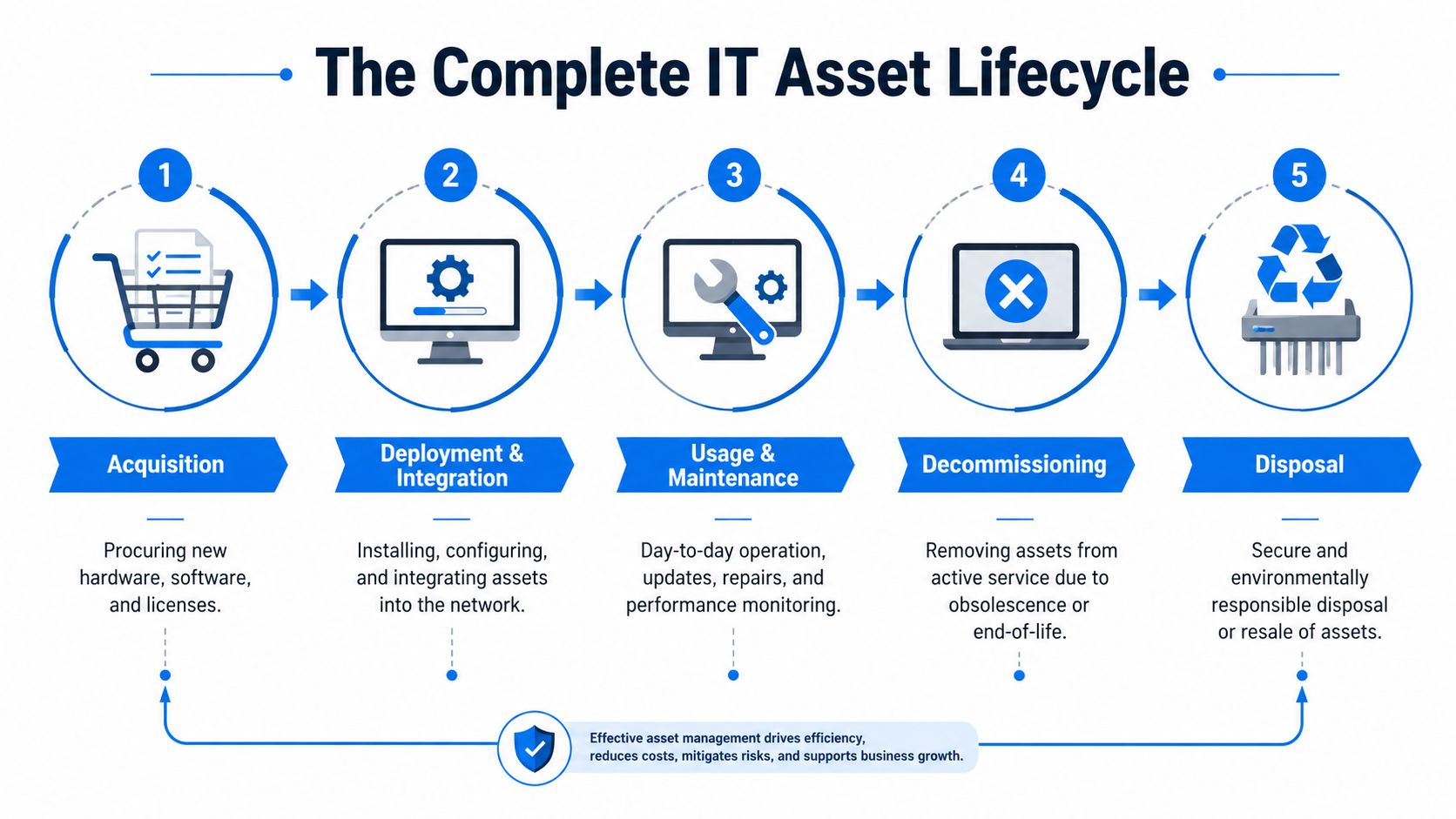
Here is the lifecycle in practical terms:
Acquisition
This starts before anyone places an order. Decide what role the device is for, what software it needs to run, how long it should last, and what support is included. Buying the cheapest option often looks sensible on paper, but if the laptop struggles with Microsoft 365, line-of-business software, or video calls from home, staff lose time every day and replacements come sooner.Deployment and integration
A new asset should be set up properly before it reaches the user. That means configuration, security settings, patching, asset tagging, user assignment, and a record of what was issued. In hybrid businesses, this stage often breaks down because devices are couriered directly to staff and the admin trail gets skipped. That is also where Shadow IT starts creeping in, with users filling gaps themselves by buying their own accessories, signing up for software, or using personal devices to get work done.Usage and maintenance
This is the longest stage, and usually the one with the most drift. People move roles, software changes, warranties expire, batteries fail, and spare screens or phones get swapped informally. A laptop may still be in daily use while the extra monitor, docking station, headset, or mobile linked to that employee has disappeared from the record. If no one updates the asset register, support gets slower and budgeting gets less accurate.Decommissioning
At some point an asset stops being suitable for front-line use. It may still power on, but that does not mean it is fit for a director travelling with client data or a remote employee relying on it all day. Decommissioning should happen because of age, performance, support status, or risk, not only after repeated failures and frustration.Disposal or recovery
End of life is where many firms lose control. Old kit gets left in cupboards, passed around informally, or sent for recycling without a clear wipe record. A proper process includes data erasure, removal from the asset register, confirmation of disposal, and a decision on whether the device has resale or refurbishment value.
Where small businesses usually lose money
The biggest waste is rarely the initial purchase. It is the messy middle and the weak ending.
I see it in smaller firms all the time. Someone leaves, their laptop sits at home for weeks, the Microsoft 365 licence keeps renewing, and a replacement device is ordered because nobody is sure what stock is available. Then an old machine turns up later in a drawer with company data still on it. That is not unusual. It is what happens when lifecycle steps rely on memory instead of process.
UK businesses can recover up to 40% of an asset's residual value through certified refurbishment and remarketing programmes, according to Zones on transforming IT asset management. That matters when you are replacing a batch of laptops and trying to control spend.
A simple comparison shows where the difference is made:
| Stage | What doesn't work | What works |
|---|---|---|
| Buying | Different models ordered ad hoc | Standard device list for each role |
| Setup | Devices handed out with no record | Asset tagged, assigned, secured, documented |
| Support | Repairs handled only when users complain | Maintenance logged and replacement planned |
| End of life | Old kit left in cupboards | Wiped, recorded, recovered or disposed of properly |
Old kit left in a cupboard is still a risk until someone can show it was wiped and retired.
For a small business, the aim is simple. Buy deliberately, issue properly, maintain consistently, and retire securely. Get those four habits right and ITAM becomes easier to run, easier to budget for, and much safer for a hybrid team.
Building Your Simple ITAM Policy and Governance
A lot of owners hear “policy” and think of long documents nobody reads. That isn't what's needed. For a small business, a useful IT asset management policy can fit on a few pages. The point isn't bureaucracy. The point is making sure everyone handles business technology the same way.
This matters even more with remote and hybrid work. With 65% of UK businesses operating a hybrid workforce, assets are now spread out and a shadow inventory gap appears that standard discovery tools can miss, according to UK IT department asset management best practices from GSDC Facility. In plain English, some of your IT now sits in kitchens, spare rooms, and home offices, not where your business can easily see it.
What your policy actually needs
A practical policy should answer a few basic questions.
Who owns the asset record
Someone needs to be responsible for keeping the register accurate. In a small firm, that may be the office manager, operations lead, or outsourced IT partner. If it belongs to everyone, it usually belongs to no one.How equipment is issued
Staff should know what happens when they need a laptop, phone, screen, or software access. The process should include approval, setup, asset recording, and user sign-off.What staff can and can't do
Can employees install their own software? Can they use personal devices for work? Can they take routers, monitors, or VoIP handsets home without telling anyone? If you don't define the rule, people make one up.What happens when roles change or staff leave
Returns, account removal, licence changes, and data handling should all be written down as one process.
How to stop shadow IT from spreading
Shadow IT in small firms rarely starts with bad intentions. It starts with speed. Someone needs a scanner app, a home Wi-Fi extender, a cloud storage account, or a spare laptop “just for now”. Months later, that temporary fix becomes part of the business.
That's where policy helps. It gives staff a simple path to follow that's easier than going around the process.
A good policy for hybrid teams should include:
- Home asset rules: Company equipment used off site must still be recorded by serial number, assigned user, and location type.
- Change reporting: Staff must tell the business when equipment is swapped, lost, damaged, or no longer needed.
- Software approval: New apps and subscriptions should go through one approval route before they touch company data.
- Return procedures: Equipment return shouldn't depend on memory. It should be part of leaving, role change, and device refresh.
Common mistake: businesses write rules for the office but ignore the home setup. That's exactly where unmanaged kit tends to sit.
It also helps to separate “must do” from “nice to have”. A small team won't maintain a policy full of legal language and edge cases. They will follow a short document that tells them how to request equipment, how to look after it, and what to do when something changes.
Governance sounds grander than it is. In a small business, it really means this: one list, one set of rules, one clear owner, and no guessing.
Practical ITAM Processes for Small Businesses
A laptop goes missing after a staff member leaves. Nobody is sure whether it was returned, wiped, or still has access to company files. For a small business with a few people in the office and the rest working from home, that is not unusual. It is what poor ITAM looks like in real life.
Good process fixes that. It gives you a repeatable way to buy, assign, support, recover, and retire assets without relying on memory or one helpful person in the office.
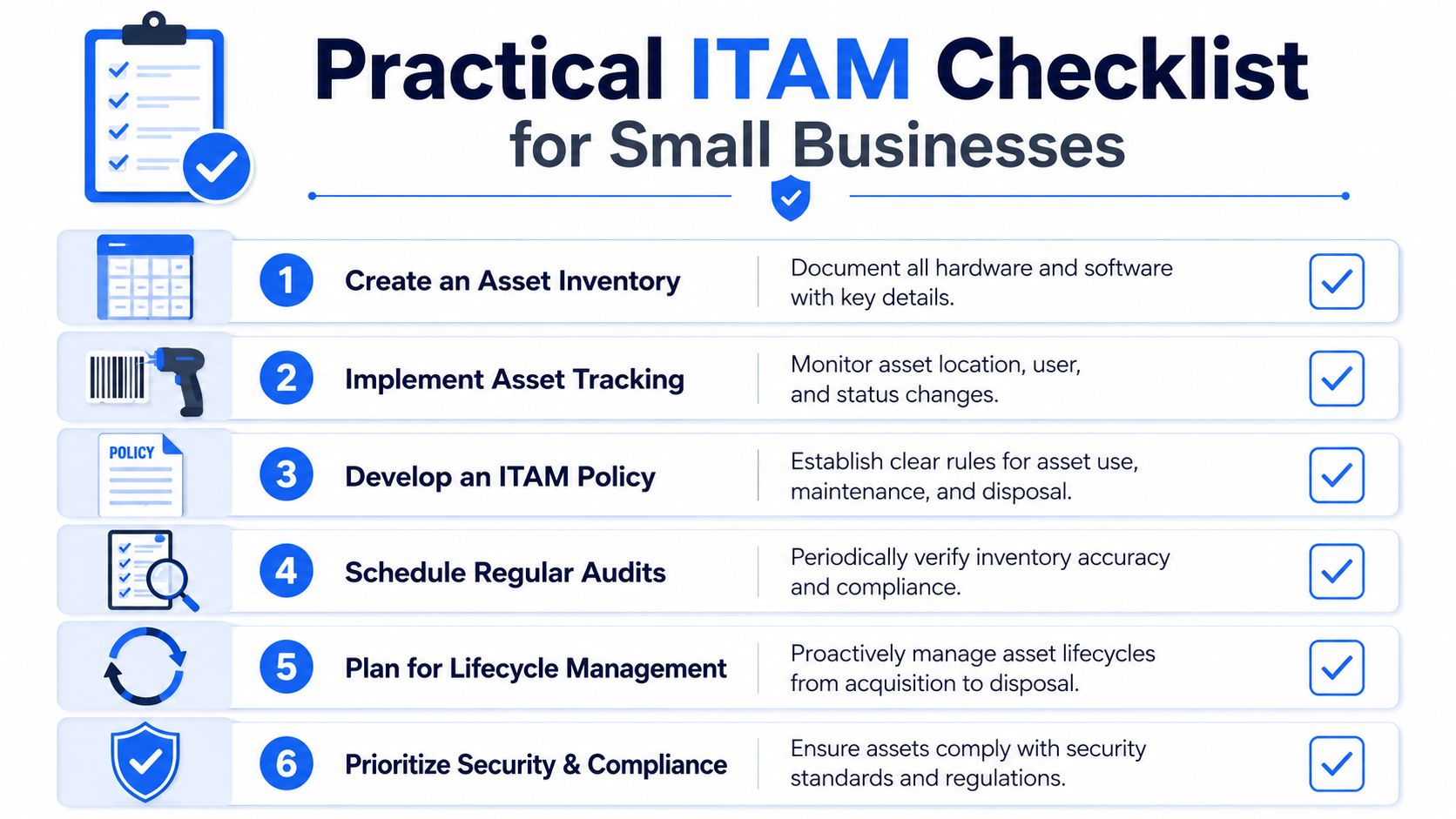
Start with one reliable asset register
The register is the working record your business comes back to every time something changes. For a small team, Excel or Microsoft Lists can do the job perfectly well if someone owns it and keeps it up to date.
Every asset needs one clear record. No duplicates. No separate spreadsheet for laptops, another for mobiles, and a third one in accounts for software renewals. That is how gaps appear, especially with hybrid staff and home-based kit.
At minimum, track:
| Asset type | Details worth recording |
|---|---|
| Hardware | Make, model, serial number, assigned user, location, purchase date, warranty status |
| Software | Product name, licence type, assigned user or device, renewal date, owner |
| Network kit | Device role, site or home location, linked user or team, support details |
| Mobile and peripherals | Assigned user, status, accessories issued, return state |
The register only helps if it is tied to real moments in the business:
- Goods received: Add the asset before it is handed out.
- User changes: Update the assigned person and location on the same day.
- Repairs and swaps: Record what went away, what replaced it, and where the old item is.
- Leavers and returns: Check equipment back in, confirm condition, and update status straight away.
- Retirement: Mark assets as disposed, recycled, or held as spare, with the date.
That last point matters more than people think. I often see small firms keep retired kit on the list as if it is still live, then wonder why the numbers never match what is in the cupboard.
Build process around joins, movers, leavers, and refresh
If you want ITAM to stay under control, tie it to the events that already happen. New starter. Role change. Broken device. Contract renewal. Staff exit. Those are the points where assets go missing or records drift.
For UK SMEs, a simple joins, movers, leavers, and refresh routine does most of the heavy lifting.
For example, when a new starter joins remotely, the checklist should cover more than sending a laptop. Record the serial number, charger, dock, monitor, licence allocations, delivery address, and who approved the setup. If that person leaves nine months later, you have a clear list of what should come back. You also have a better chance of spotting the extra app subscription they bought themselves on a company card.
That is where shadow IT starts to show up. Not in theory. In duplicate file-sharing tools, unapproved messaging apps, and software nobody remembers buying until the renewal email lands.
Treat software like an asset, not an afterthought
Small businesses usually notice missing hardware first because you can see the cost. Software slips through because it is spread across inboxes, bank statements, and admin portals.
That makes software one of the easiest places to waste money.
Keep these checks simple and regular:
- Who owns the subscription: One named person should approve and review it.
- Who uses it: Match licences to real users or devices.
- When it renews: Avoid annual renewals no one sees coming.
- Whether it overlaps with something else: Two tools doing the same job is common in growing teams.
- What happens when someone leaves: Remove access and recover the licence quickly.
This short explainer is useful if you want a quick overview before building your own process:
A practical review once a month is usually enough for a small firm. Compare your active staff list against software users, card payments, and admin consoles. You will often find old accounts, duplicate tools, and trial services that turned into paid subscriptions.
Use automation where it saves time
Tools help once the routine is clear. Used too early, they just give you another screen to ignore.
For most SMEs, the best return comes from a few focused tools rather than a large ITAM platform. A service desk can tie devices to tickets and users. Endpoint management can show patching and let you lock or wipe a lost laptop. Discovery tools can spot devices or software that appear on the network without going through your process. That is particularly useful for hybrid teams, where home routers, personal printers, and unmanaged devices blur the line between business and personal IT.
Useful categories include:
- Asset registers and service desks: For linking devices to users, tickets, and lifecycle events.
- Endpoint management tools: For updates, compliance status, and remote actions.
- Discovery tools: For spotting devices and software that appear on the network but not in your records.
- Procurement and finance links: For matching purchases to actual deployed assets.
Use the least amount of tooling that gives you control. That is the trade-off. More features sound good, but if nobody updates the system or checks the alerts, the process still fails.
The best ITAM process is the one your team still follows six months later. Simple, owned, and maintained beats clever and ignored.
ITAM for Security and UK Compliance
Security teams always come back to the same question first. What have we got?
If you don't know which laptops, phones, firewalls, switches, software installations, and home-working devices exist, you can't patch them properly, protect the data on them, or prove to anyone that they're under control. That's why IT asset management is not just an admin function. It's part of your security baseline.
Why security teams start with the asset list
The UK's National Cyber Security Centre says asset information must be collected at or before first use, and warns that poor records create inconsistencies that can lead to unpatched vulnerabilities. You can read that directly in the NCSC asset management guidance. For a small business, that means the device should be recorded before it disappears into daily use.
That one rule changes a lot. If a laptop is recorded before use, you can link it to a person, apply your setup standard, check patching, and know where to start if something goes wrong. If it isn't recorded, it becomes invisible until there's a problem.
A common weak point is the home setup. The business may know about the laptop, but not the extra screen, printer, router, or phone that supports the user. Those assets may hold or expose business information even though they never entered the official inventory.
What UK compliance expects in practice
Compliance is where many businesses realise their records aren't strong enough.
For UK GDPR and related data protection obligations, you need to know where data lives and which assets can access it. If a device goes missing and nobody can confirm what was on it, who used it, or whether it was properly secured, the problem gets harder immediately. The same applies when old hardware is retired without good records of disposal.
A sound compliance routine usually includes:
- Registration before use: New hardware and software are entered into the asset system before staff begin using them.
- Classification: Assets are tagged according to the sensitivity of the information they hold or access.
- Change control: Significant moves, swaps, and disposals are logged.
- Multi-source checking: Inventory isn't trusted blindly. It's checked against procurement, support, and technical discovery data.
That last point matters. One spreadsheet alone isn't enough if it's never tested against reality.
A missing asset record is never “just paperwork” if that asset can access customer data.
It's also worth remembering that software audits and security audits often expose the same weakness. Poor records. If your licence list is incomplete and your hardware list is patchy, you end up dealing with both commercial risk and technical risk at the same time.
For small firms with hybrid staff, the practical answer is consistent record keeping backed by periodic checks. Not because auditors like neat paperwork, but because accurate records make it much easier to answer difficult questions quickly when something goes wrong.
Measuring the ROI of Your IT Asset Management
Most small businesses don't need a long business case for IT asset management. They need proof that the work saves money, reduces hassle, and prevents avoidable mess. The return usually comes from tighter purchasing, fewer wasted licences, better redeployment of equipment, and lower compliance exposure.
The easiest mistake is trying to measure everything. It's better to track a small set of numbers that link directly to cost and control.
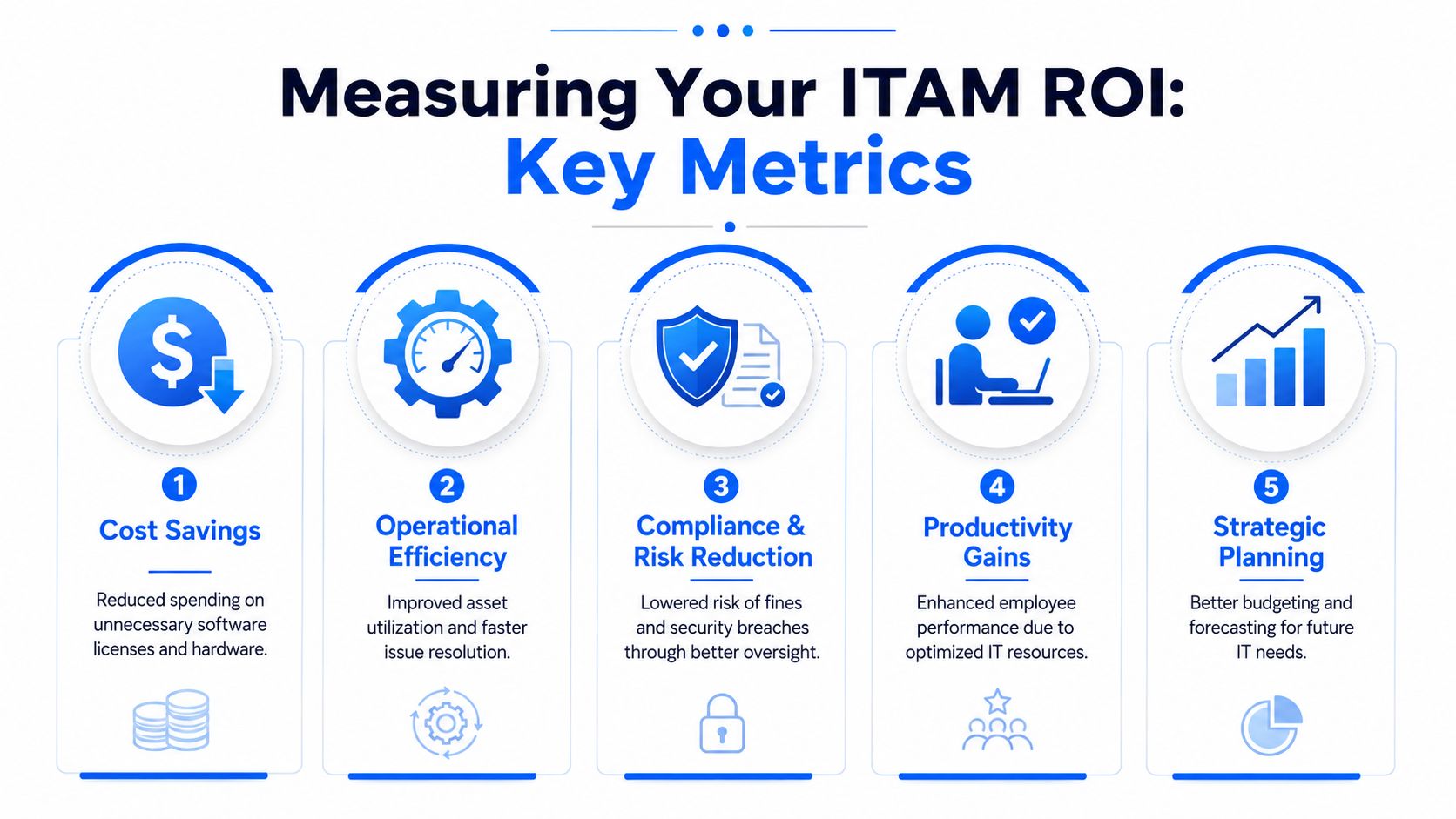
What to measure month to month
These indicators are useful in a small firm because they're practical and visible:
- Asset accuracy: Compare your register against what users and sites have.
- Unused software licences: Count paid licences with no active business need.
- Redeployed hardware: Track devices reused internally instead of replaced.
- Time to onboard and offboard: Measure how smoothly equipment and access are issued or recovered.
- Retired asset closure: Check whether decommissioned items have wipe and disposal records.
For Microsoft 365 in particular, it's worth reviewing user assignments carefully to avoid M365 licensing pitfalls before renewals stack up into unnecessary spend.
Where the return actually comes from
Some ROI is direct and visible. You find five licences nobody needs and stop renewing them. You redeploy a spare laptop instead of buying a new one for a temporary starter. You stop ordering duplicate accessories because you can see what's already in stock.
Some ROI comes from avoiding waste and risk.
Benchmark data in UK best practice guidance shows that routine self-audits reducing non-compliant assets by 40% correlate with 30% lower software licence waste costs, according to the ICO Data Protection Audit Framework asset management toolkit. That's one of the clearest examples of ITAM paying for itself through better housekeeping.
A short scorecard can help:
| KPI | Why it matters | Good sign |
|---|---|---|
| Inventory accuracy | You can trust the data | Fewer surprises during support or audits |
| Licence usage | You're not paying for dead seats | Renewals are based on real need |
| Asset recovery | Leavers return kit properly | Fewer missing devices |
| Disposal records | Risk closes cleanly | Retired kit doesn't linger in cupboards |
Key takeaway: The value of ITAM isn't only what you save on purchases. It's what you stop leaking through neglect.
The strongest ROI usually shows up after a few months of discipline rather than one dramatic moment. Cleaner records lead to better buying. Better buying leads to less waste. Less waste creates room in the budget for the upgrades that deliver value.
How Networking2000 Manages IT Assets for Local Businesses
For many businesses in Essex and London, the problem isn't understanding IT asset management. It's finding the time to do it properly while still running the company.
That's where hands-on support makes the difference. A local IT partner can turn a loose collection of laptops, phones, software renewals, network kit, and home-working equipment into a managed estate with proper records and workable routines.
What works for local businesses is usually practical rather than complicated. One accurate register. Standard setup for new devices. Clear joiner, mover, and leaver processes. Regular checks on licences and hardware. Secure retirement when equipment reaches the end of useful life.
That local support matters even more with hybrid teams. A business in Romford might have office equipment on site, laptops in Brentwood, home routers in Rayleigh, and a director working between London and Essex. Managing that properly takes more than a spreadsheet someone updates when they remember.
A solid managed approach usually includes:
- Asset discovery and documentation: Building a clean inventory of hardware, software, and network devices.
- Lifecycle handling: Supporting procurement, setup, maintenance, replacement planning, and retirement.
- Licence and user reviews: Checking what's assigned, what's still needed, and what should be removed.
- Hybrid team support: Keeping track of devices used away from the main office.
- Secure offboarding and disposal: Making sure returned or retired assets are processed properly.
A key benefit is peace of mind. When an owner asks what equipment the business has, where it is, and whether it's secure, there's an answer. When someone leaves, the process is already in place. When a refresh is due, decisions are based on records rather than guesswork.
If your business wants better control of laptops, software, phones, and home-working equipment, Networking2000 can help you put proper IT asset management in place without overcomplicating it. For businesses across Essex and London, that means clearer records, fewer surprises, stronger security, and support that's practical from day one.

