You're probably dealing with this already, even if you haven't labelled it “network security”. Staff are on the Wi-Fi. Someone works from home on Fridays. The card machine shares a connection with the office network. A director checks email on a phone. Files live in Microsoft 365 or a server cupboard that hasn't had much attention in years. Meanwhile, every cyber story in the news makes it sound as if attackers only go after banks and giant retailers, right up until a small business in Essex gets hit by a phishing email and loses a day of trading.
That's where most owners get stuck. The advice online is either too technical or too dramatic. You don't need another scare story. You need a workable plan that fits a real small business, with a real budget, run by people who have jobs to do.
Good network security for small business isn't about buying every tool on the market. It's about putting the right controls in the right places, so one bad click or one badly configured router doesn't turn into downtime, lost data, or an awkward phone call to customers. If you're in London or Essex, that usually means protecting email first, locking down Wi-Fi, separating critical systems, and realistically assessing what you can manage in-house.
Table of Contents
- Your Practical Guide to Small Business Network Security
- What Is Network Security for a Small Business
- Top Cyber Threats Facing UK SMEs in 2026
- Essential Technical Controls to Implement Now
- Building Your Human Firewall and Security Policies
- A Phased Network Security Plan for Your Budget
- DIY vs Managed Security When to Call the Experts
Your Practical Guide to Small Business Network Security
A lot of owners in places like Romford, Brentwood, Chelmsford and Rayleigh end up in the same position. The business has grown bit by bit, the tech has grown with it, and now there's a mixture of broadband kit, laptops, cloud apps, a printer nobody wants to touch, and Wi-Fi that “mostly works”. It all feels manageable until something odd happens. A fake invoice lands in email. A router still has the default admin login. A staff member connects a personal device to the same network used for business files.
That doesn't mean the business is reckless. It usually means security has grown reactively instead of deliberately.
The practical answer is to treat your network the same way you'd treat your premises. You wouldn't leave the front door open, share alarm codes with everyone, and let visitors wander through the stock room. The digital version is no different. You decide what matters, who gets access, and what happens if something goes wrong.
Practical rule: Small business security works best when it's boring, repeatable, and easy for staff to follow.
For most SMEs, the aim isn't perfection. It's resilience. You want to stop the obvious attacks, limit damage if something gets through, and recover without chaos. That means focusing on the controls that pull their weight, avoiding expensive complexity for the sake of it, and recognising when local expert help will save time and mistakes.
What Is Network Security for a Small Business
Network security for small business is the set of protections that keeps your systems, devices, data and internet connection safe enough to run the company properly. That includes the office Wi-Fi, laptops, phones, cloud accounts, firewalls, printers, remote access, and the rules around who can use what.
The easiest way to think about it is as your digital office protection. If you run a shop, office, surgery, warehouse or studio, you already understand layered security in the physical world. You lock the front door. You decide who has keys. You keep valuable items in safer places. You use alarms and cameras where needed. Digital security follows the same logic.
The physical office analogy works
A firewall is your front door plus a receptionist. It decides what traffic is allowed in and out.
Your Wi-Fi security is the equivalent of locking the windows and checking who enters the building after hours.
User accounts and permissions are your keys, fobs and staff access lists. Not everyone should be able to reach payroll, customer records, or backups.
Backups are your spare stock and duplicate records stored safely elsewhere. They matter most on the day you wish you didn't need them.
What good protection looks like
In a small business, good security usually looks quiet. Staff sign in without fuss. Guest Wi-Fi is separate from business devices. Remote access uses multi-factor authentication. Email filtering catches obvious rubbish before it lands in inboxes. Updates happen regularly instead of being postponed for months.
That's more useful than chasing buzzwords.
Network security isn't one product. It's a set of sensible controls working together.
The goal is continuity
Owners often hear security discussed in technical terms, but the business question is simpler. Can you still trade if someone clicks the wrong link, a laptop is stolen, or a password is exposed?
That's why the core ideas matter:
- Confidentiality means the right people see the right data.
- Integrity means files, records and systems aren't changed improperly.
- Availability means staff can work when they need to.
If your network supports those three things, it's doing its job.
Top Cyber Threats Facing UK SMEs in 2026
The threat picture for small firms in the UK is no longer theoretical. In 2025, 42% of small businesses in the UK identified a cyber breach, phishing was involved in 93% of those cases, and the average direct cost reached £1,970 according to Heimdal's summary of UK cyber security statistics. That cost figure doesn't capture the distraction, delayed orders, damaged trust, or lost staff time that usually follows.
A café in Shoreditch, an accountancy practice in Hornchurch, and a retailer in Rayleigh don't look like the same business. To an attacker, though, they often share the same weaknesses. Busy staff. Shared inboxes. Older routers. One flat network. Password habits that aren't ideal.
Phishing is still the front door problem
Phishing remains the easiest way into a small business because it targets people, not just hardware. One email that looks like a supplier, courier, accountant or Microsoft alert can start the whole chain. The click leads to a fake login page, a malicious attachment, or a payment request that looks genuine enough to slip through.
In London and Essex, where small firms often rely heavily on email for quoting, invoicing, bookings and approvals, that's a serious operational risk. The damage isn't limited to one mailbox. Once an attacker gets into a compromised account, they can impersonate staff, monitor conversations, and use trust against you.
If your business also relies on outbound email for orders, updates or marketing, deliverability problems can muddy the water further. A useful background read on dealing with blacklisted email issues helps explain why email reputation matters when you're trying to separate genuine communication problems from malicious activity.
Ransomware and knock-on disruption
Ransomware gets attention because it stops work cold. A local consultancy can lose access to files. A small warehouse can't process orders properly. A care provider may struggle to reach records quickly. Even when the initial compromise starts with email, the actual pain comes later when systems and shared data become unavailable.
The most important point for SMEs is this: ransomware doesn't need a dramatic Hollywood-style breach. It often starts with a weak password, exposed remote access, or a staff member opening something they shouldn't.
A short overview for business owners is worth watching here:
Weak email reputation creates extra risk
Some problems don't begin as direct attacks but still make the environment less safe. If your domain has poor sending hygiene, messages can be delayed, flagged, or distrusted. That creates confusion for staff and customers, which attackers love. Fake “resend payment details” or “use this new address” messages work better when normal communication is already messy.
A lot of threat reduction comes from reducing ambiguity. Clear email practices, controlled access, sensible filtering and basic verification habits stop many avoidable incidents before they become expensive.
Essential Technical Controls to Implement Now
Most small firms don't need an enterprise security stack. They need a dependable baseline that's configured properly and reviewed regularly. In practice, four areas deserve immediate attention: the firewall, Wi-Fi and segmentation, endpoint protection, and account security.
One useful non-technical explainer on the wider discipline is ContentRemoval.com's data security guide, especially if you want a broader view of how network controls fit into protecting business information.
Start with your firewall and internet edge
The firewall is where many small business networks either become safer or stay far too open. A decent setup should do more than just “provide internet”. It should control inbound and outbound traffic, separate business use from guest use, and support secure remote access.
A weak setup usually looks familiar:
- Consumer router left in default mode with broad settings nobody has revisited.
- Remote access added casually because someone needed to work from home quickly.
- No clear rule set for what should and should not be reachable.
A better setup looks deliberate:
- Managed firewall in place with business-grade rules and regular review.
- Remote access protected with multi-factor authentication.
- Guest connectivity separated from business systems and shared files.
Fix Wi-Fi and segment the network
Many Essex and London SMEs can make rapid improvements without overspending. According to the NCSC small organisations guide to cyber security, network segmentation can reduce the risk of an attacker moving through your network by up to 70%, and 58% of breaches in small businesses originate from unsecured Wi-Fi or default router passwords.
That matters because many offices still run everything on one flat network. Staff laptops, phones, printers, guest devices, CCTV, and sometimes card systems all share the same space. If one device is compromised, the attacker has a much easier path to the rest.
Keep critical systems away from general access. Your accounts machine, shared files, backups and payment-related devices should not sit on the same open segment as guest Wi-Fi.
You don't always need a major hardware project to improve this. Minimal segmentation using existing routers or VLAN-capable switches can be enough to create useful boundaries. Prioritise these steps:
- Change default admin credentials on routers, access points and switches.
- Use WPA3 where available, or WPA2 at a minimum for wireless security.
- Create a guest Wi-Fi network that is fully separate from business devices.
- Place sensitive systems on their own segment with strict access rules.
Protect endpoints and accounts
Even a well-configured network won't save you if devices and identities are poorly managed. Laptops, desktops and phones are where staff work, so that's where malware, credential theft and risky behaviour show up first.
Good endpoint protection for a small business is rarely glamorous. It means antivirus or anti-malware is active, updated, and not stealthily disabled because it was “getting in the way”. It means devices receive software updates promptly instead of being left weeks behind. It means old machines that can't be supported properly are replaced before they become liabilities.
For accounts, treat multi-factor authentication as standard for email, cloud platforms, remote access and admin logins. Small firms sometimes avoid it because they worry staff will complain. In reality, staff adapt quickly if you implement it cleanly and explain why it matters.
A practical baseline to check this week:
| Control | What good looks like |
|---|---|
| Firewall | Business-grade, reviewed, secure remote access enabled properly |
| Wi-Fi | WPA3 or WPA2, no default passwords, guest network separated |
| Segmentation | Critical systems isolated from general users and visitors |
| Endpoints | Antivirus active, updates routine, unsupported devices removed |
| MFA | Enabled on email, cloud apps, admin accounts and remote access |
The businesses that struggle most are usually the ones with partial controls. They have antivirus but no MFA. They changed the Wi-Fi password once but never separated guests. They bought a firewall but nobody manages it. Security gets stronger when these pieces support each other.
Building Your Human Firewall and Security Policies
A lot of incidents in small firms start with an ordinary workday. Someone in accounts gets an email about updated bank details. A director is travelling into London, replies from a phone, and asks for it to be paid quickly. Nobody breaks the firewall. Nobody installs obvious malware. The problem is that the request looks plausible and the checking process is too loose.
That is why staff habits and clear policies matter as much as technical controls. In Essex SMEs, people often cover sales, ops, finance and customer service at once. Speed helps the business run. It also creates openings for phishing, invoice fraud and accidental data loss if nobody is sure what the rule is.
Policies that staff can follow
The best policy is the one people remember under pressure. If it reads like a legal contract, staff will skip it and carry on as usual. Keep it short, plain-English, and tied to the decisions people make every day.
Start with three policy areas.
Acceptable use
Set rules for work devices, personal devices, file sharing, and software installs. This matters in smaller offices where staff often download tools on the fly or send documents to personal email to finish work at home.Password and access policy
Define how accounts are issued, who approves access, how leavers are removed, and where admin rights are allowed. Shared logins create audit gaps and make incidents harder to contain.Verification policy
Require a second check for payment changes, payroll requests, sensitive data exports, and unusual login prompts. A quick phone call to a known number can stop a costly mistake.
If a request affects money, access, or customer data, verify it through a separate channel before anyone acts on it.
That single rule prevents a surprising number of losses.
Training that changes behaviour
Training works best when it reflects what your staff see in the inbox and on their phones. For most London and Essex SMEs, that means fake Microsoft 365 alerts, courier messages, supplier invoice chasers, shared document links, and impersonation emails aimed at finance or admin staff. Generic annual slides are rarely enough.
I usually advise clients to run short refreshers during the year and include examples from their own business. Show the fake message. Point out the warning signs. Explain what staff should do next, who to report it to, and how quickly they should escalate it. The UK Cyber Security Breaches Survey regularly shows phishing and impersonation remain common problems for smaller organisations, which is why practical staff training keeps paying for itself when budgets are tight. See the Cyber Security Breaches Survey.
For businesses bidding for larger contracts, security awareness also feeds into wider control evidence. If customers are asking tougher due diligence questions, a guide to navigating your SOC 2 assessment can help you understand how policies, approvals and training records are usually reviewed.
Decide what your team can handle
Some firms can manage this in-house. A 10-person office with one cloud platform, stable staff, and a disciplined manager can often maintain a simple policy set and basic awareness training without much outside help.
That changes if the business has multiple sites, remote staff, frequent starters and leavers, regulated client data, or no one clearly responsible for access reviews and incident response. In that case, bringing in a local managed provider is usually cheaper than dealing with the gaps after a payment fraud or account takeover. The trade-off is straightforward. DIY saves monthly cost, but only if someone owns the process and keeps it current.
Insurance belongs in the same conversation
Insurance can help with recovery costs, legal support and incident response. It does not fix weak controls. Insurers often ask about MFA, backups, staff training, and documented processes before they pay out, so policy and practice need to match.
The British Business Bank guide to protecting your smaller business from cyber attacks explains why smaller businesses should review cover carefully and pair insurance with sensible baseline controls such as Cyber Essentials. For a small business owner, that is the practical point. Insurance is part of the plan, not the plan itself.
A Phased Network Security Plan for Your Budget
Security tends to stall when owners think they must fix everything at once. You don't. The smarter approach is to improve the network in phases, based on business risk and what the budget can support right now.
The good news is that the early gains are often straightforward. The NCSC has highlighted that minimal segmentation using existing routers or VLANs can be a practical starting point for smaller firms, and that's especially useful for SMEs who assume segmentation is only for larger organisations, as reflected in this NCSC discussion on practical small business segmentation.
Phase 1 for a lean setup
This phase suits startups, very small offices, and businesses that know their basics are patchy.
Focus on reducing obvious exposure:
- Secure the broadband router and Wi-Fi by changing default credentials and separating guest access.
- Turn on MFA for email, cloud storage, and any remote login.
- Confirm endpoint protection is running across every business device.
- Set up reliable backups and make sure they can be restored.
This phase doesn't try to solve everything. It closes the most common gaps first.
Phase 2 for a growing business
Once the foundations are in place, the next step is containment. You assume something may get through, then limit how far it can spread.
Key actions here include:
- Segment the network so key systems don't sit on the same access layer as general user devices.
- Tighten user permissions so staff only reach what they need.
- Introduce a managed firewall or review the current one if it's just acting as a basic internet gateway.
- Document simple response steps for suspicious emails, lost devices, and account compromise.
A modest segmentation project often does more for a growing SME than buying another flashy security product.
Phase 3 for a more mature SME
This phase fits established firms with more staff, more devices, or heavier compliance pressure. Think professional services, healthcare-adjacent businesses, retailers with multiple locations, or companies handling larger volumes of customer data.
At this point, the focus shifts to consistency and oversight:
- Formalise policies and access reviews
- Use managed monitoring and maintenance
- Review cyber insurance and certification status
- Test backup recovery and incident handling
Here's a simple planning view.
| Phase | Focus | Key Actions | Estimated Budget |
|---|---|---|---|
| Phase 1 | Basics and exposure reduction | Secure router, lock down Wi-Fi, enable MFA, confirm endpoint protection, set backups | Low |
| Phase 2 | Hardening and containment | Add segmentation, review firewall rules, limit access rights, document response steps | Medium |
| Phase 3 | Oversight and resilience | Managed monitoring, policy reviews, insurance alignment, recovery testing, certification prep | Higher |
Budget-conscious doesn't mean under-protected. It means sequencing the work so each step lowers risk in a noticeable, practical way.
DIY vs Managed Security When to Call the Experts
A common Essex SME scenario looks like this. The office has 15 to 40 staff, Microsoft 365 is in place, a few people work from home, someone logs in from a phone on the train, and the firewall was set up years ago by whoever installed the broadband. Nothing feels badly broken, so security stays on the to-do list until a mailbox is hijacked, a shared folder is encrypted, or a supplier invoice is redirected.
That point matters. DIY security is often fine at the start. It becomes risky when the business grows faster than the systems and habits behind it.
When DIY is reasonable
Handling security in-house can work if the setup is simple and one person is clearly responsible for it week to week, not just when there is a problem. I usually see DIY succeed in smaller firms with a single site, standard cloud apps, very few special devices, and a manager or office lead who will diligently check alerts, user access, backups, and updates.
DIY is a realistic option when most of these are true:
- You have a small user and device count
- Your systems are mostly standard cloud services
- You do not face heavy contract, audit, or compliance pressure
- One named person owns user access, patching, backups, and security settings
- There is time each month to review changes and fix issues properly
The trade-off is straightforward. You save on monthly service costs, but you take on the risk of missed updates, weak firewall rules, stale accounts, and alerts nobody reviews.
When managed support becomes the better option
Managed support starts to make financial sense when security stops being an occasional admin task and turns into a regular operational job. That usually happens before owners expect it. A second site opens in East London. A warehouse in Essex needs stable Wi-Fi and separate guest access. More staff work remotely. Suppliers need limited access. Cyber insurance asks sharper questions.
At that stage, the problem is rarely a total lack of tools. The problem is consistency. Systems need monitoring, firewall rules need reviewing, suspicious sign-ins need checking, and somebody needs to know what "normal" looks like on the network.
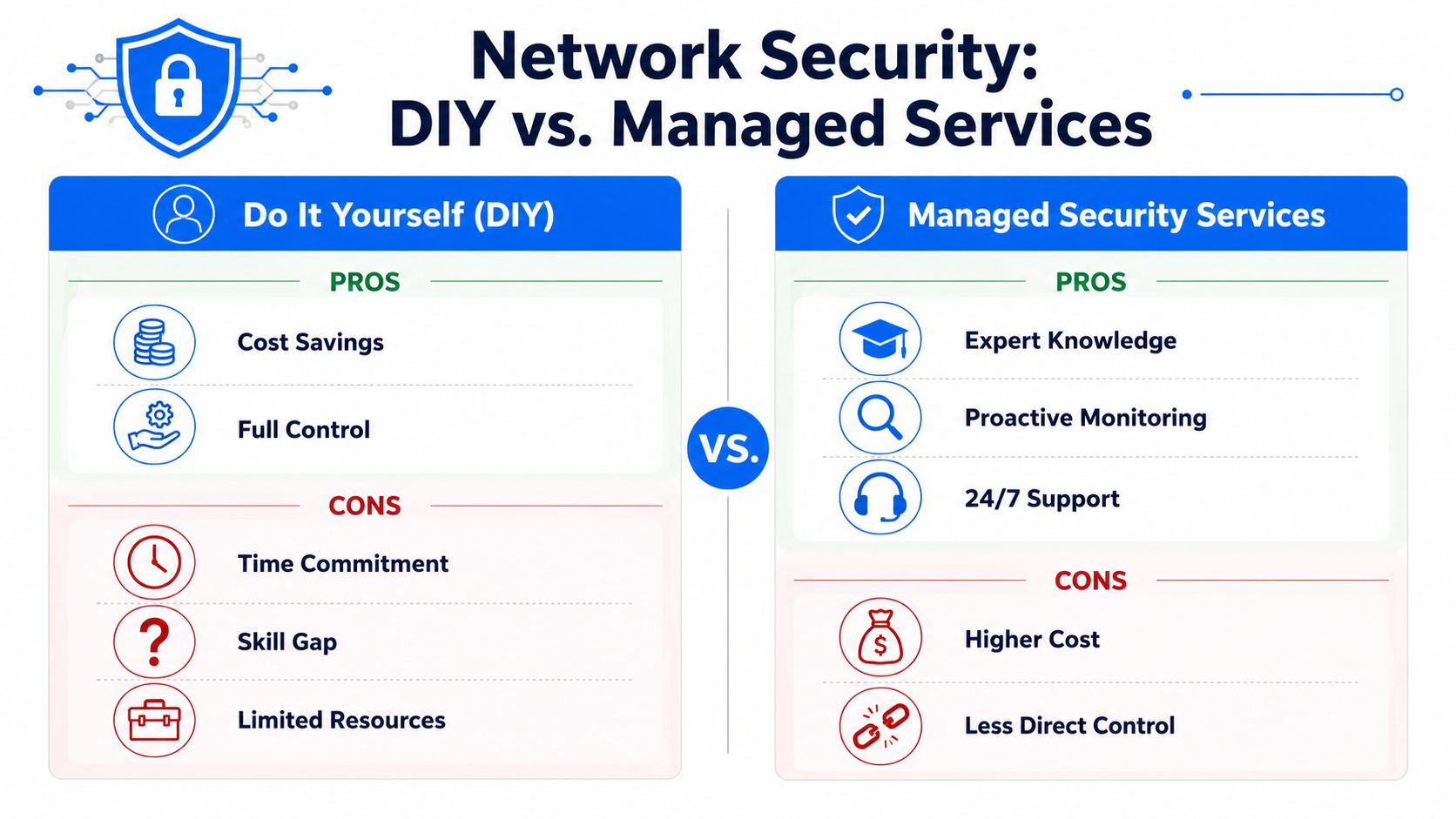
Managed security support is usually the better call when:
- You handle customer records, payment data, health-related data, or confidential client files
- Remote access, home working, or mobile device use is now routine
- You have more than one location, or a mix of office, retail, and warehouse networks
- Older systems still need to coexist with newer cloud platforms
- Nobody in-house has the time or confidence to review security settings properly
- You need records and evidence for insurers, clients, or accreditations
For many London and Essex SMEs, that local mix of old and new systems is the tipping point. A national helpdesk may support the product. A local managed provider is more likely to spot the practical problem quickly, such as a flat network in a converted office, weak Wi-Fi segregation on a shop floor, or remote access left wider open than it should be because "it was easier at the time."
A simple decision test
Ask three direct questions.
Do you know exactly who has access to email, files, routers, firewalls, and cloud admin tools today?
Would you notice unusual logins, strange mailbox rules, or ransomware behaviour before staff start reporting problems?
Can you restore clean data and get people working again without guessing?
If the answer is no, or even probably not, outside help is usually the cheaper option. Not because every small business needs a fully managed service, but because a short expert review, a managed firewall, monitored backups, or outsourced Microsoft 365 security often costs far less than a week of downtime.
If you want clear, local help with network security, Wi-Fi segmentation, managed firewalls, secure remote access, or a practical review of where your business is exposed, Networking2000 supports SMEs across London and Essex with straightforward advice and hands-on engineering. If your current setup feels patchy or you're not sure whether to keep it in-house, it's worth having a proper conversation before a minor gap becomes a business problem.

