Cloud backup is a service that copies your business's critical data to a secure, offsite server network via the internet, ensuring you can restore it after a system failure, cyberattack, or disaster. In the UK, 84% of enterprises had adopted cloud backup by 2023, and 93% of small to mid-sized companies prioritised cloud backup in 2024 as a core part of cyber security and business continuity.
If you run a business in Essex or London, you're probably already relying on digital systems for quotes, invoices, emails, customer files, CCTV footage, phone systems, and line-of-business apps. Most owners don't think much about backup until the day a server won't boot, a laptop gets encrypted by ransomware, or someone deletes the wrong folder and realises too late that syncing isn't the same as recovery.
That's where people often get confused. They assume OneDrive, Google Drive, Dropbox, or a USB drive in the office counts as “backup”. Sometimes it helps with day-to-day file access. It doesn't always help you rebuild your business after a serious outage. A proper cloud backup system is designed for one job. Getting your data back, quickly and reliably, so the business can keep trading.
For a small business owner, that's the meaning of cloud backup. It's not a buzzword. It's a practical way to protect income, staff productivity, customer trust, and your ability to operate when something goes wrong.
Table of Contents
- Why Your Business Can No Longer Ignore Cloud Backup
- How Cloud Backup Actually Works
- Exploring Different Types of Cloud Backup
- The Key Benefits and Potential Risks of Cloud Backup
- Cloud Backup vs On-Premises vs Cloud Storage
- Implementation Guide for London and Essex Businesses
- How to Choose Your Local Backup Partner
- Your Data Is Your Business Secure It Today
Why Your Business Can No Longer Ignore Cloud Backup
A local firm loses access to its shared drive on a Monday morning. Quotes are due out. Accounts needs invoices. The receptionist can't open customer records. Someone says, “It should be on the external drive.” Then they discover the drive was connected to the same network and is unreadable too.
That kind of moment is why cloud backup matters. It isn't just an IT task. It's business continuity. If the systems that hold your work stop working, the question becomes simple. How fast can you recover, and how much can you afford to lose?
In the UK, cloud backup has become normal business practice rather than a specialist option. By 2023, 84% of enterprises in the United Kingdom had adopted cloud-based backup solutions, and 20% of UK small businesses reported a hack in 2023 alone according to the verified Source 1 data referenced here: UK cloud backup adoption and cyber risk figures.
The old backup habits no longer hold up
Years ago, many small businesses got by with tape, USB drives, or a local NAS in the comms cupboard. Those tools still have their place, but on their own they leave obvious gaps.
If there's a fire, theft, flood, power issue, hardware fault, or ransomware event at your premises, local-only backup can fail at the same time as your live systems. That's why offsite backup changed the game. Your recovery copy is stored somewhere else, separate from the incident.
Practical rule: If your backup can be damaged by the same event that damages your office, it isn't enough on its own.
Business continuity is the real reason
Many owners think backup is about files. It's really about downtime. Your ability to answer phones, send orders, process payments, and serve customers depends on recovery planning. If you want a useful plain-English overview of recovery targets and continuity planning, GoSafe explains BCPs and RTOs in a way that makes the business impact easy to understand.
Cloud backup is the safety net that supports those plans. When it's set up properly, it helps you restore the data you need after deletion, corruption, hardware loss, or attack. When it's set up badly, you often only discover the weakness during the worst day of the year.
How Cloud Backup Actually Works
Hearing “cloud” often brings to mind something vague and floating about on the internet. In practice, cloud backup is much more concrete. Your files, databases, or full systems are copied from your computers or servers, encrypted, sent securely over the internet, and stored in protected offsite data centres.
A simple way to think about it is a digital safety deposit box. You keep working with your everyday files in the office. The backup system automatically sends protected copies to a separate location so you can retrieve them later if the original is lost or damaged.
To make the process easier to picture, this infographic shows the flow:
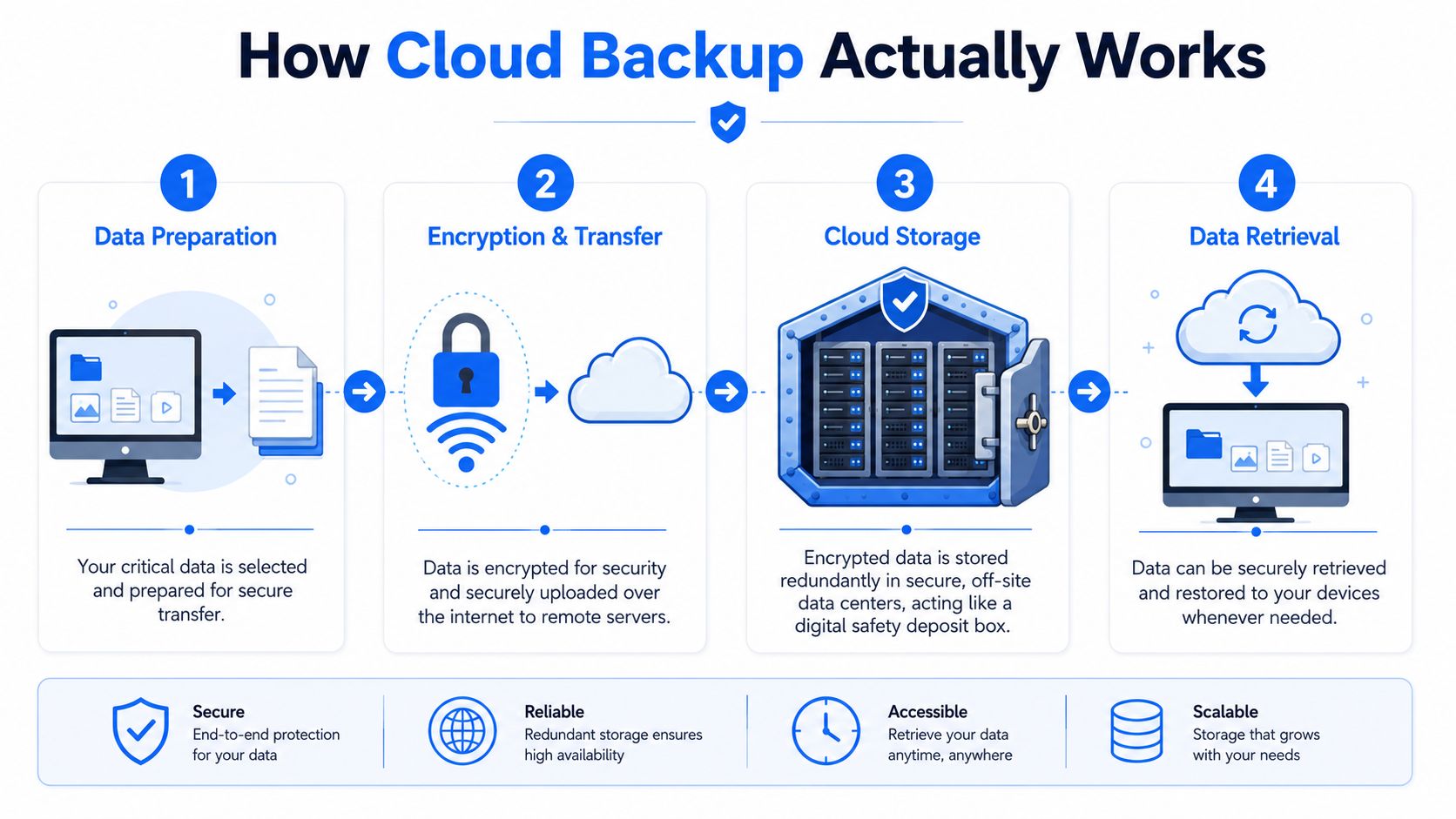
From your office to a secure offsite copy
A backup job usually starts with software identifying what needs protection. That might be a Windows Server, a Linux machine, Microsoft 365 data, a PC, or a virtual machine. Some systems use an installed backup agent. Others connect more directly to virtual or cloud environments.
The data is then encrypted before and during transfer. In plain English, that means it's scrambled so outsiders can't read it if they intercept it. The verified technical guidance says secure UK cloud backup should use AES-256 encryption for data in transit and at rest, and modern systems commonly transfer data through a secure TLS 1.3 connection according to UK guidance on secure cloud backup architecture.
Later backups usually don't resend everything from scratch. Modern systems use deduplication and block-level backup, which means they look for what changed and send only the unique changed blocks instead of full files. That can reduce backup window times by up to 70% and storage consumption by 95% according to UK benchmarks for deduplication and block-level backup.
A short video can help if you prefer visual explanations:
Why the 3-2-1 rule matters
A proper answer to “what is cloud backup” has to include the 3-2-1 rule. It's the difference between having a copy somewhere and having a recovery strategy.
The rule means:
- Three copies total: Your live data, plus two backups.
- Two different media types: For example, local disk and cloud object storage.
- One copy offsite: Kept away from your main premises.
That offsite copy matters most during ransomware and site-wide incidents. Verified UK guidance says adherence to the 3-2-1 rule reduces the probability of successful ransomware data encryption by over 90% because immutable offsite copies can't be altered by malware, as noted in UK cyber security guidance on the 3-2-1 backup rule.
Immutable means the backup copy can't be quietly changed, deleted, or encrypted by the attacker after it's written.
For a business owner, the practical meaning is simple. If one machine fails, you restore. If the whole office has a problem, you still restore. If ransomware gets into the network, your protected copy is still there.
Exploring Different Types of Cloud Backup
Not every backup product works the same way. Two providers can both say “cloud backup” and mean very different things. The right fit depends on what you need to recover. A few files, one laptop, a whole server, or an entire business system.
File backup and image backup
File-level backup protects selected files and folders. Think documents, spreadsheets, PDFs, photos, and project folders. It's useful when the main risk is accidental deletion, overwritten files, or small-scale data loss.
Image-level backup is broader. It captures a full snapshot of a machine or server, including the operating system, applications, settings, and data. If a server dies completely, image backup can help you rebuild the whole environment rather than reinstalling everything by hand.
A simple guide looks like this:
| Backup type | Best for | Main strength | Main limitation |
|---|---|---|---|
| File-level | Office documents, shared folders, user data | Fast restoration of individual files | Doesn't fully rebuild a whole machine |
| Image-level | Servers, business-critical PCs, full system recovery | Restores systems more completely | Can use more storage and planning |
Agent-based and agentless backup
With agent-based backup, you install software on the machine being protected. That software handles scheduling, encryption, and transfer. It's common for desktops, physical servers, and certain applications.
With agentless backup, the platform protects systems without installing software on each guest machine. This is common in virtualised environments where a central platform can back up workloads more efficiently.
Neither method is always “better”. The question is whether your environment is mostly physical, mostly virtual, or mixed.
A small office with a few laptops may be fine with agent-based protection. A business running virtual servers usually needs something designed around the hypervisor as well.
BaaS and DRaaS
You may also see service labels rather than technical labels.
- Backup as a Service (BaaS): The provider manages the backup platform, storage, scheduling, monitoring, and often reporting.
- Disaster Recovery as a Service (DRaaS): Goes further by providing a way to fail over workloads and keep operations running during a larger outage.
If you use platforms such as Azure SQL, backup planning also needs to reflect the app or database layer, not just the file system. For a useful practical example, this guide on how to manage Azure SQL backups with Server Scheduler shows the kind of application-specific thinking that many businesses overlook.
For UK organisations, location matters as much as method. Verified data shows modern cloud backup platforms use deduplication and block-level transfer, and providers serving the UK must offer geo-fencing so data remains within UK borders for compliance, as outlined in UK cloud backup compliance guidance on geo-fencing.
The Key Benefits and Potential Risks of Cloud Backup
Cloud backup earns its place when something goes wrong. Until then, it can feel like background plumbing. The value appears the moment a machine fails, a folder disappears, or an attack locks users out of their systems.
Why businesses adopt it
The business case is straightforward.
- Protection from local disruption: If the office has a hardware failure, break-in, or other onsite incident, your recovery copy isn't trapped in the same building.
- Faster recovery options: You can often restore the specific file, mailbox, server, or image you need rather than rebuilding from scratch.
- Less hardware overhead: You don't have to keep expanding local backup kit every time your data grows.
- Better fit for modern working: Staff now work across laptops, shared systems, cloud platforms, and remote locations.
This isn't niche behaviour in Britain anymore. Verified Source 1 data states that 84% of UK enterprises have adopted cloud backup and that 20% of UK small businesses reported a hack in 2023, reinforcing why cloud backup is now treated as a foundation for continuity in many organisations. That verified information appears in UK figures on cloud backup resilience and hacking of small businesses.
Where problems come from
Cloud backup isn't automatically safe just because it's online. Problems usually come from poor provider choice, weak policy design, or false assumptions.
Some common pitfalls include:
- Choosing storage instead of backup: A sync platform may keep files accessible but may not give you the version history, retention controls, or immutable recovery points needed after a serious incident.
- Ignoring cloud security basics: Misconfigured storage is still a real issue. If you want a technical look at how these mistakes happen, Vulnsy's cloud storage insights are worth reading.
- Not testing restores: A backup job that “ran successfully” isn't the same as a backup you can restore under pressure.
- Overlooking legal location requirements: If your provider can't clearly state where your backup data lives, you may have a compliance problem as well as a recovery problem.
Good cloud backup reduces risk. Badly chosen cloud backup creates a dangerous illusion that you're protected when you aren't.
The safest approach is to treat backup as a recoverability service, not just a storage bill. Ask how data is protected, how restores are tested, who helps during an incident, and whether the design matches how your business works.
Cloud Backup vs On-Premises vs Cloud Storage
Many small businesses often make this mistake. They use a cloud drive every day, so they assume they already have cloud backup. They don't always realise that cloud storage, on-premises backup, and cloud backup solve different problems.
The biggest misunderstanding
Cloud storage tools such as Dropbox, Google Drive, or OneDrive are mainly built for access, syncing, and collaboration. They help staff open the same files from different places and keep changes in sync between devices.
A true backup platform is built for recovery. That means scheduled copying, retention rules, version history, restore points, and protection from deletion, corruption, or ransomware. Those are not the same thing.
UK businesses face serious consequences when they confuse one with the other. Verified data states that businesses face a 200% higher risk of data loss penalties when using storage-only solutions instead of true backup with versioning, and a 2024 ICO report found 45% of data breach fines in London were linked to confusing file sharing with disaster recovery. That verified claim is cited here: ICO-linked figures on storage-only risk and London data breach fines.
Side-by-side comparison
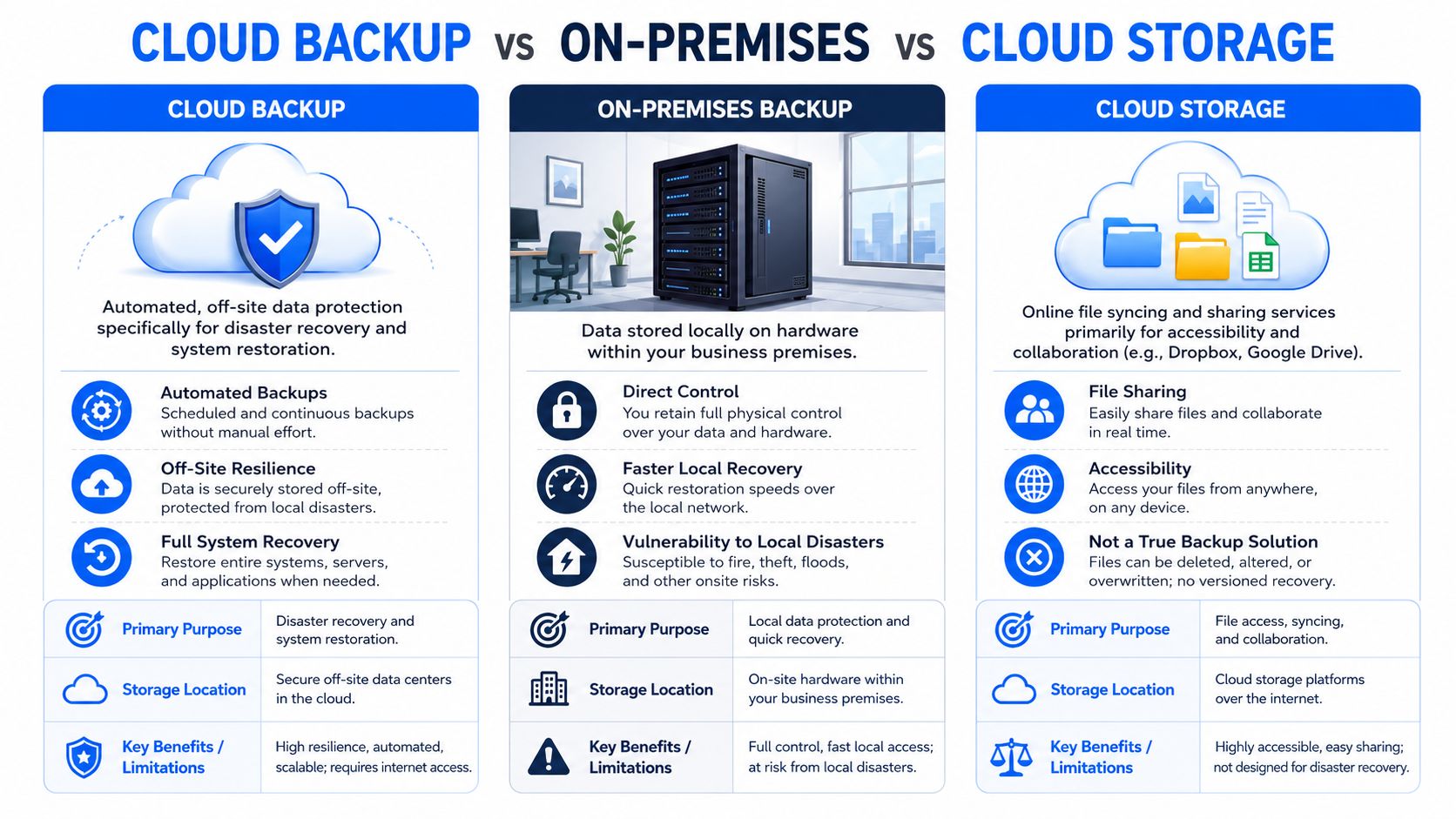
Here's the practical difference:
| Option | Primary purpose | Where data lives | Strengths | Weak spots |
|---|---|---|---|---|
| Cloud backup | Disaster recovery and restoration | Offsite cloud infrastructure | Automated recovery points, offsite resilience, versioning, scalable growth | Depends on choosing a compliant provider and testing restores |
| On-premises backup | Local copy for recovery | Office server, NAS, external device, or similar | Direct control, useful for quick local restores | Vulnerable to theft, fire, flooding, power incidents, and site-wide attacks |
| Cloud storage | File access and collaboration | Provider's sync platform | Easy sharing, remote access, teamwork | Not a full backup strategy, may lack proper retention and immutable logs |
A useful rule of thumb is this:
- Cloud storage helps your team work.
- On-premises backup helps with some local recovery.
- Cloud backup helps you survive serious disruption.
For many London and Essex firms, the sensible setup is hybrid. Keep a local recovery option for speed where needed, but make sure at least one protected copy is offsite and designed for actual restoration. That aligns far better with continuity planning than relying on a synced folder and hoping for the best.
Implementation Guide for London and Essex Businesses
If you're turning this from theory into action, don't start with products. Start with the business. Good backup design begins with what you must recover to keep trading.
Start with the data that keeps you trading
List the systems that would hurt most if they disappeared today.
That often includes:
- Customer records: CRM exports, case files, estimates, job histories.
- Finance data: Accounts packages, invoices, payroll records, VAT records.
- Operational systems: Shared drives, stock systems, scheduling tools, line-of-business databases.
- Communications data: Mailboxes, Teams or equivalent collaboration data, phone recordings where relevant.
- Security and premises data: CCTV clips, door access logs, alarm-related records if they matter to disputes or investigations.
Don't treat every file equally. Your marketing archive doesn't need the same urgency as your live accounts database or customer job schedule.
Check UK compliance and data residency
For businesses in London and Essex, data sovereignty is a real buying criterion, not a legal footnote. Verified Source 6 data states that the UK Data Protection Act 2018 mandates that personal data backups for UK citizens remain in the UK or an equivalent jurisdiction, and that this concern has driven a 35% increase in requests for local cloud backup services. That verified point is cited here: UK data sovereignty requirements and rising demand for local cloud backup.
Ask providers direct questions:
- Where is my backup data stored?
- Can you confirm UK or equivalent jurisdiction residency?
- Do you offer geo-fencing or data residency controls?
- Can you show how this is documented?
If a provider gives vague answers like “Europe somewhere” or “global infrastructure”, keep digging. Recovery and compliance both depend on knowing where the data sits.
If your backup contains personal data, location matters just as much as encryption.
Define recovery in business terms
Many owners ask for “a backup solution” when what they really need is a recovery target.
Two questions matter most:
How long can the business be down?
That's your recovery time target in plain language.How much recent data can you afford to lose?
That's your recovery point target in plain language.
If your accounts team can tolerate losing half a day of changes, that's different from a phone system database or CCTV system that needs tighter protection. The backup schedule should reflect the business impact, not generic defaults.
Plan rollout and testing
A sensible rollout usually follows this sequence:
Audit what exists now.
Find the machines, cloud apps, shared folders, and databases currently in use.Choose the backup scope.
Protect the highest-value systems first rather than trying to do everything at once.Set retention rules.
Decide how long you need short-term versions and longer-term archives.Secure access properly.
Restrict admin rights, use multi-factor authentication where available, and make sure restore rights are controlled.Test restores.
Restore a file, a mailbox, and if relevant a server image. Don't assume a green tick means the job is usable.
For businesses that want a local provider to handle onsite, offsite, and immutable cloud options, Networking2000 offers backup and disaster recovery services as one practical route among several available in the market.
A final point that often gets missed is bandwidth. Initial backups can be larger and slower than daily change-only jobs. Plan the first sync outside peak hours if your connection is already busy with VoIP, CCTV, or heavy cloud app use.
How to Choose Your Local Backup Partner
When you compare providers, don't start with price alone. Start with the restore. The cheap service that can't recover your server, can't explain its retention settings, or can't tell you where your data is stored isn't cheap when you need it most.
Questions worth asking before you sign
Use these in every conversation with an IT provider or managed backup partner:
Where are your data centres located?
You want a clear answer, not marketing language.How do you protect against ransomware?
Listen for mention of immutable copies, offsite storage, and controlled restore processes.What exactly is being backed up?
Files only, whole systems, Microsoft 365, databases, virtual machines, or all of the above.How often are backups taken and checked?
Frequency matters, but verification matters just as much.How do you handle restores?
Ask what support is available during a live incident and who helps recover your systems.How do you explain compliance with UK GDPR and the Data Protection Act 2018?
A good provider should answer in plain English.
What a good answer sounds like
A strong provider doesn't hide behind jargon. They should be able to explain the service in the same language you use to run the business.
Good answers usually include:
| Question area | What you want to hear |
|---|---|
| Data location | Specific UK or equivalent-jurisdiction residency details |
| Security | Encryption, role-based access, and ransomware protection explained clearly |
| Recovery | Real restore process, not just “we back it up every day” |
| Monitoring | Someone checks failures and alerts, not just software logs |
| Support | Named help path during an incident, with local availability if needed |
The best backup conversation is the one where you leave knowing exactly what gets restored, how long it takes, and who to call if things go wrong.
If a provider can't answer those questions cleanly, keep looking. Backup is one of those services where clarity is a feature. Confusion during a sales call usually turns into panic during a failure.
Your Data Is Your Business Secure It Today
When people ask what cloud backup is, they're usually asking a deeper question. “If something goes wrong, can my business recover?” That's the issue that matters.
A proper cloud backup service gives you an offsite, recoverable copy of the systems and data your business depends on. It is not the same as cloud storage. It works best when it follows the 3-2-1 principle, uses strong encryption, keeps recovery in mind from the start, and respects UK data residency requirements.
For businesses in London and Essex, this isn't just about IT hygiene. It's about continuity, compliance, reputation, and the practical ability to keep serving customers after a bad day. The cost of getting backup wrong is usually discovered at the exact moment you can least afford delay.
If you're not sure whether your current setup is a real backup or just a synced copy of live risk, now's the right time to check. A short review today is easier than a full rebuild after an outage.
If you want a jargon-free conversation about protecting your systems, recovery times, and UK-compliant backup options, speak to Networking2000. They can help you assess what needs backing up, where your risks are, and what a practical cloud backup plan should look like for your business in London or Essex.

