You probably know the feeling already. One member of staff has a front door key, another has the stock room key, the cleaner has a side entrance key, and someone swears they returned the spare but nobody can find it. Then an employee leaves, and you're left wondering whether to replace locks, cut new keys, or just hope that old key never turns up in the wrong hands.
That's the point where many London and Essex business owners start looking at access control systems. Not because they want something flashy, but because they want fewer unknowns. They want to know who came in, which door was used, and how to stop access immediately when someone changes role or leaves.
Electronic access control has become much more common as the technology has improved and become more accessible. The global access control market is projected to grow from USD 10.62 billion in 2025 to USD 15.80 billion by 2030 according to MarketsandMarkets' access control market outlook. For smaller businesses here in the UK, that wider investment matters because it has helped turn what used to feel like specialist kit into a practical day-to-day option. If you're also comparing wider modern security solutions for properties, access control usually sits right at the centre of that conversation.
Table of Contents
- Beyond the Bunch of Keys
- How Access Control Systems Work
- Finding the Right Type of System for You
- Key Benefits for London and Essex Businesses
- Integrating Security for Total Protection
- Choosing and Installing Your System in London and Essex
- Security Compliance and Ongoing Maintenance
Beyond the Bunch of Keys
A bunch of keys looks simple until the business gets busy. A retail unit in Romford, a small office in Brentwood, a workshop in Wickford, or a clinic in Chelmsford all run into the same problem. Physical keys don't tell you who entered, they don't expire at the end of a contract, and they don't help much when access changes every week.
For a lot of smaller firms, the breaking point isn't a dramatic security incident. It's the admin. Someone needs early access for deliveries. A contractor needs entry for two days only. A former employee still has a key. A manager wants the rear entrance open for staff in the morning but not all day. Keys make all of that awkward.
Why old key habits stop scaling
With a traditional lock-and-key setup, every change creates friction.
- Staff turnover becomes expensive: If a key goes missing, you have to choose between risk and the cost of changing locks.
- Shared responsibility gets messy: Nobody is fully sure who has which key unless someone keeps an up-to-date log and most businesses don't.
- Restricted rooms stay vulnerable: Comms rooms, stock rooms, finance offices, and medicine cupboards often need tighter control than the main front door.
Practical rule: If access changes more often than your locks do, keys are no longer the right tool on their own.
Electronic access control deals with those practical headaches first. Cards, fobs, PINs, mobile credentials, and biometrics all do the same core job. They let you decide who can enter, where they can go, and when that access applies.
What business owners usually want
Most clients don't start by asking for a reader type or controller model. They ask for outcomes.
They want a front door that grants entry to staff but not for casual callers. They want a server room that only approved people can enter. They want a simple way to cancel access without a locksmith visit. They want a system that doesn't create more admin than it saves.
That's why good access control isn't really about gadgets. It's about replacing uncertainty with control that fits the way your building operates.
How Access Control Systems Work
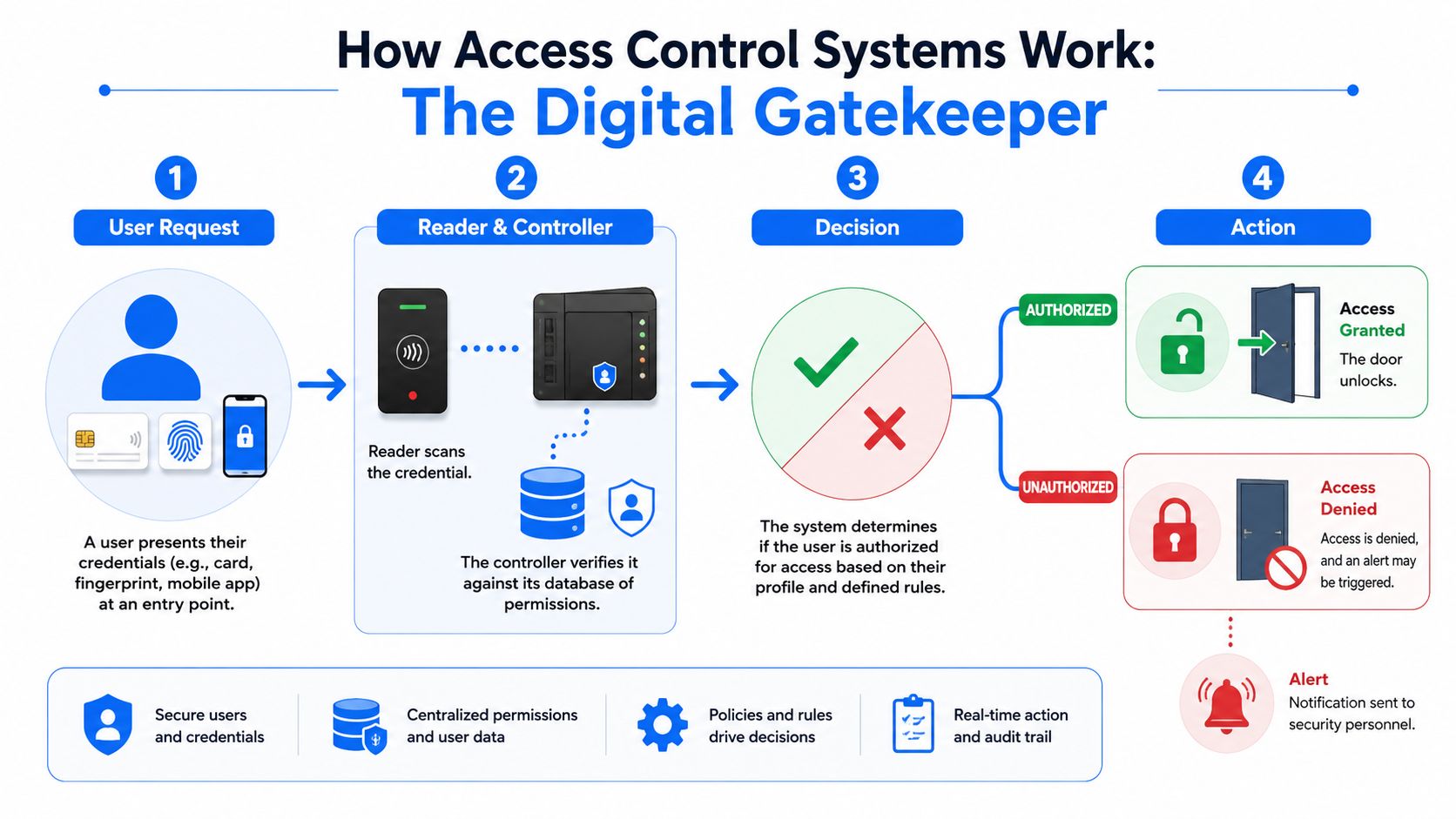
Think of an access control system as a digital gatekeeper. It checks a person's credentials, compares them to the rules you've set, and makes a decision in moments. If the person is allowed through, the door releases. If not, it stays locked and the event is recorded.
The digital gatekeeper in plain English
At the door, the user presents something the system recognises. That might be a fob, a swipe card, a phone credential, a PIN, or a biometric such as a fingerprint. The reader picks that up and passes the request to the part of the system that makes decisions.
The system then checks the rules. Is this credential valid? Is this user allowed through this door? Is it the right time of day? Has the credential been disabled? That decision happens quickly, and modern systems can grant or deny access in under a second as noted in the earlier market overview.
The four parts that matter
Most access control systems, whether simple or advanced, come down to four core parts.
Credential
This is the digital key. It could be a card, fob, mobile phone credential, PIN, or biometric identifier. The choice affects convenience, security, and replacement costs.Reader
The reader is the device at the door. It scans or receives the credential and sends the request onward. Some readers only read cards or fobs. Others can combine card, PIN, and biometric checks.Controller
This is the brain behind the door. It decides whether access should be allowed based on the permissions stored in the system. In smaller setups it may handle one or a few doors. In larger premises it may sit inside a wider network of controllers.Software
The software is where the rules live. Within it, an administrator adds users, removes access, checks event logs, and sets schedules such as staff-only hours or delivery windows.
A reliable system should be easy to explain without hiding behind jargon. If a supplier can't describe how the door makes its decision, the buyer is being asked to trust a black box.
What happens when someone leaves or changes role
Electronic systems are better than keys. You don't need to collect every physical key before you can protect the site. You disable the credential in software, update the person's permissions, or issue a replacement credential if one has been lost.
That sounds like a small change, but in practice it's what makes access control useful. It turns door security into something you can manage, not something you have to physically chase around the building.
Finding the Right Type of System for You
A small office in Hornchurch has one front door and six staff. A trade counter in Romford has a front entrance, a stock room, and regular delivery drivers. A business in central London may share a building, manage cleaners and contractors, and need tighter control over who can reach which floor. The right system depends on how people move through the site.
Buying by door count alone usually leads to the wrong choice. The better approach is to match the system to your building, your staff turnover, and how much control you want without creating extra admin.
The main system types
Standalone systems fit very small sites with one door or one internal room that needs to stay restricted. They are usually quicker to install and cheaper to start with. The limitation shows up later. If you want central reporting, timed access, or links to other security systems, replacement can be more practical than upgrading.
Wired card or fob systems are the usual choice for small and medium businesses that need dependable day-to-day control across several doors. They suit offices, clinics, warehouses, and mixed-use premises well. In older London buildings and converted Essex units, cabling routes need checking early because installation time can change quickly if walls, ceilings, or shared areas are awkward to work in.
Biometric systems suit higher-risk areas where proving the person matters more than proving they hold a card. Server rooms, medicine cupboards, cash offices, and restricted stores are typical examples. They can reduce credential sharing, but they also bring extra decisions around privacy, user enrolment, and what happens when someone has dirty hands, gloves, or a failed read at a busy time.
Cloud-based or mobile systems appeal to businesses that want to manage users remotely or across more than one site. They can work well for serviced offices, hybrid teams, and firms with a London site and an Essex site under one login. They also need proper setup. Weak admin passwords, poor permission design, and unmanaged devices can turn a convenient system into a security gap.
Access Control System Comparison
| System Type | Ideal For | Typical Cost | Security Level | Scalability |
|---|---|---|---|---|
| Standalone | One door, small offices, storerooms | Lower end of the common installed range | Basic to moderate | Limited |
| Wired card or fob system | Offices, clinics, retail back-of-house, shared staff areas | Mid to upper range depending on software and door count | Moderate to strong | Good |
| Biometric system | Sensitive rooms, higher-risk areas, stronger identity checking | Usually higher due to specialist hardware and setup | Strong when designed properly | Good |
| Cloud-based or mobile system | Multi-site businesses, hybrid workplaces, remote admin needs | Varies by hardware and management model | Moderate to strong | Very good |
Cost still matters, but the bigger question is what the system saves you from. A cheaper setup can become expensive if staff changes are frequent, audit trails are poor, or you have to replace the whole thing when you add two more doors next year.
How to narrow it down sensibly
Start with the building.
If there is a single entrance and very little staff churn, a simple system may do the job well. If there are several internal zones, separate teams, or regular contractors, choose a managed platform with user groups, schedules, and clear reporting.
A few buying checks are often missed:
- Ask how the system will expand. Many small businesses start with one or two doors, then add a stock room, rear entrance, or upstairs office.
- Check credential security. Basic fobs are common, but encrypted credentials are harder to copy and are usually worth the extra cost for businesses with stock, records, or shared premises.
- Review fire door and lock compatibility. The reader is only part of the job. The lock, exit hardware, and life safety requirements have to work together.
- Decide who will manage it. If nobody on site wants software to look after, keep the admin model simple.
- Check cyber hardening from day one. Cloud and networked systems should have strong passwords, role-based admin access, firmware updates, and secure remote access. We see this missed too often on smaller sites.
For many London and Essex SMBs, the best answer is not the most advanced system on the brochure. It is the one that fits the building properly, can be managed without fuss, and leaves room to grow without starting again.
Key Benefits for London and Essex Businesses
In this part of the country, many businesses operate in mixed-use premises. Ground floor retail with office space above. Shared industrial units. Clinics in converted buildings. Offices with couriers, contractors, visitors, and part-time staff moving through the same site. That's where access control starts paying for itself in day-to-day order.
Where businesses feel the difference
The first benefit is usually speed of response. If someone leaves, loses a credential, or changes role, access can be adjusted straight away. You're not waiting on a locksmith or wondering who copied a key months ago.
The second is traceability. You can review who used which door and when. For businesses that need cleaner records around stock, restricted areas, or incident follow-up, that matters.
Then there's operational control. Doors can follow working patterns instead of staying permanently open or permanently locked. Deliveries can be managed more cleanly. Staff-only areas can stay staff-only without constant supervision from reception.
What works better than old key management
Role-based permissions and automated user management are particularly useful in hybrid workplaces and shared premises. As noted in acre security's guidance on role-based permissions and automated user management, that approach helps businesses manage temporary contractor access and align physical entry with GDPR-style data minimisation and auditability.
That matters for smaller firms more than people expect. A business with a handful of doors can still have complex access needs if it uses cleaners, agency staff, delivery drivers, outsourced IT support, or maintenance contractors.
If your current process depends on one office manager remembering every exception, the process is already too fragile.
A good setup makes permissions match real roles. The finance team can access the finance office. The cleaner can enter only in the agreed time window. A visiting engineer can be given temporary access and then removed when the job is done. That's practical control, not overengineering.
For London and Essex businesses dealing with staff movement, shared buildings, and fast-moving schedules, those gains often matter just as much as the security benefit.
Integrating Security for Total Protection
An access control system is useful on its own. It becomes much more valuable when it connects properly with the rest of your security setup.

Why integration changes the value of the system
When access control, CCTV, and intruder alarms work as separate islands, someone has to manually piece events together. A door alarm happens. Then somebody checks another screen. Then somebody else checks whether the area was armed. That slows down response and creates gaps.
Integrated systems are easier to work with. If a door is forced, the relevant camera view can be pulled up quickly. If a user enters a part of the building at a certain time, that event can sit alongside the associated video and alarm state. For owners and managers, that means fewer blind spots and faster review after an incident.
This matters in practical building management too. If you're responsible for occupied premises, access rules often overlap with wider life-safety planning. Anyone reviewing site procedures should also understand related duties such as landlord fire safety responsibilities, because door controls, escape routes, and emergency procedures should never be designed in isolation.
Open standards matter
A lot of buyers focus on the reader and the door hardware, then discover too late that the core long-term issue is compatibility. If the system can't talk properly to CCTV, alarms, or management software, you can end up locked into one vendor's ecosystem even when a better option exists later.
ONVIF's Access Control Service specification addresses that by standardising a web-service interface for integration across physical access devices and platforms, which helps reduce vendor lock-in and supports centralised security management as outlined in ONVIF's Access Control Service specification.
Buy for the building you'll have in a few years, not just the one you have today.
A central platform doesn't have to mean an oversized enterprise deployment. For many SMEs, it means one place to manage users, view events, and connect doors with cameras and alarms. That's often the difference between a collection of products and a coherent security system.
A short example helps show the idea in action:
Choosing and Installing Your System in London and Essex
A shop in Romford, a small office in Chelmsford, and a mixed-use unit in East London can all ask for “access control” and need three different setups. The right starting point is the day-to-day reality of the site. Who comes in, which doors matter, how often access changes, and what happens if a key, card, or phone is lost.
Buy around the building and the way your staff work, not around a headline price.
Questions to answer before you buy
A short pre-purchase review saves a lot of wasted spend later. Before you look at readers, apps, or credentials, pin down these points:
- Which doors need control: Main entrance, rear delivery door, stock room, comms room, gate, shared lobby, or internal offices.
- Who needs entry: Staff, managers, cleaners, contractors, visitors, tenants, and regular delivery drivers.
- How often access rights change: Hardly ever, every month, or every week.
- What record you need: Simple door control, a usable event log, or stronger identity checks for sensitive rooms.
- Whether remote admin matters: Useful for owners who are not always on site, especially across more than one location.
- What the building can physically support: Existing cabling routes, frame condition, lock type, power availability, and fire door constraints.
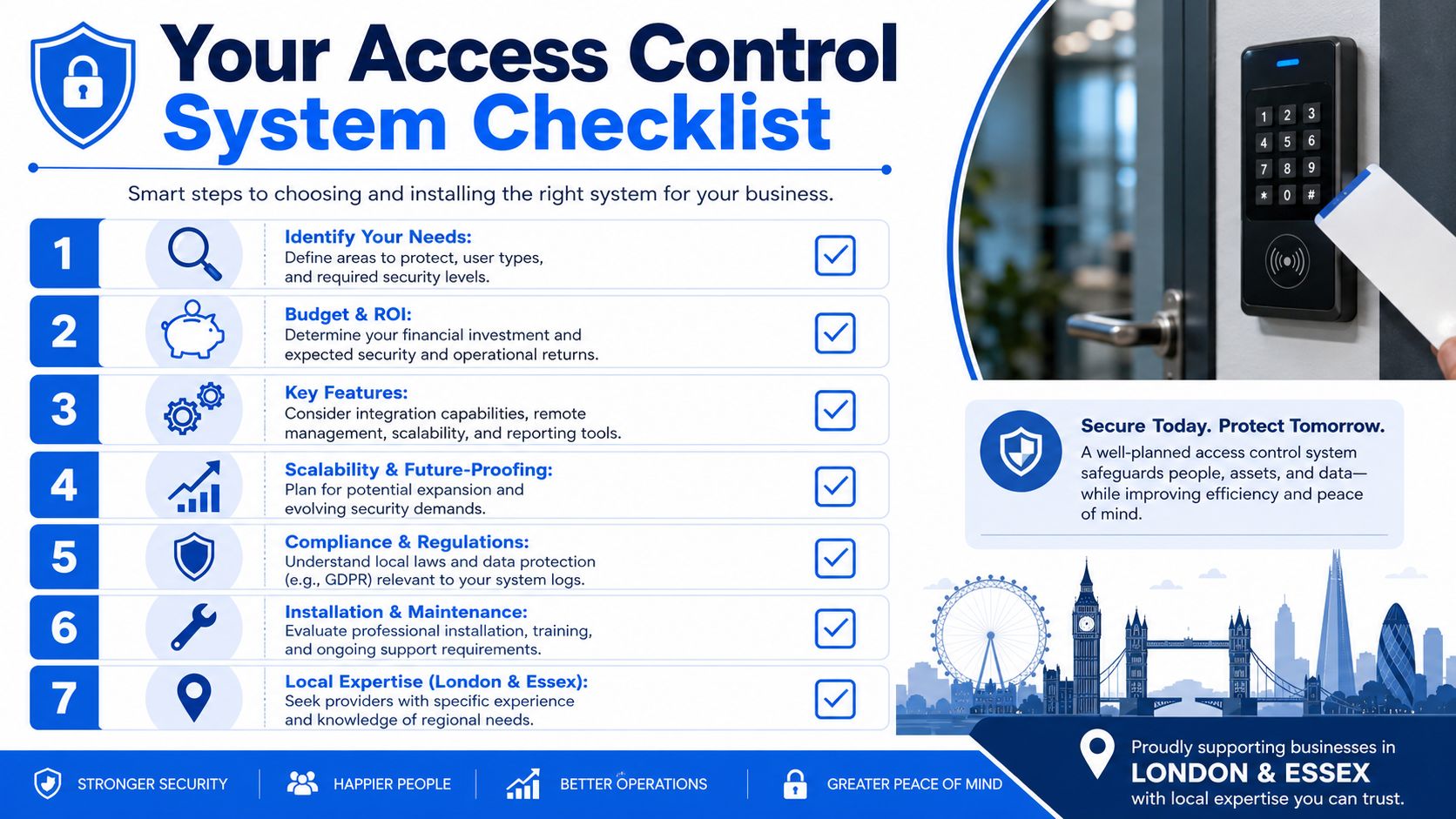
Budgeting is where many small businesses get caught out. Door hardware, glazing, out-of-hours access, and the need to link with alarms or cameras can change the cost more than the reader on the wall. As noted earlier, installed pricing varies widely by door type and by how much control and reporting you want from the software.
What installation usually involves
A proper installation starts with a site survey. On London and Essex sites, the hard part is often the door itself, not the software. Older timber frames, aluminium shopfronts, communal entrances, listed features, and awkward cable routes all affect what can be fitted safely and neatly.
A good installer will usually work through the job in this order:
Door-by-door design
Each opening is assessed on its own. That includes the reader, lock, exit device, door contact, release method, and where the controller should sit for security and servicing.Cabling and power
Clean cable runs matter. Poor routing causes intermittent faults, messy remedial work, and longer callouts later.Hardware fitting
Readers, maglocks or strikes, exit buttons, contacts, break-glass units where required, and enclosures are fitted and tested against the actual door movement.Software setup
User groups, schedules, permissions, and audit settings are configured to match how the business runs.Testing and handover
Staff should be able to add a new starter, remove a lost credential, and check who opened a door without calling an engineer for every small change.
There is also a trade-off to make early. A cheaper standalone door can suit a single back office with low staff turnover. It becomes frustrating fast if you later want central user management, better reporting, or integration with CCTV and alarms. For growing firms in Essex and London, that upgrade path matters more than many buyers expect.
If your system will rely on camera footage for incident review, or if you want access events tied to recorded video, it helps to understand cloud video storage for IP cameras before the install starts. That decision affects retention, remote access, and how easy investigations are after a missed delivery, internal theft concern, or out-of-hours entry event.
For local firms, Networking2000 can handle access control alongside cabling, networking, CCTV, and alarms where the site needs one coordinated installation rather than separate trades.
Security Compliance and Ongoing Maintenance
One of the biggest mistakes with access control is assuming the job is finished once the readers are on the wall and the doors open correctly. That only covers the visible part. The system itself also needs protecting and maintaining.

The system also needs protecting
Modern access control lives on your network or touches systems that do. That means cyber hygiene matters. Buyers often focus on stopping intruders at the door but spend less time asking how the controllers, readers, credentials, and management platform are secured.
HID's guidance on securing access control systems highlights practical protections such as encryption, secure enclosures, dedicated VLANs, disabled default interfaces, and regular patching in this overview of cyber hardening for access control systems. That's the right mindset. More connectivity is only useful if you harden it properly.
If your system also relies on surveillance for investigation or audit, it's worth taking time to understand cloud video storage for IP cameras, because access events are much easier to investigate when the supporting video is stored and managed sensibly.
Maintenance that keeps the system trustworthy
Compliance and good maintenance usually overlap. Logs need to be retained appropriately. User permissions need regular review. Old credentials should be removed. Software should be updated. Failed door hardware needs attention quickly because one unreliable door undermines confidence in the whole system.
For higher-risk spaces, card-only access often isn't enough. UK government protective security standards distinguish lower-risk controlled areas from higher-risk exclusion areas, and those high-risk areas require three-factor authentication: a possession factor, a knowledge factor, and an inherence factor, as described in the UK government PACS protective security standard. Most small businesses won't need that exact model everywhere, but the principle is sound. Protect more sensitive spaces with layered entry, not the same rule for every door.
A secure building can still be exposed if the access platform is unpatched, badly segmented, or full of old user accounts.
A sensible maintenance routine includes:
- Permission reviews: Remove or tighten access that no longer matches real roles.
- Credential housekeeping: Cancel lost, old, and duplicate credentials promptly.
- Patch management: Keep controllers and software current.
- Door health checks: Test locks, readers, contacts, and release devices.
- Audit review: Make sure the logs you rely on are being captured and retained correctly.
If you're weighing up access control systems for a site in London or Essex, Networking2000 can help you assess the doors, user types, integration needs, and practical installation options without burying the advice in jargon.

