You're probably dealing with one of these right now. Staff are dropping out of Teams calls. The card machine slows down at the worst possible time. A file that should open in seconds hangs long enough for someone to give up and email it instead. Then a customer walks in, asks for the guest Wi-Fi password, and everyone hopes that network traffic isn't mixed in with the same systems that hold quotes, accounts, or job records.
That's what poor networking looks like in a small business. It rarely arrives as one dramatic outage. It shows up as friction all day long. Lost time, patchy calls, awkward workarounds, and a nagging sense that your systems are just about coping.
The scale of the issue is bigger than many owners realise. In the UK, 5.5 million small and medium-sized enterprises were estimated to be operating at the start of 2024, accounting for 99.9% of the business population and employing around 16.6 million people, according to UK SME figures referenced here. For firms across London and Essex, that means reliable connectivity and secure access aren't specialist IT concerns. They're part of how modern business works.
Table of Contents
- Is Your Network Holding Your Business Back
- The Building Blocks of a Modern Business Network
- Exploring Your Key Network Solution Options
- Designing a Network That Supports and Protects You
- Planning for Growth Cost and Scaling Considerations
- How to Choose the Right Network Partner in London and Essex
- Your Next Steps Towards a Better Business Network
Is Your Network Holding Your Business Back
A typical small office doesn't complain about “the network”. It complains about symptoms. The printer disappears. The stock system runs slowly when everyone's in. The upstairs Wi-Fi is fine until two video calls start. Someone plugs in a cheap extender bought online, and things get even stranger.
Those issues usually come from the same root problem. The network was never designed for how the business operates today. It grew in bits. A router from the broadband provider. One extra switch under a desk. An access point added after a refurb. Then cloud apps, VoIP phones, CCTV, guest devices, and remote access all got piled on top.

The warning signs owners tend to ignore
If any of these sound familiar, your setup may be holding the business back:
- Calls break up at busy times because voice traffic is competing with everything else.
- Shared files crawl because Wi-Fi is carrying work better suited to Ethernet.
- Staff move desks and lose connectivity because nobody planned wireless coverage properly.
- Visitors use the same wireless network as staff which creates unnecessary risk.
- Every fix is reactive because no one is monitoring performance or spotting faults early.
Poor networks waste time in small pieces. That's why owners often tolerate them for too long.
For businesses in London and Essex, that matters because the local trading environment doesn't leave much room for delays. If your team depends on cloud software, online booking, card payments, hosted phones, remote logins, or supplier portals, the network isn't background plumbing. It's operational infrastructure.
What a healthy network should feel like
A good setup is almost boring. Staff connect once and get on with work. Calls stay stable. Wi-Fi reaches the places people use. Guest traffic stays separate. Files move without complaint. When broadband drops, there's a fallback plan rather than panic.
That's the core point of small business network solutions. Not more jargon. Not the fastest headline speed available on a leaflet. Just a system that supports the way your business works and doesn't create risk every day.
The Building Blocks of a Modern Business Network
A business network doesn't need to be mysterious. It's a set of parts with different jobs. Once you understand those jobs, it becomes much easier to spot what you need and what you don't.
The reason this matters is simple. Digital dependence is now standard business practice. In 2024, 97% of UK businesses with 10 or more employees had a fixed broadband connection and 93% had a website, according to this UK networking overview. That's why business-grade networking is no longer a luxury upgrade from a home setup.
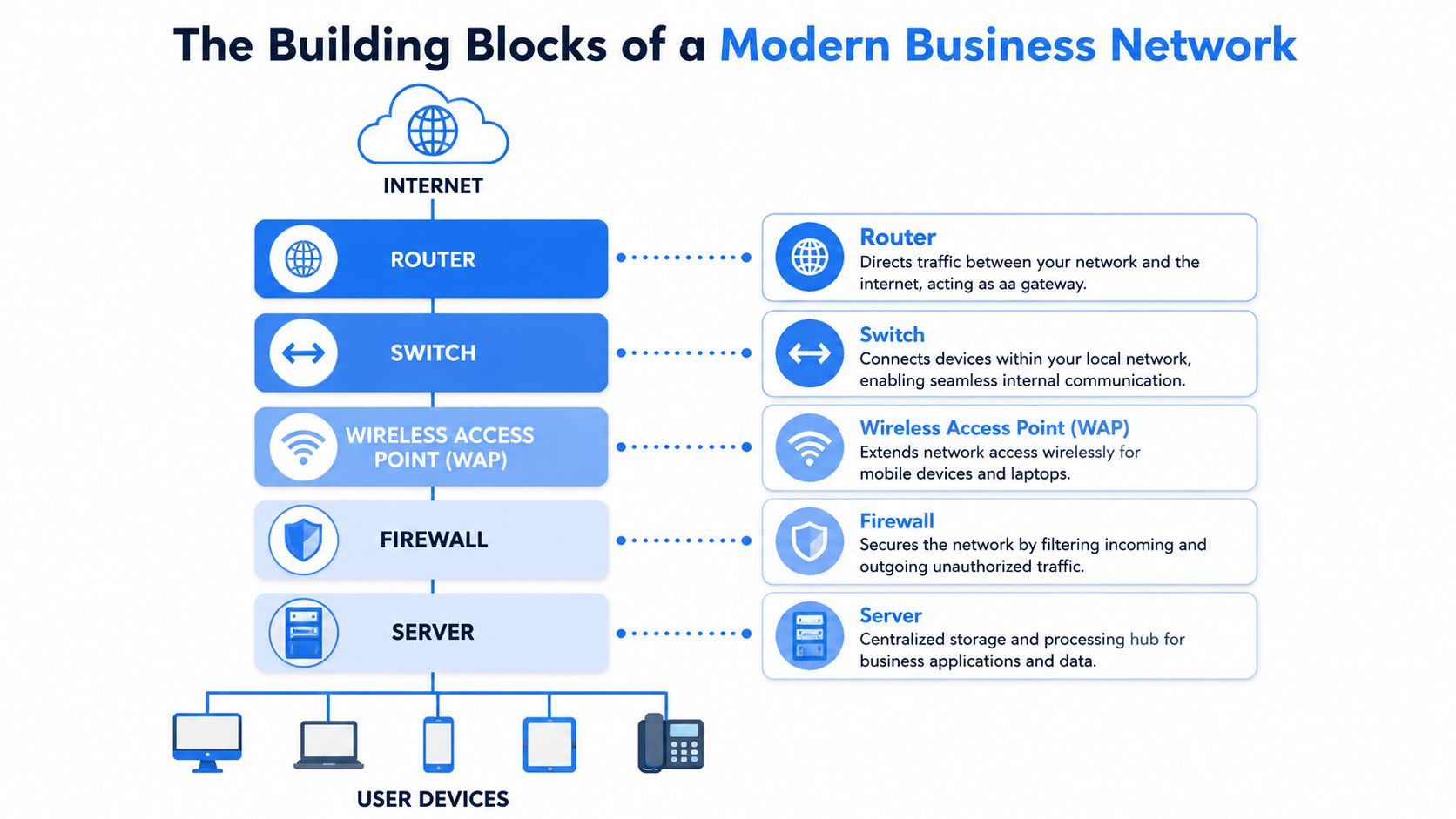
What each piece actually does
Think of the router as the front door and traffic controller. It connects your premises to the outside world and decides how data gets in and out. If your internet line is the road, the router manages who enters, who leaves, and which route they take.
A switch is your internal distribution point. It links wired devices inside the building such as desktops, printers, phones, servers, and access points. Cheap unmanaged switches can be fine in the right place, but growing firms usually benefit from managed switching because it gives you control, visibility, and cleaner separation between different types of traffic.
The firewall is the security gate. A proper business firewall does more than the basic protections bundled into many ISP routers. It helps control access, segment traffic, support secure remote working, and enforce rules that fit the way your business operates.
A wireless access point gives Wi-Fi coverage where people work. One all-in-one router in a comms cupboard rarely covers a full office properly. Separate access points placed well will almost always beat trying to blast signal from one corner of the building.
A server may still matter in some firms, though plenty of businesses now run most applications in the cloud. Where local servers do exist, they need stable switching, sensible security, and backup planning around them.
For a clear plain-English explainer of how these parts fit together, the SES Computers network guide is a useful companion read.
A short visual walk-through helps if you want to see those components in context.
Why home kit falls short
Home equipment is built for convenience. Business networks are built for consistency. That difference matters more than many owners expect.
Practical rule: if your office depends on cloud apps, hosted phones, shared files, and guest access, you need separate devices doing separate jobs.
A domestic router can work in a micro office for a while. It usually falls down when more users, more devices, more wireless coverage, or stronger security controls are needed. The weak points tend to be the same. Limited control, poor wireless management, patchy visibility, and not much room to scale.
Good cabling matters just as much as the boxes. Even the best firewall and access points won't perform well if they're connected through messy legacy cabling, poor patching, or badly placed wall points.
Exploring Your Key Network Solution Options
Most owners don't need every available technology. They need the right mix for their premises, staff, and tolerance for downtime. That's where small business network solutions should be practical, not theoretical.
Internet access that fits the way you work
Start with the connection itself. If your team mostly uses email, web apps, cloud accounting, and card payments, a standard business broadband service may be enough if the line is stable and support is responsive. If your office runs heavy cloud workloads, large file transfers, always-on phones, and several concurrent calls, you may need a higher-performance business connection with better service terms.
The part many guides skip is resilience. The fastest line on paper still becomes a liability if it's your only line and it fails. In practice, many small firms are better served by asking, “What happens when broadband drops?” than by chasing headline speed.
That's where the choices usually sit:
- Primary broadband with backup mobile failover suits many small offices that need continuity without overcomplicating things.
- Dual-WAN setups work well where two internet services can be used for failover or balancing.
- Leased or dedicated access makes sense where connectivity is business-critical and interruptions have an immediate operational cost.
If you want a broader strategic view of how connectivity is shifting away from fixed on-site thinking, CXO's guide to cloud networking is worth reading.
Wired and wireless are not rivals
A lot of businesses still ask whether they should choose wired or wireless. In most workplaces, the answer is both.
Wired connections are best for anything fixed, important, or demanding. Desktops, VoIP phones, printers, CCTV recorders, servers, and file-heavy workstations usually belong on Ethernet. Wireless is for mobility. Laptops in meeting rooms, tablets on the shop floor, scanners in a warehouse corner, and visitor access all benefit from well-planned Wi-Fi.
Here's the practical trade-off.
| Factor | Wired (Ethernet) | Wireless (Wi-Fi) |
|---|---|---|
| Reliability | Strong and consistent for fixed devices | Depends on coverage, interference, and placement |
| Performance for large files | Better suited to file-heavy work and stable throughput | Fine for general use, less ideal for demanding transfers |
| Mobility | Limited to where the cable reaches | Best for roaming users and flexible spaces |
| Security control | Easier to control by physical port and switch policy | Secure when designed properly, but needs stronger planning |
| Installation effort | Requires cabling routes and port locations | Faster to extend in some spaces |
| Best use case | Desks, phones, printers, servers, key systems | Laptops, handheld devices, guests, meeting rooms |
The strongest office setups usually use Cat6 cabling for the fixed core and business-grade access points for wireless coverage. That hybrid approach avoids the common mistake of trying to make Wi-Fi do everything.
Voice and security services that remove daily headaches
Hosted VoIP has changed what small offices can do with telephony. It gives staff flexibility, supports remote and hybrid working more cleanly than old phone systems, and avoids tying the business to one physical handset location. But VoIP only feels good when the network underneath is stable. Choppy calls are often a network issue first and a phone issue second.
Managed security services are the same story. A firewall, remote access controls, updates, and monitoring aren't separate from your network. They are part of the network. If no one is watching logs, checking alerts, or maintaining policy, businesses tend to discover problems after users do.
A sensible network solution often combines these layers:
- Connectivity that matches the site and includes a fallback option
- Structured cabling so key systems don't rely on weak wireless links
- Wi-Fi design based on coverage and user behaviour, not guesswork
- VoIP readiness so calls stay usable during busy periods
- Managed security to reduce exposure and make administration realistic
Designing a Network That Supports and Protects You
A secure network isn't built by adding one extra password. It comes from layout, separation, and choosing where different types of traffic should live. The simplest useful improvement in many offices is also one of the most overlooked. Keep guest traffic away from internal business systems.
Security guidance for small business setups recommends guest Wi-Fi isolation and WPA3 encryption where available, because separating traffic reduces the chance of exposing internal assets. That principle is outlined in this small business network setup guide.
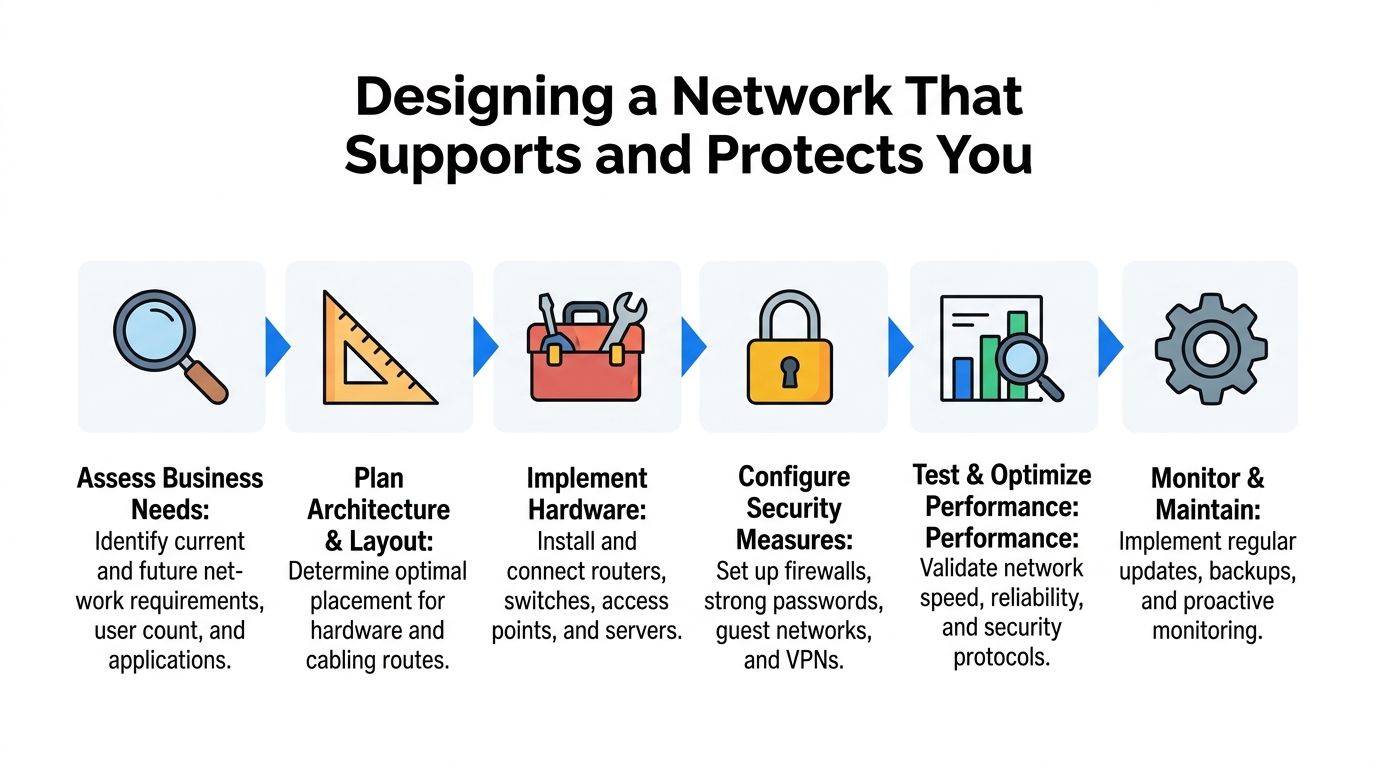
Three practical network blueprints
A basic office setup suits a very small team with a handful of staff, shared cloud apps, one printer, and light phone use. That usually means a business router or firewall, one managed switch, one or two properly placed access points, and separate guest Wi-Fi. It's simple, but still structured.
A growing business setup needs more deliberate segmentation. Staff devices, phones, printers, CCTV, and guest access should not all sit in one flat network. This is where managed switches and a dedicated firewall earn their keep. They let you separate systems cleanly and reduce the blast radius if one device is compromised or misbehaves.
A resilient setup is for firms that can't afford to stop. That might be a clinic, warehouse office, legal practice, finance team, or busy retail operation. Here, you're looking at internet failover, stronger firewall policy, monitored access points, cleaner cabling, and better visibility of what's happening across the network.
Guest Wi-Fi should be convenient for visitors and invisible to your internal systems.
Security choices that make a real difference
The security controls that help most are not always the flashy ones. They're usually the disciplined basics done properly.
- Separate guest access: visitors should never share the same network space as business devices.
- Use modern wireless security: WPA3 is the preference where supported.
- Put fixed critical devices on Ethernet: that includes desks handling large files and systems you can't afford to see drop out.
- Use dedicated security hardware: relying solely on the broadband provider's all-in-one box often leaves gaps in control and monitoring.
- Plan access point placement: poor wireless design creates both performance and security problems.
One common mistake is spending heavily on broadband and almost nothing on internal design. If the office has dead spots, flat networks, and weak segmentation, a faster line won't fix the underlying problem. Good design does.
Planning for Growth Cost and Scaling Considerations
Most network decisions are really finance decisions in disguise. You're deciding not only what the business needs now, but how much complexity, maintenance, and risk you want to own later.
The pressure point is security. The latest UK Government Cyber Security Breaches Survey, referenced in this article on SME networking and security, found that 50% of businesses experienced a cyber breach or attack in the previous year. That changes the conversation. Networking isn't only about getting online. It's about reducing operational risk.
Buying equipment versus paying for a managed service
Buying hardware outright appeals to many owners because it feels tangible. You own the firewall, the switches, the access points, and the cabling. If you have internal IT capability and the time to maintain standards, that can work well.
The trouble starts when equipment is bought once and then left untouched. Firmware gets ignored. Configurations drift. The original installer moves on. Password records go missing. Nobody notices a failing access point until users complain.
A managed service moves that burden into a monthly operating cost. That's often a better fit for firms without in-house network expertise. It can include monitoring, updates, security oversight, remote support, and a clearer route to escalation when something breaks.
The trade-off is straightforward:
- CapEx model: more control, more ownership, more internal responsibility
- OpEx model: lower upfront burden, steadier support, less day-to-day admin for the business
Buying the hardware is the easy part. Keeping it secure, documented, and properly maintained is the hard part.
How to avoid buying twice
Scaling problems usually come from short-term choices made without a layout in mind. A business installs consumer Wi-Fi to save money, then adds extenders, then replaces half of it a year later because calls and roaming don't work properly.
A better approach is to buy for the next stage, not just today's headcount. That doesn't mean overspending on enterprise kit you'll never use. It means choosing equipment and cabling that let you add users, devices, access points, or another switch without ripping everything out.
Good examples include:
- Structured cabling with spare capacity rather than only enough ports for current desks
- Managed switches that leave room for more endpoints and policy control
- Cloud-managed access points and firewalls where a small team needs simpler administration
- VoIP-ready switching and power planning if phone systems may move onto the data network
The cheapest network is often the one you don't have to rebuild.
How to Choose the Right Network Partner in London and Essex
Plenty of providers can sell boxes. Fewer can walk into a site in Essex or London, understand the building, ask the right operational questions, and design around the weak points before they become outages.
That local angle matters because broadband reality is uneven. Ofcom reports that 93% of UK premises can get gigabit-capable broadband, but local gaps still exist, particularly in harder-to-serve areas, as noted in this resilience-focused business connectivity article. A provider with regional experience is more likely to plan around actual line quality and practical failover options.
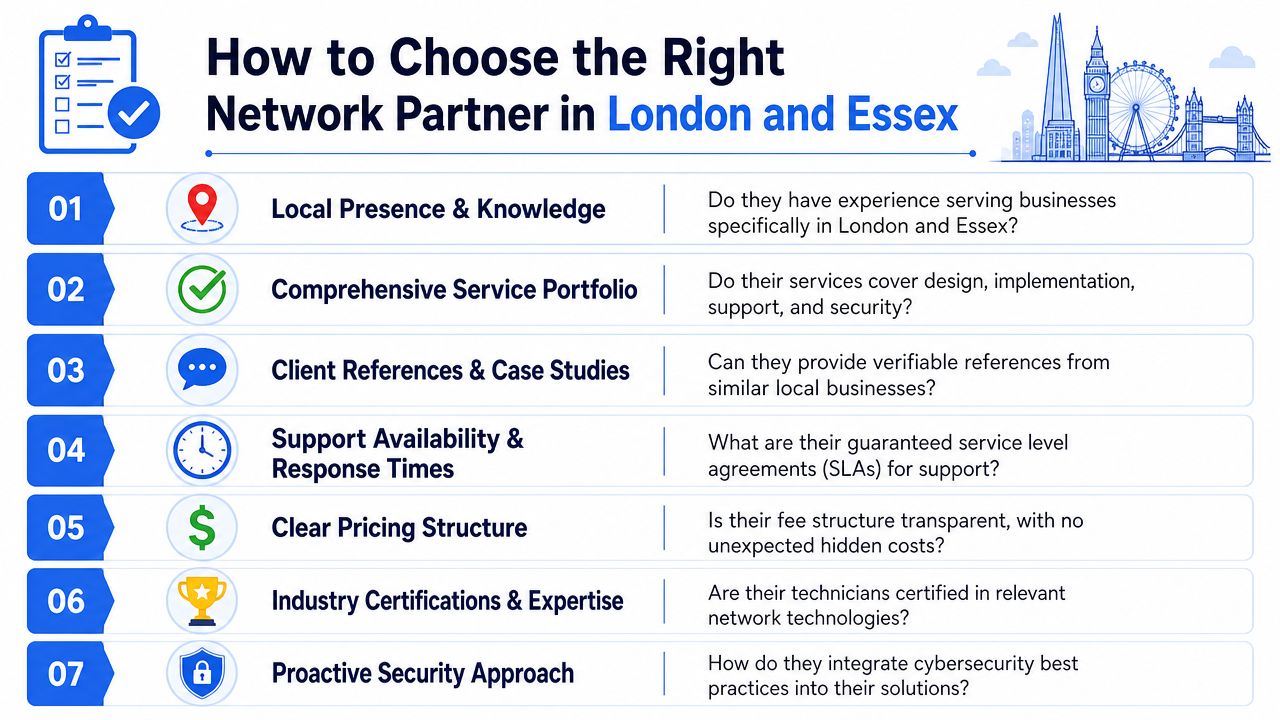
Questions worth asking before you sign anything
Don't start with brand names. Start with how they work.
- Do they assess the site properly or just quote from a parts list?
- Can they handle the full job including cabling, wireless, security, voice, and support?
- What happens when something fails outside normal office hours?
- Will they separate guest access from internal systems as standard?
- Do they explain trade-offs clearly or bury them in jargon?
- Can they support growth without a full redesign?
- Will they document the setup so you're not dependent on one engineer's memory?
You can also look at wider local business directories such as Southern Tier Resources when comparing service providers and business support options tied to the London market.
Why local knowledge matters more than brochures
A generic national provider may be fine if your site is simple and your needs are standard. But many London and Essex businesses aren't operating in textbook conditions. Older buildings, awkward layouts, shared premises, patchy internal cabling, poor cupboard locations, and variable line performance all change the design.
That's why local experience is valuable. An engineer who understands regional installation quirks will usually ask better questions. Where does the line enter? Where are the dead spots? Can a backup connection get signal here? Are there neighbouring networks causing interference? Can the existing cabling support the plan?
A good network partner also knows when not to oversell. Not every small office needs a complex stack of hardware. Some need a tidy firewall, a managed switch, proper Wi-Fi placement, and a backup connection. Others need much more. The right provider should be able to tell the difference quickly.
Your Next Steps Towards a Better Business Network
A better network starts with honesty about what isn't working. If staff are losing time to unstable Wi-Fi, clunky file access, awkward remote connections, or unreliable calls, the problem won't solve itself. It usually gets worse as more devices, more cloud services, and more security demands land on the same setup.
The fix also isn't to buy the most expensive broadband package and hope for the best. Good small business network solutions are built around fit. The right mix of connectivity, cabling, switching, Wi-Fi, voice, and security for the way your team works. In London and Essex especially, resilience matters just as much as speed.
If you're reviewing your current setup, keep the checklist simple:
- List the pain points: where staff lose time, where calls fail, where coverage is weak
- Identify the critical systems: phones, card payments, CCTV, cloud software, shared files
- Check the weak spots: guest access, old cabling, single points of failure, unsupported hardware
- Think about the next phase: more users, second site, hybrid working, hosted phones, tighter security
You don't need to become a network engineer overnight. You need a clear view of what the business depends on and a practical plan to support it.
For firms around Romford, Hornchurch, Rayleigh, Brentwood, and the wider London and Essex area, the next sensible step is a jargon-free conversation with someone who can assess what you've got, explain the trade-offs, and recommend a setup that's secure, supportable, and built for real-world use.
If you want practical help with connectivity, Wi-Fi, VoIP, security, cabling, or ongoing IT support, speak to Networking2000 for clear advice suited to your site and business methods. They support organisations across London and Essex, offer extended hours from early morning to late evening, and can help you build a network that stays reliable as your business grows.

