It usually starts with something that looks manageable. The internet drops out for half an hour. A shared folder won't open. Microsoft 365 keeps asking staff to sign in again, then refuses every password. People stop working, phones start ringing, and someone says, “It'll come back in a minute.”
Sometimes it does. Sometimes it doesn't.
For a lot of small businesses, the primary problem isn't the initial fault. It's finding out there's no written plan for what happens next. Who speaks to staff? Which systems come back first? Are the backups usable? If the issue is a compromised Microsoft 365 account or an identity lockout rather than a failed server, who can still get in and restore anything?
That's why an IT disaster recovery plan matters. It's not a corporate binder that sits on a shelf. It's a practical playbook for keeping the business running when key systems fail, accounts get compromised, or a supplier outage knocks out the tools you rely on every day.
Table of Contents
- Why a Small Glitch Can Signal a Major Disaster
- Scoping Your Plan and Assessing Real-World Risks
- Choosing Your Backup and Recovery Infrastructure
- Documenting Your Core Recovery Procedures
- Defining Roles, Responsibilities, and Communications
- Testing, Maintaining, and Improving Your Plan
- When to Partner with a Managed Service Provider
Why a Small Glitch Can Signal a Major Disaster
A “small” outage often exposes a much bigger weakness. If one member of staff can't access files, that may point to a permissions issue, a failed sync, ransomware activity, or an identity problem that's about to spread. If cloud email goes down, sales, support, invoicing, and internal approvals can all stall at once.
That's the reality many UK businesses are dealing with. The UK government's Cyber Security Breaches Survey 2024 found that around 50% of businesses experienced a cyber breach or attack in the previous 12 months, rising to 70% for medium-sized businesses, while 8% of businesses reported breaches at least once a week according to this summary of the survey findings. That's not a rare edge case. It's an operating risk.
For a small business owner, the lesson is simple. Don't treat disaster recovery as something you only need after a fire, flood, or server failure. The modern trigger is just as likely to be a phishing email, account compromise, broken SaaS integration, or a third-party service outage.
Practical rule: If your team would lose access to email, files, phones, accounts, or line-of-business apps and nobody knows the exact recovery order, you don't have a recovery plan yet.
A good plan protects more than data. It protects momentum, customer confidence, and decision-making under pressure. If you want a straightforward overview of the benefits of IT disaster preparedness, that resource is worth reading alongside your own planning work.
Scoping Your Plan and Assessing Real-World Risks
A lot of SME recovery plans fail before the first outage because they scope the problem too narrowly. The plan covers servers and backups, but misses the services that now hold the business together. For many firms, the first real disaster is not a failed box in the comms room. It is a locked Microsoft 365 tenant, a broken identity provider, or a SaaS platform your staff cannot get into.
Start with business stoppage points
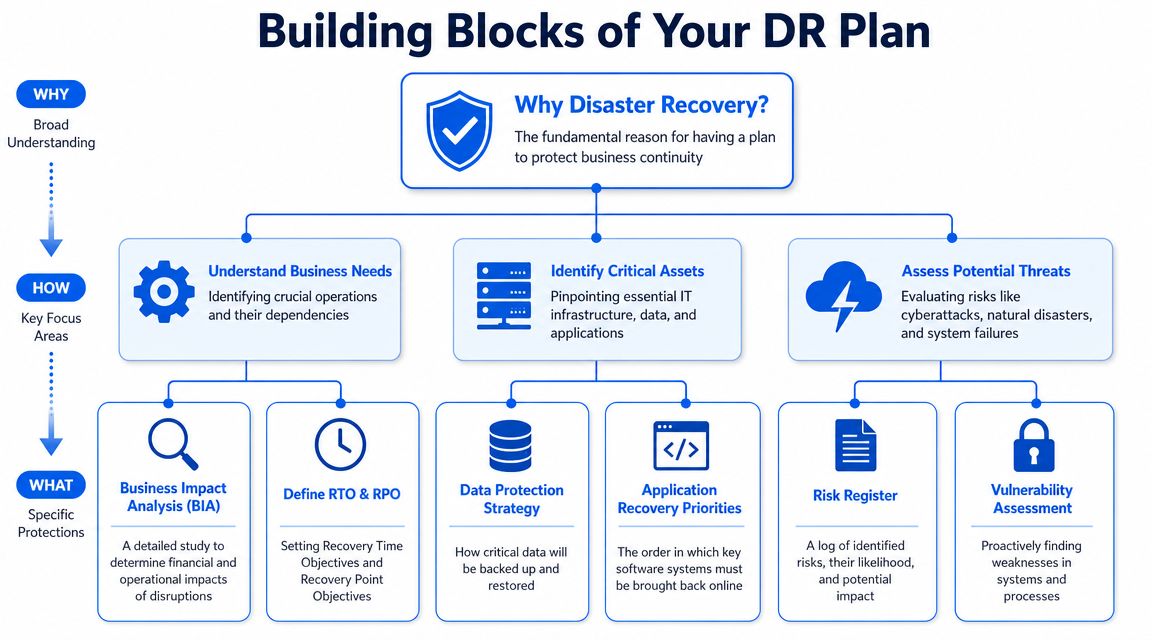
A Business Impact Analysis, or BIA, is just a structured way of answering one question. What stops the company from trading if it disappears today?
That means looking past the obvious systems and tracing the dependencies underneath them. A file share may depend on local storage, backup access, user permissions, and Microsoft 365 sign-in. Your accounts package may be cloud-hosted, but still fail hard if MFA breaks, a key user is locked out, or the supplier portal is down.
For small businesses, blind spots frequently emerge. I often see firms back up data carefully, then realise no one has documented who holds global admin rights, how to regain control of a compromised tenant, or which third-party apps rely on single sign-on.
Ask practical questions:
- What has to work first: Email, telephony, finance, customer records, booking systems, shared files, remote access.
- What does each service rely on: Internet connectivity, DNS, identity, admin accounts, supplier support, local devices, firewall rules.
- Who is affected if it fails: Directors, office staff, warehouse teams, field engineers, customers.
- What is the immediate business impact: Missed enquiries, delayed invoicing, halted dispatch, payroll problems, compliance issues.
Write the answers in plain English. “If Microsoft 365 sign-in fails, staff lose access to Outlook, Teams, SharePoint, OneDrive, and any third-party app tied to Entra ID.” That gives you something you can recover against. “Cloud issue” does not.
A simple inventory should cover services as well as hardware:
| Asset or service | Why it matters | What it depends on |
|---|---|---|
| Email platform | Customer communication, approvals, alerts | Internet, identity, admin access |
| Shared files | Daily work, contracts, templates | Storage, permissions, backup access |
| Finance system | Billing, payroll, reporting | Database, supplier support, user access |
| VoIP phones | Sales and support calls | Internet, firewall, provider portal |
| Staff laptops | Daily productivity | Device health, credentials, endpoint tools |
Set recovery targets you can use
Once the impact is clear, set two recovery targets for every key system.
RTO is how long the business can tolerate the service being down.
RPO is how much data loss the business can tolerate.
These are business decisions first, technical decisions second. If payroll can wait until tomorrow morning, the finance system may have a longer RTO. If bookings, jobs, or stock levels change throughout the day, the RPO may need to be measured in hours or less.
Don't set targets around what your backup product happens to deliver. Set them around what the business can survive without causing operational or financial damage.
The U.S. Cybersecurity and Infrastructure Security Agency explains the role of business impact analysis, recovery objectives, and dependency planning in its Business Impact Analysis guide. That is a useful reference if you want a formal framework behind the practical work.
Assess the risks you are likely to face
For most SMEs, the realistic risks are not limited to fire, flood, or server failure. They include:
- Compromised cloud accounts: Admin credentials are stolen, MFA is bypassed, or mailbox rules are used to hide fraud.
- SaaS outages or lockouts: A provider issue, billing problem, or misconfiguration blocks access to a line-of-business system.
- Human error: Files are deleted, permissions are changed, retention settings are altered, or a firewall rule breaks access.
- Supplier dependency failures: Internet, VoIP, DNS, or authentication providers go down at the wrong time.
- Endpoint compromise: A laptop infection spreads into synced folders, shared drives, or cloud storage.
This is also why recovery scoping should include how file restores work in practice. The UK IT guide to Volume Shadow Copy is a good plain-English reference for local file recovery. It helps with quick restores, but it does not solve tenant compromise, identity lockout, or a failed SaaS platform.
Good scoping gives you a recovery order that matches how the business runs, not just a list of systems in the rack. That is the difference between restoring data and restoring operations.
Choosing Your Backup and Recovery Infrastructure
Once priorities are clear, the next question is where your recoverable data and systems should live. Most SMEs end up comparing on-premise, cloud, and hybrid approaches. Each can work. Each can also fail badly if it's chosen for the wrong reason.
What local backups do well
On-premise backup usually means a NAS appliance, backup server, external storage, or a dedicated device sitting in your office or server room. The main advantage is speed. If someone deletes a file, a local restore is often quicker than pulling data back over the internet.
That matters for shared drives, larger file sets, and local virtual machines.
Local copies also give you a degree of control. If your internet line is down, you may still be able to restore data inside the building. For some firms, that's the fastest route back to operation.
The downside is obvious. If the same incident affects both production systems and your local backups, you may lose both. Theft, fire, flood, power events, and ransomware targeting connected storage can all turn a “safe” local backup into a useless one.
If you use Windows-based file recovery, it's worth understanding how shadow copies fit into the bigger picture. This UK IT guide to Volume Shadow Copy gives a useful plain-English explanation. The key point is that shadow copies can help with quick file recovery, but they are not a complete disaster recovery strategy on their own.
Where cloud backup helps and where it can catch you out
Cloud backup is attractive because it gets data off-site and reduces dependence on one physical location. It can also protect laptops, remote workers, and cloud workloads more easily than a purely local setup.
For SMEs using Microsoft 365, cloud backup is often essential. Many firms assume that because their mail and files are already “in the cloud”, they're automatically covered for every recovery scenario. That assumption causes problems. You still need clear decisions around tenant-level backup, retention, admin access, and who can restore data if the main account structure is compromised.
Cloud-first environments also introduce a modern blind spot. Sometimes the issue isn't lost data. It's lost access. If your identity provider is down or your privileged accounts are compromised, your data may still exist perfectly well while nobody can reach it.
The UK National Cyber Security Centre's cloud security guidance emphasises that customers remain responsible for how cloud services are configured and protected, which is why cloud-heavy SMEs need recovery ownership for identity, privileged access, and tenant settings, as discussed in this piece on building a reliable IT disaster recovery plan.
Why hybrid is often the practical answer
For many smaller businesses, hybrid backup is the most sensible option. Keep fast local recovery for day-to-day problems, plus off-site or immutable copies for serious incidents.
That supports the familiar 3-2-1 rule in practice. Three copies of data, two different media types, and one copy off-site. The exact tools vary, but the principle remains sound because it reduces single points of failure.
Here's a straightforward comparison.
| Factor | On-Premise | Cloud | Hybrid |
|---|---|---|---|
| Recovery speed for large local restores | Usually strong | Can be slower depending on bandwidth | Strong for urgent local restores |
| Protection from site loss | Weak on its own | Stronger, data is off-site | Stronger than local alone |
| Dependence on internet access | Lower | Higher | Shared across both approaches |
| Control over hardware | High | Lower | Mixed |
| Support for remote users | Often less convenient | Usually easier | Usually good |
| Protection against connected-system compromise | Can be weaker if not isolated | Can be stronger with proper controls | Better if designed carefully |
| Complexity | Moderate | Moderate | Higher, but often worth it |
| Best fit | Offices with local servers and big file sets | Cloud-first firms with distributed staff | SMEs needing speed plus resilience |
A practical backup scope for a modern SME should cover more than servers:
- Microsoft 365 data: Exchange Online, OneDrive, SharePoint, Teams-related content.
- Local file shares and virtual machines: Especially if line-of-business apps still run on-site.
- User devices: Senior staff laptops often hold key documents, browser-stored access, or local working files.
- Network and security configuration: Firewalls, switches, Wi-Fi settings, and VPN configuration can be just as important as file data.
- VoIP and provider settings: Number routing and call flow changes matter during an outage.
Documenting Your Core Recovery Procedures
At 8:45 on a Monday, staff can't sign into Microsoft 365, email stops flowing, Teams is down, and nobody knows whether the problem is a Microsoft outage, a locked tenant, or an attacker inside the admin account. That is the point where a disaster recovery plan earns its keep. The businesses that recover fastest are usually not the ones with the fanciest backup platform. They are the ones with clear instructions that someone can follow under pressure.
Restore the foundations first
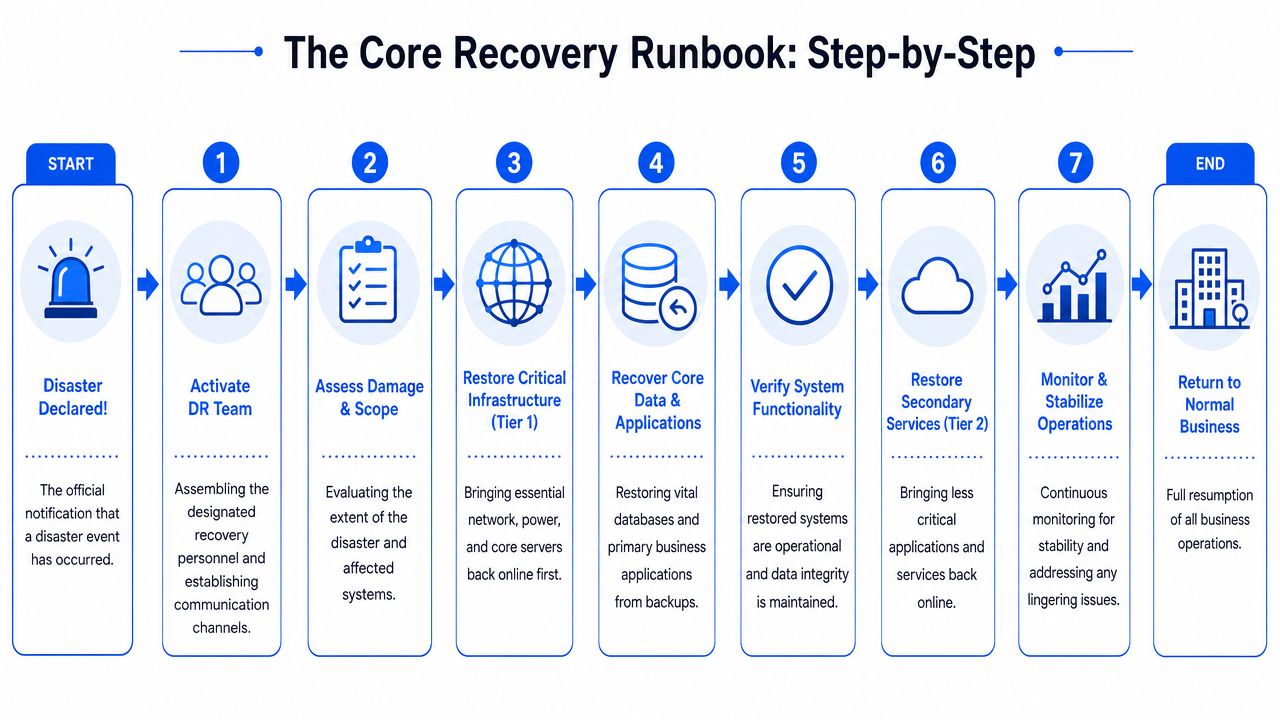
Recovery works best in layers. If identity, DNS, internet access, or admin control is broken, bringing back an application rarely solves the underlying problem. This catches out a lot of SMEs now, because the weak point is often a cloud service or identity platform rather than a failed server in the comms room.
A practical runbook should set the order clearly:
Confirm the incident scope
Work out whether this is a local outage, a cyber incident, a supplier fault, or an identity compromise. Restoring systems before you understand the failure can make the situation worse.Stabilise core access
Check internet connectivity, firewall status, DNS availability, VPN access, and internal network health.Recover identity and admin control
If Microsoft 365, Entra ID, or another identity provider is involved, confirm you still control privileged accounts, authentication methods, and recovery options.Restore critical shared services
Bring back email, file access, line-of-business systems, and phones in dependency order.Validate before broad release
Test with a small user group first. Confirm sign-in works, files open, mail flows, printers respond, and the right staff can reach the right systems.
A backup stored safely off-site is only part of the job. Recovery is complete when staff can sign in, reach the service, and do their work.
The documentation itself needs enough detail to be usable. The US Cybersecurity and Infrastructure Security Agency advises organisations to document and maintain recovery procedures so they can restore systems in a controlled way after an incident, not rely on memory during one (CISA disaster recovery guidance). That matters even more for SMEs using Microsoft 365, cloud VoIP, and SaaS platforms, where admin access and supplier coordination can be the bottleneck.
What to document for cloud and identity failures
Many plans frequently prove too thin. They cover failed hardware reasonably well, yet gloss over what happens if the Microsoft 365 tenant is compromised, MFA methods are changed, or an admin account is locked out.
Your runbook should answer the questions people ask in the first 15 minutes of an incident:
- Which emergency admin accounts exist: Where they are recorded, who is allowed to use them, and how access is controlled.
- How to verify a likely compromise: Unusual sign-ins, unexpected MFA resets, suspicious mailbox forwarding rules, disabled users, or admin role changes.
- Who contacts the supplier: Include support routes, tenant references, contract details, and the evidence to gather before raising the case.
- What gets restored first: Admin control, authentication methods, conditional access review, core user access, then service-specific recovery.
- What must happen before any restore: Password resets, session revocation, privileged role review, and checks that the threat is contained.
There is a real trade-off here. The more security controls you add, the more steps recovery can involve. Strong conditional access, privileged identity controls, and restricted admin rights are the right call, but your plan must show how to recover within those rules or they will slow you down at the worst possible time.
Cloud-dependent SMEs also need documented procedures for third-party service failure. If your VoIP platform fails, who authorises call diversion and where is that instruction stored? If SharePoint is unavailable, what is the temporary file-sharing method? If a firewall configuration is corrupted, who has the clean export and how is it restored safely?
Write for a stressed human, not an ideal day
Good recovery documentation is plain, specific, and short enough to use under pressure.
Write the exact action. Name the account. State the test. Avoid vague lines like “restore access according to policy” when the person holding the plan needs to know which account to use, which portal to open, and what success looks like.
Keep each procedure page focused on the job at hand:
| Include this | Avoid this |
|---|---|
| Named owner | “The team” |
| Exact system name | Generic labels |
| Dependency notes | Assumptions |
| Verification step | “Restore complete” with no test |
| Offline copy of key instructions | A plan that only exists inside the failed system |
Store the core runbook somewhere you can still reach during a lockout. A printed copy in a sealed envelope, a secured offline export, or a protected out-of-band document store all work. If the only copy sits inside the same tenant or password vault that has failed, the plan has a single point of failure before recovery even starts.
Defining Roles, Responsibilities, and Communications
Even a technically strong recovery plan falls apart if nobody knows who is making decisions. In real incidents, the delay often isn't the restore itself. It's the confusion around authority, escalation, and communication.
Use a simple responsibility model
You don't need a big corporate chart. A stripped-down RACI approach works well for SMEs.
- Responsible: The person doing the work.
- Accountable: The person who approves and owns the outcome.
- Consulted: The specialist or supplier giving input.
- Informed: People who need updates but aren't making the call.
A small business might assign roles like this:
| Task | Responsible | Accountable | Consulted | Informed |
|---|---|---|---|---|
| Declare a DR event | Operations manager | Managing director | IT lead | Staff leads |
| Restore Microsoft 365 access | IT lead | Managing director | External IT partner | Department heads |
| Divert phones | Telecoms contact | Operations manager | VoIP provider | Front desk |
| Customer update | Office manager | Managing director | Legal or insurer if needed | Customers, staff |
| Approve system shutdown | IT lead | Managing director | Security adviser | Senior staff |
This prevents the classic problem where three people assume someone else has already done the important bit.
The strongest plans also define escalation routes clearly. If the normal IT contact is away, who steps in? If the owner is unreachable, who can authorise a shutdown, a password reset, or a vendor support request? That needs to be settled before the bad day.
During an outage, clear authority is often more valuable than detailed theory.
Build a communication tree before you need it
Most businesses think about restoration first and messaging second. In practice, both happen together.
Your communication plan should include:
- Staff notifications: How you'll tell people what's down, what not to touch, and where to work from.
- Customer communications: Short, factual updates that reassure without speculating.
- Supplier contact paths: Internet, VoIP, cloud platform, cyber insurer, and outsourced IT contacts.
- Internal status cadence: Decide who gives updates and how often.
A usable contact list should hold direct numbers, secondary numbers, personal email alternatives where appropriate, supplier account references, and named decision-makers. Store it in more than one place.
For smaller firms under pressure, this matters as much as the technical steps. Guidance on IT recovery planning also highlights the operational reality that incidents require decision-making, evidence capture, and clear authority, not just technical recovery, as discussed in developing your IT recovery plan.
Testing, Maintaining, and Improving Your Plan
A plan usually fails in small, ordinary ways first. The backup admin account is tied to an old mobile number. The test restore works, but nobody can sign in because Microsoft 365 conditional access blocks the session. The file data is back, but SharePoint permissions are wrong and staff still cannot do their jobs.
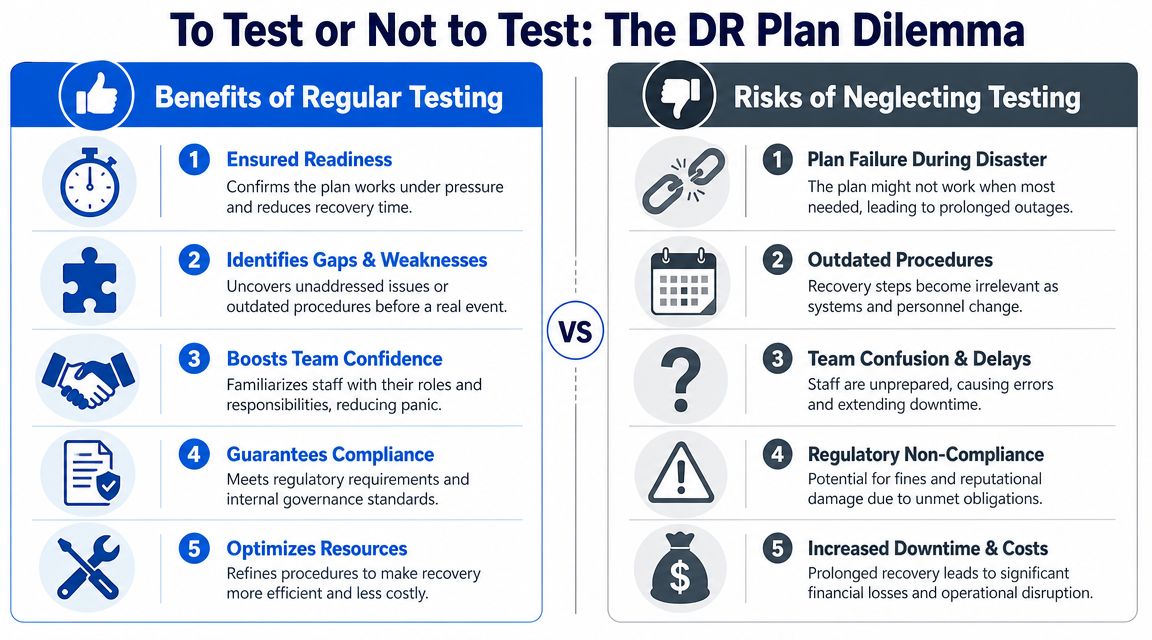
For many SMEs, that is the blind spot. They have thought about a failed server or deleted folder, but not about losing access to the cloud services and identity platform everything else depends on. If your tenant, admin accounts, or core SaaS tools are compromised, recovery is no longer just a restore job. It becomes a validation job.
Test in stages
Start with controlled tests and build up. Smaller firms usually get better value from staged testing than from jumping straight into a dramatic full failover exercise.
Tabletop exercise
Run through a realistic incident with the people who would respond. Use scenarios that reflect modern failure points, not just on-site hardware problems. For example, “Your Microsoft 365 global admin account is compromised at 9:15 on a Monday. Who confirms the incident, who contacts Microsoft, who checks backup access, and how do staff keep working?” This quickly exposes weak assumptions, missing approvals, and dependencies on one person.
Partial technical restore
Recover a test mailbox, a SharePoint library, a file set, or a virtual machine into a safe environment. Then check whether permissions, versions, and line-of-business access still make sense. A restore that produces data without usable access is only a partial success.
Full recovery simulation
A broader exercise shows how systems behave together under pressure. During such exercises, hidden dependencies tend to surface. MFA methods may be tied to the affected tenant. Licensing may delay rebuilds. VPN, VoIP, printing, or mapped applications may stop staff from working even though the main platform appears to be back.
The UK National Cyber Security Centre advises organisations to exercise response and recovery plans regularly, review the results, and update documentation after changes. That is the only way a plan stays usable when systems, suppliers, and admin controls change over time, as set out in its guidance on exercising your incident response plan.
Measure whether recovery worked
Testing should end with evidence, not a tick in a spreadsheet.
The benchmark for recovery is whether the business can operate within the agreed recovery time objective and with an acceptable amount of data loss. That means checking outcomes that matter to staff and customers, not just whether a backup file opened.
Measure things that reflect real use:
- Restore time achieved: Did the service come back inside the target window?
- Data condition: Was the recovered version current enough to use safely?
- Access validation: Could normal users sign in and complete key tasks?
- Cloud and identity dependency checks: Did MFA, admin roles, conditional access, and SaaS integrations still function?
- Unresolved findings: What still failed, and what workaround was needed?
- Documentation accuracy: Did the runbook match the live setup?
I always recommend one simple test at the end of any recovery exercise. Ask a member of staff to do the job they would normally do. Send an email. Open the shared files. Access the line-of-business app. If they cannot work, recovery is not finished.
Test to expose weak points while the pressure is low.
Maintenance does not need to be complicated, but it does need to be disciplined.
- Quarterly review: Check contacts, suppliers, systems, admin roles, and recovery priorities.
- After major change: Update the plan after tenant changes, firewall replacements, new SaaS deployments, office moves, or staffing changes.
- Regular exercise cycle: Run tabletop exercises and restore tests on a schedule, then carry out broader simulations at sensible intervals.
If you have added more services to Microsoft 365, changed your VoIP provider, introduced new security controls, or handed admin rights to someone new, the plan needs revising straight away. Otherwise, the document says one thing and the environment does another.
When to Partner with a Managed Service Provider
Some businesses can build and maintain their own IT disaster recovery plan. Many can't, and that's not a failure. It's usually a capacity issue.
If your environment includes Microsoft 365, cloud storage, remote devices, VoIP, internet failover, security tooling, and third-party apps, recovery planning gets technical very quickly. The challenge isn't just storing backups. It's documenting dependencies, testing restores, maintaining access controls, and being ready to respond when the problem starts outside your office.
It usually makes sense to bring in an MSP when:
- Your in-house team is too small: They're busy keeping daily operations running and don't have time to test recovery properly.
- Your business relies heavily on cloud and SaaS: Identity, tenant security, and vendor coordination become central recovery issues.
- You need broader cover: Outages don't wait for office hours, annual leave, or one key person to get back to you.
- You want independent validation: An outside engineer will often spot missing dependencies and weak assumptions faster than an internal team.
A good provider brings structure as well as tooling. They can help define realistic recovery targets, set up backup strategy, document cloud and identity recovery, and run tests that show what works.
If your current plan is mostly “call whoever normally fixes the computers”, it's time to formalise it.
If you want help turning scattered backups and unwritten know-how into a workable recovery plan, Networking2000 can help you map your risks, document the right recovery order, and build an IT disaster recovery plan that fits the way your business operates in London and Essex.

