You're probably dealing with this already. The internet drops during a client call, staff save files in three different places, your phone system feels dated, and every week brings another headline about AI, cyber attacks, or “digital transformation” as if a small business owner has spare time to decode all of it.
For most London and Essex SMBs, a digital transformation roadmap isn't about becoming a tech company. It's a practical plan to make the business easier to run, safer to operate, and better able to serve customers. That usually starts with the basics: reliable connectivity, secure systems, sensible backups, better communications, and clear priorities.
Table of Contents
- Why Your SMB Needs a Digital Roadmap Not a Vague Dream
- Phase 1 Audit Your Digital Foundations
- Phase 2 Define Your Business Goals and Priorities
- Phase 3 Assemble Your Team and Secure a Budget
- Phase 4 Execute the Plan and Measure Your ROI
- Avoiding Common Roadmap Pitfalls
Why Your SMB Needs a Digital Roadmap Not a Vague Dream
A lot of owners hear “digital transformation” and assume it means a major software rollout, a big consulting bill, or a boardroom exercise designed for enterprises. In practice, it means deciding what to fix first and why. If your staff lose time chasing files, your broadband struggles, or your security depends on hope, you already need a roadmap.
The reason is simple. Day-to-day operations now depend on technology even in businesses that don't think of themselves as technical. Sales calls rely on stable internet. Customer service relies on reachable phones and shared information. Basic continuity relies on backup, security, and equipment that doesn't fail at the worst moment.
The wider direction of travel in the UK makes this harder to ignore. The UK government's 2022 to 2025 Roadmap for Digital and Data set out a cross-government plan to modernise services and technology, backed by an additional £8 billion investment committed in the 2021 Spending Review for digital, data and technology transformation by 2025, alongside six missions including transformed public services and secure technology delivery, as outlined in the UK government digital and data roadmap.
That doesn't mean your firm should copy a government programme. It means digital capability is now part of the operating environment, not a side topic. SMBs feel that pressure in more practical ways: customers expect faster responses, staff expect usable systems, and owners expect fewer avoidable disruptions.
A roadmap is a filter
A proper digital transformation roadmap stops you buying disconnected tools. It gives you a filter for every decision.
Ask these questions:
- Does it solve a live business problem: Slow quoting, missed calls, poor Wi-Fi, scattered files, weak security, or patchy customer follow-up.
- Does it strengthen the foundation: Better connectivity, managed firewall protection, cleaner email, proper backups, modern telephony, organised file access.
- Can your team adopt it: If staff won't use it, the project is decoration.
- Will it reduce risk: Resilience matters as much as efficiency.
Practical rule: If a project sounds impressive but doesn't improve reliability, security, communication, or workflow, it probably isn't your next priority.
Some broader reading on digital transformation strategies can help frame the customer and operational side of change, but for an SMB the winning approach is usually narrower and more grounded. Fix what causes friction first. Build from there.
What works and what doesn't
What works is a staged plan tied to real business pain. Replace ageing phone systems with VoIP if calls are central to sales and service. Upgrade cabling and wireless if the office network is unreliable. Tighten email and firewall protection if staff face constant phishing and spam. Improve website and enquiry handling if your online presence is weak.
What doesn't work is treating transformation like a shopping list. A cloud app won't save a business with poor internet. An AI tool won't help if data is messy and staff don't trust the output. A new website won't fix missed leads if nobody gets alerts or follows up.
Phase 1 Audit Your Digital Foundations
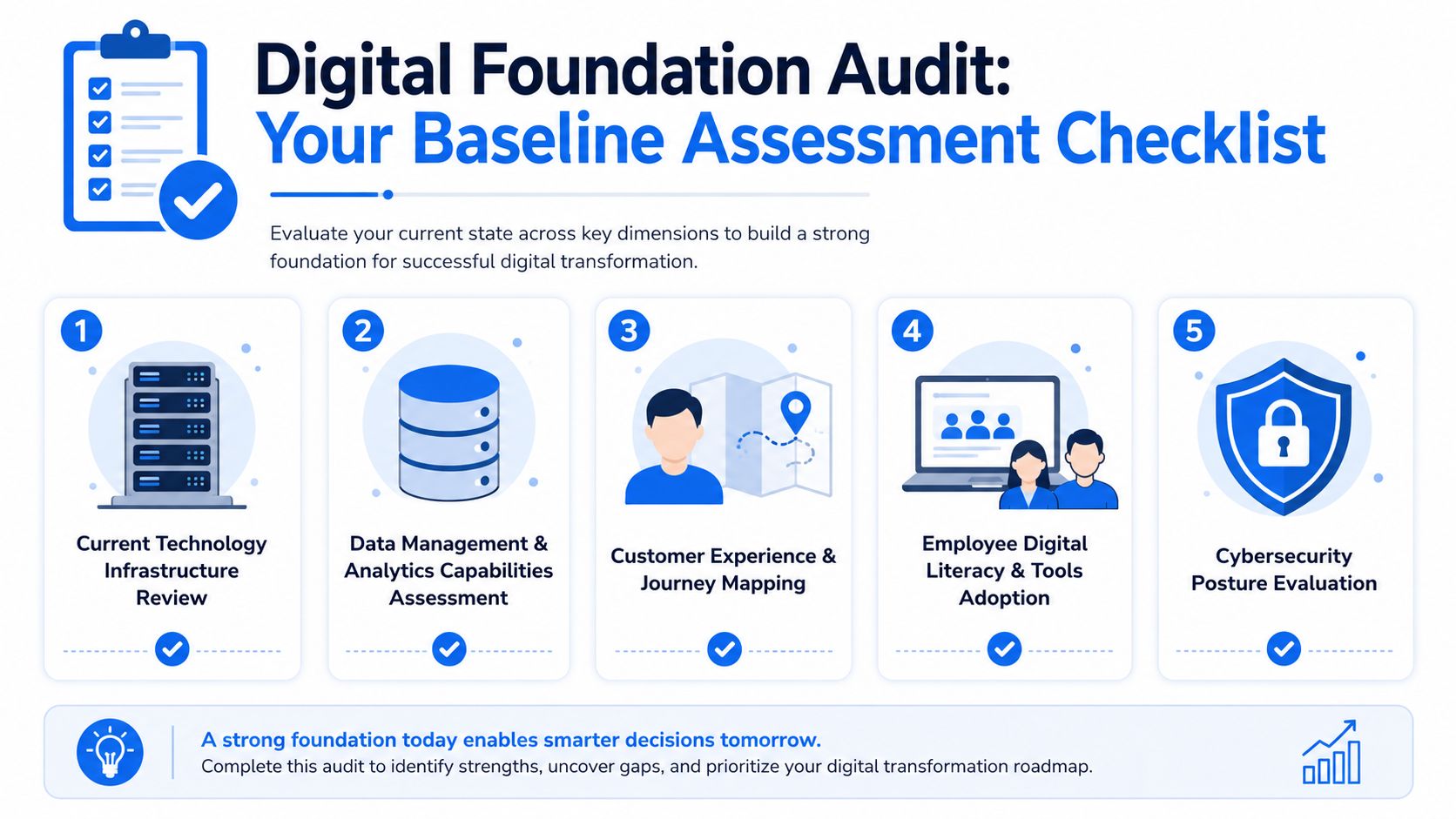
Most small businesses don't need another abstract strategy session. They need a clear view of what they already have, what's causing avoidable friction, and what's fragile.
That's why the first step in a digital transformation roadmap should be a baseline assessment. UK data from 2024 shows that 45% of businesses use cloud computing while only 18% have adopted AI, according to this UK business technology adoption reference. The gap matters. It shows many firms still need to get core systems, connectivity, and process basics in shape before moving to more advanced automation.
What to check first
Start with what your team touches every day. If any of these areas are weak, the rest of the roadmap will wobble.
- Internet and connectivity: Check whether broadband performance is stable during busy hours, not just fast on a test. If calls break up, cloud apps lag, or remote access crawls, the business feels it immediately.
- Internal network: Look at Wi-Fi coverage, router performance, switch capacity, and cabling quality. A surprising number of office problems come down to weak wireless design or tired infrastructure hidden in a comms cupboard.
- Phones and communication tools: If you're still dealing with dated handsets, poor call handling, or no flexibility for remote staff, review whether a VoIP setup would simplify call routing, voicemail, and team availability.
- Email and collaboration: Check where mail is hosted, how accounts are protected, and how files are shared. If staff are forwarding documents to personal inboxes or storing files in random folders, that's a process risk as much as a technical one.
- Backups and recovery: Ask a blunt question. If a laptop fails, a server dies, or ransomware hits, what happens next? If the answer is vague, the business isn't protected.
- Cyber security controls: Review firewalls, anti-malware, patching, access permissions, password practices, and device visibility. Many SMBs discover they have tools, but no consistent policy.
- Customer-facing systems: Website contact forms, response handling, booking workflows, and online visibility all deserve a look. A digital roadmap isn't just internal. It should also support how customers reach you.
Businesses often think they have an IT problem when they actually have a visibility problem. Nobody has mapped what depends on what.
Turn the audit into a shortlist
An audit only matters if it ends in decisions. Keep the output simple and usable.
A practical format looks like this:
| Area | What to look for | Common sign of trouble | Likely priority |
|---|---|---|---|
| Connectivity | Dropouts, slow upload, poor remote access | Video calls fail, cloud tools lag | High |
| Network | Weak Wi-Fi, ageing switches, poor cabling | Dead spots, unstable desks, printer issues | High |
| Security | Gaps in firewall, patching, access control | Suspicious emails, unmanaged devices | High |
| Backup | No tested restore process | Uncertainty after failure | High |
| Communications | Old phone setup, no flexibility | Missed calls, weak call handling | Medium to high |
| Website and enquiries | Outdated site or slow response flow | Leads go cold | Medium |
Once you've got the list, rank issues by business impact, not by technical novelty. If your office loses productivity every time the network slows down, that comes before experimenting with advanced tools. If backups are weak, that comes before cosmetic upgrades.
What a good audit usually reveals
In smaller firms, patterns repeat. The business has grown, but the setup hasn't. New staff have joined, extra devices have been added, cloud apps have crept in, and the original network or security approach is now too thin.
The strongest early wins usually come from:
- Cleaning up connectivity and network reliability
- Securing email, devices, and perimeter protection
- Improving telephony and internal communication
- Standardising file access and backup
- Fixing enquiry handling on the website side
That's not glamorous. It is effective. And it creates the base you'll need for everything else.
Phase 2 Define Your Business Goals and Priorities
Once the audit is done, the next mistake is easy to make. Owners start talking about tools instead of outcomes. They ask whether they need cloud telephony, better Wi-Fi, a new website, or automation software before they've settled the more important question. What should improve in the business first?
A useful roadmap goal describes an operational result. It doesn't just name a product.
Start with business friction
Write down the problems in plain English. If you can't explain the issue without jargon, the priority probably isn't clear enough yet.
Examples of better goals:
- Reduce missed customer calls by improving how incoming calls are routed and answered
- Keep staff working during outages through better backup, connectivity resilience, and support
- Make remote and office staff work the same way with shared systems and dependable access
- Protect client and company data with stronger perimeter security and tighter controls
- Turn the website into a working sales channel instead of a static brochure
Examples of weak goals:
- Move everything to the cloud
- Use AI
- Digitise the business
- Modernise IT
Those might become part of the answer, but they're not useful priorities on their own.
If you can't tie a project to fewer interruptions, faster response, tighter security, or better customer handling, don't fund it yet.
Choose the order carefully
Many SMB roadmaps improve or fail depending on the strategic approach taken. Mid-market transformation plans often follow a phased approach over 24 to 36 months, with year 1 focused on stabilisation, year 2 on modernisation, and year 3 on optimisation, as described in this mid-market digital roadmap overview. That sequence is sensible for smaller firms too, even if the exact timeline differs.
The key lesson isn't the timeframe. It's the order.
A sensible priority stack for an SMB often looks like this:
Stability first
Fix internet reliability, networking issues, backups, and weak points in your core setup.Security next
Tighten firewall protection, email security, access control, and monitoring.Communication and workflow after that
Improve VoIP, shared file access, and day-to-day collaboration.Customer-facing improvements next
Upgrade the website, forms, lead handling, and online presentation.Advanced automation later
Only once the groundwork is solid should you push into more ambitious automation.
A quick decision test
When budgets are tight, compare options this way:
| Proposed project | Helps resilience | Helps efficiency | Hard to adopt | Good early move |
|---|---|---|---|---|
| Firewall and backup improvement | Strongly | Indirectly | Low | Yes |
| Wi-Fi and cabling upgrade | Strongly | Strongly | Low | Yes |
| VoIP phone system | Moderately | Strongly | Low to medium | Usually |
| Full software overhaul | Varies | Varies | High | Usually no |
| Advanced AI rollout | Varies | Potentially | High | Usually later |
That's why the strongest digital transformation roadmap for a small business often looks less ambitious on paper than an enterprise plan. It focuses on what keeps the business running well this quarter, while building enough structure for the next stage.
Phase 3 Assemble Your Team and Secure a Budget
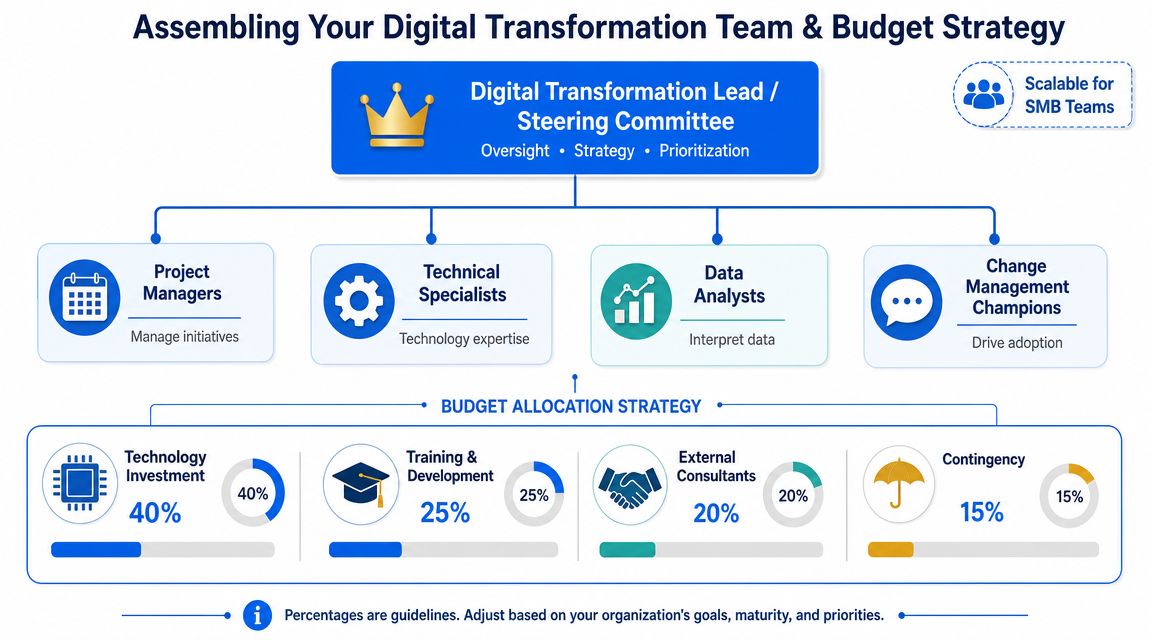
Small firms often stall here because they assume they need a formal transformation team, a programme manager, and a new hire with a digital job title. They usually don't. What they do need is clear ownership.
The people side matters more than many owners expect. Recent UK-focused guidance notes that transformation is often constrained by skills, and that AI adoption is rising sharply but unevenly across business sizes. For SMBs, sequencing the roadmap around staff enablement, governance, and expert partnership is often smarter than attempting a large-scale AI project alone, as discussed in this workforce readiness and transformation perspective.
A practical team for an SMB is lean. One person inside the business keeps momentum. One outside specialist fills the technical gaps. Department heads give input where systems affect sales, operations, finance, or service.
Pick owners before you pick platforms
Start by naming roles, not software.
- Business owner or director: Sets priorities, approves spend, removes blockers.
- Internal digital champion: Usually an organised staff member who understands how the business works. This person doesn't need to be technical. They need to be reliable and respected.
- Operational leads: People who can say where delays, duplication, or customer friction really happen.
- External IT partner: Handles design, implementation, security, support, and the ugly details many teams can't cover in-house.
That internal champion is often the difference between progress and drift. Without one, projects get pushed behind customer work and daily firefighting.
A short explanation of team roles can help before decisions get made:
Budget for the full job
SMBs often under-budget because they only price the visible item. They cost the new phones, not the network prep. They price the software, not the training. They approve the website, not the ongoing support behind forms, email delivery, and updates.
Build your budget across categories:
| Budget area | What people forget |
|---|---|
| Infrastructure | Switches, wireless access points, cabling, routers, power protection |
| Security | Firewall management, endpoint protection, email filtering, monitoring |
| Communications | Handsets, setup, call routing design, number migration, user training |
| Backup and continuity | Storage, testing, recovery planning, retained support |
| Staff enablement | Time for training, process changes, documentation |
| External support | Planning, deployment, troubleshooting, ongoing management |
Budget reality: The cheapest quote is often the one that leaves out the remedial work your business still needs.
A better budget conversation asks three questions. What must be fixed now? What can be phased? What needs specialist support because the business can't afford trial and error?
Keep the team small and the reporting simple
You don't need a monthly board pack. You need a visible list of actions, owners, due dates, and current blockers.
A simple working rhythm is enough:
- Weekly check-in: What was completed, what is late, what needs approval
- Monthly review: What has improved in operations, what still frustrates staff
- Quarterly reset: Which priorities change next based on results and business pressure
That structure keeps the roadmap alive without drowning a small business in process.
Phase 4 Execute the Plan and Measure Your ROI
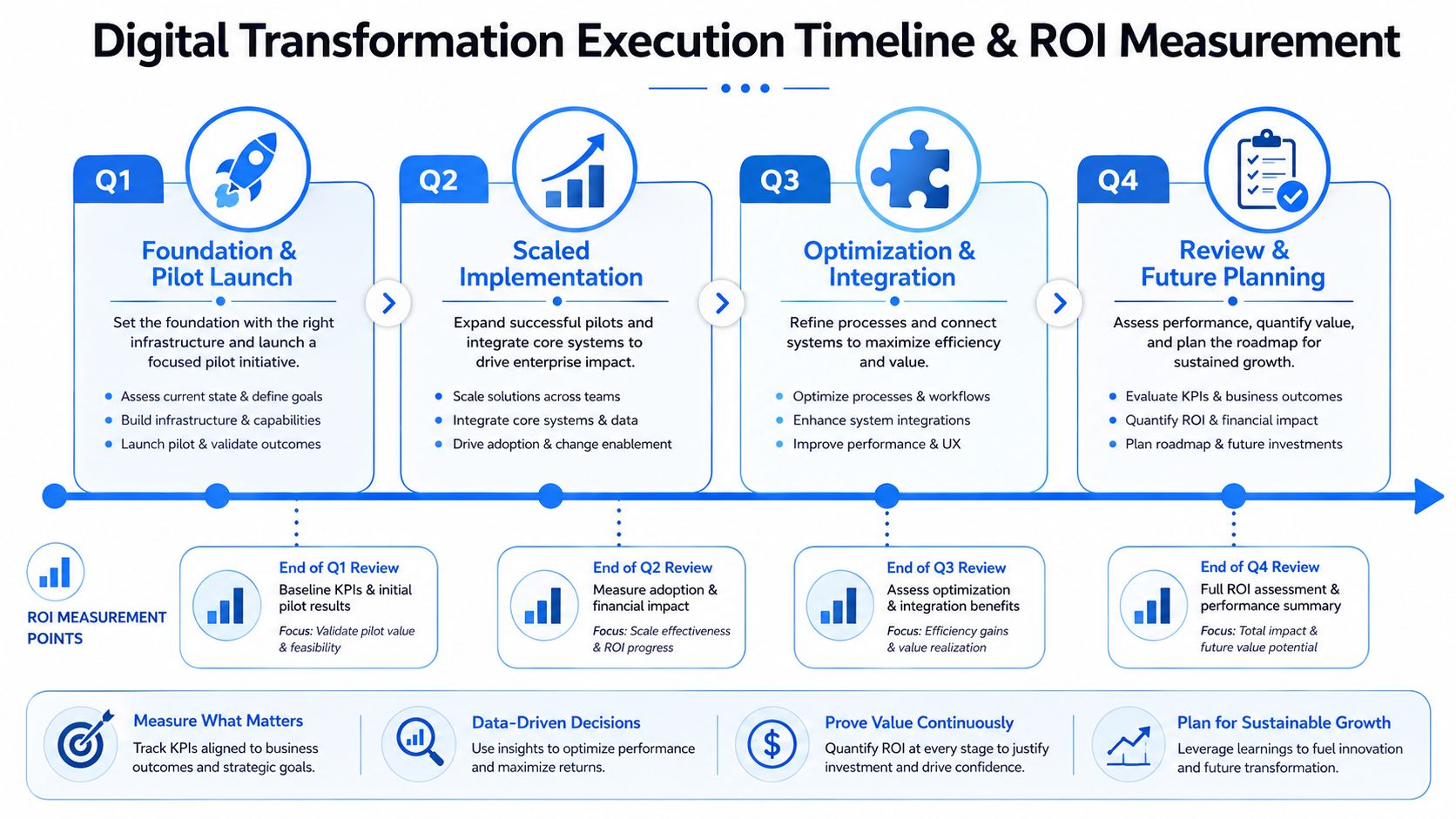
Execution is where a lot of digital plans become expensive clutter. The usual reason is pace. Too much gets launched at once, staff get confused, and the owner loses confidence because disruption rises before benefits appear.
A better digital transformation roadmap runs in phases. One practical improvement lands, staff adapt, issues get fixed, and then the next layer begins.
Run in phases not one big bang
For a typical SMB, a phased rollout might look like this:
| Phase | Focus | Example activities | What success looks like |
|---|---|---|---|
| Early phase | Stability and protection | Connectivity fixes, firewall review, backup setup, patching cleanup | Fewer interruptions, clearer visibility, safer baseline |
| Next phase | Communications and workflow | VoIP rollout, email improvements, shared file structure, remote access tidy-up | Easier calls, smoother collaboration, less friction |
| Later phase | Customer-facing upgrades | Website improvement, enquiry handling, branding and response process | Faster contact handling, better lead capture |
| Later still | Automation and optimisation | Workflow tools, reporting improvements, selective automation | Less admin effort, cleaner handoffs |
This order keeps risk controlled. It also makes benefits visible to staff, which matters more than many owners expect. If people see fewer dropouts, cleaner email, and simpler call handling, they're more willing to adopt the next change.
Measure outcomes your business can feel
The wrong metrics create false comfort. “Project completed” is not a business outcome. Neither is “tool installed”.
Track things that affect revenue, service, or risk. For example:
- Service continuity: Are staff losing fewer hours to internet or system issues?
- Call handling: Are fewer customer calls being missed or abandoned?
- Security exposure: Are suspicious emails being blocked more effectively? Are access controls cleaner?
- Support burden: Are recurring problems dropping, or does the same issue keep returning?
- Customer response flow: Are website enquiries reaching the right person quickly?
- Team adoption: Are staff using the new process, or working around it?
A useful rule is to pair each project with one operational measure and one human measure. For instance, a VoIP rollout might be judged by call handling quality and staff ease of use. A backup project might be judged by restore confidence and reduced downtime risk.
Measure what the business notices first. If owners and staff can't feel the improvement, the roadmap needs adjusting.
Know when to add smarter automation
Once the basics are stable, selective automation becomes far more useful. That might mean automating routine document handling, reducing manual admin, or tightening handoffs between systems. If you're exploring where that sort of capability fits later in the roadmap, these AI-driven data processing solutions are a useful example of the kind of targeted automation to evaluate after your data quality and workflows are in better shape.
The key word is after. Automation tends to magnify whatever sits underneath it. Good processes get faster. Messy processes become messy at speed.
Keep a rolling review
Roadmaps shouldn't be written once and forgotten. Review them on a simple cadence:
Check the current phase
What went live, what slipped, what needs fixing.Review business effect
Did service improve, risk reduce, or workflow become easier.Decide the next move
Continue, pause, or change sequence based on results.
That keeps the roadmap practical. It also stops you forcing the next project through before the current one has settled.
Avoiding Common Roadmap Pitfalls
The biggest mistake small firms make is assuming transformation has to be bold to be worthwhile. It doesn't. In many cases, the smartest roadmap is the one that removes friction incrementally and steadily.
What trips SMBs up
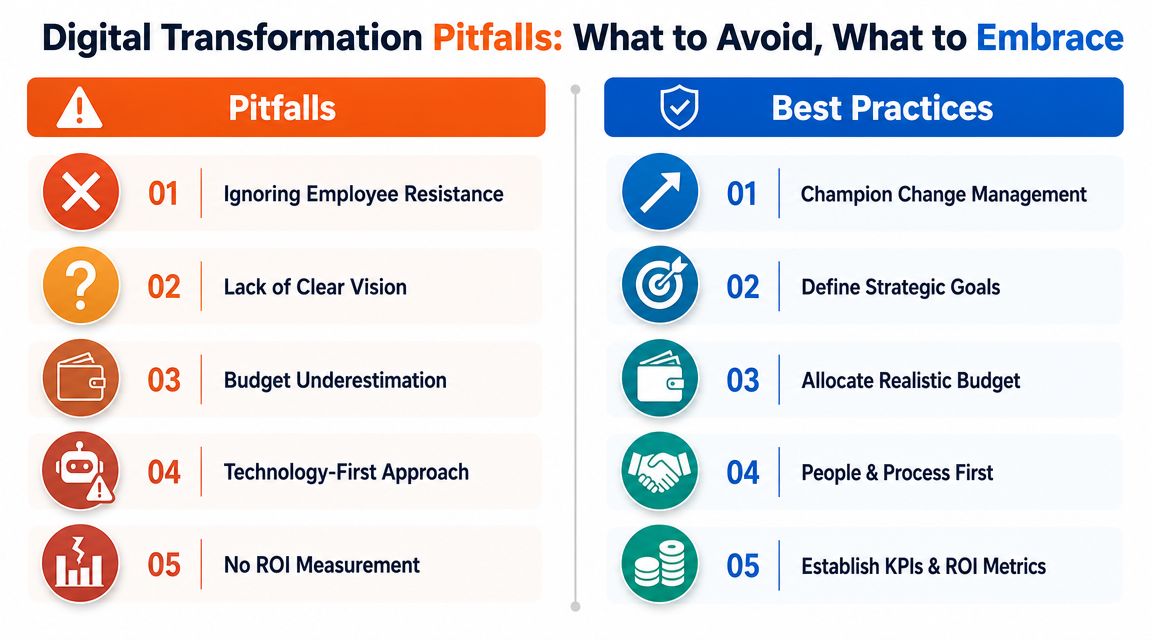
Some failures are easy to predict because they repeat.
Going too big too early
Owners approve a major software or automation project before sorting internet reliability, access control, or backup. The result is strain on top of instability.Buying tech before defining the problem
A tool gets chosen because it sounds modern. Nobody has agreed what business issue it is meant to solve.Ignoring staff adoption
If the office manager, sales team, or service desk find the new setup awkward, they create workarounds. The formal process then exists only on paper.Treating cyber security as a side task
This is one of the costliest errors. Weak firewall management, poor device visibility, and inconsistent email protection can undermine every other improvement.Underestimating support and maintenance
Systems need care after go-live. Without patching, monitoring, training, and review, improvements decay.
What a steadier approach looks like
A more durable roadmap usually follows these principles:
| Pitfall | Better response |
|---|---|
| Chasing trendy tools | Start with the business bottleneck |
| Running too many projects at once | Limit active work and finish properly |
| Weak buy-in from staff | Involve the people who use the systems daily |
| No clear success measure | Define a small set of operational outcomes |
| Cheap implementation thinking | Include support, security, and follow-through |
There's a wider strategic reason behind this. Many plans fail not because the idea was wrong, but because execution drifted. For a useful perspective on that pattern, OKR Hub's strategy insights are worth reading alongside your own planning.
Slow and structured beats ambitious and chaotic.
A strong SMB roadmap isn't flashy. It is organised, sequenced, funded properly, and tied to real business outcomes. It protects the business first, improves the working day second, and only then expands into more advanced change.
If you're in London or Essex and your systems feel patched together rather than planned, start smaller than you think. Audit the foundation. Pick the next few priorities. Give someone ownership. Then execute in order.
If you want practical help turning that plan into working systems, Networking2000 supports businesses across London and Essex with IT support, connectivity, VoIP, managed security, cabling, and website services that fit real operational needs. Start with the basics, get the setup right, and build from a stronger base.

