If you're running a small business in Essex or London, this probably sounds familiar. Staff work from home part of the week, someone needs access while travelling, your accountant logs in remotely, and your IT setup has evolved from “a few laptops” into something business-critical. The problem is that remote access often gets bolted on bit by bit. A VPN here, Remote Desktop there, maybe a cloud app login with no clear rules behind it.
That's where trouble starts. Remote working isn't unusual anymore, and neither are attacks aimed at the login points people rely on every day. Secure remote access is the difference between letting people work from anywhere safely and leaving the door half open.
For UK businesses, this matters because home working and cyber risk now sit side by side. The Office for National Statistics reported that in autumn 2022, 44% of working adults in Great Britain worked from home at least some of the time, while the UK government's 2024 Cyber Security Breaches Survey found that 39% of UK businesses reported a cyber breach or attack in the previous 12 months, as noted in this overview of secure remote access trends for modern organisations. If your team connects from home broadband, mobile data, client sites or public Wi-Fi, secure remote access stops being an IT extra and becomes part of how you run the business. If your systems also span office servers and cloud platforms, this guide on mastering hybrid cloud security is a useful companion because remote access and cloud security decisions usually affect each other.
Table of Contents
- Why Secure Remote Access Is Non-Negotiable in 2026
- Comparing Your Secure Remote Access Options
- Key Security Risks and How to Mitigate Them
- A Practical Checklist for SMBs and Home Offices
- When to Call an Expert like Networking2000
- Making Secure Remote Access Your Business Advantage
Why Secure Remote Access Is Non-Negotiable in 2026
Secure remote access means your staff can reach the systems they need without exposing the rest of the business to unnecessary risk. In plain English, it's a controlled route into your files, apps, phones, email, and support tools. Not a free-for-all network connection.
A lot of owners still think about remote access as “letting someone log in from home”. That's too narrow now. It also covers directors checking reports on a tablet, office staff using cloud systems from home, a support engineer fixing a machine remotely, or a contractor needing temporary access to one internal tool.
What secure remote access actually means
The old approach was simple. Get someone connected, then trust them once they're in. That worked better when everyone sat in one office on managed PCs. It doesn't work nearly as well when users connect from spare bedrooms, kitchen tables, client sites and trains.
Practical rule: Don't think “Can they get in?” Think “What exactly can they reach, on which device, and how do we verify it each time?”
Good secure remote access usually includes a few basics working together:
- Strong sign-in checks: A password alone isn't enough.
- Managed devices: Business data should only be reached from devices you trust.
- Encrypted connections: Traffic should be protected in transit.
- Clear access rules: People should only see the systems they need for their role.
- Logging: If something goes wrong, you need a record of what happened.
Why small firms feel the risk more quickly
Large organisations can absorb a bit of mess for longer. Smaller firms can't. If one person's account is compromised and it reaches shared folders, accounts software, email or VoIP admin tools, the disruption lands directly on the owner's desk.
That's why secure remote access isn't just a security topic. It's an operations topic. If your team can't connect safely, they can't work properly. If they can connect too freely, one bad login can create a much bigger problem than it should.
For most SMBs, the goal is balance. You want staff to work without friction, but you also want sensible barriers in the right places. The best setups don't feel dramatic. They feel calm, consistent and boring in the best possible way.
Comparing Your Secure Remote Access Options
If you've looked into remote access before, you've probably seen three common approaches come up again and again. VPN, RDP, and Zero Trust style access. They all let people work remotely, but they don't behave the same way once someone signs in.
The easiest way to think about it is this. A traditional VPN is like opening the gate to a private estate once someone shows a pass. A Zero Trust approach is closer to having a separate checkpoint at each building, each room, and sometimes each action.
The practical difference between VPN and Zero Trust
The UK's National Cyber Security Centre has shifted its guidance toward Zero Trust principles, moving away from the old assumption that a user should be trusted merely because they're on the internal network. That change is explained in this summary of remote access best practices for small businesses. In practical terms, every connection should be verified, not waved through because it came in through the “right” tunnel.
That doesn't mean VPNs are useless. Far from it. A well-configured business VPN still has a place, especially for smaller firms with a handful of users and clear access needs. The problem is how often VPNs are left too broad. Once connected, users can sometimes see far more than they should.
RDP is another one that gets used because it's familiar. It can be fine inside a properly controlled setup, but it becomes risky when businesses use it casually, especially if they expose remote desktop access without proper layers around it.
For readers comparing tunnel types and where they fit in specialised remote work scenarios, this breakdown of reliable VPN solutions for China professionals is useful because it shows how different VPN models suit different environments.
Remote Access Methods At a Glance
| Method | Security Model | Best For | Key Consideration |
|---|---|---|---|
| VPN | Connects the user to part of the network through an encrypted tunnel | Small teams needing access to several internal systems | Can become too broad if users get network-level access they don't actually need |
| RDP | Gives a user remote control of a specific machine or server | Admin tasks, support work, or access to one desktop-based system | Must be tightly protected and never treated as a casual internet-facing shortcut |
| ZTNA | Verifies the user, device and access rule for each resource | Businesses wanting tighter control over who reaches what | Setup is more policy-driven, so planning matters more at the start |
A remote access tool isn't secure because of its name. It's secure when the access scope is narrow, the sign-in is strong, and the device is trusted.
Which option suits which business
If you've got a small office with a few staff who need to open files and one line-of-business application, a business-grade VPN can still be the simplest route. Keep the permissions narrow and pair it with MFA and device controls.
If one person needs to reach one office PC from home, RDP may be acceptable, but only when it sits behind proper protection and isn't just left hanging out on the internet. That's where many DIY setups go wrong.
If your business has grown beyond a handful of users, uses both cloud and on-prem systems, or works with outside contractors, Zero Trust style access is usually the cleaner long-term model. It takes more thought up front, but it's better aligned with how modern businesses operate.
Key Security Risks and How to Mitigate Them
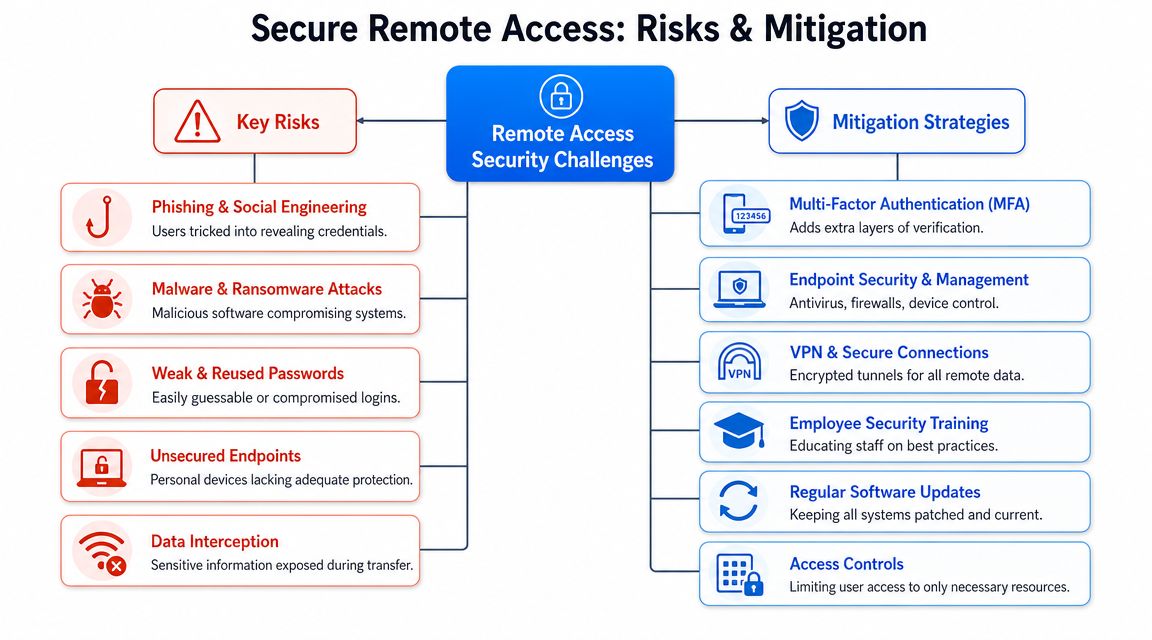
Remote access usually fails in ordinary ways. Someone clicks the wrong link. A password gets reused. A laptop misses updates. An old account is left active. The danger isn't always advanced hacking. It's weak control around common entry points.
The UK Government's Cyber Security Breaches Survey says phishing is the most common attack businesses face, which is why phishing-resistant MFA and least-privilege access controls matter so much. If one stolen password can still open your network, your remote access setup is too trusting. This practical overview of secure remote access solutions and controls reflects that point clearly.
To keep the risks straight, it helps to see the layers side by side.
Start with account security
Make MFA mandatory for every remote login. Email, VPN, Microsoft 365, remote support portals, admin panels, all of it. If a platform supports stronger forms of MFA, use them. Don't leave high-value accounts on password-only access because one person finds prompts annoying.
Least privilege matters just as much. Your bookkeeper doesn't need server admin rights. Your sales team doesn't need access to every shared folder. Your phone system supplier shouldn't be able to browse the same network space as finance.
- Protect logins first: A stolen password should hit a second barrier.
- Reduce blast radius: Give each account the minimum access needed.
- Review old accounts: Remove former staff, dormant users and outdated exceptions.
Treat devices as part of the security boundary
A secure login from an insecure device still creates risk. If staff use company laptops, those laptops need updates, encryption, antivirus or endpoint protection, and basic device management. If staff use personal devices, decide clearly what is and isn't allowed.
That decision is where many small firms stay vague. Vague rules usually become no rules. If a personal laptop can reach business email, files, and remote desktop tools, you need to know whether that device is healthy enough to trust.
This short video gives a useful overview of the risks around remote work and the controls that matter most.
Limit what each remote session can reach
A lot of damage happens after login, not at login. That's why segmentation and access control matter. Picture bulkheads on a ship. If one area takes on water, you don't want the whole vessel going with it.
In business terms, separate critical systems from everyday access. Keep admin access separate from user access. Don't let the same remote session reach everything from file shares to firewall controls.
If remote access puts every system on the same path, one compromised account can turn into a business-wide incident.
Watch and test what you've put in place
Logging matters because problems rarely announce themselves cleanly. You want to know who connected, from where, on what device, and what they tried to access. Without logs, you're guessing.
You also need occasional checking. Not panic-driven testing. Just sensible review. If you want a more technical view of how professionals examine weak spots, this guide for pentesters on network security helps explain the kind of issues proper testing is meant to uncover.
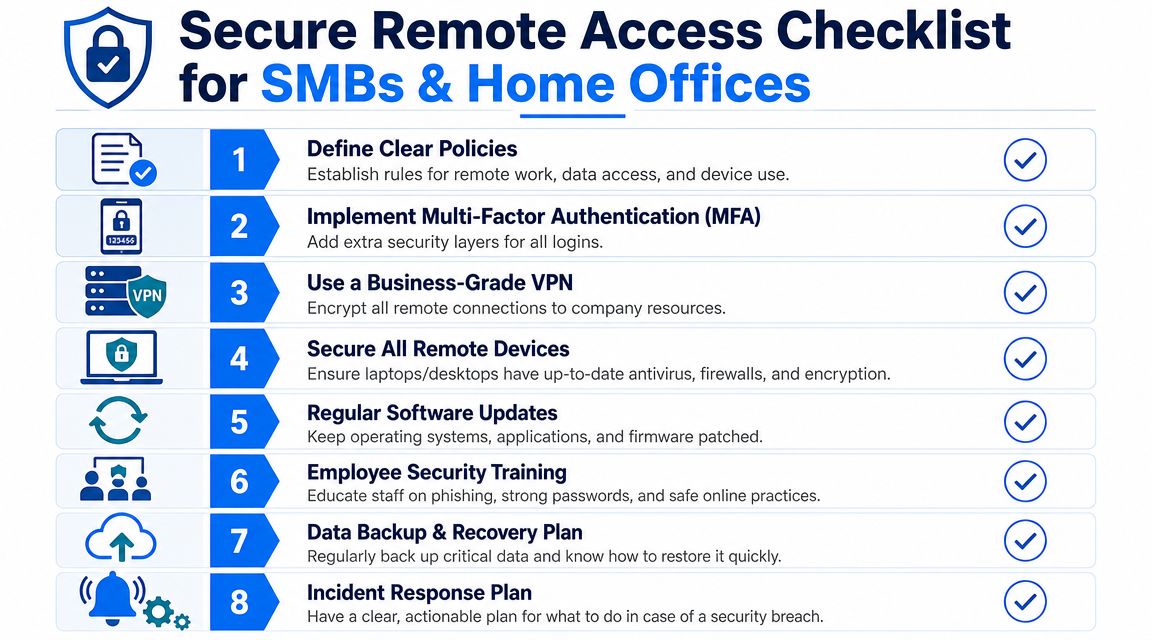
A Practical Checklist for SMBs and Home Offices
Most remote access projects go wrong because businesses buy a tool before they've decided the rules. Start with who needs access, what they need, and what level of trust you're prepared to give. The setup should follow the business requirement, not the other way round.
This checklist works for a small office, a home office with business systems, or a growing firm with a mix of both.
A sensible rollout order
List people and systems
Write down who needs remote access. Include staff, freelancers, support providers and directors. Then list what they need to reach, such as email, one application, shared files, a phone system portal, or a full office desktop.Choose the lightest suitable access model
Don't hand out full network access if browser-based access or app-level access will do. A narrower route is easier to secure and easier to support.Turn on MFA everywhere it matters
Prioritise anything that opens the door to other systems. Email and identity platforms come first, then remote access tools, then admin accounts.Set a device rule and stick to it
Decide whether remote access is allowed only from company devices, from approved personal devices, or from a mix with restrictions. Put that in writing, even if your team is small.
Owner's shortcut: If you can't explain your remote access rules on one page, they're probably too loose to enforce properly.
What good looks like after setup
A good setup isn't just technical. It's operational. Staff know how to log in, what device to use, and what to do when something looks odd.
Use this quick sense-check:
- Access is role-based: People can reach what they need, not what they might one day need.
- Admin access is separate: Day-to-day user accounts aren't doubling as technical admin accounts.
- Updates are routine: Laptops, phones, routers and business apps don't sit ignored for months.
- Backups are in place: If a device fails or data is encrypted by malware, there's a recovery path.
- Support requests are controlled: Staff know who to contact instead of finding their own workaround.
Training matters more than many owners expect. Staff don't need a lecture on cyber jargon. They need short, repeatable habits. Check the sender. Don't approve sign-in prompts you didn't start. Report odd login pages. Don't use personal email to move work files around when the VPN is slow.
For home offices, the same rule applies. Keep work separate from family use where possible. A business laptop used only for business is easier to secure than a shared home machine full of personal software and random browser extensions.
When to Call an Expert like Networking2000
There's nothing wrong with starting small. Plenty of firms begin with a sensible VPN, a few managed laptops, and basic MFA. The trouble starts when the setup grows faster than the rules behind it.
The biggest warning sign is complexity you can't comfortably explain. If different people connect in different ways, nobody's sure which old accounts are still active, and third parties have “temporary” access that never seems to end, you're already beyond a tidy DIY setup.
Signs DIY is becoming a risk
One of the most overlooked issues is third-party access. That includes software vendors, outside IT support, phone system engineers, building management suppliers, and specialist contractors. The UK's National Cyber Security Centre says ransomware remains a significant threat to UK organisations, and poor management of remote access pathways is a common entry point. The ICO has also warned about data exposure from weak third-party access controls, as discussed in this article on overlooked exposure in secure remote access for third parties.
That matters because third-party access is often granted in a rush. Someone needs to fix a fault. A supplier needs “just a quick login”. Months later, that access still exists, nobody has reviewed it, and nobody can say with confidence what that account can reach.
Bring in expert help when any of these apply:
- You rely on outside vendors: Contractors, MSPs or installers need access to internal systems.
- You handle sensitive data: Client records, financial information, health data or regulated systems need tighter control and clearer audit trails.
- Your team has grown: More users usually means more exceptions, more devices and more chances for drift.
- Your setup mixes old and new systems: Cloud apps, office servers, VoIP platforms and remote support tools need one consistent access policy.
- Nobody owns the reviews: If no one regularly checks accounts, permissions and logs, problems sit unnoticed.
Where outside help pays for itself
An experienced IT provider won't just sell you a tool. They'll cut through the confusion and help answer practical questions. Should a supplier get full VPN access, or only temporary access to one service? Should staff use their own devices? Which accounts need stronger controls than others? What gets logged, and who checks it?
That matters even more when firewalls, internet connectivity, phones, laptops and support arrangements all overlap. Remote access isn't a single product. It's a chain. If one weak link sits in the wrong place, the whole setup becomes harder to trust.
A good provider also removes a burden owners often underestimate. Ongoing maintenance. Access reviews. Device standards. User changes. Leaver processes. Emergency lockouts. Those aren't one-off jobs. They're part of keeping remote access safe month after month.
Making Secure Remote Access Your Business Advantage
The businesses that handle remote access well usually do three things right. They keep access narrow, they verify every important login, and they treat device health as part of the decision. None of that needs to be overcomplicated.
Security that supports growth
Done properly, secure remote access gives you flexibility without the usual chaos. Staff can work from home without using unsafe workarounds. Directors can travel without relying on weak shortcuts. Suppliers can get controlled access without being handed the keys to the whole building.
It also improves trust. Clients may never ask what remote access model you use, but they will care whether you protect their data, keep systems available, and respond calmly when something goes wrong. A tidy, well-managed setup helps all three.
Keep it simple and keep it managed
Start with the basics if you need to. Strong MFA. Clear device rules. Limited permissions. A proper business-grade access method instead of ad hoc remote desktop shortcuts. Then review what people need and trim away the rest.
If you're in Essex, London, Romford or Brentwood and you want a straightforward conversation about secure remote access without the jargon, speak to a local team that deals with these problems every day. The right setup should make work easier, not more confusing.
If you want practical help designing or tightening up secure remote access, Networking2000 can help you sort out the practical details, from managed firewalls and connectivity to secure remote working for offices and home users across Essex and London. Their engineers speak plainly, respond quickly, and can help you put sensible controls in place without turning your business into an IT project.

