Your network probably grew the same way most small business networks grow. One router. A switch or two. Wi-Fi added later. Then IP phones, a few printers, CCTV, maybe a NAS, maybe a cloud backup appliance, maybe a server that still runs one key line-of-business system. Everything works, so nobody touches it.
The problem is that a network that's easy to live with is often easy to abuse. If one infected laptop, weak IoT device, or misused admin account can see half the estate, a small issue can spread into a business-wide outage. That's why network segmentation matters. It puts sensible internal boundaries inside the network so one failure doesn't become everyone's failure.
For many businesses in London and Essex, the right question isn't “should we build a perfect zero trust environment?” It's “what's the smallest practical change that reduces risk without making daily work painful?” That's the version worth solving.
Table of Contents
- Why Your Flat Network Is a Business Risk
- What Is Network Segmentation Really
- Key Benefits for Your Business Beyond Security
- Comparing Common Segmentation Approaches
- Planning Your Network Segmentation Project
- Implementation for London and Essex Businesses
- Maintaining and Monitoring Your Segments
Why Your Flat Network Is a Business Risk
A common setup looks like this. The front desk PC, the finance machine, the shared printer, the CCTV recorder, the VoIP phones, the Wi-Fi access points, and the server all sit on the same internal network. Staff can reach what they need, guests sometimes end up on the wrong Wi-Fi, and the business carries on.
Until one device gets hit.
A phishing email lands on a user PC. A reused password exposes a remote service. An old camera or door controller gets probed. In a flat network, that first foothold often gives an attacker room to explore. They don't need to break in again. They just move sideways, looking for file shares, backup targets, domain services, payroll data, or anything else worth encrypting or stealing.
That's the core issue. A flat network turns one mistake into a much bigger incident because there are no meaningful internal barriers.
Network segmentation works like locks on internal doors. The front door still matters, but it shouldn't open every room in the building.
This isn't a niche security idea. It's basic containment. Sensitive systems should not sit in the same trust zone as guest devices or general staff traffic. Phones don't need to talk directly to finance systems. CCTV doesn't need access to your main file store. Backup systems should never be casually reachable from every endpoint.
For a small or medium-sized business, that matters because the practical goal isn't perfection. It's reducing blast radius. If one staff laptop has a bad day, the whole company shouldn't have a bad week.
Three warning signs usually tell you a network is too flat:
- Everything can ping everything: That usually means there are few real internal controls.
- Guest Wi-Fi and business traffic feel loosely separated: “Different password” isn't the same as a proper boundary.
- Nobody can clearly say which devices must communicate: If that isn't known, access is probably too broad.
A lot of business owners assume segmentation is something only larger firms do. In practice, smaller firms often need it more because they're running mixed environments on limited time, limited visibility, and inherited setups.
What Is Network Segmentation Really
Network segmentation is the practice of splitting one business network into smaller, controlled parts, then deciding exactly what traffic is allowed between them. That sounds technical, but the business point is simple. A guest phone, a staff laptop, a CCTV recorder, and a backup server should not all live in the same trust zone.
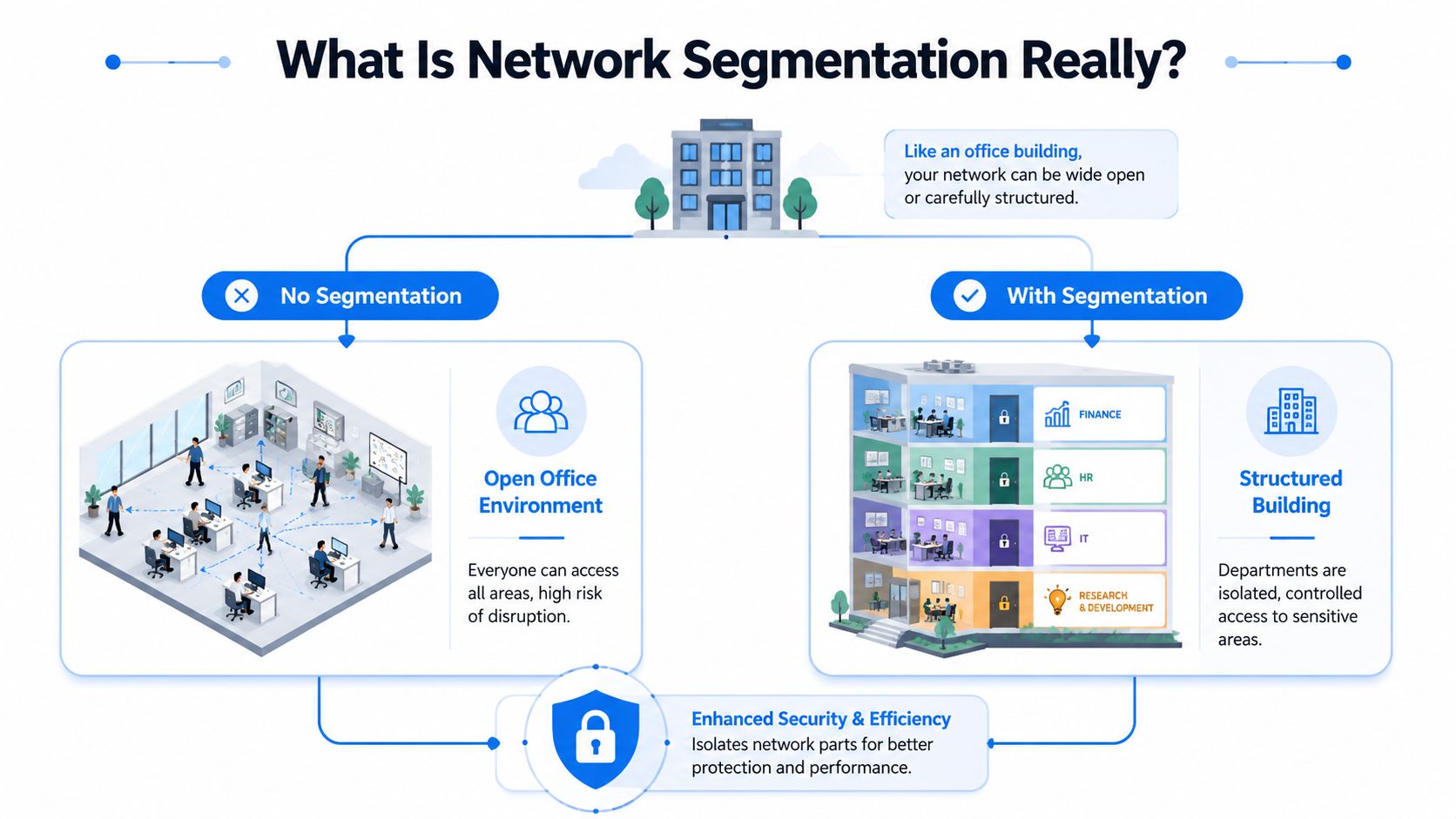
For many London and Essex SMBs, segmentation is less about buying something new and more about imposing order on a network that has grown in bits. New Wi-Fi went in one year. Phones were added later. Cameras came from another supplier. Then remote access, cloud backups, and a line-of-business app arrived. Before long, everything can see far more than it needs to.
An office building is a useful comparison here. Reception, meeting rooms, finance, and the comms room all sit in the same property, but access changes by role and risk. A network should work the same way. It still functions as one environment, but with sensible internal boundaries.
A segment is one of those boundaries in practice. It might be a guest Wi-Fi network, a user network, a voice VLAN, a server subnet, or a separate area for printers, cameras, and door controllers. The controls between those areas are usually built with VLANs, subnets, firewall rules, ACLs, and gateway policies.
Done properly, this is specific, not abstract.
A guest device should get internet access and nothing more. A printer should accept print jobs, not browse file shares. Cameras should send footage to the recording platform, not talk freely to user machines. Admin tools should reach infrastructure systems, but ordinary staff devices should not.
That is what segmentation looks like in day-to-day operation.
For UK businesses working toward better cyber hygiene, this lines up with long-standing NCSC and Cyber Essentials principles around limiting unnecessary access and reducing exposure between systems. It also fits broader cloud and security guidance such as the CloudCops recommendations for startups, where access is narrowed to what teams and systems need, rather than left open by default.
How much segmentation is enough
Many projects go wrong when businesses hear good advice, then jump from a flat network straight to an overbuilt design that is expensive to manage and awkward to support.
For most smaller organisations, the right answer is phased segmentation. Start with the areas that cut risk fastest and create the least disruption. In inherited environments, I usually see the best early return from separating guest access, staff devices, servers, backups, and privileged admin access before worrying about finer-grained controls.
That approach gives you meaningful reduction in risk without creating a support headache.
A sensible starting model often looks like this:
- Guest access separated from business access: Visitors and personal devices stay off the main network.
- Staff endpoints grouped by function where useful: General office users often belong together first, with tighter rules added later for finance or senior teams if needed.
- Servers and business systems isolated: File servers, directory services, and line-of-business applications sit behind controlled access paths.
- Backups and administrative tools restricted further: These systems are common attacker targets and deserve tighter rules from the start.
- IoT and operational devices split out: Phones, printers, CCTV, access control, and similar devices rarely need broad access.
The practical goal is not perfection. It is to reduce exposure in stages, without breaking daily work. A clean design on paper is pointless if staff cannot print, scan, use phones, or reach the systems they rely on.
Good segmentation also depends on knowing what needs to talk to what before changes are made. That is the planning piece many firms skip. If nobody has mapped the dependencies for finance software, warehouse scanners, VoIP handsets, remote users, and printers, the first rollout can turn into a day of avoidable faults.
For an SMB, the best test is straightforward. If a segment can be compromised, can the problem spread easily into backups, management tools, or critical data? If the answer is yes, the network still needs work.
Key Benefits for Your Business Beyond Security
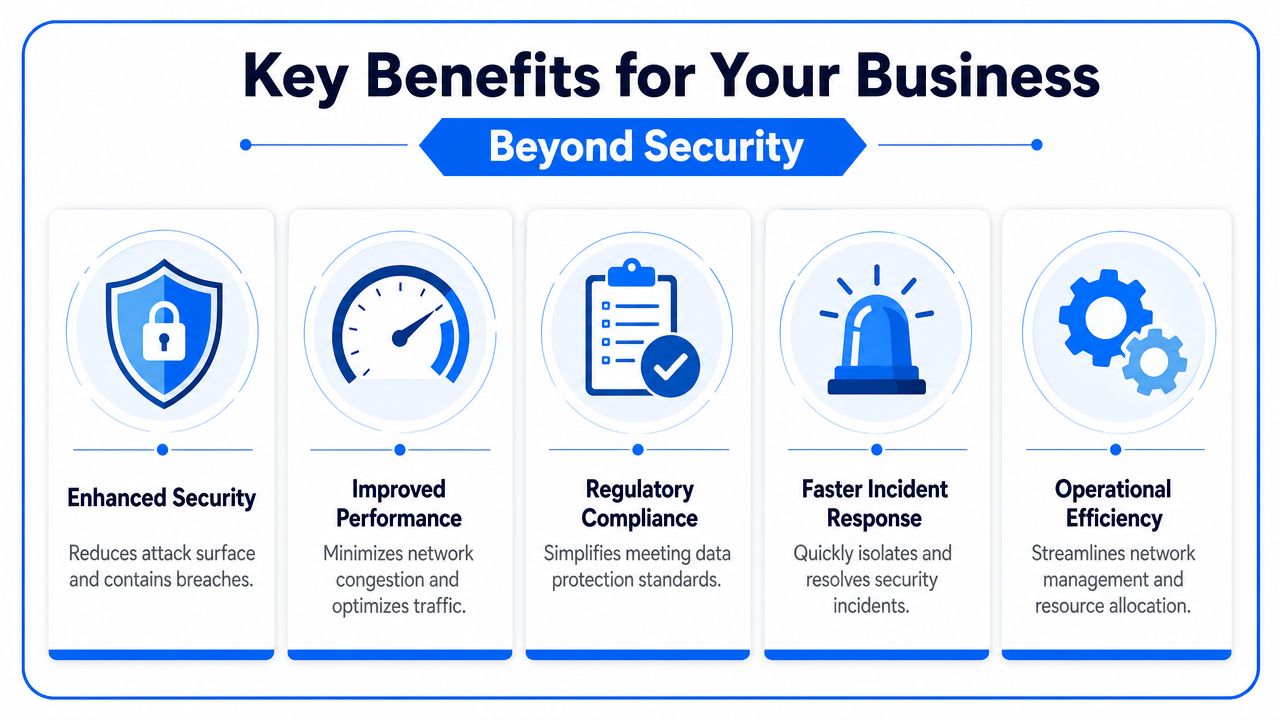
Security is the obvious reason to care about network segmentation, but it isn't the only one. A properly segmented environment is usually easier to run, easier to troubleshoot, and less fragile when something odd happens.
It limits the blast radius
Ransomware rarely stays polite. If a compromised endpoint can reach shared drives, backup locations, and management systems, the attacker doesn't need much luck. Segmentation acts as a firebreak. It limits where malware can go and what an intruder can touch after the initial compromise.
That same containment helps with insider misuse and accidental exposure too. A staff device on the wrong network can cause a lot less trouble when access paths are narrow by design.
There's also a response benefit. If a problem appears in one zone, IT can isolate and investigate that area without pulling the entire business apart.
It also makes the network behave better
Many businesses first notice segmentation as a security project and then realise it improves day-to-day performance. Voice traffic, CCTV streams, guest browsing, cloud backups, and normal office work don't all behave the same way. When they share one broad network without clear boundaries, noisy traffic can interfere with time-sensitive traffic.
A few practical examples:
- VoIP stays clearer: Phones benefit when they aren't competing with general traffic and bulky transfers.
- CCTV becomes less intrusive: Cameras and recorders can generate constant chatter. Keeping them separate stops them cluttering user segments.
- Guest access stops being a nuisance: Visitors can get online without sharing space with business systems.
- Fault-finding gets faster: A problem tied to one segment is easier to trace than a problem somewhere on “the network”.
Businesses in regulated sectors also get a governance benefit. Segmentation won't handle compliance on its own, but it helps show that access to sensitive systems is controlled rather than wide open. For legal, finance, healthcare-adjacent, or professional services firms, that matters.
A good companion read here is CloudCops recommendations for startups. It focuses on cloud security, but the underlying lesson is the same on local networks. Keep trust boundaries clear, reduce unnecessary access, and don't treat convenience as a security model.
Well-planned segmentation improves security because it improves discipline. Teams stop asking “can everything talk to everything?” and start asking “what actually needs access?”
There's a less obvious operational gain too. Segmentation forces clarity. You find out which services matter, which devices nobody owns, and which shortcuts have become permanent. That exercise often uncovers old printers, forgotten switches, unmanaged cameras, and one-off access rules that should have been cleaned up years ago.
Comparing Common Segmentation Approaches
A typical Essex office does not need military-grade isolation everywhere. It needs sensible boundaries in the places where a mistake, malware infection, or noisy device would cause real disruption. That is why the best segmentation approach for most SMBs is phased, not all-at-once.
Different methods solve different problems. Some reduce risk cheaply. Some add stronger control but need more planning and support. The right choice depends on what you are protecting, what kit you already own, and whether your team can maintain the rules six months from now.
What each method actually gives you
Physical separation uses separate switches, cabling, or even separate internet connections to keep systems apart. It gives the strongest isolation and the clearest audit story. It also costs more in hardware, support time, and cupboard space, so it usually fits payment systems, lab kit, production equipment, or a legacy system you do not fully trust.
VLANs are usually the first practical step for a small or mid-sized business. They split one switching estate into separate logical networks without replacing everything. They are cost-effective and useful, but a VLAN on its own does not decide what traffic is allowed between segments. It creates the boundary. Something else must police it.
Subnetting keeps the network structured and makes routing cleaner. Good subnet design helps avoid messy growth later, especially if you expect to add more sites, more wireless networks, or more device types. By itself, though, subnetting is organisation, not protection.
Firewall zones turn separation into policy. Traffic between user devices, servers, guest access, voice systems, and IoT can be allowed, blocked, or limited to specific ports and destinations. For many London and Essex firms, segmentation starts paying for itself by cutting unnecessary access without forcing a full redesign.
Microsegmentation controls communication at a much finer level, sometimes down to individual workloads or applications. It can be very effective in virtualised estates, hybrid environments, or businesses handling sensitive client data. It also adds operational overhead, so for most SMBs it is better as a later phase than a starting point.
For leaders tying segmentation to wider access control, security implementation for leaders explains the management side of reducing implicit trust inside the business.
VLANs separate traffic. Firewalls decide what crosses between segments.
Network Segmentation Methods Compared
| Method | How It Works | Best For SMBs? | Complexity |
|---|---|---|---|
| Physical separation | Uses separate switches, cabling, or infrastructure to isolate systems completely | Sometimes, mainly for very sensitive or specialist environments | High |
| VLANs | Splits one switching environment into separate logical networks | Yes, often the best starting point | Low to medium |
| Subnetting | Divides the network into smaller routed ranges for structure and control | Yes, as part of a wider design | Medium |
| Firewall zones | Applies policy between zones so only required traffic is allowed | Yes, this is usually where the real protection comes from | Medium |
| Microsegmentation | Controls communication at a much finer level between systems or workloads | Sometimes, but often later rather than first | High |
A practical way to choose:
- Limited budget: Start with VLANs plus a firewall that can enforce proper rules between zones.
- Lots of mixed devices: Separate users, servers, guests, printers, CCTV, and other IoT first.
- Older or unsupported systems: Isolate them behind tighter rules instead of leaving them on the same segment as staff laptops.
- Small IT team or outsourced support: Keep the design readable. A simple policy set that is maintained beats a clever one nobody understands.
One mistake comes up again and again. Businesses create one VLAN for finance, one for sales, one for directors, then assume the job is done. In practice, segmenting by risk and communication path works better than segmenting by department. Staff devices often share similar needs. Cameras, door entry systems, backup appliances, and management interfaces do not.
That is usually the point where a phased plan makes sense. Phase one might be guest Wi-Fi, users, servers, and IoT. Phase two adds tighter controls around backups, admin access, and any legacy line-of-business systems. Phase three, if the business needs it, adds finer controls around specific workloads or sites.
For most SMBs, that approach gives a better return than chasing perfect segmentation on day one. It cuts obvious exposure first, improves performance in the noisiest parts of the network, and leaves room to tighten policy later without rebuilding everything twice.
Planning Your Network Segmentation Project
A segmentation project usually goes wrong before anyone touches a switch or firewall. The trouble starts with guesswork. A business assumes it knows what is on the network, which systems matter most, and which connections are safe to restrict. In practice, there are nearly always surprises.
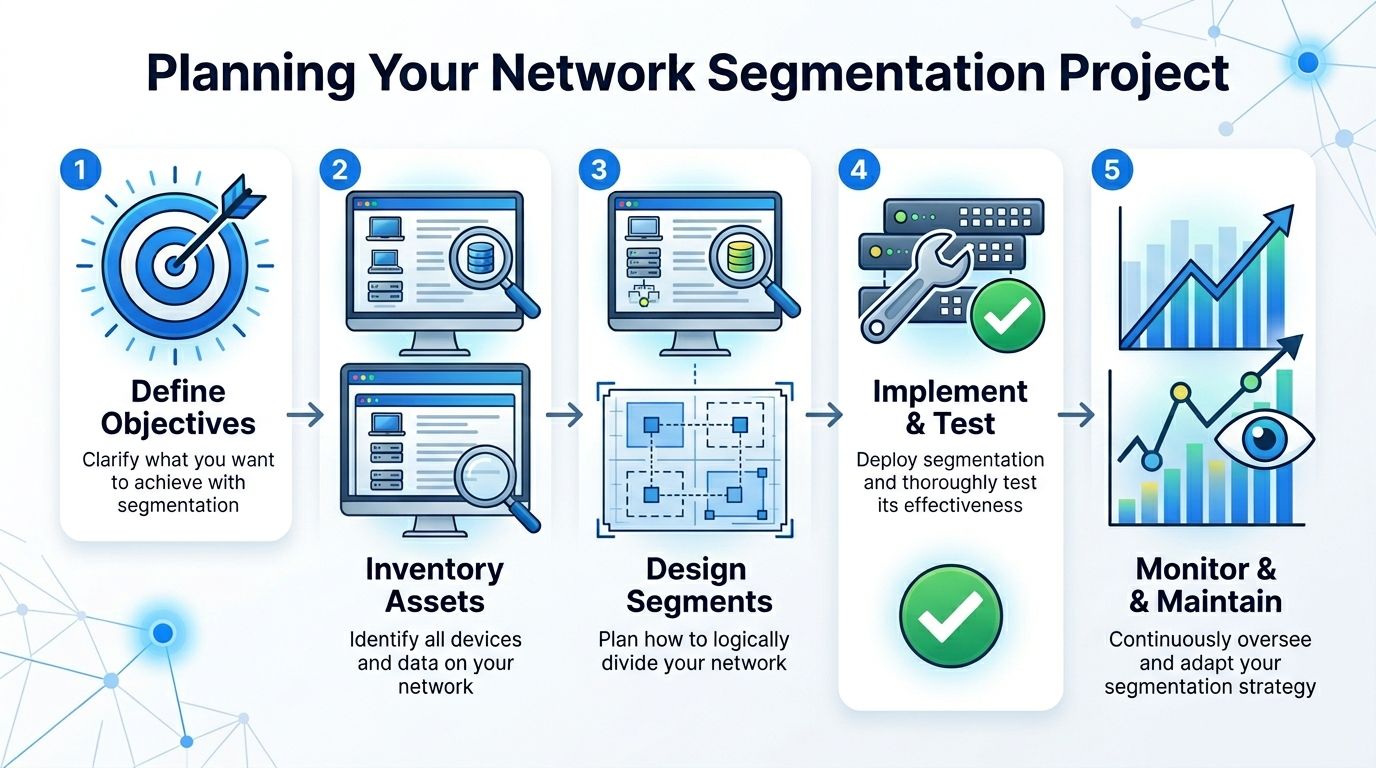
For a London or Essex SMB, the aim is not a perfect diagram on day one. The aim is to reduce risk without breaking day-to-day work. That calls for a phased plan, clear priorities, and enough testing to catch the awkward dependencies that only show up in real offices.
Start with devices and data flows
Good planning starts with visibility. That means a proper inventory of connected devices and services, including the ones that are easy to miss. Printers, phones, wireless networks, CCTV, access control, file storage, backup appliances, meeting room systems, and supplier-managed equipment all need to be on the list.
Then map the traffic that the business needs. Which devices need to talk to each other? Which only need internet access? Which should never be able to initiate connections into the rest of the estate? This exercise often reveals that the riskiest traffic paths are not the obvious ones.
A sensible sequence is:
- Set priorities for protection. Client records, finance systems, backups, line-of-business applications, admin tools, and anything that would stop operations if lost.
- Record every connected asset. Include forgotten or temporary kit, not just managed laptops and servers.
- Map required communications. Focus on business-critical paths, not broad access that exists because nobody has reviewed it.
- Spot high-risk crossings early. Guest Wi-Fi, unmanaged devices, remote access routes, third-party support links, and old systems usually need attention first.
For most SMBs, segmentation by risk and communication path works better than segmentation by department. Finance and sales laptops often need similar access. Cameras, door entry systems, NAS boxes, hypervisors, and backup repositories do not. Planning around those differences produces cleaner policy and fewer exceptions later.
This short video gives a helpful visual overview before you start drawing your own design:
Build policies around business need
Once the key zones are clear, write the access rules in plain business terms before converting them into technical policy. That keeps the project readable for management, IT support, and any outside provider who may need to maintain it later.
Start from least privilege. Allow only the traffic that supports a real task. Staff devices may need file services, line-of-business apps, and approved cloud platforms. Phones may need only the VoIP service. CCTV may need only its recorder. Backup systems should accept traffic from approved servers and admin devices, not from every endpoint on the network.
If a rule cannot be linked to a business function, it should be challenged before it goes live.
Useful policy statements often look like this:
- Staff devices can access approved business applications and shared file services
- Guest users can access the internet only
- CCTV can send footage to its recorder and nothing else
- Administrative access is limited to designated management devices
- Backup platforms accept connections only from authorised systems
This is also the point where cost and support effort need an honest review. I have seen firms buy hardware with plenty of features, then keep flat network behaviour because nobody wants to manage the rule set. A simpler design that the support team understands is usually the better choice. For many smaller businesses, phase one is enough to separate users, servers, guests, and IoT. Later phases can tighten backup access, management networks, remote support, and legacy applications.
Testing deserves more time than many projects give it. Printing, scanning, card payment terminals, accounting packages, SIP phones, remote monitoring agents, and backup jobs often rely on traffic that nobody documented properly. If those checks are skipped, the first sign of trouble is a call from users saying IT has broken something that worked yesterday.
A good plan should answer three practical questions before rollout begins. What are we protecting first? What traffic must continue without interruption? What can wait until phase two? If those answers are clear, segmentation becomes a controlled improvement rather than an expensive clean-up exercise.
Implementation for London and Essex Businesses
Monday morning in a Romford or Chelmsford office often starts the same way. Staff log in, phones register, card machines connect, someone prints a delivery note, and a visitor asks for the Wi-Fi password. If all of those systems still sit on one flat network, one bad device or one careless click can cause a problem well beyond the original fault.
That is why implementation matters more than the textbook definition. For London and Essex SMBs, the practical question is not whether segmentation is a good idea. It is how to introduce it without breaking daily operations or turning support into a full-time firefight.
A Chelmsford office example
A small accountancy practice in Chelmsford is a good example. It has staff laptops, a server or central file store for client records, MFD printers, guest Wi-Fi for visitors, and CCTV in reception. On paper, the answer looks obvious. In practice, the firm still has to keep printing, scanning, tax software, and remote access working during the change.

The sensible rollout is phased. Start by separating guest Wi-Fi, staff devices, servers, and CCTV. Leave the design simple enough that the support team can explain it without opening a diagram. Then tighten access between those zones based on real traffic, not guesses. That usually gets most of the security benefit at a cost a smaller firm can justify.
The trade-off is straightforward. More segments and stricter rules can reduce risk further, but they also add support overhead. A five-person office does not need the same level of internal separation as a larger legal or financial firm with multiple teams, external contractors, and stricter audit demands.
A Hornchurch operations example
A Hornchurch manufacturing or trade business has a different problem. Office staff use cloud software, email, and VoIP. On the floor there may be production controllers, label printers, time systems, scanners, or specialist devices supplied by a third party. Those devices often stay in service for years because replacement is expensive and operational downtime costs more than the hardware.
The right approach is usually to separate office IT from operational equipment first, then define the small number of connections that are required to pass between them. Reporting traffic may need to reach a server. A vendor may need remote access to one device. That can be allowed in a controlled way. Broad access from every laptop on the LAN should not exist by default.
I see the same mistake across mixed-use sites in Essex. A business connects everything for convenience, then discovers later that convenience also created trust where none was needed.
What practical rollout looks like
For most SMBs, implementation works best in phases:
- Phase one: separate staff devices, servers, guest Wi-Fi, and IoT or CCTV
- Phase two: restrict admin access to a small set of management devices
- Phase three: isolate legacy systems, third-party access, and backup infrastructure more tightly
That order keeps cost under control and limits disruption. It also gives the business time to find undocumented dependencies before more restrictive rules go live.
Shared buildings, serviced offices, and adapted warehouse sites add another wrinkle. Internet circuits, comms cabinets, and Wi-Fi coverage are often the result of years of patching and expansion rather than a clean design. Good implementation accepts that reality. It improves trust boundaries in the order that reduces risk fastest, instead of demanding a full rebuild.
Mistakes that cause trouble
Projects usually go wrong for operational reasons, not technical ones.
- Too much ambition at the start: Over-segmentation creates rules nobody wants to maintain. A smaller, clear design is easier to support and usually safer than a complex one full of broad exceptions.
- Poor discovery before changes: Printers, SIP phones, scanning workflows, card terminals, and old line-of-business software often rely on traffic nobody documented.
- Remote access left vague: Third-party suppliers, MSP tools, and ad hoc VPN access can punch holes straight through the design if nobody defines who needs access to what.
- No ownership after rollout: If nobody reviews rule changes, temporary exceptions become permanent and the network drifts back toward flat access.
One more point matters for growing firms in London and Essex. Segmentation works best when the wider estate is kept manageable. Businesses that pile every function into one sprawling platform usually create the same support and security problems elsewhere. The same design discipline applies at the application layer. Resources like when to decouple your tech stack are useful because clear boundaries usually make systems easier to secure, support, and change.
A good implementation plan is not flashy. It protects the areas that matter first, keeps the business running, and leaves the team with a design they can still manage six months later.
Maintaining and Monitoring Your Segments
Segmentation isn't a one-off job. The day after rollout, somebody adds a new printer, installs a smart meeting room device, signs up for a new cloud service, or asks a third party for remote access. If the rules and monitoring don't keep up, the design slowly drifts back towards “allow everything because it's easier”.
Maintenance is mostly discipline. Review firewall rules regularly. Remove temporary exceptions that became permanent. Check logs for denied traffic between segments, repeated connection attempts, and unusual internal scanning. When the business adds new systems, update the segmentation plan instead of squeezing them into the nearest convenient network.
East-west visibility matters here. Perimeter monitoring alone won't tell you much about internal propagation. You need to understand what is trying to move between VLANs, firewall zones, or more granular controls.
There's also a broader architecture lesson. As environments grow, not every function belongs in one oversized platform. The same thinking behind segmentation applies to systems design. Resources like when to decouple your tech stack are useful because they reflect the same operational truth. Clear boundaries make systems easier to secure, support, and change.
A good segmented network ages well because it's reviewed, tested, and adjusted with the business instead of being left as a one-time project.
If your business in London or Essex needs help designing or tightening internal network boundaries, Networking2000 can assess your current setup, identify practical segmentation points, and implement a plan that improves security without making the network harder to live with.

