You're probably already dealing with this, even if you haven't labelled it as cyber security.
A member of staff forwards an email and asks, “Is this real?” Your phones run over the internet, your CCTV app lives on someone's mobile, your files are in Microsoft 365 or another cloud platform, and at least one person works from home on a Friday. If any one of those pieces fails, the problem isn't just “IT”. It's missed calls, delayed orders, locked doors, blind cameras, and staff standing around waiting to get back into systems.
That's why cyber security essex isn't a niche topic for banks or large corporates. It's a live operational issue for builders, accountants, care providers, retailers, warehouses, professional services firms, and every small office that depends on stable internet, working email, and trusted access to data. Around Essex and London, the businesses that handle this well usually treat cyber security as part of keeping the business open, not as a bolt-on antivirus purchase.
Table of Contents
- Why Cyber Security in Essex Matters More Than Ever
- What Cyber Security Really Covers for Your Business
- Common Cyber Threats Facing Essex Businesses Today
- Building Your Digital Defences Layer by Layer
- Navigating Compliance and GDPR in the UK
- Choosing Your Essex Cyber Security Partner A Practical Checklist
- Frequently Asked Questions About Local Cyber Security
Why Cyber Security in Essex Matters More Than Ever
One of the most common starting points is a suspicious invoice, a password reset no one requested, or a supplier email that looks almost right. A local business owner doesn't usually say, “I need a cyber strategy.” They say, “Can you check this before someone clicks it?” That's the actual entry point.
From there, the issue gets bigger quickly. The same business that worries about a fake email also relies on cloud apps, shared files, mobile phones, remote logins, card payments, and internet-based communications. If one account is compromised, the damage can spread across finance, customer service, and day-to-day operations in hours.
The conversation is especially relevant here because the University of Essex's research focuses on how cyber risk shapes the adoption of new digital technologies in UK SMEs, which makes cyber security part of business decision-making rather than an optional extra for later (University of Essex cyber security research in UK SMEs). That matters for Essex firms moving to cloud systems, remote working tools, connected phones, and shared networks.
Cyber risk now sits inside normal business activity
Most owners don't separate “technology” from “operations” any more. If email stops, the business slows. If broadband fails, the phones may fail with it. If a compromised account gets into a CCTV or access control platform, the incident becomes physical as well as digital.
Cyber security works best when you treat it like utilities and building access. It has to be dependable every day, not just when something goes wrong.
A lot of firms still think they'll address this once they've grown a bit more. In practice, smaller businesses often feel disruption more sharply because they've got fewer spare people, fewer duplicate systems, and less tolerance for downtime.
Local businesses need practical guidance, not jargon
Business owners in Essex don't need scare stories. They need plain-English help with priorities. Which systems matter most? Which passwords need extra protection? Which devices should never share the same network? Which backups can be restored?
If you want a broader business-level view of why this matters, F1 Group's piece on essential IT security for modern organizations is a useful companion read. The key point is simple. Good cyber security protects revenue, trust, and uptime.
That's the lens worth using for every decision that follows.
What Cyber Security Really Covers for Your Business
Cyber security covers every connected system that can interrupt trading, expose customer data, or give an outsider control over part of your operation. For an Essex business, that reaches far beyond antivirus on a few PCs. It includes user accounts, laptops, mobiles, cloud apps, email, broadband, Wi-Fi, VoIP phones, CCTV, door entry systems, backups, and the rules staff follow each day.
Security has to cover operations, not just IT
The practical test is simple. If a system failing would stop calls, delay orders, lock staff out, or leave the site without working cameras, it sits inside cyber security.
That matters because modern business systems overlap. A compromised Microsoft 365 account can expose files, reset other passwords, and give an attacker a route into supplier conversations. A badly secured CCTV recorder or phone system can become an entry point on the same network as office devices. What looks like an IT issue at 9am can become an operations problem by lunchtime.
Practical rule: If a system matters enough to stop work when it goes down, it matters enough to secure properly.
Your digital estate is usually wider than expected
In smaller firms, the weakness is rarely one dramatic failure. It is usually a collection of ordinary systems that were added over time, often by different suppliers, with no one checking how they fit together or who still has access.
That usually includes:
- Email and collaboration tools because they hold quotes, invoices, approvals, customer records, and password reset routes into other systems.
- Laptops, mobiles, and desktops because one poorly protected device can give an attacker a foothold inside the wider network.
- VoIP telephony and call platforms because internet-based phone systems are business-critical and sit on the same infrastructure as other services.
- CCTV, alarms, and access control because these systems now rely on apps, cloud portals, and remote admin accounts.
- Shared files and cloud storage because deletion, encryption, or accidental overwriting can halt work just as effectively as a hardware fault.
I see this catch owners out regularly. They have spent money on endpoint protection, but the guest Wi-Fi touches internal systems, former staff still have cloud access, the CCTV default password was never changed, or the phone platform was set up once and forgotten.
Voice systems deserve special attention now. If you are reviewing newer call handling tools, SnapDial's overview of Frontline AI compliant voice agents is a useful reference for security and compliance in AI-supported voice workflows.
A proper cyber security essex plan starts with dependency mapping. Identify what the business needs to trade, who can access it, what happens if it fails, and how quickly it can be restored. That is how you protect uptime, not just devices.
Common Cyber Threats Facing Essex Businesses Today
The threat picture for Essex businesses isn't abstract. It shows up in inboxes, login pages, supplier communications, and remote access tools every day. Most attacks don't begin with something dramatic. They begin with something ordinary enough that a busy person might wave it through.

The scale is clear in official UK data. According to the UK government's 2025/2026 Cyber Security Breaches Survey, 43% of businesses reported a cyber breach or attack in the last year, with 19% becoming victims of a cyber crime (UK Cyber Security Breaches Survey 2025/2026). For a local SME, that means the risk isn't theoretical and it isn't limited to large enterprises.
The attacks that cause the most disruption
The first is still phishing. That can be a fake Microsoft 365 prompt, a spoofed supplier message, a parcel notification, or a bogus shared document. The reason it works is simple. Staff are busy, the message looks familiar, and the action requested feels routine.
Then there's business email compromise. This is often quieter than classic malware. An attacker gains access to an email account, watches conversations, and waits for the right moment to send a believable payment change or invoice instruction. The technical break-in may be small. The financial and reputational damage can be serious.
Ransomware remains one of the most disruptive threats because it doesn't just target data. It targets continuity. If file shares, email access, finance records, or line-of-business applications are encrypted or locked, even a short outage can affect customers, deliveries, and staff productivity.
A fourth category gets less attention than it should. Credential attacks such as password spraying and reused-password logins are common because many firms still rely too heavily on passwords alone. Once one account falls, attackers test where else it works.
Why local firms stay exposed
In smaller organisations, weaknesses tend to cluster around a few practical issues:
- Shared responsibility because no one person owns security decisions day to day.
- Old devices or software that still work operationally but miss current protections.
- Flat networks where office PCs, phones, CCTV, and guest Wi-Fi sit too close together.
- Weak admin habits such as daily use of privileged accounts for ordinary tasks.
This short video gives a useful overview of the threats businesses are dealing with today.
Why local firms stay exposed
What often fails isn't awareness. It's follow-through. A company knows phishing exists, but MFA isn't enabled everywhere. It knows backups matter, but no one has tested a restore recently. It knows remote access needs control, but old user accounts are still active.
Attackers don't need your entire estate to be weak. They need one convincing email, one reused password, or one exposed service.
That's why effective cyber security essex work starts with the attack paths that are most likely, not the fanciest tools on the market.
Building Your Digital Defences Layer by Layer
The strongest setups rarely rely on a single product. They rely on layers that back each other up. If email filtering misses something, MFA can still stop account takeover. If a device gets compromised, network segmentation can stop the spread. If an attacker gets further than you'd like, backups and recovery plans keep the business moving.
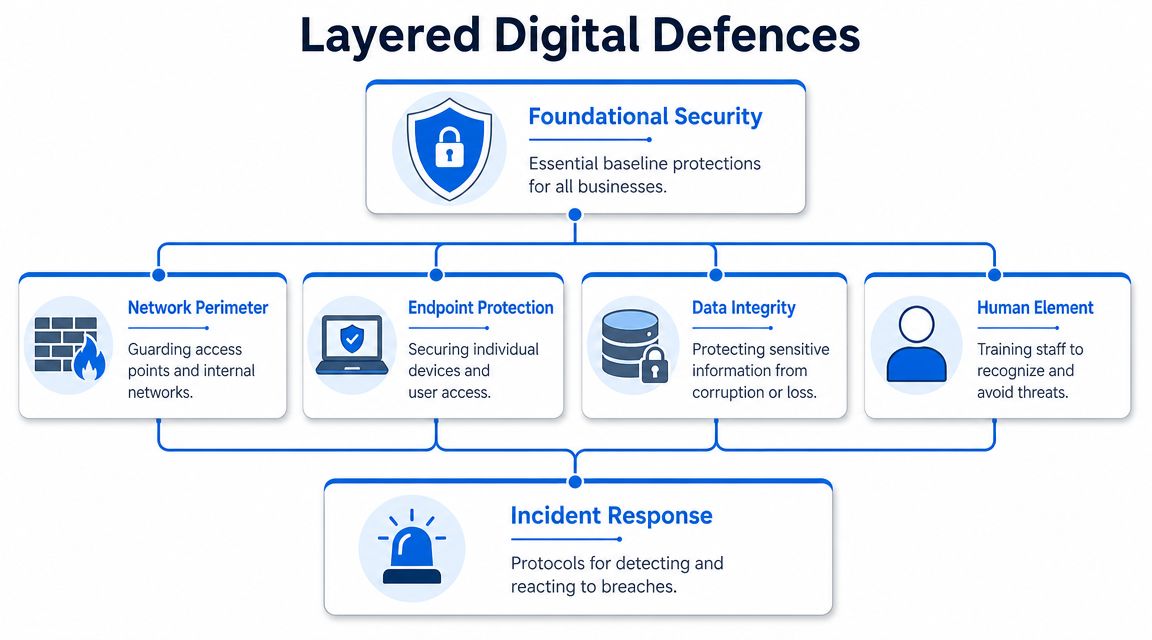
Start with the baseline controls
For most SMEs, the right baseline is the UK's practical hardening model behind Cyber Essentials. The important part isn't the badge itself. It's the discipline of covering the most common routes attackers use.
That means:
- Turn on MFA everywhere it matters for externally accessible email, cloud services, remote access, and admin portals.
- Remove admin rights from day-to-day accounts so routine work isn't being done with the keys to the whole estate.
- Patch on a defined schedule with a short maintenance window, especially for internet-facing systems and common business devices.
- Review default settings on routers, wireless equipment, CCTV platforms, door entry systems, and telecoms services.
These controls sound basic because they are basic. That's why they work. Many incidents still begin where the fundamentals were left half-done.
Protect the services your business runs on
After the baseline, focus on the systems that affect operations first.
A managed firewall should do more than sit in a rack with lights on. It should control traffic between networks, support secure remote access, and make it harder for the wrong connections to move around internally. If your guest Wi-Fi can see business devices, or your CCTV network sits beside office computers without separation, the design needs tightening.
Email security deserves dedicated attention because inboxes are still the busiest attack path. Filtering, anti-spoofing protections, attachment controls, and sensible user prompts all help. But they only work properly when paired with account security and staff habits.
Endpoint protection matters because staff don't all work in one office any more. Laptops travel. Phones connect from home Wi-Fi. USB drives still appear. Devices need current protection, central visibility, and a process for isolating them if something goes wrong.
This is also the point where connected building systems need to come into scope. VoIP handsets, CCTV recorders, access control panels, and alarm-related devices are networked assets. Treating them as separate from IT is one of the most expensive assumptions a business can make.
One practical example. Networking2000 provides managed firewalls, VoIP, connectivity, CCTV, intruder alarms, and access control in Essex and London, which is useful when a business wants one provider to understand both the network and the physical systems connected to it.
If your phones, cameras, and door access all depend on the same network, they belong in the same security conversation.
For businesses that exchange sensitive files externally, even simple packaging choices matter. A plain password on a document sent by email isn't much of a control if everyone reuses the same habits. KeepKnown's guide to securing ZIP files is a practical reference for sharing compressed files more safely when you need an extra layer around documents.
Design for failure, not just prevention
Good security isn't just about blocking attacks. It's about limiting fallout when something slips through.
For Essex businesses, that means planning for cyber-physical disruption as well as data loss. The issue is broader than stolen files. Standard cyber insurance often excludes property damage, while property insurance often excludes cyber events, and a single incident can hit VoIP, internet access, CCTV, and access control at the same time (UK discussion of cyber-physical insurance gaps).
A resilient setup usually includes:
| Area | What good looks like in practice |
|---|---|
| Network layout | Office devices, guest Wi-Fi, CCTV, and IoT are segmented rather than mixed together |
| Backups | Critical systems are backed up in a way that can't be easily altered by an attacker |
| Recovery | Someone has tested restores and knows the order systems must come back online |
| Accounts | Admin access is limited, reviewed, and not used for normal email or browsing |
| Connectivity | The business has a plan for what happens if internet or telephony is disrupted |
The trade-off is cost versus resilience. Not every firm needs duplicated everything. Most do need a realistic plan for what they can't afford to lose, what they can't afford to stop, and how quickly they need to recover.
That's where mature cyber security essex work pays off. It protects data, yes, but it also protects your ability to answer the phone, view the cameras, open the doors, process work, and keep trading.
Navigating Compliance and GDPR in the UK
A lot of business owners hear “GDPR” and think paperwork, policies, and legal risk. That's only part of it. In practice, GDPR pushes businesses to do something they should already want to do. Know what data they hold, why they hold it, who can access it, and how they protect it.
That's not separate from security. It's what good security looks like when applied to personal data.
Good security makes compliance easier
If your business can answer a few basic questions clearly, you're already in a stronger position.
- What personal data do we hold across email, files, CRM systems, finance software, and mobile devices?
- Why do we hold it and is that reason still valid?
- Who has access and do they need all of it?
- How is it protected when stored, shared, backed up, and deleted?
The firms that struggle with compliance usually struggle with system sprawl. Files live in too many places. Old staff still appear in permission lists. Shared mailboxes contain years of sensitive material. No one has reviewed retention or access in a practical way.
GDPR is easier to live with when your systems are organised. Chaos creates compliance problems long before a regulator ever sees them.
What customers and regulators both care about
Customers may never ask whether you've documented your data flows in detail. They will care if the wrong person sees their records, if invoices go to the wrong address, or if a lost laptop creates a breach headache.
The most useful way to approach GDPR in a small or medium business is to turn it into operating discipline:
- Reduce unnecessary data. If you don't need it, don't keep it.
- Control access properly. Staff should only see what they need for their role.
- Secure common channels. Email, file sharing, and remote access need consistent controls.
- Keep records current. Policies that don't match reality won't help when there's a problem.
- Know your response process. If data is exposed, people need to know who checks what and what happens next.
That approach does more than reduce risk. It helps win trust. Clients want to know you're careful, organised, and responsible with information. In many sectors, that's part of the buying decision now.
Strong cyber security essex practices make GDPR less of a separate project and more of a natural result of running systems properly.
Choosing Your Essex Cyber Security Partner A Practical Checklist
Buying cyber security support can go wrong in two opposite ways. Some firms buy almost nothing and hope common sense will cover the gaps. Others buy a stack of tools they don't fully understand, then discover no one is managing them.
The right partner should help you avoid both mistakes.
Questions worth asking before you sign anything
Start with local reality. If you're based in Essex and something affects internet, phones, CCTV, or office access, remote support may not be enough on its own.
Use a checklist like this:
- Can they support both IT and connected physical systems so your network, VoIP, CCTV, and access control aren't treated as unrelated problems?
- Do they have a local presence for businesses that sometimes need on-site help rather than endless ticket chasing?
- Can they explain risk in plain English without hiding behind acronyms?
- Will they harden what you already have before pushing a full rip-and-replace project?
- Do they cover recovery as well as prevention including backups, restore testing, and continuity planning?
- What are their support hours and what happens outside standard office time?
- How do they handle user onboarding and offboarding because access control mistakes often begin there.
- Will they document the environment clearly so you're not locked into tribal knowledge?
A provider that can only talk about antivirus licences is too narrow. A provider that only talks about strategy decks is too abstract. You want someone who can make systems safer and keep them usable.
What monthly support usually includes
Cost conversations are often awkward because pricing depends on estate size, user count, number of locations, and how much is already in place. The better approach is to compare service levels, not chase the cheapest headline.
Here's a practical planning table.
| Service Level | Typical Inclusions | Estimated Monthly Cost (per business) |
|---|---|---|
| Essential | MFA rollout, endpoint protection oversight, basic firewall management, email security checks, patching guidance, backup monitoring | Varies by user count, device count, and existing setup |
| Managed | Essential services plus active firewall management, user access reviews, network segmentation advice, incident response support, staff security guidance | Usually higher than essential support because more systems are being actively managed |
| Comprehensive | Managed services plus support across VoIP, connectivity, CCTV, access control, recovery planning, supplier coordination, and broader business continuity work | Highest ongoing cost, but often the clearest fit for businesses with multiple connected systems |
That lack of fixed public pricing isn't evasive. It reflects real trade-offs. A small office with cloud email and a few laptops doesn't need the same service shape as a warehouse with VoIP, CCTV, multiple switches, guest wireless, and remote workers.
One useful benchmark when comparing providers is history and scope. Networking2000 has operated since 1998 and covers IT support, connectivity, telephony, cabling, and premises security across Essex and London. That kind of range matters when incidents cross from inboxes to phones to cameras to doors.
Choose the partner who can show how they'll reduce disruption, not just the one with the shortest proposal.
Frequently Asked Questions About Local Cyber Security
Do we need cyber insurance if we already have security tools
Insurance and security do different jobs. Security lowers the chance and impact of an incident. Insurance may help with some of the financial fallout, but it isn't a substitute for controls.
That matters because many businesses believe cyber insurance is a complete safety net, yet a CYE analysis found 4 in 5 companies had a cyberattack not fully covered by their policy, and claims can be denied without proof of controls like MFA, tested backups, and patch management (analysis of cyber insurance payout gaps).
The practical question isn't just “Do we have a policy?” It's “Can we prove we met the conditions if we need to claim?”
What about hybrid staff and home workers
Treat home and hybrid users as part of the business environment, not exceptions to it. Their devices, accounts, email access, and file permissions need the same standards as office-based users.
That usually means business-managed devices where possible, MFA on all remote services, controlled admin rights, and a clear rule that company work doesn't drift into personal accounts and ad hoc file sharing.
Is staff training really that important
Yes, but only when it's tied to the systems people use. Generic awareness slides once a year won't do much on their own.
Staff need practical guidance on invoice changes, password prompts, shared files, unusual sign-in alerts, and what to do when something feels off. Fast reporting is often the difference between a contained issue and a business interruption.
A well-trained employee won't stop every attack. They will stop a lot of avoidable ones, and they'll raise the alarm faster when something slips through.
If your business wants help assessing the risks across email, devices, VoIP, connectivity, CCTV, and access control, speak with Networking2000. A sensible first step is a plain-English review of what your business depends on most, where the obvious gaps are, and which fixes will improve resilience without overcomplicating day-to-day work.

