The usual advice is to buy an alarm with plenty of sensors and a loud siren. That misses the most important question: who does something when it activates? A well-equipped system can still disappoint if nobody checks the alert, the signalling fails or repeated false alarms undermine its response arrangements.
When comparing intruder alarms systems, judge the complete process, not just the equipment list. For homes and businesses in London and Essex, that means matching detection to the building, agreeing how incidents will be verified, and budgeting for maintenance as well as installation.
Table of Contents
- Wired, Wireless and Monitored Systems Compared
- Sensors That Detect an Intruder and Where to Fit Them
- UK Standards That Make an Alarm Count for Police
- How to Get a System Installed and Commissioned
- Keeping False Alarms and Maintenance Under Control
- What Happens After the Alarm Goes Off
- What an Intruder Alarm Costs in the UK
- Decide Whether a Local Managed Service Fits
Wired, Wireless and Monitored Systems Compared
An intruder alarm has three connected parts: sensors detect an opening or movement, a control panel interprets those signals, and a signalling path tells someone who can act. In a bells-only installation, that last part stops at the local siren. A professionally monitored system sends events to an alarm-receiving centre.
The distinction matters commercially. In 2024, 8% of UK businesses were affected by burglary or attempted burglary, according to Newgate's Business Crime Statistics 2024. Choosing protection is therefore a decision about operational risk, not an optional gadget purchase.
Intruder alarm system types compared
| System type | How sensors connect | Installation disruption | Best suited to | Police response |
|---|---|---|---|---|
| Bells-only | Local sensors and siren, no external signalling | Low for a simple wireless installation | Low-risk homes seeking an audible deterrent | No automatic attendance |
| Wired | Cable from each sensor to the panel | High where cable routes need opening | New builds and refurbishments | Only with suitable monitoring and verification |
| Wireless | Battery-powered radio sensors to the panel | Low | Rented, listed or small premises, subject to permissions | Only with suitable monitoring and verification |
| Hybrid | Wired core with wireless additions | Medium | Larger sites with mixed building fabric | Only with suitable monitoring and verification |
| Monitored, any type | Panel connected to a receiving centre | Set by the sensor installation method | Businesses needing organised escalation | Eligible on verified activation under applicable policy |
Separate connection method from response
Wired and wireless describe sensor connections. Monitored describes what happens to the signal. These aren't competing categories: a wireless system can be monitored, and a wired system can be bells-only.
Wired equipment makes sense while ceilings, floors and risers are accessible. Installing cables during refurbishment avoids opening finished surfaces later. Wireless equipment reduces that disruption, but the installer still needs to check radio performance and plan battery access.
Hybrid systems are useful where an existing wired installation covers the main building but an extension needs additional detection. For rented or listed premises, wireless doesn't remove the need for landlord consent or any applicable building permissions.
Choose the response you need before choosing how the sensors connect.
To build a shortlist, answer these questions:
- Premises size: Which rooms, entrances and separate buildings need protection?
- Cable access: Can an installer run cables without damaging finishes or disrupting work?
- Response requirement: Do you need an organised response, or is a local audible warning sufficient?
Sensors That Detect an Intruder and Where to Fit Them
A detector is only useful when its position matches the risk. A passive infrared detector hidden behind shelving won't protect the movement route you intended it to cover. Start with the building layout, then select the sensor.
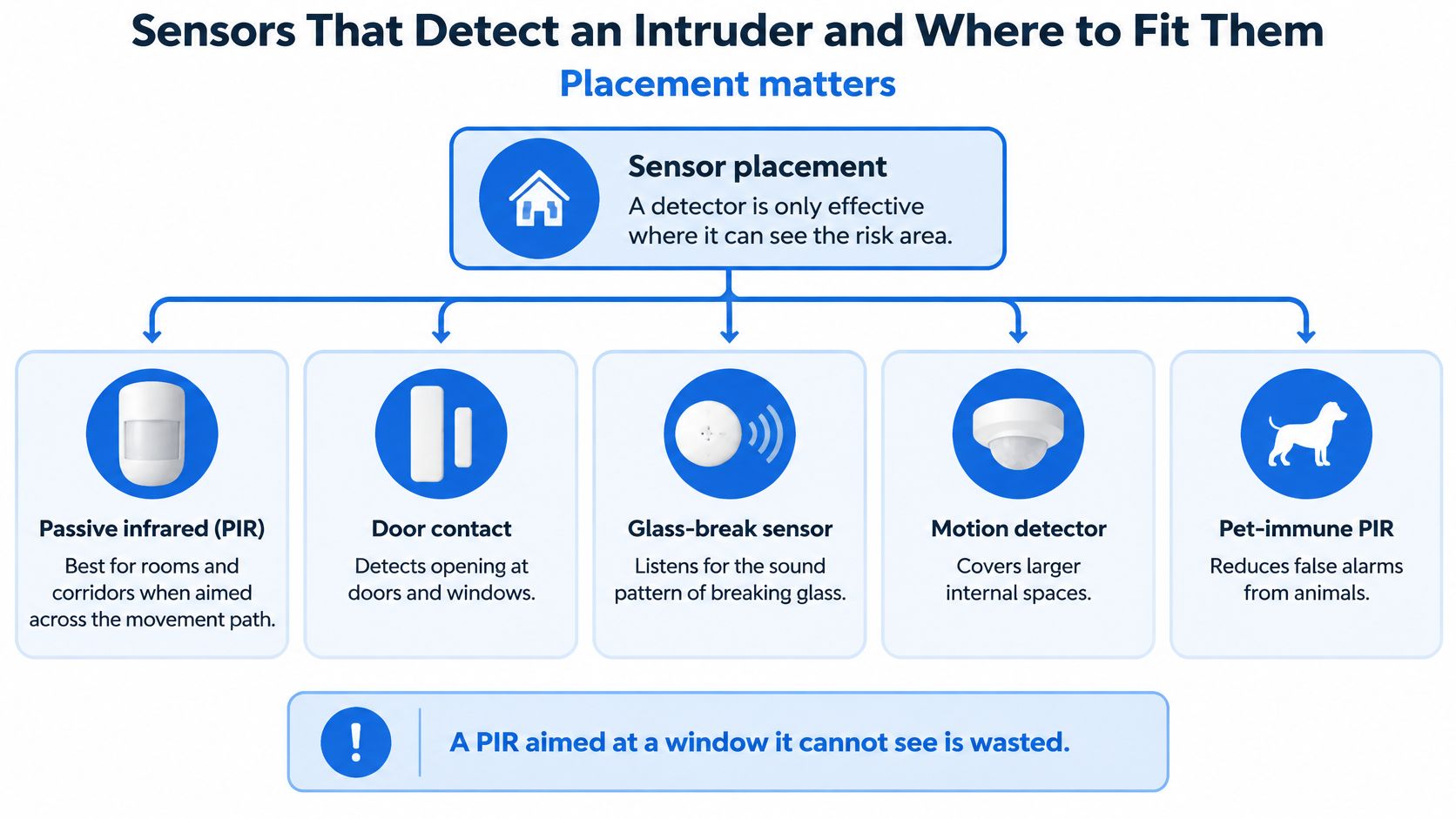
Sensor types, what they detect and where they fail
| Sensor | What it detects | Where to fit it | Common false trigger |
|---|---|---|---|
| Passive infrared, PIR | Changes in infrared energy as a person moves across its view | Room corners or corridors with an unobstructed view across likely movement | Pets, heaters, direct sunlight |
| Magnetic door or window contact | A door or window opening | Fixed frame and moving leaf of protected entry points | Loose or misaligned magnet |
| Glass-break detector | Sound pattern associated with breaking glass | Within the manufacturer's specified coverage of the glass | Loud music or hammering |
| Dual-technology, PIR and microwave | Movement detected through both sensing methods | Suitable rooms and open-plan offices | Moving objects or poor positioning affecting both technologies |
| Shock or vibration sensor | Impacts on a safe, door or wall | The protected safe, door or suitable building surface | Heavy lorries, footfall, excessive sensitivity |
Build coverage around likely routes
Put contacts on vulnerable opening doors and windows, then use internal movement detection to cover likely routes through the premises. Consider glass-break detection where glazing creates a relevant entry risk. A contact detects opening, so it doesn't necessarily identify someone breaking through a pane without moving the frame.
Check the manufacturer's coverage diagram, mounting instructions and environmental limits. Don't assume a pet-immune detector will ignore every animal in every position, particularly where pets can climb onto furniture.
Workplace storage also affects placement. Material Handling USA's guide to smart locker systems for workplaces is useful when considering how staff storage fits into a layout, but lockers mustn't obstruct detector views or create unprotected routes around valuable equipment.
- Inspect entry points: Walk the building after dark and mark accessible doors, windows and service entrances.
- Trace movement: Mark the route someone would take towards stock, cash or equipment.
- Check obstructions: Include shelving, displays, lockers and doors left open during business hours.
Give that marked plan to the installer. It's more useful than choosing detectors solely by their advertised coverage distance.
UK Standards That Make an Alarm Count for Police
A compliant control panel doesn't make the entire installation suitable for police response. Equipment, configuration and monitoring must work as a connected chain. A weak link can leave you with capable hardware but no dependable escalation arrangement.
ProtectUK's guidance on alarms and CCTV identifies the relevant layers: BS EN 50131 covers intrusion-system requirements, BS 8243 covers installation and configuration, and BS EN 50518 covers the alarm-receiving centre; police response also requires compliance with National Police Chiefs' Council policy.
Check the whole chain
The equipment requirements address what the system must do. Installation and configuration determine how that equipment behaves in the actual building. Receiving-centre requirements concern the organisation handling incoming events.
These aren't interchangeable assurances. A panel specification doesn't establish that detectors have been correctly positioned, that confirmation has been configured appropriately or that the receiving centre supports the response you require.
An audible-only alarm normally doesn't prompt police attendance without additional evidence of a genuine break-in, such as someone reporting breaking glass. Nor should a monitored-system quotation be read as a guarantee that officers will attend every activation.
Buying rule: Get the intended response arrangement in writing, rather than accepting a general promise of police connection.
Before accepting the design, obtain:
- Compliance documentation: Evidence covering the proposed equipment and installation, not just a manufacturer's brochure.
- Receiving-centre details: Its relevant certification and the signalling service connecting your panel.
- Response arrangements: The intended category, verification process and applicable local-force requirements.
- Insurance acceptance: Written confirmation of any conditions your insurer places on installation, monitoring or servicing.
Check whether an existing system's documentation still describes its current layout. An extension, changed entrance or replacement communicator can leave the paperwork out of step with the premises.
The practical outcome should be a documented installation that your insurer can assess and your keyholders can understand. Don't pay for an assumed response that nobody has confirmed.
How to Get a System Installed and Commissioned
Installation isn't complete when the siren works. Commissioning proves that the installed system matches the agreed design, communicates correctly and can be operated by the people responsible for the building.
The main stages are straightforward, but each needs a recorded outcome.
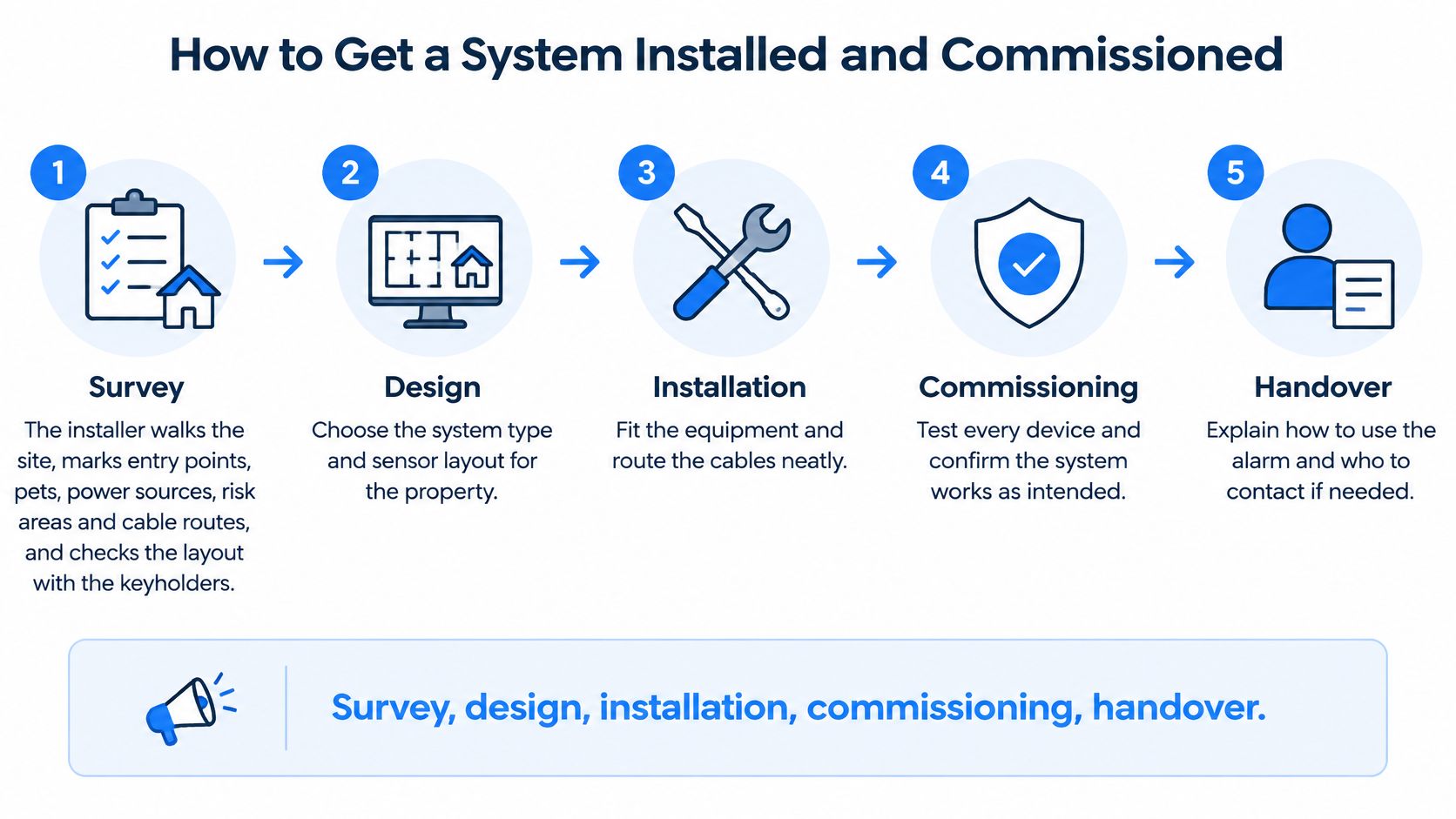
Survey the premises. Walk the site with the installer and a keyholder, identifying entrances, valuable stock, pets, heat sources, power supplies and cable routes. Include delivery routines and cleaning access, because an empty-building plan doesn't describe how people use it.
Agree the design. Record the sensor locations, zones, setting arrangements and monitoring requirements before work starts. A vague description such as full coverage leaves too much room for disagreement about an unprotected storeroom or rear entrance.
Install cables or check radio performance. Wired routes should be planned through suitable accessible spaces and finished neatly. For wireless devices, test signal performance at their intended positions before fixing them, with attention to metal shelving, partitions and closed doors.
Connect the panel and signalling. Programme clear zone names and connect the communicator to the receiving centre where monitoring is specified. Test the primary and backup communication arrangements included in the design, rather than assuming the backup works because the communicator supports it.
Commission under realistic conditions. Walk-test every detector, check warning devices and rehearse entry and exit using the actual staff route. An entry delay that expires before someone reaches the keypad is an avoidable cause of trouble, as is a detector concealed by furniture after installation.
Complete the handover. Train users to set, unset and respond to faults, and confirm who receives calls when the usual keyholder is unavailable. Collect the applicable certificates, operating instructions, zone list and test records before signing off.
Rehearse the awkward situations
Ask a staff member who hasn't watched the programming to operate the system. Can they identify an open zone, understand a fault message and contact the right person without borrowing the manager's credentials?
Test the closing routine too. A back door used for taking out rubbish may need a different operational approach from the main customer entrance, and cleaners shouldn't have to improvise around an armed zone.
A signed-off installation should leave certificates on file, a completed test log and securely managed access credentials. Keep the installer's contact details accessible without displaying alarm codes beside the keypad.
Keeping False Alarms and Maintenance Under Control
False alarms can cost you priority response, not just a call-out. Under the framework described by NSI's intruder-alarm guidance, immediate priority response can be withdrawn after three false alarm calls within a rolling 12-month period, with reinstatement requiring the cause to be identified, corrective action completed and three months without a false alarm.
That makes fault investigation part of security management. Repeatedly resetting the panel without understanding the cause can leave the same problem waiting for the next closing shift.
Use a practical maintenance routine
The schedule below is a suggested management routine, not a substitute for the installer's service specification, manufacturer's instructions or insurer's conditions. Arrange tests with the receiving centre before starting so a planned check doesn't become an unnecessary escalation.
Alarm maintenance and testing schedule
| Frequency | Task | Who does it |
|---|---|---|
| Daily | Confirm setting and unsetting, inspect panel fault indications | Keyholder or staff member |
| Monthly | Conduct an agreed walk-test, communicator test and warning-device check | Trained user, coordinated with monitoring |
| Quarterly | Review event logs for recurring zones and operating problems | Keyholder or manager |
| Annually, or as the service agreement requires | Full inspection, sensor testing, power and backup-battery checks | Installer |
| At the manufacturer's replacement interval or a battery warning | Replace wireless sensor batteries | Installer or authorised trained user |
| At the specified service interval or failed capacity test | Replace the control-panel backup battery | Installer |
Confirmation logic helps distinguish an isolated event from a corroborated intrusion. For example, the system can use sequential activations from independent detectors to establish confirmation before the monitoring service requests the relevant response. The installer must configure that logic appropriately, rather than only delaying every alert.
Loose contacts, low batteries, moving objects, environmental changes and incorrect operation all deserve investigation. Record the zone, time, people present and conditions surrounding each unwanted activation.
- Look for patterns: A fault at closing time may point to procedure; repeated events in an empty room may indicate placement or equipment trouble.
- Train every keyholder: Include temporary cover and staff who close only occasionally.
- Escalate recurring faults: Contact the installer promptly rather than repeatedly clearing the warning.
Treat an unwanted activation as a diagnostic signal, not a successful test of how loud the siren sounds.
What Happens After the Alarm Goes Off
An alert isn't a response. A notification can arrive successfully while the recipient is asleep, travelling or unable to check the premises.
The gap between concern and action is real: Aviva research reported by Professional Security found that 65% of UK residents worried about burglary, while 21% said they would activate a burglar alarm when away for an extended period. Start by making the alarm part of a reliable leaving routine, then decide who handles an incident.
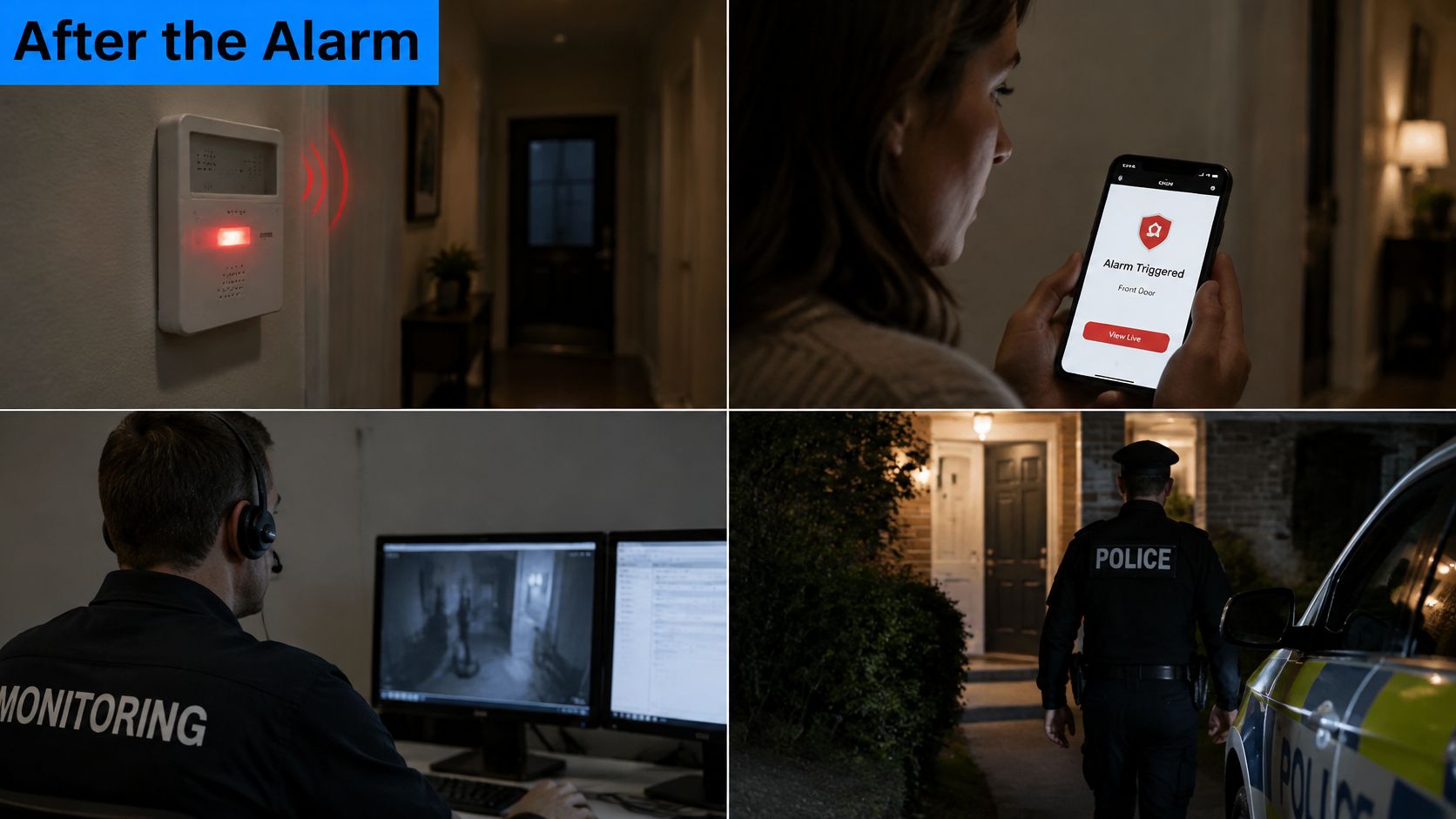
| Handling method | What happens | Main limitation |
|---|---|---|
| Audible-only | Local warning devices operate | Nobody is assigned to investigate |
| App notification | A nominated device receives an alert | The recipient can miss or dismiss it |
| Keyholder response | A named person follows the agreed procedure | Availability, travel and personal safety |
| Professional monitoring | A receiving centre handles signals and follows verification and escalation procedures | Requires functioning communications and current instructions |
A keyholder shouldn't enter a building where an intruder may still be present. Give responders clear safety instructions and an alternative contact when they're unavailable.
Check connected-alarm resilience
A smart alarm introduces software and network dependencies. The UK government's digital telecare commissioning guidance specifies TLS and SRTP with AES-128 encryption, expected-life security updates and compliance with the Product Security and Telecommunications Infrastructure Act 2022 for the personal-alarm devices within its scope.
That document isn't an intruder-alarm installation standard. Its procurement questions are nevertheless useful when assessing a connected security product:
- Encryption: What protects panel, app and monitoring communications?
- Support lifetime: How long are security updates guaranteed?
- Vulnerability handling: How are flaws reported, investigated and corrected?
- Outage behaviour: What continues working when broadband or mains power fails?
- Independent testing: What evidence can the manufacturer provide?
Where practical, put connected alarm equipment on a segregated network with only the necessary communications permitted. Don't assume sharing a connection with office computers, CCTV and internet telephony is harmless.
Measure the arrangement by whether someone can detect, verify and act, including during an outage. A successful push notification alone doesn't establish that.
What an Intruder Alarm Costs in the UK
There isn't a defensible universal price for an intruder alarm without a site specification. Obtain written, itemised quotations before committing, rather than treating an advertised kit price as the installed cost of protecting your premises.
The useful comparison is between complete scopes of work. The table identifies what needs pricing without attaching unsupported market ranges.
Typical UK intruder alarm costs to request in a quotation
| Setup | Monitoring | What it includes |
|---|---|---|
| DIY wireless kit, home | None for a bells-only arrangement | Panel, sensors and siren, self-installed |
| Professionally installed wireless system, home | Separately priced if selected | Installation, configuration and handover |
| Professionally installed wired system, home | Separately priced if selected | Cabling, installation and applicable certification |
| Small business monitored system | Recurring fee to be itemised | Standards-aligned installation, monitoring and agreed response arrangements |
| Annual service contract | Monitoring may be a separate charge | Inspection, testing and specified battery checks |
Read the scope before the total
Sensor quantity matters, but so does placement and access. A compact office with accessible cable routes presents a different job from premises with finished ceilings, separate outbuildings and restricted working hours.
Ask the quotation to identify cable routes, making-good work, power provision and any necessary network changes. If these are excluded, establish who supplies them before accepting the installation price.
The response requirement also affects the specification. A cheap self-installed kit isn't a substitute for a documented monitored installation where your insurer requires one.
- Installation scope: Compare sensor locations and types, not just the overall device count.
- Recurring charges: Separate monitoring, maintenance, app subscriptions and communication charges where applicable.
- Contract conditions: Establish the minimum term, cancellation process and whether an introductory monitoring period is included.
- Changes and repairs: Check charges for relocation, expansion, replacement batteries and call-outs.
- Ownership and access: Confirm who owns the equipment and what happens if you change service provider.
A lower headline price isn't a saving if the quotation leaves out the response or certification you need.
Compare offers line by line, including handover records and ongoing responsibilities. Cutting corners can mean paying for additional visits, replacing unsuitable equipment or discovering after installation that an important requirement was never included.
Decide Whether a Local Managed Service Fits
Self-management can suit a small premises where a reliable keyholder understands the system, can follow a safe response procedure and has no conflicting insurance conditions. It still requires someone to own testing, contact updates and fault resolution.
A managed arrangement becomes more useful when responsibilities are spread across sites, nobody is nearby overnight or alarm communications depend on business IT. The decision isn't whether you can operate a keypad. It's whether you can keep the entire service dependable.
Match support to the operational gap
- Choose clear ownership: Name the person responsible for faults, service appointments and changes to opening hours.
- Define the service boundary: Establish whether the contract covers monitoring, attendance, repairs or only scheduled maintenance.
- Check commercial terms: Confirm renewal arrangements, included visits, battery charges and the effect of moving or extending the system.
- Assign network responsibility: Record who investigates a communication failure and who approves router or broadband changes.
Physical boundaries also deserve attention. FenceScape's explanation of commercial security fencing in Ottawa offers a useful separate perspective on perimeter planning, although local conditions and requirements differ from those in the UK. The practical lesson is to consider the route to the building as well as detection inside it.
At Networking2000, we provide CCTV, intruder alarms and access control systems for customers across London and Essex. Our surveyors are trained to match CCTV equipment to a customer's system needs, which helps when discussing how visual information could support the wider security design.
Bring operational questions to the survey, not just a shopping list of devices. Explain who locks up, who can respond, what your insurer requires and which parts of the building are occupied outside normal hours.
Gather a floor plan, a current keyholder list, your insurer's requirements and a clear description of the response you need. Those documents give the survey a practical starting point and help prevent assumptions becoming expensive omissions.
Networking2000 offers intruder alarms, CCTV and access control alongside IT and networking support across London and Essex. Visit Networking2000 to discuss your premises and arrange a site survey, bringing your floor plan, keyholder details and insurance requirements so the conversation starts with the protection and response you need.

