During 2024, UK fixed-voice connections fell by 3.1 million, or 11%, to 24 million, according to Ofcom's Communications Market Report. For a small office in Chelmsford leaving ISDN for full fibre, that transition changes what keeps the phones working. The broadband, router, switches and power supply become part of the telephone system.
A proper VoIP phone system setup is therefore a fraud, emergency-calling and power-cut project, not just a handset installation. A provider can mark your service live while callers still hear silence, emergency records show the wrong address or a compromised extension runs up charges.
Table of Contents
- Check Broadband and Network Readiness
- Set Up the System in a Safe Order
- Allow Only the Voice Traffic You Need
- Set Emergency Location and Recording Rules
- Stop Fraud on Extensions and Admin Logins
- Test Outages and Keep the System Healthy
- Arrange a Local Cutover for Your Office
Check Broadband and Network Readiness
Start with the circuit you use, under the workload your staff create. A speed test before opening time won't reveal what happens when cloud backups, video meetings and customer calls compete for upload capacity.
Measure performance across a working day, including the busiest periods. Use the router's traffic graphs and the provider's voice-quality test, rather than relying entirely on a browser speed test. Test towards the voice platform where possible, because a fast connection to a nearby speed-test server doesn't prove the route to your phone provider is healthy.
Test the busy office, not the empty office
Ask the provider for its acceptance limits for latency, jitter and packet loss. Latency is delay; jitter is variation in that delay; packet loss means pieces of the conversation never arrive. Record the results while someone makes a test call and another person runs the ordinary office workload.
Size the connection around simultaneous conversations, not the number of purchased extensions. Get the provider to calculate bandwidth using its supported codec and allowance for network overhead, then leave room for other business traffic. Download speed alone is the wrong buying criterion.
Quality-of-service controls can prioritise voice at a congested router, but they can't repair a faulty circuit or control every network beyond your premises. For a practical companion to those checks, We Fix PC Laptop explains how to improve call quality during VoIP setup.
Make the local network predictable
Use wired Ethernet for reception and staff who spend much of the day on calls. Cat5e or Cat6 cabling avoids the changing signal strength and interference that can make a Wi-Fi handset unreliable at exactly the wrong moment.
Put phones on a separate voice VLAN, which is a logically separated part of the office network. Keep guest Wi-Fi outside it, and apply DSCP EF voice marking where the switches and router honour it. A VLAN separates traffic; it doesn't automatically reserve bandwidth or secure every device.
Network checks before a VoIP cutover
| Check | Target | Fail sign |
|---|---|---|
| Round-trip latency | Within the provider's acceptance limit during busy periods | Talk-over and delayed audio |
| Jitter | Within the provider's voice-quality limit under normal office load | Choppy or robotic calls |
| Packet loss | No recurring loss during test calls; investigate any bursts | Gaps and dropped words |
| Cabling and VLAN | Cat5e or Cat6 on a voice VLAN, guest Wi-Fi separate, DSCP EF where switches honour it | Reception handsets drop on Wi-Fi |
| Power | UPS on router, PoE switch and any local gateway | Phones die in a mains cut |
Check that the switch's Power over Ethernet capacity can run all connected phones. Include the fibre termination equipment when identifying what needs backup power, not just the router.
Buying rule: Fix a failed readiness check before ordering more seats. Extra handsets won't cure a congested upload or an overloaded switch.
Keep the completed table with the installation paperwork. It gives the business and provider an agreed starting point when a fault needs investigating.
Set Up the System in a Safe Order
Begin with the devices and services that depend on the old line. An alarm communicator, lift phone or door-entry system can be easier to overlook than the reception handset, and more awkward to replace after the line has gone.
The safe sequence starts with service design and number migration rather than distributing phones.
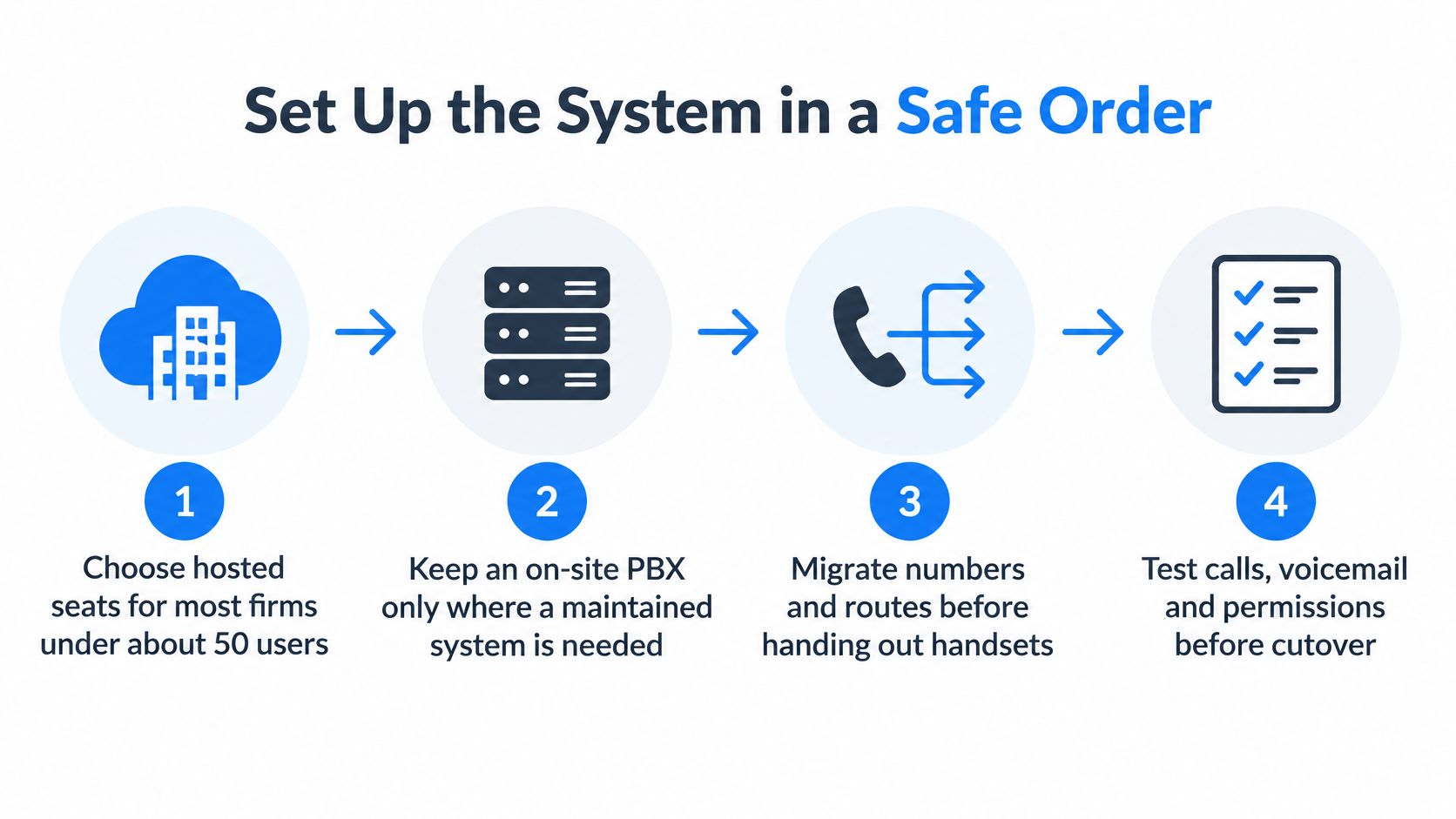
Build the service before moving the numbers
Choose the operating model. Hosted seats usually suit a small business that doesn't want to maintain a telephone server. An on-site PBX makes sense when you have a clear integration or control requirement, suitable infrastructure and someone responsible for maintenance. Don't choose it just because the old system lived in a cupboard.
Write the call-flow schedule. List users, direct-dial numbers, reception duties, hunt groups, opening hours and voicemail destinations. Decide what callers hear when everyone is busy and who receives messages when the office is shut. Have the business owner approve this document before anyone starts programming.
Size concurrent calling from demand. Extensions and call channels aren't interchangeable. Use existing call records to identify the busy period, then account for inbound calls, outbound calls and transfers that may use additional capacity. Ask how the proposed service behaves when that capacity is exhausted: queue, busy tone or overflow.
Raise the number port with matching account details. Supply the current bill and the authority documents the receiving provider requests. Check the installation address, account name and complete number range, including numbers that staff rarely use. Choose a quiet supported window, and don't independently cancel the existing service while the port is pending.
Build routes before the port completes. Configure extensions, greetings, opening-hours rules, voicemail and the agreed mobile diversion. Use a temporary number to prove the call flow. Reception should be able to describe what happens to an unanswered call without needing the installer to interpret the configuration.
Provision supported endpoints. Use the provider's approved provisioning method for desk phones and softphones. Prefer its supported voice codec configuration rather than forcing compression to disguise inadequate bandwidth. Label handsets and record which user and desk each device belongs to.
Pilot representative users. Include reception, a frequent caller and someone working away from the office. Test transfers, hold, pickup, voicemail delivery and headset controls during normal work. Correct the faults before moving the remaining users.
A visual demonstration can help staff understand the difference between account setup and a working calling service.
Clear the hidden dependencies
Inventory alarms, payment terminals, lifts, intercoms, fax equipment and any broadband service attached to the existing line. The GOV.UK guidance on moving landlines to digital technologies advises business customers to review infrastructure before migration because the effects can extend beyond voice calls.
An analogue adapter isn't a universal replacement for a telephone pair. Get the equipment maintainer and communications provider to approve the proposed arrangement, particularly where signalling or safety monitoring is involved. A dial tone doesn't prove an alarm has successfully reported to its monitoring centre.
Keep a cutover sheet containing the number list, routing plan, device inventory, port reference and provider contacts. Give staff a short rehearsal on answering, transferring and retrieving messages. Familiarity with those ordinary actions prevents avoidable confusion on the day the public numbers move.
Allow Only the Voice Traffic You Need
A hosted PBX doesn't configure your office firewall for you. Unless the support agreement explicitly assigns that job elsewhere, the business needs a named person or IT company to maintain the local rules.
Get the provider's network requirements in writing. They should identify signalling destinations, media destinations, transport protocols and the supported method for remote users. Avoid instructions that amount to opening the router until the phones work.
Separate registration from audio
A handset can show as registered while calls remain silent. SIP signalling sets up the call, while RTP media carries the audio; allowing one doesn't prove the other has a working path.
Work through these changes deliberately:
- Check SIP ALG behaviour. Disable it where the provider requires this. ALG rewriting can interfere with signalling and media information, but don't treat it as the explanation for every voice fault.
- Restrict provider paths. Permit the documented SIP and RTP destinations rather than exposing services to the whole internet.
- Use the documented media range. Copy the provider's required protocol and port range into the change record. Don't substitute a range found in an unrelated setup guide.
- Keep administration private. Allow authorised computers to reach the management portal securely. Don't publish a local PBX administration page to make remote support convenient.
- Use the supported remote connection. Remote staff should connect through the provider's session border controller or an approved VPN, not an unrestricted inbound SIP rule.
- Test from different networks. Check an office handset and an off-site softphone after each change. Include incoming calls, outgoing calls and transfers, not just registration status.
Keep a usable firewall record
The table is a rule checklist, not a set of universal port values. The provider's current documentation determines the actual service ports and destinations.
Voice paths to allow on the office firewall
| Traffic | Ports | Direction | If it is blocked |
|---|---|---|---|
| SIP signalling | Provider-documented signalling ports and addresses; SIP ALG off where required | Phones or PBX to the provider | Handsets fail to register or lose registration |
| RTP audio | Provider-documented UDP media range | Both ways, same provider IPs | One-way or silent calls |
| Secure admin | Provider-documented HTTPS management port | Outbound from admin PCs only; PBX admin page not published | Portal access or supported provisioning fails |
| Remote workers | Provider SBC or VPN, never open SIP to the internet | Outbound from laptops and mobiles | Remote calling fails; opening SIP instead creates exposure |
Save a configuration backup before changing the router. Record who authorised the work, which provider destinations were used and how to reverse the change.
A replacement router often arrives with different defaults. Give its installer the voice requirements before the swap, rather than discovering afterwards that ordinary browsing works but calls don't.
Set Emergency Location and Recording Rules
VoIP caller ID doesn't reliably tell an emergency operator where the caller is standing. Ofcom's emergency-location document warns that IP-routed VoIP calls cannot generally use calling-line information to establish the caller's location.
That matters when an office number follows someone onto a laptop at home. The number may still identify the business while the person needing help is somewhere else.
Make location a managed record
Create an emergency-location register for geographic numbers, extension groups and users who move between locations. Agree with the provider how addresses are stored, how nomadic users are handled and who can change the records.
Use a checklist to make the location and recording decisions visible before launch.
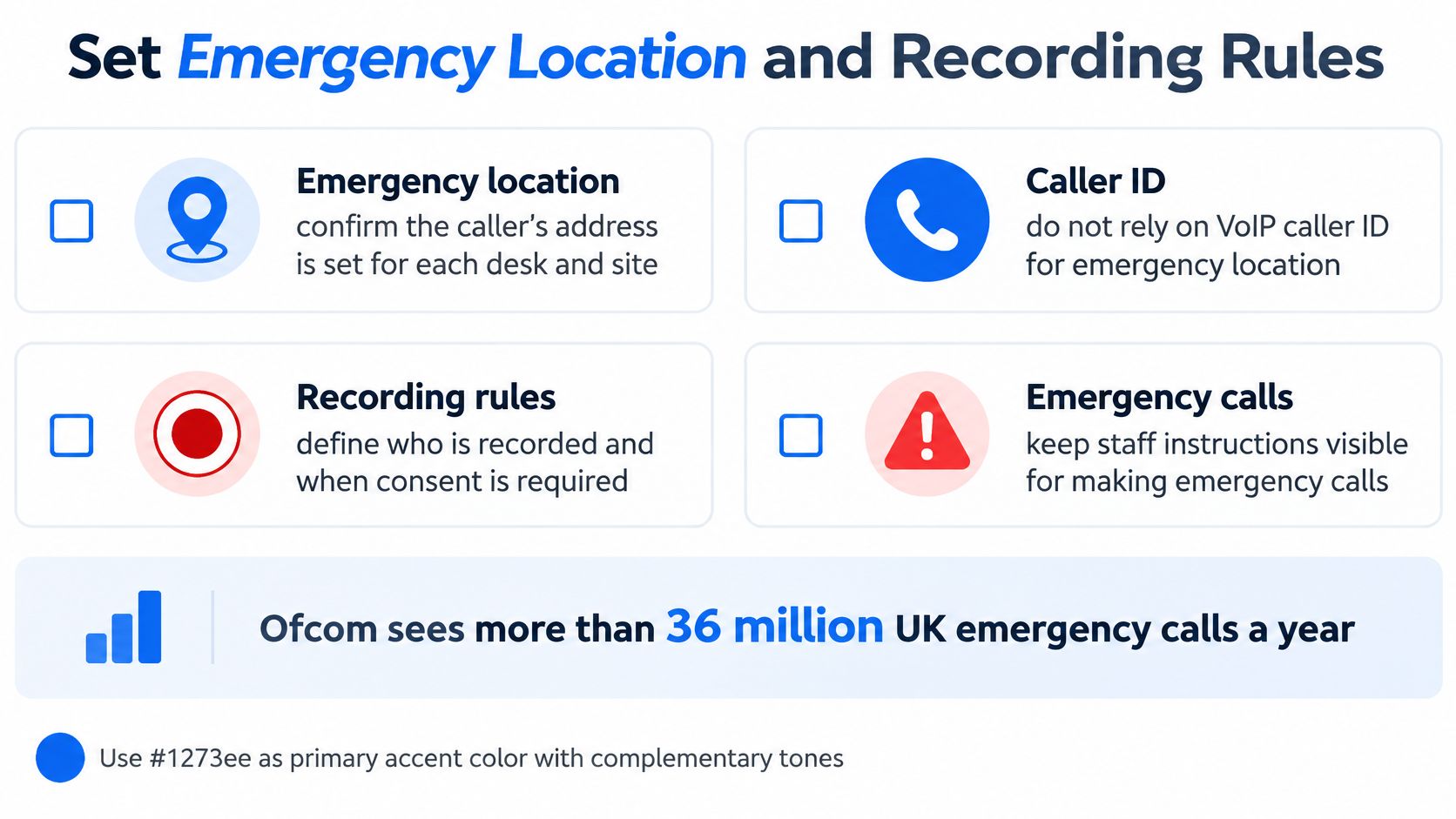
Arrange validation of emergency-call routing through the provider's approved procedure. Don't make an unarranged live emergency call as a routine installation test. Ask how the intended address and callback information can be checked without occupying an emergency operator unnecessarily.
Add location updates to office moves, home-working changes and device reassignment. Give staff visible instructions explaining how to state their physical location and what alternative calling route to use if the office system is unavailable.
Distinguish backup calling from office continuity
Ask the provider to document any emergency-calling backup obligation that applies to your service and circumstances. Don't assume that a provider-supplied backup powers every handset, switch and workstation.
An emergency calling route and a fully operational office are different requirements. Specify and test them separately.
The fallback should be usable by the people present, including visitors or staff without company mobiles. Keep instructions somewhere accessible during an outage, not only in an online document.
Enable recording deliberately
Keep call recording off until the business has defined its purpose, lawful basis, scope and retention rules. Tell workers what is monitored, and give callers a clear notice explaining that calls are recorded and why.
- Limit access. Give playback and export rights only to staff who need them.
- Control storage. Protect recordings with encryption and an agreed deletion schedule.
- Log activity. Record access and exports so misuse can be investigated.
- Plan retrieval. Make sure authorised staff can locate relevant recordings when handling an access request.
Don't mistake a consent setting in the portal for a complete privacy policy. Decide how sensitive information and calls that shouldn't be recorded will be handled before enabling automatic capture.
Stop Fraud on Extensions and Admin Logins
Hosted VoIP removes some server maintenance, not the customer's security work. The business still controls who holds administrator credentials, which endpoints connect and what destinations staff can call.
The National Cyber Security Centre's PBX best-practice guidance recommends trusted-provider restrictions, firewalls, changed default passwords, patching, administrator multi-factor authentication and dialling limits. These are installation tasks, not optional improvements for later.
Lock down access before handing over
Treat handset provisioning credentials, extension passwords and portal accounts as separate assets. A strong portal password doesn't compensate for a reused extension secret stored on an unmanaged laptop.
The security handover needs to cover both the hosted account and the equipment on the desk.
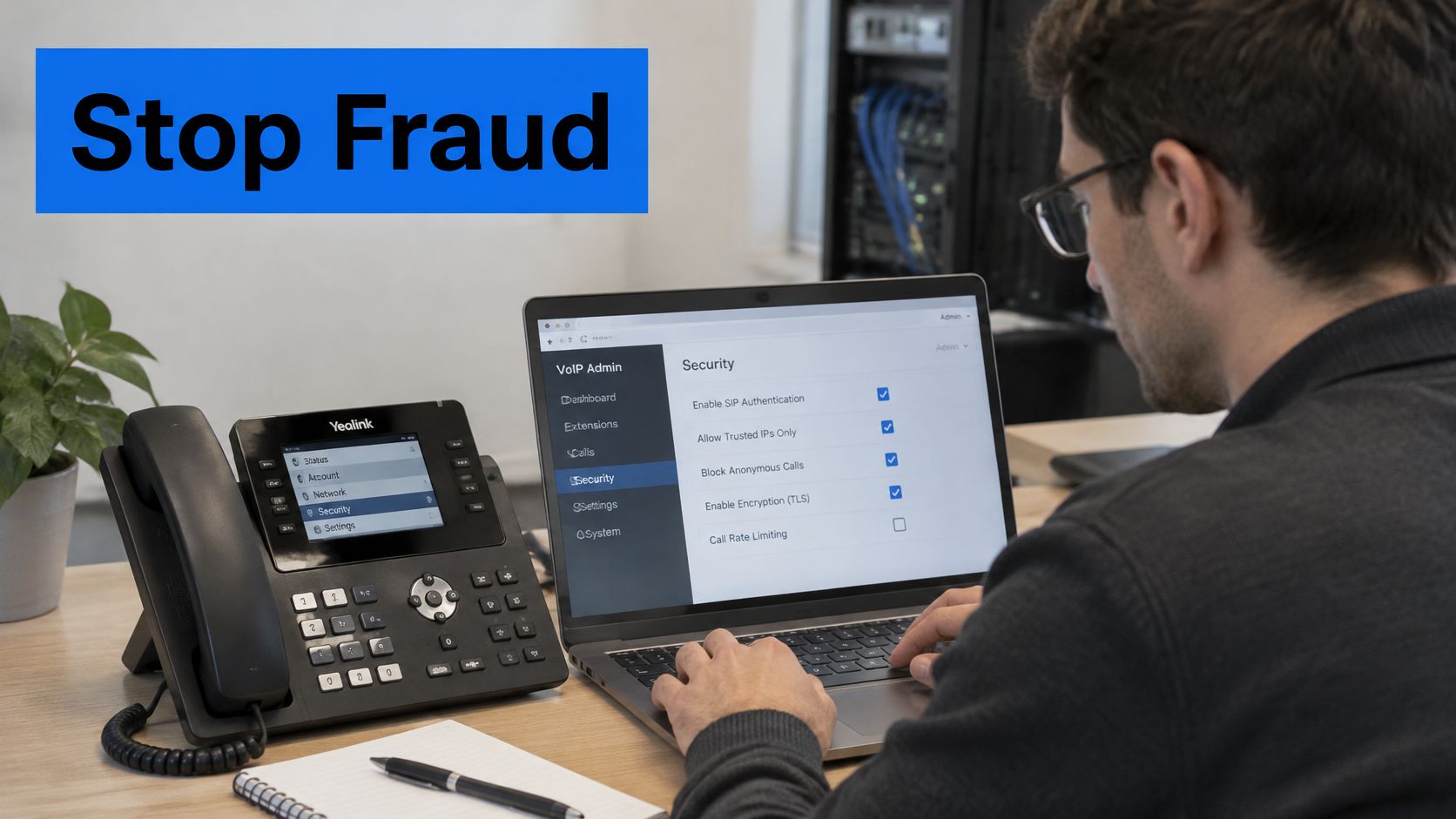
- Replace defaults. Set unique credentials and keep administrative secrets in a business password manager.
- Require MFA. Protect administrator access and establish a secure recovery method.
- Separate privileges. Reception may need to change a greeting without gaining access to billing, security settings or every recording.
- Maintain devices. Assign responsibility for supported handset firmware, router updates and softphone updates.
- Remove stale access. Disable departing users, unused extensions and obsolete provisioning accounts.
For an office in Brentwood with a home worker in Wickford, include the remote endpoint in the handover. Check who manages the laptop, how the softphone authenticates and how lost equipment is reported.
Limit what a stolen extension can do
Block international and premium-rate destinations unless there's a business requirement. Where someone needs access, grant it deliberately rather than enabling it across the whole organisation.
Ask whether the provider supports spend caps, destination restrictions and alerts for unusual traffic. Clarify whether a cap actively stops calls or merely sends a notification. An email nobody reads overnight isn't an effective response plan.
Keep registration events, failed login attempts, configuration changes and outbound destination records for an agreed period consistent with the business's security and privacy needs. Name the person who reviews alerts and the backup who takes over when they're unavailable.
Incident test: Can an authorised administrator disable a compromised extension immediately, without waiting for the original installer?
Practise that action using a test account. Also agree how the provider will block suspicious traffic and how the business will preserve logs without leaving the compromised account active.
Test Outages and Keep the System Healthy
A premium hosted platform can't keep a desk phone working through failed local equipment. Acceptance testing must prove what staff can do when something breaks, not merely show that the provider's dashboard is green.
The NCSC's PBX resilience guidance recommends backups, recovery planning, monitoring and testing, including preparation for hardware failure and cyber attacks. Turn those requirements into a repeatable office exercise with named owners.
Accept the service under real conditions
Before sign-off, check audio in both directions, caller ID, hunt groups, voicemail, transfers and the mobile divert. Make calls from outside the organisation as well as between extensions. Internal calling can work while the public inbound route is wrong.
Record jitter and packet loss during the acceptance calls so there's a baseline for later investigations. Test what happens when the PoE switch loses mains power, with the person responsible for the UPS present.
Check the backup path independently. A mobile application using office Wi-Fi isn't an independent fallback if that Wi-Fi relies on the failed connection.
Run a repeatable resilience drill
Schedule the exercise outside a critical trading period and tell staff what will happen. Use this sequence:
- Disconnect the primary broadband. Leave the rest of the setup unchanged so you're testing the intended failure.
- Confirm automatic diversion. Check that public numbers reach the agreed mobiles without an administrator intervening.
- Test backup calling. Place incoming and outgoing calls over the fallback connection.
- Review emergency-location handling. Confirm the stored records and provider-supported behaviour for the active calling route.
- Restore and document. Check that normal routing returns, then write down failures, owners and corrective actions.
Don't assume automatic recovery is clean. Some devices reconnect promptly while others retain a failed session until they're re-registered.
Call faults on cutover day
| Symptom | Likely cause | First fix |
|---|---|---|
| One-way audio | SIP ALG still on, or RTP ports closed | Turn SIP ALG off where required and allow the provider RTP range |
| Choppy calls | Congestion, unstable Wi-Fi or packet loss | Move the phone onto the wired voice VLAN |
| No inbound after port day | Port incomplete or inbound number routing missing | Confirm completion with both providers |
| Dead phones after a power cut | Router or PoE switch has no UPS | Power the network core from the UPS and retest |
| Mobiles work but desk phones do not | Extension unregistered or wrong password | Re-provision that handset and read the registration log |
Keep the fallback current
Set a recurring maintenance review for updates, unused accounts, traffic alerts and UPS battery condition. Update diversion destinations when staff leave or responsibilities change.
A second connection is worthwhile where reception cannot stop taking calls, but check its independence. Connections that share the same powered router or vulnerable access route can fail together. The useful question isn't whether you bought backup broadband; it's whether the tested backup still works when the primary service doesn't.
Arrange a Local Cutover for Your Office
Don't cease the old line while a readiness check has failed or a dependent device remains unresolved. Book a cutover that covers circuit testing, number migration, routing, security, emergency records and failure testing, rather than accepting handset delivery as completion.
The UK Government reported that between April 2024 and March 2025, more than two-thirds of UK PSTN lines had migrated to VoIP, leaving fewer than 5.6 million lines operational. Plan the move around your business requirements rather than waiting for a withdrawal notice.
Ask for an accountable handover
Compare a provider-led installation with a local communications engineer who can also handle the premises network. Networking2000 is one local option for VoIP installation, phone-system maintenance, cabling, routers and managed firewalls across London and Essex.
Ask the quotation to identify:
- Calling capacity. The agreed simultaneous-call allowance and overflow behaviour.
- Cutover ownership. Who coordinates the port and confirms completion.
- Failure support. Who responds when the service works remotely but fails inside the office.
- Handover evidence. Test results, configuration records and staff instructions.
Decide whether unanswered, busy and outage calls should follow different routes before approving the configuration. VoxNote's guide to call forwarding is a useful companion when comparing those choices.
Book a readiness assessment with your current bill, number list and dependent-device inventory available. That gives the installer something concrete to design and quote.
Networking2000 offers VoIP installation and maintenance alongside the network configuration, cabling and firewall work that a dependable setup needs. Visit Networking2000 to request a cutover assessment covering your numbers, emergency-location records and tested outage plan.

