A fast acknowledgement is not the same as a fast fix. For urgent IT issues, under one hour is a useful response benchmark; general service requests and minor issues may reasonably receive a response within one business day. An IT support response times guarantee should define when a person starts engaging with the problem, not promise it will be fixed by that deadline.
It’s reasonable to expect clear communication when a fault disrupts work. The right response target depends on the issue’s priority and the support coverage set out in the agreement.
This guide explains what makes a response time reasonable, how an SLA sets response and escalation targets, and what to ask about acknowledgement, active work and resolution. You’ll be better placed to judge whether a support commitment matches your business needs.
Key Takeaways
- Separate the time taken to acknowledge and begin work from the time needed to resolve a fault.
- Match incident priorities to clear response, resolution and escalation targets in the SLA.
- Check when support coverage applies, how the response clock starts and whether remote and on-site targets differ.
- Ask how progress is communicated and how response performance is reported, so you can judge whether the agreement suits your business.
What Is a Good Response Time for IT Support?
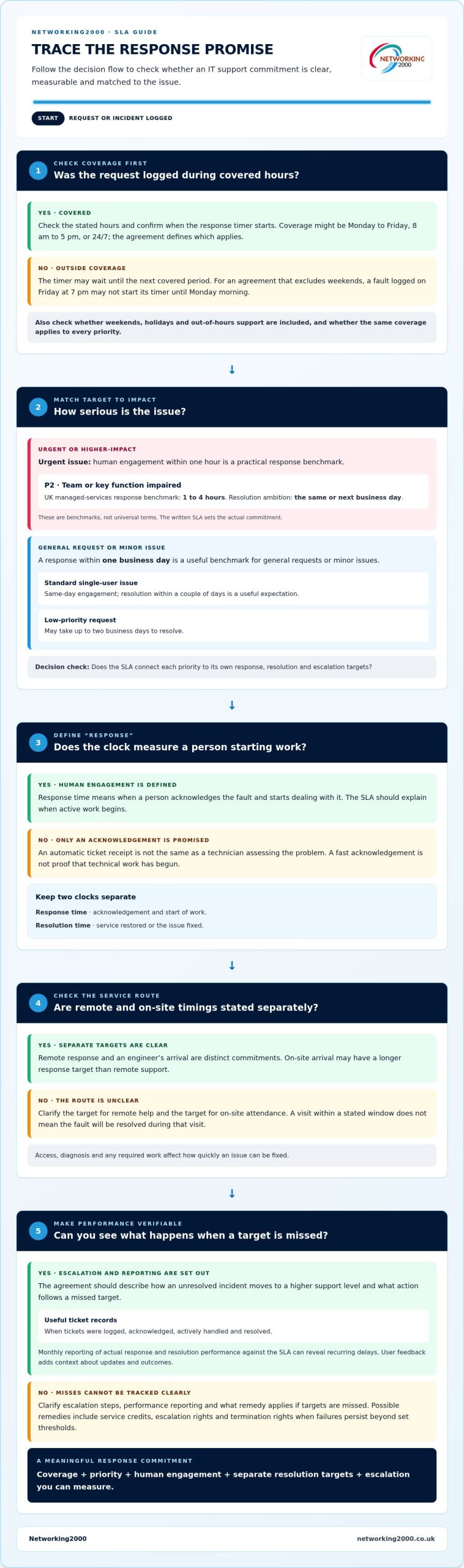
A useful target depends on priority, business impact and support coverage. For an urgent issue, human engagement within an hour is a practical benchmark, while minor requests may receive a response within one business day.
Response Time Versus Resolution Time
Response time measures when a person acknowledges a fault and starts dealing with it; resolution time measures when service is restored or the issue is fixed. This distinction matters because a quick acknowledgement alone doesn’t show that technical work has begun. An automatic ticket receipt is not the same as a technician assessing the problem.
For a standard single-user issue, same-day engagement and resolution within a couple of days are useful expectations. A low-priority request may take up to two business days to resolve. For example, a minor software problem can be logged promptly but still require investigation before it’s fixed. An SLA should state separate response and resolution targets for each priority.
Onsite response is also distinct from remote response: an engineer’s arrival may have a longer response target than remote support. The agreement should make that distinction clear. A visit within a stated window doesn’t mean the fault will be resolved during that visit; access, diagnosis and any required work affect how quickly it can be fixed.
Managed Support and Break-Fix Commitments
Managed support sets ongoing expectations through an SLA, while break-fix arrangements address support when a fault occurs. The practical difference is whether response targets, coverage hours and escalation steps are agreed in advance or set for each request. An IT support response times guarantee is useful only if it defines when the clock starts and what counts as active engagement.
Compare the written terms, not just a headline promise. For a managed arrangement, check targets by priority and whether urgent cases receive human attention. For break-fix support, establish whether the agreement includes a response commitment for each reported fault. In either case, clarify remote and onsite timings, resolution expectations and who handles escalation if the first target is missed. This makes the commitment meaningful during a real outage.
Service level agreements for response and escalation
A service level agreement (SLA) turns support expectations into measurable commitments. It should explain how incidents are prioritised, handled and escalated.
What an IT Service Level Agreement Covers
An IT SLA defines the support scope and the service levels that apply to different requests. A response target is useful only when everyone knows what starts the clock and what happens next.
For example, the agreement can set a response target, explain when active work begins and describe how unresolved incidents move to a higher support level. It should also distinguish response from resolution commitments. The UK National Cyber Security Centre gives one business day as a useful benchmark for responding to general service requests or minor IT issues.
For higher-impact incidents, the agreement should connect priority to action. A P2 incident, where a team or key function is impaired, has a UK managed-services response benchmark of 1 to 4 hours. Its resolution ambition is the same or next business day. These are benchmarks, not universal terms; the written SLA determines the actual commitment.
Measuring Service Levels and Progress
Service-level monitoring compares ticket records with the SLA’s response and resolution targets. This helps a business see whether maximum timeframes are being met, rather than relying on a general impression of support.
Useful reporting separates results by priority and shows when tickets were logged, acknowledged, actively handled and resolved. Monthly reporting of actual response and resolution performance against the SLA helps reveal recurring delays. For instance, repeated missed targets for P3 incidents may point to an escalation bottleneck, even if urgent cases are handled promptly.
Customer satisfaction adds context to the figures. Ticket data shows timing; user feedback can show whether updates were clear and the outcome solved the problem. Review both alongside escalation records, then agree what action follows a missed target. Appropriate remedies can include service credits, escalation rights and termination rights when failures persist beyond set thresholds. A clear support agreement makes those expectations easier to understand and measure.
How do SLA agreements define minimum response requirements?
No, an SLA applies 24/7 only when its coverage says so; some agreements cover Monday to Friday, 8 am to 5 pm. Response commitments can also depend on priority, stated exclusions and whether the contract includes out-of-hours support.
Coverage Hours and the SLA Timer
Coverage hours define when the response timer runs, which matters because a request logged outside that window may wait for the next covered period. Under an agreement that excludes weekends, an issue logged on Friday at 7 pm may not start its timer until Monday morning.
Check whether the contract includes weekends and holidays, and whether the same hours apply to every priority. A Monday-to-Friday, 8 am to 5 pm arrangement works differently from 24/7 coverage. The exact start point should be clear for both remote support and onsite attendance.
After-Hours Response Arrangements
After-hours arrangements state who receives urgent requests outside normal coverage and what response follows. This matters when an overnight outage needs attention before the next working period.
Look for separate primary and secondary response commitments: the first describes initial human engagement, while the second sets out escalation if the issue remains unresolved. The contract should explain how to report an urgent fault, who handles it, and whether the target covers acknowledgement or active work. A 24/7/365 tier offers round-the-clock coverage; defined business-hours tiers do not.
Limits on Response Guarantees
An SLA tier sets minimum targets, but its scope and exclusions determine when those targets apply. Knowing the distinction helps prevent an impressive headline from being mistaken for a promise covering every request.
For example, listed tiers include a Bronze next-business-day response during standard business hours, a Silver 4-hour Priority 1 response with extended business-hours coverage, and a Platinum/Gold 2-hour Priority 1 response with 24/7/365 coverage. These are tier examples, not universal terms. Check how the contract classifies incidents, handles dependencies and defines exclusions. A delayed response can also follow from using the wrong reporting route or giving incomplete fault details, so the agreement should state the correct process.
Questions to ask an IT support provider
Ask specific questions to establish whether an SLA describes real support, not just a fast ticket receipt. The answers should explain how the provider responds, begins work and escalates faults.
- What counts as a response? Ask whether a person assesses the fault or merely logs it. A 15-minute target may mean only that the issue has been recorded, not actively worked on. The UK National Cyber Security Centre gives under one hour as a useful benchmark for responding to urgent IT issues, so clarify what happens during that interval.
- How are priorities assigned? Ask for examples tied to business impact. A business-wide outage should not follow the same route as one user’s minor software issue. Confirm who can raise a priority and whether the provider can reclassify it after diagnosis.
- What happens if the first target is missed? Ask who owns escalation, when a senior technician becomes involved and how you’ll receive progress updates. The answer should describe a clear route, rather than leaving your team to chase the same ticket repeatedly.
- Which hours does the commitment cover? Ask whether the response clock runs outside business hours, at weekends and on bank holidays. Get an example involving a Friday evening request, and establish whether the timer starts immediately or at the next covered period.
- What does the resolution target promise? Ask how the provider distinguishes ongoing diagnosis from a completed fix. Guaranteed fix times are rarely realistic for faults that haven’t been diagnosed. The agreement should explain the next update and escalation if work remains open.
Compare each answer with the written SLA, including remote and onsite support. A useful service review should show actual response and resolution performance, identify missed targets and set out follow-up actions. This gives you a practical way to assess whether the agreement suits your business, beyond its headline promise.
Discuss your IT support requirements and the response expectations that matter to your team.
Networking2000: Managed IT Support
Networking2000 provides Managed IT Support for businesses that need help managing day-to-day technology and support requirements. It can be a practical next step if you’re reviewing how IT issues are handled, prioritised and escalated across your organisation.
Clear response expectations matter alongside dependable infrastructure. Networking2000 also provides Managed Firewalls, which support businesses looking to strengthen network protection as part of their wider IT arrangements. The right support setup depends on your systems, business needs and the commitments set out in your agreement, so focus on defining priorities and coverage clearly.
For support with your business IT requirements, contact Networking2000 or visit networking2000.co.uk.
Make response expectations part of your IT plan
Use your SLA as a working tool, not just a contract to file away. Map its priorities to the systems your team relies on, and make sure staff know how to report a fault and provide useful details. That preparation helps support teams assess the impact and act on the right issue.
Before relying on an IT support response times guarantee, make sure its commitments fit your business hours, working practices and essential services. Networking2000 provides Managed IT Support, Managed Firewalls and VoIP Telephony to help businesses manage their IT and communications needs. These services can be considered together where network protection or phone systems are part of the business’s support requirements.
Choose clear expectations that your team can follow, then keep them aligned with changing business needs. Contact Networking2000 about IT support to discuss the support your business needs.
Frequently Asked Questions
What should happen if the provider misses its SLA?
The provider should follow the remedy and escalation process written into the agreement. Record the ticket reference, timestamps and business impact, then raise the missed target through the named escalation route. The SLA may provide service credits or escalation rights; termination rights may apply if failures persist beyond set thresholds. A Wickford business should also review the provider’s explanation and agreed actions to help prevent similar delays.
Are guaranteed fix times realistic?
Guaranteed fix times are rarely realistic for faults that haven’t been diagnosed. A provider may need to identify whether the cause is a device, network, application or external dependency before estimating the repair. Restoring one user’s access, for example, differs from recovering a shared system with multiple affected services. A useful commitment sets a clear response target, then provides progress updates and escalation steps while diagnosis continues.
Can you negotiate an SLA?
Yes, you can discuss SLA terms before agreeing the contract. Start with the systems your Wickford team relies on, then match incident priorities, coverage hours and escalation routes to their business impact. Ask for separate terms for remote support and onsite attendance, plus a clear process for missed targets. This keeps negotiations focused on operational needs rather than just a headline response figure.
How long should it take to resolve an IT problem?
Resolution time depends on the fault’s scope, cause and dependencies, so there isn’t one suitable deadline for every ticket. A low-priority request may take up to two business days to resolve. For a Wickford business, distinguish a temporary workaround from a complete fix, and agree what updates staff receive if the issue remains open beyond the initial estimate.
What response times do UK IT support providers guarantee?
There’s no single response time guaranteed by every UK provider; the service agreement sets the commitment. The UK National Cyber Security Centre gives under one hour as a useful benchmark for urgent issues and one business day for general service requests or minor IT problems. Treat these as reference points when assessing terms, not as a universal guarantee for every support contract.
What are typical IT support SLA response times by priority level?
UK managed-services benchmarks vary by priority: P1 critical faults may receive human engagement within 15 to 60 minutes; P2 high-priority incidents, 1 to 4 hours; P3 standard incidents, 4 to 8 business hours; and P4 low-priority requests, within 1 business day. P3 incidents are typically resolved within 1 to 3 days. Check that the SLA defines each priority using business impact, not labels alone.

