A VoIP phone system makes calls over an internet connection by turning voice into digital data packets, instead of using a dedicated phone line. For a business, that means the broadband connection and the equipment's power supply become part of the telephone system.
You might be looking at a renewal quote, replacing an ageing office switchboard or trying to let staff answer the business number from home. The handset can look reassuringly familiar, but the important questions sit behind it: what carries the call, who maintains the service, and what happens when something stops working?
Table of Contents
- What a VoIP Phone System Is in Plain Terms
- How a VoIP Call Travels Across Your Network
- VoIP Versus Traditional Phone Lines Compared
- Features Small Businesses Use Every Day
- Outages, Security and 999 Calls Explained
- What a UK VoIP Phone System Costs
- How to Migrate From Your Current Phone Line
- Confirm Your VoIP Route Before You Switch
What a VoIP Phone System Is in Plain Terms
VoIP stands for Voice over Internet Protocol. Think of a traditional telephone circuit as a private pipe reserved for a conversation. VoIP works more like a parcel service: the equipment divides speech into labelled packets, sends them across a shared network and reassembles them into sound at the destination.
The change is already substantial. Ofcom's Communications Market Report reports that UK fixed voice connections fell by 3.1 million, or 11%, during 2024, reaching 24 million, while “other” fixed connections, mainly managed VoIP services, increased by 0.7 million, or 6%, to 11.5 million.
Who runs the phone system?
With a hosted system, the provider runs the call-control platform in its infrastructure. You normally pay a subscription, manage users through a dashboard and leave platform maintenance to the provider.
An on-premise IP-PBX is a phone-system server at your premises. PBX means private branch exchange: the equipment or software that connects extensions and manages calls. You have more control over local configuration, but someone must maintain, secure and back it up.
Core components of a VoIP phone system
| Component | What it does | Example |
|---|---|---|
| Handset or softphone | Sends and receives voice | Desk IP phone; app on a laptop or mobile |
| Switch and Wi-Fi | Carries voice traffic on the office network | Power over Ethernet network switch; Wi-Fi access point |
| Router or firewall | Links the office network to broadband and prioritises voice | Business router with traffic prioritisation |
| Broadband connection | Carries packets to and from the provider | Full fibre, fibre to the cabinet, leased line or mobile backup |
| Hosted platform or IP-PBX | Routes calls and runs features | Cloud-hosted PBX; on-site IP-PBX server |
| Phone number | Identifies the business to callers | Geographic number retained through number porting |
A softphone is a calling application, usually used with a headset. Your customers can still dial an ordinary business number, and you can retain familiar functions such as transfers and voicemail. What changes is the machinery underneath, not necessarily the way callers reach you.
How a VoIP Call Travels Across Your Network
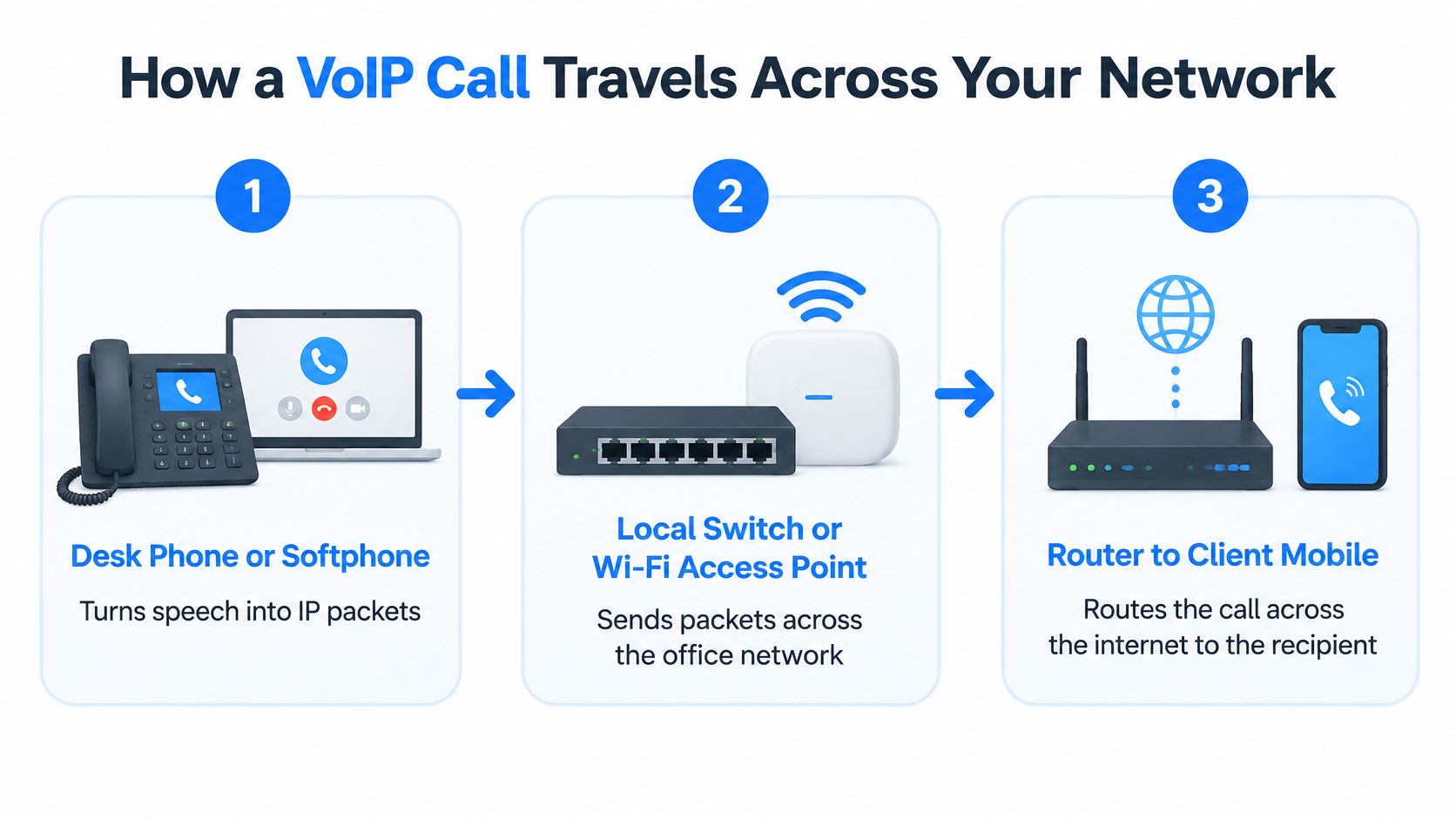
Say you're calling a client's mobile from your office desk. Your phone captures your speech, converts it into digital information and sends packets towards the phone provider.
The path includes more than the handset. This diagram groups the journey into its main stages.
From your desk to the provider
An Ethernet-connected phone sends its packets through the office network switch. A wireless device uses a Wi-Fi access point instead, where interference or weak coverage can affect the conversation before it reaches the internet.
Your router forwards the traffic onto the broadband connection. Its firewall permits authorised communications while blocking unwanted access. Properly configured Quality of Service, usually shortened to QoS, gives voice traffic priority when other office activity competes for the connection.
The broadband network carries the packets to your VoIP provider, which routes the call towards the client's mobile network. Their reply travels back through the corresponding chain.
Every powered device in that chain matters. Unlike a basic analogue handset that could often draw power from its telephone line, internet-based calling relies on local equipment; UK government guidance on digital landlines warns that emergency calling may be unavailable when premises power or broadband fails.
Why a fast connection can still sound bad
A large download-speed result doesn't prove that a connection handles live speech well. Ask your installer to measure:
- Latency: The delay before speech reaches the other person. Excessive delay makes people interrupt each other.
- Jitter: Uneven packet arrival times, which can produce broken or distorted speech.
- Packet loss: Missing packets, which can remove pieces of words altogether.
A downloaded document can wait while missing information is sent again. A live conversation can't wait indefinitely without becoming difficult to follow. For practical troubleshooting, the Fivenines guide to packet loss detection explains how to investigate missing network traffic rather than relying on a speed test alone.
Use wired Ethernet for desk phones where practical. A voice VLAN, a logically separated part of the office network, helps organise and control phone traffic, although it doesn't create extra broadband capacity.
Practical rule: Test calls while the office is busy, not just when everyone else has gone home.
Include the broadband modem or fibre terminal, router, powered network switch and any local phone server when planning battery backup. Protecting only the handset leaves the rest of the call path exposed.
VoIP Versus Traditional Phone Lines Compared
| Factor | Traditional line | VoIP system |
|---|---|---|
| Call charges | Per-minute rates or line bundles set by the provider | Often bundled into a subscription; check mobile and international rates |
| Number portability | Number associated with the existing service; transfers need coordination | Existing number can usually be ported, subject to provider checks |
| Built-in features | Basic calling unless a separate PBX supplies more | Routing, voicemail-to-email, conferencing and hunt groups through a platform |
| Adding users | May require PBX capacity, wiring or additional external lines | Add an extension in software, with suitable licences and network capacity |
| Remote and mobile use | Usually centred on the premises, with forwarding or extra equipment | Softphones work on supported devices with internet access |
| Set-up | Physical line and PBX work may require an engineer | Provisioning can be remote; broadband readiness and porting control timing |
| Equipment lifespan | Legacy equipment becomes harder to support | IP handsets and routers need supported firmware and eventual replacement |
The main advantage is how you manage calling, not a guaranteed saving on every conversation. You can change destinations, add extensions and support people away from the office without treating each change as a wiring project.
For another side-by-side explanation, the VoIP comparisons from UpTime Web Hosting provide useful background. UK buyers should still check local contract terms and emergency-calling arrangements with their chosen supplier.
Three assumptions worth challenging
VoIP is automatically cheaper. A low licence price can exclude handsets, installation, support and the network improvements needed to make calls dependable. Compare the complete service, not just the subscription.
Internet calls always sound worse. Poorly managed networks can produce poor audio, but that isn't an unavoidable characteristic of VoIP. A suitable connection, sound configuration and a decent headset can provide clear conversations.
Changing technology means losing the number. Number porting transfers an existing number between providers where supported. The receiving provider needs accurate account details, and you shouldn't cancel the existing service before the transfer is agreed.
Which situation favours which approach?
A straightforward office with dependable fibre will often benefit from hosted calling and simpler administration. A business with many remote staff has an especially strong reason to consider softphones, because employees can use the business identity without being at a particular desk.
Premises with unreliable broadband or specialist line-connected equipment need more preparation. Keeping an old system temporarily may be sensible while its dependencies are resolved, but it isn't a substitute for a migration plan.
Features Small Businesses Use Every Day
The useful features are the ones that stop callers being missed or passed around. A long specification sheet matters less than whether customers reach the right person.
Help callers reach someone
- Call routing: Ring groups alert several people together; hunt groups try people in a chosen order. Opening-hours rules send calls somewhere appropriate when the office closes.
- Auto-attendant: A recorded menu directs callers to sales, accounts or support without someone answering every call manually.
- Voicemail-to-email: Messages arrive in a monitored inbox, so they aren't trapped on an unattended desk phone.
- Transfers and presence: Staff can see whether a colleague appears available and introduce a caller before transferring them.
Say an accountancy practice in Brentwood wants reception calls to ring the office team before reaching an authorised mobile. Outside opening hours, it sends callers to a shared voicemail inbox instead. The useful work is agreeing that sequence and assigning responsibility for returning messages, not just enabling forwarding.
Give staff the right information
- Softphone and mobile apps: Employees answer business calls from supported computers or smartphones without giving customers their personal number.
- Call recording: Record selected conversations where appropriate, with suitable privacy information, access controls and retention arrangements. A recorded announcement alone doesn't settle every data-protection question.
- Call reporting: Managers can review missed calls and busy periods to adjust staffing or routing.
- CRM integration: A customer relationship management system can display the caller's record, reducing repeated questions and manual searching.
A small team may need little more than reliable apps, straightforward transfers and shared voicemail. A growing office benefits from hunt groups, a clear menu and missed-call reporting; a dedicated service desk may need queues and more detailed analysis.
Buy features against a named task and a named owner. If nobody can explain who will use a feature, leave it out of the initial package.
Check demonstrations using your actual workflow. Ask the provider to show a transferred call, an unanswered call and a message being retrieved, rather than only showing the administration dashboard.
Outages, Security and 999 Calls Explained
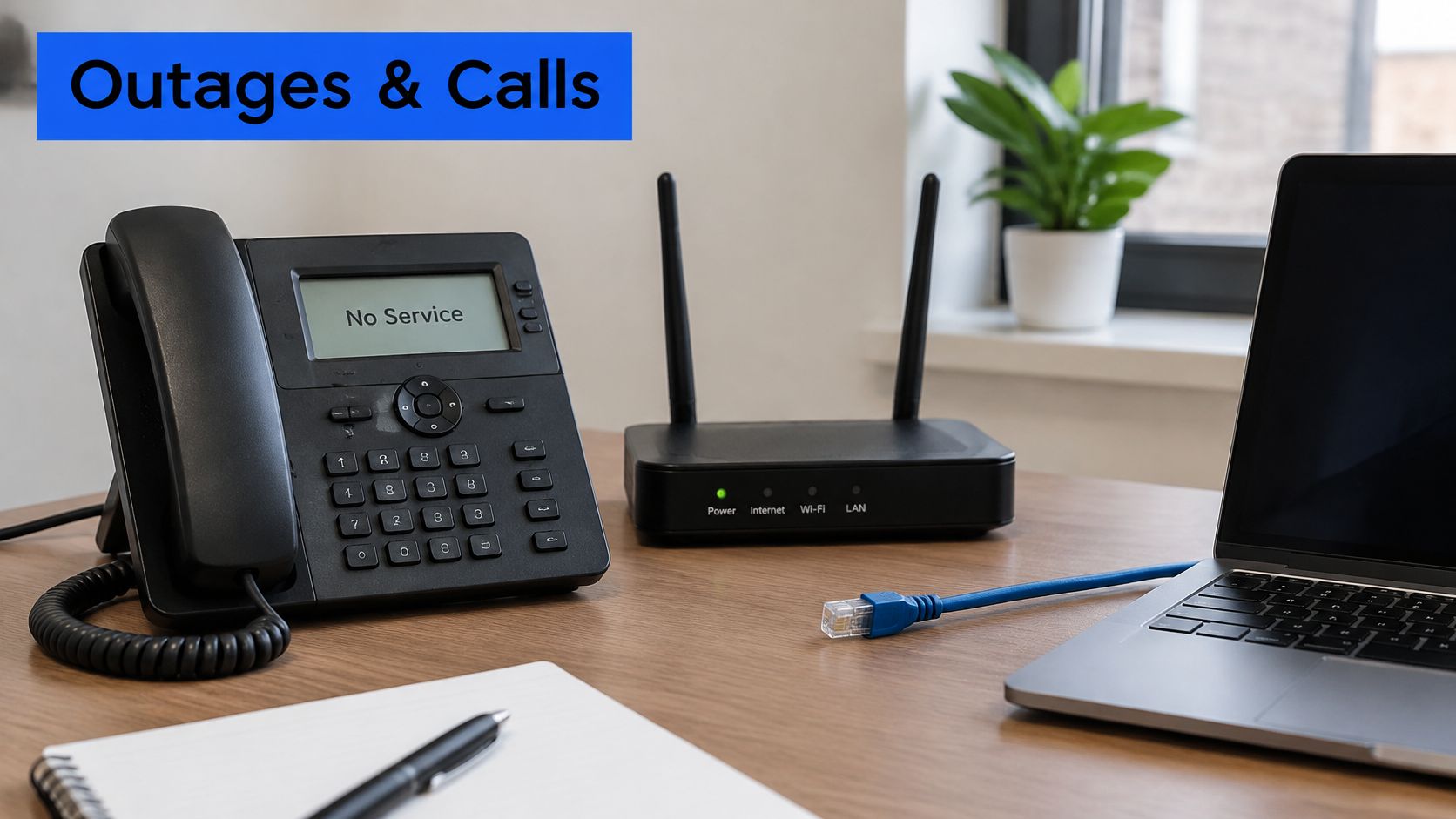
A VoIP handset can be switched on and still be unable to call for help. Calls depend on a working broadband connection, router, network equipment and power, as well as the phone and provider. A “No Service” warning may point to any failure along that chain, not just a faulty handset.
Match the backup to the failure
| Failure | What can stop | What limits the damage |
|---|---|---|
| Broadband outage | Calling from office devices | Tested secondary connectivity and provider-side diversion |
| Router or switch fault | Devices behind the failed equipment | Supported replacement equipment and a documented recovery process |
| Mains power cut | Unprotected network and phone equipment | Battery backup sized for the whole essential call path |
| Provider outage | Registration, routing or external calls | Independent alternative calling arrangements |
| Faulty handset | Calling from that device | A spare phone or authorised softphone |
Backups only help when they cover the point of failure. A mobile connection may bypass a broadband outage, for example, but cannot help if the router using it has lost power. A second connection may also share vulnerable infrastructure with the first, so check how independent each route really is.
Emergency access needs a written plan
VoIP services can carry 999 and 112 calls, but access depends on the connection and equipment staying operational. Ofcom's emergency-access consultation proposes a minimum one-hour resilience solution during a premises power outage. Ofcom's General Conditions require a free emergency-access solution for at-risk customers who rely solely on their landline.
That proposed minimum is not a full business-continuity plan. Decide how long your essential call path needs power, and consider what happens to lone workers and safety-critical equipment if the office connection fails. Keep the emergency-call address for each site accurate. Ask the provider how it identifies remote users' locations, and what callers must tell the emergency operator.
Use the video as a prompt for a practical discussion about your own outage procedure.
Protect the account as well as the connection
Ask whether the provider encrypts call setup and audio on supported connections. Limit administrator access, enable multi-factor authentication and keep handset and router firmware supported.
Restrict international and premium-rate destinations that staff do not need. Toll fraud occurs when attackers misuse a phone account to make chargeable calls. Spending alerts and destination restrictions can help contain the resulting charges.
Alarms, lift phones and care equipment may need separately approved arrangements. An ordinary handset test does not show whether these devices will keep working safely during an outage. Include each in the site's continuity plan.
What a UK VoIP Phone System Costs
| Cost item | What drives the price |
|---|---|
| Hosted VoIP licence per user | Feature tier and call bundle |
| Desk IP phone | Screen size, Power over Ethernet support and model |
| Softphone app | Whether desktop and mobile apps are included |
| Installation and configuration | Sites, porting requirements and call-flow complexity |
| Number porting | Quantity of numbers and provider policy |
| Business router with QoS | Throughput, traffic prioritisation and backup connectivity support |
| UPS for router and switch | Required battery runtime and connected electrical load |
| Mobile backup connectivity | Data allowance, coverage, hardware and contract length |
| Managed support | Response commitments and hours covered |
Treat these as quote items, not published price ranges. Obtain written prices for the equipment and service your premises need, including whether VAT is included.
Calculate the whole ownership cost
For a first-year comparison, calculate the annual licence commitment, then add hardware, installation, porting, resilience equipment and support. Add expected chargeable calls and any overlapping service costs during migration.
Ask suppliers to separate recurring charges from purchases. Leasing can reduce the initial payment, but check the total commitment, ownership at the end and what happens if you change phone providers.
The less visible costs often sit outside the telephony licence:
- Network work: Router configuration, cabling, powered switch capacity and suitable Wi-Fi coverage.
- Continuity: Battery replacement, mobile backup subscriptions and periodic failover testing.
- Service extras: Engineer visits, recording storage, advanced reporting and changes to call routing.
- Contract exposure: Early termination charges, renewal rules and charges for reducing user numbers.
Budget check: A cheap calling plan isn't a cheap system if you must separately buy everything needed to keep it working.
Request the cancellation calculation in writing before signing. Also establish who supports a fault that could involve both broadband and telephony, especially when different suppliers provide them.
A useful quote states what's included, what's excluded and who owns each part of the installation. Without those details, monthly prices aren't comparable.
How to Migrate From Your Current Phone Line
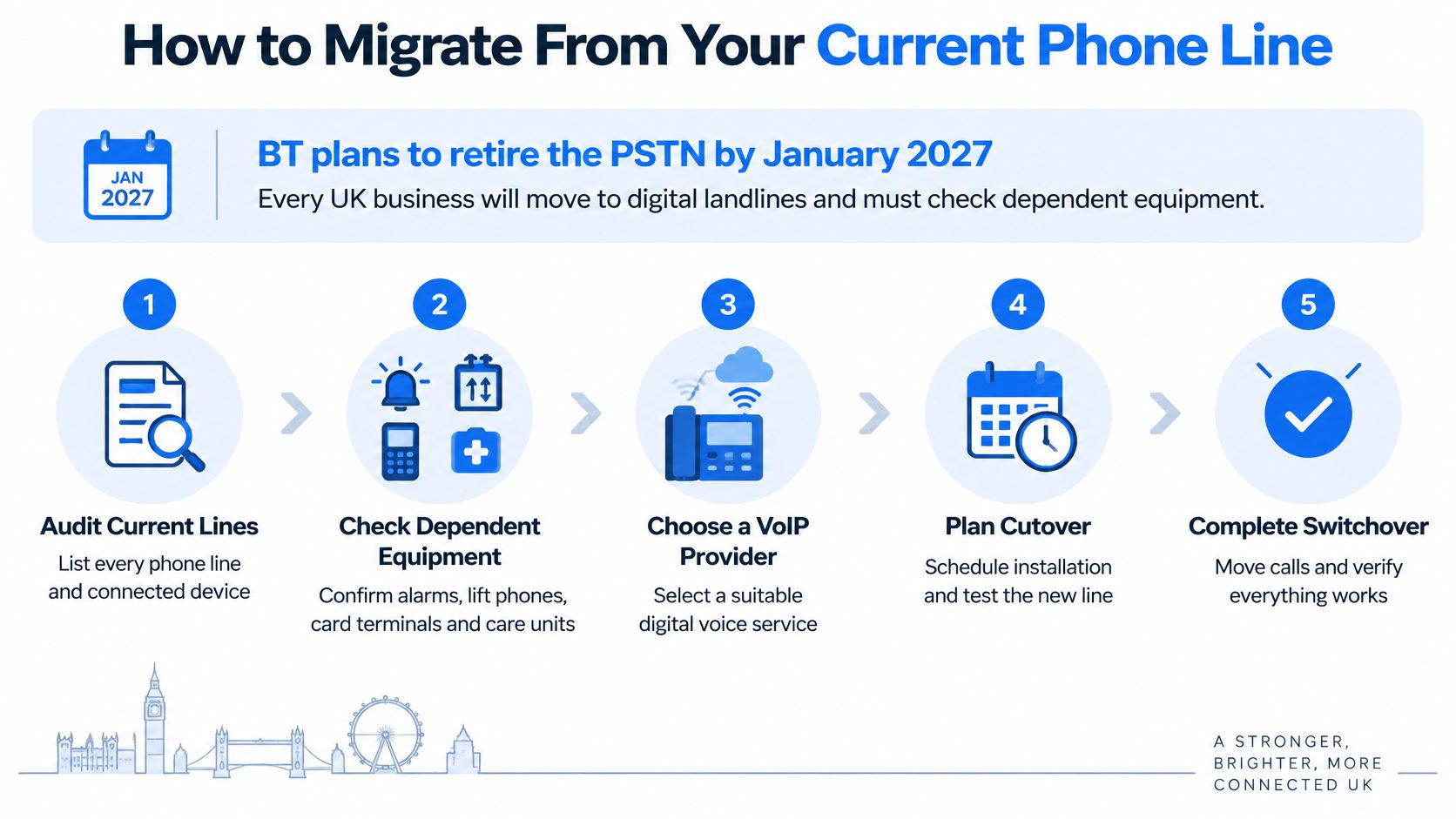
Timing matters because the old telephone network is being retired. Ofcom's guidance on the future of landline calls states that BT plans to retire the Public Switched Telephone Network, or PSTN, by January 2027, with other providers expected to follow broadly similar timescales.
That is a planned network transition, not a promise that every existing device will work after a handset swap. Your provider should confirm the arrangements for your particular services.
The migration needs to cover connected equipment as well as everyday calls.
Prepare before requesting the transfer
Build an asset register. List every line, number, handset and attached device, including alarms, lift phones, payment terminals, door entry and fax equipment. Record its owner, emergency function and whether the specialist supplier approves replacement, an adapter or cellular connectivity.
Test the actual site. Measure call quality under normal working conditions, including uploads and wireless activity. The common mistake is accepting an advertised broadband speed instead of checking what the office experiences.
Choose the operating model and responsibilities. Decide whether hosted calling or a maintained local server suits the business, then request written support and resilience commitments. Make sure someone owns faults that cross the boundary between the phone platform and office network.
Arrange porting before cancelling anything. Give the receiving provider account names, service addresses and number details exactly as recorded by the existing supplier. Agree the transfer window and check whether moving a number will affect linked broadband or other services.
Install, prove and then cut over
Prepare the network. Install and configure the router, traffic prioritisation, any voice VLAN and battery protection before staff depend on the service. Label the protected equipment so someone doesn't accidentally unplug it or connect an unrelated appliance to the battery supply.
Configure the working day. Set up users, opening hours, routing, voicemail ownership and emergency-call addresses. Train staff to transfer calls, use their headset and switch to the agreed alternative device.
Run a controlled pilot. Start with a small representative group and test incoming calls, outgoing calls, transfers and deliberate loss of the primary connection. Arrange any emergency-routing verification through the provider's approved process; don't make an unarranged live emergency call as a test.
Transfer the main numbers and verify completion. Keep the existing service active until the port completes, with temporary routing or another agreed overlap where available. Porting may automatically cease the old service, so confirm linked-service consequences and retire remaining equipment only after the new arrangements pass acceptance checks.
A successful migration ends with documented ownership, not just ringing phones. Keep the asset register, support contacts, recovery procedure and configuration record somewhere accessible when the office network is unavailable.
Confirm Your VoIP Route Before You Switch
Don't cut over without a written failover and battery plan if critical equipment uses the current line or the premises has only a single broadband route. Resolve the dependency before agreeing the final transfer.
For a straightforward office, the decision rests on your sites, your staff and your connections. Identify where people work, which devices they'll answer on, and whether each location has full fibre, fibre to the cabinet or a leased line.
Send a request suppliers can answer
Ask each prospective provider for:
- A site survey: Check cabling, wireless coverage, connected devices and available backup routes.
- An itemised quote: Separate licences, handsets, porting, router, UPS, installation and failover.
- Emergency-calling confirmation: Explain power-cut behaviour, location handling and the approved verification process.
- A dated migration plan: Identify responsibilities, dependencies, acceptance checks and rollback arrangements.
Compare the replies line by line, including the initial ownership cost and continuing support. For premises in Romford, Hornchurch, Rayleigh, Brentwood, Chelmsford or Wickford, ask whether an on-site survey is available before committing.
Use this checklist when reviewing the proposed installation.
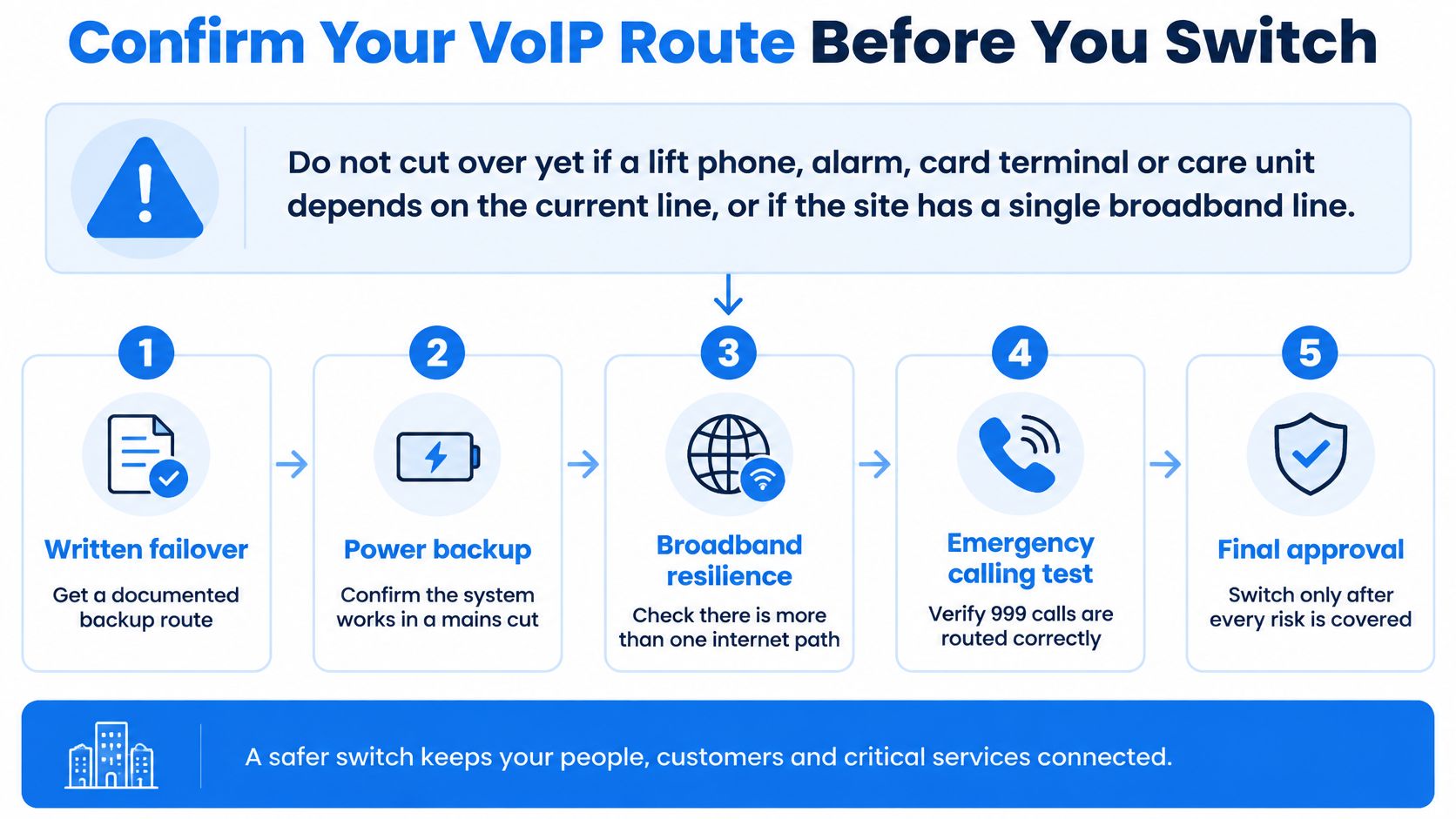
The right proposal explains who restores service when something fails, not just how staff make calls when everything works.
Networking2000 offers hosted VoIP installations, internet connectivity, networking and managed support for businesses across London and Essex. Visit to discuss a site survey and an itemised phone-system proposal that includes routing, local network requirements and practical outage arrangements.

