A reliable IT support budget starts with your current commitments, a forecast of changes in your business, and a separate allowance for costs that fall outside the regular monthly bill. To work out how to budget for IT support in 2026, build your forecast from actual spending and model a 3% increase as an inflation scenario, not a guaranteed rise. Then map shared costs, renewals and planned upgrades so they don’t arrive as surprises.
It’s easy to focus on the monthly support charge and overlook the wider picture. Staffing changes, security needs, telephony and infrastructure can all affect what your business needs from IT over the year.
This guide explains how to project support costs, account for changes and turn your figures into a practical budget. You’ll also learn how to organise shared spending and non-monthly commitments, so you can plan ahead and see what your IT budget needs to cover.
Key Takeaways
- Build projections from current IT spending, then adjust them for planned business changes and one-off needs.
- Use a 3% inflation increase as a planning scenario, and compare it with your actual renewal and supplier costs.
- Turn your forecast into a working budget by assigning costs to clear categories and setting an emergency buffer.
- Map shared expenses, renewal dates and other non-monthly commitments so they’re included before they fall due.
Preparing financial projections
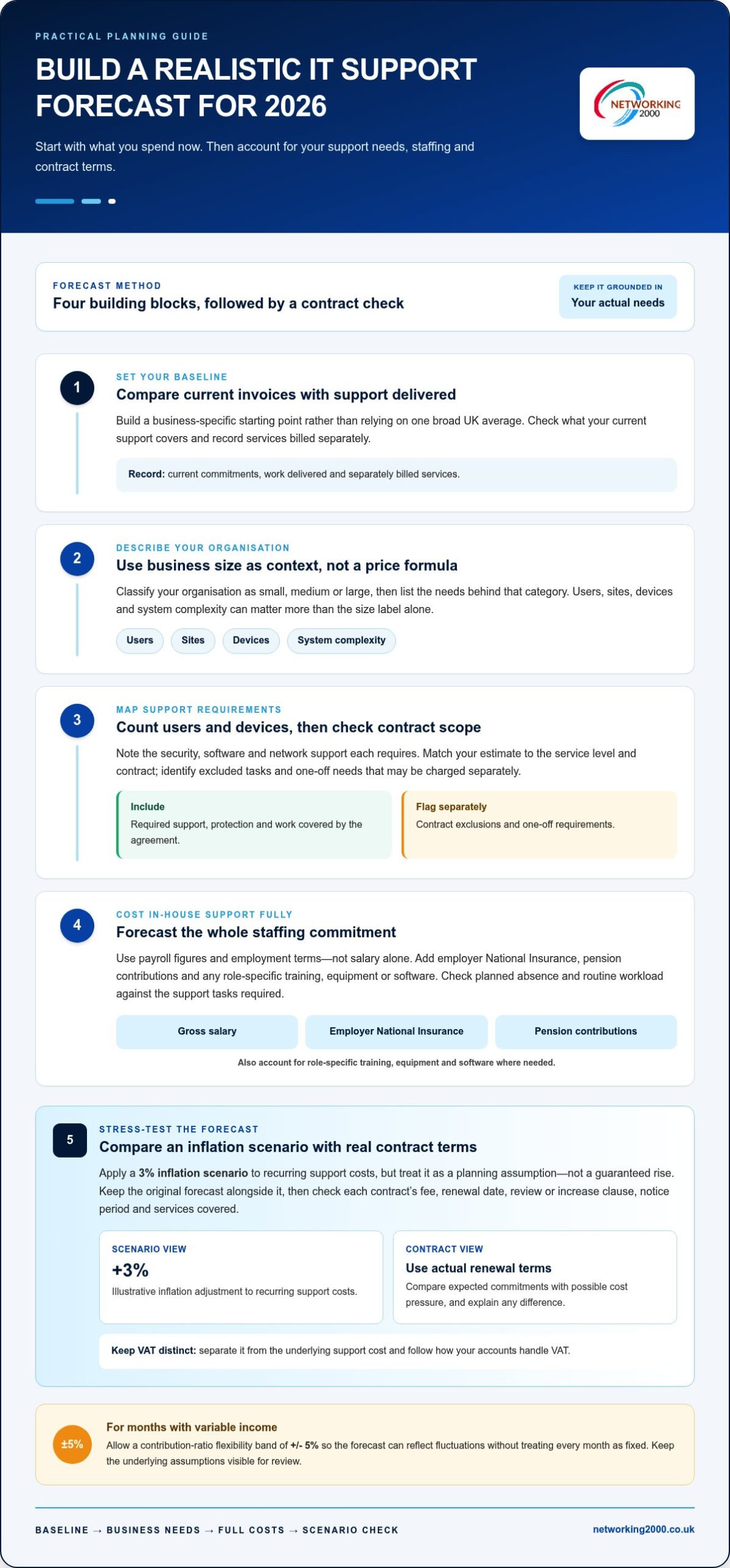
Build a 2026 forecast from your current commitments, planned changes and the support your business needs. Use these four steps to make the estimate practical.
-
Compare Average UK Support Costs
Set a business-specific baseline instead of relying on one average for UK IT support. The right budget depends on what support covers, how your systems are managed and the level of service you need. Compare current invoices with the work delivered, then record any separately billed services. Don’t treat a broad market figure as a like-for-like estimate for your business.
-
Compare Costs by Business Size
Classify your organisation as small, medium or large, but use size only as a starting point, not as a price calculation. A smaller organisation may have fewer users, while a larger one may have more sites, devices or complex systems to support. These differences can matter more than the category itself. List the actual support needs behind your size band before setting a forecast.
-
Estimate Costs from Users and Devices
Count users and devices, then note the support each requires, including security, software and network needs. Match the estimate to your service requirements and contract scope. Contracts define which tasks are included; additional work may be charged separately, so record exclusions and one-off needs. Underbudgeting can leave essential work unfunded. Reduce waste by removing unused services and prioritising support according to business needs, not by cutting necessary protection.
-
Calculate In-house Staffing Costs
For in-house IT support, include gross salary, employer National Insurance and pension contributions in your annual forecast. Use payroll figures and employment terms to calculate these costs rather than budgeting for salary alone. Add any role-specific training, equipment or software the team needs. Compare the full staffing cost with the support tasks required, then check that your forecast accounts for planned absence and routine workload.
For months with variable income, allow a contribution-ratio flexibility band of +/- 5%. This gives the forecast room to reflect fluctuations without treating each month as fixed, while keeping the underlying assumptions visible for review.
A budgeting example increases total compensation from $500,000 in 2025 to $515,000 in 2026. Use the same approach when updating staffing assumptions: make planned changes explicit, then check that the revised compensation figure is consistent with the work and support needs included in the forecast.
Allowing for inflation
There is no single average that predicts a UK business’s IT support spend in 2026. The total depends on users, devices, service scope and contract terms, so model inflation against your own baseline.
- Apply an inflation scenario to your existing forecast. For 2026, use 3% as an example inflation rate, then calculate the effect on recurring support costs. This is a planning scenario, not an automatic increase. Keep the original forecast beside the adjusted one, so you can see how much of the projected change comes from inflation rather than new users, services or equipment.
- Separate VAT from the underlying support cost in your budget. Check how VAT is handled in your accounts and reflect that consistently in your forecast. This makes the cash amount to plan for clear without confusing it with the service charge. Don’t apply the same VAT assumption to every line without checking how your accounts handle it.
- Review each contract before changing its forecast. Note the current fee, renewal date, any scheduled review or increase clause, notice period and services covered. These terms determine when a cost may change and whether an adjustment applies to the whole service or only specific items. Base your projection on the contract wording rather than assuming every agreement has the same annual increase.
- Run a second forecast using the contract’s actual renewal terms. Compare that result with your 3% inflation scenario and explain any difference, such as a scope change or additional service. Keep one version for expected commitments and another for possible cost pressure. This gives decision-makers a clearer view of which changes are contractual, which are inflation assumptions, and which depend on business needs.
There is no fixed average cost: it varies with a business’s users, devices, service scope and contract terms.
Creating an actionable budget
Turn your forecast into a working plan by assigning each IT commitment to a clear budget line. Review the figures against business priorities, cash flow and the work each commitment supports.
- Separate recurring support from planned projects and unplanned work. Give each line an owner, purpose and review point, such as a renewal or system change. Record what the cost covers and which teams rely on it. For a business deciding how to budget for IT support in 2026, this record makes assumptions easier to review. It can also help managers spot duplicated services or overlooked requirements.
- Give cybersecurity, backups and disaster recovery separate budget lines. Include the security measures your systems need, backup arrangements, recovery planning and any work required to test those plans. The right provision depends on your systems, information and recovery needs. Identify what an existing agreement covers, then budget separately for additional work. Don’t leave these protections out simply because they sit beyond routine support.
- Choose a budgeting method that helps organise decisions, rather than one that dictates them. The 50/30/20 plan is one possible budgeting technique, but it doesn’t set a universal IT spending share. Knowing how to budget for IT support in 2026 means linking spending decisions to your organisation’s priorities. For example, list a planned system change separately from routine support, with its purpose and timing.
- Set aside a cash buffer for shared costs and unexpected commitments. Three months of shared costs is one possible emergency-buffer target. Consider which IT commitments could still fall due during disruption, and keep this reserve separate from routine spending. Decide who can approve its use. Review the budget when business needs or commitments change, so the plan stays relevant throughout the year.
Mapping shared and non-monthly commitments
- List IT costs used by more than one team, site or department. Include shared systems, network infrastructure and security services, then name the groups that benefit. Choose a fair allocation method, such as user numbers, device counts or actual usage. A guide example divides shared costs 60%/40% between Maya and Jordan; treat that as an illustration, not a standard business split. Record the reason for your chosen allocation.
- Put every non-monthly commitment on a calendar. Record renewal dates, billing frequency, contract review points and planned project milestones. Include software renewals, equipment replacement and agreed support work where relevant. A predictable cost may arrive only once a year, so spread it across the months in your internal forecast. This helps prevent a renewal or planned purchase from becoming an unexpected cash-flow problem.
- Assign each commitment an owner and a budget category. For example, the finance lead might track renewal dates, while an IT manager confirms which teams use a service. Note whether a charge is shared, project-based or recurring, and identify the department responsible for its share. Clear ownership helps you spot duplicate subscriptions, missed renewals and changes in usage before they distort the budget.
- Review the schedule alongside your budget whenever staffing, sites or systems change. A new office may affect shared network costs, while a team change can alter user-based allocations. Compare planned commitments with actual invoices and revise the forecast when scope changes. If you need help organising ongoing IT requirements across your business, discuss your IT support needs as part of your budgeting process.
Treat this calendar as a short-range control as well as a record of future obligations: budgets provide monthly or annual financial oversight, and the forecast should make that cadence visible. The guide’s example gives Maya and Jordan combined monthly take-home pay of $10,300; Maya’s monthly take-home pay is $6,200, while Jordan earns $5,200 per month before taxes and retirement contributions. Maya earns $8,400 per month before taxes and retirement contributions. These figures are examples, not allocation rules, so base business shares on the usage evidence and ownership recorded for each commitment.
Networking2000: Managed IT Support
Networking2000 helps businesses plan and manage their IT requirements through Managed IT Support. It can be a useful next step when your projections reveal support needs that are difficult to coordinate internally, or when you’re reviewing how ongoing support fits your budget.
For a clearer view of related commitments, consider how Managed Firewalls, VoIP Telephony or Website Design & Development fit your business plans. Each may involve different requirements and timing, so include relevant work in the appropriate budget category rather than treating every IT need as one cost. A conversation about your priorities can help connect the budget to the support your business needs.
To discuss your IT support requirements, contact Networking2000.
Make your next budget review count
A useful IT budget should support decisions, not simply record spending. Treat it as a working plan that can adapt as your organisation changes. When teams, systems or priorities shift, revisit the assumptions behind your forecast and decide what needs attention next. That keeps planning for how to budget for IT support in 2026 connected to the business you’re running, rather than the one you had when the figures were first prepared.
If you’re weighing up how ongoing support fits your plans, Networking2000 can discuss Managed IT Support alongside related needs such as Managed Firewalls and VoIP Telephony. The aim is to understand what your business needs and how those requirements fit into your IT planning.
Contact Networking2000 to discuss IT support and take a clear next step towards a budget that works for your business.

