IT that once supported steady progress can become a brake on growth. Signs your Wickford business has outgrown its IT include slow performance, rising costs and everyday tasks becoming harder to manage. These problems often appear together as systems struggle to keep pace with how your team works.
When growth plateaus, it’s understandable to look first at sales or staffing. But slow or unreliable systems, repeated workarounds and unclear IT costs can also make it harder to serve customers and make confident decisions.
This article explains how to recognise warning signs, from technology that slows work to security and support needs that are harder to manage. You’ll learn what each sign may indicate and how to decide whether your current IT setup still fits your business.
Key Takeaways
- Compare business performance and financial pressure with the demands your current IT setup places on the team.
- Notice where reliance on one person or manual workarounds makes it harder to maintain control and delegate.
- Track how slow systems and recurring downtime interrupt everyday work and affect customer service.
- Review whether computers, servers and network capacity still support the way your business operates and plans to grow.
1. Plateauing growth and financial performance
A sales plateau can reflect more than changing demand. If staff spend time re-entering orders, waiting for files or fixing avoidable system problems, they have less capacity for customer work. For example, a Wickford distributor may win new accounts but struggle to process orders promptly. Stagnating performance and profitability can reduce a business’s market value.
Look for patterns in performance and spending. Compare sales activity with completed work, then identify technology-related delays. Review recurring costs for duplicate tools, unused systems and repeated repairs. These checks can show whether IT helps the business handle more work or absorbs time and money without supporting growth. One slow month alone doesn’t establish a pattern.
Cloud IT can suit teams that need access to shared files across locations and want services hosted remotely. On-premises servers may suit workloads that need local control or rely on existing systems. The right choice depends on access, security, resilience and ongoing management needs.
Growing Wickford businesses typically need reliable computers, a dependable network, shared access to business data and security controls. The right setup also depends on how staff work, which applications they use and whether they need to connect from different locations.
Map one important workflow, such as preparing a quote for a new customer. Note each system involved, every handover and any repeated data entry. Then ask whether the same process would cope with more customers without adding avoidable delays or expense. Include practical details, such as whether staff can update signage or customer records promptly, rather than relying on outdated files. If one employee must solve every access problem or approve routine changes, that dependence can restrict progress. Colleagues may wait for decisions, creating a bottleneck and resentment. Delegation can also feel risky when the owner lacks trust in the team or fears losing control. Clear permissions and dependable systems can make responsibilities easier to share. These are useful signs to investigate, not proof that buying new equipment alone will restore growth.
If an owner lacks the enthusiasm to investigate why growth has stalled, they may need to consider giving way to a new owner.
Struggling to maintain control
As a Wickford business adds people, devices and customer records, keeping track becomes harder. A new starter may need access to shared files, email and business applications. Without a clear process, permissions can be missed, duplicated or left active after someone changes role. That makes routine oversight less reliable.
Growing organisations also have more potential entry points into their systems. Each staff account, laptop and remote connection needs appropriate protection. Weak passwords, excessive access and unpatched devices can increase exposure to phishing, malware or unauthorised access. For example, an old account that can still open customer files creates a risk the business may not spot quickly.
To assess whether IT can support more staff and customers, map the systems used for everyday work. Check who can access each system, how new accounts are created and whether the network handles busy periods without delays. Then test a realistic change, such as adding a team member or processing more customer enquiries. Note where manual fixes or one person’s knowledge become essential.
Control also depends on clear ownership. If only the business owner knows how to restore files or approve access, routine decisions can stall. Record key systems, responsibilities and recovery steps in a shared, current document. Review it when staff roles or working practices change. This helps reveal whether the setup can grow without relying on memory or informal workarounds.
When access, security and system oversight become difficult to manage, Managed IT Support can help organise those responsibilities. A practical review should clarify what the business uses, where access needs tightening and which systems need attention. For a growing Wickford firm, this creates a clearer basis for decisions about adding staff, serving customers and maintaining control.
3. How can slow systems and frequent downtime affect business productivity?
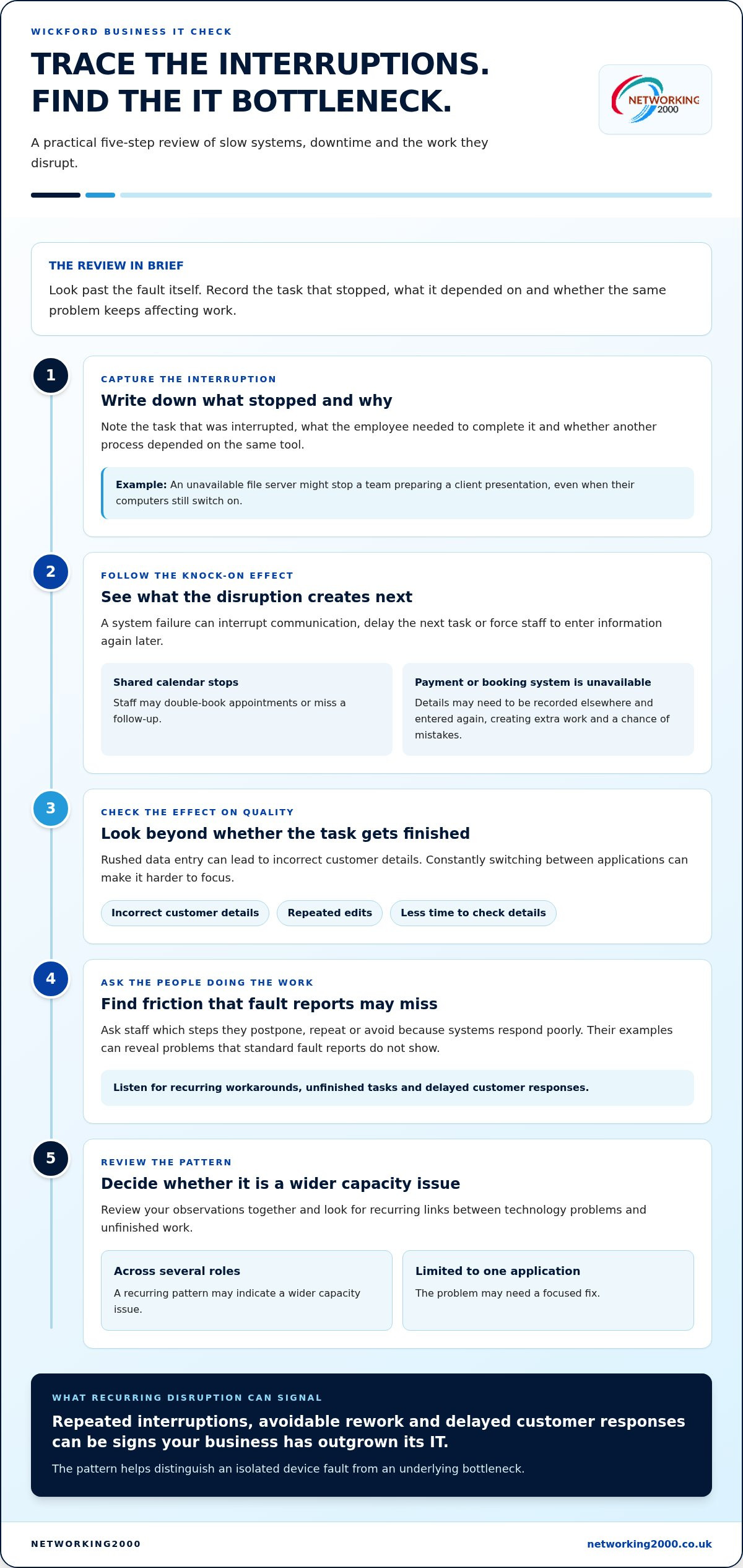
Slow systems can turn small tasks into repeated interruptions. A staff member preparing a proposal for a Wickford customer might wait for design files to load, then repeat edits after an application freezes. The delay can push back the next task and leave less time to check details. When delays recur across everyday work, they can be signs your Wickford business has outgrown its IT.
Downtime can also disrupt communication between colleagues and customers. If a shared calendar stops responding, staff may double-book appointments or miss a follow-up. If a payment or booking system becomes unavailable, employees may need to record details elsewhere and enter them again later. That creates extra work and increases the chance of mistakes.
Look beyond the moment a system fails. Note which task was interrupted, what the employee needed to complete it and whether another process depended on the same tool. For example, an unavailable file server might stop a team preparing a client presentation, even though their computers still switch on. This helps distinguish an isolated device fault from an underlying bottleneck.
Check the effect on work quality as well as task completion. Rushed data entry can lead to incorrect customer details, while constantly switching between applications makes it harder to focus. Ask staff which steps they postpone, repeat or avoid because systems respond poorly. Their examples can reveal friction that standard fault reports miss.
Review your observations together and look for recurring links between technology problems and unfinished work. A pattern affecting several roles may indicate a wider capacity issue; a problem limited to one application may need a focused fix. Repeated interruptions, avoidable rework and delayed customer responses can be signs your Wickford business has outgrown its IT. Identifying the pattern gives you a practical starting point for deciding what to address.
4. When should a Wickford business upgrade its computers, servers or network?
Upgrade when equipment repeatedly blocks work, not simply because it looks old. A computer that struggles with accounting software, video calls and shared files can slow everyday tasks. If staff need workarounds to complete routine jobs, record which devices and applications cause friction. That evidence helps distinguish a failing computer from a wider network or server issue.
Compatibility matters too. Check whether essential applications still run reliably on existing computers and whether devices receive the updates they need. If a system no longer supports a key programme, or staff rely on an outdated machine for customer records, plan a replacement before it interrupts normal operations. Match new equipment to actual workloads rather than buying capacity the team won’t use.
For servers and networks, assess the whole working environment. Consider how many staff need simultaneous access, where shared files are stored and whether connections remain dependable during busy periods. A Wickford office adding a design team, for example, may need greater network capacity for large files. A business with staff working across locations may prioritise secure, dependable access to shared systems.
Plan changes around business processes. First, list critical devices, software and dependencies. Next, identify equipment causing delays, faults or access problems. Then prioritise upgrades by operational impact, security needs and compatibility. Schedule installation and data migration so staff know which systems may change and how work will continue. Keep a record of decisions and review it when the business changes.
Replace equipment when repair work keeps recurring, performance restricts essential tasks or the setup cannot support planned changes. An upgrade may involve one computer, a server, network equipment or a combination. Avoid replacing components in isolation if the underlying issue affects the wider setup. Plan an IT infrastructure review to identify upgrade priorities for your Wickford business.
If you find yourself thinking about opportunities outside the business, consider what needs to change before frustration affects performance. When colleagues wait for one person to make decisions, that person can become a bottleneck and frustration can build within the team. Clear responsibilities and processes can help distribute routine decisions.
Networking2000: Managed IT Support
Networking2000 can help Wickford businesses assess IT that no longer fits their needs. Its Managed IT Support gives businesses a route to address recurring technology issues and plan infrastructure around day-to-day operations. If access controls or network protection need attention, Managed Firewalls and IT Security can support that focus.
Turn to Networking2000 when repeated faults, unclear responsibilities or growing security concerns make it difficult to manage IT internally. A practical discussion can focus on the systems your team relies on, the problems affecting work and the changes your business expects. This helps identify relevant support without treating every business as if it needs the same setup.
Contact Networking2000 to discuss your business IT needs.
Set your next IT priorities with confidence
If you recognise the signs your Wickford business has outgrown its IT, use them to shape a practical plan. Decide what your business needs to support next, then prioritise changes that fit its workload and working practices. This keeps technology decisions connected to business goals instead of reacting to each new fault in isolation.
Networking2000 can help you consider the right next step, whether that means Managed IT Support for day-to-day technology needs, Managed Firewalls for network protection, or VoIP Telephony for business communications. The aim is to focus on the issues affecting your operation and identify relevant support.
Start a conversation about what your team needs now and where it plans to go next. Contact Networking2000 about your IT and take a clear, considered step towards technology that supports your business.
Frequently Asked Questions
What are the signs a small business has outgrown its IT infrastructure?
Common signs include systems that don’t work together, business data split across incompatible tools and routine tasks that depend on manual workarounds. For example, a Wickford business may struggle to combine customer details from separate sales and accounts systems. If staff can’t get a consistent view of orders or records, document where information sits and which processes rely on it. That reveals where the infrastructure no longer fits.

