Structured cabling is a standardised, application-independent system of copper and fibre links, outlets, patch panels and cross-connects designed as a reusable building platform rather than one cable per device. It gives a business organised connections that can stay in place while its phones, computers, wireless access points and other services change.
A desk move or new Wi-Fi point can expose a familiar problem: cables have been added wherever they were needed, but no one knows where they run or what they connect to. In a small London or Essex office, the result might be loose leads behind desks, a camera cable threaded around a doorway and a phone that stops working when someone moves a switch.
Table of Contents
- What Structured Cabling Means in a Working Building
- How a Permanent Cabling Plant Is Organised
- Choosing Copper Fibre and Connecting Hardware
- Why Businesses Gain from a Planned System
- Structured Cabling Examples for London and Essex
- Installation Practice and When to Upgrade
- Your Next Step for a Reliable Network
What Structured Cabling Means in a Working Building
A small office adds a Wi-Fi point, moves a desk and replaces a phone. If every connection depends on a separate cable run, each change can mean more work in walls and ceilings. Structured cabling gives the building a reusable platform, so services can change while the fixed infrastructure remains in place.
It consists of organised copper and fibre links, outlets, patch panels, equipment rooms and cross-connects. These provide connection points for equipment without needing a dedicated concealed cable for every computer or telephone. Like a building's frame, the pathways and fixed links stay put while the equipment using them can change.
A reusable platform, not a bundle of wires
The permanent cabling is the fixed part of the system. Switches, routers, wireless access points and VoIP phones are devices that connect to it, and can be replaced as requirements change. The cabling can support different applications over time, if its components and design suit the services in use.
That makes structured cabling a building decision, not merely a choice between Cat5e and Cat6. For a London or Essex SME, planned spare pathways may matter more than installing premium cable everywhere. A route left available can make it easier to add a future service; a suitable single-pair copper or fibre link may also be a better fit for a particular connection than higher-grade copper throughout.
An unlabelled bundle can carry network signals, but it gives the business little guidance when something changes. Organisation and records help staff and engineers identify connections, make changes and maintain the system without guessing.
The UK framework
The BS EN 50173 family is the main UK generic cabling design series. It sets out requirements for cabling intended to support different applications, rather than tying a system to one product or vendor.
Its parts address different environments, including general requirements, offices, industrial spaces, homes, data centres and distributed building services. Requirements vary by setting, so an office design may not suit a factory, home or data centre. The ONS overview of UK digital infrastructure and cabling standards provides broader context on the role of digital infrastructure in the UK.
A useful handover tells the business which outlet connects to which cabinet port, where the cables run and how the links performed in testing. Those records make the installation easier for the next engineer to understand and help keep the cabling useful as building services change.
How a Permanent Cabling Plant Is Organised
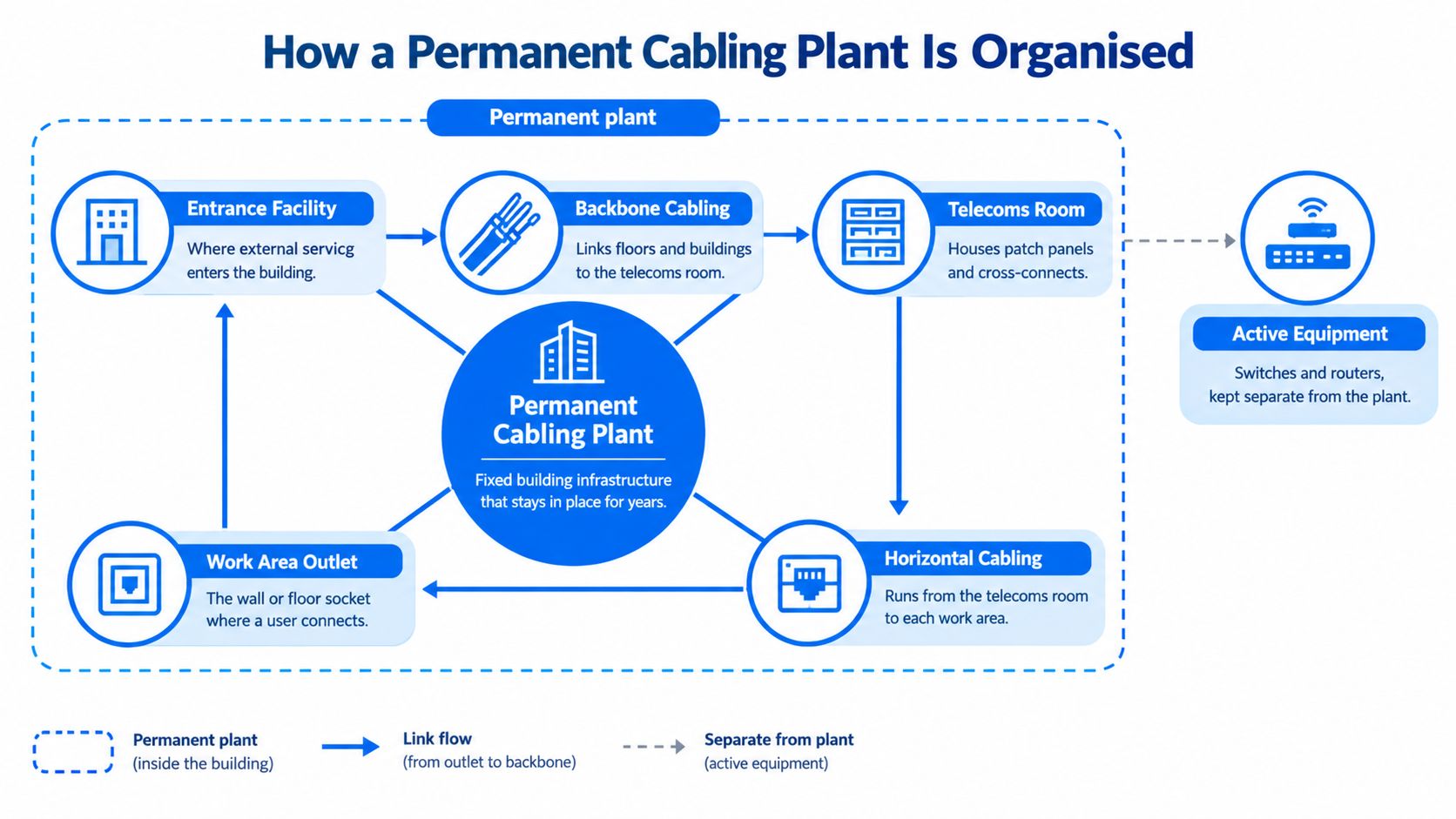
A staff member plugs in a laptop at a desk. The connection travels through fixed cabling in the building before reaching network equipment. That fixed route is the permanent cabling plant. Switches, routers, wireless access points and VoIP phones are active equipment, connected to the plant but not part of it.
Follow the link through the building
In a typical office, a socket near a desk connects by permanent horizontal copper cable to a patch panel in a communications room. A short patch lead then joins the panel to a switch or other network equipment. The fixed cable stays in place; the patch lead makes it easier to change which equipment uses the connection.
Buildings with several floors or distribution points also need backbone cabling between them. Depending on the design and environment, those links may use copper or optical fibre. Clear identification matters: a technician should be able to trace a link to its destination without guessing.
The railway analogy makes the distinction clear. Permanent cabling is the track; devices and services are the trains using it. If a business moves a desk, adds a phone or replaces a switch, staff can usually make the change at an outlet, patch panel or equipment connection. The concealed route remains available for other services, rather than being tied to the first device installed.
The building type matters
An office, factory, home, data centre and building-services system do not all need the same layout. Office cabling designed around desks may miss the locations or connection needs of industrial equipment and building services. For a London or Essex SME, planning spare pathways can make it easier to add or move services later. Those routes may matter more than fitting premium cable everywhere, especially where future devices could use a dedicated fibre or single-pair link.
The Office for National Statistics describes digital infrastructure as fixed physical assets used to maintain broadband communications and move data. Its examples include fibre-optic networks, coaxial and copper cables, and communications towers (ONS explanation of the UK's physical digital infrastructure). Within a building, the same idea applies on a smaller scale: fixed routes support changing services over time.
A permanent plant is useful because it stays in place while the devices connected to it change. Give each link a clear route, purpose and record at handover, and the building has a reusable platform rather than cabling designed for one moment in time.
Choosing Copper Fibre and Connecting Hardware
Choose cabling by the job it needs to do, not by assuming the highest category is always the right answer. Cat5e, Cat6 and Cat6A are copper cabling options; fibre is often considered for backbone links; and some building devices may need a different approach again.
| Choice | Best suited to | Main caution |
|---|---|---|
| Cat5e copper | Existing or planned links where it suits the application and the full channel design | Don't assume it will suit every future requirement without checking the intended use |
| Cat6 copper | Typical office outlets and connections to wireless access points, where the design supports the application | The cable category alone doesn't guarantee the performance of the finished link |
| Cat6A copper | Links where the planned application and channel design call for it | Higher specification everywhere can add cost without solving pathway or design problems |
| Fibre | Backbone connections between distribution points or buildings when the design calls for an optical link | Choose it for a defined route and purpose, not simply because it sounds more future-proof |
| Single-pair cabling | Suitable edge devices that may use only one twisted pair | The device, topology, outlets, components and verification all need to be considered |
| Patch panels and cabinets | Organising permanent links and making connections visible and manageable | Labels and records need to stay up to date after changes |
The whole channel determines the result
A cable doesn't work in isolation. Connectors, patch leads, termination quality, bend radius, separation from electrical services and testing all affect the finished link. Installing a higher-category cable won't ensure higher network performance if other parts of the channel don't match the design or the installation is poorly executed (ECA technical guidance on data cabling design and installation).
Patch panels and cabinets provide a control point: technicians can see and manage connections at an accessible location instead of tracing an unidentified run through the building. But the panel is only useful when its ports and the corresponding outlets are labelled consistently.
Practical rule: Specify the connection you need at each location, then ask how the complete channel will be designed, installed and tested.
Match the choice to the device
The 2025 single-pair-cabling standard extends generic cabling to applications that may use only one twisted pair, with requirements for topology, outlets, performance, components and verification. That can matter for sensors or other edge devices, where a premium multi-pair cable everywhere may not be the most useful or cost-effective choice. BS EN 50173 covers generic-system design, while BS EN 50174 covers installation and planning (BSI information on generic single-pair cabling).
For a small or medium-sized business, the right question is not “Should everything be Cat6A?” It's “Which mix of copper, fibre or single-pair links fits each device, location and pathway?” A design that reserves usable routes for later connections can be more valuable than paying for the highest-grade cable everywhere.
Why Businesses Gain from a Planned System
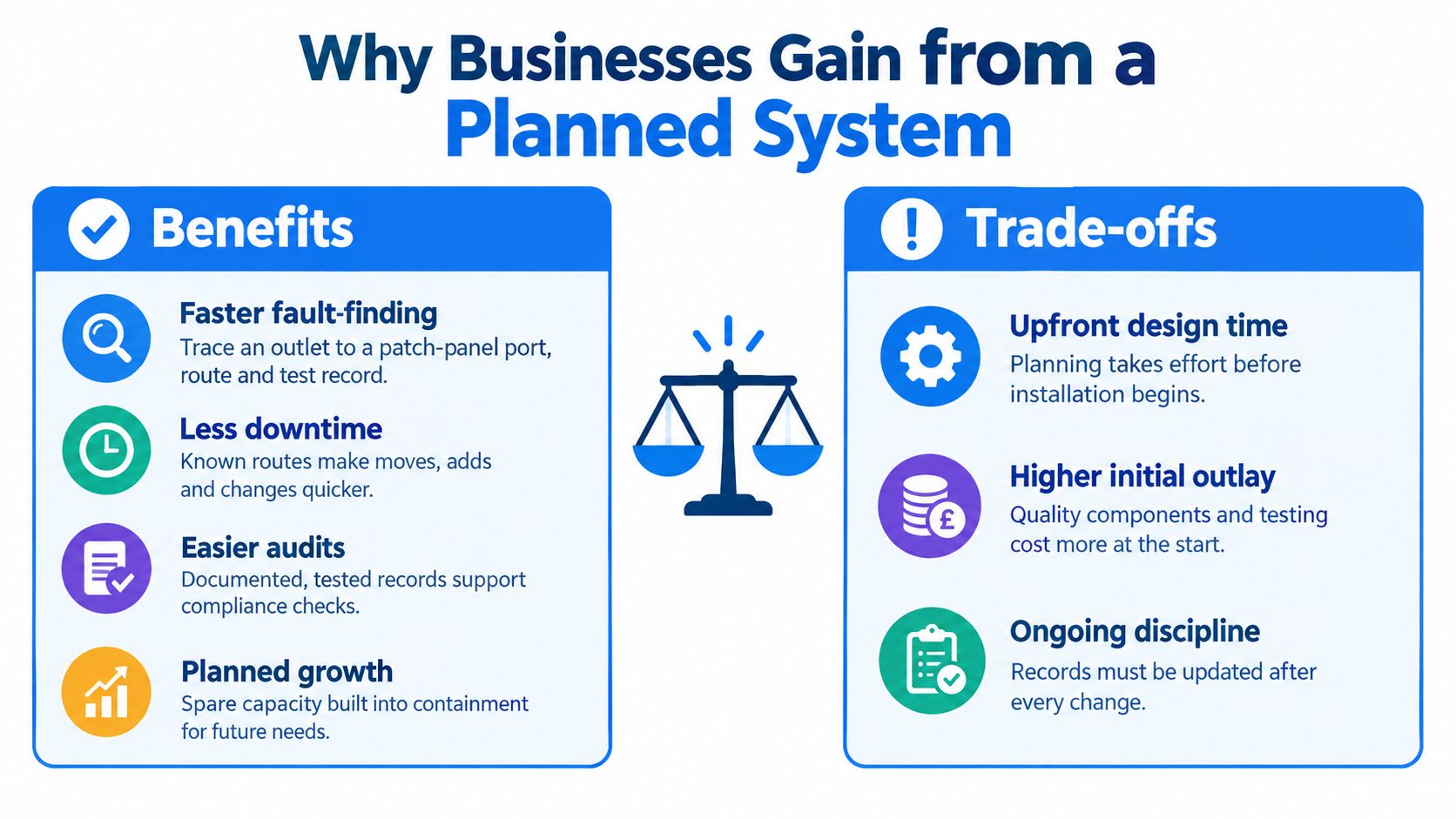
A planned system makes change easier to control. If a user reports a faulty connection, a technician can trace the outlet to its patch-panel port, cable route and test record. That gives them a clear starting point instead of a tangle of unidentified leads and concealed runs.
The system can also support several types of service. A correctly designed and installed cabling system may carry data, voice, connections to wireless access points, CCTV and other building services. That doesn't mean any cable will suit every service: the category, channel design and installation conditions need to match the intended use.
Routing affects performance and maintenance
Poor routing can create practical problems. Excessive cable tension or a tight bend can alter transmission performance. Crowded containment can make maintenance harder and impede heat dissipation, while inadequate separation from power cabling can increase electromagnetic interference risk (BSI guidance on network infrastructure standards).
Fire performance also belongs in the specification. UK projects may need to consider cable reaction-to-fire classifications under the Construction Products framework. For example, a UK university specification calls for Category 6A U/FTP cable with a low-flammability sheath meeting at least Cca-S1b,d2,a2. That is an example of a project requirement, not a universal specification for every business.
A tidy cabinet is useful, but a labelled, tested route that can be maintained is what makes the system dependable.
The business benefit is predictable change, not a promise that cabling alone will make internet access faster. The internet service, active equipment, device setup and complete cabling channel all affect what users experience. Planned records help engineers identify which part needs attention.
By contrast, improvised point-to-point wiring often grows one device at a time. Each new service may add another run, with no shared record of where it goes. A planned system gives future technicians a map and makes it easier for the business to review what can be reused before commissioning more work.
Structured Cabling Examples for London and Essex
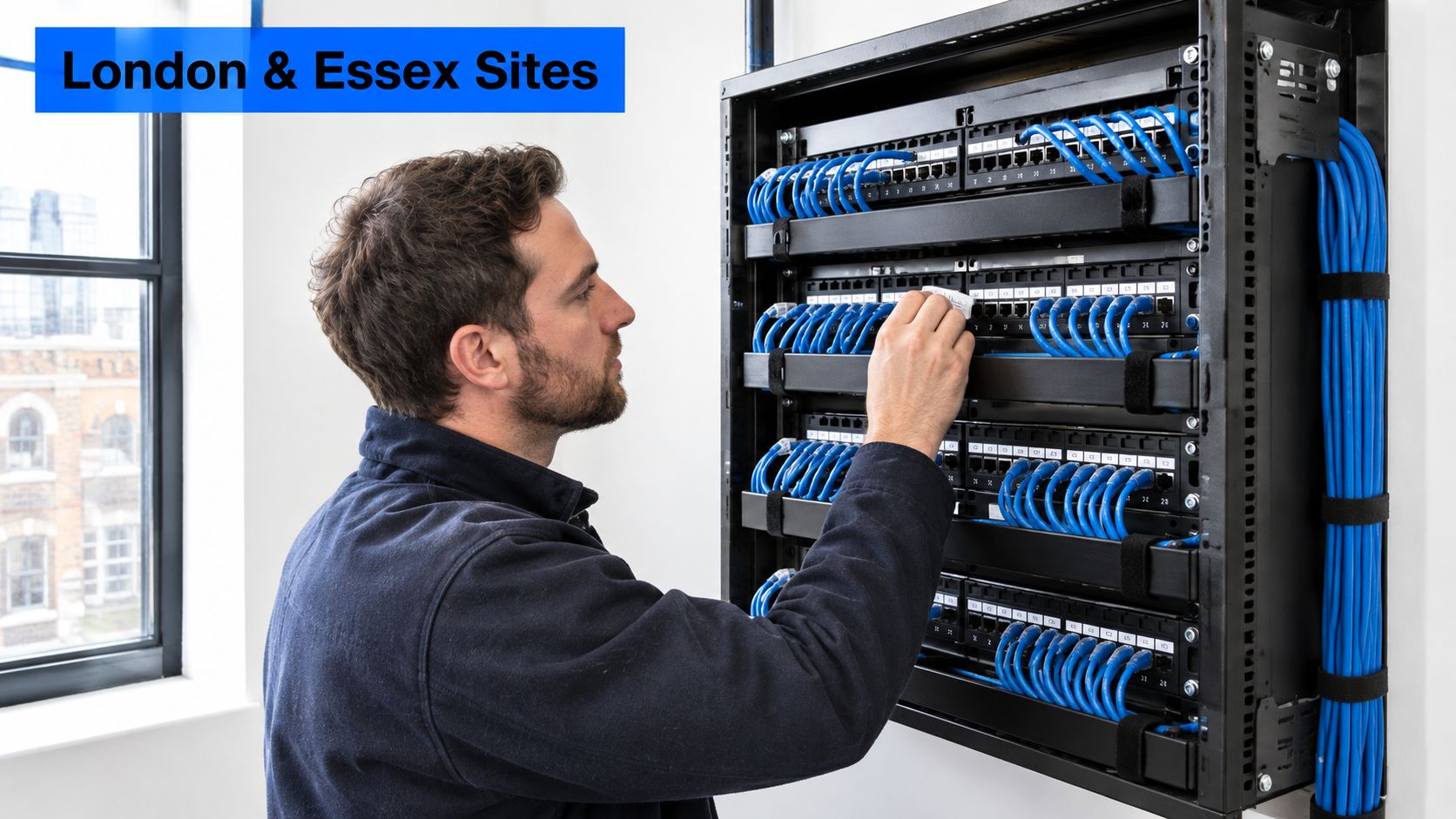
A small office in Chelmsford adds desks and VoIP phones. If the outlets are connected to labelled horizontal runs, the installer can make new connections by changing the patching in the cabinet. The business should receive a record of outlet identifiers, patch-panel ports, cable routes, cabinet locations and test results, so the next move doesn't depend on someone remembering which loose cable goes where.
Plan for devices beyond desks
Consider a site in Romford or Brentwood adding wireless access points and CCTV. The installation should include sensible outlet locations and accessible pathways near those devices, with suitable consideration for powering and the conditions around each location. Extension leads and loose cable coils might solve an immediate placement problem, but they don't provide a clear, maintainable route for later changes.
Access control, sensors and building-management equipment may also connect through the building's infrastructure. Before installation, identify where each device will sit, what powering it requires, where connections will aggregate and how the completed links will be verified. That gives the installer something more useful than a blanket instruction to “run more Cat6”.
Use fibre where the route calls for it
A business split across several rooms or buildings might use fibre for a backbone between distribution points, with local copper runs serving users. That gives the design separate roles for the interconnecting route and the connections within each work area. The chosen cabling still needs to suit the actual layout and be documented before handover.
A home or home-working setup also shouldn't automatically copy an office design. The standards distinguish homes from offices as separate environments, and the needs of a domestic installation can differ from those of a commercial workplace. A designer should start with the building, the devices and the intended services rather than applying one template to every premises.
For a first planning conversation, sketch the rooms and note where people work, where phones and cameras are needed, where Wi-Fi coverage matters, and where the communications cabinet or room is located. That simple map helps reveal where outlets are required and where accessible spare pathways could reduce disruption when the layout changes.
Installation Practice and When to Upgrade
A cable route can look tidy and still cause trouble if it is poorly tested, hard to trace or unsafe around other services. BS EN 50174-2 covers cabling installation inside buildings, and BS EN 50174-3 covers installations outside them. BS 6701:2016+A1:2017 covers the installation, operation, administration and maintenance of telecommunications equipment and cabling alongside UK electrical-installation requirements.
What to require at handover
Before work starts, ask how the installer will test and document the system. At handover, check that you receive:
- Test results for the complete channel: Components should be tested together, with written results.
- Clear labels at both ends: Outlet and patch-panel identifiers should match the records.
- A record of the installation: Keep routes, cabinet locations and test results so a future technician can trace the system.
- Protected cable routes: Confirm how cables will be kept apart from electrical services and how wall and floor openings will be fire-stopped.
An estimating tool can help a contractor organise project costs and scope. Exayard electrical estimating software supports electrical estimating workflows. It does not replace a cabling design, installation specification or test record.
Know when patching stops being enough
If nobody can trace the existing routes, containment is full, or there is no spare pathway for a new access point or phone, a review may be needed. Repeated faults after devices change can also point to problems with the installation, its records or its design. The same applies if the backbone cannot sensibly connect distribution points or the layout has no room for new edge devices.
For a London or Essex SME, the answer may be better routes rather than premium cable everywhere. Accessible spare pathways can make later changes less disruptive, while single-pair links may suit some building devices and fibre may suit longer or inter-building connections. The right choice depends on the route and the equipment at each end. Keep usable existing links where they meet requirements, then specify Cat6, Cat6A, fibre or single-pair cabling where the job calls for it. That makes the cabling plant a platform for changing services, rather than a one-time cable purchase.
For projects that include data cabling, Networking2000 provides cabling installation services.
Your Next Step for a Reliable Network
A cabling plan should support the building's current needs and future changes. Record the permanent system, match copper, fibre or single-pair links to the devices and environment, and check whether pathways, labels and test records still make changes practical.
Before contacting an installer, note where staff work, where phones and cameras are needed, and where Wi-Fi must reach. Add recurring problems, such as dropouts or disruption when desks move, and mark the existing cabinet or communications room. A rough sketch and clear observations are enough to help an installer assess the site.
Networking2000 provides cabling and connectivity reviews for business and home premises across London and Essex, including Romford, Hornchurch, Rayleigh, Brentwood, Wickford and Chelmsford. Its services can be considered alongside the building's changing network needs. To discuss your premises and request a survey, contact Networking2000 through its website.

