The best business phone solutions aren’t necessarily the ones with the longest feature list. They’re the ones that handle your calls reliably and fit the way your team works, whether staff are at a desk, moving between sites or working remotely.
If you’re unsure whether to choose an internet-hosted phone system, keep traditional handsets or rethink your lines and calls, start with your call workflows. The UK’s PSTN and ISDN services are due to cease on 31 January 2027, so it’s important to understand how your current setup will be affected. Then consider the system, connectivity and support your business needs.
This guide compares the main business phone options and explains how to weigh up features against your priorities. You’ll also learn what to consider when planning implementation and choosing a communications partner. Networking2000 has 19+ years’ experience supporting businesses, including in Wickford and across London, Essex and surrounding counties, with internet-hosted telephone systems, lines and calls, and phone system maintenance. We’ll help you understand what to look for, without the jargon.
Key Takeaways
- Business phone solutions should start with your call volumes, team size and working patterns, not a long list of features.
- Compare traditional and internet-hosted systems by how they handle your calls and what each needs from your connectivity.
- Use a practical checklist to weigh usability, maintenance and support alongside your current phone-system pain points.
- Plan a change in stages: map existing calls, set requirements, prepare connectivity and keep staff informed to help limit disruption.
- Explore how hosted telephone systems, lines and calls, and phone system maintenance can support businesses in Wickford and across London, Essex and surrounding counties.
What business phone solutions do modern teams actually need?
Business phone solutions are the systems and services a business uses to make, receive and manage calls. They include the phone system, the handsets or other devices staff use, the connectivity that carries calls and the maintenance that keeps the setup working.
These parts work together but solve different needs. A phone system manages how calls are handled. Handsets let staff make and answer calls. Connectivity carries calls between your business and the people you contact. Maintenance supports the system over time. Choose a setup based on how your team communicates day to day, rather than the length of its feature list.
For a small office with a shared reception phone, straightforward call handling may be the priority. A business with several teams, higher call volumes or staff working across different locations may need to plan how calls reach the right people and how colleagues stay accessible. Start by understanding the work, then assess what the system needs to do.
Which everyday business calls should your system handle?
Map the usual journey for an incoming call. Does it reach a named person, a shared number or a receptionist first? If that person is busy or unavailable, who answers next? For outgoing calls, consider which staff contact customers, suppliers or colleagues, and whether someone else needs to follow up.
Write down who answers, transfers and follows up each type of call. Include busy periods and common exceptions, such as a call intended for someone who is away from their desk. This map highlights essential call handling before you consider optional features. A feature is worth prioritising when it supports a real workflow, such as directing a caller to the right team. If it doesn’t solve a clear problem, it may not belong on your priority list.
How do phone systems support office and remote teams?
Where people work affects how they need to make and receive business calls. An office-based team may rely mainly on deskphones. A hybrid team may also need staff to use a mobile or computer for work calls away from the office. Assess your team’s working patterns before deciding which devices and access arrangements to include.
Think through a typical working day. Who needs to answer the main business number? Can colleagues transfer a call to the person best placed to help? What happens when someone moves between the office and another work location? Clear answers help you identify which devices and arrangements matter, rather than assuming everyone needs the same setup.
Modern systems can use internet-based architecture. For technical background, IP PBX systems route voice communications using internet protocol networks. The right choice still depends on your call flows, devices and connectivity, not the technology label alone.
Hosted, internet-based or traditional: understand the main business phone options
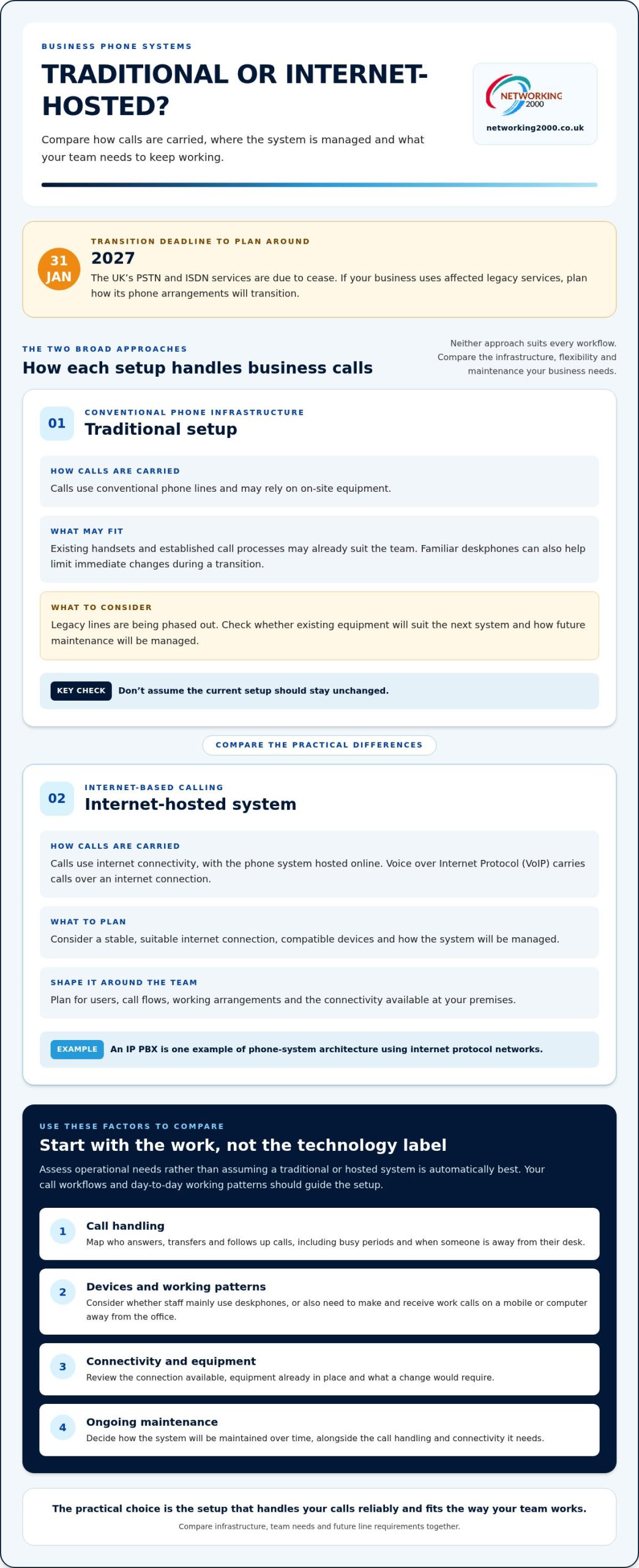
Business phone solutions generally use traditional telephone infrastructure or an internet-based system. The practical difference is how calls are carried and where the phone system is managed. Neither approach suits every workflow. Compare the infrastructure involved, the flexibility your team needs and how the setup will be maintained.
| Approach | How it works | Considerations |
|---|---|---|
| Traditional | Calls use conventional phone lines and may rely on on-site equipment. | Existing handsets and processes may fit, but legacy lines are being phased out. |
| Internet-hosted | Calls use internet connectivity, with the phone system hosted online. | Consider connectivity, compatible devices and how the system will be managed. |
What is an internet-hosted telephone system?
An internet-hosted telephone system manages business calling through a system hosted online rather than relying solely on a traditional on-site phone exchange. It uses Voice over Internet Protocol (VoIP) to carry calls over an internet connection. Plan the system around your users, call flows, working arrangements and the connectivity available at your premises. An IP PBX is one example of phone-system architecture that uses internet protocol networks.
Hosted calling makes a stable, suitable internet connection part of the phone setup, so plan connectivity alongside handsets and call handling. Review the UK digital landline switchover guidance as you consider the change. The UK’s PSTN and ISDN switch-off deadline is 31 January 2027. If your business uses affected legacy services, plan how its phone arrangements will transition.
When might a business retain a traditional phone setup?
Existing equipment, established call routines or a need to limit immediate changes can influence the decision to retain parts of a traditional setup. For example, a team accustomed to fixed deskphones may prefer to keep a familiar way of answering calls during a transition. However, familiarity doesn’t remove the need to consider the future of legacy lines or whether existing equipment will suit the next system.
Compare operational needs rather than assuming the current setup should stay unchanged or that a hosted system is automatically best. Consider the equipment in place, how calls are handled, what connectivity a change would require and how maintenance will be managed. A detailed VoIP-versus-landline guide can help with the deeper comparison; this overview is a starting point for matching the broad approach to your business.
Once you understand the trade-offs, weigh the options against your call workflows and infrastructure. Networking2000 provides internet-hosted telephone systems, lines and calls, and phone system maintenance for businesses across London, Essex and surrounding counties. Explore business telephone support as you consider the approach that fits your organisation.
How to compare business phone solutions against your real requirements
A useful comparison starts with the calls your team handles, not a feature list. Note how many people need access, when calls are busiest and what currently causes friction. For example, callers may reach the wrong person, handovers may be unclear, or staff may struggle to answer calls away from their usual desk. These details give you a practical basis for comparing business phone solutions.
Separate essential requirements from optional conveniences. A requirement solves a current business need; an optional feature may be useful, but shouldn’t outweigh the basics. Use the checklist below in a planning meeting and record your answers before comparing systems.
Which call-management requirements matter to your team?
Look at call ownership as well as call volume. Note peak periods, who answers incoming calls, who handles transfers and who follows up when the first person can’t help. Include outbound calling too, particularly if different teams contact customers, suppliers or other sites. Describe your real call journeys, including exceptions, rather than planning for an idealised working day.
- Call volume: When are calls busiest, and how many people may need to handle calls at those times?
- Users and ownership: Which roles need to make or answer calls, and who takes responsibility for each type of enquiry?
- Handover and follow-up: Where do calls go when someone is unavailable, and who makes sure the next action is clear?
- Working pattern: Do staff work mainly at desks, across locations, remotely or in a mix of settings? This helps you consider suitable devices and access arrangements.
Mark each answer as essential or optional. For instance, reaching the right person may be essential, while a convenience that doesn’t address a known problem can wait. This keeps the comparison focused on outcomes your team can recognise.
How should you assess connectivity and ongoing maintenance?
For an internet-hosted phone system, connectivity is part of the calling setup. Consider the connection used at each workplace, how it performs during normal business activity and whether voice calls will share it with other online tasks. If staff work from more than one location, include those connections in the assessment too. This helps you identify infrastructure questions early, rather than treating connectivity as an afterthought.
Maintenance and support are separate decision factors. Establish who will handle system changes, routine maintenance and faults, and how staff should report an issue. Record the support arrangements and hours that matter to your business. If phone-system upkeep sits alongside wider IT needs, consider how responsibilities align with your existing or planned managed IT support, so the right people know what they’re responsible for.
- Usability: Can staff understand the day-to-day process for answering, transferring and following up calls?
- Connectivity: What does the system need from your internet connection and workplace network?
- Maintenance: Who looks after the phone system, and how are changes handled?
- Support: What help arrangements fit your working hours and operational needs?
Keep the completed checklist. It gives colleagues a shared set of priorities and makes it easier to explain why a requirement matters, or why a feature is simply nice to have.
What to plan before changing your business phone system
A phone-system change is easier to manage when you consider people, call routines and infrastructure together. Work through the plan in stages: document how calls are handled now, define what the new setup needs to do, review connectivity and existing equipment, then prepare staff for any changes. This gives your team a clear brief and helps surface practical issues before the changeover.
How can a business prepare its team for a phone-system change?
Start by recording who answers each type of call, how calls are transferred and who follows up. Include everyday exceptions, such as a colleague being away or a busy period at reception. Use this picture to confirm requirements and identify which routines may change. Then tell employees what to expect, using plain language and explaining where to direct questions.
Timing matters. Choose a changeover period that suits your call patterns and gives staff time to understand the new process. Let affected teams know the planned timing and any actions they need to take. Share key instructions before the changeover, not on the day itself.
Use this first-day checklist to keep the basics visible:
- Make sure staff know how to make and answer business calls using the agreed setup.
- Confirm employees understand who handles incoming calls and where transfers should go.
- Share the process for reporting a phone-system issue or asking for help.
- Gather early feedback on any call routines that aren’t working as expected.
These steps don’t guarantee a disruption-free change, but they give people clear responsibilities and a practical way to raise problems.
What should you consider about internet and existing infrastructure?
Before moving to an internet-hosted system, take stock of the connection and network used at each workplace. Note where calls are made, what other business activity relies on the same connection and whether staff work from more than one location. Review your current phone setup too, including equipment and lines that may need to be considered as part of the change. Assess whether existing equipment and network arrangements will suit the new system.
Phone services also sit within the wider IT environment. Considering connectivity and network requirements alongside the phone system can clarify responsibilities and highlight dependencies. If broader IT support is part of the planning, align phone-system tasks with the people responsible for the business network, so questions about connectivity and maintenance have a clear route.
Networking2000 provides Internet Hosted Telephone Systems and Phone System Maintenance to support business calling needs. A clear plan connects the choice of system with the work needed to maintain it. Plan your business phone system with Networking2000.
Business phone solutions from Networking2000 for Essex and London
For businesses in Wickford, choosing a phone setup is only part of the decision. It also helps to understand which services address your calling needs and how ongoing maintenance fits into your plans. Networking2000 supports businesses in Wickford and across London, Essex and surrounding counties with business communications services.
With 19+ years’ experience supporting businesses, Networking2000’s highly trained professional team and highly experienced IT engineers offer straightforward guidance. They can help you relate day-to-day calling requirements to the right type of service, without unnecessary complexity.
Which Networking2000 communications services may fit your business?
Each service addresses a different part of business calling. Consider the need you’re looking to meet:
- Internet Hosted Telephone Systems: Internet-based business calling for organisations considering a hosted phone system.
- Lines & Calls: Business telephone lines and calling services for everyday communication needs.
- Phone System Maintenance: Maintenance support for businesses that need their phone system looked after.
These are distinct services, not a pre-set bundle. Your call workflows, current setup and priorities can guide the discussion. Pay as you go options are available, along with monthly maintenance options. This gives businesses different ways to approach their calling and maintenance needs, without assuming every organisation requires the same arrangement.
A Wickford business reviewing internet-based calling may focus on an Internet Hosted Telephone System. A business assessing its existing lines or ongoing system upkeep may have different priorities. A clear view of what you need helps keep the conversation practical.
What support hours and local coverage should businesses know?
Networking2000 supports businesses in Wickford and across London, Essex and surrounding counties. Its support hours are 6 am to 10 pm, Monday to Sunday and on Bank Holidays. These hours help your team understand when support is available as you plan phone-system changes or maintenance.
Before discussing your setup, note how your team uses its phones, what you’d like to improve and whether you’re considering hosted telephony, lines and calls, or maintenance. You don’t need to have every technical detail worked out first. Discuss your business phone requirements with Networking2000.
Turn your phone-system plans into a clear next step
A phone-system review doesn’t need to begin with a technical specification. Start with a short working brief: what your team needs calls to do, what isn’t working now and what must be ready before any change. That gives colleagues a shared reference point and keeps decisions grounded in day-to-day needs.
Use the brief to identify questions that still need answering, especially around connectivity, staff routines and ongoing maintenance. Then agree who should be involved in the next conversation. A considered plan can make it easier to compare business phone solutions and move forward at a pace that suits your organisation.
Networking2000 brings practical communications experience and local knowledge to businesses across London, Essex and surrounding counties. Its highly trained professional team and highly experienced IT engineers can help you discuss the requirements behind your phone-system plans.
Take the next step: Explore your business phone options. A clear brief is a solid place to start, and you can build from there with confidence.
Frequently Asked Questions
Can I keep my existing business phone number if I change systems?
Number retention and transfer arrangements depend on your existing service and the system you’re moving to. Before choosing business phone solutions, list the numbers customers and suppliers use most, including direct lines and numbers on printed materials. Include number continuity in your change plan and allow time to understand the arrangements. Choosing a phone system and planning what happens to your numbers are related, but separate decisions.
Does an internet outage affect an internet-hosted business phone system?
It may. Internet-hosted calling relies on internet connectivity, so an outage can affect that route for making or receiving calls. Include this possibility in your continuity planning: consider how your organisation would communicate with customers if internet access was disrupted, and who should manage updates to callers or staff.
How many business phone lines does a small company need?
There’s no fixed line count that suits every small company. The requirement depends on how many calls need to happen at the same time, staff roles, opening patterns and how calls are handled. Review busy periods and missed-call records, if you keep them, to spot when callers have difficulty getting through. A small team with overlapping calls may have different needs from a similar-sized team whose calls are spread across the day.
Can employees answer business calls when they are away from the office?
Some business phone arrangements support teams working across locations, but the method depends on the system chosen. Include office, home-working and mobile requirements in your assessment. For example, identify roles that must remain reachable when staff are off site, and whether calls need to be handled by another colleague if someone is unavailable. This helps define the requirement without assuming a particular app, device or remote-access method will be part of the setup.
Do businesses need special handsets for an internet-hosted phone system?
Handset requirements depend on the system design and how staff make and receive calls. Some organisations may assess deskphones alongside other ways of calling, while others may prioritise familiar equipment at particular workstations. List the devices employees already use and the tasks they need to perform. Then treat equipment requirements as part of the system assessment, rather than assuming every hosted arrangement uses the same handsets or supports identical devices.
What support hours does Networking2000 provide?
Networking2000’s listed support hours are 6 am to 10 pm, Monday to Sunday, including Bank Holidays. Use these hours when planning support arrangements for your business. If you’re planning a phone-system change for a Wickford business, include them in your operational planning and decide who in your organisation will coordinate questions or updates.

