Could a dedicated connection solve your Wickford business’s connectivity problems, or would it simply move the bottleneck elsewhere? If cloud services, VoIP calls or everyday work are slowed by an unreliable connection, it’s reasonable to consider a leased line. As part of business IT infrastructure support Wickford, connectivity needs to be considered alongside the rest of your network.
A leased line provides a dedicated connection, while standard business broadband may be shared with other users. That difference can matter when your business depends on consistent performance. But a leased line isn’t automatically the right choice. Availability depends on the specific Wickford premises, and the benefits need to justify the performance commitments and contract terms.
This guide explains which business requirements could make a leased line worth considering, what to compare when assessing connectivity options, and how the connection fits with routers, Wi-Fi, cabling, firewalls and IT support. The aim is to help you make a practical decision based on your whole network, not just the connection coming into the building.
Key Takeaways
- Map users, applications and busy periods to understand what your connection needs to support.
- Separate internet capacity issues from limits caused by Wi-Fi, routers, cabling or firewalls.
- Compare leased-line availability, performance commitments, contract terms and support arrangements using written specifications.
- Plan for resilience by identifying critical applications, network dependencies and premises requirements before deciding.
- See how business IT infrastructure support Wickford can bring connectivity planning together with managed IT support and the wider business network.
Leased line providers in Wickford: what businesses are actually comparing
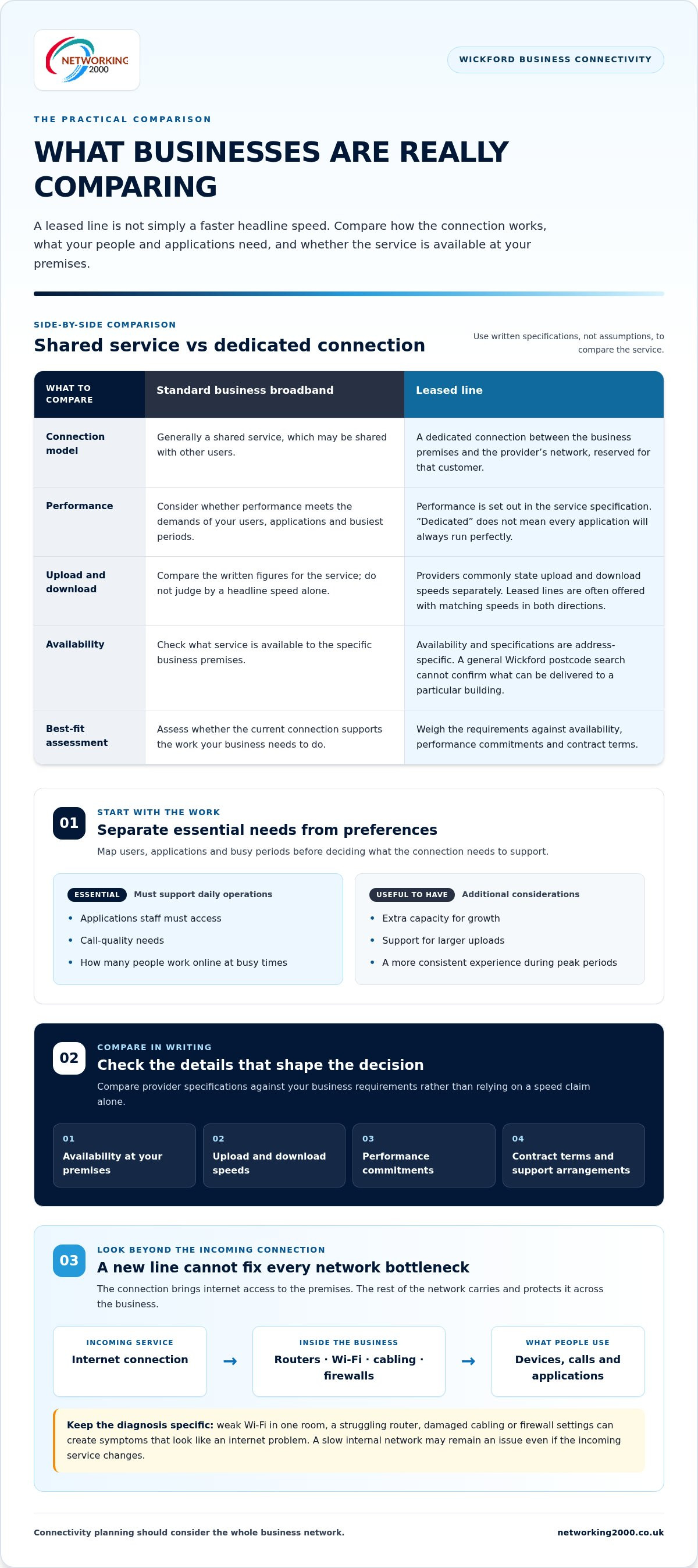
A connection that slows at busy times or struggles to support calls and cloud applications can disrupt the working day. Choosing a leased line is not simply a matter of finding the fastest headline speed. Compare what the service provides at your premises, what your people and applications require, and whether the rest of your network can make good use of the connection.
In plain English, a leased line is a dedicated connection between a business premises and the provider’s network, reserved for that customer rather than shared in the same way as many standard broadband services. The details matter: What is a leased line? offers a helpful overview of the term. Availability and specifications are address-specific, so a general Wickford postcode search cannot establish what can be delivered to a particular building.
What makes a leased line different from standard broadband?
Standard broadband is generally a shared service. A leased line is dedicated to the business, with its performance set out in the service specification. Providers commonly state upload and download speeds separately, and leased lines are often offered with matching speeds in both directions. Compare the written figures and commitments rather than assuming that “dedicated” means every application will always run perfectly.
The right option depends on how the business works. A team that regularly sends large files may care about upload performance, while staff using hosted applications may prioritise consistent access throughout the working day. The number of users, simultaneous tasks and services available at the premises all shape the decision.
Which Wickford businesses might consider one?
A leased line may be worth assessing when connectivity is central to daily operations. For example, a business with staff using cloud-based systems, hosted communications and shared files at the same time may need more predictable capacity than its current connection provides. It may also be relevant when poor performance has a clear operational cost, such as delays to customer calls or teams waiting for online systems to respond.
These are reasons to investigate, not proof that every SME needs a leased line. Start by separating essential requirements from preferences:
- Essential: Applications staff must access, call-quality needs and the number of people working online at busy times.
- Useful to have: Extra capacity for growth, larger uploads or a more consistent experience during peak periods.
Keep the connection in perspective. A leased line brings internet access to the premises, but routers, wireless coverage, cabling and firewalls carry and protect that connection across the business. A slow Wi-Fi area or outdated internal equipment may remain a problem even if the incoming service changes. Effective business IT infrastructure support Wickford therefore considers the connection alongside the full network. Networking2000 supports businesses across London, Essex and surrounding counties, including Wickford, with managed IT support, internet connectivity, routers, wireless networks and data cabling.
Assess your Wickford business network before comparing leased-line options
Before comparing connection packages, build a clear picture of how your business uses its network. This helps distinguish a genuine internet capacity problem from an issue inside the office. It also gives you a sound basis for deciding what the connection needs to support, rather than relying on a speed figure alone.
Which users, applications and work patterns need reliable connectivity?
Start with the people, places and tasks that depend on being online. Include office-based staff, colleagues working from home and employees who connect while visiting client locations. Then list the applications they use and when demand is highest. A quiet morning may feel very different from a busy period when staff are on calls, accessing cloud platforms and transferring files at the same time.
Work through these points:
- Users and locations: Note how many people connect at the office and how remote or travelling staff access business systems.
- Applications: Include cloud platforms, video calls, hosted telephony and file transfers. Identify which tasks are essential and which can wait.
- Busy periods: Record when slowdowns, call issues or delays tend to happen, and which activities are running at the time.
- Current symptoms: Describe what staff experience, where it happens and whether it affects everyone or only particular rooms, devices or applications.
This evidence can show whether the issue is limited to a specific work pattern or affects the whole business. There’s no need to set an arbitrary bandwidth target before you understand the demand.
Could the office network be the real bottleneck?
A poor connection is not always caused by the service coming into the building. Weak wireless coverage can cause slow loading in one room, while a router that struggles with the number of connected devices may affect several users. Older or poorly placed equipment, damaged cabling or firewall settings that affect particular traffic can also create symptoms that look like an internet problem.
Review the path from the connection to the user. Check whether the issue happens on a wired device as well as over Wi-Fi, whether it is confined to one area, and whether it coincides with a particular application or busy period. Consider the router’s capacity, wireless coverage, Cat5e or Cat6 cabling, and firewall settings. This helps distinguish an external connection issue from an internal network limitation.
The right connection is the one that meets evidenced business requirements. Assess actual users, applications and working patterns, then consider the office network that distributes the connection. Business IT infrastructure support Wickford should take this whole-network view, not treat connectivity as a standalone speed purchase.
Networking2000 provides managed IT support that brings connectivity into the wider infrastructure picture, including routers, wireless networks, data cabling and security. Its managed IT support services offer useful context for planning your network. For Wickford businesses, business IT infrastructure support can help keep network requirements in view as decisions take shape.
Compare leased-line providers in Wickford using practical business criteria
Once you’ve defined what your business needs, compare proposals against the same criteria. A headline speed or broad claim about reliability won’t show the full picture. Use written, premises-specific specifications to see what each service includes and where details differ.
| What to compare | What to look for in writing |
|---|---|
| Availability | Information for the exact Wickford premises, including any site-specific requirements or limitations. |
| Stated performance | Quoted upload and download speeds, how performance is described, and any contention details provided. |
| Service commitment | The stated service level, how faults are handled and any response or restoration commitments. |
| Contract terms | Contract length, renewal arrangements, charges and any relevant termination conditions. |
| Support arrangements | How to report a fault, the escalation route and the support hours stated for the connection. |
Which technical details should appear in a comparison?
Check that each proposal gives comparable figures for upload and download performance. Note whether the information explains contention and what service commitment applies. If a detail is absent or described differently between proposals, mark it as unclear rather than filling in the gap yourself.
Availability is specific to the premises. A result for one Wickford address doesn’t establish the options at another. Record any installation requirements, proposed handover arrangements and included equipment or work, so the operational implications are visible alongside the technical details.
How should you read contract and support terms?
Look beyond the contract length. Compare how faults are reported, how escalation works and whether response commitments are stated. Check that the written terms explain what happens if the connection has a problem, and distinguish a response commitment from a promise that an issue will be fixed within a particular time.
There are two support arrangements to understand. The connection provider handles faults with its service; your business IT support arrangement covers the wider network and the devices, systems and security that depend on it. Knowing who is responsible for each part can make fault diagnosis clearer. If security is part of the network review, managed firewall protection is also relevant.
Put the written specifications side by side and highlight differences, omissions and assumptions. This gives you a more dependable basis for a decision than headline claims alone, and connects the leased-line choice to business IT infrastructure support Wickford and the needs of the wider network.
Plan a leased-line decision around resilience, security and future growth
A connection decision affects more than the monthly service. It can shape how staff access business systems, how communications are handled and what happens if connectivity is disrupted. Before committing, document what depends on the connection and how the wider network will support it. This turns resilience, security and growth into practical planning questions.
What should a business document before making a decision?
Build a short record of current needs and likely changes. Include the services that rely on internet access, the teams using them, busy periods and known disruption patterns. Note which activities could pause briefly and which would immediately affect customers or staff.
Then map the infrastructure that depends on the connection. Consider routers, wireless networks, firewalls and internal cabling, along with where equipment is located and how a new service would connect to the existing setup. Include installation requirements and practical access considerations in the premises plan.
- Critical applications: Identify systems needed for daily operations, communications and access to business information.
- Users and dependencies: Record which teams, devices and locations rely on those systems.
- Disruption patterns: Note when problems occur, how staff are affected and what work is delayed.
- Future needs: Consider expected changes in users, working arrangements and application use without assuming a particular speed or contract is right.
This checklist helps distinguish what the business needs now from what it may need later. It also gives the connectivity decision a clear operational context.
How do security and continuity fit into connectivity planning?
A dedicated connection is not, by itself, a complete security solution. The business still needs to consider firewall management, access controls and wider IT security. Review how the firewall is configured, which systems it protects and how network changes could affect existing security arrangements. Treat the connection as one part of a layered approach, not a replacement for security controls.
Continuity planning is equally practical. Decide which work could continue if the main connection became unavailable, which tasks would need to wait and how staff should communicate the disruption. Consider whether alternative working arrangements are suitable for essential tasks. These are planning choices, not a promise that service will never be interrupted or that a particular backup option is in place.
For SMEs considering business IT infrastructure support Wickford, the connection, internal network, security and continuity plan should be viewed together. Networking2000 supports businesses in Wickford and across London, Essex and surrounding counties with managed IT support and wider infrastructure services. Review your wider IT infrastructure needs as part of planning a connection that fits the business, rather than treating the line as a standalone purchase.
Connect leased-line planning with business IT infrastructure support in Wickford
A leased-line decision is one part of a wider infrastructure plan. Start with address-specific availability information, then document the business requirements and compare written specifications on a like-for-like basis. This gives you a clearer view of what the connection would address and what still depends on the office network, security and support arrangements.
The connection itself and the infrastructure around it are separate considerations. A new service won’t automatically resolve poor wireless coverage, an unsuitable router or problems with internal cabling. Planning both together helps reduce the risk of investing in a connection that doesn’t address the difficulty staff are experiencing.
Where Networking2000 fits into the wider infrastructure picture
Networking2000 supports business IT infrastructure across London, Essex and surrounding counties, including Wickford. Its managed IT support and business networking services cover internet connectivity, routers, wireless networks and Cat5e and Cat6 data cabling. These services relate to the wider network staff use after a connection reaches the premises.
Managed firewalls are a distinct part of the security picture. They help businesses consider network protection alongside connectivity, rather than treating a connection as a substitute for security controls. Planning the connection and its surrounding infrastructure together helps clarify how each part fits into the business network.
What to prepare before discussing your business IT needs
A short, accurate summary makes it easier to focus on practical requirements. You don’t need a complicated technical report. Gather details that show how the business works and where the current setup is causing difficulty.
- Users and locations: Note the number of people working at the premises and any regular office, home or client-site working patterns.
- Applications: List the systems staff rely on, such as cloud platforms, hosted communications and file-sharing tools.
- Current issues: Describe slowdowns, dropped calls or interruptions, including when and where they occur.
- Network components: Record the routers, wireless networks, firewalls and cabling that support staff and business systems.
- Premises details: Note the address and any known constraints that could affect equipment location or installation planning.
Bring any written connection proposals or service specifications too. They can help distinguish the stated terms from the separate needs of the internal network. With this context, Networking2000 can offer straightforward advice tailored to your business requirements and wider IT setup.
For business IT infrastructure support Wickford, a joined-up discussion can bring connectivity, networking and security considerations into focus. Discuss your business IT infrastructure needs with Networking2000 and explore how your wider IT support can align with your business requirements.
Make your next connectivity decision with confidence
A leased-line decision is also an opportunity to make sure the whole network is ready to support the way your business works. Treat connectivity, equipment, security and IT support as connected parts of one plan, so changes solve the right problems and fit future requirements.
Networking2000 has 19+ years of experience supporting businesses. Its highly experienced IT engineers and highly trained professional team provide practical, straightforward advice for SMEs. Support is available from 6am to 10pm, Monday to Sunday and on Bank Holidays.
If you’re considering business IT infrastructure support Wickford, take the next step with a clear picture of what your people need from their network. Discuss the wider setup, including the systems and equipment your business relies on, and plan around your requirements.
Discuss your business IT infrastructure needs with Networking2000 to bring connectivity, networking and security considerations together.
Frequently Asked Questions
Is a leased line worth it for a small business in Wickford?
It may be worth considering if unreliable connectivity regularly affects essential work, such as taking customer calls or accessing a key online system. Start by recording the impact of disruption and which tasks are affected. Then weigh the value of a more predictable connection against its commitments and contract terms. A small team with modest online needs may find standard business broadband is sufficient, so assess the business case rather than choosing by company size.
How can I check whether a leased line is available at my Wickford premises?
Availability information needs to relate to the full business address, not just the town or postcode. A broad postcode result can be a useful starting point, but it doesn’t confirm the options at a specific building. Review address-specific written details, including any premises work required to make the connection. Keep those conditions alongside the availability information, installation assumptions and any proposed timescale.
What should I compare when choosing a leased-line provider?
Compare proposals side by side, checking the quoted upload and download speeds, contention information, service commitments and contract terms. Also look at how faults are reported, how escalation works and what support arrangements are stated. If two proposals use different wording for performance or response commitments, treat the terms as unclear until the written specifications explain the difference. This makes each option easier to judge against your business requirements.
Is a leased line faster than business broadband?
Not necessarily in every comparison. A leased line is dedicated to the business, but its quoted speed still needs to be compared with the available broadband package. Look at upload as well as download performance, since sending large files or using cloud applications can depend on upload capacity. Also consider how the service performs during your busy periods. Base the comparison on written specifications and the tasks your staff need to complete.
Do I need a new router for a leased line?
Not always. Whether your existing router is suitable depends on the leased-line handover, the router’s capabilities and how your network is configured. Compare the connection requirements with your router’s available ports and supported performance as part of installation planning. Also consider whether it can handle the number of users and devices on your network. A router change won’t automatically improve weak Wi-Fi coverage, so assess that separately.
Can Networking2000 help with business IT infrastructure in Wickford?
Yes. Networking2000 supports business IT infrastructure in Wickford through managed IT support and wider networking services, including internet connectivity, routers, wireless networks and data cabling. Managed firewalls and IT security are also relevant when reviewing how the network is protected. Its support can help businesses consider how connectivity fits with the wider IT setup. Share your users, applications and current issues to keep the discussion practical.

