Stop buying Cat6A just because a product page calls it future-proof. I've cabled enough London and Essex offices to see the same mistake repeated: owners pay for 10-gigabit headroom they can't use, then squeeze a thicker, stiffer cable into trunking that was never built for it. Cat6 wins plenty of real jobs. Cat6A wins others outright. The right call depends on your port speeds, run lengths, building and how painful a future rewire would be, not on which reel has the bigger number printed on it.
Table of Contents
- Why This Choice Matters More Than You Think
- Headline Specifications Side by Side
- Shielding, Crosstalk and the Real Channel
- Matching Cable to Real Use Cases
- When Cat6a Is Worth the Extra Cost
- Installation Penalties and PoE Heat
- A Practical Decision Framework and Recommendations
Why This Choice Matters More Than You Think
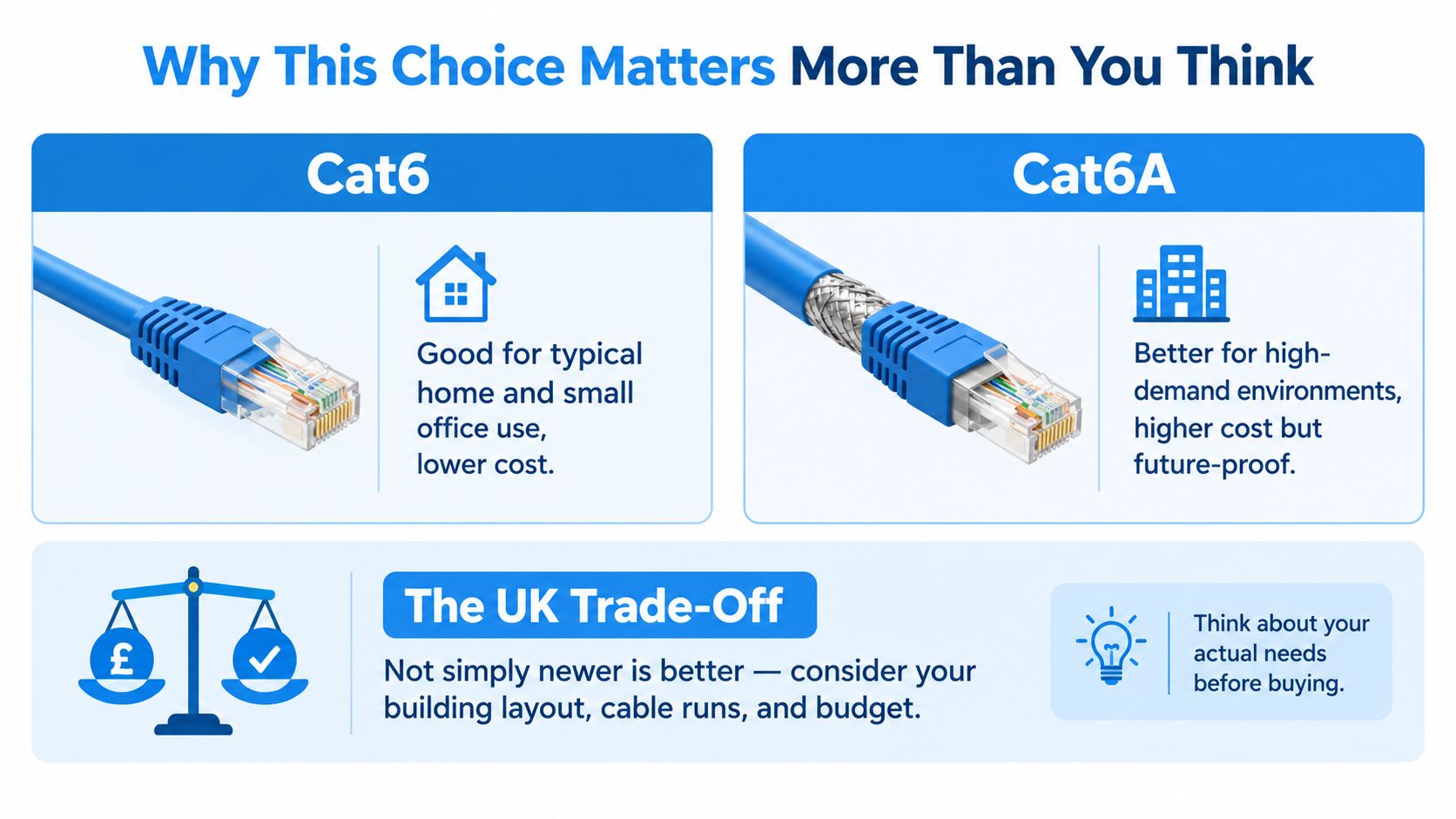
Most Cat6 cable vs Cat6A advice compares reels. You don't run a network on a reel. You run it on an installed channel made of fixed cable, patch panels, outlets, patch leads and the workmanship that joins them. Buy the higher category and terminate it badly, mix in lower-rated parts or crush it through unsuitable containment, and you've paid extra for performance you won't certify.
That gap between catalogue claims and site reality is where UK buyers get caught. A modern fit-out in Chelmsford with generous ceiling voids is a different job from a converted Victorian property in London with narrow trunking, crowded risers and bends everywhere. Your switches matter just as much. If every desk port, phone and printer still connects at gigabit speed, Cat6A to every outlet doesn't make those devices faster today.
The Question You Should Ask First
Don't ask which cable is newer. Ask this: do you need 10-gigabit capacity across your longest runs, or reliable gigabit to ordinary desks and devices? Internal traffic answers that question. Local servers, NAS appliances, virtualisation hosts, media work and aggregated wireless or CCTV traffic push you one way. Cloud apps, VoIP handsets, email and standard office documents push you the other.
The short comparison below frames the trade-off before you look at the technical detail.
| Spec | Cat6 | Cat6a |
|---|---|---|
| Best fit | Ordinary gigabit access networks | Full-distance 10-gigabit links |
| Physical handling | Slimmer and more flexible | Thicker and stiffer |
| Containment demand | Easier in tight trunking | Needs more space and gentler bends |
| Typical buyer logic | Pay for what current ports use | Pay to avoid a disruptive rewire later |
| Main risk | Limited 10-gigabit reach | Higher material and labour cost |
My position is simple. Cat6 is the sensible default for standard gigabit access. Cat6A is the deliberate upgrade where distance, internal throughput or rewire disruption justifies it. Treating Cat6A as automatic is lazy specification, and treating Cat6 as obsolete is just as wrong.
Headline Specifications Side by Side
Start with the published ratings, because they set the boundaries for everything else. The visual summary below puts the class and bandwidth figures together.
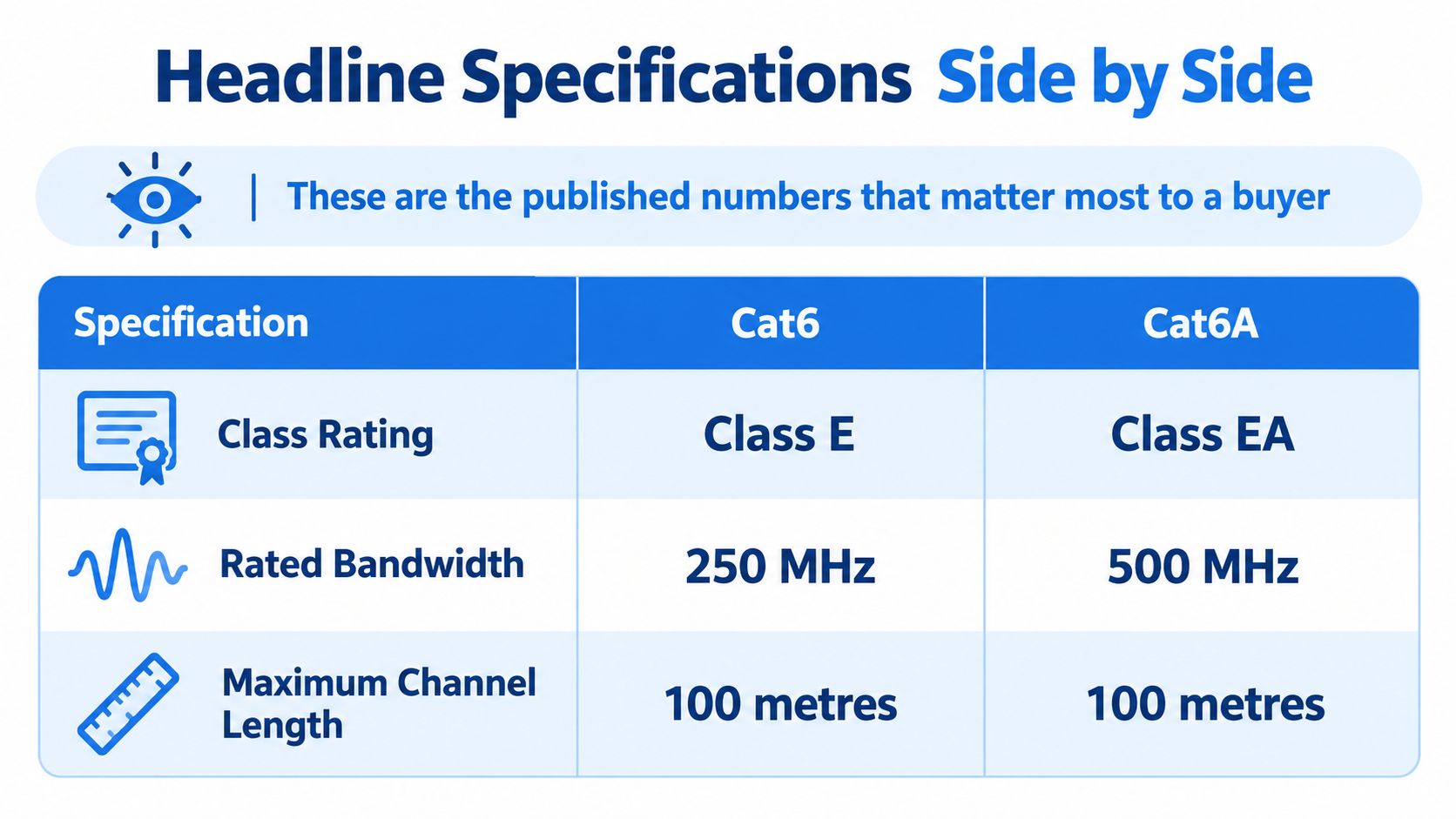
Under the UK framework, Cat6 sits in Class E and Cat6A sits in Class EA. Those labels describe the performance of a complete channel built from matching components, not a marketing badge for cable alone. That's why two installations using cable from similar-looking reels can test very differently once panels, outlets and leads are added.
Bandwidth and Distance
The core fact is clear. Cat6 is specified at 250 MHz and supports 1 Gbit/s Ethernet across the full 100 m channel, while 10 Gbit/s operation is generally limited to about 55 m and as little as 37 m in tightly bundled runs, and Cat6A raises the rated bandwidth to 500 MHz and supports 10GBASE-T across the complete 100 m channel. Read that carefully. Cat6 isn't incapable of 10-gigabit Ethernet. Its problem is reach under real installation conditions.
That distinction changes buying decisions on actual floors. A short link inside a comms room or between nearby cabinets may sit comfortably inside Cat6's reduced 10-gigabit envelope. A long route from a riser cupboard to the far corner of an office, classroom block or warehouse is a different proposition. Once your required speed and longest route exceed that envelope, Cat6 stops being a saving and becomes a constraint.
The video below gives a useful visual walk-through of the category differences before you apply them to your own building.
Practical rule: Specify from the longest run backwards. If that route must carry 10-gigabit traffic reliably, choose the category designed for the full channel. If it only needs gigabit access, don't inflate the whole project.
So the headline contest isn't really speed versus speed. It's guaranteed distance at your target speed. Cat6 gives you full-distance gigabit and conditional short-range 10-gigabit. Cat6A gives you standards-based 10-gigabit across the whole channel. Pick based on the route you have to serve.
Shielding, Crosstalk and the Real Channel
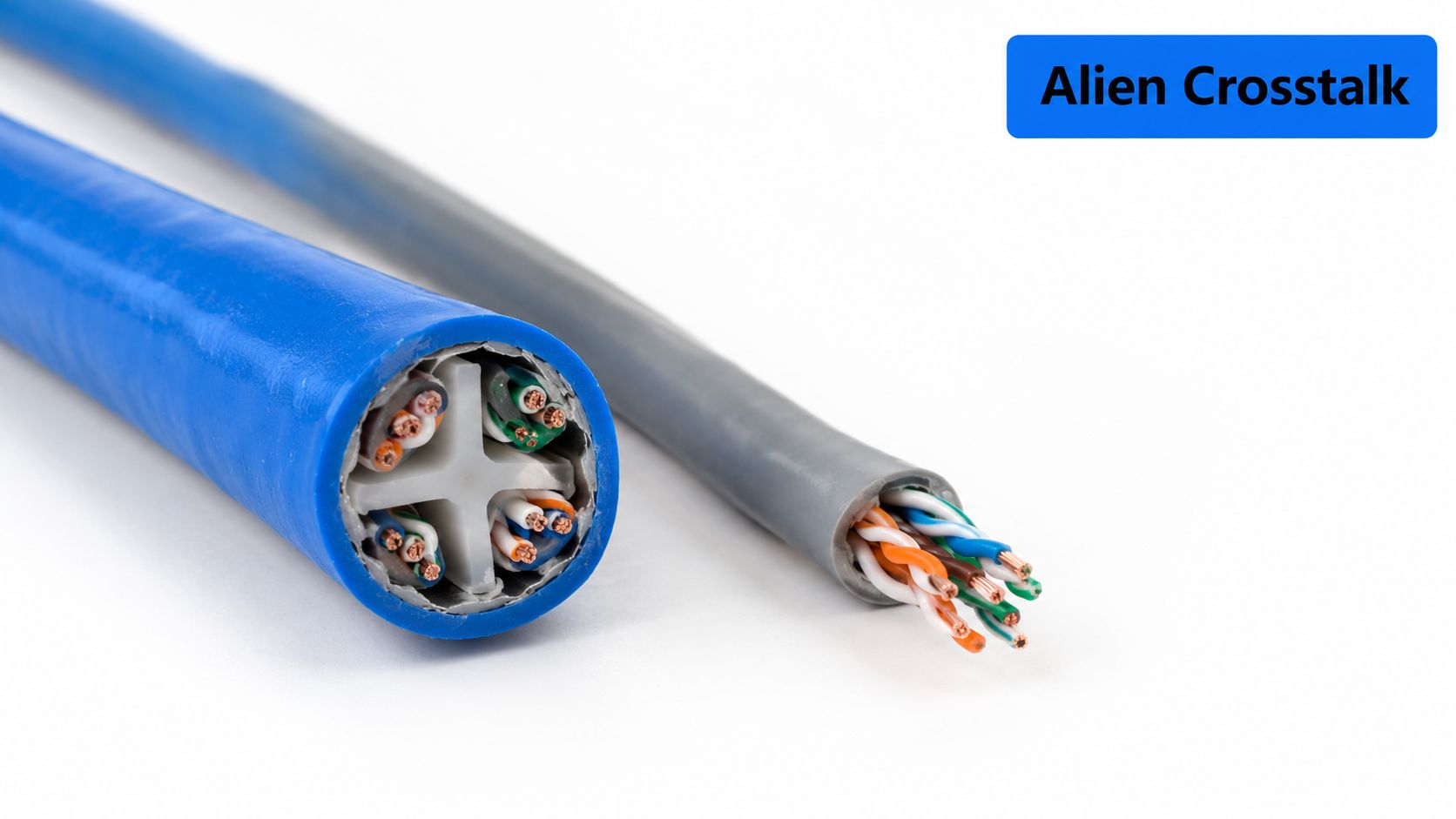
Crosstalk is unwanted signal coupling between pairs or between neighbouring cables. Inside one cable, pair twists and, on some designs, a central spline or separator help keep pairs apart. Between separate cables in a bundle, the problem is alien crosstalk, and it's the issue that exposes the gap between a tidy test bench and a packed tray above a ceiling.
The construction difference is visible once you handle both types side by side.
UTP, F/UTP and S/FTP in Plain English
UTP has no overall foil or braid. F/UTP adds an overall foil screen around the pairs. S/FTP combines an overall braid with individually foiled pairs. Shielding can help in electrically noisy routes, but it isn't free performance. Screened systems need suitable components and correct earthing practice. Fit them carelessly and you've added cost, stiffness and termination complexity without a cleaner channel.
Don't assume every Cat6A product is shielded or every Cat6 product is unshielded. Read the construction code on the specification sheet. Then check that the panel, outlet module and patch lead belong to the same system approach. A screened cable landed on unscreened hardware is a half-finished idea.
Why the Reel Does Not Guarantee the Result
The technical step behind Cat6A is specific. Cat6A increased nominal bandwidth to 500 MHz and introduced performance requirements intended to control alien crosstalk, enabling 10GBASE-T over 100 metres, while the UK structured-cabling framework caps the permanent link at 90 metres with up to 10 metres for combined patch leads. Notice the structure of that limit. The cable in the wall is only part of the channel, and generous patch leads at both ends eat into the same allowance.
This is also where your wider connection matters. If you're weighing internal cabling against the incoming service, how fiber internet keeps you connected is a helpful reminder that reliability depends on the whole path, not one component. The same principle applies indoors.
When you read a quote, look for language about a tested end-to-end channel, matching component category and certification results. If a quote only names the cable category, it hasn't told you enough. The weakest component or the sloppiest termination sets your ceiling.
Matching Cable to Real Use Cases
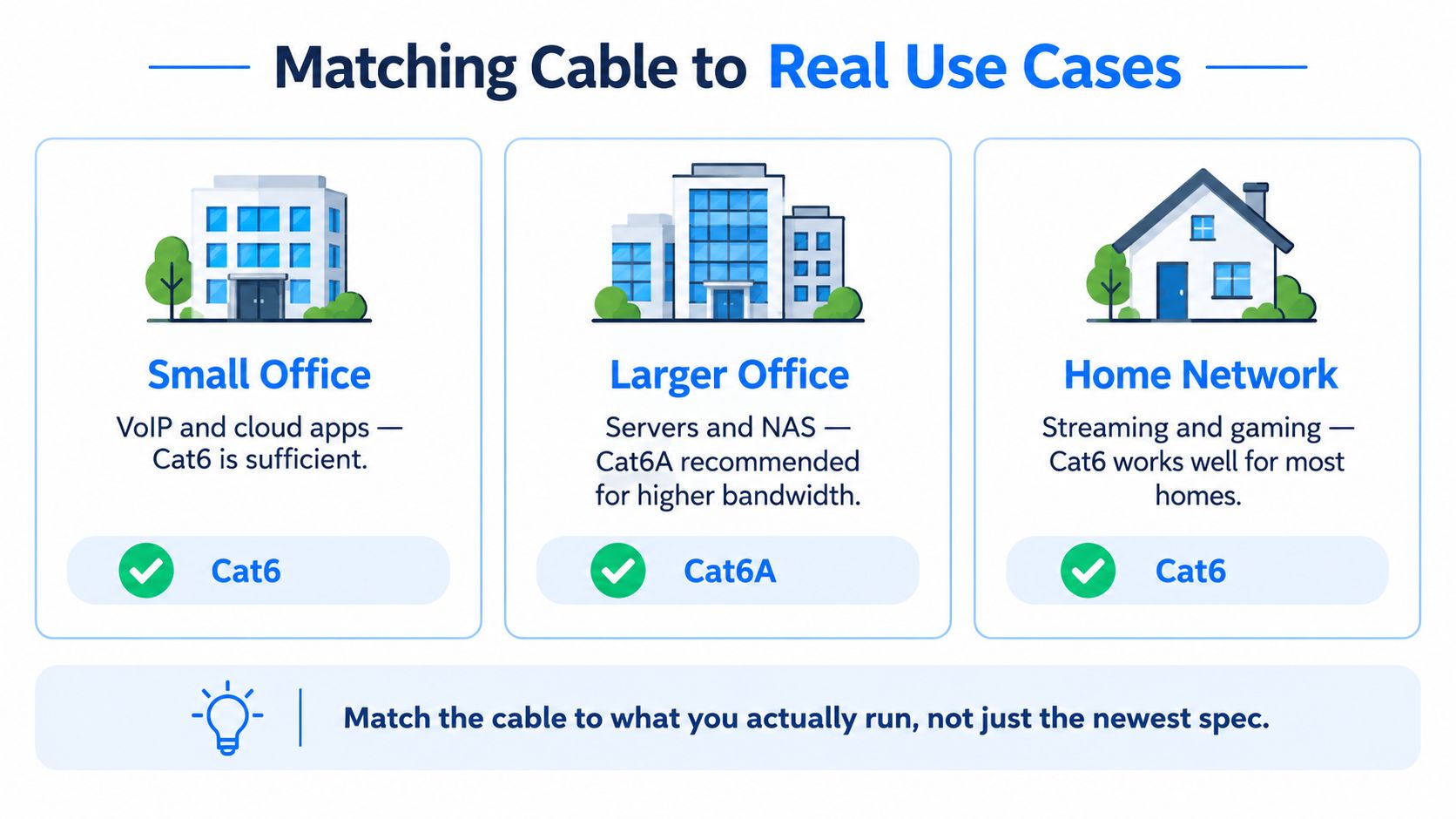
Forget abstract future-proofing for a moment and look at what's plugged in. The right category becomes obvious once you separate ordinary access ports from aggregation points and high-throughput local traffic.
Where Cat6 Is Enough
For a small office running cloud software, VoIP phones, printers and standard desktops, I'd normally specify Cat6 and spend the saved money on tidy containment, enough outlets and proper certification. Those endpoints don't become faster because the horizontal cable has spare capacity they can't request. The same logic suits most homes with smart televisions, games consoles, home-working desks and a modest number of access points.
Short, well-installed Cat6 links also have a place where faster local equipment sits close together. Don't rip out sound Cat6 purely because a switch upgrade is planned. Test what you have, check the route lengths and replace only the links that fail your actual requirement.
Where I Would Specify Cat6A
Choose Cat6A where traffic concentrates. That includes links feeding busy wireless access points, CCTV aggregation, server and NAS connections, virtualisation hosts, media-production workstations and uplinks between cabinets. Schools and colleges planning new copper infrastructure also have a clear steer from current UK guidance towards Cat6A, which reflects long building life and rising device density rather than fashion.
- Small office with cloud apps: Cat6 to desks, phones and printers.
- Growing office with local storage: Cat6A to servers, NAS devices, uplinks and high-demand workstations.
- School or college new build: Cat6A as the planned copper standard.
- Typical larger home: Cat6 for most rooms, with Cat6A considered for a study, media room or cabinet link that's hard to access later.
- Warehouse or retail site: Cat6A for long, dense wireless and CCTV routes where rework means lifts, closures or out-of-hours labour.
Match the cable to the traffic pattern, not the loudest sales claim. Ordinary access and high-capacity backbone links are different jobs, and they don't always need the same answer.
A mixed design is often the smartest UK SME answer. Put Cat6A where capacity and distance converge. Keep Cat6 at straightforward outlets. You'll control cost without bottlenecking the parts of the network that carry everybody else's traffic.
When Cat6a Is Worth the Extra Cost
Your broadband speed is a poor reason to buy Cat6A. I hear this weekly: a business orders a faster internet service and assumes every internal cable must jump a category. That doesn't follow. A gigabit internet connection still arrives at a gigabit rate, and Cat6 was built to carry gigabit Ethernet across the full structured-cabling channel.
The external picture underlines the point. Ofcom reported in May 2025 that gigabit-capable networks covered 84% of UK residential and business premises, while around 48,000 premises still lacked decent broadband, showing that external speed is no longer a reliable proxy for the cabling a site actually needs. Availability outside the building says nothing about whether your staff are shifting large files between local machines inside it.
Internal Traffic Is the Real Trigger
Cat6A earns its premium when the heavy traffic never touches the internet. Editors opening projects from a NAS, staff backing up to a local server, virtual machines moving between hosts and multiple wireless users feeding one uplink all create local demand. In those cases, a slower broadband line doesn't weaken the case for 10-gigabit internal links at all.
It also earns its place when access will soon disappear behind finished walls, fitted joinery, sealed ceilings or occupied trading floors. Cable material is only part of project cost. Labour, making good, downtime and returning to a finished building are what hurt. If you're already opening the building up and you expect the cabling to remain through several switch generations, paying more once can be rational.
When It Does Not Earn Its Place
Be honest about upgrade probability. If your switches, servers and wireless kit are staying at gigabit level, your runs are accessible and your work is mostly cloud-based, Cat6A everywhere is dormant capacity. You're buying thicker cable, larger containment and slower terminations for a benefit nobody can schedule.
My test has three parts. First, is there a named device or link that needs 10-gigabit throughput? Second, does its route approach the distance where Cat6 becomes conditional? Third, would upgrading later be unusually disruptive? If you answer yes to at least two, specify Cat6A for those links. If you answer no across the board, Cat6 is not a compromise. It's the correct engineering choice.
Installation Penalties and PoE Heat
Cat6A's disadvantages aren't theoretical. You feel them in your hands, see them in the trunking and pay for them in labour. Installers who gloss over that are either selling you the easiest specification to defend or haven't fought a stiff bundle through an old riser at ceiling height.
The size gap is material. Cat6A is physically thicker at roughly 7 to 8 mm outside diameter compared with about 6 mm for Cat6, can require around 40% more conduit-fill allowance, and is less flexible, which affects routing in older buildings with narrow trunking and tight bends. Multiply that difference across a bundle leaving a cabinet and the containment problem arrives quickly.
Buildings That Punish Cat6A
Period conversions, small high-street premises and older Essex office stock often have shallow voids, existing cables nobody labelled and routes that turn sharply around joists or steelwork. Cat6A needs gentler bend control and more room at panels and outlets. Forcing it through the same path as the old cable risks kinks, excessive pulling tension, untwisted pairs at terminations and failed tests.
That doesn't make Cat6A impossible in older buildings. It makes survey work essential. A competent installer checks containment capacity, bend points, back-box depth and cabinet space before quoting. If the route needs new trunking or tray, price that openly. Don't discover it after ceilings are open.
PoE Changes the Bundle Conversation
Power over Ethernet sends electrical power over the same cable as data for access points, cameras, phones, access-control devices and some lighting. Bundled powered cables warm up, and heat affects how a route should be planned. Dense bundles in hot ceiling voids deserve particular care, separation where appropriate and an installer who designs for the load rather than tying everything into the neatest possible loom.
- Check containment first: Confirm trunking, conduit and tray capacity before choosing the category.
- Protect bend radius: Don't trade electrical performance for a visually tight turn.
- Plan powered bundles: Treat heat as a design input on camera and wireless-heavy routes.
- Demand certification: A passed channel test proves the installed result, not the purchase order.
Site warning: A poorly installed Cat6A channel can perform worse than a clean, well-terminated Cat6 installation. Workmanship isn't an accessory to the specification. It is half of it.
So yes, Cat6A carries more capability. It also demands more space, patience and skill. In a constrained building, those penalties can outweigh capacity you'll never switch on.
A Practical Decision Framework and Recommendations
Use this sequence in order. Don't start with price per metre, because that number tells you almost nothing about the finished network or the cost of changing your mind.
Five Checks Before You Commit
- List your port speeds: Write down what your switches, servers, NAS devices, access points and workstations can negotiate today, then mark only the upgrades you have a realistic plan to fund.
- Measure the longest routes: Use the actual path through risers, ceilings and trunking, not the straight-line distance on a floor plan.
- Separate traffic types: Label each link as internet-bound access, local high-throughput traffic or an aggregation uplink carrying many users or devices.
- Inspect the building: Check containment fill, bend points, cabinet space, outlet depth and whether powered bundles will run through warm, enclosed voids.
- Price the rewire: Include labour, access equipment, making good and disruption, not just a replacement reel.
Those checks usually produce a split answer. That's fine. Structured cabling doesn't require ideological purity. It requires each link to meet its job and the whole channel to be certified with matching components.
My Recommendations by Reader
Home users should choose Cat6 for most rooms. It's easier to route, entirely adequate for gigabit devices and still gives useful faster-link potential on shorter runs. Reserve Cat6A for a hard-to-reach cabinet-to-study or media-room route if you know local storage or high-end wireless will sit on it.
Small businesses in Wickford, Chelmsford, Romford and similar towns should default to Cat6 at ordinary desks and Cat6A selectively for cabinet uplinks, servers, NAS appliances and busy access points. That hybrid approach protects the network core without inflating every outlet. If you're refitting and access will become difficult, widen the Cat6A portion. If you're in leased space with accessible trunking and cloud-only work, don't.
Larger London and Essex offices, schools and commercial premises should lean Cat6A for new infrastructure, especially where floor runs are long, device density is high or the building will be occupied for years. The decisive factor isn't prestige. It's the cost and chaos of returning later.
Whatever you choose, insist on end-to-end certification and records you can hand to the next engineer. In the Cat6 cable vs Cat6A decision, the winning specification is the one matched to your ports, distances, traffic and building, then installed well enough to prove it.
If you're planning a new office fit-out, a school upgrade or a home network across London or Essex and want the category matched to your actual routes and equipment, Networking2000 can survey the building, design the structured cabling and certify the finished channel. Visit Networking2000 to discuss your Cat6 or Cat6A requirements with an engineer before you commit to a reel.

