What if the biggest risk to your clients’ information isn’t a sophisticated cyberattack, but a file saved in the wrong place or an old account nobody remembers? Protecting client data for Wickford businesses starts with knowing what information you hold, where it lives and who can access it. That can be difficult when records are spread across email, shared folders, devices and paper files.
Phishing, lost laptops, unauthorised access and missing data are all worth considering, especially when time and IT resources are limited. You don’t need to tackle every possible threat at once. Start by getting a clear view of your data, then prioritise safeguards that fit the risks and your day-to-day operations.
This guide explains how to identify client data across your business, reduce avoidable exposure and establish repeatable habits for staff. It covers practical steps such as limiting access, securing devices and planning for backups, as well as how managed IT and security support can help put those measures into practice. The aim is to make data protection manageable, consistent and part of how your business works.
Key Takeaways
- Map where client information is stored, from inboxes and devices to shared systems, so you can spot avoidable exposure.
- Protecting client data for Wickford businesses starts with matching safeguards to real risks, rather than relying on a single tool.
- Use role-based access, staff awareness, device security, backups and managed firewalls to address different points of vulnerability.
- Turn your approach into practical outputs: a data and system list, an access record, staff procedures and regular reviews.
- Managed IT support, IT security and managed backup can help put suitable safeguards into practice.
Protecting client data in Wickford: understand what you hold and where it goes
Client information rarely sits in one neat folder. A name may appear in an email, a phone contact, a shared spreadsheet and a business system, with extra copies created when staff reply, download or forward records. Before choosing safeguards, map these everyday information flows. Client data is information that identifies a client or relates to them; knowing where it is held is the first step towards protecting it.
Which client information needs protection?
Start with familiar examples: names, addresses, telephone numbers, email correspondence, invoices and payment-related records. Personal information might also appear in notes or documents created during a working relationship. These details do not all carry the same privacy or business risk. A public business contact address, for instance, may need different handling from confidential correspondence or financial records. Identify what each item is and how it is used before deciding how to protect it.
Where might client data sit in a Wickford business?
Check the places staff use to do their jobs: email, office workstations, mobile devices, shared folders and business systems. Consider routine actions as well. An attachment might be downloaded to a computer, copied into a shared folder or sent to a colleague, creating another copy to manage. Focus on systems your business actually uses instead of trying to list every file or hypothetical storage location.
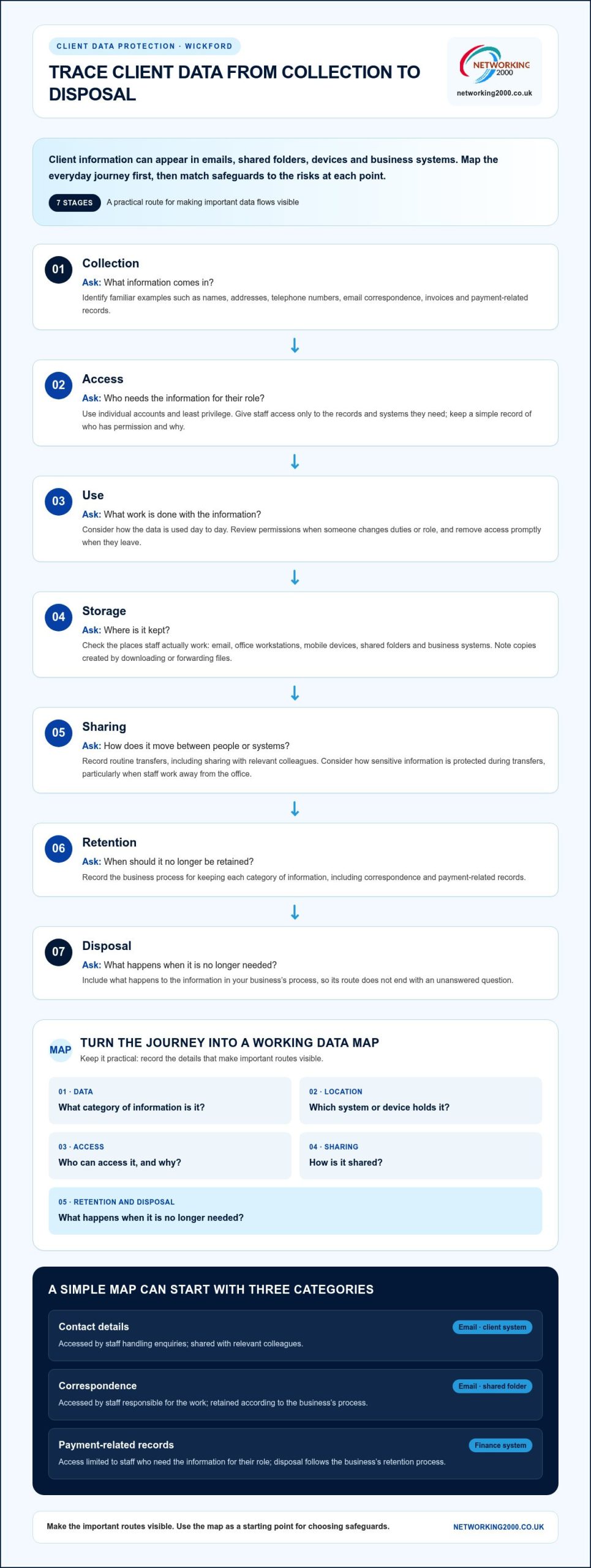
Trace the data through its lifecycle: collection, access, use, storage, sharing, retention and disposal. Ask what information comes in, who needs it, what work is done with it, where it is kept and when it should no longer be retained. Note how it is shared, including routine transfers between colleagues or systems. For an overview of the safeguards involved, see this Data Security Overview. The aim is not to create a complex inventory, but to make the important routes visible.
A compact data map could look like this:
- Contact details: email and client system; accessed by staff handling enquiries; shared with relevant colleagues.
- Correspondence: email and shared folder; accessed by the staff responsible for the work; retained according to the business’s process.
- Payment-related records: finance system; access limited to staff who need the information for their role; disposal follows the business’s retention process.
Keep the map practical. Record the data category, the system or device where it sits, who can access it, how it is shared and what happens when it is no longer needed. This gives you a working view of where exposure could occur, including overlooked copies, and a starting point for choosing safeguards. It is the practical foundation of protecting client data for Wickford businesses.
Build client data protection around access, storage and staff behaviour
Once you know where client information sits, set safeguards around how people access and handle it. No single tool covers every risk. Protection depends on sensible permissions, secure systems, recoverable copies and staff who understand safe working practices. These measures support one another, but each has a different job. A backup won’t restrict who can open a file, for example, and a password won’t restore information that has been lost.
How should a business control access to client records?
Use individual accounts rather than shared credentials, so access is tied to a specific person. Apply least privilege: give each staff member access only to the information and systems needed for their role. Someone handling enquiries may need contact records, for example, but not every finance folder. This limits unnecessary access and makes it easier to review who can reach what.
- Set access by role: decide which folders and systems each job requires.
- Review changes: update permissions when someone takes on new duties or changes role.
- Remove access promptly: close accounts and revoke permissions when a member of staff leaves.
Keep a simple access record showing who has permission and why. Review it as part of routine staff changes instead of waiting for an issue to arise. These controls reduce opportunities for accidental or inappropriate access, but cannot remove every risk.
How do backups, encryption and device security help?
These safeguards address different problems. Backups provide copies that can support recovery if working files are deleted, damaged or unavailable. Encryption makes stored or transferred information harder to read without the right access. Device security helps protect the computers and phones staff use to view or handle client records. Treat these as complementary controls, not alternatives.
- Backups: decide which business information needs a recoverable copy, and include how and when it will be restored in your recovery planning.
- Encryption: consider how sensitive information is protected on devices and during transfers, particularly when staff work away from the office.
- Device security: keep software updated, use screen locks and follow secure working practices. Staff should lock screens when stepping away and take care when handling devices in public.
Clear staff guidance matters as much as technical settings. Show people how to handle client files, share them appropriately and recognise suspicious messages. The University of Houston’s Business Data Security Measures also highlights the value of combining technical safeguards with employee education.
Access controls limit who can reach information, secure devices help protect it in use, and recoverable copies support restoration after data loss. Bringing these measures together is a practical foundation for protecting client data for Wickford businesses. If putting the controls in place is difficult to manage alongside daily work, managed IT support and IT security can help organise safeguards around your business’s needs.
Compare client data safeguards by the risk they are designed to reduce
Safeguards work best when each has a clear purpose. A firewall, staff procedure and backup are not interchangeable: they address different ways information could be exposed, disrupted or lost. Use the comparison below to see what a control can help with and where another measure is needed. Protecting client data for Wickford businesses means matching safeguards to actual working practices, not collecting tools for their own sake.
| Risk to consider | Suitable safeguard | What it helps do | Limit to keep in mind |
|---|---|---|---|
| Someone can access records they don’t need | Individual accounts and role-based access | Restricts access to information needed for each person’s work | Permissions need review when roles change or staff leave |
| A staff member shares information carelessly or responds to a suspicious message | Staff awareness and clear handling procedures | Helps staff recognise risky requests and use agreed sharing methods | Training supports good decisions but can’t remove every mistake or threat |
| A lost or unattended computer or phone exposes information | Device security, including updates and screen locks | Helps protect the device and the information accessible from it | It doesn’t control access to every separate account or system |
| Files are deleted, damaged or unavailable | Backups and a recovery process | Provides copies that can support restoration | A backup doesn’t prevent exposure of the original information |
| Unwanted network traffic threatens network security | Managed firewall protection | Helps manage traffic at the network boundary | It doesn’t govern staff handling or secure every account and device by itself |
Which safeguards should a small business prioritise first?
Begin with the basics: identify where client records are held and remove access that is no longer needed. Then consider routine working risks, such as staff sharing files or leaving devices unlocked. The right sequence depends on your information, how sensitive it is and which systems your business relies on. A safeguard that matters most for one business may be less urgent for another, so treat this as a way to think through priorities, not a universal ranking or compliance guarantee.
Consider the possible impact if information is exposed or unavailable, how sensitive it is, and how essential the system is to daily work. Address gaps that could disrupt important operations or expose information unnecessarily. Record why each measure is in place, then revisit those decisions when your systems or working practices change.
What does a managed firewall protect, and what doesn’t it?
A managed firewall helps manage network traffic and supports network security. It is one layer of protection, but it doesn’t decide which employee should see a client record or whether a file is sent to the right person.
For example, a firewall may help manage traffic entering or leaving a business network, while access permissions determine who can open a shared client file. Both have a role, but they solve different problems. Pair network protection with sensible data-handling practices rather than relying on a firewall to cover every risk.
How to put a client data protection plan into practice
A useful plan doesn’t need to be complicated. It should show what information you handle, the main risks, who is responsible for safeguards and how the plan stays current. UK GDPR and the Data Protection Act 2018 are relevant to personal data. For current guidance on your organisation’s responsibilities and responding to an incident, consult the Information Commissioner’s Office (ICO) guidance rather than relying on an old checklist.
How can a Wickford business make a useful data-handling checklist?
Keep the checklist brief enough to revisit. For each relevant data type, record its location, who needs access and how it is shared. Assign routine tasks, such as reviewing permissions, briefing staff and checking backups, to a role rather than just a named person. This makes the plan easier to maintain when responsibilities change.
- Map the data. List the client information you handle and the business systems or devices where it is stored. Include relevant routes for sharing, such as email or shared folders. Output: a concise data and system list.
- Assess the risks. Consider what could happen if information were seen by the wrong person, lost or unavailable. Weigh the sensitivity of the data against its role in daily operations. Output: a short record of key risks and why they matter.
- Assign safeguards. Match each risk with a practical measure, such as limiting access, securing devices or maintaining backups. Note who is responsible for each measure. Output: an action list with an owner for every task.
- Brief staff. Set out how staff should access, use and share client information, and how they should raise concerns. Keep instructions relevant to their work. Output: a short staff procedure that can be shared and revisited.
- Review the plan. Check that systems, permissions and responsibilities still match how the business operates. Output: a dated review note recording changes and actions still to complete.
When should the plan be reviewed or escalated?
Review it after a meaningful change, such as a staff member taking on new responsibilities, a system being introduced or an information-sharing process changing. A checklist is useful when it reflects how work is done now, not how it used to be.
If you suspect client data has been lost, accessed inappropriately or shared by mistake, act promptly within your business: raise the concern with the responsible person, record what is known and take sensible steps to limit further exposure. Then consult current official guidance to understand what action may be required. Avoid assumptions about reporting deadlines or obligations, as these depend on the circumstances.
A clear plan gives your team a practical routine for protecting client data for Wickford businesses. If you’d like support putting suitable safeguards in place, discuss managed IT support with Networking2000.
Protecting client data with Networking2000’s local IT and security support
A clear data map and sensible safeguards give you a practical starting point. The next challenge is keeping systems, access and recovery arrangements organised as your business changes. Networking2000 supports businesses in Wickford and across Essex and London with managed IT support, managed firewalls, IT security and managed backup. These services can help turn your protection priorities into workable steps that fit the way your business operates.
How can managed IT support help organise data safeguards?
Managed IT support can help manage the infrastructure your team relies on and organise practical security measures across it. Reviewing systems and staff access, for example, can help identify where permissions or device practices need attention. Managed firewalls support network security, while IT security and managed backup address other parts of protection and recovery planning. Each has a distinct role, and none should be treated as a guarantee of compliance or breach prevention.
Networking2000’s highly experienced IT engineers and highly trained professional team offer straightforward, jargon-free advice. They can help you understand technical priorities and plan appropriate support around your business needs, while keeping everyday staff processes in view.
- Managed IT support helps organise and manage the IT infrastructure your business uses.
- Managed firewalls help manage network traffic and support network security.
- IT security helps you address security needs as part of your wider IT environment.
- Managed backup supports your arrangements for recovering business information.
What should a Wickford business do next?
Start with a concise inventory: note the client information you hold, the systems and devices where it sits, and the staff roles that need access. Add any gaps you have identified, such as unclear permissions or uncertainty about backup checks. This gives you a useful basis for deciding what matters most, rather than trying to solve every possible issue at once.
Networking2000 offers pay as you go and monthly maintenance options. Support is available from 6 am to 10 pm Monday to Sunday and on Bank Holidays. A clear view of your systems and priorities can help shape a practical discussion about protecting client data for Wickford businesses, whether you need managed IT support, managed firewalls or wider IT security.
If you’re ready to put your priorities into practice, discuss your business IT and security needs with Networking2000.
Make your next data-protection step manageable
Protecting client data for Wickford businesses is an ongoing part of running a trusted business, not a task that needs to be solved all at once. Choose one practical next step, such as clarifying who can access an important system or assigning responsibility for reviewing safeguards. Small, clearly owned actions can turn a written plan into a routine your team can maintain.
If you’d like experienced help putting those priorities into practice, Networking2000 brings more than 19 years of experience supporting businesses with their IT needs. You can discuss the areas that matter to your organisation and work towards a practical way forward with a local team.
Talk to Networking2000 about IT support for your business. A clear next step can make data protection feel more manageable, so you can focus on serving your clients with confidence.
Frequently Asked Questions
What counts as client data for a small business?
Client data includes information that identifies a client or relates to their dealings with your business. Alongside obvious details such as a name or email address, it could include appointment notes, delivery instructions, support messages or records linked to a particular account. Information that seems harmless on its own may reveal more when combined with other details. Consider what your business collects, creates or receives during routine work.
How can a small business protect client data?
Start with a manageable routine: know which systems hold client information, keep access relevant to each person’s role and make sure staff understand how to handle records. Before sending a spreadsheet outside the business, for example, check that it contains only the details the recipient needs. Include recovery arrangements in your planning, too. For protecting client data for Wickford businesses, safeguards should suit the information and the way your team works.
Does a firewall protect all client data?
No. A firewall helps manage network traffic, but it doesn’t control every route to client information. It won’t decide whether an employee should have access to a particular folder or prevent someone from sharing a file with the wrong recipient. Treat it as one part of your security arrangements. Account permissions, secure devices and staff procedures address different risks that a firewall alone doesn’t cover.
Do Wickford businesses need to follow UK GDPR?
If your business processes personal data, UK GDPR and the Data Protection Act 2018 are generally relevant, regardless of being based in Wickford. What you need to do depends on factors such as the information handled and how it is used. Personal data can include details that identify someone directly or indirectly. Check current guidance from the Information Commissioner’s Office (ICO) for advice that reflects your circumstances.
How often should a business review access to client data?
Review access whenever a change could make existing permissions inappropriate, such as a staff member changing role, leaving the business or taking on a new responsibility. It’s also useful to set a recurring review that fits how often your systems and team change. Keep a brief record of what was checked and any permissions updated. This makes it easier to spot accounts that no longer have a clear business purpose.
What should a business do if it suspects client data has been exposed?
Act promptly: tell the person responsible for handling incidents, record what is known and take reasonable steps to limit further exposure. If a file may have been shared with the wrong recipient, for example, establish what was sent and who could access it. Preserve relevant information rather than guessing or deleting records. Then consult current ICO guidance to assess what action may be appropriate in the specific circumstances.
Can managed IT support help protect client data?
Yes. Managed IT support can help a business organise its IT systems and put suitable technical safeguards into practice. Depending on your needs, managed firewalls, IT security and managed backup can each support a different part of your approach. Your team still needs clear procedures for handling information and deciding who should access it. Managed support can help with the technical work, while responsibility for business decisions remains with your organisation.

