More security tools don’t automatically make a business safer. Effective IT security starts with clear priorities and active oversight, so controls address real gaps instead of adding unnecessary complexity.
It’s understandable to be unsure where to start. Business data sits across devices, email, cloud services and networks, and security measures can seem disruptive when day-to-day work depends on them. A practical approach puts appropriate controls in place, keeps watch for risks and sets out how to respond, as part of routine IT operations.
This guide explains the main parts of a business security plan and how to identify sensible priorities for protecting systems and information. You’ll see how secure access, staff awareness, backups and ongoing monitoring work together, and how to review whether your current protections still fit the way your business operates.
We’ll also look at how managed IT support and firewall protection can make security an ongoing responsibility rather than a one-off project. The aim is a clearer, more manageable approach that supports your people and helps keep your business running.
Key Takeaways
- IT security protects the systems, devices, networks and information your business relies on. Start by identifying what would cause the greatest disruption if it were exposed or unavailable.
- Build protection in layers, combining access controls, maintained devices, careful data handling and staff awareness. A firewall helps protect your network, but it’s only one part of the picture.
- Make security priorities manageable: map important assets, who can access them, where they’re exposed and which controls are already in place.
- A written incident plan can help your team respond calmly, with clear roles and steps for containing an issue, preserving information and assessing its impact.
- Managed IT support and firewall monitoring can bring routine oversight into day-to-day operations for businesses in Wickford, Essex and London.
What IT security means for a modern business
IT security is the coordinated protection of a business’s systems, networks, devices and information from unauthorised access, misuse, loss or disruption. It isn’t simply buying a firewall or another security tool. It brings together technology, clear processes and the people who use business systems, so protection works as part of everyday operations.
That distinction matters. A tool can help address one risk, but it won’t automatically protect every device, account or file. Effective IT security considers how business information is accessed, where it is stored and what needs to happen if something goes wrong. The wider principles are explored in this Information Security Overview.
A security incident can interrupt routine work, expose information or prevent staff from accessing the systems they need. The impact depends on what is affected. Losing access to a shared folder, for example, may delay a team’s work. Compromised email could also affect business conversations and customer confidence. Protection is therefore an ongoing responsibility, not a one-off installation.
Which business assets does IT security protect?
Start with the resources your team relies on to communicate, store information and deliver work. These commonly include:
- Staff laptops, desktop computers and other devices used for work.
- Business networks that connect devices and systems.
- Cloud accounts, applications and the information held in them.
- Stored files, including shared documents and customer or business records.
For a small business, that might mean keeping staff email accounts and shared project files accessible to the right people, while reducing the risk of accidental exposure. Note where each asset sits. Some may be on-site, others used remotely, and some hosted by third parties. A useful security picture includes all of these, not just the equipment in the office.
Keep the inventory practical. For each asset, note what it is used for, who needs access and who is responsible for it. This makes it easier to spot overlooked accounts or files and decide which systems need attention first.
Why IT security matters to Wickford and Essex SMEs
For SMEs in Wickford and across Essex, technology supports everyday tasks such as communicating with customers, managing information and completing work. If an important account or system becomes unavailable, staff may have to pause work while the issue is understood and access is restored. If information is exposed, the business may also need to assess what happened and manage the effect on customers and operations.
Smaller organisations don’t need to copy the security arrangements of a large enterprise. They do need safeguards that reflect their systems, information and working practices. A proportionate approach starts with the essentials: understand what needs protecting, limit access to what people need for their roles, and make responsibilities clear.
This gives owners and teams a steadier basis for decisions. Security becomes part of how systems are managed and used, rather than a complicated project separate from the working day.
How layers of IT security work together
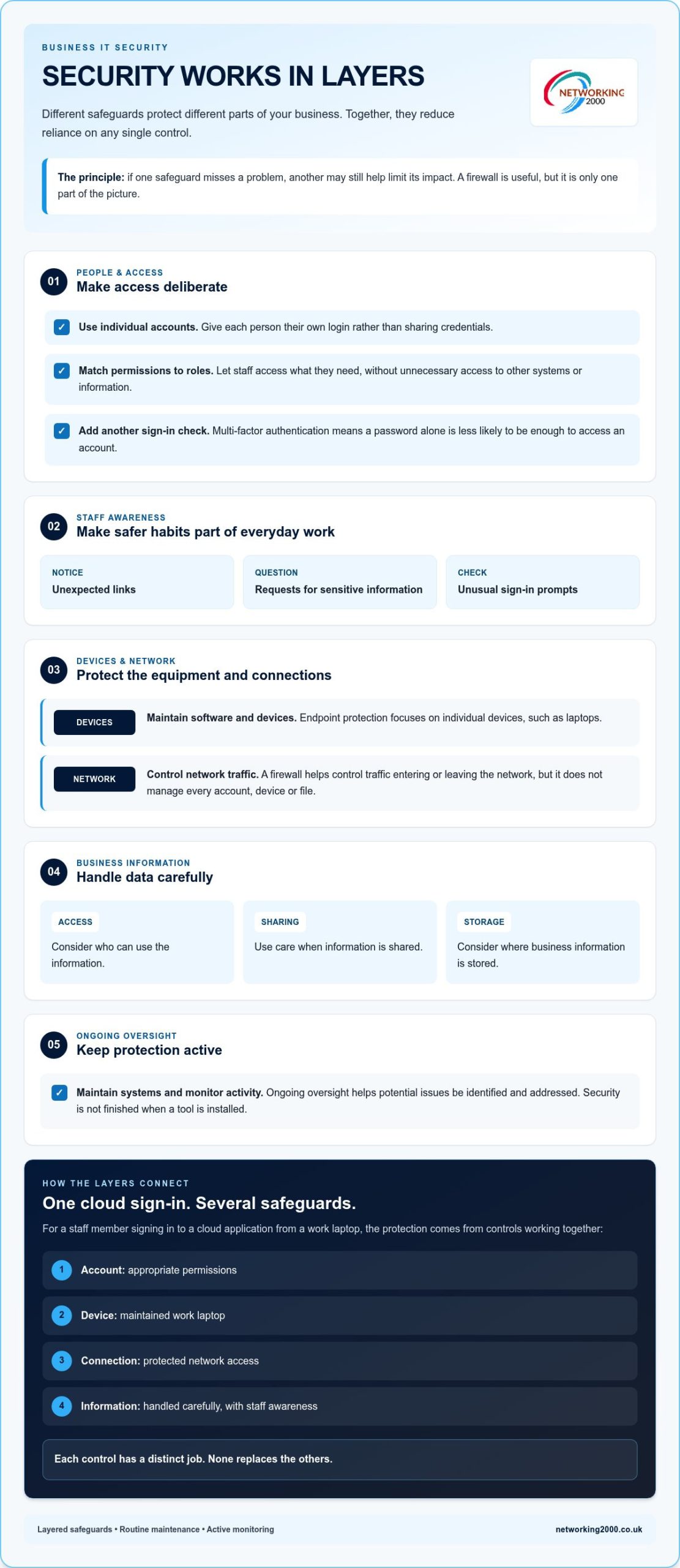
Good IT security uses safeguards that support one another. If one control misses a problem, another may still limit its impact. Layered controls reduce reliance on any single safeguard by protecting different parts of the business in different ways.
Consider a staff member signing in to a cloud application from a work laptop. Their account needs appropriate permissions, the device needs to be maintained, the network connection needs protection, and business information must be handled carefully. Staff awareness helps connect these measures, so people know how to spot unusual requests and follow safe working practices.
A firewall helps control network traffic, but it can’t manage every account, device or file. It works best alongside other controls and regular oversight. Security isn’t finished once a tool is installed. Systems need ongoing maintenance, and activity should be monitored so potential issues can be identified and addressed.
People, access and everyday security controls
Give each person an individual account rather than sharing logins. Set permissions to match their role, so staff can access what they need without unnecessary access to other systems or information. Multi-factor authentication adds another identity check at sign-in, making a password alone less likely to be enough for someone attempting to access an account.
Keep software and devices maintained, and make secure habits part of normal work. Staff should know how to handle unexpected links, requests for sensitive information and unusual sign-in prompts. The UK’s National Cyber Security Centre offers practical advice in its NCSC Small Business Guide, which can help small businesses review everyday safeguards.
Networks, devices and business data
Each control has a distinct job. A firewall helps protect the network by controlling traffic entering or leaving it. Endpoint protection focuses on individual devices, such as laptops, whilst secure data handling covers how information is accessed, shared and stored. None replaces the others. Together, they help reduce gaps between the network, the device and the information a person is using.
Remote working and cloud services extend the business environment beyond the office. Staff may connect from different locations, and applications or files may be hosted by third parties. Include these connections and services in routine oversight, alongside on-site equipment. For more detail on network-level protection, explore managed firewall protection for local businesses.
For businesses in Wickford, Essex and London, managed firewall protection contributes to this layered approach through continuous monitoring and threat mitigation. Managed IT support can also bring security into routine infrastructure management, rather than leaving it as a separate task. If your team would benefit from ongoing support with day-to-day IT, managed IT support can be part of that approach.
How to assess IT security priorities without overcomplicating them
A useful review doesn’t need to begin with a long technical checklist. It should give you a clear view of what matters, who has access and which gaps could disrupt essential work. Use the findings to make practical decisions, not to chase the idea of perfect security. No control can remove every risk, but proportionate steps can reduce exposure and improve readiness.
Work through this sequence with the people responsible for your systems:
- Identify assets. List core devices, business accounts, applications and places where information is stored.
- Map access. Note who uses each system and whether their permissions still match their role.
- Consider exposure. Record remote connections, cloud services and third-party systems that support your work.
- Review existing controls. Document the protections already in place and any known gaps.
- Assign ownership. Name who is responsible for decisions, routine checks and follow-up actions.
Keep the record concise. A simple table showing each asset, its business purpose, access arrangements, dependencies and owner can be more useful than a complex document that quickly becomes outdated.
Start with systems, information and access
Focus first on the systems people need to serve customers, communicate and complete essential tasks. Trace what each depends on. For example, an order process might rely on a cloud application, staff accounts and an internet connection. If one part fails, the whole process could be delayed.
Where personal data is involved, UK GDPR and the Data Protection Act 2018 are relevant to how that information is handled and protected. The precise steps depend on your business and data use. The Information Commissioner’s Office (ICO) publishes guidance to help you understand data protection responsibilities and security measures. Keep your review focused on the information you hold, who can access it and how it is managed.
Turn findings into proportionate priorities
Compare possible improvements by considering the effect of a problem on your business, how exposed the system is and the practical effort involved in addressing it. You don’t need an invented score or elaborate risk model. Give priority to a weakness affecting an essential system or sensitive information, especially if access is broader than necessary or responsibility is unclear.
Then agree who will own each action. Assign responsibility for matters such as updates, access reviews and security decisions, and set a sensible review point. This keeps priorities moving without treating every improvement as equally urgent.
For wider operational context, see how managed IT support for Essex businesses can sit alongside internal decisions. If you’re considering ongoing support for your business systems, explore managed IT support as part of a practical security plan.
What to do when a security concern or incident arises
A suspected incident can create pressure to act quickly. A short written response plan helps staff focus on the next sensible step instead of guessing who should decide or what to do. It should set out key roles, who can authorise changes and how to escalate concerns, including when to involve responsible technical support.
Preparation won’t prevent every incident, but it can help your team respond in a calmer, more orderly way. The aim is to limit further impact, keep a clear record and make informed decisions. Avoid making broad changes before the situation is understood, as they may disrupt work or affect information needed to assess what happened.
Prepare before a security incident
Keep essential response information somewhere appropriate and accessible to the people who may need it. Record key systems, decision-makers, technical support contacts and communication routes. Include a straightforward escalation path, so staff know who to notify if they spot unusual account activity, a device behaving unexpectedly or a service they rely on becoming unavailable.
Recovery arrangements belong in wider business continuity planning. Consider which work depends on particular systems and how the business would manage if they were unavailable. Backups can support recovery, but they should be part of a planned approach, not treated as a complete answer on their own. The disaster recovery plan guide for Essex businesses explores how to prepare for restoring important services.
Respond calmly and review what happened
If a concern arises, follow your organisation’s incident process and involve the people responsible for technical support. Use the plan’s instructions for containing the issue safely. Depending on the situation, that could mean restricting access or separating an affected device from normal use. Avoid improvising technical changes that could make the problem harder to assess.
Work through the response in a clear order:
- Contain safely. Follow the plan and technical guidance to limit further impact.
- Preserve relevant information. Record what was noticed and when. Keep relevant messages or other evidence, and avoid disturbing affected systems unnecessarily.
- Assess the impact. Establish which systems, accounts or information may be involved, with support from the responsible people.
- Follow the response plan. Use the agreed escalation and communication routes, and keep a record of actions and decisions.
After the immediate concern has been addressed, review what happened with the people involved. Identify where the process worked, what caused uncertainty and whether any controls or instructions need updating. This turns an incident into a practical opportunity to strengthen everyday IT security, without assuming that any single change can eliminate risk.
For support with dependable day-to-day IT operations, explore managed IT support for your business.
How managed IT security supports your Wickford business
Security is easier to maintain when it’s part of routine IT management. Managed IT support complements your team’s decisions with proactive infrastructure management and technical assistance. It gives internal decision-makers practical technical support for keeping systems organised and addressing concerns as they arise.
For businesses in Wickford, Essex and London, Networking2000 provides managed firewall protection with continuous monitoring and threat mitigation for business networks. A firewall is one part of a wider security approach, not a replacement for responsible access, device maintenance or careful handling of information. Effective IT security remains an ongoing business responsibility, shared between the business and its support arrangements.
What a managed security relationship can cover
Managed support connects everyday IT oversight with the technical needs of your organisation. It includes proactive infrastructure management and technical assistance to help address issues affecting business systems. Managed firewall protection adds network monitoring and threat mitigation. These activities support your security approach, but they don’t remove the need for clear internal decisions, staff awareness or agreed responsibilities.
It helps to be clear about who does what. Your business understands its priorities, information and working practices. Support contributes technical knowledge and routine oversight. That division makes it easier to keep security practical rather than treating it as a separate, one-off project.
| Area | Self-managed responsibilities | Managed support contribution | Shared business responsibilities |
|---|---|---|---|
| Systems and infrastructure | Set business priorities and explain how systems support essential work. | Provide technical assistance and proactive infrastructure management. | Keep an accurate picture of systems and raise changes or concerns. |
| Network protection | Identify network needs and decide how they fit the wider security plan. | Managed firewall monitoring and threat mitigation. | Agree responsibilities and review whether protection still fits business needs. |
| People and decisions | Set internal expectations and assign responsibility for security decisions. | Offer technical input to support informed decisions. | Communicate clearly and make security part of normal operations. |
Choose practical next steps for your organisation
Start with your business priorities, the systems your staff rely on and any security concerns already on your radar. This gives a support discussion a useful focus: which services matter most, where technical assistance would help and how managed firewall protection could contribute. A tailored approach can reflect your organisation’s systems and requirements, without assuming every business needs the same arrangement.
If you’re considering a more supported approach to security for your Wickford, Essex or London business, discuss IT security for your business.
Make security a steady part of how you work
The next step doesn’t have to be a large project. Choose one practical improvement that fits your business priorities, assign someone to own it and review whether it’s working. A small, consistent step can help turn IT security from a concern you revisit only when something goes wrong into a normal part of running your organisation.
As your systems and working practices change, your approach can change with them. The right support should fit your organisation’s needs and help you make informed decisions without adding unnecessary complexity.
To discuss a practical approach for your business, talk to Networking2000 about IT security support. A clearer plan starts with a conversation about what matters to your team.
Frequently Asked Questions
What is the difference between IT security and cyber security?
IT security is often used for protecting an organisation’s technology, including devices, networks, systems and data. Cyber security tends to refer more specifically to digital threats and attacks. In practice, the terms overlap and businesses may use them differently. The useful point is to consider the full picture: protect technology, information and the business activities that rely on them, rather than getting caught up in terminology.
Is IT security only necessary for large businesses?
No. Small businesses use email, devices and applications, and may hold customer or company information that needs appropriate protection. A local Wickford business could begin by checking who can access shared accounts and whether staff still need that access. Safeguards should match the organisation’s systems and the possible impact of disruption. Start with the basics and build on them as needs change.
Can a firewall protect a business from every cyber threat?
No. A firewall helps manage network traffic, but it can’t address every risk to a business. For example, it won’t make a weak or shared account password safe, or ensure that staff recognise a suspicious request. Treat it as one component of a wider plan. It works alongside suitable account controls, maintained devices and clear ways for staff to raise concerns.
How much IT security does a small business need?
There isn’t one fixed set of controls for every small business. Consider the consequences if a key system, such as your invoicing application or customer records, became unavailable or exposed. Then decide which safeguards are appropriate and who will maintain them. If you handle personal data, include relevant data-protection responsibilities in your planning and consult current guidance from the Information Commissioner’s Office (ICO).
What happens if a business suspects a security incident?
Follow your organisation’s response process and involve the people responsible for technical decisions. Avoid switching off or altering systems without guidance, as this could disrupt work or remove useful information. Note what was observed, when it happened and what actions followed. Once the affected systems and information have been assessed, check whether the circumstances trigger any reporting or notification duties, using current official guidance.
Does UK GDPR require every business to use the same IT security measures?
No. UK GDPR calls for security measures appropriate to the personal data and the risks involved, so measures vary between organisations. A business handling staff contact details may have different needs from one processing more sensitive information. Consider who can access the data, how it is used and what could happen if it were compromised. A particular tool or certification alone doesn’t establish compliance.
How often should a business review its IT security?
Review it at planned intervals and after meaningful changes, such as introducing a new business application, changing how staff work or giving someone new access to information. Check whether responsibilities and protections still reflect how the organisation operates. Record follow-up actions and who owns them. This makes it easier to revisit unfinished work and notice when a previous decision needs updating.

