At 8:45 on a wet Essex morning, reception is already dealing with a client, a courier, a contractor and a new starter who hasn't yet received their access card. The paper visitor book is open on the desk, one line is difficult to read, and someone has written a mobile number in the wrong column. Then the fire alarm sounds. The receptionist knows roughly who arrived, but nobody can quickly confirm who has left, which contractor is on the first floor or whether every visitor understands the evacuation route.
That situation isn't unusual. A paper logbook can be adequate for an occasional guest, but it becomes unreliable when a business has a steady flow of visitors, multiple hosts, contractors working in restricted areas or shared premises with more than one organisation. Visitor management systems are useful because they improve the process behind the sign-in, not just because they replace paper with a touchscreen.
Table of Contents
- Why Paper Logbooks Stop Working for Growing UK Businesses
- What a Visitor Management System Actually Does
- The Core Features That Matter and the Nice-to-Haves
- A Practical Selection Checklist for UK Small Businesses
- Integration With Access Control, CCTV, VoIP and Your Network
- Privacy, Compliance and Safety Working Together
- A Realistic London and Essex Case Scenario
- Costs, ROI and Why the Right Partner Matters
Why Paper Logbooks Stop Working for Growing UK Businesses
A paper book creates the appearance of control. It has a date, a name and perhaps a signature, but it rarely gives reception a dependable live view of the building. Handwriting can be unclear, visitors forget to sign out, and a host may not know that their guest has arrived until somebody walks through the office looking for them.
The weakness becomes more obvious during busy periods. A receptionist has to greet people, answer calls, issue badges, contact hosts and keep deliveries moving. If the book is the only record, each task competes for attention, and the business depends on someone remembering to update it correctly.

The emergency test
During an alarm or evacuation drill, the question changes from “who has arrived?” to “who is still inside?” A paper list may contain employees and visitors together, omit a contractor's company, or show somebody as present even though they left without signing out. Fire marshals then have to reconcile incomplete information at the assembly point.
The UK fire-safety framework places responsibility on the Responsible Person to maintain a suitable evacuation plan for everyone likely to be on the premises, and government guidance says fire procedures must be made available to visitors. The government's fire-safety guidance makes the operational implication clear: visitor records need to support accountability, not merely prove that a reception process exists.
Practical rule: If your receptionist can't produce a trustworthy list of visitors during an alarm, the sign-in process isn't doing its safety job.
Why a basic tablet may not be enough
A tablet with a sign-in form can solve illegible handwriting, but it may still leave important gaps. A basic app might record a name without a host, allow a visitor to remain “on site” indefinitely, or store information without a clear retention rule. It may also lack offline access, badge control, host escalation and an exportable evacuation list.
The decision isn't about buying the most elaborate kiosk. It is about designing a process that answers four questions consistently: who is here, why are they here, where are they authorised to go, and have they left? Once visitor numbers, contractor activity or site complexity increase, a structured system usually becomes easier to manage than a book, provided the configuration matches the business.
What a Visitor Management System Actually Does
Think of a visitor management system as a digital reception desk with a memory and a set of rules. It records the visit, confirms the information the organisation needs, tells the host that the visitor has arrived, issues a badge or other identifier, and keeps a searchable record until departure.
The hardware might be a reception tablet, badge printer, card reader or staffed desktop. The software controls the workflow. A simple product may only provide digital check-in and check-out. A fuller platform can support pre-registration, host approval, visitor agreements, restricted-area rules, evacuation reporting and connections to access control or communications systems.

The visit lifecycle
A well-designed workflow normally covers these stages:
- Before arrival, a host registers the visit, provides directions and identifies any approval or access requirements.
- At reception, the visitor confirms the necessary details, completes any required acknowledgement and receives a badge or pass.
- During the visit, the host and facilities team can see that the visitor is present and, where appropriate, which areas they may use.
- At departure, the visitor signs out, returns a badge and closes the record.
- During an incident, authorised staff can produce a current occupancy list and reconcile it with the headcount at the assembly point.
The system doesn't decide your security policy for you. It applies the policy you define. If contractors need an induction, the workflow should require it. If guests must remain escorted beyond reception, the badge and host process should reinforce that rule.
Why UK sites need a flexible model
The UK has to manage movement on a large and varied scale. In the year ending March 2023, an estimated 118 million passenger arrivals came to the UK from outside the Common Travel Area, including returning UK residents, while the Home Office recorded 3,057,654 visas granted, with visitors representing 51% of those grants. The Home Office immigration statistics also recorded 2,012,116 Visitor visa applications and 1,554,667 Visitor visas granted during that period.
Those figures aren't a forecast of the visitors at your reception. They illustrate why UK-facing organisations may need to handle international guests alongside employees, delivery personnel, contractors, candidates and returning residents. The broader visitor economy remains substantial too. Final VisitBritain figures report 42.6 million inbound visits to the UK in 2024, with £32.5 billion spent, approximately 293.4 million nights and an average visit of 6.9 nights. VisitBritain's inbound tourism data helps explain why visitor processes affect offices, venues, hotels, attractions and shared workspaces, not just corporate headquarters.
The Core Features That Matter and the Nice-to-Haves
Start with the record, not the product brochure. A system should capture enough information to authorise the visit, trace what happened and support an emergency response, while avoiding data collection that adds risk without adding practical value.
Layer one, the visitor record
The foundation is a structured record containing:
- Identity or identity-check status, so staff can distinguish a verified visitor from somebody who has only typed a name.
- Organisation and visit purpose, which helps reception understand whether the person is a client, contractor, courier or supplier.
- Host, because every guest should have a responsible internal contact.
- Arrival and departure times, including a clear open-visit status when checkout hasn't happened.
- Badge number or pass status, so unreturned credentials can be identified.
- Vehicle registration where relevant, particularly for sites with parking, loading areas or contractor vehicles.
Wigan Council safeguarding guidance supports this type of record and recommends that visitors prove their identity and sign in and out, including familiar visitors. It also provides a useful privacy lesson: verification doesn't automatically require the organisation to copy and retain an identity document.
Layer two, operational controls
Pre-registration is valuable when hosts arrange frequent meetings or contractors need instructions before arriving. Host notifications prevent the visitor from waiting at an unattended desk, while configurable messages can explain parking, reception access, safety rules or escort requirements.
Badge printing can make visitors visible, but it isn't a substitute for access control. NDA acceptance, safety acknowledgements or contractor inductions may be appropriate in some environments, yet each additional field should have a clear purpose and retention rule. Photograph capture deserves particular care because it introduces more personal data than a name and host record.
Layer three, accountability and advanced functions
Evacuation reporting is usually more important than visual branding. The system should identify people who are still marked as present, distinguish visitors from contractors and employees, and produce a report that staff can use without relying on an internet connection.
Watchlists, restricted-area workflows, multi-tenant administration and integrations can be useful for larger or more complex sites. They can also increase cost, training requirements and privacy exposure. A small professional-services office may need reliable host notifications and emergency reporting long before it needs facial recognition or automated screening.
A feature belongs in the design because it solves a defined problem, not because the supplier can demonstrate it.
A Practical Selection Checklist for UK Small Businesses
Take the shortlist into a real reception area and test it against the way your site operates. A polished demonstration can hide awkward steps, weak fallback procedures or administrative controls that only work for a dedicated facilities team.
Fit
Ask whether the system supports your actual visitor categories. Can it distinguish clients, contractors, delivery drivers and interview candidates? Can a host register somebody in advance without giving them more access than they need? Does the interface work for a visitor who has no smartphone, limited digital confidence or accessibility requirements?
Check the busiest expected period rather than the quiet average. National Protective Security Authority guidance for shared workspaces recommends choosing a system that can cope with busy periods, keeping logs securely for a defined retention period and retaining staffed reception alongside electronic security.
Function
Put these questions on your procurement sheet:
- Check-in and checkout: Can the system enforce a host and arrival time, flag open visits and record a genuine departure event?
- Emergency reporting: Can authorised staff export or print a current persons-on-site list, including visitors and contractors?
- Fallback operation: What happens if the internet, power, kiosk or badge printer fails?
- Approvals: Can the process require host or facilities approval for restricted visits?
- Notifications: Can it use email, SMS, desktop alerts or an existing phone workflow without creating a second unmanaged inbox?
Compliance
Ask where data is processed, who acts as controller or processor, how administrators use multi-factor authentication and how the supplier supports access, correction, deletion and export requests. Confirm that the privacy notice can be shown at the point of collection and that retention can be configured rather than left indefinite.
Don't accept “GDPR compliant” as a complete answer. Ask the supplier to demonstrate the settings that limit fields, delete records and control administrator access.
Future
Finally, check the exit route. Can you export your records in a usable format? Does the system offer documented integration paths for your access control, CCTV, VoIP and network environment? What happens if you change supplier, move site or add another tenant?
A cloud service may reduce local maintenance, but it still depends on connectivity and supplier availability. An on-site system may give you more local control, but it creates responsibility for updates, backups and hardware replacement. Score the answers against your risks, not against the number of icons in the sales presentation.
Integration With Access Control, CCTV, VoIP and Your Network
Integration means that one event, a visitor's arrival, can trigger useful actions elsewhere. It doesn't necessarily mean every system shares one database or that a single supplier should replace your entire security estate.
Access control is the most direct connection. After a host approves a visitor, the system might issue a temporary card or mobile credential limited to reception and a meeting area. When the visit ends, the permission should expire or be revoked. Anti-passback rules can help prevent a credential being reused to bring another person through a controlled entrance, but the exact behaviour depends on the access-control platform and the doors involved.
CCTV integration needs equal care. A useful connection may link a visit identifier and timestamp to relevant footage, helping an authorised investigator review an incident. That doesn't mean storing more video or making every receptionist a surveillance operator. Define who can search, what event creates a link and how long the associated records remain available.
Communications and connectivity
VoIP integration can notify a host through a desk phone, softphone or reception call queue. That is helpful when hosts don't watch email, but it needs an escalation rule. If the host doesn't answer, reception should know whether to call a delegate, contact facilities or keep the visitor waiting.
The network carries more than the kiosk screen. A fixed device may use Power over Ethernet, a badge printer may need local connectivity, and a guest Wi-Fi voucher workflow may involve a separate wireless network. Keep visitor devices in an appropriate network segment, restrict administrative access and document what happens during an internet outage.
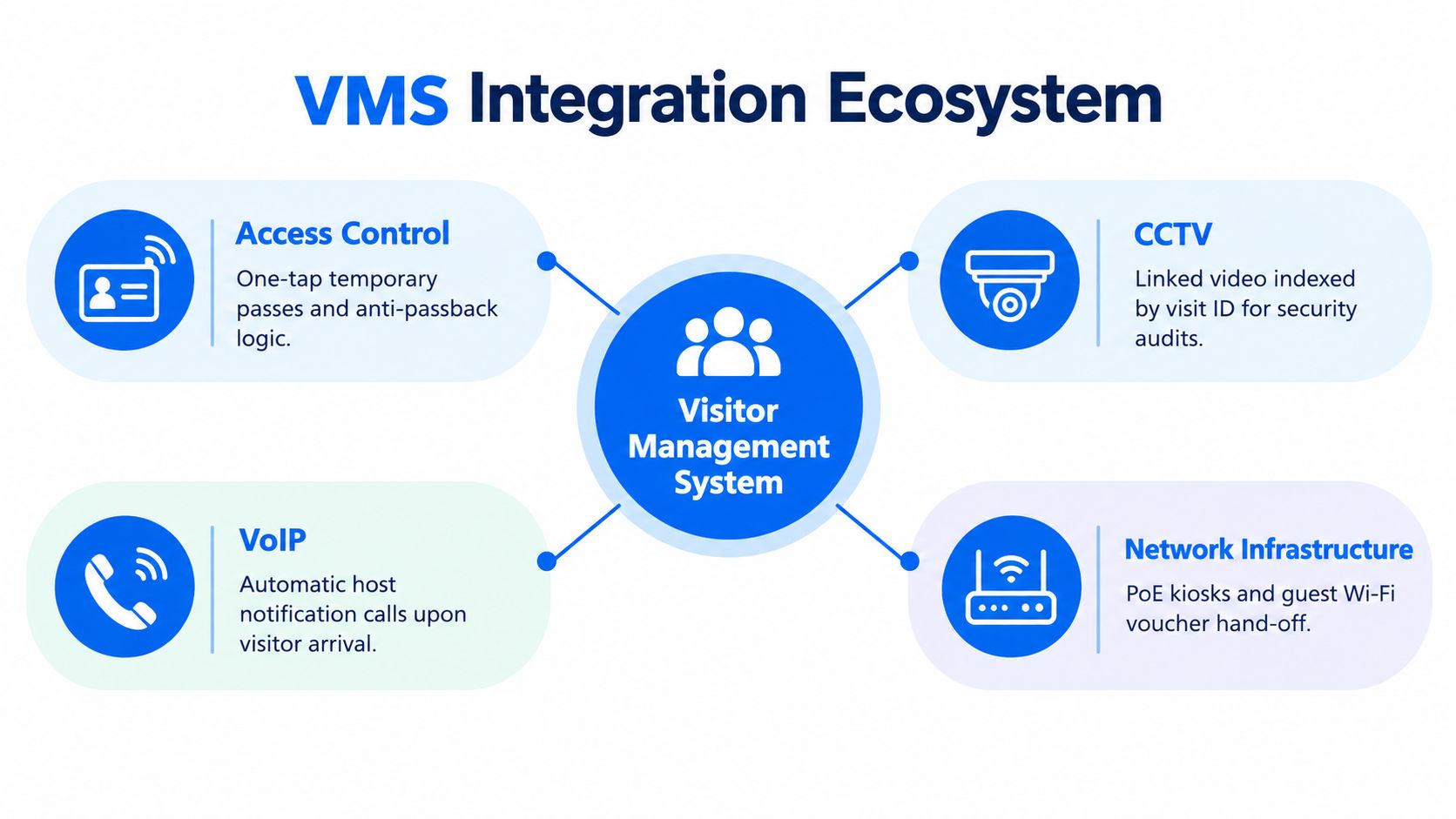
Integration test: Simulate a visitor arrival, host notification, temporary pass, CCTV event and checkout. If staff have to copy information manually between systems, you have connected products, not an integrated process.
Before approving a design, document the interfaces, ownership and failure modes. An access-control engineer may manage doors, an IT team may manage the network, and a facilities team may own reception. This Facility Management Insights guide to physical access control offers useful background for connecting visitor workflows to the wider access-control conversation.
Privacy, Compliance and Safety Working Together
Privacy and safety aren't competing objectives when the system is designed properly. The same record that helps an evacuation can become a problem if the business collects identity documents, photographs or detailed movement histories without a defined reason.
UK business guidance recommends collecting only data that is necessary and relevant, using it for specified purposes, retaining it only as long as needed, securing it and explaining its use through a privacy notice. The UK business data-protection guidance provides the practical baseline.
Build the smallest useful record
A sensible configuration might ask for a visitor's name, organisation, purpose, host, arrival and departure status, plus an identity-check flag where verification is required. It may record a vehicle registration if parking or site safety demands it. It shouldn't automatically retain a scanned passport or driving licence merely because the kiosk can capture one.
The ICO's own visitor process illustrates this distinction. A visitor shows identification for verification, but the identification isn't recorded, and badges are destroyed when the visit ends. That approach supports a useful security check without creating a permanent document archive.
Consider a DPIA when planned processing is likely to create a high risk to individuals. Facial recognition, linking visitor data to CCTV or Wi-Fi logs, extensive movement tracking and background checks deserve more scrutiny than a minimal reception record. Where a business is considering checks for volunteers or school visitors, it should also separate general visitor registration from specialist safeguarding processes, such as guidance on a sex offender check for school volunteers.
Make the emergency list dependable
Fire procedures need to work under pressure. The Responsible Person's evacuation plan must cover everyone likely to be on the premises, and visitors need access to the relevant instructions. The live register should distinguish visitors, contractors, employees and hosts, and it should remain available if the network or cloud service is temporarily unreachable.
Configure a cached or offline list on the reception device where possible. Keep a printed fallback, define who takes it to the assembly point, and test manual reconciliation during drills. Include arrangements for visitors who may need assistance to evacuate, rather than assuming a touchscreen record solves every operational need.
The best privacy control is often a clear process. Staff should know what they may collect, why they collect it, when they delete it and who can access the records. Visitors should receive a short, understandable privacy notice instead of being asked to accept an unexplained collection of data.
A Realistic London and Essex Case Scenario
A 25-person professional-services firm in Romford operates across two floors and receives clients, couriers and contractors. It starts with a paper book, then chooses a system that requires a host, visit purpose, arrival status and checkout, while allowing reception to verify identity without retaining a document copy.
The first test exposes a missing host. Instead of allowing the guest to wander upstairs, reception contacts the nominated delegate and issues a badge limited to the approved area. A contractor's temporary pass expires at the end of the visit, and an open-visit alert identifies another contractor who forgot to sign out.
During the first fire drill, reception prints the current list, takes it to the assembly point and reconciles it with the headcount. Six months later, an internet outage stops the kiosk from reaching the service, so staff use the documented paper fallback and enter the records once connectivity returns.
The system didn't create the safety process. The business did. The software made the rules visible, repeatable and easier to audit.
Costs, ROI and Why the Right Partner Matters
The cost case isn't limited to a kiosk and a subscription. Include installation, badge hardware, access-control changes, network work, staff training, support and the time needed to agree retention and emergency procedures.
The return may appear through reclaimed reception time, fewer manual corrections, quicker host contact, cleaner audits and more reliable evacuation preparation. It also reduces the temptation to collect excessive information because the process can be structured around the minimum useful record.
A partner that understands only software may miss the door controller, wireless network, CCTV permissions or VoIP escalation. Networking2000 works across IT support, networking, communications, CCTV, access control and related security systems for organisations in London and Essex, which can provide a single technical conversation when these dependencies overlap.
Networking2000 can assess your reception workflow, network, access control, CCTV and communications, then help design a visitor management process with practical fallback procedures. Speak with the team through Networking2000 to review your site and plan a system that supports privacy, daily operations and emergency accountability.

