A VPN can protect a connection, but it can’t prove that the person or device using it is safe. Securing remote worker connections takes more than a single tool. Lost laptops, weak passwords and unsafe Wi-Fi can all put business systems at risk, even when staff need straightforward access to do their jobs.
It’s understandable to wonder whether your current setup is enough. A practical answer is to build security in layers without making everyday work harder than necessary. This guide explains how to verify users, protect devices and limit access to the systems each person needs.
You’ll also find a rollout sequence for an SME, from strengthening sign-in and setting device standards to reviewing access as roles and business needs change. We’ll cover how VPNs fit into the picture, where managed firewalls can help, and why regular oversight matters. The aim is a manageable approach that protects remote access whilst keeping staff productive.
Key Takeaways
- Map remote users, business systems, access levels and existing controls to identify gaps.
- A VPN can encrypt traffic, but it doesn’t replace strong sign-in checks or device protection.
- Use the principle of least privilege so staff can reach the resources their roles require, not everything by default.
- Introduce controls in stages, then test and review them regularly to make securing remote worker connections manageable.
- Managed IT support can help maintain access policies and device standards, whilst managed firewalls protect one layer of the wider security approach.
Why securing remote worker connections takes more than a VPN
Remote access is any connection staff make to business accounts, files, devices or systems from outside the office. A Wickford employee might sign in from home, check work email on a mobile phone or access a shared file whilst visiting a customer. Each situation involves different networks and devices, so the office firewall alone cannot control every point of access.
A Virtual Private Network (VPN) can encrypt traffic between a device and a business network, helping protect data as it travels across a connection. But a VPN doesn’t establish that the person signing in is the right employee, that their device is secure or that they should be able to open a particular file. It protects one part of the journey, not every access decision.
Secure remote access is a layered business control that checks who is connecting, assesses the device and connection, and limits access to the resources needed for the job. For securing remote worker connections, treat identity, equipment and permissions as related but separate checks.
Which risks can arise when staff work remotely?
Remote-working risks are manageable, but worth planning for. A phishing email could trick someone into entering their password on a false sign-in page. A device left unattended might give another person access to an open work session, while a file shared with the wrong recipient could expose business information by mistake.
If a password is stolen, an unpatched device or an account with access to too many systems can increase the potential impact. These outcomes aren’t inevitable. Clear device standards, sensible access limits and staff awareness help reduce the chances of a problem and contain its reach.
What does a secure remote connection need to protect?
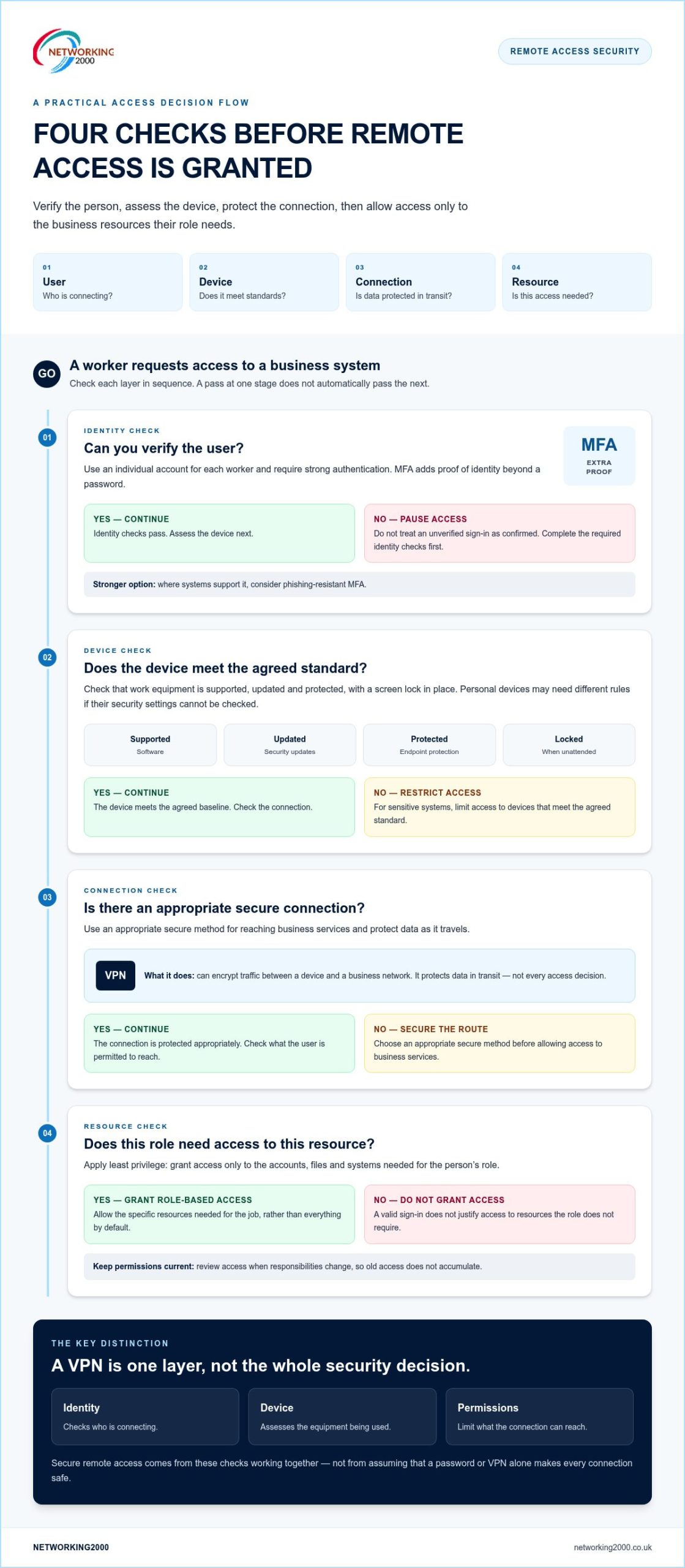
Consider four parts of each access decision: the user, the device, the connection and the business resource. A password or other sign-in check helps establish identity. Device checks help confirm that equipment meets business standards. Secure connectivity protects data in transit, whilst permissions determine which accounts, files or systems the user can reach.
Think of entering an office. A receptionist checks who you are, but that doesn’t automatically give you a key to every room. Remote access should work in a similar way: verify the person, then allow only the areas their role requires. These layers support confidentiality and controlled access without asking a VPN to do a job it wasn’t designed to do.
Build remote worker security in layers: identity, devices and access
Remote access is safer when each control has a clear job. Sign-in checks help establish who is connecting. Device protection reduces the chance that an insecure laptop or phone becomes a route into business systems. Secure connectivity protects data in transit, and resource-level permissions decide what the user can reach. The controls should reinforce one another rather than relying on a single tool to cover every risk.
Identity confirms who is connecting, device checks assess the equipment, and permissions limit what that connection can reach. This is the practical logic behind Zero Trust: access is assessed rather than assumed. The NIST Zero Trust Architecture describes this approach in more detail. An SME can apply the principle through clear, manageable controls without treating it as a product to buy.
- Identity: use an individual account for each worker and require strong authentication.
- Device: keep work devices supported, updated and protected, with a screen lock in place.
- Connection: use an appropriate secure method for reaching business services and protect data as it travels.
- Resource: grant access only to the accounts, files and systems needed for the person’s role.
A weakness in one layer shouldn’t automatically open the way to everything else. For example, a valid password should not alone grant broad access from any device to every business system. Identity, device condition and permissions need to work together.
Verify users with strong authentication
Give every worker a unique account. Shared logins make it harder to tell who performed an action and complicate access reviews when someone changes role or leaves. Require multi-factor authentication (MFA), which asks for additional proof of identity as well as a password. Where business systems support it, consider phishing-resistant MFA, such as a method that’s harder to trick users into approving. Choose an option that works with the systems in use.
Protect devices and limit what each user can reach
Set a device baseline: supported software, security updates, endpoint protection and automatic locking when unattended. Personal devices may need different rules from managed work equipment, especially if the business can’t check their security settings. For sensitive systems, restrict access to devices that meet the agreed standard.
Apply least privilege: give each person only the access needed for their role. A staff member who needs shared documents may not need administrative access or access to finance systems. Review permissions when responsibilities change, rather than allowing old access to accumulate.
Where remote work involves personal data, UK GDPR requires appropriate security measures. It doesn’t make a VPN the only answer or prescribe one universal setup. A layered approach helps a business choose controls that fit its systems and the information it handles. For Wickford businesses, tailored IT security support can help align access and device controls with day-to-day needs.
VPN, zero-trust access and firewalls: compare what each control does
These controls address different parts of remote access. A VPN can encrypt traffic between a worker’s device and approved business resources. Zero-trust access focuses on whether a user and their device should reach a particular resource. A firewall manages network traffic and helps reduce unauthorised connections. They can complement one another, but none replaces the others.
| Control | Main role | What it doesn’t do alone |
|---|---|---|
| VPN | Creates an encrypted route between a device and a business network or resource. | It doesn’t prove a user’s identity, check device health or decide that every requested resource is appropriate. |
| Zero-trust network access | Applies identity- and context-based checks to access requests, often granting access to specific applications rather than the whole network. | It isn’t a single product or a substitute for securing devices and business systems. |
| Firewall | Controls network traffic according to security rules, helping block unwanted connections. | It doesn’t replace user authentication, device protection or permissions within applications. |
The right mix depends on what staff need to access, how systems are hosted and which devices they use. A business with a shared internal file server may have different requirements from one whose staff use cloud applications. Match each control to a clear risk instead of adding tools without considering how they fit together.
When can a VPN be a suitable part of remote access?
A VPN can provide an encrypted route to approved business resources, making it useful when staff need to connect to systems on the company network. Its protection depends on sound configuration, strong authentication, secure devices and ongoing maintenance. A VPN isn’t obsolete, but it shouldn’t be treated as proof that every user or device is safe.
How do zero-trust access and managed firewalls differ?
Zero-trust access applies identity and context checks to requests for particular resources, with access conditions reassessed where the system supports it. A firewall manages traffic across a network boundary. Managed firewall protection helps keep network rules maintained, but remains one layer. A business may combine it with VPN or resource-level access controls to suit its systems and working patterns.
For example, a team might use a VPN for an internal application, MFA to verify each worker, and permissions that limit access to the files needed for their role. A firewall can restrict network traffic around those services. This makes securing remote worker connections a set of practical decisions, not a choice between one all-purpose tool and another.
How to secure remote worker connections: a practical rollout plan
A staged rollout helps improve protection without disrupting the working day. Start with what staff actually need, then address the highest-impact gaps before adding or changing controls. This keeps securing remote worker connections focused on business requirements, not tools for their own sake.
- Build an access inventory. List remote users, the business accounts and systems they use, their access levels and the controls already in place. Note whether access is regular, occasional or mobile. Include shared accounts, old user accounts and systems that may have been overlooked.
- Assess risk and business impact. Identify sensitive information, legacy systems and devices that aren’t managed by the business. Consider what could happen if an account or device were compromised, and which services staff need to keep work moving. Prioritise gaps that could expose important information or interrupt essential work.
- Set clear access and device standards. Decide what sign-in checks are required, which devices can connect and what condition they must meet. Define permissions by role, and set stricter conditions for sensitive systems where appropriate. Make the rules understandable, including how staff should report a lost device or suspicious sign-in.
- Review network-level controls. Check how remote connections reach business systems and whether network rules allow only the traffic that’s needed. A firewall helps manage network access, but sits alongside user and device controls. The managed firewall guide for Essex businesses explains how network-level protection fits into a wider security approach.
- Introduce changes in stages. Roll out authentication, device requirements and connection controls in a manageable order. Explain what’s changing, why it matters and what staff need to do. Trial the changes with a small group first, including people who use different systems or work from different locations.
- Test, review and adjust. Check that authorised staff can do their work and that access is limited as intended. Resolve usability issues before expanding the rollout. Schedule permission reviews and remove access promptly when someone changes role or leaves. Revisit the inventory when systems, working patterns or business needs change.
Keep a record of decisions and outstanding issues. It gives the business a useful reference point and makes later reviews more straightforward. Managed IT support can help maintain remote-access controls as devices, staff and systems change. Discuss a tailored remote-access security approach to plan controls around your business requirements.
Make remote access manageable with ongoing IT security support
Remote access needs attention after the initial setup. Staff join, change roles and leave. Devices are replaced, business systems evolve and working patterns shift. Without regular maintenance, permissions can become outdated and device standards harder to apply consistently. Managed IT support helps keep controls aligned with how the business operates, whilst giving staff a clear route to resolve access problems.
Support should fit your systems and requirements. A managed firewall can help control network traffic and reduce unauthorised connections, but it’s one part of a wider security approach. User accounts, devices and application permissions still need their own safeguards.
What ongoing support should cover
Access reviews should reflect real changes, not just a fixed policy written at the start. When someone moves into a new role, check whether their permissions still fit. When employment ends, remove access promptly. If a new system is introduced, establish who needs it and how it should be reached. An up-to-date record makes these changes easier to manage.
Staff also need practical help. A locked account, authentication issue or device that can’t connect can interrupt work and tempt people to find unsafe workarounds. Clear guidance and support help resolve these problems whilst keeping security controls in place. Maintenance can also cover updates to device standards and network rules, based on the systems the business uses.
Plan the next step for your business
Begin with a simple picture of your current setup: who works remotely, which devices they use, what systems they access and which controls protect those connections. Note where responsibilities are unclear or access may have changed. This gives you a basis for deciding what to address first, without making unnecessary changes to tools that already serve the business well.
Networking2000 provides managed IT support, managed firewall protection and IT security tailored to business requirements. For Essex organisations looking to keep technology and support aligned with their needs, explore managed IT support services for Essex businesses. Ongoing support can help maintain access policies and device standards as your business changes, whilst firewall management strengthens the network layer.
If your Wickford or Essex business wants a practical plan for securing remote worker connections, discuss remote worker security with Networking2000. A clear review of your users, devices and systems is a sensible place to start.
Keep remote access ready for what comes next
Remote working arrangements rarely stay fixed. New systems, changing responsibilities and different ways of working can all affect who needs access and how it should be provided. Set a regular point to revisit your approach, and treat changes to staff or technology as a prompt to check that access still fits.
This makes securing remote worker connections an ongoing part of running your business, rather than a project that ends once controls are in place. Start with a short list of what has changed, what still works well and where staff are finding access difficult. Those details provide a practical basis for deciding on the next improvement.
Networking2000 works with businesses in Wickford and Essex on tailored IT support, firewall protection and security. If you’re ready to plan a practical next step for your organisation, explore remote access security support with Networking2000. A clear, manageable plan can help your team work confidently as the business changes.
Frequently Asked Questions
Is a VPN enough to secure remote workers?
No. A VPN can protect data travelling between a device and business resources, but it won’t stop someone using stolen sign-in details or remove malware already on a device. For securing remote worker connections, pair it with multi-factor authentication, device safeguards and access limited to each person’s role. For example, a valid VPN connection shouldn’t automatically give a user access to finance records they don’t need.
Can employees safely access work systems on public Wi-Fi?
They can if the business has suitable safeguards and staff follow clear guidance, but public Wi-Fi shouldn’t be treated as trusted. Require the approved secure connection method and check that work services use encrypted web connections. Staff should avoid automatically connecting to unknown hotspots and use a mobile hotspot where practical. If a sign-in page or network name seems suspicious, they should disconnect and report it rather than proceed.
Does UK GDPR require a business to use a VPN?
No. UK GDPR doesn’t name a VPN as a mandatory security measure. It requires organisations to use appropriate technical and organisational measures to protect personal data, with controls suited to the circumstances. A VPN may be useful, but it isn’t automatically the right or only measure for every system. Consider the type of information involved, how staff access it and the risks of that access when deciding on safeguards.
How should a business secure remote access for contractors?
Give each contractor a named account rather than sharing an employee’s login, and restrict it to the specific systems and information needed for their work. Require appropriate sign-in safeguards, and define whether access is allowed from contractor-managed devices. Set an end date or review point when access is granted, then remove the account when the work finishes or the arrangement changes.
What should happen to remote access when an employee leaves?
Disable the employee’s accounts as part of the offboarding process, including remote access, cloud services and any third-party systems they used. Revoke active sign-in sessions where the service allows it, recover business devices and reassign ownership of work files. If the person knew shared credentials, change them. Coordinate the timing with the employee’s final working arrangements so access is removed promptly without losing business records.
How often should a business review remote access permissions?
There’s no single review interval that suits every organisation. Set a regular review schedule that reflects how sensitive the systems are and how often roles change. A quarterly review can be a useful starting point for some businesses, but also check permissions after a role change, new system launch or contractor engagement. Ask managers to confirm that each person still needs their assigned access.
Can staff use personal devices to access company systems securely?
Yes, if the business sets and enforces clear conditions. Require supported operating systems, current security updates, screen locking and a secure sign-in method. Where possible, keep work information in an approved work app or profile rather than allowing it to mix with personal files. Decide how lost devices will be reported and whether business data can be removed remotely, then make these expectations clear before access is granted.

