A Monday morning outage rarely starts with a dramatic alarm. Someone reports that shared files won't open. Then the phones stop connecting, cloud email becomes unreliable and staff begin using personal hotspots. The business may still look open from the outside, but every delayed customer response and abandoned task is already creating a cost.
That's the weakness of break-fix IT. You pay attention when something fails, rather than managing the environment so failures are less likely and recovery is organised. Managed IT services for businesses change that arrangement by combining monitoring, maintenance, security, user support and planning under an agreed service model.
Table of Contents
- Understanding Managed IT Services for Businesses
- Core Components of a Managed IT Package
- Evaluating the Financial Value of Managed Support
- Navigating Pricing Models and Contract Structures
- Choosing a Local Provider in London and Essex
- Aligning IT Strategy with Cloud and Digital Adoption
- Your Decision Checklist and Next Steps
Understanding Managed IT Services for Businesses
A small accountancy practice provides a useful example. Its staff arrive to find that the office network has failed overnight. Under a break-fix arrangement, someone calls an engineer, waits for availability, explains the symptoms and starts paying for remedial work. The provider may restore access, but the underlying cause, outdated equipment, weak backups or an unmanaged firewall, can remain unresolved.
A managed provider takes responsibility earlier in the process. It monitors key systems, applies maintenance, reviews alerts and records recurring faults. When an issue appears, the team can investigate before employees discover it, or follow a documented response process when prevention isn't possible.

Break-fix leaves responsibility unclear
A reactive contract often creates uncertainty around three questions:
- Who owns prevention: Is anyone checking patches, backup jobs, firewall rules and device health before a failure?
- Who decides during an incident: Can an engineer isolate a compromised account or restore a critical service without waiting for approval?
- Who plans for growth: Will new offices, suppliers, applications and employees be added safely, or handled as emergencies?
A managed service agreement should answer those questions in writing. It should define what the provider monitors, which systems are covered, how users raise requests, when engineers escalate an issue and what happens outside normal office hours.
That doesn't mean every managed service is automatically complete. Some contracts cover only remote helpdesk support, while others include infrastructure, cybersecurity, connectivity, telephony, on-site engineering and strategic reviews. Business owners need to compare responsibilities, not labels.
The operational shift
The important change is not just outsourcing technical tasks. It's shifting from incident response as the main IT activity to continuous control of the environment. Your provider should maintain an accurate asset record, understand the dependencies between internet connectivity, cloud software, phones and local equipment, and explain risks in business language.
This matters for specialist environments too. A firm evaluating IT services for accounting firms can use that resource to consider how sector-specific workflows, sensitive client information and application access should influence its support model.
Practical rule: Buy an accountable operating process, not a promise that someone will answer the phone after the system has already failed.
Core Components of a Managed IT Package
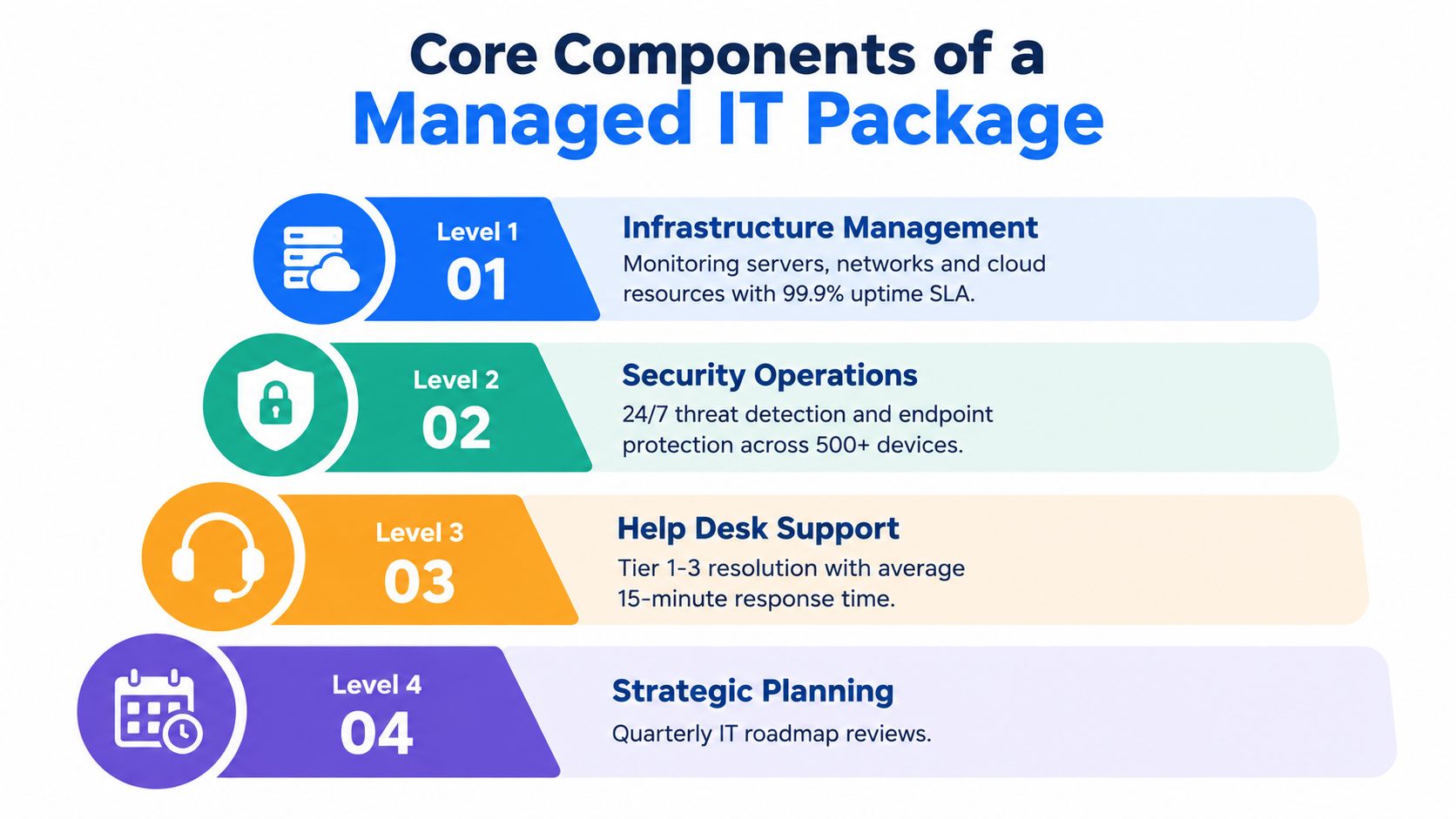
A credible managed IT package should cover the layers that employees depend on every day. Start at the physical connection, then work upwards through infrastructure, security, applications and user support. If a provider discusses only laptops and passwords, it isn't addressing the whole operating environment.
Infrastructure and connectivity
The first layer includes servers, routers, switches, wireless networks and cloud connections. Monitoring should identify capacity problems, failed services and unusual behaviour. Maintenance should include patching, configuration review, hardware lifecycle planning and documented recovery procedures.
The physical network deserves equal attention. Poorly installed or overloaded cabling can create intermittent faults that are difficult to diagnose remotely. Structured Cat5e and Cat6 data cabling, wireless optimisation and sensible network segmentation provide a more stable base for office staff, visitors, printers, phones and connected security equipment.
Internet connectivity and VoIP telephony belong in the same conversation. If a business relies on hosted phones or cloud email, a provider should document the dependencies, test failover arrangements where appropriate and explain how staff will communicate during an outage.
Security and resilience
Endpoint protection is only one control. A sensible package should also address:
- Managed firewalls: Review rules, firmware, remote access and supplier connections instead of treating the firewall as a box that can be installed and forgotten.
- Identity and access: Remove former users promptly, apply appropriate permissions and protect administrator accounts.
- Backups and recovery: Confirm what is backed up, where copies are held, how long restoration takes and when recovery tests occur.
- Employee support: Give staff a clear route for reporting suspicious messages, lost devices and unusual account activity.
- Physical security integration: Coordinate CCTV, intruder alarms and access control with the wider premises and network plan.
A cyber risk reduction for SMEs resource can help business owners frame security as a set of practical controls rather than an abstract technical exercise. The same principle applies to managed support. Ask what the provider will configure, monitor, test and report.
Helpdesk and strategic oversight
Users need more than a ticket number. They need clear escalation, sensible response commitments and engineers who can distinguish a local device problem from a wider service failure. The contract should state whether remote support, on-site visits, procurement, mobile devices and out-of-hours incidents are included.
Strategic oversight turns support data into decisions. Repeated printer faults may indicate replacement is more sensible than repair. Frequent access requests may reveal a poor onboarding process. An expanding remote workforce may require changes to identity controls, connectivity and user training.
The strongest package joins these layers together. Cabling supports the network, the network supports cloud applications and phones, security protects access, backups support recovery and the service desk helps people work through problems without improvising.
Evaluating the Financial Value of Managed Support
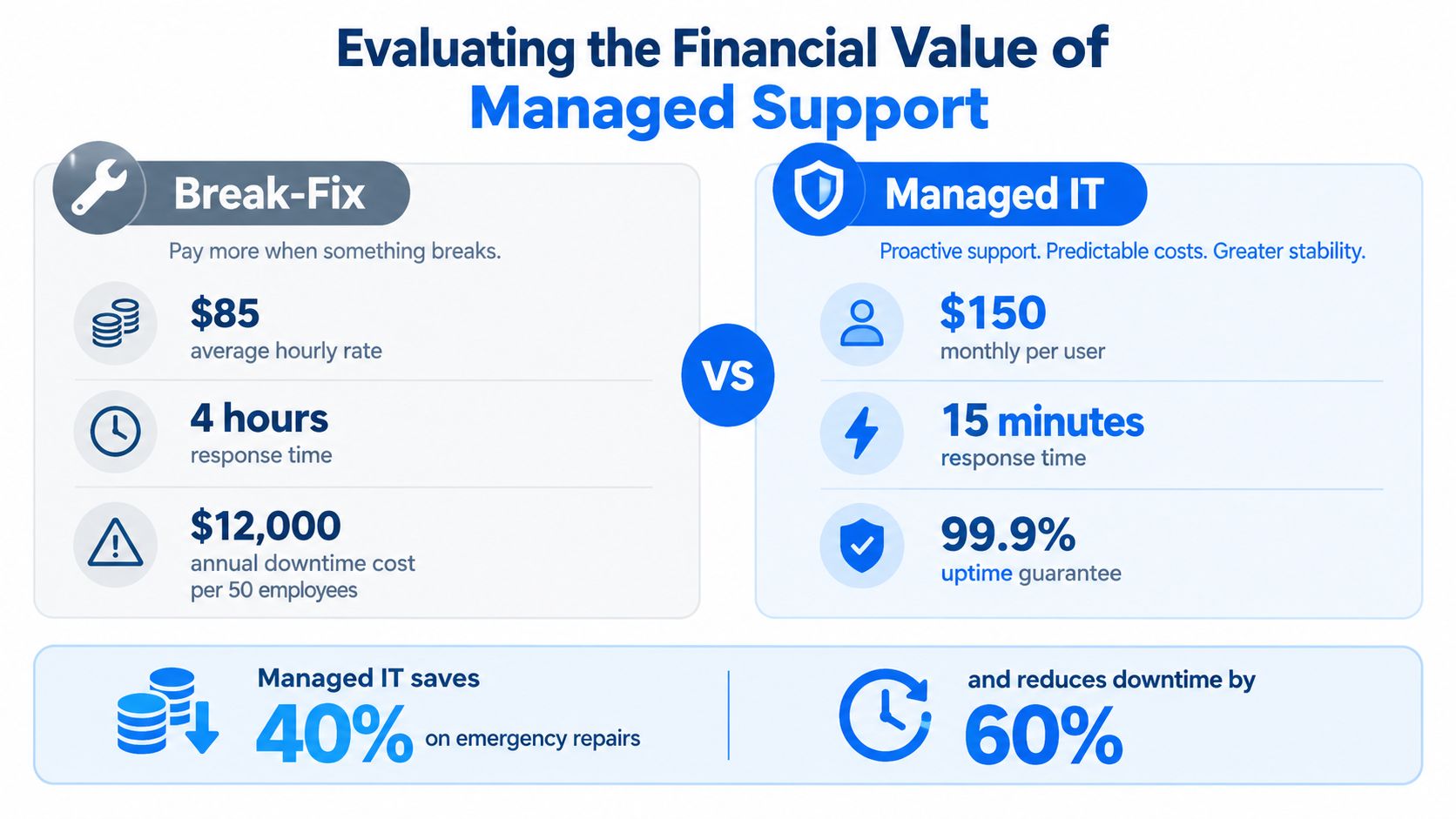
A growing SME can lose productive hours quickly when email fails, systems become unsafe or staff cannot access customer records. The monthly per-user fee matters, but it is only one part of the decision. Assess managed IT against the total cost of risk: business interruption, security exposure, recovery speed and the provider's ability to respond locally.
The UK Government's Cyber Security Breaches Survey 2025 found that 43% of UK businesses, approximately 612,000 businesses, reported a cyber security breach or attack in the preceding 12 months. The proportion reached 67% among medium-sized businesses and 74% among large businesses. Phishing affected 37% of businesses, ransomware was reported by 3%, and the survey estimated approximately 8.58 million cyber crimes of all types affecting UK businesses, including around 680,000 non-phishing cyber crimes.
A managed provider cannot prevent every incident. These figures justify spending on prevention, patching, endpoint protection, monitoring and response planning as part of the continuity budget. Security controls should be assessed alongside the practical question of how quickly the provider can contain an incident and restore normal operations.
Model the cost of risk
The survey reported that 16% of businesses experienced a negative outcome from a breach or attack, compared with 13% in the previous survey year. It placed the average cost of the most disruptive breach at £1,600, rising to £3,550 when zero-cost incidents were excluded. The analysis of the Government survey also reported that 62% of small businesses reported having some form of cyber insurance.
Those amounts are useful starting points; a complete loss calculation must also cover downtime, remediation and lost confidence. Build the assessment around four cost areas:
- Subscription fees: Include the managed service, security tools, backup, connectivity and excluded work.
- Employee downtime: Estimate the cost of waiting, manual work and tasks that must be repeated after data loss.
- Emergency remediation: Allow for urgent engineering, replacement equipment, forensic work and recovery assistance.
- Lost sales and confidence: Consider missed calls, delayed proposals, unavailable customer records and damaged client relationships.
A one-person office may prioritise rapid recovery and secure access over a large helpdesk. A multi-site business may place more value on coordinated changes, local engineering and supplier management. A firm dependent on VoIP or cloud email should give communications continuity a high weighting in the decision.
The service is valuable only when it protects an outcome the business can name.
Don't buy false confidence
Managed support earns its cost only when it produces dependable control. A broad toolset, weak documentation and untested backups can create reassuring reports without reliable recovery. Ask the provider to show how it measures recurring faults, response quality, backup success, security alerts and restoration readiness.
Insurance transfers part of the financial risk, but it does not provide operational recovery, rapid technical decisions or protection from downtime. Treat it as one layer of risk management. Prepared staff, functioning systems and a tested recovery process still determine how the business performs during an incident.
Compare predictable service costs with unmanaged exposure, then test the proposal against real operating conditions. If the provider cannot explain which disruptions it will help prevent, contain or recover from, the proposal is not ready for approval.
Navigating Pricing Models and Contract Structures
Pricing models shape behaviour. Ad-hoc support encourages the business to delay calls until a problem becomes serious. A fixed monthly agreement encourages routine maintenance, but only if the scope is clear and the provider has enough authority to act.
| Pricing Model | Best Suited For | Key Considerations |
|---|---|---|
| Ad-hoc break-fix | Very small operations with limited technology dependency | Costs vary, prevention may be absent and response depends on availability |
| Block hours | Businesses with occasional planned projects | Unused time, expiry rules, emergency rates and included tasks need careful review |
| Fixed-fee maintenance | Firms seeking predictable support for defined systems | Confirm covered users, devices, sites, security controls and exclusions |
| Per-user subscription | Growing businesses with relatively standardised users and applications | Check shared devices, contractors, leavers, new starters and multi-site treatment |
| Tiered service package | Businesses with different support and security priorities | Compare what each tier actually delivers rather than assuming the highest tier fits |
Read the agreement like an operator
The service-level agreement should describe response, not just resolution. A provider might acknowledge a critical issue quickly but take much longer to restore service. Ask how the contract defines priority, response, escalation, communication and restoration.
Check these points before signing:
- Coverage boundaries: List servers, endpoints, network equipment, cloud platforms, phones, sites and physical security systems.
- Out-of-hours support: State the hours, channels, escalation path and extra charges.
- On-site work: Clarify when visits are included, how travel is charged and what happens during a physical failure.
- Third-party responsibility: Identify who manages Microsoft 365, internet suppliers, software vendors and hardware warranties.
- Change control: Define what counts as routine support, a project or billable consultancy.
- Exit arrangements: Require access to documentation, credentials, configurations and backups if the relationship ends.
Match the model to the risk
A one-person consultancy with simple cloud tools may manage with a narrow support agreement, provided it has documented recovery and secure access. A growing firm with a shared office, remote employees, cloud applications and customer-facing phones needs broader accountability. Multi-site organisations should avoid contracts that treat each location as an afterthought.
Never choose on headline price alone. Compare the total included service, the quality of documentation, the provider's ability to attend site and the consequences of exclusions. Cheap support becomes expensive when every sensible request is treated as a separate project.
Choosing a Local Provider in London and Essex
A cheap remote support contract looks fine until a switch fails, cabling is damaged, or someone needs to inspect the building. At that point, response time matters more than brochure promises. Businesses in London and Essex should choose a provider that can manage cloud systems remotely and still get a competent engineer on site fast.
Local knowledge changes the outcome. An engineer who knows the premises can trace cabling faster, understand where network equipment sits, and see how access control, telephony, and internet connectivity depend on each other. A remote helpdesk may diagnose the issue correctly and still leave staff waiting for someone who can resolve it on site.
A good test is simple: ask how the provider handles real disruption.
- Where are engineers based: Can they reach your sites without leaning on subcontractors for every visit?
- What can they source: Can they replace failed networking, wireless, telephony, or security equipment quickly?
- How do they document sites: Will you get current diagrams, equipment records, and port details?
- What happens during a premises incident: Can one team coordinate IT, CCTV, alarms, and access control?
- How do they communicate: Will a non-technical manager get a clear explanation and practical options?
A local provider should also understand that many regional businesses run older office infrastructure alongside newer cloud services. Fixing one part without checking the rest creates fresh problems. A wireless upgrade can expose cabling limits. A phone system change can depend on firewall settings and internet performance.
Ask for examples, not sales talk. How do they handle a failed internet connection, a lost device, a new office, or a suspected compromised account? You are testing for repeatable process, clear escalation, and a hard line between urgent recovery and longer-term improvement.
Face-to-face planning helps when priorities shift. A provider that knows your sites, staff patterns, and customer commitments can recommend the right order of work instead of pushing a generic package.
Local support earns its place when a remote diagnosis still needs a safe, competent pair of hands on site.
Extended support hours matter too. If your business serves customers outside a standard office day, confirm whether help is available while your systems are in use, not just while the provider's office is open.
Aligning IT Strategy with Cloud and Digital Adoption
Cloud adoption is now a routine part of business operations. The Office for National Statistics found that 69% of UK firms used cloud-based computing systems and applications in 2023, while 61% adopted specialised software. Adoption was lower for specialised equipment at 36%, artificial intelligence at 9% and robotics at 4%, according to the ONS analysis of technology adoption in UK firms.
For an SME, the subscription fee is only one part of the decision. Cloud email, file sharing, customer-management systems, accounting platforms and hosted communications often support daily work. A failed login, unsafe sharing setting or unavailable internet connection can stop sales and service delivery. Assess the provider against continuity, security exposure and response time, including how quickly someone can act locally when remote support is insufficient.
Buying the application is only the start. Access, configuration, data protection, integrations, backups, supplier relationships and troubleshooting still need clear ownership across office and remote locations.
Treat cloud as a managed environment
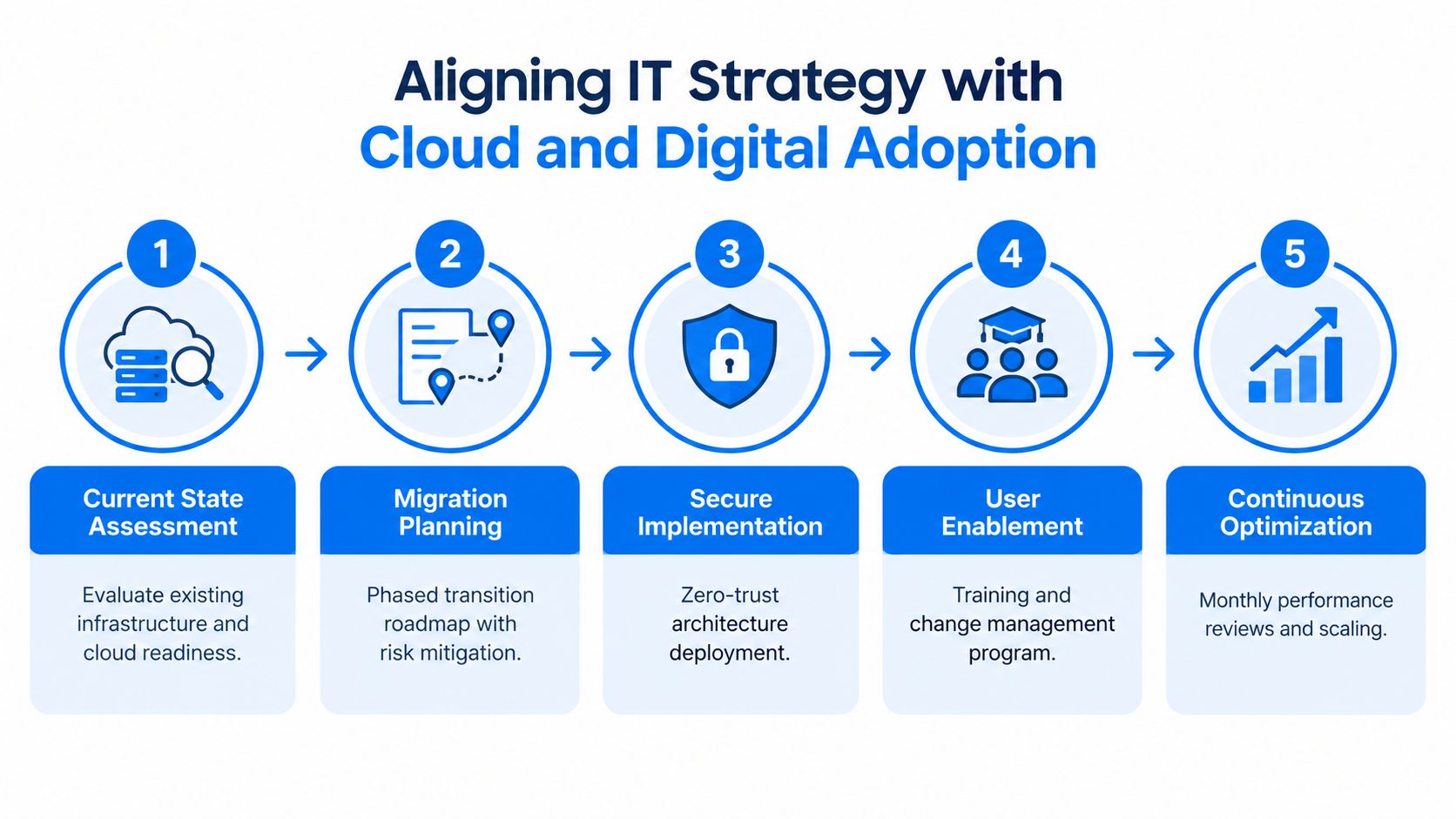
Start with dependencies. Identify the users who need access, the applications that exchange data, the effect of an internet failure, the platform owner and the person authorised to make urgent changes.
A provider should establish controls that support measurable continuity:
- Access management: Match permissions to roles and remove access when responsibilities change.
- Secure configuration: Review authentication, sharing settings, devices and administrative privileges.
- Resilience: Document backup arrangements and recovery priorities for critical information.
- Integration: Confirm that cloud applications work with local networks, printers, phones and remote access.
- User enablement: Train staff on safe access, file handling, reporting and procedures during disruption.
This gives staff a workable hybrid environment without requiring them to understand every dependency. Management can also see which systems support revenue, which can be replaced and where investment reduces operational risk.
Connect internal and external digital work
Map the full customer journey before approving separate technology projects. If a hosted phone system routes enquiries to an unmonitored inbox after hours, a well-managed network has not protected the sale. Trace each enquiry from the website form or advert through the phone system, inbox, CRM and staff response.
The website, customer communications and internal tools must support the same operating process. Map the whole digital operating model first, then decide which services one provider can legitimately cover and which need a specialist. This approach exposes gaps between customer-facing systems and the infrastructure staff rely on, while keeping accountability clear when something fails.
Your Decision Checklist and Next Steps
Start with an inventory, not a supplier shortlist. Record every location, user group, device, cloud application, phone service, internet connection, backup arrangement and security control. Mark the systems that would stop sales, service delivery, payroll, customer communication or regulatory work if they became unavailable.
Audit your current exposure
Use the next few weeks to answer these questions:
- What fails repeatedly: Review support emails, informal complaints and staff workarounds. Recurring faults deserve a permanent fix, not another reset.
- What depends on what: Map the relationship between internet access, cloud email, file sharing, VoIP, local networks and key applications.
- Can you recover: Ask when backups last completed successfully, who can restore them and whether restoration has been tested.
- Who has access: Check administrator accounts, former employees, suppliers, remote workers and shared credentials.
- What does the contract exclude: Read response times, on-site work, security, projects, hardware, out-of-hours support and termination terms.
Then ask each potential provider to explain onboarding in plain English. A competent team should assess the environment, identify immediate risks, document dependencies, install agreed monitoring and security controls, confirm backup arrangements and establish a support route. It should also separate urgent remediation from later improvement work so the transition doesn't become an uncontrolled project.
Interview for outcomes
Ask:
- How will you measure service quality: Request reporting on response, recurring incidents, backup status, security events and unresolved risks.
- How do you handle a suspected breach: Confirm who makes decisions, how accounts are contained and how management receives updates.
- How often are recovery procedures tested: Don't accept a backup statement without evidence that restoration works.
- What requires approval: Understand which changes the provider can make immediately and which need your authorisation.
- Who attends site: Establish the process for failed hardware, cabling, wireless, telephony and premises security.
- How will you support growth: Discuss new starters, additional locations, suppliers, applications and changing working patterns.
Use disruption as the basis of the business case. The Government survey figures show why cyber exposure deserves attention, while the broader cost model should include employee downtime, emergency remediation and lost sales, not just the invoice from the support provider. Insurance may help with certain losses, but it won't run your recovery process for you.
A managed service is worth purchasing when it delivers defined outcomes: faster recovery, fewer recurring faults, controlled access, secure supplier connections and continuity of communication. If you can't measure those outcomes, keep negotiating until the agreement is operationally specific.
Networking2000 provides contract-based business IT support, infrastructure management, managed firewalls, endpoint protection, backups, disaster recovery, VoIP, connectivity, networking and on-site engineering across London and Essex. Visit Networking2000 to discuss a managed support package built around your systems, locations and continuity priorities.

