A dropped video call or a phone that won’t connect can quickly disrupt work and customer service. Reliable business connectivity in Essex depends on more than broadband: your workplace network, security and business phones all need to work together.
These systems are easier to plan when you consider how they depend on one another. A firewall setting can affect access to business tools, while a VoIP phone relies on a stable network for clear calls. With the UK’s analogue phone network scheduled to switch off by January 2027, businesses still using traditional landlines also need to plan their next step.
This guide explains what dependable business connectivity involves and how to assess your organisation’s needs. You’ll learn how networks, managed firewalls, IT security and VoIP fit together, what to review in your setup, and how local IT support can help manage systems as your business changes. From its Wickford base, Networking2000 supports businesses with managed IT and connectivity-related services.
Key Takeaways
- Map your users, work locations, devices, calls and essential applications to understand what your connectivity needs to support.
- Review internet access, your internal network, business telephony and managed IT as distinct but connected parts of the setup.
- Consider where wired connections and Wi-Fi access points are needed, and how security controls protect network access.
- Choose IT support and communications that suit daily operations, including whether VoIP fits the way your team handles calls.
- Explore business connectivity Essex support from Networking2000, a Wickford-based provider serving businesses in Essex and London.
What does business connectivity in Essex include?
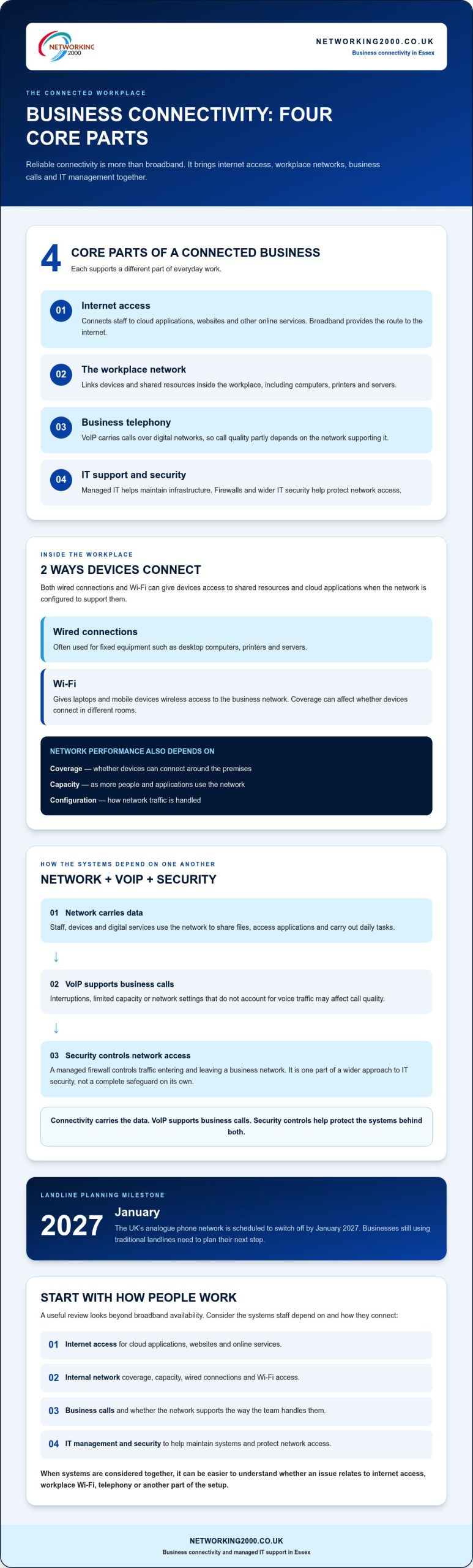
For a small or medium-sized business, connectivity is the combination of systems that lets staff, devices and digital services work together. It includes the internet connection, the network inside the workplace, business phone systems, and the IT support and security that help maintain those systems.
Internet access connects your organisation to online services; business connectivity also covers the wider systems linking people, devices and services inside and outside the workplace. Broadband provides the route to the internet, but it is only one part of the setup. Internal connections, telephony and IT management matter too.
Which parts make up a connected business?
Internet access lets staff use cloud applications, websites and other online services. Within the workplace, wired network connections link equipment such as desktop computers, printers and servers. Wi-Fi gives laptops and mobile devices wireless access to the internal network, while critical systems such as retail point-of-sale terminals can rely on dedicated cellular solutions from Choice IoT to prevent payment downtime.
Business telephony is another part of the picture. VoIP carries calls over digital networks, so call quality depends partly on the network supporting it. Some business gateways bring functions such as routing, voice and security together. The multi-service business gateway (MSBG) is one example of this combined approach. Managed IT support, firewalls and IT security help businesses maintain their infrastructure and protect network access.
Why does reliable connectivity matter to Essex businesses?
Staff depend on connected systems for everyday work: sharing files, updating records, joining meetings and responding to customers. If a connection is slow or unreliable, these tasks can take longer or need a workaround. The disruption may be small at first, but it can build when several people depend on the same systems.
For example, one team at an Essex business might share files through a cloud service while another handles customer calls. Staff need reliable access to documents and a network that supports clear conversations. If the systems are poorly organised, a fault may affect more than one task. It can then be difficult to tell whether the cause is internet access, workplace Wi-Fi, telephony or another part of the setup.
Business connectivity Essex planning should therefore start with how people work, not just the broadband connection. Reviewing the network, communications and security together helps show what supports daily operations and where management or technical support may be useful.
How business networks, VoIP and security work together
A business network carries data between staff, devices and digital services. In an office, desktop computers and other fixed equipment often connect by cable, while laptops and mobiles use Wi-Fi access points. Both can provide access to shared resources and cloud applications when the network is configured to support them.
How does a business network support everyday work?
Imagine a member of staff opening a shared file, joining an online meeting and sending a document to a network printer. Each task uses part of the network. Wi-Fi coverage affects whether devices can connect in different rooms; capacity matters as more people and applications use the network; and configuration determines how traffic is handled.
A weak signal in one area, a congested connection or a configuration issue can make routine work frustrating. The right setup depends on the premises, devices and working practices, so performance needs to be considered in that context. Managed IT support can help businesses maintain network infrastructure and investigate issues affecting connected systems.
How do VoIP and managed firewalls fit in?
VoIP telephony carries business calls over digital networks. Calls need a connection configured to support them. Interruptions, limited capacity or network settings that do not account for voice traffic may affect call quality. Wired connections, Wi-Fi coverage and the wider internet connection can all be relevant, depending on how the phones are used.
A managed firewall provides a security layer that controls traffic entering and leaving a business network. It helps protect connected systems, but is one part of a wider approach to IT security, not a complete safeguard on its own. Managing voice and security alongside the network can also make it easier to understand how a change or fault in one area affects another.
Connectivity carries the data, VoIP supports business calls, and security controls help protect the systems behind both.
For businesses planning business connectivity Essex, broadband availability is one part of the picture. The UK government’s Project Gigabit programme sets out the national rollout of gigabit-capable broadband; an individual business’s options depend on its location. Reviewing the network, calls and security together helps identify what needs attention. Explore local business IT support for practical help maintaining and managing connected systems.
Which business connectivity approach suits your Essex organisation?
The right setup depends on what your organisation needs to keep running. A small office with straightforward systems may mainly need help maintaining its internal network. A business with several teams, cloud applications and customer calls may need broader managed IT support that considers how its systems work together. The best starting point is the work your systems need to support, rather than assuming every business needs the same arrangement.
Use this guide to match common needs with relevant systems and practical outcomes:
| Business need | Relevant system or support | Practical outcome |
|---|---|---|
| Maintain workplace devices and network | Managed IT support | Infrastructure is monitored and managed in line with business requirements |
| Handle customer calls across a team | Business telephony, including VoIP | Calls can fit staff roles and communication routines |
| Control traffic to and from the network | Managed firewall | Network traffic has a managed security layer |
When might managed IT support be useful?
Managed IT support can suit businesses that need ongoing help maintaining infrastructure, managing devices and resolving technical issues. It may be particularly useful when internal staff have limited time or specialist knowledge to oversee IT alongside their main roles. Consider the systems involved, the technical requirements and the support your team needs day to day when deciding what is appropriate.
For a closer look at what this can involve, read the managed IT support guide for Essex businesses.
When should a business consider VoIP or managed firewall support?
Review your calling needs if your team handles regular customer calls, works across different locations or needs calls to fit changing staff arrangements. VoIP telephony may suit these requirements, while a traditional phone setup may continue to fit established routines. Compare the options in the VoIP and landline comparison guide.
A managed firewall can be relevant when your business needs ongoing oversight of network traffic and a security layer for connected systems. It forms part of wider IT security, rather than replacing it. The managed firewall guide for Essex explains this support in more detail.
A business connectivity Essex plan works best when it reflects your actual operational needs. Start with the tasks that must run smoothly, then match each one to the right network, communications or security support.
How to assess your business connectivity needs in Essex
A useful review starts with how your organisation works, not with a shopping list of technology. Map the people, places and systems that depend on connectivity, then identify where problems affect staff, customers or essential tasks. This gives you a practical basis for deciding what to address first.
What should you include in a connectivity review?
Ask staff who use the systems day to day where access slows or drops, which applications are essential, and how they handle calls. Record how people connect when working away from the main workplace. Include shared resources such as printers and files, plus the areas where staff rely on Wi-Fi.
- Set business priorities. Identify the work that must run smoothly, such as serving customers, processing orders or accessing key records.
- Map users and working locations. Record who needs access, where they work and whether they move between rooms, sites or remote locations.
- List devices and applications. Include computers, mobiles, phones, shared equipment and cloud-based tools. Note any slow or unreliable access.
- Review calls and shared resources. Consider call volumes and routines, alongside how staff reach shared files, printers and other systems.
- Check coverage, security and access. Review Wi-Fi reach, wired connections, who can access business systems, which security measures are in place and who manages them.
- Consider continuity and support. Identify how essential work would continue during a connectivity or system issue, and who is responsible for maintaining the infrastructure.
How can you plan improvements without unnecessary complexity?
Rank issues by their effect on operations, customer service and staff time. For instance, a weak connection in an area used for customer calls may deserve attention before an inconvenience affecting occasional tasks. Then consider the equipment you already have, how your team works and likely business changes. Any improvement should address a clear need, rather than add systems or complexity without purpose.
Checklist: Set priorities, map users and systems, check coverage and security, identify continuity needs, then plan changes around your current setup and future requirements.
A focused business connectivity essex review can turn scattered concerns into a clear plan. For support assessing and managing your business IT infrastructure, discuss your connectivity needs with Networking2000.
Business connectivity support in Essex from Networking2000
Business connectivity works best when the systems behind everyday tasks are planned together. Networking2000 is a Wickford-based business IT provider supporting small and medium-sized businesses across Essex and London. Its services help businesses manage the technology that supports their operations.
Support can be shaped around the systems you use and the practical issues your team needs to address. This may involve maintaining IT infrastructure, managing network security or reviewing how business calls are handled. The aim is to make the setup easier to manage without adding complexity that does not serve your organisation.
How Networking2000 supports connected business operations
Managed IT support helps businesses maintain their IT infrastructure and manage technical requirements as they evolve. Managed firewalls and IT security provide security oversight for business networks and connected systems. For organisations reviewing business communications, VoIP telephony offers a digital way to manage business calls as part of the wider connectivity plan. Considering these services together helps align support with how your systems and staff rely on one another.
What is a useful next step for an Essex business?
Before discussing changes, note the systems your organisation uses, the tasks that matter most and the connectivity concerns affecting staff or customers. Include how your team works, what infrastructure is already in place and where technical support would help. This gives you a clear starting point for discussing options that fit your current environment and requirements.
There is no single setup that suits every business. Networking2000 can discuss your organisation’s needs and tailor support to its existing systems and working arrangements. For practical help planning your business connectivity Essex requirements, discuss your business connectivity needs with Networking2000.
Make your next connectivity decision with confidence
Dependable business connectivity for Essex organisations starts with understanding how staff, devices and essential services connect. Review the systems your team depends on, identify where access or communications cause friction, and prioritise improvements around operational needs. Network performance, business calls and security work best when considered together, rather than as separate problems.
For businesses without in-house IT expertise, support can make those decisions easier to manage. Networking2000 is a Wickford-based business IT provider serving Essex and London, with managed IT support, managed firewalls and VoIP telephony tailored to business infrastructure and requirements.
Start by listing your current systems, the work they support and the issues you want to resolve. Discuss your business connectivity needs with Networking2000 and take a practical next step towards a setup that works for your organisation.
Frequently Asked Questions
What does business connectivity include?
Business connectivity includes the systems that let staff, devices and services communicate. That means internet access, internal wired and Wi-Fi networks, business phones, security controls and the IT support that helps maintain them. For example, a team may use Wi-Fi to access cloud software, a wired connection for a shared printer and VoIP phones for customer calls. Reviewing these elements together can help identify where a problem is affecting everyday work.
How can I improve connectivity for my business in Essex?
Start by identifying where access is slow or unreliable and which tasks it affects. Check Wi-Fi coverage across your premises, how devices connect, and whether business calls or cloud applications are disrupted. Then review network security and who manages your systems. Improvements should fit your equipment and working arrangements. Networking2000, based in Wickford, provides managed IT support for businesses in Essex.
Is VoIP suitable for a small business?
VoIP can suit a small business that wants to manage calls over a digital network. Consider how your team handles customer calls, whether staff work from different locations and which call functions support day-to-day work. Call quality depends partly on the network carrying the voice traffic, so connection capacity and configuration matter. Assess VoIP alongside your wider business connectivity needs, rather than treating the phone system as a separate decision.
Can a managed firewall improve business connectivity?
A managed firewall can support safer business connectivity by controlling traffic entering and leaving your network. It adds a security layer for connected systems and business data, with management helping keep the firewall aligned with your organisation’s requirements. A firewall does not automatically make a connection faster or resolve Wi-Fi coverage issues. It should form part of wider IT security, alongside appropriate network management and access controls.
What should a business connectivity assessment cover?
A useful assessment should cover business priorities, users, work locations, devices, calls and essential applications. Review wired connections and Wi-Fi coverage, note where access problems disrupt tasks, and consider remote working and shared resources. Include existing security measures, who manages them, access permissions and how essential work could continue during an issue. This gives you a practical view of current systems and helps prioritise changes according to their operational impact.
How do managed IT support and business connectivity work together?
Managed IT support helps maintain the infrastructure behind business connectivity. This can include managing business systems, addressing technical issues and supporting the network, devices and services staff rely on. If a problem affects access to files or business applications, support can help investigate the systems involved. For small and medium-sized businesses, tailored support can reflect their existing environment and technical requirements, without assuming every organisation needs the same setup.
Does business connectivity only mean an internet connection?
No. Internet access connects your organisation to online services, but business connectivity also includes the internal network, workplace Wi-Fi, wired device connections, phone systems and security controls. These parts work together to support tasks such as accessing cloud applications, sharing files and handling calls. For business connectivity in Essex, review the full setup, not just the broadband service, to understand how staff and systems connect throughout the working day.

