What if the desks and computers are in place, but staff still can’t access email, files or phone systems on their first day? An office move involves more than transporting equipment. This moving office IT relocation checklist Wickford businesses can use treats the changeover as a business-critical cutover, so essential systems are planned, moved and tested in the right order.
Downtime often starts with a missed dependency: broadband that hasn’t been arranged for the new premises, a network setting that needs updating or an account no one has responsibility for. Even where full fibre is available in Wickford, the service needs to be ordered for the new address. Planning early gives you time to identify these tasks, assign owners and set deadlines.
Use this guide to prepare before the move, protect equipment and business data, and test systems before staff return. It covers computers, connectivity, phones, networks and security. Managed IT support from a local provider can help coordinate readiness checks and follow-up, reducing the planning burden on your team.
Key Takeaways
- Use a dated plan with named owners to keep relocation tasks and decisions on track.
- The moving office IT relocation checklist Wickford businesses need should cover equipment, accounts, suppliers and services tied to the current site.
- Compare in-house coordination with managed IT support by considering who owns each task, brings technical expertise and follows through.
- Divide the move into preparation, moving-day control and post-move checks, including secure handling of equipment and data.
- Plan for phones and network security as well as computers, and test essential systems before staff return.
Why a Wickford office move needs an IT relocation checklist
Overlooked systems can delay staff returning to work, even when desks and computers arrive safely. An office IT relocation checklist sets out the people, systems and equipment involved, from preparing the new site to checking that staff can work securely after the move.
Moving hardware is only one part of the job. Employees also need working internet, access to files and applications, functioning phones and the right permissions. The IT infrastructure components behind those services include hardware, software and networks. Planning them together can reveal dependencies a basic packing list misses.
Which business systems must be ready on day one?
Build your list around the services staff rely on, not just the equipment being moved. Include:
- Internet access, Wi-Fi, routers, switches and other network equipment.
- Computers, printers and shared devices, including the cables and accessories they need.
- Email, cloud applications, file access, backups and business-critical software.
- VoIP phones, call routing, user access and services that depend on the office site.
What makes a Wickford office move different from a home move?
A business move affects more than one household’s access to technology. Staff need systems to do their jobs, customers may need to reach the business, and interruptions can affect daily operations. Clear ownership and testing are as important as transporting equipment.
Before confirming move dates, map the requirements of both offices. Record the services used at the current site, what the new premises need to support, and which tasks depend on suppliers, accounts or site-specific arrangements. For organisations upgrading or reconfiguring their workplace tech, working with design specialists like AVC Principles for audio-visual and ICT system design helps ensure physical spaces are fully prepared for modern collaboration. This gives you time to identify gaps and assign responsibilities before staff arrive.
Quick checklist summary:
- List users, equipment, systems and site-dependent services.
- Map dependencies between connectivity, devices, access and applications.
- Assign an owner and readiness check to each essential service.
- Test staff access, phones and business systems at the new office.
A well-ordered moving office IT relocation checklist Wickford businesses can follow turns the move into a planned change, not simply an equipment transfer. It gives your team a clear basis for coordinating preparation and checking that essential services are ready.
Plan the Wickford IT relocation around dependencies and owners
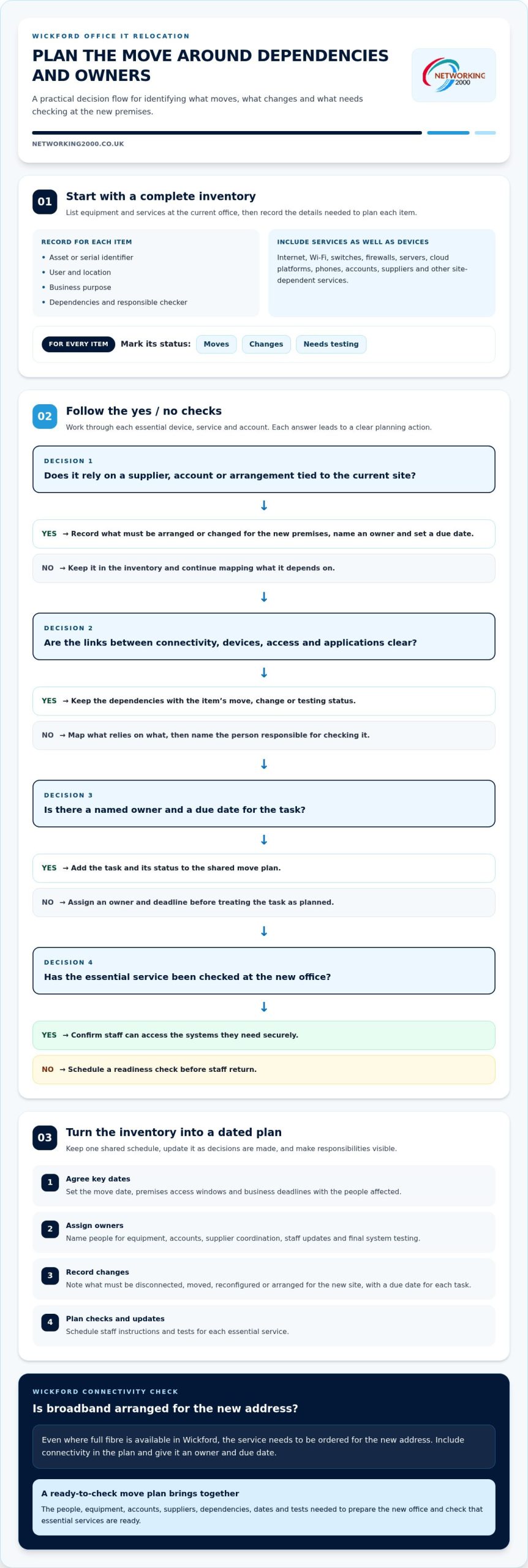
A useful move plan shows what must happen, when it must happen and who is responsible. Start with a dated schedule, then link each task to the systems and people it affects. This turns the moving office IT relocation checklist Wickford businesses need into a working plan rather than just an equipment record.
Build an IT inventory and dependency map
Begin with an inventory of equipment and services at the current office. Record each device’s asset or serial identifier, user, location and business purpose. Include computers, printers, network equipment and phones, as well as accounts, suppliers and services tied to the site.
Next, map how these parts depend on one another. Staff might need office connectivity to reach a cloud application, then an account and authentication method to sign in. Record internet access, Wi-Fi, switches, firewalls, servers, cloud platforms and connected services. A useful successful IT relocation plan considers risk and business continuity instead of treating each device as a separate item.
For every item, mark whether it moves, changes or needs testing at the new premises. Note dependencies and name the person responsible for checking them. This can expose gaps, such as a service that relies on an account no one has been assigned to manage.
Set dates, responsibilities and communications
Use this sequence to turn the inventory into an actionable schedule:
- 1. Agree key dates. Set the move date, premises access windows and business deadlines with the people affected.
- 2. Assign owners. Name a person for equipment, accounts, supplier coordination, staff updates and final system testing.
- 3. Record changes. Note what must be disconnected, moved, reconfigured or arranged for the new site, and set a due date for each task.
- 4. Plan checks and updates. Schedule staff instructions and tests for each essential service.
Keep one shared plan and update it as decisions are made. Staff need clear information about what to expect, while the move coordinator needs an up-to-date view of outstanding tasks. For more on ongoing support, see this managed IT support guide for Essex businesses.
Managed IT support can help coordinate infrastructure tasks and readiness checks around the relocation. Include managed IT support in your move planning to give technical tasks clear ownership.
Compare relocation options and manage the downtime concern
Moving IT in-house can seem straightforward: label the equipment, transport it and reconnect everything at the new office. The challenge lies in the dependencies behind each device. Connectivity, user access, security settings, applications and phone services may all need attention. If one link is missed, staff may be unable to work as planned.
Downtime risk depends on the move’s scope, the readiness of the new premises and systems, and whether checks are completed before staff rely on them. No approach can promise that disruption will be avoided. The aim is to make responsibilities clear, identify risks early and test essential services in a controlled order. Use the moving office IT relocation checklist Wickford businesses can adapt to decide who should coordinate each part.
When can an internal team coordinate the IT move?
An internal approach can suit a small, well-documented setup with a technical owner who understands its equipment, accounts and dependencies. Before assigning the work, consider whether that person has time alongside their usual duties, knows the equipment and can coordinate any suppliers involved. If those responsibilities are unclear, name additional owners and build checks into the plan.
When does managed IT support add value?
Managed IT support can help map dependencies, prepare devices and organise readiness checks across infrastructure, connectivity, access and security. After the move, a support partner can help test whether users can reach the services they need and whether network and security arrangements are working as intended. Include business phone continuity in the plan too. This VoIP and landline comparison guide can help frame that part of your planning.
| Consideration | Internal coordination | Managed IT support |
|---|---|---|
| Ownership | Internal staff manage tasks and supplier communication. | Support helps coordinate technical tasks and readiness checks. |
| Expertise | Best suited to a well-documented setup with an available technical owner. | Useful where infrastructure, security or service dependencies need specialist attention. |
| Risk to manage | Competing duties or unfamiliar equipment can leave gaps in the plan. | Responsibilities still need to be agreed, including who makes business decisions. |
| Follow-through | Internal owners arrange and record tests. | Support can assist with post-move connectivity, access and security checks. |
Choose the approach that fits your setup and available ownership. Whichever route you take, name the people responsible for decisions, coordination and testing.
Use this before, during and after office move IT checklist
Keep the moving office IT relocation checklist Wickford businesses use practical: assign an owner to each action, record its status and note any issue needing follow-up. Handle equipment and data securely throughout the move, following your organisation’s procedures and keeping responsibility clear.
Before moving day: prepare systems and people
- [ ] Confirm the inventory and plan. The move coordinator checks that devices, shared equipment and essential services are listed, with an owner for each task.
- [ ] Agree access and equipment labels. The office or facilities lead confirms access arrangements. The IT owner checks labels against the inventory and planned locations.
- [ ] Check backups and account access. The IT owner reviews backup status and documents how authorised staff access essential accounts and systems. Keep access information secure and available to those responsible.
- [ ] Brief staff. The team lead explains what is changing, when staff should reconnect and where to report issues. Include any actions employees need to take with their devices or accounts.
Before moving equipment, make sure the people responsible understand how to handle it securely. Keep the contact list and task plan accessible to the move team, without exposing sensitive account details.
Moving day and first working day: reconnect and test
- [ ] Track equipment arrival. The equipment owner checks items against the inventory and notes anything missing or damaged. Confirm network equipment is in its planned location before testing services.
- [ ] Test connectivity and access. The IT owner checks internet access and Wi-Fi, then confirms staff can sign in and reach email, shared files and essential business applications.
- [ ] Check phones and security. The telephony owner tests VoIP calling and call routing. The IT owner checks firewall protection and confirms that relevant security settings are in place.
- [ ] Verify backups and record issues. The person responsible for backups checks that they are operating as expected. Log problems with an owner and next action, then retest affected services before marking them ready.
After the move: close the loop
Ask staff to report access or equipment problems through the agreed channel. The move coordinator reviews outstanding issues, confirms each has an owner and updates the checklist when tests pass. A device powering on doesn’t prove its user can work, so verify the services they actually need.
For help coordinating IT readiness checks around your office move, plan your relocation with Networking2000.
Get local IT support for a smoother Wickford office move
A well-planned relocation brings people, equipment and business services together in the right order. Networking2000 provides managed IT support and infrastructure services to businesses, helping coordinate systems and readiness checks around an office move. A moving office IT relocation checklist Wickford businesses can rely on should cover the whole working setup, including connectivity, staff access, phones and security.
What a coordinated IT support plan can cover
Planning starts with understanding your existing systems, staff requirements and intended setup at the new premises. From there, tasks and responsibilities can be shaped around your organisation: what needs preparing, which systems depend on one another, and what should be checked after the move.
That coordination can cover computers and network infrastructure alongside VoIP telephony and firewall protection. Treat phones as part of business readiness, not as an afterthought once desks are occupied. For security planning, read the Wickford managed firewall guide. Once equipment and services are in place, agreed checks can confirm whether connectivity, user access and security are working as intended.
The right scope depends on your setup. Your team knows its business priorities, while IT support can help organise the technical preparation and checks. Agreeing who handles each decision keeps the plan practical and suited to your requirements.
What to prepare before discussing the move
A few details make an initial planning conversation more useful. Bring together:
- Your target move date and any important business deadlines.
- A current equipment list and known links between systems or services.
- The essential applications, accounts and services staff need to do their work.
- Staff numbers, phone requirements and the working hours when systems are most important.
- Any known requirements or constraints at the new office.
You don’t need a perfect technical inventory to start. A clear outline of what the business relies on can help identify priorities and shape a support plan around your circumstances. Local, tailored support can help coordinate the moving parts and plan suitable follow-up.
If your business is moving in Wickford, discuss managed IT support for your office move with Networking2000. Start with your priorities, move date and a list of the systems staff need to work.
Make your Wickford office move a planned IT change
A well-managed office move starts with clear ownership and a realistic sequence of tasks. Use the moving office IT relocation checklist Wickford businesses can adapt to map dependencies, prepare staff and equipment, and test essential services before relying on them. Include phones, connectivity and security alongside computers and files.
Managed IT support can help bring those moving parts together, from infrastructure planning to post-move readiness checks. Networking2000 provides managed IT and infrastructure services, business VoIP, managed firewalls and IT security. Shape the plan around your systems, staff requirements and new premises, and set out priorities before the move date.
Discuss your Wickford office move with Networking2000 and take a practical next step towards a controlled changeover. Clear preparation and support help your team approach moving day with greater clarity.
Frequently Asked Questions
How do I plan an office IT relocation?
Start by documenting your current systems, the new office requirements and the people responsible for each task. Use a moving office IT relocation checklist Wickford businesses can adapt to record equipment, accounts, connectivity, suppliers and business-critical services. Set dates for each action, including staff updates and post-move tests. Map dependencies too: staff may need working internet, user access and specific applications before they can resume normal work.
What should be on an office IT relocation checklist?
Include equipment, users, locations, accounts, suppliers and services tied to the existing site. Add internet access, Wi-Fi, network equipment, computers, printers, shared devices, email, cloud applications, files, backups and essential software. Record what moves, what changes and what needs testing at the new office. Add owners, due dates, staff communications and a way to log unresolved issues, so important tasks don’t disappear in the move-day rush.
How can a business reduce IT downtime when moving offices?
Reduce disruption by identifying technical dependencies early and preparing the new premises before staff need to work there. Confirm access arrangements, connectivity plans, equipment locations and supplier tasks. Assign an owner to each action, then test essential systems in a sensible order, including internet, user access, email, shared files and phones. The amount of disruption depends on the move’s scope and readiness, so plan carefully without assuming downtime can be eliminated.
Can we move our office IT without managed IT support?
Yes, an internal team can coordinate a move if the setup is well documented and someone has the technical knowledge and time to own the work. Account for equipment, accounts, suppliers, connectivity, security and post-move checks. The workload can be easy to underestimate, especially if technical tasks compete with normal responsibilities. Managed IT support is another option for coordinating infrastructure preparation and readiness checks around a Wickford office move.
What happens to business phones when an office moves?
Include phone services in the relocation plan rather than treating them as an afterthought. Check how the business uses its phone system, which staff or teams need access, and whether call routing needs to change for the new setup. For VoIP, plan to test calling once the relevant connectivity is available. Tell staff who will check the phones and how to report problems before relying on the system for customer calls.
When should we start planning an office IT move?
Start as soon as you begin planning the office move, ideally before dates and arrangements are fixed. Early planning gives you time to inventory systems, map dependencies, clarify responsibilities and identify tasks involving suppliers or the new premises. The schedule varies with the size and complexity of your setup. Allow time for preparation and testing, and review the plan when move details or business priorities change.
Do we need to test the network after an office move?
Yes. Test the network at the new office before treating systems as ready for normal work. Check internet access and Wi-Fi, then confirm staff can sign in and reach shared files, email and essential applications. Also check that phones work, firewall protection is in place and backups are operating as expected. Record any failures, assign someone to resolve them and retest affected services before closing the relocation tasks.

