Feeling let down by current IT provider? The key question is whether the problems can be put right or whether it’s time for a more accountable partnership. Recurring faults, slow updates and uncertainty about who manages important systems can make everyday work harder and leave business risks unclear.
You’re right to expect more than a response when something breaks. Dependable IT support should help prevent avoidable issues, explain what’s happening in plain English and make responsibilities clear. If that isn’t your experience, identify where the service is falling short before deciding what to do next.
This guide will help you assess specific service failures, define what better support should look like and plan a controlled handover. You’ll find practical ways to review your systems and responsibilities, prepare information for a change and consider how a local managed IT support partner in Wickford can bring support, security and business technology into a clearer relationship.
Key Takeaways
- If you’re feeling let down by current IT provider, record recurring problems and their effect on staff, customers and business continuity.
- Set clear priorities before making a change, separating essential support needs from future IT projects.
- Compare support through practical measures such as clear system ownership, proactive maintenance, security and communication.
- Reduce handover disruption by mapping systems, dependencies, key accounts and current support arrangements.
- Explore how a local managed IT relationship can bring technical assistance and proactive care together for your business.
Feeling let down by your IT provider? Pinpoint what is affecting the business
Repeated faults, vague updates or support that only appears after something goes wrong can wear down staff and disrupt normal work. If you’re feeling let down by current IT provider, look for patterns before making a decision. One isolated problem may have a clear explanation. The same fault returning, or several issues left unresolved, may point to a wider service gap.
Assess the effect on your business by recording what happened, how it affected work and what needs to change. A clear record makes it easier to discuss problems constructively and decide what action to take. It also helps distinguish a one-off technical issue from a recurring gap in support or ownership.
An outsourced IT relationship is often described as a Managed Service Provider (MSP) arrangement. Whatever the label, focus on the support your business actually receives: who takes responsibility, how issues are followed through and whether recurring problems are investigated rather than simply closed.
Which IT service problems are disrupting work?
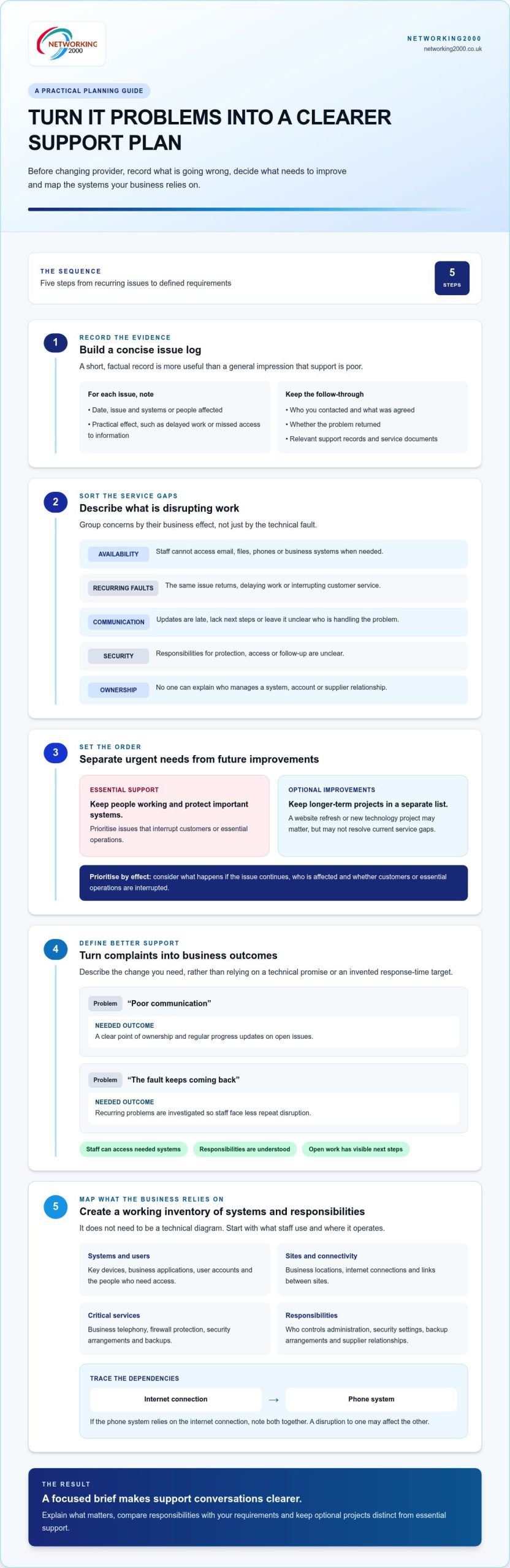
Sort concerns into practical categories. Describe the effect on people and operations, not just the technical fault.
- Availability: staff can’t access email, files, phones or business systems when needed.
- Recurring faults: the same issue returns, delaying work or interrupting customer service.
- Communication: updates arrive late, lack clear next steps or leave you unsure who is handling the problem.
- Security: responsibilities for protection, access or follow-up are unclear.
- Ownership: no one can explain who manages a system, account or supplier relationship.
Separate urgent operational risks from longer-term frustrations. For example, a system staff need to serve customers being unavailable may need attention before a slow-moving project or feature request. Both are worth recording, but they may call for different priorities.
What should you document before making a decision?
Keep a concise issue log. A short, factual record is more useful than a general impression that support is poor.
- Note the date, issue and systems or people affected.
- Record the practical consequence, such as delayed work or missed access to information.
- Include who you contacted, what was agreed and whether the problem returned.
- Gather relevant support records, service documents and system information already held by the business.
Finish each entry with one clear outcome you need. For example, you may want a named person to own the issue, a regular progress update or a clear explanation of which systems are covered. This turns frustration into specific expectations that can be discussed and reviewed.
Before changing IT provider, define what needs to improve
Once you’ve recorded the problems, turn that evidence into a clear brief. Feeling let down by current IT provider can make switching seem like the only answer, but a change is more useful when you know what the business needs instead. Document the problems, rank priorities, map dependencies and define what better support should achieve.
Separate essential support from optional improvements. Keeping staff able to work, protecting important systems and knowing who owns key responsibilities are likely to be core needs. A website refresh or new technology project may matter too, but it can sit in a separate list if it isn’t needed to resolve current service gaps.
How do you turn complaints into measurable support requirements?
Describe the change you need in terms of the business outcome, not a technical promise. “Poor communication” could become “we need a clear point of ownership and regular progress updates on open issues”. “The fault keeps coming back” could become “we need recurring problems investigated so staff face less repeat disruption”. These requirements are specific enough to discuss and assess without relying on invented response-time targets or contractual commitments.
Rank each need by its effect on work. Consider what happens if the issue continues, who is affected and whether it interrupts customers or essential operations. Then define what success would look like: staff can access the systems they need, responsibilities are understood and unresolved work has visible next steps.
Which systems and responsibilities need mapping?
Make a working inventory of the technology your business relies on. It doesn’t need to be a technical diagram. Start with what staff use and where it operates.
- Systems and users: key devices, business applications, user accounts and the people who need access.
- Sites and connectivity: business locations, internet connections and links between sites.
- Critical services: business telephony, firewall protection, security arrangements and backups.
- Responsibilities: who controls administration, security settings, backup arrangements and relationships with other suppliers.
Flag dependencies where an interruption would have a wider effect. For example, if the phone system relies on the internet connection, note both together. This can reveal gaps that might be missed when each service is considered separately.
With priorities and dependencies written down, conversations about support become more focused. You can explain what matters, compare responsibilities with your requirements and keep optional projects distinct from essential support. For a local perspective on managed IT support for businesses, explore Networking2000’s IT support.
What dependable managed IT support should deliver for an SME
A new provider won’t automatically solve old frustrations. The difference should be visible in how support is organised: clear ownership, useful updates, preventative work and security responsibilities that make sense for your business. If you’re feeling let down by current IT provider, use the criteria below to assess the working relationship, not just the promises made in a sales conversation.
Area to assess | Dependable support should make clear
Ownership | Who is responsible for an issue, system or outstanding action, and what happens next.
Communication | How to raise a problem, where to find updates and how decisions or open tasks are recorded.
Proactive maintenance | What routine checks and maintenance help keep systems healthy and reduce avoidable disruption.
Security | Who manages firewall protection, security settings and related follow-up.
Fit | Whether the support covers your users, locations, systems and business priorities.
These are practical measures, not prescribed response times or contractual targets. A useful support arrangement should leave you able to explain who owns a task, what is outstanding and what happens next. That clarity helps staff know where to turn and gives decision-makers a better view of recurring concerns. For organisations operating across multiple territories or overseas sites, finding dependable regional expertise—such as providers delivering managed IT services Eastern South Dakota—follows these same principles of clear ownership, proactive care and responsive communication.
How can you assess communication and accountability?
Look for a clear route to report issues and updates that explain progress in plain English. Responsibility shouldn’t disappear between teams or conversations. Decisions, agreed actions and unresolved work should be recorded somewhere accessible, so you can follow the thread without relying on memory or repeatedly chasing the same information.
Ask whether the process makes it easy to see who is following through. Consistent ownership and visible next steps are more useful signs of accountability than vague assurances.
How should proactive support and security fit together?
Maintenance should help keep systems in good order before avoidable faults interrupt routine work. Security belongs in the same continuity discussion: firewall protection and wider IT security help protect the systems staff rely on. There should be a clear connection between these responsibilities, day-to-day support and the way issues are followed up.
Networking2000 provides managed IT support, including proactive maintenance and technical assistance, alongside managed firewall services. Its managed IT support services are tailored to small and medium-sized businesses. This gives SMEs a practical basis for discussing support, maintenance and security within one business technology relationship.
Use these criteria to assess whether a support process addresses the causes of past frustration and fits the needs you’ve identified. They help keep the comparison grounded in clear responsibilities and practical outcomes rather than unsupported promises.
How to plan an IT provider transition with less disruption
Changing IT support doesn’t have to mean changing everything at once. If you’re feeling let down by current IT provider, a staged handover can help protect day-to-day work while making ownership clearer. The right sequence and timing depend on your systems, suppliers and business needs, so don’t assume there is a fixed transition duration.
Use this as a working plan, adjusting the order to suit your environment:
- Confirm responsibilities: agree who is coordinating the handover, which systems are involved and how open issues will be tracked.
- Inventory what’s in place: gather available records for equipment, users, applications, sites, suppliers and support arrangements.
- Coordinate access: identify account owners and administrative access, then plan any access changes carefully. Don’t send passwords through insecure channels.
- Review continuity: identify the services staff rely on most, any dependencies between them and what needs attention during the change.
Keep a record of critical accounts, system dependencies, supplier contacts and current support responsibilities. This gives everyone a shared reference point and reduces the risk of important details being lost between conversations. For broader continuity planning, use this alongside a separate disaster recovery guide.
What information should be ready for a handover?
Bring together the records the business already holds. Include asset and user lists, system information, supplier details, relevant support documents and a note of work still in progress. Identify who controls administration for key accounts and services, but don’t share passwords in an ordinary email or an unsecured document. Note essential services and appropriate escalation contacts too, so outstanding work has a clear route forward.
How can you protect day-to-day operations during the change?
Start with business-critical systems. If staff rely on internet access for calls, for example, make the connection between connectivity and telephony visible in the handover plan. Keep a list of open issues with their current status, owner and next step. Coordinate account and access changes rather than making them in isolation, which can help avoid unnecessary interruptions to systems people need for work.
For a wider view of technology priorities and planning, include IT consultancy in Wickford in your preparation. A well-organised transition should make responsibilities and dependencies easier to see, not add uncertainty.
Networking2000 provides managed IT support for businesses planning their technology needs. Read more about business IT support.
How Networking2000 supports businesses ready for a better IT relationship
If you’re feeling let down by current IT provider, a better relationship starts with support that fits how your business works. Networking2000 provides managed IT support tailored to small and medium-sized businesses, combining technical assistance with proactive maintenance. This gives businesses a clear place to turn for support and a way to discuss the health of the systems they rely on.
Networking2000 is a privately owned UK IT services provider, founded in 1998, serving businesses in Wickford, Essex and London. Its local focus gives SMEs in Wickford a nearby option for managed IT support, with the relationship centred on their systems, priorities and day-to-day needs.
What does Networking2000 bring to a support relationship?
Managed support brings ongoing care and practical help together. Technical assistance addresses the issues staff encounter, while proactive maintenance focuses on the health of the systems they rely on. This gives a business a clearer basis for discussing recurring problems, important systems and support responsibilities.
IT rarely sits in isolation. Networking2000 also provides managed firewalls, IT security and VoIP telephony. These services can form part of a broader technology conversation, rather than being considered only when a fault or change arises. The right support approach depends on the business’s environment and priorities.
Experience provides useful context, but doesn’t replace a clear understanding of your requirements. Networking2000’s history since 1998 reflects its work supporting businesses, while its managed IT support is tailored to each SME’s needs.
What is a sensible next step for Wickford businesses?
Before discussing a change, gather a short summary of what needs to improve. Note recurring issues, the systems your staff depend on, the support responsibilities that feel unclear and the outcomes you want from a new working relationship. You don’t need to have every technical detail resolved. A clear picture of the business impact is a useful place to begin.
A conversation can then focus on your requirements and the support approach that fits, without rushing into a decision. For businesses in Wickford considering a different IT support relationship, review Networking2000’s business IT support.
Make your next IT support decision with confidence
If you’re feeling let down by current IT provider, start with evidence rather than urgency. Identify recurring problems and their effect on the business, then set out what needs to improve. Clear priorities make it easier to assess whether support is accountable, proactive and suited to your systems and staff.
A move doesn’t need to happen all at once. Map important systems, access, dependencies and open issues, then plan a handover around keeping essential work on track. The right approach depends on your business environment, but preparation can make responsibilities clearer and help reduce avoidable disruption.
Networking2000 provides managed IT support tailored to small and medium-sized businesses in Wickford, Essex and London. If you’re considering a change, bring your priorities and key concerns to a practical conversation about the support your business needs.
Discuss your business IT support needs and take a clear first step towards a more dependable IT relationship.
Frequently Asked Questions
Can I change IT provider without disrupting my business?
A planned handover can reduce avoidable disruption, but it can’t remove every risk. The level of care needed depends on your systems, who controls access, how services rely on one another and what work is still open. List business-critical tools first, agree responsibility for each handover task and track unresolved issues. For a Wickford business, this helps keep staff focused on essential work while the change is managed.
How do I know whether to change my IT provider or ask them to improve?
If you’re feeling let down by current IT provider, document recurring issues, their effect on staff or customers and what you’ve already asked to change. Set out specific improvements, such as named ownership of open issues or regular progress updates, then review whether the underlying problems are being addressed. If the same concerns continue without clear progress, your records can help you decide whether to seek a different support relationship.
What information do I need when switching IT support providers?
Gather the system and asset records your business already holds, including devices, applications, users and sites. Note who owns or administers important accounts, along with supplier details and current support arrangements. List open issues and dependencies, such as telephony relying on a particular internet connection. These details help create a more orderly handover and make it easier to identify missing information before responsibilities change.
How long does it take to switch business IT provider?
There’s no single timeframe that applies to every business. The duration depends on your IT environment, the quality of available records, the number of systems and suppliers involved, and the scope of the handover. Open work and access arrangements can also affect the plan. Start by identifying critical services, current account ownership and dependencies. This gives the people coordinating the change a clearer basis for planning its stages.
What should managed IT support include for a small business?
Managed IT support for a small business should combine practical technical assistance with proactive maintenance to help keep systems in good order. Responsibilities should be clear, so staff know where to raise issues and understand what is being done next. Security should also be part of the support discussion, including how important systems and firewall protection are managed. The right arrangement should reflect your users, technology and business priorities — whether working with a local team or engaging regional providers like mydeskit.com for overseas offices.
Can one IT provider support both IT systems and business phone services?
Yes. A provider that supports both business IT and phone services can make ownership clearer, particularly where telephony depends on the network or internet connection. With fewer separate support relationships to coordinate, it may also be easier to see who is handling an issue. Networking2000 provides managed IT support and VoIP telephony for businesses, including those in Wickford, so both areas can be part of a wider technology conversation.
What if my current IT provider controls important accounts or system access?
Create an inventory of important accounts and systems, recording who owns each account and who currently has administrative access. Include connected services and note any work that depends on them. Plan transfers and access changes in a controlled order, so staff aren’t unexpectedly locked out of tools they need. Don’t put passwords in ordinary emails or unsecured documents. Keep the handover record accessible to the people responsible for managing the change.

