The fastest connection available isn’t always the right one for your business. A business network setup Wickford companies can rely on depends on more than headline speed. Patchy Wi-Fi, a connection that slows when several people are online, or unclear support arrangements can all affect staff and cloud applications.
Standard business broadband may suit your needs, while a leased line could be worth considering if disruption or changing performance would seriously affect operations. Availability, installation requirements and service commitments vary by premises, so check them with providers before deciding.
This guide explains how broadband, leased lines, wired networking and Wi-Fi fit together, and what to check about resilience, support and what a provider’s offer includes. Use the checklist to compare options against your day-to-day needs, plan the work and leave room for growth. The aim is to choose a connection that suits how your Wickford business works, not simply the biggest speed figure on a sales page.
Key Takeaways
- Separate your internet connection from the internal network your staff and devices use to work.
- Plan a business network setup Wickford can rely on by starting with how your team works and what each part of the premises needs.
- Compare broadband and leased-line options against your business needs, checking availability and service commitments with providers.
- Use a checklist to clarify what’s included, who handles installation and testing, and what support continues after handover.
- Shortlist partners by relevant experience and clear responsibilities; consider how managed IT support, firewalls, VoIP and IT security fit your plans.
Business network setup in Wickford: what does a business actually need?
A business network connects the systems and devices staff rely on to do their jobs. These may include computers, printers, phones and cloud applications, along with the equipment that lets them communicate securely. A computer network can connect devices within one premises, known as a local network, or link systems across wider locations.
Your internet connection carries traffic between the premises and external services, such as cloud software and websites. The internal network connects devices on site and manages how they communicate. Both matter: a fast internet service won’t fix weak Wi-Fi in a meeting room, and good internal coverage won’t compensate for a connection that can’t support your workload.
Review your setup when opening or moving an office, adding staff or devices, experiencing patchy coverage, or dealing with recurring disruption. Start by listing what people use, where they work and which systems are most important. Your requirements will depend on your premises, users and business systems.
Which business network components should Wickford firms assess?
Assess the complete connection, not just the broadband package. The internet service brings connectivity into the premises. A router directs traffic between that connection and your internal network, while a firewall helps control and protect network traffic. Switches connect wired devices, cabling provides their physical links, and Wi-Fi access points provide wireless coverage. Some equipment can combine functions, so ask providers to identify what each proposed device does.
Match the design to how the premises are used. In a larger or divided office, check whether access points are needed in different areas. If staff use fixed workstations or make calls over VoIP, ask which devices should connect by cable. In specialised environments such as healthcare or assisted living facilities, wired infrastructure often integrates dedicated alert devices alongside standard IT—a principle demonstrated by teams delivering nurse call system installation Melbourne to ensure fail-safe internal communication. Identify where cloud applications are used, whether visitors need guest Wi-Fi, and how guest access will be separated from business systems.
When is a leased line worth considering?
A leased line is a dedicated business connectivity option, but it isn’t necessary for every firm. It may be worth comparing if your operations depend on consistent connectivity or disruption to critical services would have a serious effect. Don’t assume it is automatically the right choice. Compare the provider’s stated performance and service terms with your actual requirements.
Before deciding, ask providers to confirm availability for your Wickford premises, installation requirements and service commitments in writing. Networking2000 offers managed IT support, managed firewalls and IT security, which may be relevant when planning the wider network. For leased-line availability and supply, speak directly with connectivity providers.
How business network setup works: from site needs to secure connections
A reliable business network setup in Wickford starts with how people work, not a shopping list of equipment. A practical process moves through clear stages: gather requirements, assess the premises, design the network, install equipment, test it and agree how it will be maintained.
Build security and resilience into the requirements from the outset. Identify which systems must remain accessible, what a connection failure would mean for the business, and whether staff need secure remote access. If you’re considering a leased line, ask the relevant connectivity provider to confirm availability at your premises, installation requirements, lead times and service terms. Treat these details as unconfirmed until the provider has supplied them.
What should a business network site assessment cover?
An on-site assessment should turn day-to-day needs into a practical plan. Record the premises layout, user and device numbers, and the areas where staff need dependable Wi-Fi. Include meeting rooms, reception areas and separate floors or workspaces. Check existing cabling routes, equipment and internet provision, then note known weak spots and recurring faults.
List business-critical systems and services as well. Cloud applications, VoIP calls and connected security equipment may all depend on a stable network, but their requirements can differ. This information helps determine where wired connections or wireless access points may be needed, and what to test after installation. If coverage is inconsistent, identify the rooms and tasks affected rather than relying on a general description such as “the Wi-Fi is slow”. Similar principles apply across residential and international properties; for example, KINETIX IT Infrastructure highlights how targeted troubleshooting and coverage optimisation resolve dead spots in expansive layouts.
How do security and ongoing management fit into the setup?
Security isn’t a final add-on. The design should cover firewall protection, who can access business systems, how devices receive updates and how guest Wi-Fi is separated from internal resources. The National Cyber Security Centre’s small business guidance offers practical advice on secure connections and other basic protections.
After installation, check coverage across the premises and test the services staff rely on, including business applications and calls if you use VoIP. Agree who will maintain equipment, apply updates and investigate faults. Ongoing attention can help identify issues before they become more disruptive. For a closer look at firewall considerations, read this guide to managed firewall protection for local businesses.
Make the handover practical: request a record of the installed equipment, network layout, relevant settings and support responsibilities. If you’re planning changes, you can discuss your business IT requirements with Networking2000, which offers managed IT support, managed firewalls and IT security.
Business broadband vs leased line: compare the options before choosing
For a business network setup Wickford firms can depend on, compare the connection with the work it needs to support. Standard business broadband may suit everyday email, web access and cloud applications. A leased line is a dedicated business connectivity option that may suit organisations with more demanding performance or continuity needs. Neither is automatically the better choice: availability, performance and support depend on the service offered at your premises.
Don’t decide from headline speed alone. Ask providers for current, written details about upload and download performance, service levels and fault handling. Check exactly what the quotation covers. It may include connectivity only, so confirm whether installation, router equipment, monitoring or resilience options are included or need to be arranged separately.
What questions help compare broadband and leased lines?
Ask each provider the same questions, then compare the answers side by side. Availability and terms can differ between nearby Wickford premises.
- Availability: Can this service be supplied to the exact business address, and are there site-specific installation requirements?
- Performance: What upload and download details are provided, and what evidence or terms support them?
- Support: What service levels apply, how are faults reported and handled, and what response or resolution commitments are written into the agreement?
- Scope: Does the quote include installation, router equipment, monitoring or backup connectivity, or are these separate?
Ask providers to explain any resilience options and their limitations. A backup connection is only useful if its operation, ownership and support terms are clear.
| Use case | Questions to ask | Details to verify |
|---|---|---|
| Routine office work and cloud services | Will the proposed broadband service support staff numbers and normal workloads? | Premises availability, upload and download details, included equipment and fault support. |
| Workflows sensitive to disruption or changing performance | Would a leased line address a specific operational risk? | Dedicated service terms, installation requirements, lead time and written service levels. |
| Business needing a fallback connection | What happens if the primary service fails? | Whether a resilience option is available, included and covered by clear support arrangements. |
How should a business judge whether a leased line fits?
Start with your critical applications, staff needs, reliance on cloud services and the practical impact of an outage. Then weigh the potential operational benefit against the provider’s confirmed service terms and the full scope of the proposal. Request a quotation for your specific premises rather than relying on general cost estimates.
A leased line is worth comparing when it addresses a clear business need, but it isn’t a default requirement for every Wickford business. Confirm availability, lead times, installation requirements and commitments directly with the relevant provider before deciding.
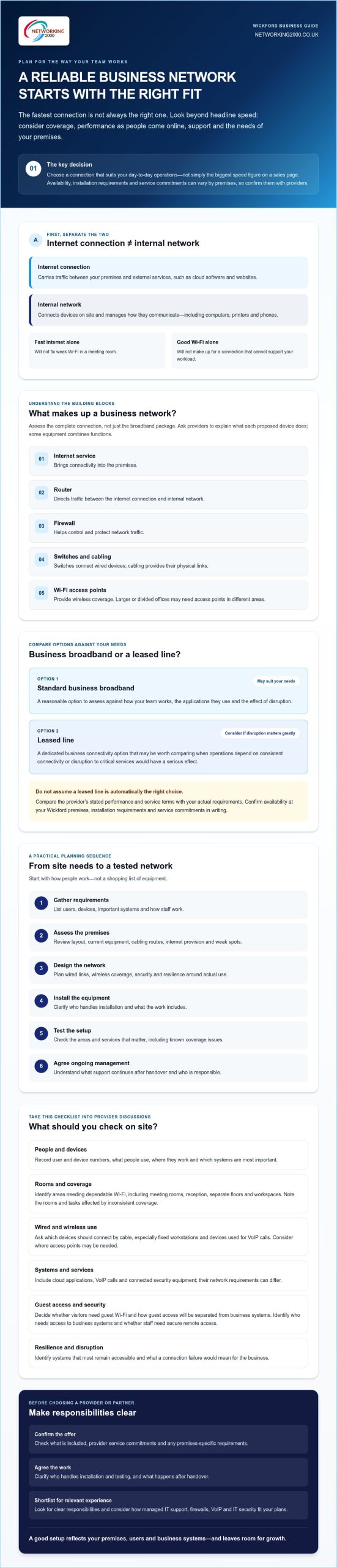
Plan a Wickford business network setup with this provider checklist
Use this checklist to compare proposals against your needs and what the provider will actually deliver. For a business network setup Wickford staff can rely on, look beyond the equipment list. Check responsibilities, security, testing and ongoing support before agreeing the work.
- Requirements: Are staff numbers, devices, cloud services, VoIP use and business-critical systems documented?
- Site survey: Has the provider checked the premises layout, existing cabling, coverage gaps and installation routes?
- Hardware and connectivity: Does the proposal specify the equipment and connection included, plus anything you must arrange separately?
- Security: Does it explain firewall protection, access controls, updates and separation of guest access?
- Support: Who handles faults, maintenance and provider liaison after installation, and what support terms apply?
What should a business network proposal make clear?
Ask for an itemised scope covering equipment, configuration, installation and support tasks. A clear proposal should identify who is responsible for each part, include a network diagram and explain how the work will be tested. Confirm what handover documentation you’ll receive, such as a record of installed equipment and relevant settings.
Check how the work could affect existing systems and staff. Ask about the planned sequence, any expected interruption and how changes will be tested before handover. Clarify whether the provider or your business is responsible for coordinating with the internet service provider.
How can Wickford SMEs plan for growth and resilience?
List the systems staff need for essential work, then decide what they should do if the main connection becomes unavailable. Ask providers to explain practical backup options, how they operate and what they don’t protect against. Confirm availability and service terms for your premises rather than assuming a particular option can be supplied.
Consider likely changes too: more staff, additional devices, a different premises layout or greater use of cloud services. Ask how the proposed equipment and cabling could accommodate those changes, and which parts might need upgrading. For broader planning context, see this guide to IT consultancy in Wickford for growing businesses.
If you’d like to discuss how managed IT support, firewalls or IT security could fit your requirements, talk through your business IT needs with Networking2000.
Choose a business network partner in Wickford and agree the next steps
The right partner should make the work and responsibilities clear, from understanding your business needs to explaining who supports the network after installation. For a business network setup Wickford SMEs can plan around, shortlist providers with relevant business experience, a clear written scope and support arrangements that match your needs.
Compare proposals on more than the equipment or connection. Ask who assesses the site, coordinates with the connectivity provider and looks after network equipment after installation. If a proposal includes a leased line, confirm directly with the relevant provider whether supply and installation are available for your premises, and request the terms in writing.
What should Wickford businesses ask a prospective IT partner?
Ask who will handle each stage and what happens after handover. Clarify support hours, how staff report faults and what response arrangements apply. Don’t assume emergency cover outside the stated support hours. Where available, request examples of relevant business work and check that the proposed scope fits your premises, systems and priorities.
How can managed IT support complement a network setup?
A network needs attention after installation. Managed IT support can provide ongoing technical assistance and maintenance for business IT, helping keep the wider infrastructure supported as requirements change. Confirm which systems and tasks are covered, how support is accessed and which responsibilities remain with your business or other providers.
Networking2000 provides IT services in Essex and London, including managed IT support, managed firewalls, VoIP telephony and IT security. These services may be relevant when planning the support and protection around your Wickford network. For leased-line supply or installation, contact the connectivity provider directly.
For more detail on ongoing assistance, read about managed IT support services for Essex businesses. Once you’ve outlined your requirements and questions, you can discuss your business network requirements with Networking2000.
Build a network that’s ready for what comes next
A reliable business network setup Wickford businesses can plan around starts with their actual needs, not the biggest speed figure. Assess how staff use the premises, devices and cloud services, then compare broadband and leased-line options against your operational requirements. Confirm availability, installation details and service commitments directly with the relevant connectivity provider.
Before work begins, get the scope, responsibilities, testing and handover arrangements in writing. Include security, ongoing support and room for changes such as more staff, devices or cloud services. These details help you compare partners on the whole service, rather than a headline specification alone.
Networking2000 provides business services including managed IT support, managed firewalls, VoIP telephony and IT security. These may be relevant to the support and protection around your network. Confirm leased-line provision or installation directly with the appropriate connectivity provider.
Ready to talk through your priorities? Discuss your business network requirements with Networking2000 and take the next step with a clearer plan. A well-considered setup can support your team today and provide a practical foundation for future changes.
Frequently Asked Questions
What does a business network setup include?
A business network setup includes the connection, equipment and links that let staff devices communicate with one another and reach online services. It may involve business broadband, a router, firewall, switches, cabling and Wi-Fi access points. The right mix depends on your Wickford premises, staff, devices and systems. Ask which equipment, configuration, security measures and ongoing support are included rather than assuming every proposal covers the same things.
Does a small business need a leased line?
No, a small business doesn’t automatically need a leased line. Business broadband may meet your needs if it supports everyday workloads and the provider’s service terms are suitable. Consider comparing a leased line if your work depends on consistent connectivity or an outage would seriously affect operations. Base the decision on your business requirements, provider details and a premises-specific quotation, not the assumption that a dedicated connection is always necessary.
Is a leased line available at every Wickford business address?
No, don’t assume a leased line is available at every Wickford business address. Availability can depend on the exact premises and what providers can supply there. Ask the relevant connectivity provider to check the full address and confirm any site survey, installation requirements, lead time and service terms in writing. Verify availability and installation directly with the provider before planning around a leased-line connection.
How do I choose between business broadband and a leased line?
Choose by matching each option to your workloads, user needs and the impact of disruption. For a business network setup Wickford staff can rely on, ask providers for written details of upload and download performance, support arrangements, fault handling and service levels. Check what equipment, installation and resilience options are included. Compare the full scope and premises-specific terms, then request a tailored quotation rather than relying on headline speed alone.
Can a business network support VoIP and cloud applications?
Yes, a business network can support VoIP and cloud applications if the internet connection and internal network suit how your team uses them. Consider how many people may make calls or use cloud services at once, upload requirements, Wi-Fi coverage and whether wired connections are needed. Ask providers or your IT support partner what should be assessed and tested. The actual experience depends on the connection, network design and services being used.
What should I ask a business network installer before work begins?
Ask what the proposal includes, who supplies and configures each item, and who coordinates with the connectivity provider. Confirm the site assessment, installation plan, expected disruption, testing, handover documents and ongoing support responsibilities. Clarify support hours and how faults are reported. If a leased line is proposed, verify its availability, installation details and service terms directly with the connectivity provider. Get the agreed scope and responsibilities in writing before work starts.

