A kitchen that drops a video call, a bedroom where streaming buffers, and a garden office that loses connection behind one solid wall are familiar UK Wi-Fi problems. Many owners respond by buying a faster router, only to discover that the new box performs brilliantly beside the TV and no better at the other end of the house.
The problem is usually the property before it's the router. UK homes commonly combine brick, concrete, dense floors, metalwork and awkward room layouts. Ofcom's broadband reporting shows that the access network is improving, with gigabit-capable coverage reaching 84% of UK properties in spring 2025 and full-fibre coverage reaching 78% of UK residential premises by late 2025. That faster incoming line still needs a sensible in-building wireless design to reach your devices reliably. Ofcom's Connected Nations reporting also uses Ordnance Survey base data in its checker, showing why property-level conditions matter more than a national average.
| Setup | Best fit | Range verdict | Main compromise |
|---|---|---|---|
| Single modern router | Studio, flat or compact home | Strong near the router, limited by walls and floors | Dead zones remain in difficult layouts |
| Mesh kit | Multi-room or multi-floor home | More consistent whole-home coverage | Wireless backhaul can weaken through dense construction |
| Wired access points | Office, shop, clinic or large property | Most controllable and reliable coverage | Needs cabling, planning and usually PoE hardware |
Table of Contents
- Why Range Matters More in a UK Home Than the Box Suggests
- What Really Determines How Far Wi-Fi Reaches
- Reading the Spec Sheet Without the Marketing Spin
- Single Router vs Mesh vs Access Points Compared
- Placement, Channels and Quick Wins Before You Buy
- Matching the Right Setup to Your Property and Business
- A Clear Recommendation and Decision Path Forward
Why Range Matters More in a UK Home Than the Box Suggests
Take a typical Victorian terrace. The router sits near the front of the house because that's where the broadband line enters. The kitchen lies behind a load-bearing brick wall, the upstairs bedrooms are separated by a dense floor, and the garden office is beyond the rear wall. The box may claim impressive coverage, yet the phone in the kitchen keeps switching to mobile data and the laptop in the office reports a weak connection.
That result doesn't mean the router is faulty. It means the signal has to cross materials and distances that retailer diagrams rarely represent. An open-plan room with lightweight internal partitions is an easy environment for Wi-Fi. A narrow terrace with solid brick, thick floors and several internal walls is not.
Site-survey rule: A router's advertised range is not a promise about your house. Treat it as a radio capability, then judge the building.
Independent UK guidance places reliable indoor coverage in typical living spaces at roughly 20 to 40 metres, while unobstructed outdoor coverage on 2.4 GHz can exceed 50 metres. Those figures are useful only as broad context, because walls, floors and interference can reduce the practical distance sharply. The same guidance says that brick, stone, concrete and metal weaken wireless signals, with a single concrete wall potentially cutting signal strength by 50% or more. UK fixed broadband experience guidance from OpenSignal supports the central point: range isn't a fixed measurement independent of the building.
This is why international “best range” lists need caution. A router that performs well in a timber-framed apartment may not behave the same way in a 1930s semi-detached house. UK buyers should diagnose the route between the router and the device, not select equipment from a square-metre claim with no stated building type.
Ofcom also warns that predicted broadband data may not match the service a particular property receives, because localised issues can affect individual premises. Recent survey coverage reported that 36% of adults struggle with home Wi-Fi, 24% move rooms to stream, and 15% experience problems across multiple rooms. Ofcom's spring 2025 Connected Nations update shows why the key question isn't “Which router has the biggest number on the box?” It's “Which design gives this property a usable signal where people work, stream and call?”
What Really Determines How Far Wi-Fi Reaches
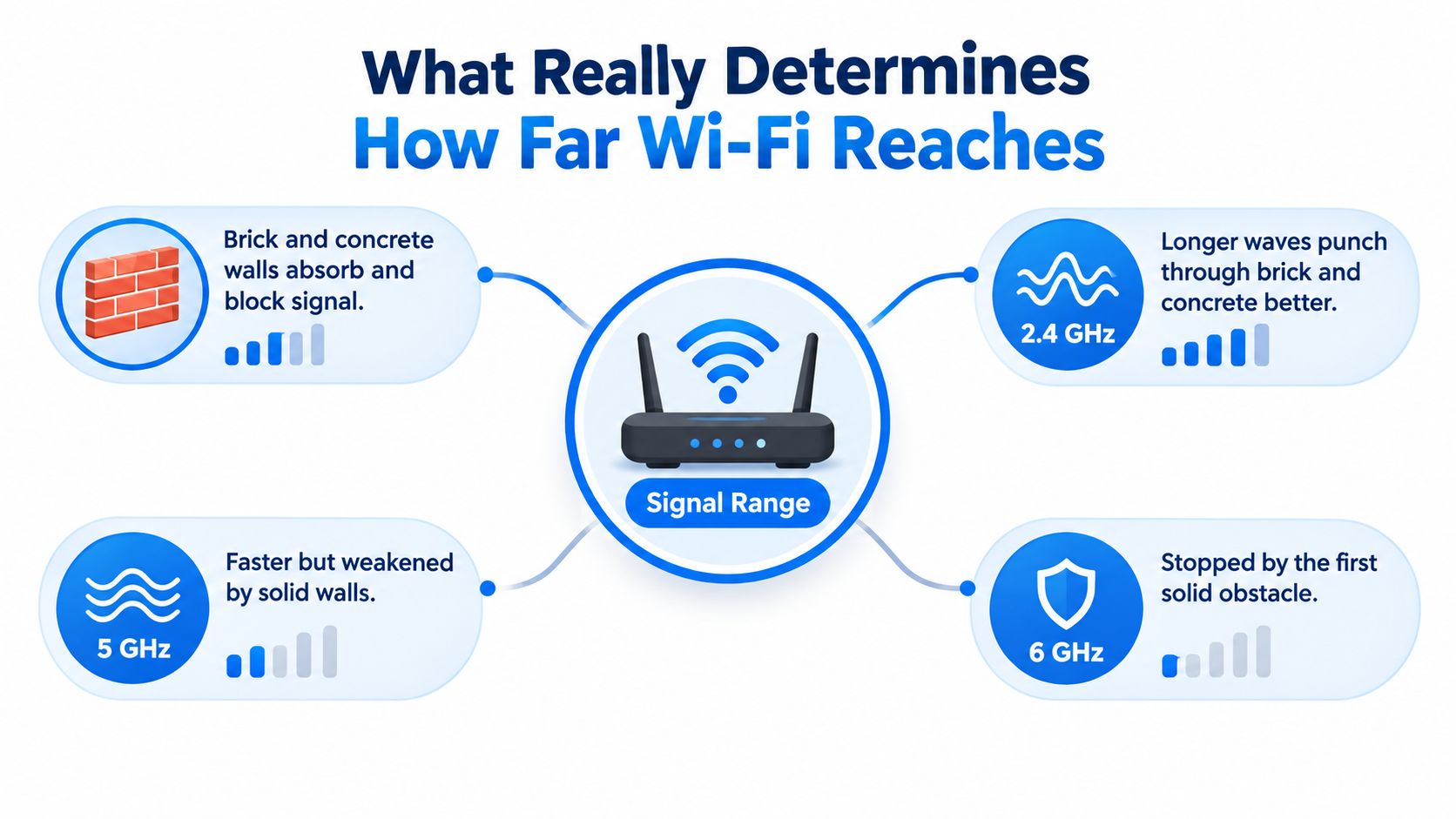
Wi-Fi range comes down to four practical factors: frequency, obstruction, radio quality and the signal received by the client device. You can improve some of these with a new router. You can't make a brick wall behave like plasterboard.
Frequency is a trade-off, not a ranking
The 2.4 GHz band generally travels farther and passes through dense materials more effectively than higher bands, although it's more vulnerable to congestion. 5 GHz normally gives better speed at shorter reach. 6 GHz can provide excellent performance close to the router, but UK homes with thick walls and several rooms quickly expose its shorter practical range.
The important point is that higher frequency doesn't mean better coverage. It means more potential capacity under suitable conditions. A phone at the far end of a terrace may get a more dependable connection on 2.4 GHz, while a laptop in the same room as the router may benefit from 5 GHz or 6 GHz.
Measure the client end
Router dashboards can show a healthy connection while a device in the kitchen struggles. The device's received signal strength indicator, or RSSI, is more useful for judging the room where the problem occurs. NHS England Digital treats stronger than -67 dBm as the target for excellent Wi-Fi. Performance begins to degrade through the -67 to -75 dBm and -75 to -79 dBm bands, while anything weaker than -79 dBm is poor. The guidance also identifies SNR above 25 dB as the best target. NHS England Digital's Wi-Fi metrics guidance gives these measures for real-world assessment across 2.4 GHz, 5 GHz and 6 GHz.
RSSI tells you how much signal arrives. SNR, or signal-to-noise ratio, tells you how clearly the device can hear it. A strong signal surrounded by interference can still perform badly.
If you want a plain-language checklist before changing hardware, this guide to improve WiFi signal strength is a useful companion. Use it to check the simple physical and configuration causes first.
Reading the Spec Sheet Without the Marketing Spin
A router specification sheet contains useful information, but the headline speed is usually the least useful part for range. Labels such as AX3000, AC2600 or a combined multi-band throughput figure add the theoretical capacity of several radios. They don't tell you what a laptop will receive through a brick wall.
Start with the standard. Wi-Fi 6 is a sensible baseline for many homes because it improves efficiency in busy networks and supports modern client devices. Wi-Fi 6E and Wi-Fi 7 add access to 6 GHz, but that band is most valuable close to the router or to a nearby mesh node. It shouldn't be your reason for buying a single router for a large, thick-walled home.
Independent testing cited by a UK review recorded sustained 6 GHz throughput of 1.5 to 3.5 Gbps at around 5 metres, with Wi-Fi 7 showing a 25% to 40% gain over comparable Wi-Fi 6 conditions. The same UK analysis warns that 6 GHz range is shorter in UK homes than many US reviews imply. This UK Wi-Fi 7 router analysis supports a simple conclusion: Wi-Fi 7 is a performance upgrade, not a magic wall-penetration upgrade.
The four specifications worth checking
Radio configuration matters because a capable router can serve several compatible devices more efficiently. It doesn't mean every client receives the combined headline throughput.
Transmit power affects how loudly the router sends, but the client device must also send back. A phone with small internal antennas can remain the limiting factor even when the router has substantial radio power.
Antenna design can improve coverage consistency and steer energy towards connected clients. External antennas may give you more visible adjustment, while internal designs can use beamforming automatically. More antennas alone don't guarantee more range.
Mesh and wired backhaul support matter most when the building itself creates the dead zone. A second coverage point in the right room often beats a more expensive single router in the wrong room.
| Spec | Why it matters for UK range | Marketing claim to ignore |
|---|---|---|
| Wi-Fi 6, 6E or 7 | Determines efficiency, client compatibility and available bands | “Latest standard means whole-home coverage” |
| Radio and stream design | Helps serve multiple devices and maintain capacity | Combined band speed presented as one client speed |
| Transmit power | Influences the signal leaving the router | High-power claims without UK regulatory context |
| Antennas and beamforming | Can improve consistency and client directionality | More antenna shapes automatically mean more reach |
| Mesh or access-point support | Adds coverage where walls defeat a single radio | A metre or square-foot claim with no building class |
The best Wi-Fi router with range isn't necessarily the newest model. It's the model that supports the coverage architecture your property needs.
Single Router vs Mesh vs Access Points Compared
There are three sensible ways to improve coverage. A single router is the cleanest option when the property is compact and the device can sit near the centre. Mesh adds wireless coverage points that work together. Dedicated access points use Ethernet cable to put the radio where coverage is required, which is the most dependable approach for business premises.
Single router
Choose a single router for a studio, one-bed flat or small property with lightweight internal partitions. It gives the strongest throughput close to the unit and avoids the management overhead of multiple nodes. It also keeps the network simple for smart-home devices and visitors.
Its weakness is predictable. If the router has to cross a solid wall, a floor and another room to reach the device, increasing the specification rarely removes the physical obstruction. Moving the router may help more than replacing it.
Mesh kit
Mesh is the practical answer for many two-storey homes and awkward terraces. Place one node near the broadband entry point and another where the signal remains usable, not inside the dead zone itself. Tri-band systems can use an additional band for communication between nodes, but wireless backhaul still has to pass through the building.
Mesh gives a single network name and smoother movement between coverage points than manually switching between unrelated routers. It can also expand as the property changes, although adding nodes indiscriminately can create congestion and poor placement.
Dedicated access points
For offices, shops, clinics and hospitality spaces, I prefer wired access points. Ethernet backhaul avoids asking the wireless system to carry both the client traffic and the link between coverage points. A PoE switch can provide power and data through the network cable, while central management makes it easier to adjust channels, power and guest access.
If your building contains steelwork, insulated panels or other unusually difficult materials, targeted equipment may need more careful selection. A specialist guide to the Best WiFi extender for metal buildings can help explain why ordinary consumer extender placement may not suit metal-heavy environments.
| Factor | Single router | Mesh kit | Access points |
|---|---|---|---|
| Cost | Lowest equipment complexity | Higher equipment cost | Highest installation complexity |
| Coverage | Best near one central unit | Consistent across rooms when nodes are well placed | Strongest control across planned areas |
| Management | Simple | App-led and generally accessible | Centralised, more technical |
| Roaming | Basic client-led behaviour | Designed for movement between nodes | Strong when centrally managed |
| Scalability | Limited | Add nodes carefully | Excellent with planned cabling |
| Best use | Flat or compact home | Multi-room and multi-floor home | Business and challenging layouts |
Placement, Channels and Quick Wins Before You Buy
Move the router before you replace it. Put it centrally, high up and in the open, rather than on the floor, inside a cabinet or at the edge of the building. A router under the stairs is particularly poor because the enclosure, surrounding walls and low position all work against even distribution.
Keep it away from large metal objects, appliances, mirrors, boilers and foil-backed building materials. Don't hide it behind the television just to keep the room tidy. The best location is the point that minimises the worst distance to the rooms you use, not necessarily the point closest to the incoming line.
Check the airwaves
Use a Wi-Fi survey app on Android, such as WiFi Analyzer, or a laptop survey tool. Record RSSI and SNR in the rooms where calls, streaming and work happen. Aim for RSSI stronger than -65 dBm and SNR above 25 dB in occupied working areas, using the NHS targets cited earlier. Treat weaker readings as a design warning rather than proof that you need a premium router.
Split 2.4 GHz and 5 GHz into distinct network names while testing. This makes it clear which band each device uses and helps older or distant equipment stay on the longer-reaching band. On 2.4 GHz, test channels 1, 6 and 11 to reduce overlap with neighbouring networks. Don't assume the automatic setting has chosen well.
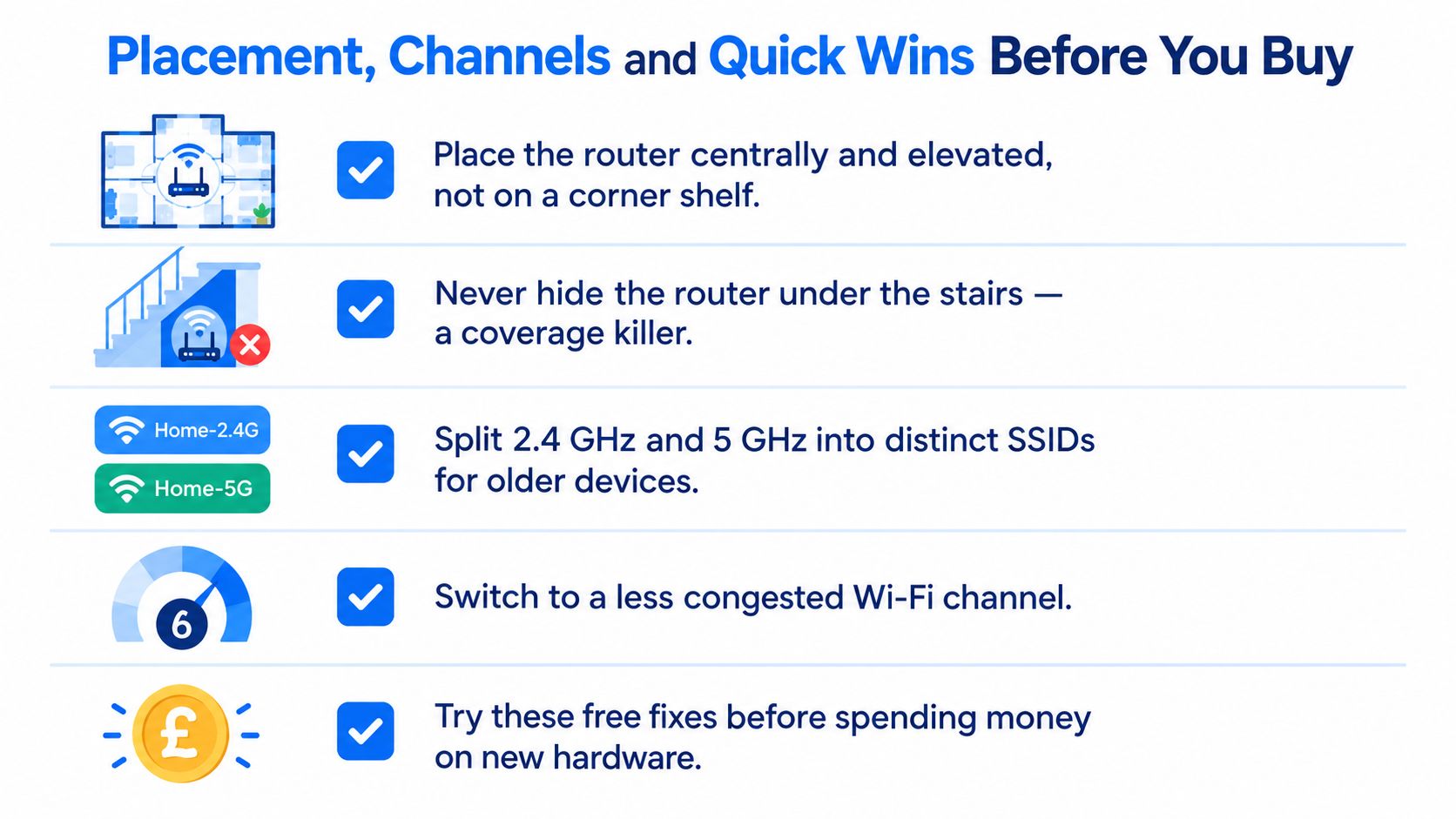
Cheap fix first: If moving the router and extending the broadband cable solves the dead zone, you've avoided an unnecessary hardware purchase.
Configuration advice can vary between router brands, so the practical WiFi range advice from Computer Daddy is useful when you're checking settings before committing to mesh. Make one change at a time, then measure again. Otherwise, you won't know which adjustment helped.
Matching the Right Setup to Your Property and Business
A router recommendation is only useful when it matches the building. Start with the construction, then consider the number of rooms and devices. A new-build timber frame may behave very differently from a Victorian terrace with solid masonry, while foil-backed insulation can be particularly hostile to higher-frequency signals.
Flats and compact homes
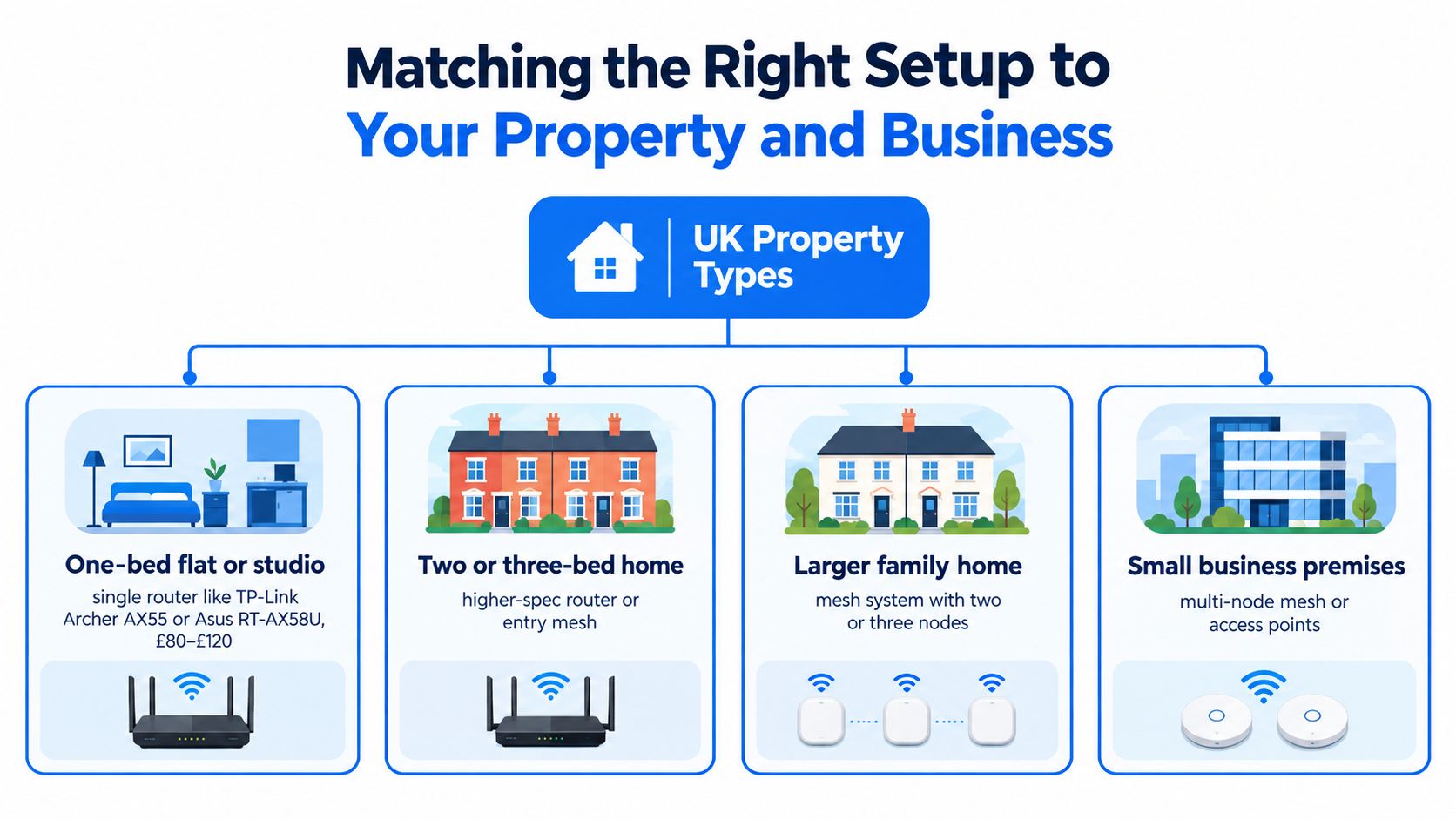
A studio or one-bed flat usually suits a single Wi-Fi 6 router placed near the centre of the living area. Models such as the TP-Link Archer AX55 or Asus RT-AX58U are the sort of equipment to consider when the access line enters a sensible location and the walls aren't unusually dense.
Don't buy Wi-Fi 7 solely because the name sounds future-proof. If the devices are in the same room or across a lightweight partition, the newer standard may help capacity. It won't compensate for a router hidden in a cupboard or positioned at the far end of the flat.
Terraced and semi-detached homes
A two or three-bedroom terrace or semi-detached house is where router-only upgrades often disappoint. A two-node mesh system, such as the TP-Link Deco X50 or Asus ZenWiFi XD5, gives you a better chance of placing one radio near the front and another towards the rear or upstairs.
Put the second node in a room where the primary node still has a healthy connection. A node placed in the dead zone just repeats a poor signal. With thick floors, a wired link between nodes is preferable if you can install cable.
Larger homes and outbuildings
A detached house with a garden office needs a coverage plan, not a bigger box. A three-node mesh may work if the office is within a suitable wireless path, but a router plus a wired access point is more reliable when the rear wall or external structure blocks the signal.
Avoid extending coverage through several walls just to reach an outbuilding. If the office supports business calls or large file transfers, cable the route where practical and place the access point inside the office. That gives the remote room its own strong local signal instead of relying on a weak outdoor hop.
Business premises
A small office benefits from ceiling-mounted access points, such as the TP-Link EAP670 or Ubiquiti U7 Pro, connected back to a PoE switch. That arrangement lets you position radios for desks and meeting areas rather than accepting the coverage pattern from a cupboard near the internet entry point.
Retail floors, cafés, warehouses and clinics need a proper multi-access-point design. Survey the space, plan channels and power, separate guest access from business systems, and use wired backhaul. Networking2000 provides wireless network setup, router support and Cat5e and Cat6 cabling for homes and businesses across London and Essex, which is relevant when the solution needs installation rather than another retail purchase.
A Clear Recommendation and Decision Path Forward
My recommendation is staged and firm.
First, fix placement and channels. Put the existing router in a central, raised, open position, test the bands separately and measure the problem rooms. If the readings improve to the NHS target of stronger than -67 dBm RSSI, with SNR above 25 dB, stop spending and keep the existing hardware.
If the property is a flat or compact home and the signal remains weak, buy a capable single router. Prioritise Wi-Fi 6, sensible antenna and radio design, and mesh support. Don't pay for a headline throughput figure that your broadband line and client devices can't use.
For a multi-floor terrace, semi-detached house or detached home with persistent dead zones, go straight to a properly placed mesh kit. Tri-band is useful when the nodes must communicate wirelessly, but it doesn't remove the effect of brick, concrete or dense floors. Where possible, use Ethernet between nodes.
For an office, retail floor, warehouse or clinic, install wired access points. This gives you control over coverage, channels and capacity. It's also the right point to involve an installer if you need new cable runs, PoE, separate network segments or persistent dead zones after two hardware attempts.
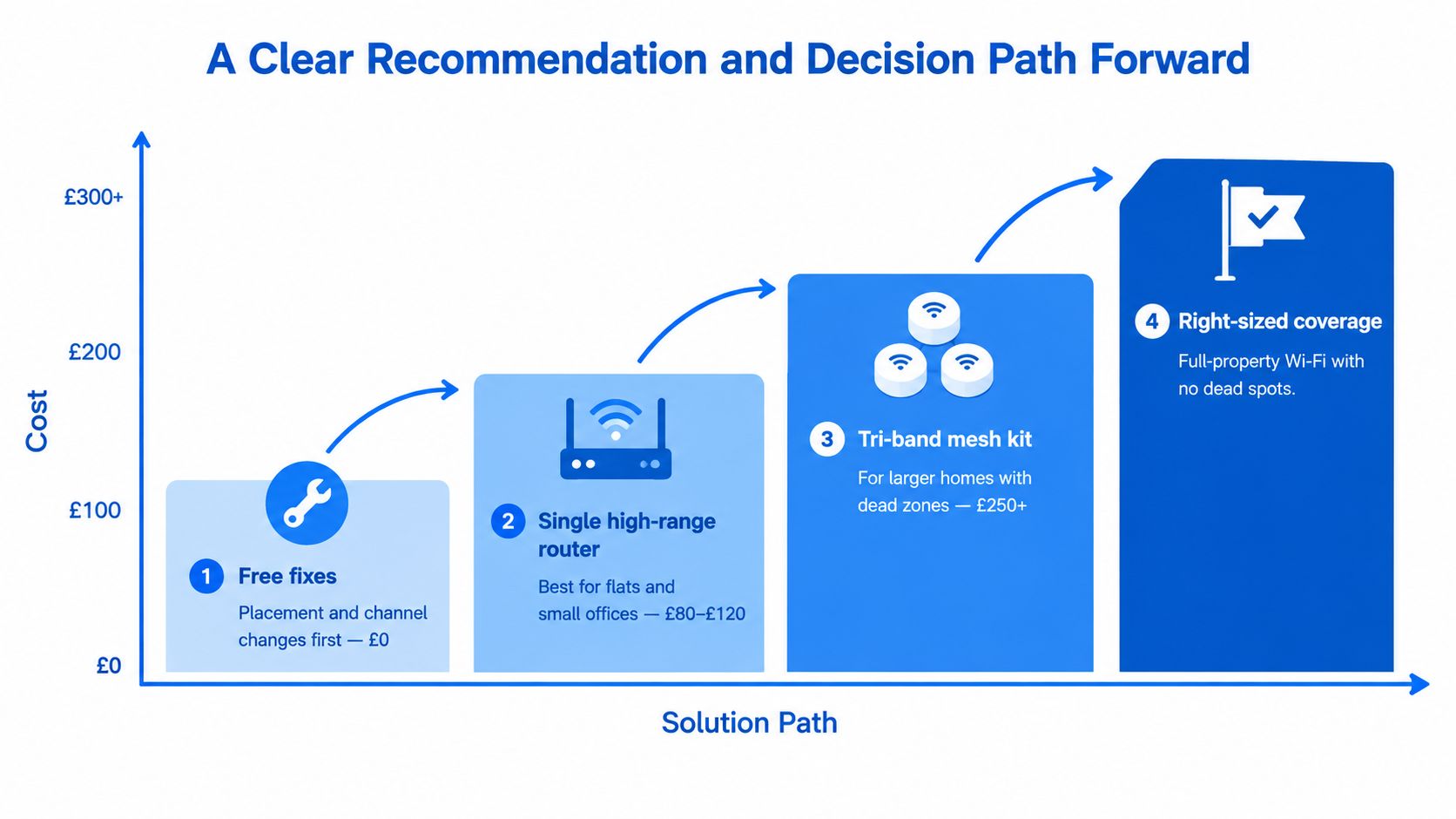
Use this decision path today:
- Move and measure. Central, raised and open placement comes first.
- Upgrade one router. Choose this for a compact property with one main coverage area.
- Deploy mesh. Choose this when walls, floors or room layout create multiple residential dead zones.
- Install access points. Choose this when reliability, wired backhaul and business control matter.
Keep -75 dBm as the practical floor for non-critical areas. If an occupied room falls below that, or calls fail despite reasonable placement, stop chasing router specifications. You need another coverage point or a wired design.
Networking2000 can survey your property, diagnose dead zones, configure routers or mesh, and install Cat5e or Cat6 cabling and wireless access points across London and Essex. If your Wi-Fi still fails after the free fixes, visit Networking2000 to arrange practical network support for your home or business.

