What if outsourcing IT support gave you more control, not less? For businesses looking for outsourced IT support Wickford, the arrangement works best when responsibilities, response expectations and day-to-day needs are agreed upfront.
It’s understandable to want reliable help without losing sight of your systems. Unplanned IT issues can interrupt staff and customer-facing work, while a small in-house team may not have the capacity to handle support and maintenance alongside its other work. If service terms are vague, comparing providers becomes difficult.
This guide explains what outsourced IT support may include for Wickford businesses, what could sit outside an agreement, and how outsourced, in-house and hybrid support compare. You’ll also find practical questions to ask providers about service scope, response arrangements and escalation. Use them to assess whether a support arrangement fits your business and keeps responsibilities clear.
Key Takeaways
- Understand which maintenance, user support and infrastructure tasks may be included in outsourced IT support, and confirm what’s out of scope.
- Clarify how staff should report issues, how requests are prioritised and who will keep your team updated.
- Compare outsourced, in-house and hybrid support by weighing skills, responsibility, continuity and control against your business needs.
- Use a provider checklist to check service hours, response commitments, escalation arrangements and any extra charges.
- Prepare for a useful proposal by listing your IT pain points, essential systems, staff needs and the responsibilities you’ll retain internally.
What does outsourced IT support in Wickford mean for a business?
Outsourced IT support means an external provider manages agreed parts of your business’s IT. It follows the wider business practice of outsourcing: an organisation assigns specific work to an outside provider rather than handling every task itself. A Wickford business might use an IT provider for ongoing user assistance, system maintenance or management of parts of its infrastructure.
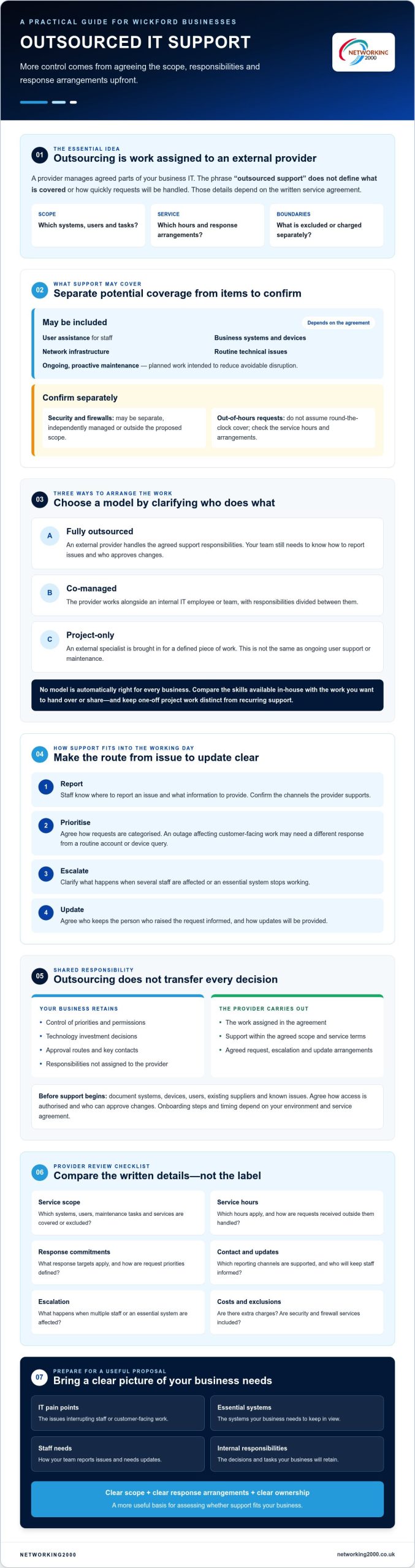
The key word is agreed. “Outsourced support” doesn’t define which systems, users or tasks are covered, or how quickly requests will be handled. Those details depend on the written service agreement, including service hours, response arrangements and exclusions. Check them before comparing providers or assuming support is available outside normal working hours.
What can outsourced IT support include?
Depending on the agreement, support may cover business systems and devices, network infrastructure, routine technical issues and ongoing maintenance. Proactive maintenance means planned work intended to reduce avoidable disruption, rather than waiting for something to fail. Security and firewalls may be separate services, so confirm whether they’re included, managed independently or outside the proposed scope.
Is outsourcing the same as managed IT support?
The terms are related, but they don’t always describe the same arrangement. Managed IT support usually means ongoing services delivered under agreed terms. Outsourcing describes who carries out the work: it may be fully external, shared with your own IT staff or limited to particular tasks. A provider’s proposal should spell out which model it covers.
Three common arrangements illustrate the difference:
- Fully outsourced: An external provider handles the agreed support responsibilities. Your team still needs to know how to report issues and who approves changes.
- Co-managed: The provider works alongside an internal IT employee or team, with responsibilities divided between them.
- Project-only: An external specialist is brought in for a defined piece of work. This isn’t the same as ongoing user support or maintenance.
None is automatically right for every business. Consider the skills already available in-house and the tasks you want to hand over or share. Keep consultancy, one-off project work and recurring support distinct when reviewing proposals. When comparing outsourced IT support in Wickford, clear responsibilities and response arrangements make it easier to understand what help staff can expect and what remains your team’s responsibility.
How outsourced IT support works with your Wickford team
Good support should fit the way your business operates, not leave staff guessing where to turn. Agree how people report issues, who reviews incoming requests and how updates reach the person who raised them. A shared email address or support portal can help keep requests visible, but confirm which channels the provider actually supports.
Requests also need clear priorities. A system outage affecting customer-facing work may need a different response from a routine account or device query. Ask how urgent interruptions are identified, what information staff should provide and when the provider will send updates. For more background on ongoing support, see this managed IT support services guide.
Which responsibilities stay with your business?
Outsourcing doesn’t transfer every decision to the provider. Your business retains control of priorities, permissions and technology investment, while the provider carries out the work assigned in the agreement. Before onboarding, document key contacts, approval routes and business-critical systems. Clarify who manages user access, equipment decisions and relationships with software or connectivity suppliers, then record the agreed split of responsibilities.
Onboarding should give the provider a reliable picture of your setup before support begins. Systems, devices, users, existing suppliers and known issues may need to be documented, along with plans for access. Agree how access will be authorised and who can approve changes. The exact steps and timing depend on your environment and the service agreement, so don’t assume there’s a fixed onboarding period.
How should support requests and escalation work?
Before signing, check the contact channels, service hours, priority definitions and escalation steps. Ask what happens if a problem affects several staff or stops an essential system from working. Confirm response targets and update arrangements in writing. Don’t assume round-the-clock cover. Ask which hours apply and how requests received outside them are handled.
- Staff: Know where to report an issue and what details to include.
- Provider: Categorises and prioritises requests under agreed definitions, then communicates progress.
- Your business: Approves decisions that affect access, priorities, equipment or spending.
This working arrangement is worth discussing with any provider you’re considering for outsourced IT support in Wickford. Networking2000 provides managed IT support to businesses in Essex and London. If you’re reviewing how support could fit your team, explore its business IT support services alongside the responsibilities and response arrangements you need to confirm.
Outsourced vs in-house or hybrid IT support in Wickford
There’s no single support model that suits every business. The right choice depends on the skills you need, how much day-to-day responsibility you want to retain and how your team works. Business size alone won’t settle it: a small firm with complex systems may need a different arrangement from a larger organisation with straightforward requirements.
| Support model | Potential strengths | Trade-offs to consider |
|---|---|---|
| Fully outsourced | Access to external support and skills without relying on an internal IT team. | Your provider handles only agreed tasks; your business still makes key decisions and may have less direct control over daily work. |
| In-house | Close day-to-day contact and direct ownership of internal priorities. | Available skills and capacity depend on your own team, and continuity can rely on a small number of people. |
| Hybrid | Combines internal coordination with external support or expertise. | Shared work needs clear boundaries to prevent gaps, duplicated effort or uncertainty about ownership. |
When might fully outsourced IT support fit?
When is a hybrid or in-house model worth considering?
Keep internal capacity where staff need close daily coordination, internal ownership or an on-site presence. An external provider can then add expertise or take responsibility for agreed areas. Define handovers carefully: agree who investigates an issue, who approves a change and who updates staff. This helps prevent duplicated effort and tasks falling between teams.
Whichever model you choose, retain clear control of business priorities and technology investment. If strategic planning is part of your decision, read this IT consultancy guide for Wickford. Compare outsourced IT support options in Wickford against your actual responsibilities and skill gaps to see whether full outsourcing, internal support or a shared arrangement is the best fit. You can also explore Networking2000’s managed IT support as part of your research.
How to assess outsourced IT support providers serving Wickford
A useful comparison starts with the agreement, not the sales pitch. Ask each provider serving Wickford and the wider Essex area to explain its service in plain terms. Check what’s included, what’s excluded and which tasks could incur extra charges. Then compare the answers against the systems your staff rely on and the support your business needs.
Questions to ask before agreeing support
Ask how staff contact the support team, how requests are logged and prioritised, and what happens when an issue needs escalation. Get service hours, response commitments and escalation steps in writing. Clarify how the provider reports recurring issues, whether regular review meetings are included, and how changes to the service or its scope are agreed.
- Scope: Which users, devices, systems and routine tasks are covered? What falls outside the agreement, and how is additional work charged?
- Service: What are the support hours and response commitments? How are urgent interruptions handled, and who provides updates?
- Documentation: How will systems, approved access and key contacts be recorded and kept current?
- Continuity: What information or arrangements support continuity if a key contact or system becomes unavailable?
- Reviews: How often will you review service performance, business changes and priorities?
How to check local fit and service evidence
Ask about experience supporting organisations with similar working patterns, systems and operational needs. A local address or nearby team may be useful, but proximity alone doesn’t guarantee an on-site response within a particular timeframe. If an on-site visit matters, ask when it may be available, how it’s arranged and whether it’s included in the proposed terms.
Request relevant references or case studies, subject to availability and permission. Use them to understand the provider’s approach, but still check that your own requirements are covered in writing. Ask how it documents your systems and access controls, and how continuity planning and service reviews would work for your business.
For outsourced IT support in Wickford, look for clear answers rather than broad assurances. A provider should be able to explain the proposed scope, service hours, response arrangements and exclusions in a way your team can understand. Compare those details across providers before deciding.
If you’re ready to discuss your requirements, talk to Networking2000 about managed IT support and the support arrangements your business needs.
Choosing outsourced IT support for your Wickford business
Before approaching providers, take stock of what your business needs help with. A clear picture of recurring problems, essential systems and staff requirements makes it easier to judge whether a proposed service is relevant. It also helps you retain ownership of decisions that should stay in-house.
What information should you prepare for a provider discussion?
Bring practical details rather than trying to create a technical audit. Note where IT issues interrupt work and which systems staff need to do their jobs. Include how your team works, who currently looks after IT and which suppliers are involved. This gives a provider useful context without assuming every responsibility should be handed over.
- Current pain points: List recurring faults, delays and the effect they have on staff or customer-facing work.
- Essential systems: Identify the devices, software, networks and infrastructure your business relies on.
- Staff and working patterns: Note team locations, typical working arrangements and how users currently ask for help.
- Existing responsibilities: Record internal IT duties, key contacts and relationships with other suppliers.
- Areas to discuss: Flag any security, communications or infrastructure concerns that may need separate consideration.
If security is a key part of your decision, consider those requirements separately from general support. For example, a firewall may need its own defined scope and responsibilities. This managed firewall guide for Essex businesses can help you consider that area in more detail.
What should a clear next step look like?
A useful proposal should make the service understandable before you commit. Check that it explains what’s included and excluded, which systems and users are covered, the service hours, response arrangements and escalation process. Ask about anything unclear, including where your team’s responsibilities begin and end.
Outsourced IT support in Wickford should fit your actual requirements, not just a standard package description. Networking2000 provides managed IT support for businesses in Essex and London, but suitability depends on your needs and the agreed scope. Discuss your requirements and ask how the proposed service would fit your business before making a decision.
Discuss your managed IT support requirements with Networking2000 and confirm the service scope and support expectations that matter to your team.
Take the next step with a clear support plan
The right arrangement starts with your business needs, not a default package. List the IT issues disrupting work, identify the systems your team depends on and decide which responsibilities should remain in-house. Then compare outsourced, in-house and hybrid support based on the skills, continuity and control each model can provide.
For outsourced IT support in Wickford, make sure any proposal clearly sets out what’s covered, the service hours, response arrangements and how issues are escalated. Clear terms help you understand what staff can expect and where your own responsibilities begin.
Networking2000 provides managed IT support, managed firewalls and VoIP telephony. These services may be relevant to your requirements, but the right fit depends on your needs and the agreed scope. Discuss your Wickford business’s IT support needs with Networking2000 and ask how its managed IT support could fit your team.
A considered conversation is a practical place to start. With your priorities clear, you can choose the level of support that works for your business with confidence.
Frequently Asked Questions
What is outsourced IT support?
Outsourced IT support is help from an external provider that manages agreed parts of a business’s technology. The arrangement might cover staff assistance, routine maintenance or management of business systems and infrastructure. The precise scope depends on the agreement. Before starting, clarify which users and systems are covered, what your team remains responsible for, how to request support and which service hours and response arrangements apply.
Is outsourced IT support suitable for a small business in Wickford?
It can suit a small Wickford business that needs ongoing technical support but doesn’t have enough internal capacity or specialist skills. Suitability depends on the systems the business relies on, how staff work and which responsibilities it wants to retain. List recurring IT problems and essential systems, then check whether a provider’s written scope addresses them. Compare fully outsourced, in-house and shared support rather than assuming one model is best.
What is the difference between outsourced and managed IT support?
Outsourced IT support describes work handled by an external provider, whilst managed IT support usually refers to ongoing services delivered under agreed terms. They often overlap, but aren’t identical. Outsourcing may be fully external or shared with an internal team. Managed support is distinct from consultancy or one-off project work, which may address a particular task without providing continued assistance. Check the proposed service agreement to understand exactly what’s being offered.
Can outsourced IT support work alongside an in-house IT team?
Yes. A hybrid arrangement can pair internal IT staff, who coordinate daily priorities or understand the business context, with an external provider supplying agreed support or expertise. Set out who handles each task, approves changes, manages access and updates staff. Clear handovers help prevent work being missed or duplicated. The agreement should also explain how the provider and your team communicate, particularly when an issue crosses their areas of responsibility.
How quickly will an outsourced IT provider respond?
Response times vary by provider, service agreement, support hours and the priority assigned to a request. Don’t assume that an urgent interruption automatically means immediate help or that support is available round the clock. Ask how priorities are defined, how requests are escalated and when updates are provided. Before agreeing support, get the response commitments and applicable service hours in writing, including how requests outside those hours are handled.
What should a Wickford business check before outsourcing IT support?
Before choosing outsourced IT support in Wickford, list the problems disrupting work, the systems staff depend on and the IT responsibilities your business will retain. Compare providers on what’s included and excluded, support hours, response commitments, escalation steps and any additional charges. Ask how systems and access are documented, how service reviews work and whether the provider understands your working patterns. Make sure the proposal is clear before committing.
Can an outsourced IT provider also help with firewalls or VoIP?
Some providers offer firewall management or VoIP telephony alongside IT support, but these may be separate services with their own scope and terms. Networking2000 offers managed firewalls and VoIP telephony as well as managed IT support. Ask whether the service you’re considering includes either, how responsibilities are divided and how related issues are handled. Confirm the details in writing so you know which provider or team to contact for each requirement.

