What if the IT support you expect isn’t covered by your monthly agreement? If you’re asking “what does managed IT support include”, the answer depends on the provider and the written scope. User help and routine maintenance may be covered, while security, backups, on-site visits or larger changes could be separate services or incur extra charges.
That uncertainty makes providers difficult to compare, especially when IT problems interrupt work and there’s no in-house specialist to turn to. Day-to-day support, maintenance and security can also be presented as separate services, so it is important to understand how they fit together.
This guide explains common parts of managed IT support and what can vary between agreements. You’ll learn what to check about support hours, response times, security, maintenance and exclusions, so you can discuss your business’s needs with confidence.
For example, Wickford-based Networking2000 offers managed IT support alongside managed firewall and IT security services. Don’t assume every service is automatically included: check the proposal and responsibilities in writing before you choose.
Key Takeaways
- Ask what managed IT support includes for your users, systems and agreed infrastructure, rather than relying on the service label.
- Clarify how users request help and whether assistance is remote, on-site or both.
- Check which systems are monitored and which maintenance or security tasks the provider is responsible for.
- Use a written list of inclusions, exclusions and extra charges to compare proposals fairly.
- List recurring IT issues and critical systems before discussing support needs with a provider.
What does managed IT support include? A clear explanation of the service
Managed IT support is an ongoing service for maintaining and supporting a business’s IT environment. It commonly brings together user assistance, proactive maintenance and responsibility for agreed systems or infrastructure. For example, support might include investigating why someone cannot access a work application, alongside scheduled checks of systems named in the agreement.
The managed services model focuses on ongoing management rather than waiting to charge for each fault as it occurs. That doesn’t mean every issue will be prevented or every IT task will be covered. Providers set their own service boundaries, so a business needs to understand what is included, what sits outside the scope and who is responsible for each part of its IT environment.
Managed support is also different from one-off repairs and project work. Resolving a fault with an existing account may fall within support, while setting up a new site or moving systems to a different platform could be treated as a separate project. Security and communications services may have their own scope too. For example, Networking2000 offers managed IT support alongside managed firewall protection. Don’t assume one service automatically includes the other.
What is a managed IT support agreement?
It is the written description of the service: what the provider will do, what the business must manage and where the boundaries sit. Check that it explains how to request help, which support channels are available, the service hours and any response targets. Resolving a user’s access issue may be routine support, for example, while rolling out a new system across the business may need separate planning and approval.
Who commonly uses managed IT support?
Small and medium-sized businesses use managed support when they need dependable help with day-to-day IT, but it isn’t only for firms without internal staff. An external provider can work alongside an employee who handles basic IT tasks or an internal IT contact who needs extra technical capacity. A Wickford business with a small internal team might agree which issues that team handles and when the provider takes responsibility.
For businesses in Wickford, Essex and London, the useful starting point isn’t a package label. It’s a clear picture of recurring problems, essential systems and the support responsibilities the business wants covered. That gives both sides a practical basis for defining the service.
What day-to-day user and technical support can managed IT include?
For staff, support often starts with a practical problem: a login isn’t working, an application keeps closing or a device won’t connect to the business network. If you’re asking what does managed IT support include at user level, these are useful examples to discuss with a provider, not guaranteed inclusions. As Forbes explains in its guide to managed service providers, providers can cover different types of IT service, so the agreed scope matters.
What does a business IT helpdesk usually help with?
A helpdesk may investigate access difficulties, common software faults and connectivity problems. Ask how users should report an issue, such as by phone, email or a support portal, and what details to provide. A ticketing process records the request, helps the provider prioritise it and gives staff a reference for updates. Confirm the provider’s support hours and response targets in writing. Don’t assume round-the-clock availability or a particular response time.
The agreement should also identify who and what is supported. Check whether it covers all employees or only named users, and list the devices and applications in scope. For example, clarify whether support applies to work laptops, office computers, business software and network access, rather than assuming every device or application is covered.
Remote help or an on-site visit?
Many issues can be investigated remotely, with a support technician connecting to an affected system or guiding the user through checks. This can be practical for access or software problems. Some faults may need someone to inspect equipment at the workplace, so confirm whether on-site support is included, how it is arranged and whether any limits apply. Remote assistance and an on-site visit aren’t automatically interchangeable.
Does managed IT support include routine maintenance?
It may. Depending on the agreement, routine maintenance can involve checking systems and applying updates to supported devices or software. Ask which systems are monitored, who is responsible for patching and how updates are scheduled. Clear responsibilities can help reduce avoidable faults, but maintenance can’t guarantee uninterrupted operation.
Before agreeing a service, write down the devices, applications, users and locations that need support. Then ask the provider to confirm what’s covered, how requests are prioritised and how maintenance is handled. Wickford businesses can review Networking2000’s managed IT support as one local example, and compare its stated scope with their own requirements.
How managed IT support can maintain systems and strengthen security
Proactive monitoring means checking agreed systems for signs of a problem, such as a service becoming unavailable or a device reporting an issue. It gives a provider the opportunity to investigate before staff are affected, but it can’t prevent every fault. As you consider what managed IT support includes, check which systems are monitored, what the provider looks for and how issues are escalated.
Proactive maintenance looks for issues before users report them; reactive support starts after someone notices a fault. Both can play a part in a support service. The difference is whether the provider has agreed responsibility for routine checks or only investigates problems reported by staff.
Can managed IT support include network and firewall management?
It can, but the scope needs to be clear. Network oversight may cover agreed infrastructure and connectivity components, such as checking whether key network equipment is operating as expected. Firewall work is a distinct security responsibility. It might involve monitoring or managing agreed firewall settings, but don’t assume those tasks sit inside general IT support automatically.
Ask which network components are covered, who makes firewall changes and how the provider handles a security concern. Networking2000 offers managed firewall protection alongside managed IT support, but confirm how each service is defined in any proposed agreement. For more background, see the guide Managed Firewall Essex: Expert Network Security for Local Businesses.
Are updates, backups and recovery automatically included?
No. Treat these as separate responsibilities to clarify. Software updates involve deciding which systems are covered and who applies patches. Backup administration concerns the systems and data being backed up, how backup checks are handled and who investigates failures—for an example of how dedicated data protection is structured, manage-point.com illustrates what comprehensive backup management typically involves. Recovery planning sets out how the business restores important services after an incident. Cloud administration and device management also need explicit confirmation rather than assumption.
Before signing, ask the provider to identify:
- Covered systems: Which devices, applications, network components or cloud services are in scope?
- Ownership: Who checks monitoring alerts, applies updates and follows up on backup issues?
- Recovery: What data is included, what retention arrangements apply and who is responsible for restoring it?
A backup is only part of the picture if nobody has agreed how recovery will work. A written Disaster Recovery Plan can help clarify responsibilities and priorities, but confirm whether developing or maintaining one is part of the proposed support service. Forbes’ overview of managed service providers also explains that providers can offer different types of service, making written scope essential.
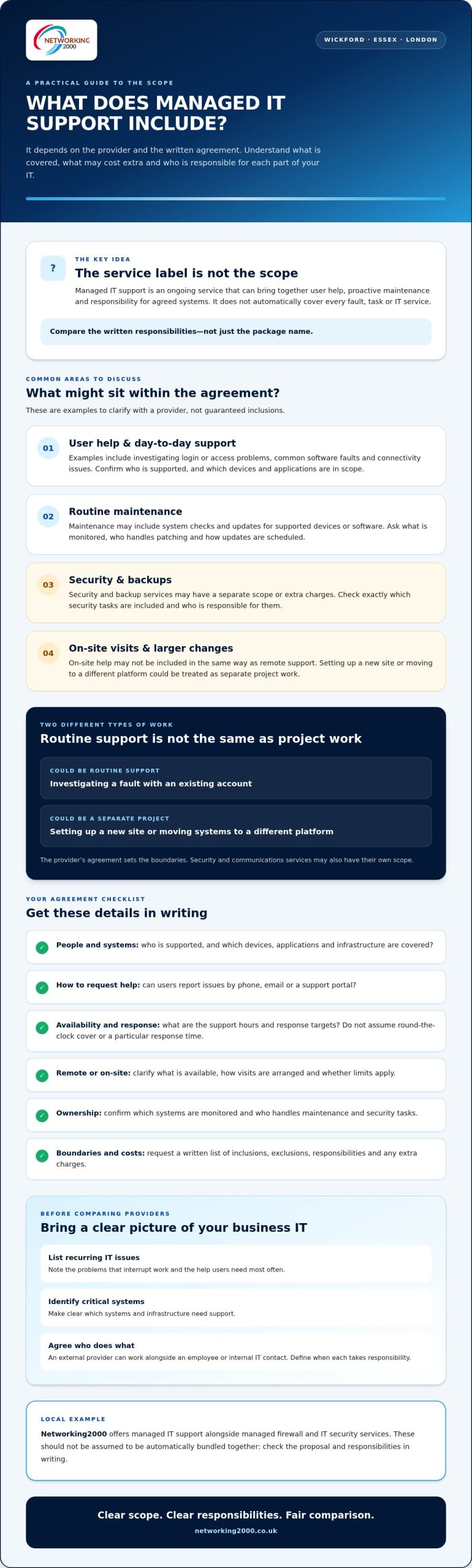
Managed IT support: what’s included and what’s extra?
Service names can sound similar while covering different responsibilities. A provider might include routine user support but scope advanced security, cloud administration or backup work separately. The contract, not the phrase “managed IT”, defines the provider’s obligations. Use a written breakdown to see what the service covers and where extra work may begin.
| Service area | Possible tasks | Questions to ask the provider |
|---|---|---|
| Helpdesk | Investigating user access, software or device issues | Which users and devices can request support, and how? |
| Maintenance and monitoring | Checking agreed systems and applying updates | Which systems are covered, and who handles patching? |
| Security | Managing or monitoring agreed security controls | What security work is included, and what is separately scoped? |
| Backup and recovery | Administering backups or planning restoration, if agreed | Which data is covered, and who checks and restores it? |
| Cloud services | Assisting with agreed cloud systems or settings | Which services and tasks are in scope? |
These are contract-dependent examples, not a standard checklist of guaranteed inclusions. Projects such as new installations, migrations or major changes may sit outside routine support. Fixing an existing problem may also be treated as additional work if it falls beyond the agreed responsibilities. Ask the provider to explain how it identifies, approves and charges for work outside the scope before it starts.
Which services should you check in the agreement?
Check that the agreement identifies supported users, devices, sites and applications, along with service hours and contact routes. Ask who is responsible for patching, firewall administration, backups, recovery testing and liaison with other suppliers. Look for response targets, exclusions and escalation steps, as well as a clear description of project work and how it is authorised.
How do providers define optional services?
Providers may separate specialist security, cloud or infrastructure projects from everyday support. Ask for a written definition of each included task and optional service, including what triggers additional work. For instance, routine checks on an agreed system may be scoped differently from a wider infrastructure change. Whether assessing local IT partners or exploring overseas providers of managed IT services Anchorage, compare responsibilities, not just package names, so you can judge whether each proposal fits your business.
For a local point of comparison, review Networking2000’s managed IT support and ask how the proposed scope maps to your requirements.
How to decide whether managed IT support fits your Wickford business
Start with the work your business needs help with, not a package name. A practical assessment has three steps: list recurring IT problems, identify the systems your staff rely on, then define the support you need. This makes it easier to decide whether external support could fill a gap, add capacity to an internal team or provide clearer responsibility for ongoing IT tasks.
Ask what managed IT support includes for the issues that matter most to your business. If staff regularly lose access to an important application, for example, check whether that application and its users would be covered. If a particular system is essential to daily operations, make sure the provider understands its importance and explains how support requests involving it would be handled.
What should you prepare before speaking to a provider?
A short written overview will help keep the conversation focused. Note:
- How many staff and business locations need support.
- The key applications and systems the business relies on.
- Recurring IT problems, security concerns and planned changes.
- Any tasks already handled by an employee or internal IT contact.
Then ask for a written scope that sets out included work, exclusions and escalation arrangements. A strategic perspective can also help connect support decisions to wider business goals. For more context, read Managed IT Support Services: A Strategic Guide for Essex Businesses.
What is a sensible next step for a local business?
Take your notes into a practical conversation with a provider. Discuss the systems in use, where staff experience disruption and which responsibilities need to be clearer. You can use that discussion to identify gaps and compare what different agreements cover, without assuming you need to buy a particular package.
Networking2000 is a business IT provider based in Wickford, offering managed IT support to businesses. Its service scope, like any provider’s, should be checked against the needs and responsibilities set out in a proposal. Confirm support hours, response targets and specific inclusions in writing rather than assuming they apply.
If you’re ready to discuss your requirements, discuss your business IT support needs.
Choose support that fits the way your business works
So, what does managed IT support include? It depends on the provider’s written agreement. User assistance, maintenance, monitoring and security may all be part of the picture, but the scope can vary. Check which users, systems and tasks are covered, what sits outside the agreement and how support requests are handled.
Before comparing providers, list recurring IT problems and the systems your staff rely on. Use that list to clarify responsibilities, including any maintenance, security or recovery work you need. A clear scope helps you compare services based on what they actually cover, not just the package name.
Networking2000 has supported businesses since 1998. Based in Wickford, it serves business customers in Essex and London. To discuss your business’s managed IT support needs, contact Networking2000 and set out the systems and responsibilities you want covered.
Frequently Asked Questions
What does managed IT support include?
Managed IT support commonly covers ongoing user assistance, proactive maintenance and agreed technical support for a business’s IT environment. The answer to what managed IT support includes can vary: network oversight, security, cloud services or backups may be offered, but they aren’t automatic inclusions. Check the written scope for supported users and systems, service hours, response targets, exclusions and separately charged work. Wickford businesses can compare these responsibilities with the systems staff rely on each day.
Does managed IT support include cybersecurity?
It may include some security tasks, but the level of protection depends on the provider and agreement. Ask whether firewall management, security monitoring, software updates, endpoint protection or incident response are covered. Find out which systems are protected and who investigates an alert. A provider may offer IT security as a separate service, so don’t assume a general managed support agreement includes every security capability. Request a written breakdown of what’s covered and what isn’t.
Does managed IT support include a helpdesk?
User support is a common part of managed IT, but contact methods and coverage vary. Check whether staff can report issues by telephone, email or a ticketing system, and which users, devices and applications are eligible for help. Confirm the service hours, escalation arrangements and response targets in the agreement. Don’t assume the helpdesk is available outside those stated hours or that every request will be handled in the same way.
Is proactive monitoring included in managed IT support?
Some agreements include monitoring of specified systems to identify faults or performance issues. Ask what the provider checks, when alerts are reviewed and what action follows an alert. Monitoring can help a provider spot issues, but it doesn’t prevent every outage or security incident. Confirm whether investigating and resolving a problem is included, or whether a fix needs separate approval or may be charged as additional work.
Does managed IT support include backups and disaster recovery?
Not always. Backup management, storage, recovery testing and disaster recovery planning are distinct responsibilities, even if a provider offers them. Ask which data and systems are included, how often backups run, who checks them and who is responsible for restoration. Clarify how recovery is handled if an important system becomes unavailable. Put these responsibilities in writing rather than assuming routine IT support includes a complete backup and recovery service.
Does managed IT support include Microsoft 365 or cloud services?
Some providers manage Microsoft 365 or other cloud platforms, while others offer this separately or cover only specific tasks. Confirm which services, accounts and configuration changes are in scope. Ask whether user changes, security settings and fault handling are included, and who manages issues that involve the cloud supplier. A general description of managed IT doesn’t confirm cloud support. The agreement should name the platforms and set out the provider’s responsibilities clearly.
How is managed IT support different from one-off IT help?
One-off IT help usually addresses a specific fault or project, while managed IT support is an ongoing arrangement with agreed responsibilities. Depending on its scope, that may include user assistance, maintenance or monitoring. The contract defines the difference in practice. Before signing, ask how routine requests, planned changes, urgent issues and larger projects are classified. Check which tasks are included, which need separate approval and whether additional work may be charged.

