What if the IT problem you can see is only a symptom of a bigger risk? A slow computer or dropped connection can disrupt staff and customer service, but weaknesses in devices, networks, backups or security may not be obvious until something goes wrong. A Wickford business IT health check can help turn those uncertainties into clear priorities.
It’s reasonable to want more than a technical report full of jargon. You need to know what’s working, what needs attention and which issues could affect day-to-day operations. This practical guide explains what a thorough check should cover and how to assess whether a provider’s proposed review fits your business.
Use the checklist to review devices, network security, access controls, updates, backups and recovery plans. You’ll also find questions to ask about scope and evidence, ways to prioritise follow-up actions, and guidance on when managed IT support or security may be relevant. The aim is a clearer picture of your risks and sensible next steps, so you can choose local IT support in Wickford with confidence.
Key Takeaways
- A Wickford business IT health check should link technical findings to business priorities, not leave you with an unexplained list of faults.
- Use a practical checklist to spot risks that could affect staff, customer service or your ability to recover from disruption.
- Compare providers by asking what they’ll assess, what’s excluded and how they’ll explain evidence and recommended next steps.
- Prepare by listing your concerns, agreeing access and appointing a business contact to coordinate questions.
- Choose support that communicates clearly and matches the findings. Managed IT support or security may be relevant when specific needs are identified.
What a Wickford business IT health check should tell you
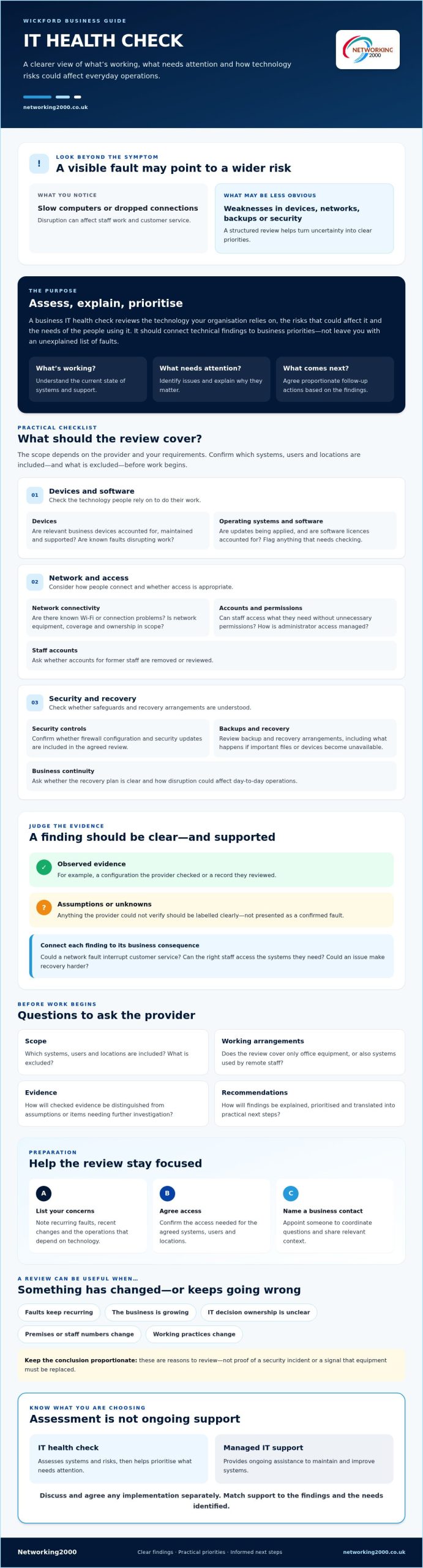
A Wickford business IT health check is a structured review of the technology your business relies on, the risks that could affect it and the needs of the people using it. The goal is to identify priorities and explain why they matter, not to assume every issue needs an immediate repair or replacement.
A health check assesses and prioritises; managed IT support provides ongoing assistance to maintain and improve systems. This distinction matters when comparing proposals. An assessment may recommend changes, but any implementation should be discussed and agreed separately. For background on the purpose and scope of formal IT reviews, see this overview of an Information technology audit.
For a Wickford SME, findings should connect to everyday operations. Can the right staff access the systems they need? Could a network fault interrupt customer service? Are recovery arrangements clear if important files or devices become unavailable? A useful review translates technical observations into practical business consequences.
What is included in a business IT health check?
The scope depends on the provider and your requirements. It might include devices, network connectivity, software, security controls, and backup or recovery arrangements. Before work begins, ask which systems, users and locations are included and what is excluded. For example, confirm whether the review covers only office equipment or also systems used by remote staff.
Ask how findings will be supported. A provider should distinguish between observed evidence, such as a configuration they checked or a record they reviewed, and assumptions they couldn’t verify. If something needs further investigation, it should be labelled clearly rather than presented as a confirmed fault. That helps you understand both the finding and its limits.
When should a Wickford business arrange an IT review?
You don’t need to wait for a crisis. A review can be useful when faults keep recurring, the business is growing, or nobody is sure who owns key IT decisions. Changes to premises, staff numbers or working practices can also prompt a fresh look. A move to new premises in or around Wickford, for instance, may raise questions about connectivity, device access and how staff will work across locations.
These are reasons to review, not proof of a security incident or a signal that equipment must be replaced. Start by noting what has changed, what’s causing concern and which operations depend on the technology. That gives a provider a clearer basis for discussing a proportionate scope and useful next steps.
Business IT health check checklist: systems, security, and recovery
A useful checklist groups technical checks by what they mean for the business. This makes it easier to see which gaps could interrupt staff, affect customer service or make recovery harder. The scope of a Wickford business IT health check will vary, so ask the provider to confirm the systems, users and locations included, along with any exclusions, before the review starts.
Devices, network, and access controls
Start with the technology staff rely on to do their work. Ask whether the review will check:
- Devices: Are business computers and other relevant devices accounted for, maintained and supported? Are any known faults disrupting work?
- Operating systems and software: Are updates being applied, and are software licences accounted for? Ask the provider to flag anything that needs checking rather than assume there’s a licence or update issue.
- Network connectivity: Are there known Wi-Fi or connection problems? Clarify whether network equipment, coverage and ownership are within scope.
- Accounts and permissions: Can staff access what they need without unnecessary permissions? Ask how administrator access is managed and whether accounts for former staff are removed or reviewed.
These checks link the condition of devices and connections to practical effects, such as staff being unable to reach shared files or use essential systems. For a general security checklist that also covers backups, access control and multi-factor authentication, see the US Federal Trade Commission’s Cybersecurity for Small Business guidance. Use it as supplementary reading, not as a statement of UK requirements.
Security, backups, and business continuity
Confirm whether firewall configuration and security updates are included in the agreed review. Ask whether staff accounts use multi-factor authentication where appropriate, and which systems or users are covered. These checks can reveal weaknesses to investigate, but a review alone doesn’t prove compliance with a standard or legal requirement.
For backups, establish what data and systems are covered, how the arrangements are checked, and whether restoration has been tested. A backup existing on paper is not the same as knowing it can be restored. A restore test matters because it shows whether your business can recover usable data and resume essential work after disruption.
Before agreeing next steps, request a clear record of findings, evidence and items that need further investigation. If the review points to a need for ongoing support, firewalls or security, you can discuss suitable options with Networking2000’s IT support team, subject to confirming the scope of any work.
How to judge IT health-check findings and compare providers
A useful report should help you decide what to do, not leave you with a technical fault list and no context. For each finding, look for four things: business impact, priority, supporting evidence and a practical next action. For example, a report might explain that an access issue could prevent a member of staff reaching a system they need, show what was observed and state whether it needs prompt attention or further investigation.
Before choosing a provider, compare proposals against the same points. This makes differences in scope and reporting easier to spot, even if providers use different terminology.
- Scope: Which systems, users and locations will be reviewed?
- Evidence: How will observations be checked and recorded?
- Exclusions: What won’t be examined, and what needs separate investigation?
- Reporting: Will findings include impact, priority and clear explanations?
- Follow-up: Are recommendations and any further work discussed separately?
Be direct about your main concern. Ask for a transparent scope and confirmation that assessment is separate from optional remedial work. A review can identify an issue without obliging you to proceed with the same provider’s proposed changes. Agree how any additional work will be described and scoped before deciding.
What should a useful IT health-check report include?
Look for a plain-English summary, the agreed scope, observations and clearly labelled limitations. Priorities should distinguish business risks needing prompt attention from planned improvements. Each recommendation should explain who needs to act and what a sensible next step could be. Treat guarantees of specific outcomes with caution unless the provider explains exactly what is covered and on what basis.
Questions to ask an IT health-check provider
Ask who will carry out the review and how they’ll gather evidence from your systems. Confirm access requirements, whether checks could disrupt work, how relevant data will be handled and what format the report will take. You can also ask what staff input may be needed. The US Federal Communications Commission’s cybersecurity tips for small businesses may offer general background, but it isn’t a UK standard or a substitute for a scoped review.
Finally, ask whether recommendations can be implemented separately. If the findings point to a need for ongoing support, explore whether managed IT support services are relevant to your situation. A Wickford business IT health check should give you enough clarity to weigh that option without making the decision for you.
Prepare your Wickford business for an IT health check
A little preparation helps the review focus on business risks rather than time spent piecing together basic information. Before your Wickford business IT health check, agree what you want to understand, who will coordinate the process and how access will be handled. You don’t need a perfect inventory. A useful outline and clear questions are a good start.
Before the assessment: gather useful business information
Work through these steps with the people who know how your systems are used:
- Define your concerns. Note recurring IT problems, which teams are affected and what work gets interrupted. For example, record whether connection issues delay customer responses or prevent staff from accessing key files.
- Outline your setup. Gather what you know about business devices, key software, relevant suppliers and existing IT support arrangements. Flag gaps in your records rather than guessing.
- Identify critical systems. Explain which tools or data are essential for daily operations and what would be difficult to manage if they became unavailable.
- Share upcoming changes. Tell the assessor about planned staff or premises changes, new systems or shifts in working practices that could affect the review.
Appoint a named business contact to coordinate staff questions, gather information and handle provider requests. This gives the assessor a clear point of contact and helps prevent different teams from supplying conflicting details.
During and after the review: agree responsibilities
Before checks begin, confirm which staff may be contacted, what access is required and who can authorise it. Don’t send passwords casually by email or share them in an unsecured message. Agree a secure access method with the provider, and clarify what access is needed, for how long and for which systems. Also check whether any assessment activity could interrupt normal work.
Once the findings are available, ask the assessor to explain the evidence, business impact and any uncertainties in plain English. A point that needs further investigation should be distinguished from a confirmed issue. Then agree which recommendations to take forward, who owns each action and when it should be reviewed. This turns a report into a working plan without committing you automatically to remedial work.
If the review highlights gaps in how the business would restore systems or continue essential work after disruption, consider whether a disaster recovery plan needs attention. The right follow-up depends on the findings and your operational needs.
For a conversation about your business’s IT support requirements, contact Networking2000. Share your concerns and ask what scope and next steps may be appropriate.
Choose local IT health-check support in Wickford with clear next steps
The right provider should make the review understandable and relevant to your business, not simply offer a long list of technical checks. When comparing providers for a Wickford business, consider their understanding of local business needs, how clearly they explain the scope, which areas of technology they cover and how they communicate findings. Ask how they’ll distinguish confirmed issues from areas that need further investigation.
Before agreeing to a Wickford business IT health check, check what the assessment includes and excludes, what information or access is required, and what you’ll receive afterwards. Keep the assessment separate from any optional remedial work. That gives you space to review recommendations, ask questions and decide what to do next without assuming every finding means you need a new service.
Networking2000 is a privately owned UK IT services provider serving businesses in Essex and London. Its managed IT support and IT security may be relevant if the findings identify needs in those areas, subject to confirming the required scope. If the review raises firewall concerns, you can explore managed firewall protection as a possible follow-up, where appropriate.
When ongoing managed IT support may make sense
A one-off review can clarify priorities, but it doesn’t provide ongoing assistance. If your business regularly needs help with IT issues, or it’s unclear who will manage recommended improvements, it may be worth discussing whether managed IT support fits your needs. Base that conversation on the findings, your existing arrangements and the support your staff require. Ask what the service covers and how it works before deciding. Don’t assume particular response times or inclusions.
A low-pressure next step for Wickford businesses
To start a useful conversation, outline your business’s main IT concerns and current support arrangements. Share any review findings you’re comfortable discussing, and ask whether Networking2000’s services fit the assessment scope you have in mind. Confirm what can be assessed before making plans, as the exact health-check scope and availability need to be agreed.
If you’re ready to discuss your requirements, Discuss your business IT requirements.
Turn your IT findings into confident next steps
A clear Wickford business IT health check should leave you with priorities you can act on, not a list of technical terms to decipher. Check that each finding explains its business impact, evidence and a practical next step. Keep any assessment separate from optional remedial work, so you can decide what matters most and who should handle it.
If the review identifies ongoing support or security needs, choose a provider that can explain how its services fit those findings. Networking2000 offers managed IT support and security services tailored to small and medium-sized businesses. The right scope and any follow-up should be confirmed against your requirements.
To discuss your business’s needs and whether Networking2000’s services may be suitable, Discuss your business IT requirements with Networking2000. With clear findings and a practical plan, you can make informed decisions and help your team work with greater confidence.
Frequently Asked Questions
What does a business IT health check include?
A business IT health check reviews agreed parts of your technology and explains any findings in relation to your business needs. For a Wickford business IT health check, the scope might include devices, operating systems, software, network connectivity, user access, firewalls, security updates and backup arrangements. The provider should confirm which users, locations and systems are covered. Ask them to distinguish verified observations from assumptions or areas that need further investigation.
How often should a small business have an IT health check?
There isn’t one review schedule that suits every small business. Consider arranging a review when your systems or working practices change, recurring faults emerge, or ownership of IT becomes unclear. You could also ask your IT provider what review frequency fits your business’s size, risks and existing support. The aim is to keep an accurate view of priorities, not to repeat an assessment on a set timetable without a clear business reason.
Can an IT health check identify cybersecurity weaknesses?
Yes, if security is included in the agreed scope. A review may examine areas such as firewall configuration, security updates, account permissions, multi-factor authentication and backup arrangements. Findings can help identify weaknesses or questions that need further investigation, but an IT health check isn’t automatically a complete security audit or proof that your systems meet a particular standard. Ask the provider to state what was checked and what remains outside the review.
How long does a business IT health check take?
The time required depends on the agreed scope, the number and type of systems involved, and how readily relevant information and access are available. A review covering one site may differ from one that includes several locations or remote users. There’s no confirmed standard duration for every assessment. Before agreeing, ask the provider to estimate the time required, explain what could affect it and confirm when staff may need to be available.
Will an IT health check disrupt staff or business operations?
It depends on the checks involved and how they’re carried out. Some reviews may rely on existing records or observation, whilst others may require staff input or access to systems. Before work begins, ask whether any checks could interrupt normal activity, which users may be contacted and whether there are suitable times to carry them out. Agree access and communication arrangements in advance so staff know what to expect.
What should I do after receiving an IT health-check report?
Start by asking the provider to explain any unclear findings. For each recommendation, establish the business impact, evidence, priority and practical next step. Then decide which actions to take forward, who will own them and when you’ll review progress. You don’t have to accept every recommendation or have the assessment provider carry out remedial work. If an issue needs more investigation, ask what further information is required before deciding.
How do I choose an IT health-check provider in Wickford?
Choose a provider that understands local business needs and can explain the proposed scope in plain English. Ask who will conduct the review, what systems are included, how evidence is gathered, what the report will contain and which checks are excluded. Also confirm how access, data handling and possible disruption will be managed. Compare providers on clarity and relevance, and check whether any recommended follow-up matches your requirements.

